APPLICATION LAYER
Videos
• Video1
• Video2
• Video3
• Video4
• Video5
• Video6
• Video7
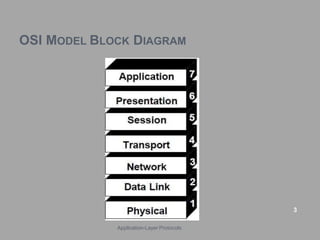
OSI MODEL BLOCK DIAGRAM
3
Application-Layer Protocols
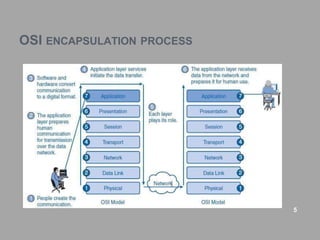
OSI ENCAPSULATION PROCESS
5
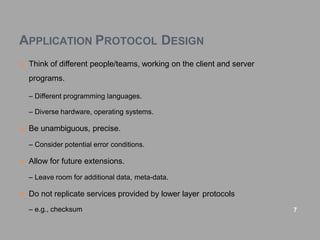
APPLICATION PROTOCOL DESIGN
 Think of different people/teams, working on the client and server
programs.
– Different programming languages.
– Diverse hardware, operating systems.
 Be unambiguous, precise.
– Consider potential error conditions.
 Allow for future extensions.
– Leave room for additional data, meta-data.
 Do not replicate services provided by lower layer protocols
– e.g., checksum 7
APPLICATION LAYER PROTOCOLS
 An application layer protocol defines how an application processes
(clients and servers), running on different end systems, pass
messages to each other.
 In particular, an application layer protocol defines:
–The types of messages, e.g., request messages and response
messages.
– The syntax of the various message types, i.e., the fields in the
message and
 how the fields are delineated.
–The semantics of the fields, i.e., the meaning of the information that
the
 field is supposed to contain;
–Rules for determining when and how a process sends messages
and responds to messages. 9
CONTINUE..
 Many Internet application-layer protocols are fully specified in
Request.
 For Comments documents (RFCs) and are therefore in the public
domain.
–For example, the HTTP 1.1 specification is included in RFC 2068,
which was
 finalized and made public January 1997.
– If a browser (HTTP client) developer follows the rules of the HTTP
1.1 RFC,
 the browser will be able to retrieve Web pages from any Web server
that has also has followed the rules of the HTTP 1.1 RFC.
10
CONTINUE..
Application layer protocols as follows:
1. HTTP(Hypertext Transfer Protocol)
2. DNS(Domain Name System)
3. FTP(File Transfer Protocol)
4. TELNET
5. DHCP(Dynamic Host Configuration Protocol)
6. SMTP(Simple Mail Transfer Protocol)
11
1. HTTP
 Hypertext Transfer Protocol is used to transfer files that make up
the web pages of the World Wide Web.
 HTTP: TCP port 80.
 Was originally developed to publish and retrieve HTML pages.
 used for distributed, collaborative information systems.
 HTTP is used across the world wide web for data transfer and is one
of the most used application protocols.
 HTTP specifies a request/response protocol.
 When a client, typically a web browser, sends a request message to
a server, the HTTP protocol defines the message types the client
uses to request the web page and the message types the server
uses to respond.
 The three common message types are:
o GET
o POST
o PUT
12
CONTINUE..
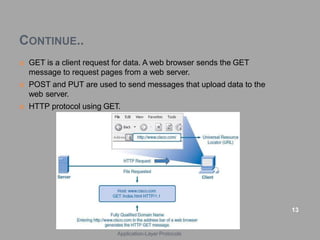
 GET is a client request for data. A web browser sends the GET
message to request pages from a web server.
 POST and PUT are used to send messages that upload data to the
web server.
 HTTP protocol using GET.
13
Application-Layer Protocols
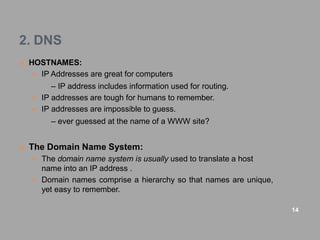
2. DNS
 HOSTNAMES:
 IP Addresses are great for computers
– IP address includes information used for routing.
 IP addresses are tough for humans to remember.
 IP addresses are impossible to guess.
– ever guessed at the name of a WWW site?
 The Domain Name System:
 The domain name system is usually used to translate a host
name into an IP address .
 Domain names comprise a hierarchy so that names are unique,
yet easy to remember.
14
CONTINUE..
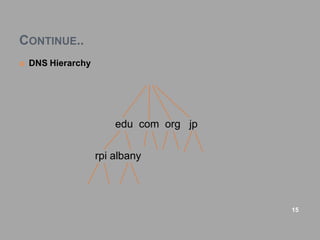
 DNS Hierarchy
edu com org jp
rpi albany
15
CONTINUE..
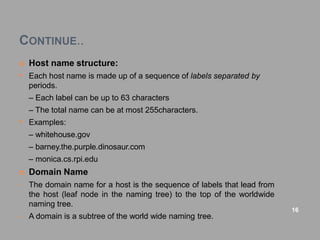
 Host name structure:
• Each host name is made up of a sequence of labels separated by
periods.
– Each label can be up to 63 characters
– The total name can be at most 255characters.
• Examples:
– whitehouse.gov
– barney.the.purple.dinosaur.com
– monica.cs.rpi.edu
 Domain Name
• The domain name for a host is the sequence of labels that lead from
the host (leaf node in the naming tree) to the top of the worldwide
naming tree.
• A domain is a subtree of the world wide naming tree.
16
CONTINUE..
 Top level domains:
• edu, gov, com, net, org, mil, …
• Countries each have a top level domain(2 letter domain name).
• New top level domains include:
.aero .biz .coop .info .name .pro
 DNS Organization
• Distributed Database
–The organization that owns a domain name is responsible for
running a DNS server that can provide the mapping between
hostnames within the domain to IP addresses.
– So - some machine run by RPI is responsible for everything within
the rpi.edu domain.
17
CONTINUE..
 DNS Clients:
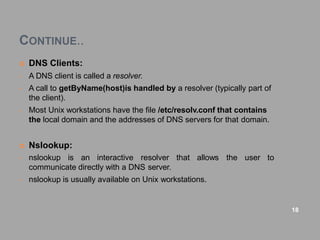
• A DNS client is called a resolver.
• A call to getByName(host)is handled by a resolver (typically part of
the client).
• Most Unix workstations have the file /etc/resolv.conf that contains
the local domain and the addresses of DNS servers for that domain.
 Nslookup:
the user to
• nslookup is an interactive resolver that allows
communicate directly with a DNS server.
• nslookup is usually available on Unix workstations.
18
CONTINUE..
 DNS Servers:
• Servers handle requests for their domain directly.
• Servers handle requests for other domains by contacting remote
DNS server(s).
• Servers cache external mappings.
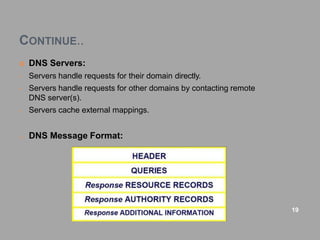
o DNS Message Format:
19
CONTINUE..
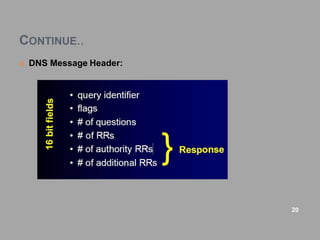
 DNS Message Header:
20
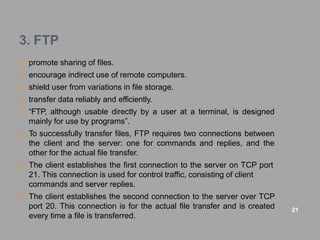
3. FTP
 promote sharing of files.
 encourage indirect use of remote computers.
 shield user from variations in file storage.
 transfer data reliably and efficiently.
 “FTP, although usable directly by a user at a terminal, is designed
mainly for use by programs”.
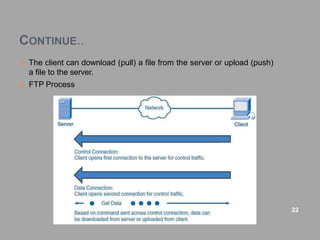
 To successfully transfer files, FTP requires two connections between
the client and the server: one for commands and replies, and the
other for the actual file transfer.
 The client establishes the first connection to the server on TCP port
21. This connection is used for control traffic, consisting of client
commands and server replies.
 The client establishes the second connection to the server over TCP
port 20. This connection is for the actual file transfer and is created
every time a file is transferred.
21
CONTINUE..
 The client can download (pull) a file from the server or upload (push)
a file to the server.
 FTP Process
22
4. TELNET
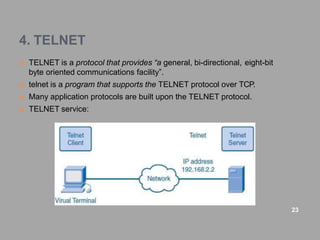
 TELNET is a protocol that provides “a general, bi-directional, eight-bit
byte oriented communications facility”.
 telnet is a program that supports the TELNET protocol over TCP.
 Many application protocols are built upon the TELNET protocol.
 TELNET service:
23
CONTINUE..
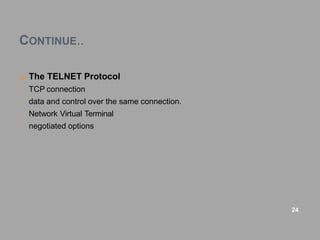
 The TELNET Protocol
o TCP connection
o data and control over the same connection.
o Network Virtual Terminal
o negotiated options
24
CONTINUE..
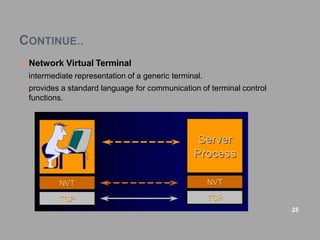
 Network Virtual Terminal
o intermediate representation of a generic terminal.
o provides a standard language for communication of terminal control
functions.
25
CONTINUE..
 Negotiated Options:
o All NVTs support a minimal set of capabilities.
o Some terminals have more capabilities than the minimal set.
o The 2 endpoints negotiate a set of mutually acceptable options
(character set, echo mode, etc).
o The protocol for requesting optional features is well defined and
includes rules for eliminating possible negotiation “loops”.
o The set of options is not part of the TELNET protocol, so that new
terminal features can be incorporated without changing the TELNET
protocol.
26
CONTINUE..
 Control Functions:
o TELNET includes support for a series of control functions commonly
supported by servers.
for communication of (the
o This provides a uniform mechanism
supported) control functions.
o Interrupt Process (IP)
– suspend/abort process.
o Abort Output (AO)
– process can complete, but send no more output to user’s terminal.
o Are You There (AYT)
– check to see if system is still running.
o Erase Character (EC)
– delete last character sent
– typically used to edit keyboard input.
o Erase Line (EL)
– delete all input in current line. 27
5. DHCP
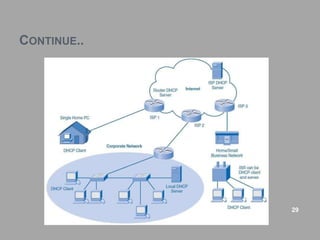
 DHCP enables clients on a network to obtain IP addresses and other
information from a DHCP server.
 DHCP allows a host to obtain an IP address dynamically when it
connects to the network.
 The DHCP server is contacted by sending a request, and an IP
address is requested.
 The DHCP server chooses an address from a configured range of
addresses called a pool and assigns it to the host client for a set
period.
 different ways of having DHCP servers arranged in next diagram
28
CONTINUE..
29
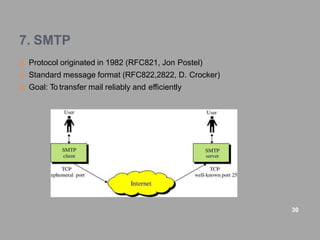
7. SMTP
 Protocol originated in 1982 (RFC821, Jon Postel)
 Standard message format (RFC822,2822, D. Crocker)
 Goal: To transfer mail reliably and efficiently
30
CONTINUE..
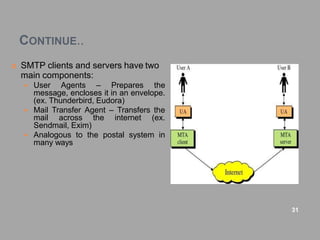
 SMTP clients and servers have two
main components:
 User Agents – Prepares the
message, encloses it in an envelope.
(ex. Thunderbird, Eudora)
 Mail Transfer Agent – Transfers the
mail across the internet (ex.
Sendmail, Exim)
 Analogous to the postal system in
many ways
31
CONTINUE..
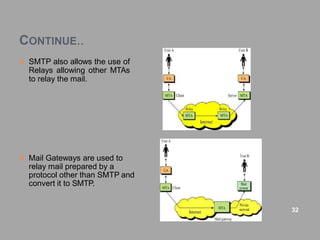
 SMTP also allows the use of
Relays allowing other MTAs
to relay the mail.
 Mail Gateways are used to
relay mail prepared by a
protocol other than SMTP and
convert it to SMTP.
32
CONTINUE..
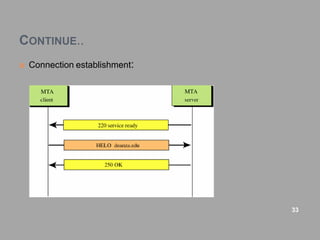
 Connection establishment:
33
CONTINUE..
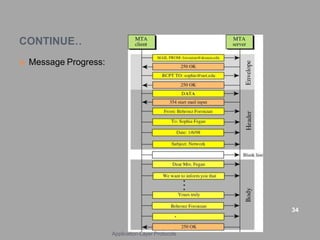
 Message Progress:
34
Application-Layer Protocols
CONTINUE..
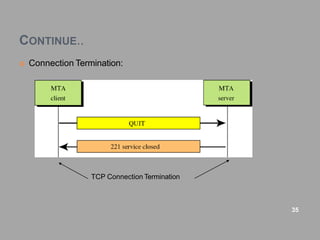
 Connection Termination:
35
TCP Connection Termination
CONTINUE..
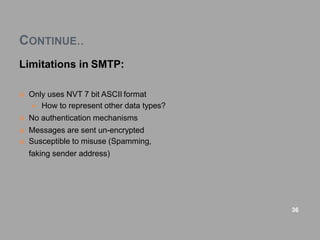
Limitations in SMTP:
 Only uses NVT 7 bit ASCII format
 How to represent other data types?
 No authentication mechanisms
 Messages are sent un-encrypted
 Susceptible to misuse (Spamming,
faking sender address)
36
Questions
 Explain OSI model with 7 layers.
 Explain application layer protocol in detail.
Write note on:
o HTTP(Hypertext Transfer Protocol)
o DNS(Domain Name System)
o FTP(File Transfer Protocol)
o TELNET
o DHCP(Dynamic Host Configuration Protocol)
o SMTP(Simple Mail Transfer Protocol)
37

Application layer

  • 1.
  • 2.
    Videos • Video1 • Video2 •Video3 • Video4 • Video5 • Video6 • Video7
  • 3.
    OSI MODEL BLOCKDIAGRAM 3 Application-Layer Protocols
  • 4.
  • 5.
    APPLICATION PROTOCOL DESIGN Think of different people/teams, working on the client and server programs. – Different programming languages. – Diverse hardware, operating systems.  Be unambiguous, precise. – Consider potential error conditions.  Allow for future extensions. – Leave room for additional data, meta-data.  Do not replicate services provided by lower layer protocols – e.g., checksum 7
  • 6.
    APPLICATION LAYER PROTOCOLS An application layer protocol defines how an application processes (clients and servers), running on different end systems, pass messages to each other.  In particular, an application layer protocol defines: –The types of messages, e.g., request messages and response messages. – The syntax of the various message types, i.e., the fields in the message and  how the fields are delineated. –The semantics of the fields, i.e., the meaning of the information that the  field is supposed to contain; –Rules for determining when and how a process sends messages and responds to messages. 9
  • 7.
    CONTINUE..  Many Internetapplication-layer protocols are fully specified in Request.  For Comments documents (RFCs) and are therefore in the public domain. –For example, the HTTP 1.1 specification is included in RFC 2068, which was  finalized and made public January 1997. – If a browser (HTTP client) developer follows the rules of the HTTP 1.1 RFC,  the browser will be able to retrieve Web pages from any Web server that has also has followed the rules of the HTTP 1.1 RFC. 10
  • 8.
    CONTINUE.. Application layer protocolsas follows: 1. HTTP(Hypertext Transfer Protocol) 2. DNS(Domain Name System) 3. FTP(File Transfer Protocol) 4. TELNET 5. DHCP(Dynamic Host Configuration Protocol) 6. SMTP(Simple Mail Transfer Protocol) 11
  • 9.
    1. HTTP  HypertextTransfer Protocol is used to transfer files that make up the web pages of the World Wide Web.  HTTP: TCP port 80.  Was originally developed to publish and retrieve HTML pages.  used for distributed, collaborative information systems.  HTTP is used across the world wide web for data transfer and is one of the most used application protocols.  HTTP specifies a request/response protocol.  When a client, typically a web browser, sends a request message to a server, the HTTP protocol defines the message types the client uses to request the web page and the message types the server uses to respond.  The three common message types are: o GET o POST o PUT 12
  • 10.
    CONTINUE..  GET isa client request for data. A web browser sends the GET message to request pages from a web server.  POST and PUT are used to send messages that upload data to the web server.  HTTP protocol using GET. 13 Application-Layer Protocols
  • 11.
    2. DNS  HOSTNAMES: IP Addresses are great for computers – IP address includes information used for routing.  IP addresses are tough for humans to remember.  IP addresses are impossible to guess. – ever guessed at the name of a WWW site?  The Domain Name System:  The domain name system is usually used to translate a host name into an IP address .  Domain names comprise a hierarchy so that names are unique, yet easy to remember. 14
  • 12.
    CONTINUE..  DNS Hierarchy educom org jp rpi albany 15
  • 13.
    CONTINUE..  Host namestructure: • Each host name is made up of a sequence of labels separated by periods. – Each label can be up to 63 characters – The total name can be at most 255characters. • Examples: – whitehouse.gov – barney.the.purple.dinosaur.com – monica.cs.rpi.edu  Domain Name • The domain name for a host is the sequence of labels that lead from the host (leaf node in the naming tree) to the top of the worldwide naming tree. • A domain is a subtree of the world wide naming tree. 16
  • 14.
    CONTINUE..  Top leveldomains: • edu, gov, com, net, org, mil, … • Countries each have a top level domain(2 letter domain name). • New top level domains include: .aero .biz .coop .info .name .pro  DNS Organization • Distributed Database –The organization that owns a domain name is responsible for running a DNS server that can provide the mapping between hostnames within the domain to IP addresses. – So - some machine run by RPI is responsible for everything within the rpi.edu domain. 17
  • 15.
    CONTINUE..  DNS Clients: •A DNS client is called a resolver. • A call to getByName(host)is handled by a resolver (typically part of the client). • Most Unix workstations have the file /etc/resolv.conf that contains the local domain and the addresses of DNS servers for that domain.  Nslookup: the user to • nslookup is an interactive resolver that allows communicate directly with a DNS server. • nslookup is usually available on Unix workstations. 18
  • 16.
    CONTINUE..  DNS Servers: •Servers handle requests for their domain directly. • Servers handle requests for other domains by contacting remote DNS server(s). • Servers cache external mappings. o DNS Message Format: 19
  • 17.
  • 18.
    3. FTP  promotesharing of files.  encourage indirect use of remote computers.  shield user from variations in file storage.  transfer data reliably and efficiently.  “FTP, although usable directly by a user at a terminal, is designed mainly for use by programs”.  To successfully transfer files, FTP requires two connections between the client and the server: one for commands and replies, and the other for the actual file transfer.  The client establishes the first connection to the server on TCP port 21. This connection is used for control traffic, consisting of client commands and server replies.  The client establishes the second connection to the server over TCP port 20. This connection is for the actual file transfer and is created every time a file is transferred. 21
  • 19.
    CONTINUE..  The clientcan download (pull) a file from the server or upload (push) a file to the server.  FTP Process 22
  • 20.
    4. TELNET  TELNETis a protocol that provides “a general, bi-directional, eight-bit byte oriented communications facility”.  telnet is a program that supports the TELNET protocol over TCP.  Many application protocols are built upon the TELNET protocol.  TELNET service: 23
  • 21.
    CONTINUE..  The TELNETProtocol o TCP connection o data and control over the same connection. o Network Virtual Terminal o negotiated options 24
  • 22.
    CONTINUE..  Network VirtualTerminal o intermediate representation of a generic terminal. o provides a standard language for communication of terminal control functions. 25
  • 23.
    CONTINUE..  Negotiated Options: oAll NVTs support a minimal set of capabilities. o Some terminals have more capabilities than the minimal set. o The 2 endpoints negotiate a set of mutually acceptable options (character set, echo mode, etc). o The protocol for requesting optional features is well defined and includes rules for eliminating possible negotiation “loops”. o The set of options is not part of the TELNET protocol, so that new terminal features can be incorporated without changing the TELNET protocol. 26
  • 24.
    CONTINUE..  Control Functions: oTELNET includes support for a series of control functions commonly supported by servers. for communication of (the o This provides a uniform mechanism supported) control functions. o Interrupt Process (IP) – suspend/abort process. o Abort Output (AO) – process can complete, but send no more output to user’s terminal. o Are You There (AYT) – check to see if system is still running. o Erase Character (EC) – delete last character sent – typically used to edit keyboard input. o Erase Line (EL) – delete all input in current line. 27
  • 25.
    5. DHCP  DHCPenables clients on a network to obtain IP addresses and other information from a DHCP server.  DHCP allows a host to obtain an IP address dynamically when it connects to the network.  The DHCP server is contacted by sending a request, and an IP address is requested.  The DHCP server chooses an address from a configured range of addresses called a pool and assigns it to the host client for a set period.  different ways of having DHCP servers arranged in next diagram 28
  • 26.
  • 27.
    7. SMTP  Protocoloriginated in 1982 (RFC821, Jon Postel)  Standard message format (RFC822,2822, D. Crocker)  Goal: To transfer mail reliably and efficiently 30
  • 28.
    CONTINUE..  SMTP clientsand servers have two main components:  User Agents – Prepares the message, encloses it in an envelope. (ex. Thunderbird, Eudora)  Mail Transfer Agent – Transfers the mail across the internet (ex. Sendmail, Exim)  Analogous to the postal system in many ways 31
  • 29.
    CONTINUE..  SMTP alsoallows the use of Relays allowing other MTAs to relay the mail.  Mail Gateways are used to relay mail prepared by a protocol other than SMTP and convert it to SMTP. 32
  • 30.
  • 31.
  • 32.
  • 33.
    CONTINUE.. Limitations in SMTP: Only uses NVT 7 bit ASCII format  How to represent other data types?  No authentication mechanisms  Messages are sent un-encrypted  Susceptible to misuse (Spamming, faking sender address) 36
  • 34.
    Questions  Explain OSImodel with 7 layers.  Explain application layer protocol in detail. Write note on: o HTTP(Hypertext Transfer Protocol) o DNS(Domain Name System) o FTP(File Transfer Protocol) o TELNET o DHCP(Dynamic Host Configuration Protocol) o SMTP(Simple Mail Transfer Protocol) 37