Chapter 6 – Application Layer Compiled By : Er. Jeewan Rai
1
Application layer is the top most layer in OSIand TCP/IP layered model. This layer exists in both layered Models because of its significance,
of interacting with user and user applications. This layer is for applications which are involved in communication system.
A user may or may not directly interacts with the applications. Application layer is where the actual communication is initiated and
reflects. Because this layer is on the top of the layer stack, it does not serve any other layers. Application layer takes the help of Transport
and all layers below it to communicate or transfer its data to the remote host.
When an application layer protocol wants to communicate with its peer application layer protocol on remote host, it hands over the data
or information to the Transport layer. The transport layer does the rest with the help of all the layers below it.
The application layer is not the application itself that is doing the
communication. It is a service layer that provides these services:
- Simple Mail Transfer Protocol
- File transfer
- Web surfing
- Web chat
- Email clients
- Network data sharing
- Virtual terminals
- Various file and data operations
6.1 Web : HTTP & HTTPS
HTTP - On the other hand, when we use a Web Browser, which is actually using Hyper Text Transfer Protocol (HTTP) to interact with the
network. HTTP is Application Layer protocol.
The Hyper Text Transfer Protocol (HTTP) is the foundation of World Wide Web. Hypertext is well organized documentation system which
uses hyperlinks to link the pages in the text documents. HTTP works on client server model. When a user wants to access any HTTP page
on the internet, the client machine at user end initiates a TCP connection to server on port 80.When the server accepts the client request,
the client is authorized to access web pages.
To access the web pages, a client normally uses web browsers, who are responsible for initiating, maintaining, and closing TCP
connections. HTTP is a stateless protocol, which means the Server maintains no information about earlier requests by clients.
HTTP versions
 HTTP 1.0 uses non persistent HTTP. At most one object can be sent over a single TCP connection.
 HTTP 1.1 uses persistent HTTP. In this version, multiple objects can be sent over a single TCP connection.
HTTPS (also called HTTP over TLS,[1][2] HTTP over SSL,[3] and HTTP Secure[4][5]) is a protocol for secure communication over
a computer network which is widely used on the Internet. HTTPS consists of communication over Hypertext Transfer Protocol (HTTP)
within a connection encrypted by Transport Layer Security or its predecessor, Secure Sockets Layer. The main motivation for HTTPS
is authentication of the visited website and protection of the privacy and integrity of the exchanged data.
In its popular deployment on the internet, HTTPS provides authentication of the website and associated web server with which one is
communicating, which protects against man-in-the-middle attacks. Additionally, it provides bidirectional encryption of communications
between a client and server, which protects against eavesdropping and tampering with or forging the contents of the
communication.[6] In practice, this provides a reasonable guarantee that one is communicating with precisely the website that one
intended to communicate with (as opposed to an impostor), as well as ensuring that the contents of communications between the user
and site cannot be read or forged by any third party.
Historically, HTTPS connections were primarily used for payment transactions on the World Wide Web, e-mail and for sensitive
transactions in corporate information systems. In the late 2000s and early 2010s,HTTPS began to see widespread use for protecting page
authenticity on all types of websites, securing accounts and keeping user communications, identity and web browsing private.
Difference from HTTP
- HTTPS URLs begin with "https://" and use port 443 by default, whereas HTTP URLs begin with "http://" and use port 80 by default.
- HTTP is not encrypted and is vulnerable to man-in-the-middle and eavesdropping attacks, which can let attackers gain access to
website accounts and sensitive information, and modify webpages to inject malware or advertisements. HTTPS is designed to
withstand such attacks and is considered secure against them (with the exception of older, deprecated versions of SSL).
6.2 File Transfer : FTP, PuTTY, WinSCP
File Transfer Protocol(FTP) - which helps a user to transfer text based or binary files across the network. A user can use this protocol in
either GUI based software like FileZilla or CuteFTP and the same user can use FTP in Command Line mode.
Hence, irrespective of which software you use, it is the protocol which is considered at Application Layer used by that software. DNS is a
protocol which helps user application protocols such as HTTP to accomplish its work.
Chapter 6 – Application Layer Compiled By : Er. Jeewan Rai
2
There are several protocols which work for users in Application Layer. Application layer protocols can be broadly divided into two
categories:
 Protocols which are used by users. For email for example, email.
 Protocols which help and support protocols used by users. For example DNS.
PuTTY - PuTTYis a free implementation of SSH and Telnet for Windows and Unix platforms, along with an xterm terminal emulator. It is
written and maintained primarily by Simon Tatham.
The latest version is beta 0.67.
 SSH (which stands for ‘secure shell’) is a recently designed, high-security protocol. It uses strong cryptography to protect your
connection against eavesdropping, hijacking and other attacks. Telnet and Rlogin are both older protocols offering minimal
security.
 SSH and Rlogin both allow you to log in to the server without having to type a password. (Rlogin's method of doing this is
insecure, and can allow an attacker to access your account on the server. SSH's method is much more secure, and typically
breaking the security requires the attacker to have gained access to your actual client machine.)
 SSH allows you to connect to the server and automatically send a command, so that the server will run that command and then
disconnect. So you can use it in automated processing.
The Internet is a hostile environment and security is everybody's responsibility. If you are connecting across the open Internet, then we
recommend you use SSH. If the server you want to connect to doesn't support SSH, it might be worth trying to persuade the
administrator to install it.
If your client and server are both behind the same (good) firewall, it is more likely to be safe to use Telnet or Rlogin, but we still
recommend you use SSH.
WinSCP – WinSCP (Windows Secure Copy) is a free and open-source SFTP, FTP, WebDAV and SCP client for Microsoft Windows. Its main
function is secure file transfer between a local and a remote computer. Beyond this, WinSCP offers basic file manager and file
synchronization functionality. For secure transfers, it uses Secure Shell (SSH) and supports the SCP protocol in addition to SFTP.
WinSCP is for file transfer to and from your server while PuTTY is used to interact with the server directly. Putty is just a command line
interface to your server. WinSCP is a file transfer application using Secure FTP.
6.3 Electronic Mail : SMTP, POP3, IMAP
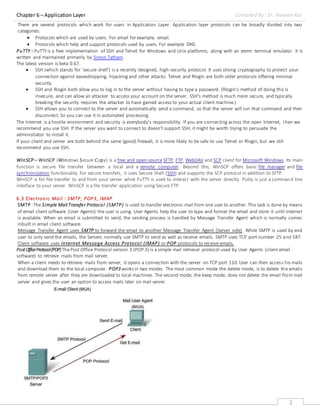
SMTP :The Simple Mail Transfer Protocol (SMTP) is used to transfer electronic mail from one user to another. This task is done by means
of email client software (User Agents) the user is using. User Agents help the user to type and format the email and store it until internet
is available. When an email is submitted to send, the sending process is handled by Message Transfer Agent which is normally comes
inbuilt in email client software.
Message Transfer Agent uses SMTP to forward the email to another Message Transfer Agent (Server side). While SMTP is used by end
user to only send the emails, the Servers normally use SMTP to send as well as receive emails. SMTP uses TCP port number 25 and 587.
Client software uses Internet Message Access Protocol (IMAP) or POP protocols to receive emails.
PostOfficeProtocol(POP) ThePost Office Protocol version 3 (POP 3) is a simple mail retrieval protocol used by User Agents (client email
software) to retrieve mails from mail server.
When a client needs to retrieve mails from server, it opens a connection with the server on TCP port 110.User can then access his mails
and download them to the local computer. POP3 works in two modes. The most common mode the delete mode, is to delete the emails
from remote server after they are downloaded to local machines. The second mode, the keep mode, does not delete the email from mail
server and gives the user an option to access mails later on mail server.
Chapter 6 – Application Layer Compiled By : Er. Jeewan Rai
3
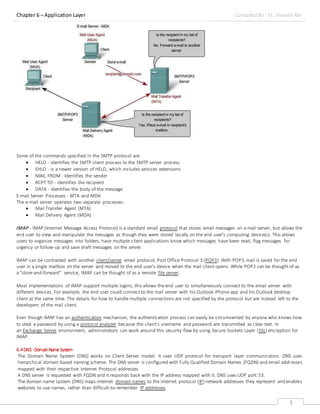
Some of the commands specified in the SMTP protocol are:
 HELO - identifies the SMTP client process to the SMTP server process
 EHLO - Is a newer version of HELO, which includes services extensions
 MAIL FROM - Identifies the sender
 RCPT TO - Identifies the recipient
 DATA - Identifies the body of the message
E-mail Server Processes - MTA and MDA
The e-mail server operates two separate processes:
 Mail Transfer Agent (MTA)
 Mail Delivery Agent (MDA)
IMAP - IMAP (Internet Message Access Protocol) is a standard email protocol that stores email messages on a mail server, but allows the
end user to view and manipulate the messages as though they were stored locally on the end user's computing device(s). This allows
users to organize messages into folders, have multiple client applications know which messages have been read, flag messages for
urgency or follow-up and save draft messages on the server.
IMAP can be contrasted with another client/server email protocol, Post Office Protocol 3 (POP3). With POP3,mail is saved for the end
user in a single mailbox on the server and moved to the end user's device when the mail client opens. While POP3 can be thought of as
a "store-and-forward" service, IMAP can be thought of as a remote file server.
Most implementations of IMAP support multiple logins; this allows the end user to simultaneously connect to the email server with
different devices. For example, the end user could connect to the mail server with his Outlook iPhone app and his Outlook desktop
client at the same time. The details for how to handle multiple connections are not specified by the protocol but are instead left to the
developers of the mail client.
Even though IMAP has an authentication mechanism, the authentication process can easily be circumvented by anyone who knows how
to steal a password by using a protocol analyzer because the client’s username and password are transmitted as clear text. In
an Exchange Server environment, administrators can work around this security flaw by using Secure Sockets Layer (SSL) encryption for
IMAP.
6.4DNS-DomainNameSystem
The Domain Name System (DNS) works on Client Server model. It uses UDP protocol for transport layer communication. DNS uses
hierarchical domain based naming scheme. The DNS server is configured with Fully Qualified Domain Names (FQDN) and email addresses
mapped with their respective Internet Protocol addresses.
A DNS server is requested with FQDN and it responds back with the IP address mapped with it. DNS uses UDP port 53.
The domain name system (DNS) maps internet domain names to the internet protocol (IP) network addresses they represent and enables
websites to use names, rather than difficult-to-remember IP addresses.
Chapter 6 – Application Layer Compiled By : Er. Jeewan Rai
4
Domain names give people a more intuitive way to access content or services than IP addresses: www.techtarget.com instead of
206.19.49.149, for example. Most URLs are built around the domain name of the web server fielding the request: e.g.,
http://searchnetworking.techtarget.com/definition/DNS-attack. Web browsing and most other internet activity rely on DNS behind the
scenes to quickly provide the information necessary to connect users to remote hosts.
Why is DNS important?
Having a single DNS server somewhere that maintained a complete central list of domain name or IP address mappings would be
impractical. There are too many mappings, they change too often and the number of requests for address or name lookups would
overwhelm any system. As a result, DNS is distributed throughout the internet in a hierarchy of authority. Access providers and
enterprises, as well as governments, universities and other organizations, typically have their own assigned ranges of IP addresses and
an assigned domain name; they also typically run DNS servers to manage the mapping of those names to those addresses.
How does DNS work?
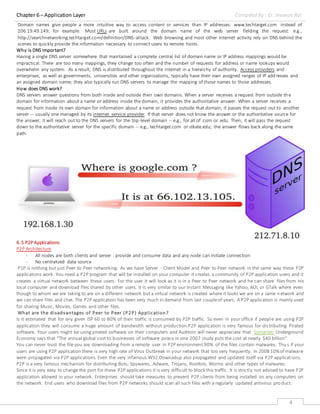
DNS servers answer questions from both inside and outside their own domains. When a server receives a request from outside the
domain for information about a name or address inside the domain, it provides the authoritative answer. When a server receives a
request from inside its own domain for information about a name or address outside that domain, it passes the request out to another
server -- usually one managed by its internet service provider. If that server does not know the answer or the authoritative source for
the answer, it will reach out to the DNS servers for the top-level domain -- e.g., for all of .com or .edu. Then, it will pass the request
down to the authoritative server for the specific domain -- e.g., techtarget.com or stkate.edu; the answer flows back along the same
path.
6.5 P2P Applications
P2P Architecture
- All nodes are both clients and server : provide and consume data and any node can initiate connection
- No centralized data source
P2P is nothing but just Peer to Peer networking. As we have Server - Client Model and Peer to Peer network in the same way these P2P
applications work. You need a P2P program that will be installed on your computer it creates a community of P2P application users and it
creates a virtual network between these users. For the user it will look as it is in a Peer to Peer network and he can share files from his
local computer and download files shared by other users. It is very similar to our Instant Messaging like Yahoo, AOL or GTalk where even
though to whom we are taking to are on a different network but a virtual network is created where it looks we are on a same network and
we can share files and chat. The P2P application has been very much in demand from last coupleof years. A P2P application is mainly used
for sharing Music, Movies, Games and other files.
What are the disadvantages of Peer to Peer (P2P) Application?
Is it estimated that for any given ISP 60 to 80% of their traffic is consumed by P2P traffic. So even in your office if people are using P2P
application they will consume a huge amount of bandwidth without production.P2P application is very famous for distributing Pirated
software. Your users might be using pirated software on their computers and Auditors will never appreciate that. Symantec Underground
Economy says that "The annual global cost to businesses of software piracy in one 2007 study puts the cost at nearly $40 billion"
You can never trust the file you are downloading from a remote user in P2P environment.90% of the files contain malwares. Thus if your
users are using P2P application there is very high rate of Virus Outbreak in your network that too very frequently. In 2008 10%of malware
were propagated via P2P applications. Even the very infamous W32.Downadup also propagated and updated itself via P2P applications.
P2P is a very famous mechanism for distributing Bots, Spywares, Adware, Trojans, Rootkits, Worms and other types of malwares.
Since it is very easy to change the port for these P2P applications it is very difficult to block this traffic. It is strictly not advised to have P2P
application allowed in your network. Enterprises should take measures to prevent P2P clients from being installed on any computers on
the network. End users who download files from P2P networks should scan all such files with a regularly updated antivirus pro duct.
Chapter 6 – Application Layer Compiled By : Er. Jeewan Rai
5
Examples : BitTorrent, Skype
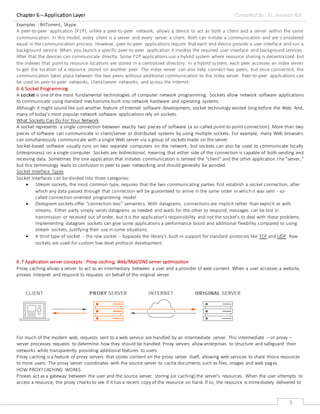
A peer-to-peer application (P2P), unlike a peer-to-peer network, allows a device to act as both a client and a server within the same
communication. In this model, every client is a server and every server a client. Both can initiate a communication and are c onsidered
equal in the communication process. However, peer-to-peer applications require that each end device provide a user interface and run a
background service. When you launch a specific peer-to-peer application it invokes the required user interface and background services.
After that the devices can communicate directly. Some P2P applications use a hybrid system where resource sharing is decentralized but
the indexes that point to resource locations are stored in a centralized directory. In a hybrid system, each peer accesses an index server
to get the location of a resource stored on another peer. The index server can also help connect two peers, but once connected, the
communication takes place between the two peers without additional communication to the index server. Peer-to-peer applications can
be used on peer-to-peer networks, client/server networks, and across the Internet.
6.6 Socket Programming
A socket is one of the most fundamental technologies of computer network programming. Sockets allow network software applications
to communicate using standard mechanisms built into network hardware and operating systems.
Although it might sound like just another feature of Internet software development, socket technology existed long before the Web. And,
many of today's most popular network software applications rely on sockets.
What Sockets Can Do For Your Network
A socket represents a single connection between exactly two pieces of software (a so-called point-to-point connection). More than two
pieces of software can communicate in client/server or distributed systems by using multiple sockets. For example, many Web browsers
can simultaneously communicate with a single Web server via a group of sockets made on the server.
Socket-based software usually runs on two separate computers on the network, but sockets can also be used to communicate locally
(interprocess) on a single computer. Sockets are bidirectional, meaning that either side of the connection is capable of both sending and
receiving data. Sometimes the one application that initiates communication is termed the "client" and the other application the "server,"
but this terminology leads to confusion in peer to peer networking and should generally be avoided.
Socket Interface Types
Socket interfaces can be divided into three categories:
 Stream sockets, the most common type, requires that the two communicating parties first establish a socket connection, after
which any data passed through that connection will be guaranteed to arrive in the same order in which it was sent - so-
called connection-oriented programming model.
 Datagram sockets offer "connection-less" semantics. With datagrams, connections are implicit rather than explicit as with
streams. Either party simply sends datagrams as needed and waits for the other to respond; messages can be lost in
transmission or received out of order, but it is the application's responsibility and not the socket's to deal with these problems.
Implementing datagram sockets can give some applications a performance boost and additional flexibility compared to using
stream sockets, justifying their use in some situations.
 A third type of socket -- the raw socket -- bypasses the library's built-in support for standard protocols like TCP and UDP. Raw
sockets are used for custom low-level protocol development.
6.7 Application server concepts : Proxy caching, Web/Mail/DNS server optimization
Proxy caching allows a server to act as an intermediary between a user and a provider of web content. When a user accesses a website,
proxies interpret and respond to requests on behalf of the original server.
For much of the modern web, requests sent to a web service are handled by an intermediate server. This intermediate – or proxy –
server processes requests to determine how they should be handled. Proxy servers allow enterprises to structure and safeguard their
networks while transparently providing additional features to users.
Proxy caching is a feature of proxy servers that stores content on the proxy server itself, allowing web services to share those resources
to more users. The proxy server coordinates with the source server to cache documents such as files, images and web pages.
HOW PROXYCACHING WORKS
Proxies act as a gateway between the user and the source server, storing (or caching) the server’s resources. When the user attempts to
access a resource, the proxy checks to see if it has a recent copy of the resource on hand. If so, the resource is immediately delivered to
Chapter 6 – Application Layer Compiled By : Er. Jeewan Rai
6
the user. If not, the resource is retrieved from the source and simultaneously cached to the proxy and delivered to the user.
Step-by-step, here’s how proxy cachingworks:
- A user opens a webpage containing static content such as media, JavaScript or CSS.
- The user’s browser automatically connects to a proxy server. This could be a content delivery network (CDN) which caches content in
various locations around the world.
- The browser requests resources from the proxy server. The proxy server checks to see if it not only has the resource, but if the
resource is recent. If the resource is old or missing, the proxy fetches a new copy from the source.
- The proxy delivers the resource to the browser. If the proxy had to fetch a new copy, it caches the copy for future use.
Once a proxy refreshes a resource, it resets the resource’s “expiration date” to prevent it from being reflagged as out-of-date. The
resource will be delivered as-is until a certain time passes, at which point the proxy server will re-check the source.
EXAMPLE OF PROXY CACHING
CDNs like MaxCDN perform proxy caching on a massive scale. When a user accesses a static website hosted by MaxCDN, content is
provided directly from MaxCDN’s servers instead of the original web server. The user only connects to the original server when dynamic
content is required or when MaxCDN’s copy is outdated.
Proxy caching allows enterprises to quickly and easily manage their websites. CDNs perform real-time analytics on data, maintain copies
of cached content across the globe, and can keep a website up and running even when the source server goes offline.
BENEFITS OF PROXY CACHING
Proxy caching makes it easier for enterprises to manage their web services and deliver content to their customers.
- Users enjoy a faster, more reliable experience by retrieving files that are already cached.
- Enterprises see higher customer satisfaction since proxies allow content to be delivered to customers faster.
- Enterprises also see lower administration costs since infrastructure can be outsourced to third parties such as CDNs.
Web Server optimization is avital part of web development and maintenance but also something often overlooked by webmasters. Just
think of the money you can save, and how it can potentially help increase your readership and traffic when they are properly done.
If you have not done any optimization to your website (or blog) so far or merely curious how it can help speed up your site, please take a
look at this list of optimization tips we’ve put together.
We’ve split things up into 3 separate sections for better readability – respectively server-side optimization,assets optimization (which
includes web components like CSS, Javascript, images, etc) and platform,where we’ll focus on WordPress optimization. At the last
section, we throw in a couple of links we figured useful. Full list after jump.
Server side optimization
*Choose a decent Web Host
Your web hosting account has no direct relationship with the optimizations you are about to perform but we figured choosing the right
web hosting account so important we decided to bring it to your attention first. Hosting account is the foundation of your website/blog
where it’s security, accessibility (cPanel, FTP, SSH), server stability, prices and customer supports all play important roles. You need to
make sure you are in good hands.
Recommended reading:How to Choose a Web Host by wikiHow is agreat article that gives you steps and tips you should know before
purchasing any web hosting account.
*Host Assets Separately
When we mention assets, we meant web components like images and static scripts thatdon’t require server-side processing. These
includes any web graphics, images, Javascripts, Cascading Style Sheets (CSS), etc. Hosting assets separately is not a must, but we’ve seen
tremendous result in terms of server stability with this implementation when the blog was having a traffic spike.
Recommended reading:Maximizing Parallel Downloads in the Carpool Lane.
*Compression with GZip
In short, contents travel from server side to client side (vicet versa) whenever a HTTP request is make. Compressing the content for
sending greatly reduce the time needed to process each request.
GZip is one of the best ways to do this and it various according to the type of servers you are using. For instance, Apache
1.3 uses mod_zip, Apache 2.xuses mod_deflate and here‘s how you do it in Nginx.Here are some really good articles to get you familiar
with server side compressions:
Speed up a web site by enabling Apache file compression
Compress Web Output Using mod_gzip and Apache
How To Optimize Your Site With GZIP Compression
Server-side compression for ASP
*Minimize Redirects
Webmasters do URL redirect (whether it’s Javascript or META redirects) all the time. Sometimes it’s purpose is to point users from an
old page to new, or merely guide users to the correct page. Each redirect create an additional HTTP request and RTT (round-trip-time).
The more redirection you have, the slower user will get to the destination page.
Chapter 6 – Application Layer Compiled By : Er. Jeewan Rai
7
Recommended reading:Avoid Redirects by Google Code gives you a good overview on the matter. The article also recommends some
practical ways to minimize redirection to increase serving speed.
*Reduce DNS Lookups
According to Yahoo! Developer Network Blog,ittakes about 20-120 milliseconds for DNS (Domain Name System) to resolve IP address
for a given hostname or domain name and the browser cannot do anything until the process is properly completed.
Author Steve Souders suggested that splitting these components across at least two but no more than four hostnames reduces DNS
lookups and allow high degree parallel downloads. Read more on the article.
The assets Optimization : CSS, JavaScript, Images
Merge Multiple Javascripts into One
Compress Javascript & CSS
There are also some web services that allow you to manually compress your Javascripts and CSS files online. Here are few we come to
know:
 compressor.ebiene(Javascript,CSS)
 javascriptcompressor.com (Javascript)
 jscompress.com (Javascript)
 CleanCSS (CSS)
 CSS Optimizer (CSS)
Customize Header Expiry/Caching
By using a customized Expiry header, your web components like images, static files, CSS, Javascript skipped unnecessary HTTP request
when the same user reload the page for the second time. It reduces the bandwidth needed and definetely help in serving the page
faster.
Off-load The Assets
By off-loading, we mean separating the Javascripts, images, CSS and static files from main server where the website is hosted and place
them on another server or rely on other web services. We’ve seen significant improvement here in Hongkiat by off-loadingassets to
other web services available, leaving the server to mainly do the PHP processing. Here are some suggestions of online services for off-
loading:
 Images:Flickr,Smugmug, Paid hostings*
 Javascripts:Google Ajax Library, Google App Engine, Paid hostings*
 Web Forms:WuFoo, FormStack
 RSS:GoogleFeedburner
 Survey and Polls:SurveyMonkey, PollDaddy
Handling Web Images
Images are important part of your website. However if they are not properly optimize, they can become a burden and end up utilizing
unpredictably large amount of bandwidths on daily basis. Here are some best practices to optimize your images:
 Optimize PNG ImagesFolks atSmashing Magazine describes some clever techniques that may help you optimize your PNG-
images.
 Optimizing for Web –Things you need to know (the formats)Learn more about Jpeg, GIF, PNG and how you should save your
images for web.
 Don’t Scale ImagesAlways practice inserting the width and heightfor each images. Also don’t scale down an image just because
you need a smaller version on the web. For example:Do not force scale a 200×200 px image to 50×50 px for your website by
altering the widthand height. Get a 50×50 px instead.
Optimizing with Web Services and Tools.Good news is, you don’t need to be a Photoshop expert to optimize your images. There are
plenty of web services and tools to help you do the job.
Handling CSS
Modern websites uses CSS as the foundation of the style, as well as the look and feel. Not only CSS gives great flexibility to changes, it is
also lesser in terms of codes needed. However, if they are badly coded, it could be a backfire. Here are some checklists, or rather guides
to you make sure your CSS are properly optimized:
 Keeping Your Elements’ Kids in Line with OffspringHowto keep your markup clean with CSS Selectors.
 Keep CSS shortWhen they give the same style, the codes are better the shorter they are. Here’s a CSS Shorthand guide you’ll
probably need.
 CSS Sprite technique reduce HTTP request each time a page is load by combining several (or all) images together on a single
image file and control it’s output with CSS background-position attribute. Here are some useful guides and techniques to create
CSS Sprites:
o Creating easy and useful CSS Sprites
o Online CSS Sprite Generator
o Best Online And Offline CSS Sprites Generator
Chapter 6 – Application Layer Compiled By : Er. Jeewan Rai
8
 Using every declaration just onceWhen lookingto optimize your CSS files, one of the most powerful measures you can employ is
to use every declaration just once.
 Reduce amount of CSS filesThereason is simple, the more CSS files you have the more HTTP request it’ll have to make when a
webpage is being requested. For example, instead of having multiple CSS files like the following:
1
2
3
<link rel="stylesheet" type="text/css" href="main.css" />
<link rel="stylesheet" type="text/css" href="body.css" />
<link rel="stylesheet" type="text/css" href="footer.css" />
 You can combine them into the one single CSS:
1<link rel="stylesheet" type="text/css" href="layout.css" />
Mail Server Optimization
*How we went from 2 000 000 to 200 000 daily SMTP connections overnight
If you are running a huge pile of email servers, like we do, you deal with a lot of SPAM messages on a daily basis. In which case -
godspeed, but this article is not about the way you find, flag, and prevent SPAM. It is about its impact on the computational
resources practically wasted by the servers for processing messages that afterwards ended up in the junk folder. Turns out, you can
effectively find a way to reclaim all that computational power and use it for better purposes. Even if you don’t deal with huge
volumes of SPAM messages in particular, our quest could surely shed some light on some simple server optimisations that can help
you use your resources much more efficiently.
*Measuring SPAM in terms of server resources
At Kyup we use EXIM as our message transfer agent (MTA). It is free software distributed under GNU General Public License, and it
aims to be a general and flexible mailer with extensive facilities for checking incoming email.
To understand the amount of server power that goes into servicing email, let’s drill down into the lifetime of a single SMTP session:
1. Server acknowledges TCP connection
2. EXIM MTA forks child process to handle that connection
3. Additional SSL/TLS overhead might be added depending on the session requirements
4. MTA starts processing the message
5. On each phase during the SMTP session additional filtering and classification is applied based on different criteria
6. Finally, EXIM MTA takes decision to accept and deliver, defer, or deny the e-mail message.
Each step above takes up precious system resources, in order for those requests to be computed and fulfilled. Also, each of those
steps is performed for each and every SMTP session. At the time, the average amount of SMTP connections on each of our servers
was 2 000 000 pеr 24 hours. Yes, that’s two million daily on each server.
So, to get an idea of how many server resources were being used by our whole infrastructure for SMTP processes only, multiply each
step above by 2 000 000. Then multiply that by thousands of mail servers we operate. And the total number you’ll get would be just
for a 24-hour interval.
It’s known that 70-80% of the connections established to a single SMTP server eventually turn out to be associated with SPAM
delivery attempts. This means the resources that go into servicing these requests are effectively wasted. Such an extreme dissipation
made us start thinking what we can do to optimise our email servicing processes in order to free up those resources and use them
for better purposes.
*Asking the right questions
We started working on the problem by breaking it down to several simple questions:
 Can we stop SMTP connections known to be associated with previous SPAM attempts from happening entirely?
 How we can do that at the first possible sign and save most of the steps associated with the connection handling overhead?
 What system resources we will be able to save if we manage to achieve that?
 How we can do all of the above lightening-fast without wasting more resources than we were actually going to save?
*A reliable way to identify IPs associated with SPAM messages
If you pass certain known-to-be-SPAM-mail-message via SPAM assassin, dSPAM or similar solutions and this message is known to be
SPAM you have two types of classifications. Low-to-medium probability of SPAM and screamingly high probability of SPAM.
For the purpose of our system we started to flag message/IP pairs where messages were identified only with high probability of
SPAM. We used SPAMAssassin with a combination of custom EXIM ACLs we built over time that were 99.9% accurate to identify suc h
high-probability-of-SPAM messages. With EXIM we also started to flag message/IP pairs where IPs were known to deliver good
messages or such with low probability of SPAM.
What we were missing at that point was how EXIM can block those IPs? Since EXIM is an MTA, its job is not to take care of the
blocking at all. What we actually needed was a communication method between EXIM and an external system (daemon) where EXIM
will report certain information and the daemon will take care of the rest.
*EXIM readsocket - a fast and easy method for communication between the MTA and the rest of the world
While looking at the EXIM documentation, we discovered EXIM readsocket string expansion. For us it was one of the super-handy
features provided by the MTA that allowed us to report to the external processor what is actually happening inside the MTA during
ACL processing. Any EXIM variable that can be used inside the ACLs can be reported to an external program. Awesome, right?
Chapter 6 – Application Layer Compiled By : Er. Jeewan Rai
9
With “readsocket“ if you have your own custom EXIM ACLs rules, you can tell MTA to report certain information to inet or unix
domain socket in case all of the ACL criteria are met and do that right before the SMTP processing action is taken by the specific rule.
Suppose you are processing a message with SPAMAssassin inside an ACL and you want the IP of the delivering mail server to be
reported to an external program if SPAMAssassin marks the message as really “bad“ and you want to do that right before you drop or
deny the SMTP connection. With readsocket it is really simple:
1 set acl_m01 = ${readsocket{/var/run/SPAMprocessor.socket}{SPAM|$sender_host_address}{3s}{}{}}
This line instructs EXIM to establish unix domain socket connection to /var/run/SPAMprocessor.socket and send the following string
to the connection “SPAM|$sender_host_address”. It will wait for 3 seconds and continue if the connection can't be established
without caring about the output received after the connection was established and the “message“ was reported to the socket.
Now we needed something to listen on that unix domain socket and act on certain conditions.
*Building the stats collector
We decided to create a simple daemon that listens on unix domain socket. It accepts data on that socket and uses it to sample
statistics about IP addresses and whether they are delivering SPAM or SPAM-free mail messages.
With a little bit of logic-and-magic in that daemon we can sort out the IPs of mail and non-mail servers that are attempting to deliver
messages where 90% (or any number) of previous delivery attempts were for SPAM or SPAM-free messages.
So the daemon got all bad IPs that are sending SPAM-only mails from EXIM but what we really wanted to achieve was the entire
system to save precious system resources by preventing flagged IPs to be able to establish TCP connections to the SMTP (and
perhaps other) TCP ports.
*Blocking bad with ipset - low overhead and close-to-zero maintenance costs
If you have been working in the network world enough and managing a lot of systems, sooner or later you notice that having 10k
iptables rules in your firewall is not something you really want. At least most of the time. I suppose that other people had the same
problem and that's how Ipset was born.
Ipset basically allows you to store huge lists of IP addresses, networks, complex ip-port relations etc. Later you can apply certain
actions with iptables and do this in a single rule.
So basically you have a separation between the parts where you store the IP list in one really-fast-to-lookup structure (ipset) and
where you reference that list in a single rule which will be iptables with set match support.
This allows us to store huge numbers of ips that we want to block from accessing the SMTP service on our servers and most
importantly to do this with minimum system and network overhead. Store in ipset, block with iptables.
When we refer to close-to-zero maintenance we wanted to define how long each blocked IP should stay in the block list and let this
block automatically expire, straight out of the box. Here the ipset iptree set type helped a lot too. It allowed us to create separate
lists where we define the expiration time for the objects added to that list. Finally, we combine all those separate lists by referring
them to a single list of type setlist and we match against it with a single iptables rule. Voila.
A little side-note here: “iptree” set type was removed in ipset version 6 and it is now replaced by hash:ip type of sets.
*Expanding the logic of the blocker daemon
Having different ipset lists with different expiration times allowed us to do some more stuff.
If we add an IP object to a list with expiration 1 hour that particular IP address will be unable to connect to the SMTP service for 1
hour. When it is removed from the list it will be able to re-connect to the SMTP server again.
However if the very same IP continues to attempt to deliver mail messages mainly flagged as SPAM it is then added to a set block list
with expiration 2 hours. The third time, the expiration period is increased to 4 hours, the fourth to 8 hours and so on. The more
SPAM you send, the longer the block gets. Finally, we started adding “bad” IPs to 24-hour block lists directly.
*Wrapping it up
We were thrilled how simple the end flow looked like:
1. EXIM will flag ip-message pairs as good or bad
2. EXIM will report those to external socket
3. Custom daemon will listen on that daemon and will sample statistics about bad Ips/networks
4. If IP exceeds certain threshold of SPAM vs SPAM free messages it is considered for blocking
5. The length of the block depends on the previous blocking history for that IP/net
6. IP addresses blocked are stored in ipset iptree set list with different expirations
7. iptree set lists are merged into single setlist list
8. The actual blocking is done with a single iptables rulesets
And more importantly, the entire system had very low overhead, close to zero maintenance and the more you refine your ACLs and
SPAM criteria, the better it gets.
6.8 Concept of traffic analyser: MRTG, PRTG, SNMP, Packet Tracer, Wireshark
Simple Network Management Protocol (SNMP) is an application–layer protocol defined by the Internet Architecture Board (IAB) in
RFC1157 for exchanging management information between network devices. It is a part of Transmission Control Protocol⁄Internet
Protocol (TCP⁄IP) protocol suite.
Chapter 6 – Application Layer Compiled By : Er. Jeewan Rai
10
Simple Network Management Protocol (SNMP) is an Internet-standard protocol for collecting and organizing information about managed
devices on IP networks and for modifying that information to change device behavior. Devices that typically support SNMP include
routers, switches, servers, workstations, printers, modem racks and more.[1]
SNMP is widely used in network management for network monitoring. SNMP exposes management data in the form of variables on the
managed systems organized in a management information base which describe the system status and configuration. These variables can
then be remotely queried (and, in some circumstances, manipulated) by managing applications.
Three significant versions of SNMP have been developed and deployed. SNMPv1 is the original version of the protocol. More recent
versions, SNMPv2c and SNMPv3, feature improvements in performance, flexibility and security.
SNMP is one of the widely-accepted protocols to manage and monitor network elements. Most of the professional–grade network
elements come with bundled SNMP agent. These agents have to be enabled and configured to communicate with the network
management system (NMS).
Basic commands of SNMP
The simplicity in information exchange has made the SNMP as widely accepted protocol. The main reason being concise set of
commands, here are they listed below:
- GET: The GET operation is a request sent by the manager to the managed device. It is performed to retrieve one or more values
from the managed device.
- GET NEXT: This operation is similar to the GET. The significant difference is that the GET NEXT operation retrieves the value of the
next OID in the MIB tree.
- GET BULK: The GETBULK operation is used to retrieve voluminous data from large MIB table.
- SET: This operation is used by the managers to modify or assign the value of the Managed device.
- TRAPS: Unlike the above commands which are initiated from the SNMP Manager, TRAPS are initiated by the Agents. It is a signal to
the SNMP Manager by the Agent on the occurrence of an event.
- INFORM: This command is similar to the TRAP initiated by the Agent, additionally INFORM includes confirmation from the SNMP
manager on receiving the message.
- RESPONSE: It is the command used to carry back the value(s) or signal of actions directed by the SNMP Manager.
Typical SNMP communication
Being the part of TCP⁄ IP protocol suite, the SNMP messages are wrapped as User Datagram Protocol (UDP) and intern wrapped and
transmitted in the Internet Protocol. The following diagram will illustrate the four–layer model developed by Department of Defense
(DoD).
For more SNMP detail visit : https://www.manageengine.com/network-monitoring/what-is-snmp.html
The Multi Router Traffic Grapher (MRTG) is atool to monitor the traffic load on network links. MRTG generates HTML pages containing
PNG images which provide a LIVE visual representation of this traffic.
MRTG consists of a Perl script which uses SNMP to read the traffic counters of your routers and a fast C program which logs the traffic
data and creates beautiful graphs representing the traffic on the monitored network connection. These graphs are embedded into
webpages which can be viewed from any modern Web-browser.
In addition to a detailed daily view, MRTG also creates visual representations of the traffic seen during the last seven days, the last five
weeks and the last twelve months. This is possible because MRTG keeps a log of all the data it has pulled from the router. This log is
automatically consolidated so that it does not grow over time, but still contains all the relevant data for all the traffic seen over the last
two years. This is all performed in an efficient manner. Therefore you can monitor 200 or more network links from any halfway decent
UNIX box.
MRTG is not limited to monitoring traffic, though. It is possible to monitor any SNMP variable you choose. You can even use an external
program to gather the data which should be monitored via MRTG. People are using MRTG, to monitor things such as System Load, Login
Sessions, Modem availability and more. MRTG even allows you to accumulate two or more data sources into a single graph.
- MRTG works on most UNIX platforms and Windows NT
- MRTG is written in Perl and comes with full source.
- MRTG Uses a highly portable SNMP implementation written entirely in Perl (thanks to Simon Leinen). There is no need to install
any external SNMP package.
Chapter 6 – Application Layer Compiled By : Er. Jeewan Rai
11
- MRTG can read the new SNMPv2c 64bit counters. No more counter wrapping.
- Router interfaces can be identified by IP address, description and ethernet address in addition to the normal interface number.
- MRTG's logfiles do NOT grow thanks to the use of a unique data consolidation algorithm.
- MRTG comes with a set of configuration tools which make configuration and setup very simple.
Paessler Router Traffic Grapher,renamed PRTG Network Monitorfromversion 7 in 2008,[1] is a server up-time and utilisation, network
monitoring and bandwidth usage software package for server infrastructure from Paessler AG. It can monitor and classify bandwidth
usage in a network using SNMP, packet sniffing and Netflow. It services Microsoft Windows and Linux. It was derived from the open-
source Multi Router Traffic Grapher (MRTG) project. A version with a limited number of sensors is available free of charge.
Having used only ISP-provided bandwidth monitors in the past, I’d never set one up myself and didn't know how bandwidth monitors
actually gather the data they use to display their traffic graphs and statistics. Unfortunately, the bandwidth monitor that my company’s
ISP uses shows information only for the Internet connection at our main location; we recently needed data for all 21 locations before
committing to a private network upgrade. A consultant friend recommended Paessler's PRTG Traffic Grapher.
This valuable tool supports SNMP monitoring via SNMPv1, SNMPv2, and SNMPv3; Cisco Systems’ NetFlow protocol, packet sniffing
(which provides data about applications and devices), or latency (which uses ICMP to identify overloaded devices or network segments).
Paessler’s recommendation for PRTG Traffic Grapher is to use SNMP in most cases, or NetFlow for large or traffic-heavy Cisco networks.
To use the packet sniffing sensor, you must plug into a switch’s monitoring port or install PRTG Traffic Grapher on a computer acting as a
router between the subnets you want to monitor. In addition, Windows Server 2008 doesn’t support the packet sniffing sensor.
PRTG Traffic Grapher’s system requirements are pretty loose. According to the company’s website, Windows XP or later, either 64-bitor
32-bit, will work. Hardware-wise, you need a server, PC, or virtual machine (VM) with the equivalent performance of an average
computer built in 2007.To view the PRTG Traffic Grapher web console, you need Internet Explorer 8.0, Google Chrome, Mozilla Firefox,
or Apple’s Safari. In my testing, I installed the product on Windows Server 2008,Windows Vista, and XP without any problems.
To install PRTG Traffic Grapher, simply download the executable file from Paessler’s website and run it on a Windows client. Along with
the desktop application, the software installs a web-based management interface. If you're already running a website on the machine
you want to install the software on, you can easily change the port for the PRTG web server in the program options.
Next, you need to decide what interfaces you want to monitor. I wanted to know the amount of bandwidth being used on the WAN and
by which sites. We use SonicWall firewalls at each of our 21 locations to form our IPsec VPN. Because our SonicWall devices can all be
managed with SNMP, and all site traffic passes though their interfaces, monitoring them would give me the information I needed. I
logged on to each device and configured SNMP, pointing to PRTG Traffic Grapher.
Once the endpoint devices are ready to share their SNMP data, you need to configure PRTG Traffic Grapher to collect the data. From the
Start menu, select PRTG Traffic Grapher to launch the console application, which Figure 1 shows. In the console’s Data section, select
Edit, Add Sensor. Click through the wizard and enter your endpoint device’s IP address when prompted. If PRTG Traffic Grapher can’t
communicate with a device via SNMP, the software will prevent you from completing the Add Sensor section. I ran into this problem a
couple of times when I forgot to enable SNMP for the SonicWall LAN interface
that I wanted to monitor.
Next, you can customize your configuration. You can configure error notification
via email, set a limit on your bandwidth graphs to remind you of a particular
length’s maximum, set up reports to automatically email at designated times,
and so on.
Since installing PRTG Traffic Grapher, I’ve used the program to perform several
useful tasks. I gathered all the data necessary to determine the size of circuits
we’d need at each location for the network upgrade, identified a device that
was being overloaded with network traffic and needed to be replaced, and
tracked down a user who decided to plug his personal laptop into the corporate
network and start hogging bandwidth.
Even if you have network monitoring in place, you might want to take advantage
of PRTG Traffic Grapher’s ability to generate real-time and historical data about
traffic usage. The software is easy to set up and use, and the product provides
valuable data about networks of any size. I’ve used the trial version for several
months, and I plan to purchase the full version so that I can monitor traffic
usage at several network points simultaneously.
Wireshark is the world’s foremost and widely-used network protocol analyzer. It lets you see what’s happening on your network at a
microscopic level and is the de facto (and often de jure) standard across many commercial and non-profit enterprises, government
agencies, and educational institutions. Wireshark development thrives thanks to the volunteer contributions of networking experts
around the globe and is the continuation of a project started by Gerald Combs in 1998.
Wireshark has a rich feature set which includes the following:
PRTG Traffic Grapher
PROS: Minimal installation requirements; easy to
install and use; alerts and reports included;
inexpensive
CONS:Can'talert by modem in the event of network
outage
RATING: 3 outof 5
PRICE: 10 nodes,free; 100 nodes, $380;500 nodes,
$995; 1,000 nodes, $1,595;unlimited nodes, contact
vendor
RECOMMENDATION:Irecommend the product for
anyone working on a network with more than one
location or in an environment with a lot of network
traffic.
CONTACT:Paessler • +49-911-7872497
• www.paessler.com
Chapter 6 – Application Layer Compiled By : Er. Jeewan Rai
12
- Deep inspection of hundreds of protocols, with more being added all the time
- Live capture and offline analysis
- Standard three-pane packet browser
- Multi-platform: Runs on Windows, Linux, macOS, Solaris, FreeBSD, NetBSD, and many others
- Captured network data can be browsed via a GUI, or via the TTY-mode TShark utility
- The most powerful display filters in the industry
- Rich VoIP analysis
- Read/write many different capture file formats: tcpdump (libpcap), Pcap NG, Catapult DCT2000, Cisco Secure IDS iplog, Microsoft
Network Monitor, Network General Sniffer® (compressed and uncompressed), Sniffer® Pro, and NetXray®, Network Instruments
Observer, NetScreen snoop, Novell LANalyzer, RADCOM WAN/LAN Analyzer, Shomiti/Finisar Surveyor, Tektronix K12xx, Visual
Networks Visual UpTime, WildPackets EtherPeek/TokenPeek/AiroPeek, and many others
- Capture files compressed with gzip can be decompressed on the fly
- Live data can be read from Ethernet, IEEE 802.11,PPP/HDLC, ATM, Bluetooth, USB, Token Ring, Frame Relay, FDDI, and others
(depending on your platform)
- Decryption support for many protocols, includingIPsec, ISAKMP, Kerberos, SNMPv3, SSL/TLS, WEP, and WPA/WPA2
- Coloring rules can be applied to the packet list for quick, intuitive analysis
- Output can be exported to XML, PostScript®, CSV, or plain text
Packet Tracer's traffic simulation tools are similar to Wireshark in the sense that you can click on a PDU (in this case, an envelope) and
look at the bytes in the message as well as the decoded meaning of the message at the different layers of the stack, but that's really as
far as the similarities go.
Packet Tracer is not only not a real network, but it's not a virtualized network either, at least not in the same sense as something like
GNS3 (which can run real Cisco IOS and create real packets, even those leaving a physical network card). Packet Tracer is limited to its
own sandbox and exists solely for training purposes, whereas Wireshark has a greater scope. Wireshark can look at "real" packets from
actual networks, both from a network card directly or saved/distributed in a standardized packet capture file format. In
short, Wireshark's scope extends to the real world, and the real network administration workforce, whereas Packet Tracer is a classroom
training tool.
Cisco Packet Tracer is a powerful network simulation program that allows students to experiment with network behavior and ask “what
if” questions. As an integral part of the Networking Academy comprehensive learning experience, Packet Tracer provides simulation,
visualization, authoring, assessment, and collaboration capabilities and facilitates the teaching and learning of complex tec hnology
concepts.
Packet Tracer supplements physical equipment in the classroom by allowing students to create a network with an almost unlimited
number of devices, encouraging practice, discovery, and troubleshooting. The simulation-based learning environment helps students
develop 21st century skills such as decision making, creative and critical thinking, and problem solving. Packet Tracer complements the
Networking Academy curricula, allowing instructors to easily teach and demonstrate complex technical concepts and networking
systems design.
The Packet Tracer software is available free of charge ONLY to Networking Academy instructors, students, alumni, and administrators
that are registered Academy Connection users.

application layer

  • 1.
    Chapter 6 –Application Layer Compiled By : Er. Jeewan Rai 1 Application layer is the top most layer in OSIand TCP/IP layered model. This layer exists in both layered Models because of its significance, of interacting with user and user applications. This layer is for applications which are involved in communication system. A user may or may not directly interacts with the applications. Application layer is where the actual communication is initiated and reflects. Because this layer is on the top of the layer stack, it does not serve any other layers. Application layer takes the help of Transport and all layers below it to communicate or transfer its data to the remote host. When an application layer protocol wants to communicate with its peer application layer protocol on remote host, it hands over the data or information to the Transport layer. The transport layer does the rest with the help of all the layers below it. The application layer is not the application itself that is doing the communication. It is a service layer that provides these services: - Simple Mail Transfer Protocol - File transfer - Web surfing - Web chat - Email clients - Network data sharing - Virtual terminals - Various file and data operations 6.1 Web : HTTP & HTTPS HTTP - On the other hand, when we use a Web Browser, which is actually using Hyper Text Transfer Protocol (HTTP) to interact with the network. HTTP is Application Layer protocol. The Hyper Text Transfer Protocol (HTTP) is the foundation of World Wide Web. Hypertext is well organized documentation system which uses hyperlinks to link the pages in the text documents. HTTP works on client server model. When a user wants to access any HTTP page on the internet, the client machine at user end initiates a TCP connection to server on port 80.When the server accepts the client request, the client is authorized to access web pages. To access the web pages, a client normally uses web browsers, who are responsible for initiating, maintaining, and closing TCP connections. HTTP is a stateless protocol, which means the Server maintains no information about earlier requests by clients. HTTP versions  HTTP 1.0 uses non persistent HTTP. At most one object can be sent over a single TCP connection.  HTTP 1.1 uses persistent HTTP. In this version, multiple objects can be sent over a single TCP connection. HTTPS (also called HTTP over TLS,[1][2] HTTP over SSL,[3] and HTTP Secure[4][5]) is a protocol for secure communication over a computer network which is widely used on the Internet. HTTPS consists of communication over Hypertext Transfer Protocol (HTTP) within a connection encrypted by Transport Layer Security or its predecessor, Secure Sockets Layer. The main motivation for HTTPS is authentication of the visited website and protection of the privacy and integrity of the exchanged data. In its popular deployment on the internet, HTTPS provides authentication of the website and associated web server with which one is communicating, which protects against man-in-the-middle attacks. Additionally, it provides bidirectional encryption of communications between a client and server, which protects against eavesdropping and tampering with or forging the contents of the communication.[6] In practice, this provides a reasonable guarantee that one is communicating with precisely the website that one intended to communicate with (as opposed to an impostor), as well as ensuring that the contents of communications between the user and site cannot be read or forged by any third party. Historically, HTTPS connections were primarily used for payment transactions on the World Wide Web, e-mail and for sensitive transactions in corporate information systems. In the late 2000s and early 2010s,HTTPS began to see widespread use for protecting page authenticity on all types of websites, securing accounts and keeping user communications, identity and web browsing private. Difference from HTTP - HTTPS URLs begin with "https://" and use port 443 by default, whereas HTTP URLs begin with "http://" and use port 80 by default. - HTTP is not encrypted and is vulnerable to man-in-the-middle and eavesdropping attacks, which can let attackers gain access to website accounts and sensitive information, and modify webpages to inject malware or advertisements. HTTPS is designed to withstand such attacks and is considered secure against them (with the exception of older, deprecated versions of SSL). 6.2 File Transfer : FTP, PuTTY, WinSCP File Transfer Protocol(FTP) - which helps a user to transfer text based or binary files across the network. A user can use this protocol in either GUI based software like FileZilla or CuteFTP and the same user can use FTP in Command Line mode. Hence, irrespective of which software you use, it is the protocol which is considered at Application Layer used by that software. DNS is a protocol which helps user application protocols such as HTTP to accomplish its work.
  • 2.
    Chapter 6 –Application Layer Compiled By : Er. Jeewan Rai 2 There are several protocols which work for users in Application Layer. Application layer protocols can be broadly divided into two categories:  Protocols which are used by users. For email for example, email.  Protocols which help and support protocols used by users. For example DNS. PuTTY - PuTTYis a free implementation of SSH and Telnet for Windows and Unix platforms, along with an xterm terminal emulator. It is written and maintained primarily by Simon Tatham. The latest version is beta 0.67.  SSH (which stands for ‘secure shell’) is a recently designed, high-security protocol. It uses strong cryptography to protect your connection against eavesdropping, hijacking and other attacks. Telnet and Rlogin are both older protocols offering minimal security.  SSH and Rlogin both allow you to log in to the server without having to type a password. (Rlogin's method of doing this is insecure, and can allow an attacker to access your account on the server. SSH's method is much more secure, and typically breaking the security requires the attacker to have gained access to your actual client machine.)  SSH allows you to connect to the server and automatically send a command, so that the server will run that command and then disconnect. So you can use it in automated processing. The Internet is a hostile environment and security is everybody's responsibility. If you are connecting across the open Internet, then we recommend you use SSH. If the server you want to connect to doesn't support SSH, it might be worth trying to persuade the administrator to install it. If your client and server are both behind the same (good) firewall, it is more likely to be safe to use Telnet or Rlogin, but we still recommend you use SSH. WinSCP – WinSCP (Windows Secure Copy) is a free and open-source SFTP, FTP, WebDAV and SCP client for Microsoft Windows. Its main function is secure file transfer between a local and a remote computer. Beyond this, WinSCP offers basic file manager and file synchronization functionality. For secure transfers, it uses Secure Shell (SSH) and supports the SCP protocol in addition to SFTP. WinSCP is for file transfer to and from your server while PuTTY is used to interact with the server directly. Putty is just a command line interface to your server. WinSCP is a file transfer application using Secure FTP. 6.3 Electronic Mail : SMTP, POP3, IMAP SMTP :The Simple Mail Transfer Protocol (SMTP) is used to transfer electronic mail from one user to another. This task is done by means of email client software (User Agents) the user is using. User Agents help the user to type and format the email and store it until internet is available. When an email is submitted to send, the sending process is handled by Message Transfer Agent which is normally comes inbuilt in email client software. Message Transfer Agent uses SMTP to forward the email to another Message Transfer Agent (Server side). While SMTP is used by end user to only send the emails, the Servers normally use SMTP to send as well as receive emails. SMTP uses TCP port number 25 and 587. Client software uses Internet Message Access Protocol (IMAP) or POP protocols to receive emails. PostOfficeProtocol(POP) ThePost Office Protocol version 3 (POP 3) is a simple mail retrieval protocol used by User Agents (client email software) to retrieve mails from mail server. When a client needs to retrieve mails from server, it opens a connection with the server on TCP port 110.User can then access his mails and download them to the local computer. POP3 works in two modes. The most common mode the delete mode, is to delete the emails from remote server after they are downloaded to local machines. The second mode, the keep mode, does not delete the email from mail server and gives the user an option to access mails later on mail server.
  • 3.
    Chapter 6 –Application Layer Compiled By : Er. Jeewan Rai 3 Some of the commands specified in the SMTP protocol are:  HELO - identifies the SMTP client process to the SMTP server process  EHLO - Is a newer version of HELO, which includes services extensions  MAIL FROM - Identifies the sender  RCPT TO - Identifies the recipient  DATA - Identifies the body of the message E-mail Server Processes - MTA and MDA The e-mail server operates two separate processes:  Mail Transfer Agent (MTA)  Mail Delivery Agent (MDA) IMAP - IMAP (Internet Message Access Protocol) is a standard email protocol that stores email messages on a mail server, but allows the end user to view and manipulate the messages as though they were stored locally on the end user's computing device(s). This allows users to organize messages into folders, have multiple client applications know which messages have been read, flag messages for urgency or follow-up and save draft messages on the server. IMAP can be contrasted with another client/server email protocol, Post Office Protocol 3 (POP3). With POP3,mail is saved for the end user in a single mailbox on the server and moved to the end user's device when the mail client opens. While POP3 can be thought of as a "store-and-forward" service, IMAP can be thought of as a remote file server. Most implementations of IMAP support multiple logins; this allows the end user to simultaneously connect to the email server with different devices. For example, the end user could connect to the mail server with his Outlook iPhone app and his Outlook desktop client at the same time. The details for how to handle multiple connections are not specified by the protocol but are instead left to the developers of the mail client. Even though IMAP has an authentication mechanism, the authentication process can easily be circumvented by anyone who knows how to steal a password by using a protocol analyzer because the client’s username and password are transmitted as clear text. In an Exchange Server environment, administrators can work around this security flaw by using Secure Sockets Layer (SSL) encryption for IMAP. 6.4DNS-DomainNameSystem The Domain Name System (DNS) works on Client Server model. It uses UDP protocol for transport layer communication. DNS uses hierarchical domain based naming scheme. The DNS server is configured with Fully Qualified Domain Names (FQDN) and email addresses mapped with their respective Internet Protocol addresses. A DNS server is requested with FQDN and it responds back with the IP address mapped with it. DNS uses UDP port 53. The domain name system (DNS) maps internet domain names to the internet protocol (IP) network addresses they represent and enables websites to use names, rather than difficult-to-remember IP addresses.
  • 4.
    Chapter 6 –Application Layer Compiled By : Er. Jeewan Rai 4 Domain names give people a more intuitive way to access content or services than IP addresses: www.techtarget.com instead of 206.19.49.149, for example. Most URLs are built around the domain name of the web server fielding the request: e.g., http://searchnetworking.techtarget.com/definition/DNS-attack. Web browsing and most other internet activity rely on DNS behind the scenes to quickly provide the information necessary to connect users to remote hosts. Why is DNS important? Having a single DNS server somewhere that maintained a complete central list of domain name or IP address mappings would be impractical. There are too many mappings, they change too often and the number of requests for address or name lookups would overwhelm any system. As a result, DNS is distributed throughout the internet in a hierarchy of authority. Access providers and enterprises, as well as governments, universities and other organizations, typically have their own assigned ranges of IP addresses and an assigned domain name; they also typically run DNS servers to manage the mapping of those names to those addresses. How does DNS work? DNS servers answer questions from both inside and outside their own domains. When a server receives a request from outside the domain for information about a name or address inside the domain, it provides the authoritative answer. When a server receives a request from inside its own domain for information about a name or address outside that domain, it passes the request out to another server -- usually one managed by its internet service provider. If that server does not know the answer or the authoritative source for the answer, it will reach out to the DNS servers for the top-level domain -- e.g., for all of .com or .edu. Then, it will pass the request down to the authoritative server for the specific domain -- e.g., techtarget.com or stkate.edu; the answer flows back along the same path. 6.5 P2P Applications P2P Architecture - All nodes are both clients and server : provide and consume data and any node can initiate connection - No centralized data source P2P is nothing but just Peer to Peer networking. As we have Server - Client Model and Peer to Peer network in the same way these P2P applications work. You need a P2P program that will be installed on your computer it creates a community of P2P application users and it creates a virtual network between these users. For the user it will look as it is in a Peer to Peer network and he can share files from his local computer and download files shared by other users. It is very similar to our Instant Messaging like Yahoo, AOL or GTalk where even though to whom we are taking to are on a different network but a virtual network is created where it looks we are on a same network and we can share files and chat. The P2P application has been very much in demand from last coupleof years. A P2P application is mainly used for sharing Music, Movies, Games and other files. What are the disadvantages of Peer to Peer (P2P) Application? Is it estimated that for any given ISP 60 to 80% of their traffic is consumed by P2P traffic. So even in your office if people are using P2P application they will consume a huge amount of bandwidth without production.P2P application is very famous for distributing Pirated software. Your users might be using pirated software on their computers and Auditors will never appreciate that. Symantec Underground Economy says that "The annual global cost to businesses of software piracy in one 2007 study puts the cost at nearly $40 billion" You can never trust the file you are downloading from a remote user in P2P environment.90% of the files contain malwares. Thus if your users are using P2P application there is very high rate of Virus Outbreak in your network that too very frequently. In 2008 10%of malware were propagated via P2P applications. Even the very infamous W32.Downadup also propagated and updated itself via P2P applications. P2P is a very famous mechanism for distributing Bots, Spywares, Adware, Trojans, Rootkits, Worms and other types of malwares. Since it is very easy to change the port for these P2P applications it is very difficult to block this traffic. It is strictly not advised to have P2P application allowed in your network. Enterprises should take measures to prevent P2P clients from being installed on any computers on the network. End users who download files from P2P networks should scan all such files with a regularly updated antivirus pro duct.
  • 5.
    Chapter 6 –Application Layer Compiled By : Er. Jeewan Rai 5 Examples : BitTorrent, Skype A peer-to-peer application (P2P), unlike a peer-to-peer network, allows a device to act as both a client and a server within the same communication. In this model, every client is a server and every server a client. Both can initiate a communication and are c onsidered equal in the communication process. However, peer-to-peer applications require that each end device provide a user interface and run a background service. When you launch a specific peer-to-peer application it invokes the required user interface and background services. After that the devices can communicate directly. Some P2P applications use a hybrid system where resource sharing is decentralized but the indexes that point to resource locations are stored in a centralized directory. In a hybrid system, each peer accesses an index server to get the location of a resource stored on another peer. The index server can also help connect two peers, but once connected, the communication takes place between the two peers without additional communication to the index server. Peer-to-peer applications can be used on peer-to-peer networks, client/server networks, and across the Internet. 6.6 Socket Programming A socket is one of the most fundamental technologies of computer network programming. Sockets allow network software applications to communicate using standard mechanisms built into network hardware and operating systems. Although it might sound like just another feature of Internet software development, socket technology existed long before the Web. And, many of today's most popular network software applications rely on sockets. What Sockets Can Do For Your Network A socket represents a single connection between exactly two pieces of software (a so-called point-to-point connection). More than two pieces of software can communicate in client/server or distributed systems by using multiple sockets. For example, many Web browsers can simultaneously communicate with a single Web server via a group of sockets made on the server. Socket-based software usually runs on two separate computers on the network, but sockets can also be used to communicate locally (interprocess) on a single computer. Sockets are bidirectional, meaning that either side of the connection is capable of both sending and receiving data. Sometimes the one application that initiates communication is termed the "client" and the other application the "server," but this terminology leads to confusion in peer to peer networking and should generally be avoided. Socket Interface Types Socket interfaces can be divided into three categories:  Stream sockets, the most common type, requires that the two communicating parties first establish a socket connection, after which any data passed through that connection will be guaranteed to arrive in the same order in which it was sent - so- called connection-oriented programming model.  Datagram sockets offer "connection-less" semantics. With datagrams, connections are implicit rather than explicit as with streams. Either party simply sends datagrams as needed and waits for the other to respond; messages can be lost in transmission or received out of order, but it is the application's responsibility and not the socket's to deal with these problems. Implementing datagram sockets can give some applications a performance boost and additional flexibility compared to using stream sockets, justifying their use in some situations.  A third type of socket -- the raw socket -- bypasses the library's built-in support for standard protocols like TCP and UDP. Raw sockets are used for custom low-level protocol development. 6.7 Application server concepts : Proxy caching, Web/Mail/DNS server optimization Proxy caching allows a server to act as an intermediary between a user and a provider of web content. When a user accesses a website, proxies interpret and respond to requests on behalf of the original server. For much of the modern web, requests sent to a web service are handled by an intermediate server. This intermediate – or proxy – server processes requests to determine how they should be handled. Proxy servers allow enterprises to structure and safeguard their networks while transparently providing additional features to users. Proxy caching is a feature of proxy servers that stores content on the proxy server itself, allowing web services to share those resources to more users. The proxy server coordinates with the source server to cache documents such as files, images and web pages. HOW PROXYCACHING WORKS Proxies act as a gateway between the user and the source server, storing (or caching) the server’s resources. When the user attempts to access a resource, the proxy checks to see if it has a recent copy of the resource on hand. If so, the resource is immediately delivered to
  • 6.
    Chapter 6 –Application Layer Compiled By : Er. Jeewan Rai 6 the user. If not, the resource is retrieved from the source and simultaneously cached to the proxy and delivered to the user. Step-by-step, here’s how proxy cachingworks: - A user opens a webpage containing static content such as media, JavaScript or CSS. - The user’s browser automatically connects to a proxy server. This could be a content delivery network (CDN) which caches content in various locations around the world. - The browser requests resources from the proxy server. The proxy server checks to see if it not only has the resource, but if the resource is recent. If the resource is old or missing, the proxy fetches a new copy from the source. - The proxy delivers the resource to the browser. If the proxy had to fetch a new copy, it caches the copy for future use. Once a proxy refreshes a resource, it resets the resource’s “expiration date” to prevent it from being reflagged as out-of-date. The resource will be delivered as-is until a certain time passes, at which point the proxy server will re-check the source. EXAMPLE OF PROXY CACHING CDNs like MaxCDN perform proxy caching on a massive scale. When a user accesses a static website hosted by MaxCDN, content is provided directly from MaxCDN’s servers instead of the original web server. The user only connects to the original server when dynamic content is required or when MaxCDN’s copy is outdated. Proxy caching allows enterprises to quickly and easily manage their websites. CDNs perform real-time analytics on data, maintain copies of cached content across the globe, and can keep a website up and running even when the source server goes offline. BENEFITS OF PROXY CACHING Proxy caching makes it easier for enterprises to manage their web services and deliver content to their customers. - Users enjoy a faster, more reliable experience by retrieving files that are already cached. - Enterprises see higher customer satisfaction since proxies allow content to be delivered to customers faster. - Enterprises also see lower administration costs since infrastructure can be outsourced to third parties such as CDNs. Web Server optimization is avital part of web development and maintenance but also something often overlooked by webmasters. Just think of the money you can save, and how it can potentially help increase your readership and traffic when they are properly done. If you have not done any optimization to your website (or blog) so far or merely curious how it can help speed up your site, please take a look at this list of optimization tips we’ve put together. We’ve split things up into 3 separate sections for better readability – respectively server-side optimization,assets optimization (which includes web components like CSS, Javascript, images, etc) and platform,where we’ll focus on WordPress optimization. At the last section, we throw in a couple of links we figured useful. Full list after jump. Server side optimization *Choose a decent Web Host Your web hosting account has no direct relationship with the optimizations you are about to perform but we figured choosing the right web hosting account so important we decided to bring it to your attention first. Hosting account is the foundation of your website/blog where it’s security, accessibility (cPanel, FTP, SSH), server stability, prices and customer supports all play important roles. You need to make sure you are in good hands. Recommended reading:How to Choose a Web Host by wikiHow is agreat article that gives you steps and tips you should know before purchasing any web hosting account. *Host Assets Separately When we mention assets, we meant web components like images and static scripts thatdon’t require server-side processing. These includes any web graphics, images, Javascripts, Cascading Style Sheets (CSS), etc. Hosting assets separately is not a must, but we’ve seen tremendous result in terms of server stability with this implementation when the blog was having a traffic spike. Recommended reading:Maximizing Parallel Downloads in the Carpool Lane. *Compression with GZip In short, contents travel from server side to client side (vicet versa) whenever a HTTP request is make. Compressing the content for sending greatly reduce the time needed to process each request. GZip is one of the best ways to do this and it various according to the type of servers you are using. For instance, Apache 1.3 uses mod_zip, Apache 2.xuses mod_deflate and here‘s how you do it in Nginx.Here are some really good articles to get you familiar with server side compressions: Speed up a web site by enabling Apache file compression Compress Web Output Using mod_gzip and Apache How To Optimize Your Site With GZIP Compression Server-side compression for ASP *Minimize Redirects Webmasters do URL redirect (whether it’s Javascript or META redirects) all the time. Sometimes it’s purpose is to point users from an old page to new, or merely guide users to the correct page. Each redirect create an additional HTTP request and RTT (round-trip-time). The more redirection you have, the slower user will get to the destination page.
  • 7.
    Chapter 6 –Application Layer Compiled By : Er. Jeewan Rai 7 Recommended reading:Avoid Redirects by Google Code gives you a good overview on the matter. The article also recommends some practical ways to minimize redirection to increase serving speed. *Reduce DNS Lookups According to Yahoo! Developer Network Blog,ittakes about 20-120 milliseconds for DNS (Domain Name System) to resolve IP address for a given hostname or domain name and the browser cannot do anything until the process is properly completed. Author Steve Souders suggested that splitting these components across at least two but no more than four hostnames reduces DNS lookups and allow high degree parallel downloads. Read more on the article. The assets Optimization : CSS, JavaScript, Images Merge Multiple Javascripts into One Compress Javascript & CSS There are also some web services that allow you to manually compress your Javascripts and CSS files online. Here are few we come to know:  compressor.ebiene(Javascript,CSS)  javascriptcompressor.com (Javascript)  jscompress.com (Javascript)  CleanCSS (CSS)  CSS Optimizer (CSS) Customize Header Expiry/Caching By using a customized Expiry header, your web components like images, static files, CSS, Javascript skipped unnecessary HTTP request when the same user reload the page for the second time. It reduces the bandwidth needed and definetely help in serving the page faster. Off-load The Assets By off-loading, we mean separating the Javascripts, images, CSS and static files from main server where the website is hosted and place them on another server or rely on other web services. We’ve seen significant improvement here in Hongkiat by off-loadingassets to other web services available, leaving the server to mainly do the PHP processing. Here are some suggestions of online services for off- loading:  Images:Flickr,Smugmug, Paid hostings*  Javascripts:Google Ajax Library, Google App Engine, Paid hostings*  Web Forms:WuFoo, FormStack  RSS:GoogleFeedburner  Survey and Polls:SurveyMonkey, PollDaddy Handling Web Images Images are important part of your website. However if they are not properly optimize, they can become a burden and end up utilizing unpredictably large amount of bandwidths on daily basis. Here are some best practices to optimize your images:  Optimize PNG ImagesFolks atSmashing Magazine describes some clever techniques that may help you optimize your PNG- images.  Optimizing for Web –Things you need to know (the formats)Learn more about Jpeg, GIF, PNG and how you should save your images for web.  Don’t Scale ImagesAlways practice inserting the width and heightfor each images. Also don’t scale down an image just because you need a smaller version on the web. For example:Do not force scale a 200×200 px image to 50×50 px for your website by altering the widthand height. Get a 50×50 px instead. Optimizing with Web Services and Tools.Good news is, you don’t need to be a Photoshop expert to optimize your images. There are plenty of web services and tools to help you do the job. Handling CSS Modern websites uses CSS as the foundation of the style, as well as the look and feel. Not only CSS gives great flexibility to changes, it is also lesser in terms of codes needed. However, if they are badly coded, it could be a backfire. Here are some checklists, or rather guides to you make sure your CSS are properly optimized:  Keeping Your Elements’ Kids in Line with OffspringHowto keep your markup clean with CSS Selectors.  Keep CSS shortWhen they give the same style, the codes are better the shorter they are. Here’s a CSS Shorthand guide you’ll probably need.  CSS Sprite technique reduce HTTP request each time a page is load by combining several (or all) images together on a single image file and control it’s output with CSS background-position attribute. Here are some useful guides and techniques to create CSS Sprites: o Creating easy and useful CSS Sprites o Online CSS Sprite Generator o Best Online And Offline CSS Sprites Generator
  • 8.
    Chapter 6 –Application Layer Compiled By : Er. Jeewan Rai 8  Using every declaration just onceWhen lookingto optimize your CSS files, one of the most powerful measures you can employ is to use every declaration just once.  Reduce amount of CSS filesThereason is simple, the more CSS files you have the more HTTP request it’ll have to make when a webpage is being requested. For example, instead of having multiple CSS files like the following: 1 2 3 <link rel="stylesheet" type="text/css" href="main.css" /> <link rel="stylesheet" type="text/css" href="body.css" /> <link rel="stylesheet" type="text/css" href="footer.css" />  You can combine them into the one single CSS: 1<link rel="stylesheet" type="text/css" href="layout.css" /> Mail Server Optimization *How we went from 2 000 000 to 200 000 daily SMTP connections overnight If you are running a huge pile of email servers, like we do, you deal with a lot of SPAM messages on a daily basis. In which case - godspeed, but this article is not about the way you find, flag, and prevent SPAM. It is about its impact on the computational resources practically wasted by the servers for processing messages that afterwards ended up in the junk folder. Turns out, you can effectively find a way to reclaim all that computational power and use it for better purposes. Even if you don’t deal with huge volumes of SPAM messages in particular, our quest could surely shed some light on some simple server optimisations that can help you use your resources much more efficiently. *Measuring SPAM in terms of server resources At Kyup we use EXIM as our message transfer agent (MTA). It is free software distributed under GNU General Public License, and it aims to be a general and flexible mailer with extensive facilities for checking incoming email. To understand the amount of server power that goes into servicing email, let’s drill down into the lifetime of a single SMTP session: 1. Server acknowledges TCP connection 2. EXIM MTA forks child process to handle that connection 3. Additional SSL/TLS overhead might be added depending on the session requirements 4. MTA starts processing the message 5. On each phase during the SMTP session additional filtering and classification is applied based on different criteria 6. Finally, EXIM MTA takes decision to accept and deliver, defer, or deny the e-mail message. Each step above takes up precious system resources, in order for those requests to be computed and fulfilled. Also, each of those steps is performed for each and every SMTP session. At the time, the average amount of SMTP connections on each of our servers was 2 000 000 pеr 24 hours. Yes, that’s two million daily on each server. So, to get an idea of how many server resources were being used by our whole infrastructure for SMTP processes only, multiply each step above by 2 000 000. Then multiply that by thousands of mail servers we operate. And the total number you’ll get would be just for a 24-hour interval. It’s known that 70-80% of the connections established to a single SMTP server eventually turn out to be associated with SPAM delivery attempts. This means the resources that go into servicing these requests are effectively wasted. Such an extreme dissipation made us start thinking what we can do to optimise our email servicing processes in order to free up those resources and use them for better purposes. *Asking the right questions We started working on the problem by breaking it down to several simple questions:  Can we stop SMTP connections known to be associated with previous SPAM attempts from happening entirely?  How we can do that at the first possible sign and save most of the steps associated with the connection handling overhead?  What system resources we will be able to save if we manage to achieve that?  How we can do all of the above lightening-fast without wasting more resources than we were actually going to save? *A reliable way to identify IPs associated with SPAM messages If you pass certain known-to-be-SPAM-mail-message via SPAM assassin, dSPAM or similar solutions and this message is known to be SPAM you have two types of classifications. Low-to-medium probability of SPAM and screamingly high probability of SPAM. For the purpose of our system we started to flag message/IP pairs where messages were identified only with high probability of SPAM. We used SPAMAssassin with a combination of custom EXIM ACLs we built over time that were 99.9% accurate to identify suc h high-probability-of-SPAM messages. With EXIM we also started to flag message/IP pairs where IPs were known to deliver good messages or such with low probability of SPAM. What we were missing at that point was how EXIM can block those IPs? Since EXIM is an MTA, its job is not to take care of the blocking at all. What we actually needed was a communication method between EXIM and an external system (daemon) where EXIM will report certain information and the daemon will take care of the rest. *EXIM readsocket - a fast and easy method for communication between the MTA and the rest of the world While looking at the EXIM documentation, we discovered EXIM readsocket string expansion. For us it was one of the super-handy features provided by the MTA that allowed us to report to the external processor what is actually happening inside the MTA during ACL processing. Any EXIM variable that can be used inside the ACLs can be reported to an external program. Awesome, right?
  • 9.
    Chapter 6 –Application Layer Compiled By : Er. Jeewan Rai 9 With “readsocket“ if you have your own custom EXIM ACLs rules, you can tell MTA to report certain information to inet or unix domain socket in case all of the ACL criteria are met and do that right before the SMTP processing action is taken by the specific rule. Suppose you are processing a message with SPAMAssassin inside an ACL and you want the IP of the delivering mail server to be reported to an external program if SPAMAssassin marks the message as really “bad“ and you want to do that right before you drop or deny the SMTP connection. With readsocket it is really simple: 1 set acl_m01 = ${readsocket{/var/run/SPAMprocessor.socket}{SPAM|$sender_host_address}{3s}{}{}} This line instructs EXIM to establish unix domain socket connection to /var/run/SPAMprocessor.socket and send the following string to the connection “SPAM|$sender_host_address”. It will wait for 3 seconds and continue if the connection can't be established without caring about the output received after the connection was established and the “message“ was reported to the socket. Now we needed something to listen on that unix domain socket and act on certain conditions. *Building the stats collector We decided to create a simple daemon that listens on unix domain socket. It accepts data on that socket and uses it to sample statistics about IP addresses and whether they are delivering SPAM or SPAM-free mail messages. With a little bit of logic-and-magic in that daemon we can sort out the IPs of mail and non-mail servers that are attempting to deliver messages where 90% (or any number) of previous delivery attempts were for SPAM or SPAM-free messages. So the daemon got all bad IPs that are sending SPAM-only mails from EXIM but what we really wanted to achieve was the entire system to save precious system resources by preventing flagged IPs to be able to establish TCP connections to the SMTP (and perhaps other) TCP ports. *Blocking bad with ipset - low overhead and close-to-zero maintenance costs If you have been working in the network world enough and managing a lot of systems, sooner or later you notice that having 10k iptables rules in your firewall is not something you really want. At least most of the time. I suppose that other people had the same problem and that's how Ipset was born. Ipset basically allows you to store huge lists of IP addresses, networks, complex ip-port relations etc. Later you can apply certain actions with iptables and do this in a single rule. So basically you have a separation between the parts where you store the IP list in one really-fast-to-lookup structure (ipset) and where you reference that list in a single rule which will be iptables with set match support. This allows us to store huge numbers of ips that we want to block from accessing the SMTP service on our servers and most importantly to do this with minimum system and network overhead. Store in ipset, block with iptables. When we refer to close-to-zero maintenance we wanted to define how long each blocked IP should stay in the block list and let this block automatically expire, straight out of the box. Here the ipset iptree set type helped a lot too. It allowed us to create separate lists where we define the expiration time for the objects added to that list. Finally, we combine all those separate lists by referring them to a single list of type setlist and we match against it with a single iptables rule. Voila. A little side-note here: “iptree” set type was removed in ipset version 6 and it is now replaced by hash:ip type of sets. *Expanding the logic of the blocker daemon Having different ipset lists with different expiration times allowed us to do some more stuff. If we add an IP object to a list with expiration 1 hour that particular IP address will be unable to connect to the SMTP service for 1 hour. When it is removed from the list it will be able to re-connect to the SMTP server again. However if the very same IP continues to attempt to deliver mail messages mainly flagged as SPAM it is then added to a set block list with expiration 2 hours. The third time, the expiration period is increased to 4 hours, the fourth to 8 hours and so on. The more SPAM you send, the longer the block gets. Finally, we started adding “bad” IPs to 24-hour block lists directly. *Wrapping it up We were thrilled how simple the end flow looked like: 1. EXIM will flag ip-message pairs as good or bad 2. EXIM will report those to external socket 3. Custom daemon will listen on that daemon and will sample statistics about bad Ips/networks 4. If IP exceeds certain threshold of SPAM vs SPAM free messages it is considered for blocking 5. The length of the block depends on the previous blocking history for that IP/net 6. IP addresses blocked are stored in ipset iptree set list with different expirations 7. iptree set lists are merged into single setlist list 8. The actual blocking is done with a single iptables rulesets And more importantly, the entire system had very low overhead, close to zero maintenance and the more you refine your ACLs and SPAM criteria, the better it gets. 6.8 Concept of traffic analyser: MRTG, PRTG, SNMP, Packet Tracer, Wireshark Simple Network Management Protocol (SNMP) is an application–layer protocol defined by the Internet Architecture Board (IAB) in RFC1157 for exchanging management information between network devices. It is a part of Transmission Control Protocol⁄Internet Protocol (TCP⁄IP) protocol suite.
  • 10.
    Chapter 6 –Application Layer Compiled By : Er. Jeewan Rai 10 Simple Network Management Protocol (SNMP) is an Internet-standard protocol for collecting and organizing information about managed devices on IP networks and for modifying that information to change device behavior. Devices that typically support SNMP include routers, switches, servers, workstations, printers, modem racks and more.[1] SNMP is widely used in network management for network monitoring. SNMP exposes management data in the form of variables on the managed systems organized in a management information base which describe the system status and configuration. These variables can then be remotely queried (and, in some circumstances, manipulated) by managing applications. Three significant versions of SNMP have been developed and deployed. SNMPv1 is the original version of the protocol. More recent versions, SNMPv2c and SNMPv3, feature improvements in performance, flexibility and security. SNMP is one of the widely-accepted protocols to manage and monitor network elements. Most of the professional–grade network elements come with bundled SNMP agent. These agents have to be enabled and configured to communicate with the network management system (NMS). Basic commands of SNMP The simplicity in information exchange has made the SNMP as widely accepted protocol. The main reason being concise set of commands, here are they listed below: - GET: The GET operation is a request sent by the manager to the managed device. It is performed to retrieve one or more values from the managed device. - GET NEXT: This operation is similar to the GET. The significant difference is that the GET NEXT operation retrieves the value of the next OID in the MIB tree. - GET BULK: The GETBULK operation is used to retrieve voluminous data from large MIB table. - SET: This operation is used by the managers to modify or assign the value of the Managed device. - TRAPS: Unlike the above commands which are initiated from the SNMP Manager, TRAPS are initiated by the Agents. It is a signal to the SNMP Manager by the Agent on the occurrence of an event. - INFORM: This command is similar to the TRAP initiated by the Agent, additionally INFORM includes confirmation from the SNMP manager on receiving the message. - RESPONSE: It is the command used to carry back the value(s) or signal of actions directed by the SNMP Manager. Typical SNMP communication Being the part of TCP⁄ IP protocol suite, the SNMP messages are wrapped as User Datagram Protocol (UDP) and intern wrapped and transmitted in the Internet Protocol. The following diagram will illustrate the four–layer model developed by Department of Defense (DoD). For more SNMP detail visit : https://www.manageengine.com/network-monitoring/what-is-snmp.html The Multi Router Traffic Grapher (MRTG) is atool to monitor the traffic load on network links. MRTG generates HTML pages containing PNG images which provide a LIVE visual representation of this traffic. MRTG consists of a Perl script which uses SNMP to read the traffic counters of your routers and a fast C program which logs the traffic data and creates beautiful graphs representing the traffic on the monitored network connection. These graphs are embedded into webpages which can be viewed from any modern Web-browser. In addition to a detailed daily view, MRTG also creates visual representations of the traffic seen during the last seven days, the last five weeks and the last twelve months. This is possible because MRTG keeps a log of all the data it has pulled from the router. This log is automatically consolidated so that it does not grow over time, but still contains all the relevant data for all the traffic seen over the last two years. This is all performed in an efficient manner. Therefore you can monitor 200 or more network links from any halfway decent UNIX box. MRTG is not limited to monitoring traffic, though. It is possible to monitor any SNMP variable you choose. You can even use an external program to gather the data which should be monitored via MRTG. People are using MRTG, to monitor things such as System Load, Login Sessions, Modem availability and more. MRTG even allows you to accumulate two or more data sources into a single graph. - MRTG works on most UNIX platforms and Windows NT - MRTG is written in Perl and comes with full source. - MRTG Uses a highly portable SNMP implementation written entirely in Perl (thanks to Simon Leinen). There is no need to install any external SNMP package.
  • 11.
    Chapter 6 –Application Layer Compiled By : Er. Jeewan Rai 11 - MRTG can read the new SNMPv2c 64bit counters. No more counter wrapping. - Router interfaces can be identified by IP address, description and ethernet address in addition to the normal interface number. - MRTG's logfiles do NOT grow thanks to the use of a unique data consolidation algorithm. - MRTG comes with a set of configuration tools which make configuration and setup very simple. Paessler Router Traffic Grapher,renamed PRTG Network Monitorfromversion 7 in 2008,[1] is a server up-time and utilisation, network monitoring and bandwidth usage software package for server infrastructure from Paessler AG. It can monitor and classify bandwidth usage in a network using SNMP, packet sniffing and Netflow. It services Microsoft Windows and Linux. It was derived from the open- source Multi Router Traffic Grapher (MRTG) project. A version with a limited number of sensors is available free of charge. Having used only ISP-provided bandwidth monitors in the past, I’d never set one up myself and didn't know how bandwidth monitors actually gather the data they use to display their traffic graphs and statistics. Unfortunately, the bandwidth monitor that my company’s ISP uses shows information only for the Internet connection at our main location; we recently needed data for all 21 locations before committing to a private network upgrade. A consultant friend recommended Paessler's PRTG Traffic Grapher. This valuable tool supports SNMP monitoring via SNMPv1, SNMPv2, and SNMPv3; Cisco Systems’ NetFlow protocol, packet sniffing (which provides data about applications and devices), or latency (which uses ICMP to identify overloaded devices or network segments). Paessler’s recommendation for PRTG Traffic Grapher is to use SNMP in most cases, or NetFlow for large or traffic-heavy Cisco networks. To use the packet sniffing sensor, you must plug into a switch’s monitoring port or install PRTG Traffic Grapher on a computer acting as a router between the subnets you want to monitor. In addition, Windows Server 2008 doesn’t support the packet sniffing sensor. PRTG Traffic Grapher’s system requirements are pretty loose. According to the company’s website, Windows XP or later, either 64-bitor 32-bit, will work. Hardware-wise, you need a server, PC, or virtual machine (VM) with the equivalent performance of an average computer built in 2007.To view the PRTG Traffic Grapher web console, you need Internet Explorer 8.0, Google Chrome, Mozilla Firefox, or Apple’s Safari. In my testing, I installed the product on Windows Server 2008,Windows Vista, and XP without any problems. To install PRTG Traffic Grapher, simply download the executable file from Paessler’s website and run it on a Windows client. Along with the desktop application, the software installs a web-based management interface. If you're already running a website on the machine you want to install the software on, you can easily change the port for the PRTG web server in the program options. Next, you need to decide what interfaces you want to monitor. I wanted to know the amount of bandwidth being used on the WAN and by which sites. We use SonicWall firewalls at each of our 21 locations to form our IPsec VPN. Because our SonicWall devices can all be managed with SNMP, and all site traffic passes though their interfaces, monitoring them would give me the information I needed. I logged on to each device and configured SNMP, pointing to PRTG Traffic Grapher. Once the endpoint devices are ready to share their SNMP data, you need to configure PRTG Traffic Grapher to collect the data. From the Start menu, select PRTG Traffic Grapher to launch the console application, which Figure 1 shows. In the console’s Data section, select Edit, Add Sensor. Click through the wizard and enter your endpoint device’s IP address when prompted. If PRTG Traffic Grapher can’t communicate with a device via SNMP, the software will prevent you from completing the Add Sensor section. I ran into this problem a couple of times when I forgot to enable SNMP for the SonicWall LAN interface that I wanted to monitor. Next, you can customize your configuration. You can configure error notification via email, set a limit on your bandwidth graphs to remind you of a particular length’s maximum, set up reports to automatically email at designated times, and so on. Since installing PRTG Traffic Grapher, I’ve used the program to perform several useful tasks. I gathered all the data necessary to determine the size of circuits we’d need at each location for the network upgrade, identified a device that was being overloaded with network traffic and needed to be replaced, and tracked down a user who decided to plug his personal laptop into the corporate network and start hogging bandwidth. Even if you have network monitoring in place, you might want to take advantage of PRTG Traffic Grapher’s ability to generate real-time and historical data about traffic usage. The software is easy to set up and use, and the product provides valuable data about networks of any size. I’ve used the trial version for several months, and I plan to purchase the full version so that I can monitor traffic usage at several network points simultaneously. Wireshark is the world’s foremost and widely-used network protocol analyzer. It lets you see what’s happening on your network at a microscopic level and is the de facto (and often de jure) standard across many commercial and non-profit enterprises, government agencies, and educational institutions. Wireshark development thrives thanks to the volunteer contributions of networking experts around the globe and is the continuation of a project started by Gerald Combs in 1998. Wireshark has a rich feature set which includes the following: PRTG Traffic Grapher PROS: Minimal installation requirements; easy to install and use; alerts and reports included; inexpensive CONS:Can'talert by modem in the event of network outage RATING: 3 outof 5 PRICE: 10 nodes,free; 100 nodes, $380;500 nodes, $995; 1,000 nodes, $1,595;unlimited nodes, contact vendor RECOMMENDATION:Irecommend the product for anyone working on a network with more than one location or in an environment with a lot of network traffic. CONTACT:Paessler • +49-911-7872497 • www.paessler.com
  • 12.
    Chapter 6 –Application Layer Compiled By : Er. Jeewan Rai 12 - Deep inspection of hundreds of protocols, with more being added all the time - Live capture and offline analysis - Standard three-pane packet browser - Multi-platform: Runs on Windows, Linux, macOS, Solaris, FreeBSD, NetBSD, and many others - Captured network data can be browsed via a GUI, or via the TTY-mode TShark utility - The most powerful display filters in the industry - Rich VoIP analysis - Read/write many different capture file formats: tcpdump (libpcap), Pcap NG, Catapult DCT2000, Cisco Secure IDS iplog, Microsoft Network Monitor, Network General Sniffer® (compressed and uncompressed), Sniffer® Pro, and NetXray®, Network Instruments Observer, NetScreen snoop, Novell LANalyzer, RADCOM WAN/LAN Analyzer, Shomiti/Finisar Surveyor, Tektronix K12xx, Visual Networks Visual UpTime, WildPackets EtherPeek/TokenPeek/AiroPeek, and many others - Capture files compressed with gzip can be decompressed on the fly - Live data can be read from Ethernet, IEEE 802.11,PPP/HDLC, ATM, Bluetooth, USB, Token Ring, Frame Relay, FDDI, and others (depending on your platform) - Decryption support for many protocols, includingIPsec, ISAKMP, Kerberos, SNMPv3, SSL/TLS, WEP, and WPA/WPA2 - Coloring rules can be applied to the packet list for quick, intuitive analysis - Output can be exported to XML, PostScript®, CSV, or plain text Packet Tracer's traffic simulation tools are similar to Wireshark in the sense that you can click on a PDU (in this case, an envelope) and look at the bytes in the message as well as the decoded meaning of the message at the different layers of the stack, but that's really as far as the similarities go. Packet Tracer is not only not a real network, but it's not a virtualized network either, at least not in the same sense as something like GNS3 (which can run real Cisco IOS and create real packets, even those leaving a physical network card). Packet Tracer is limited to its own sandbox and exists solely for training purposes, whereas Wireshark has a greater scope. Wireshark can look at "real" packets from actual networks, both from a network card directly or saved/distributed in a standardized packet capture file format. In short, Wireshark's scope extends to the real world, and the real network administration workforce, whereas Packet Tracer is a classroom training tool. Cisco Packet Tracer is a powerful network simulation program that allows students to experiment with network behavior and ask “what if” questions. As an integral part of the Networking Academy comprehensive learning experience, Packet Tracer provides simulation, visualization, authoring, assessment, and collaboration capabilities and facilitates the teaching and learning of complex tec hnology concepts. Packet Tracer supplements physical equipment in the classroom by allowing students to create a network with an almost unlimited number of devices, encouraging practice, discovery, and troubleshooting. The simulation-based learning environment helps students develop 21st century skills such as decision making, creative and critical thinking, and problem solving. Packet Tracer complements the Networking Academy curricula, allowing instructors to easily teach and demonstrate complex technical concepts and networking systems design. The Packet Tracer software is available free of charge ONLY to Networking Academy instructors, students, alumni, and administrators that are registered Academy Connection users.