Chapter 11
Searching
Dr. Muhammad Hanif Durad
Department of Computer and Information Sciences
Pakistan Institute Engineering and Applied Sciences
hanif@pieas.edu.pk
Some slides have bee adapted with thanks from some other lectures
available on Internet. It made my life easier, as life is always
miserable at PIEAS (Sir Muhammad Yusaf Kakakhil )
Lecture Outline
 Searching Concept
 Linear Search
 Binary Search
 Interpolation Search
Searching Concepts(1/3)
 The problem of locating an element in a list
(ordered or not) occurs in many contexts.
 For instance, a program that checks the spelling
of words searches for them in a dictionary,
which is just an ordered list of words.
 Problems of this kind are called searching
problems.
D:Data StructuresHanif_SearchSearchingLecture 08 - Searching Algorithms.ppt
Searching Concepts(2/3)
 There are many searching algorithms.
 The natural searching method is linear search
(or sequential search, or exhaustive search),
which is very simple but takes a long time
when applying with large lists.
D:Data StructuresHanif_SearchSearchingLecture 08 - Searching Algorithms.ppt
Searching Concepts(3/3)
 A binary search repeatedly subdivides the list
to locate an item and for larger lists it is much
faster than linear search.
 Like a binary search, an interpolation search
repeatedly subdivides the list to locate an item.
 Interpolation search is much faster than binary
search because it makes a reasonable guess
about where the target item should lie
D:Data StructuresHanif_SearchSearchingLecture 08 - Searching Algorithms.ppt
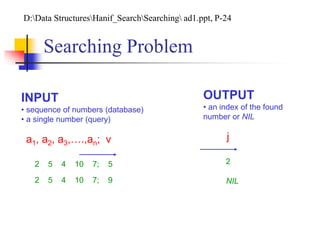
Searching Problem
INPUT
• sequence of numbers (database)
• a single number (query)
a1, a2, a3,….,an; v j
OUTPUT
• an index of the found
number or NIL
2 5 4 10 7; 5 2
2 5 4 10 7; 9 NIL
D:Data StructuresHanif_SearchSearching ad1.ppt, P-24
Linear Search (1/8)
 This is a very simple algorithm.
 It uses a loop to sequentially step through
an array, starting with the first element.
 It compares each element with the value
being searched for and stops when that
value is found or the end of the array is
reached.
D:Data StructuresHanif_SearchSearchingLecture 08 - Searching Algorithms.ppt
Linear Search-Pseudo Code (2/8)
LINEAR_SEARCH(A,v)
1. for i←1 to n
2. do if A[i]=v
3. then return I
4. return NIL
DSAL-4,P-13
Linear Search (3/8)
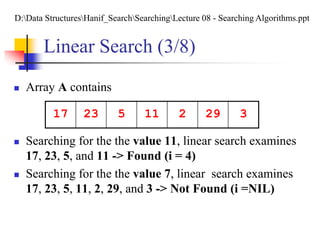
 Array A contains
 Searching for the the value 11, linear search examines
17, 23, 5, and 11 -> Found (i = 4)
 Searching for the the value 7, linear search examines
17, 23, 5, 11, 2, 29, and 3 -> Not Found (i =NIL)
17 23 5 11 2 29 3
D:Data StructuresHanif_SearchSearchingLecture 08 - Searching Algorithms.ppt
Linear Search (4/8)
 The advantage is its simplicity.
 It is easy to understand
 Easy to implement
 Does not require the array to be in order
 The disadvantage is its inefficiency
 If there are 20,000 items in the array and what
you are looking for is in the 19,999th element,
you need to search through the entire list.
Linear Search (5/8)
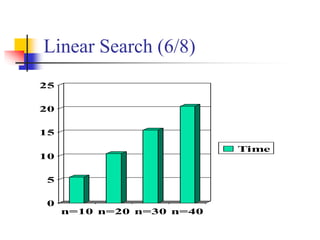
 Whenever the number of entries doubles, so
does the running time, roughly.
 If a machine does 1 million comparisons per
second, it takes about 30 minutes for
4 billion comparisons.
Linear Search (6/8)
0
5
10
15
20
25
n=10 n=20 n=30 n=40
Time
Analysis of Linear Search (7/8)
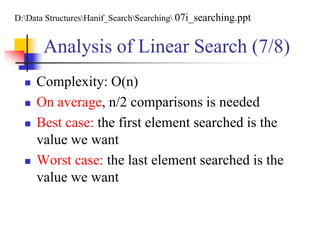
 Complexity: O(n)
 On average, n/2 comparisons is needed
 Best case: the first element searched is the
value we want
 Worst case: the last element searched is the
value we want
D:Data StructuresHanif_SearchSearching 07i_searching.ppt
Average Case Analysis of Linear
Search (8/8)
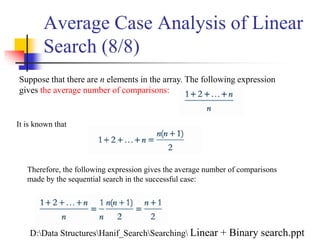
Suppose that there are n elements in the array. The following expression
gives the average number of comparisons:
It is known that
Therefore, the following expression gives the average number of comparisons
made by the sequential search in the successful case:
D:Data StructuresHanif_SearchSearching Linear + Binary search.ppt
Binary Search (1/10)
Can We Search More Efficiently?
 Yes, provided the list is in some kind of order,
for example alphabetical order with respect to
the names.
 If this is the case, we use a “divide and conquer”
strategy to find an item quickly.
 This strategy is what one would use in a
“number guessing game”, for example.
D:Data StructuresHanif_SearchSearchingLecture 08 - Searching Algorithms.ppt
Binary Search (2/10)
I’m Thinking of A Number…
 … between 1 and 1000. Guess it!
 Is it 500? Nope, too low.
 Is it 750? Nope, too high.
 Is it 625? … etc…
This strategy guarantees a correct guess in
no more than ten guesses!
Binary Search (3/10)
Apply This Strategy to Searching
 The resulting algorithm is called the “Binary
Search” algorithm.
 We check the middle key in our list.
 If it is beyond what we are looking for (too
high), we look only at the top half of the list.
 If it’s not far enough in (too low), we look at
the bottom half.
 Then iterate!
Binary Search Steps (4/10)
1. Divide a sorted array into three sections.
 middle element
 elements on one side of the middle element
 elements on the other side of the middle
element
2. If the middle element is the correct value,
done. Otherwise, go to step 1, using only the
half of the array that may contain the correct
value.
Binary Search Steps (5/10)
3. Continue steps 1 and 2 until either the
value is found or there are no more
elements to examine.
Binary Search-Pseudo Code-1
(6/10)
RECURSIVE_BINARY _SEARCH (A, v, low, high )
1. if low > high
2. then return NIL
3. mid ←
4. If v = A[mid]
5. then return mid
6. If v > A[mid]
7. then return RECURSIVE_BINARY _SEARCH (A, v, mid+1, high )
8. else return RECURSIVE_BINARY _SEARCH (A, v, low, mid-1)
DSAL-4,P-18
( )/2low high  
Binary Search-Pseudo Code-2
(7/10)
ITERATIVE_BINARY _SEARCH (A, v, low, high )
1. While low high
2. do mid ←
3. If v = A[mid]
4. then return mid
5. else if v > A[mid]
6. then low ← mid+1
7. else high← mid-1
8. return NIL
DSAL-4,P-18
( )/2low high  

Binary Search (8/10)
 The worst case number of comparisons grows by
only 1 comparison every time list size is doubled.
 Only 32 comparisons would be needed on a list
of 4 billion using Binary Search. (Sequential
Search would need 4 billion comparisons and
would take 30 minutes!)
D:Data StructuresHanif_SearchSearchingLecture 08 - Searching Algorithms.ppt
 Considering the worst-case for binary search:
 We don’t find the item until we have divided the array as far as it will
divide
 We first look at the middle of n items, then we look at the
middle of n/2 items, then n/22 items, and so on…
 We will divide until n/2k = 1, k is the number of times we have
divided the set (when we have divided all we can, the above
equation will be true)
 n/2k = 1 when n = 2k, so to find out how many times we
divided the set, we solve for k
k = log2 n
 Thus, the algorithm takes O(log n) , the worst-case (we ingore
logarithmic base)
Binary Search (9/10)
D:Data StructuresHanif_SearchSearching cset3150_algo_search.ppt
Binary Search (10/10)
 Benefit
 Much more efficient than linear search.
 For array of N elements, performs at most log2N
comparisons.
 Disadvantage
 Requires that array elements be sorted.
Interpolation Search
 Binary search is a great improvement over
linear search because it eliminates large
portion of the list without actually examing
all the eliminated values.
 If we know that the values are fairly evenly
distributed, we can use interpolation to
eliminate even more values at each step.
D:Data StructuresHanif_SearchSearchingLecture 08 - Searching Algorithms.ppt
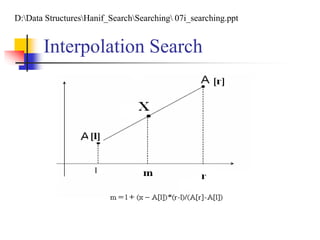
Interpolation Search
 Interpolation is the process of using known
values to guess where an unknown value lies.
 We use the indexes of known values in the
list to guess what index the target value
should have.
 Interpolation search selects the dividing point
by interpolation using the following code
m = l + (x – A[l])*(r-l)/(A[r]-A[l])
Interpolation Search
D:Data StructuresHanif_SearchSearching 07i_searching.ppt
Interpolation Search
 Requirement: the list of data is sorted
Interpolation Search
 Compare x to A[m]
 If x = A[m]: Found.
 If x<A[m]: set r = m-1
 If x > A[m]: set l = m + 1
 If searching is still not finish, continue searching
with new l and r.
 Stop searching when Found or x<A[l] or x>A[r].
D:Data StructuresHanif_SearchSearchingLecture 08 - Searching Algorithms.ppt
Interpolation Search
Example: Find the key x = 32 in the list
1 2 3 4 5 6 7 8 9 10 11 12 13 14 15 16 17 18 19 20
1 4 7 9 9 12 13 17 19 21 24 32 36 44 45 54 55 63 66 70
1: l=1, r=20 -> m=1+(32-1)*(20-1)/(70-1) = 10
a[10]=21<32=x -> l=11
2: l=11, r=20 -> m=11+(30-24)*(20-11)/(70-24) = 12
a[12]=32=x -> Found at m = 12
Interpolation Search
Example: Find the key x = 30 in the list
1 2 3 4 5 6 7 8 9 10 11 12 13 14 15 16 17 18 19 20
1 4 7 9 9 12 13 17 19 21 24 32 36 44 45 54 55 63 66 70
1: l=1, r=20 -> m=1+(30-1)*(20-1)/(70-1) = 9
a[9]=19<30=x -> l=10
2: l=10, r=20 -> m=10+(30-21)*(20-10)/(70-21) = 12
a[12]=32>30=x -> r = 11
3: l=10, r=11 -> m=10+(30-24)*(11-10)/(24-21) = 12
m=12>11=r: Not Found
Interpolation Search-Pseudo
Code (1/2)
Private Sub Interpolation(a[]: Int, x: Int, n: Int,
Found: Boolean)
l = 1: r = n
Do While (r > l)
m = l + ((x – a[l]) / (a[r] – a[l])) * (r - l)
‘Verify and Decise What to do next
Loop
End Sub
Interpolation Search-Pseudo
Code (2/2)
‘Verify and Decide what to do next
If (a[m] = x) Or (m < l) Or (m > r) Then
Found = iif(a[m] = x, True, False)
Exit Do
ElseIf (a[m] < x) Then
l = m + 1
ElseIf (a[m] > x) Then
r = m – 1
End If
Interpolation Search
 Binary search is very fast (O(logn)), but
interpolation search is much faster (O(loglogn)).
 For n = 2^32 (four billion items)
 Binary search took 32 steps of verification
 Interpolation search took only 5 steps of
verification.
Interpolation Search
 Interpolation search performance time is
nearly constant for a large range of n.
 Interpolation is still more usefull if the data
had been stored on a hard disk or other
relatively slow device.

Chapter 11 ds

  • 1.
    Chapter 11 Searching Dr. MuhammadHanif Durad Department of Computer and Information Sciences Pakistan Institute Engineering and Applied Sciences hanif@pieas.edu.pk Some slides have bee adapted with thanks from some other lectures available on Internet. It made my life easier, as life is always miserable at PIEAS (Sir Muhammad Yusaf Kakakhil )
  • 2.
    Lecture Outline  SearchingConcept  Linear Search  Binary Search  Interpolation Search
  • 3.
    Searching Concepts(1/3)  Theproblem of locating an element in a list (ordered or not) occurs in many contexts.  For instance, a program that checks the spelling of words searches for them in a dictionary, which is just an ordered list of words.  Problems of this kind are called searching problems. D:Data StructuresHanif_SearchSearchingLecture 08 - Searching Algorithms.ppt
  • 4.
    Searching Concepts(2/3)  Thereare many searching algorithms.  The natural searching method is linear search (or sequential search, or exhaustive search), which is very simple but takes a long time when applying with large lists. D:Data StructuresHanif_SearchSearchingLecture 08 - Searching Algorithms.ppt
  • 5.
    Searching Concepts(3/3)  Abinary search repeatedly subdivides the list to locate an item and for larger lists it is much faster than linear search.  Like a binary search, an interpolation search repeatedly subdivides the list to locate an item.  Interpolation search is much faster than binary search because it makes a reasonable guess about where the target item should lie D:Data StructuresHanif_SearchSearchingLecture 08 - Searching Algorithms.ppt
  • 6.
    Searching Problem INPUT • sequenceof numbers (database) • a single number (query) a1, a2, a3,….,an; v j OUTPUT • an index of the found number or NIL 2 5 4 10 7; 5 2 2 5 4 10 7; 9 NIL D:Data StructuresHanif_SearchSearching ad1.ppt, P-24
  • 7.
    Linear Search (1/8) This is a very simple algorithm.  It uses a loop to sequentially step through an array, starting with the first element.  It compares each element with the value being searched for and stops when that value is found or the end of the array is reached. D:Data StructuresHanif_SearchSearchingLecture 08 - Searching Algorithms.ppt
  • 8.
    Linear Search-Pseudo Code(2/8) LINEAR_SEARCH(A,v) 1. for i←1 to n 2. do if A[i]=v 3. then return I 4. return NIL DSAL-4,P-13
  • 9.
    Linear Search (3/8) Array A contains  Searching for the the value 11, linear search examines 17, 23, 5, and 11 -> Found (i = 4)  Searching for the the value 7, linear search examines 17, 23, 5, 11, 2, 29, and 3 -> Not Found (i =NIL) 17 23 5 11 2 29 3 D:Data StructuresHanif_SearchSearchingLecture 08 - Searching Algorithms.ppt
  • 10.
    Linear Search (4/8) The advantage is its simplicity.  It is easy to understand  Easy to implement  Does not require the array to be in order  The disadvantage is its inefficiency  If there are 20,000 items in the array and what you are looking for is in the 19,999th element, you need to search through the entire list.
  • 11.
    Linear Search (5/8) Whenever the number of entries doubles, so does the running time, roughly.  If a machine does 1 million comparisons per second, it takes about 30 minutes for 4 billion comparisons.
  • 12.
  • 13.
    Analysis of LinearSearch (7/8)  Complexity: O(n)  On average, n/2 comparisons is needed  Best case: the first element searched is the value we want  Worst case: the last element searched is the value we want D:Data StructuresHanif_SearchSearching 07i_searching.ppt
  • 14.
    Average Case Analysisof Linear Search (8/8) Suppose that there are n elements in the array. The following expression gives the average number of comparisons: It is known that Therefore, the following expression gives the average number of comparisons made by the sequential search in the successful case: D:Data StructuresHanif_SearchSearching Linear + Binary search.ppt
  • 15.
    Binary Search (1/10) CanWe Search More Efficiently?  Yes, provided the list is in some kind of order, for example alphabetical order with respect to the names.  If this is the case, we use a “divide and conquer” strategy to find an item quickly.  This strategy is what one would use in a “number guessing game”, for example. D:Data StructuresHanif_SearchSearchingLecture 08 - Searching Algorithms.ppt
  • 16.
    Binary Search (2/10) I’mThinking of A Number…  … between 1 and 1000. Guess it!  Is it 500? Nope, too low.  Is it 750? Nope, too high.  Is it 625? … etc… This strategy guarantees a correct guess in no more than ten guesses!
  • 17.
    Binary Search (3/10) ApplyThis Strategy to Searching  The resulting algorithm is called the “Binary Search” algorithm.  We check the middle key in our list.  If it is beyond what we are looking for (too high), we look only at the top half of the list.  If it’s not far enough in (too low), we look at the bottom half.  Then iterate!
  • 18.
    Binary Search Steps(4/10) 1. Divide a sorted array into three sections.  middle element  elements on one side of the middle element  elements on the other side of the middle element 2. If the middle element is the correct value, done. Otherwise, go to step 1, using only the half of the array that may contain the correct value.
  • 19.
    Binary Search Steps(5/10) 3. Continue steps 1 and 2 until either the value is found or there are no more elements to examine.
  • 20.
    Binary Search-Pseudo Code-1 (6/10) RECURSIVE_BINARY_SEARCH (A, v, low, high ) 1. if low > high 2. then return NIL 3. mid ← 4. If v = A[mid] 5. then return mid 6. If v > A[mid] 7. then return RECURSIVE_BINARY _SEARCH (A, v, mid+1, high ) 8. else return RECURSIVE_BINARY _SEARCH (A, v, low, mid-1) DSAL-4,P-18 ( )/2low high  
  • 21.
    Binary Search-Pseudo Code-2 (7/10) ITERATIVE_BINARY_SEARCH (A, v, low, high ) 1. While low high 2. do mid ← 3. If v = A[mid] 4. then return mid 5. else if v > A[mid] 6. then low ← mid+1 7. else high← mid-1 8. return NIL DSAL-4,P-18 ( )/2low high   
  • 22.
    Binary Search (8/10) The worst case number of comparisons grows by only 1 comparison every time list size is doubled.  Only 32 comparisons would be needed on a list of 4 billion using Binary Search. (Sequential Search would need 4 billion comparisons and would take 30 minutes!) D:Data StructuresHanif_SearchSearchingLecture 08 - Searching Algorithms.ppt
  • 23.
     Considering theworst-case for binary search:  We don’t find the item until we have divided the array as far as it will divide  We first look at the middle of n items, then we look at the middle of n/2 items, then n/22 items, and so on…  We will divide until n/2k = 1, k is the number of times we have divided the set (when we have divided all we can, the above equation will be true)  n/2k = 1 when n = 2k, so to find out how many times we divided the set, we solve for k k = log2 n  Thus, the algorithm takes O(log n) , the worst-case (we ingore logarithmic base) Binary Search (9/10) D:Data StructuresHanif_SearchSearching cset3150_algo_search.ppt
  • 24.
    Binary Search (10/10) Benefit  Much more efficient than linear search.  For array of N elements, performs at most log2N comparisons.  Disadvantage  Requires that array elements be sorted.
  • 25.
    Interpolation Search  Binarysearch is a great improvement over linear search because it eliminates large portion of the list without actually examing all the eliminated values.  If we know that the values are fairly evenly distributed, we can use interpolation to eliminate even more values at each step. D:Data StructuresHanif_SearchSearchingLecture 08 - Searching Algorithms.ppt
  • 26.
    Interpolation Search  Interpolationis the process of using known values to guess where an unknown value lies.  We use the indexes of known values in the list to guess what index the target value should have.  Interpolation search selects the dividing point by interpolation using the following code m = l + (x – A[l])*(r-l)/(A[r]-A[l])
  • 27.
  • 28.
    Interpolation Search  Requirement:the list of data is sorted
  • 29.
    Interpolation Search  Comparex to A[m]  If x = A[m]: Found.  If x<A[m]: set r = m-1  If x > A[m]: set l = m + 1  If searching is still not finish, continue searching with new l and r.  Stop searching when Found or x<A[l] or x>A[r]. D:Data StructuresHanif_SearchSearchingLecture 08 - Searching Algorithms.ppt
  • 30.
    Interpolation Search Example: Findthe key x = 32 in the list 1 2 3 4 5 6 7 8 9 10 11 12 13 14 15 16 17 18 19 20 1 4 7 9 9 12 13 17 19 21 24 32 36 44 45 54 55 63 66 70 1: l=1, r=20 -> m=1+(32-1)*(20-1)/(70-1) = 10 a[10]=21<32=x -> l=11 2: l=11, r=20 -> m=11+(30-24)*(20-11)/(70-24) = 12 a[12]=32=x -> Found at m = 12
  • 31.
    Interpolation Search Example: Findthe key x = 30 in the list 1 2 3 4 5 6 7 8 9 10 11 12 13 14 15 16 17 18 19 20 1 4 7 9 9 12 13 17 19 21 24 32 36 44 45 54 55 63 66 70 1: l=1, r=20 -> m=1+(30-1)*(20-1)/(70-1) = 9 a[9]=19<30=x -> l=10 2: l=10, r=20 -> m=10+(30-21)*(20-10)/(70-21) = 12 a[12]=32>30=x -> r = 11 3: l=10, r=11 -> m=10+(30-24)*(11-10)/(24-21) = 12 m=12>11=r: Not Found
  • 32.
    Interpolation Search-Pseudo Code (1/2) PrivateSub Interpolation(a[]: Int, x: Int, n: Int, Found: Boolean) l = 1: r = n Do While (r > l) m = l + ((x – a[l]) / (a[r] – a[l])) * (r - l) ‘Verify and Decise What to do next Loop End Sub
  • 33.
    Interpolation Search-Pseudo Code (2/2) ‘Verifyand Decide what to do next If (a[m] = x) Or (m < l) Or (m > r) Then Found = iif(a[m] = x, True, False) Exit Do ElseIf (a[m] < x) Then l = m + 1 ElseIf (a[m] > x) Then r = m – 1 End If
  • 34.
    Interpolation Search  Binarysearch is very fast (O(logn)), but interpolation search is much faster (O(loglogn)).  For n = 2^32 (four billion items)  Binary search took 32 steps of verification  Interpolation search took only 5 steps of verification.
  • 35.
    Interpolation Search  Interpolationsearch performance time is nearly constant for a large range of n.  Interpolation is still more usefull if the data had been stored on a hard disk or other relatively slow device.