Chapter 3
Arrays and Matrices
Dr. Muhammad Hanif Durad
Department of Computer and Information Sciences
Pakistan Institute Engineering and Applied Sciences
hanif@pieas.edu.pk
Some slides have bee adapted with thanks from some other lectures
available on Internet. It made my life easier, as life is always
miserable at PIEAS (Sir Muhammad Yusaf Kakakhil )
Dr. Hanif Durad 2
Lecture Outline (1/2)
 Introduction
 One-Dimensional Arrays
 Representing 1-D arrays in Memory
 Operations on arrays
 Limitations Of Linear Arrays
 Multidimensional Arrays
 Row- and Column-Major Mappings
Dr. Hanif Durad 3
Lecture Outline (2/2)
 Special Matrices
 Diagonal:
 Tridiagonal:
 Lower triangular:
 Upper triangular:
 Symmetric
 Strings
3.1 Introduction
 Arrays are most frequently used in programming
 Data is often available in tabular form
 Tabular data is often represented in arrays
 Collection of homogenous elements referred by
single name
 Mathematical problems like linear algebra can
easily be handled by 2-dimensional arrays
Dr. Hanif Durad 4
5
3.3 One-Dimensional Arrays (1/2)
 Suppose, you need to store years of 100 cars.
Will you define 100 variables?
int y1, y2,…, y100;
 An array is an indexed data structure to represent
several variables having the same data type: int
y[100];
y[0] y[1] y[2] … y[k-1] y[k] y[k+1] … y[98] y[99]
D:Data StructuresHanif_SearchArrays and Matrices Chap5.ppt
6
One-Dimensional Arrays (2/2)
 An element of an array is accessed using the
array name and an index or subscript, for
example: y[5] which can be used like a variable
 In C, the subscripts always start with 0 and
increment by 1, so y[5] is the sixth element
 The name of the array is the address of the first
element and the subscript is the offset
y[0] y[1] y[2] … y[k-1] y[k] y[k+1] … y[98] y[99]
7
3.2 Definition and Initialization
 An array is defined using a declaration
statement.
data_type array_name[size];
 allocates memory for size elements
 subscript of first element is 0
 subscript of last element is size-1
 size must be a constant
8
Example
int list[5];
 allocates memory for 5 integer variables
 subscript of first element is 0
 subscript of last element is 4
 C does not check bounds on arrays
 list[6] =5; /* may give segmentation fault or
overwrite other memory locations*/
list[0]
list[1]
list[2]
list[3]
list[4]
9
Initializing Arrays
 Arrays can be initialized at the time they are
declared.
 Examples:
double taxrate[3] ={0.15, 0.25, 0.3};
char list[5] = {‘h’, ’e’, ’l’, ’l’, ’o’};
double vector[100] = {0.0}; /* assigns
zero to all 100 elements */
int s[] = {5,0,-5}; /*the size of s is 3*/
10
Assigning values to an array
For loops are often used to assign values to an array
Example:
int list[5], i;
for(i=0; i<5; i++){
list[i] = i;
} list[0]
list[3]
list[4]
list[1]
list[2]
0
1
2
3
4
list[0]
list[1]
list[2]
list[3]
list[4]
OR
for(i=0; i<=4; i++){
list[i] = i;
}
11
Assigning values to an array
Give a for loop to assign the below values to list
int list[5], i;
for(i=0; i<5; i++){
list[i] = 4-i;
}
list[0]
list[3]
list[4]
list[1]
list[2]
4
3
2
1
0
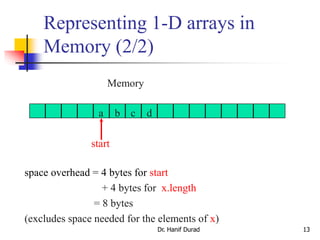
3.4 Representing 1-D arrays in
Memory (1/2)
Dr. Hanif Durad 12
 1-dimensional array x = [a, b, c, d]
 map into contiguous memory locations
Memory
a b c d
start
• location(x[i]) = start + i
D:Data StructuresCSED232lecture3-array.ppt
Representing 1-D arrays in
Memory (2/2)
Dr. Hanif Durad 13
space overhead = 4 bytes for start
+ 4 bytes for x.length
= 8 bytes
(excludes space needed for the elements of x)
Memory
a b c d
start
3.5 Operations on arrays
 Traversing
 Insertion
 Deletion
 Searching
 Concatenation
 Merging
 Inversion
 Sorting
Dr. Hanif Durad 14
3.6 Limitations Of Linear Arrays
 The prior knowledge of no. of elements in the linear
array is necessary
 These are static structures static in the sense that
memory is allocated at compilation time, their memory
used by them can’t be reduced or extended
 Since the elements of this arrays are stored in these
arrays are time consuming this is because of moving
down or up to create a space of new element or to
occupy the space vacated by deleted element
Dr. Hanif Durad 15
3.7 Multidimensional Arrays
 An array can have many dimensions – if it has more than
one dimension, it is called a multidimensional array
 Each dimension subdivides the previous one into the
specified number of elements
 Each dimension has its own length
 Memory requirement changes drastically, can result in
shortage of memory
e.g.
int X [3] [4] [5];
Dr. Hanif Durad 16
D:Data StructuresHanif_SearchArrays and Matrices20080714_MultiD.ppt+
D:Data StructuresHanif_SearchArrays and MatricesMultidimensional Arrays.ppt
3.8 2-D Arrays
The elements of a 2-dimensional array a
declared as:
int a[3][4];
may be shown as a table
a[0][0] a[0][1] a[0][2] a[0][3]
a[1][0] a[1][1] a[1][2] a[1][3]
a[2][0] a[2][1] a[2][2] a[2][3]
Dr. Hanif Durad 17
D:Data StructuresCSED232lecture4-arrays.ppt
Rows of a 2D Array
Dr. Hanif Durad 18
a[0][0] a[0][1] a[0][2] a[0][3] row 0
a[1][0] a[1][1] a[1][2] a[1][3] row 1
a[2][0] a[2][1] a[2][2] a[2][3] row 2
Columns of a 2D Array
Dr. Hanif Durad 19
a[0][0] a[0][1] a[0][2] a[0][3]
a[1][0] a[1][1] a[1][2] a[1][3]
a[2][0] a[2][1] a[2][2] a[2][3]
column 0 column 1 column 2 column 3
2D Array Representation in C++
view 2D array as a 1D array of rows
x = [row0, row1, row 2]
row 0 = [a, b, c, d]
row 1 = [e, f, g, h]
row 2 = [i, j, k, l]
and store as 4 1D arrays
2-dimensional array x
a, b, c, d
e, f, g, h
i, j, k, l
2D Array Representation in C++
a b c d
e f g h
i j k l
x[]
4 separate
1-dimensional arrays
 space overhead = overhead for 4 1D arrays
= 4 * 4 bytes
= 16 bytes
= (number of rows + 1) x 4 bytes
Array Representation in C++
 This representation is called the array-of-arrays representation.
 Requires contiguous memory of size 3, 4, 4, and 4 for the 4 1D
arrays.
 1 memory block of size number of rows and number of rows
blocks of size number of columns
a b c d
e f g h
i j k l
x[]
Row-Major Mapping
 Example 3 x 4 array:
a b c d
e f g h
i j k l
 Convert into 1D array y by collecting elements by rows.
 Within a row elements are collected from left to right.
 Rows are collected from top to bottom.
 We get y[] = {a, b, c, d, e, f, g, h, i, j, k, l}
row 0 row 1 row 2 … row i
3.9 Representing 2-D arrays in Memory
Locating Element x[i][j]
 assume x has r rows and c columns
 each row has c elements
 i rows to the left of row i
 so ic elements to the left of x[i][0]
 x[i][j] is mapped to position
ic + j of the 1D array
row 0 row 1 row 2 … row i
0 c 2c 3c ic
3.10 Address Calculation for 2-D Array
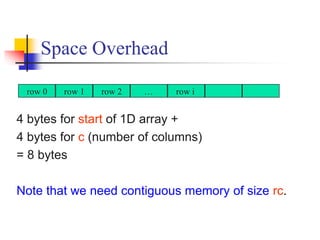
Space Overhead
4 bytes for start of 1D array +
4 bytes for c (number of columns)
= 8 bytes
Note that we need contiguous memory of size rc.
row 0 row 1 row 2 … row i
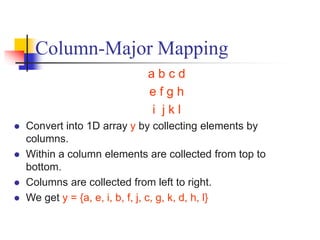
Column-Major Mapping
a b c d
e f g h
i j k l
 Convert into 1D array y by collecting elements by
columns.
 Within a column elements are collected from top to
bottom.
 Columns are collected from left to right.
 We get y = {a, e, i, b, f, j, c, g, k, d, h, l}
27
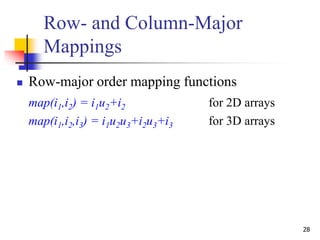
Row- and Column-Major
Mappings
2D Array int a[3][6];
a[0][0] a[0][1] a[0][2] a[0][3] a[0][4] a[0][5]
a[1][0] a[1][1] a[1][2] a[1][3] a[1][4] a[1][5]
a[2][0] a[2][1] a[2][2] a[2][3] a[2][4] a[2][5]
28
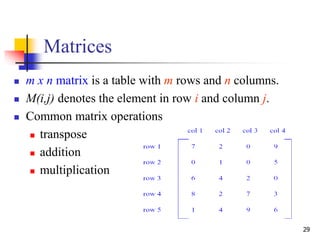
Row- and Column-Major
Mappings
 Row-major order mapping functions
map(i1,i2) = i1u2+i2 for 2D arrays
map(i1,i2,i3) = i1u2u3+i2u3+i3 for 3D arrays
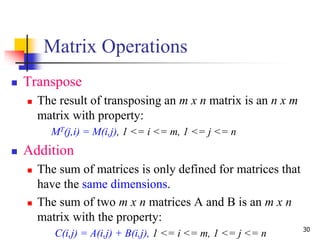
29
Matrices
 m x n matrix is a table with m rows and n columns.
 M(i,j) denotes the element in row i and column j.
 Common matrix operations
 transpose
 addition
 multiplication
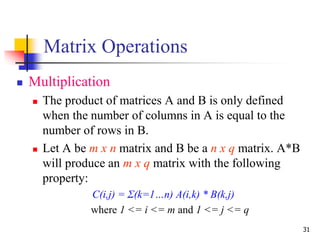
30
Matrix Operations
 Transpose
 The result of transposing an m x n matrix is an n x m
matrix with property:
MT(j,i) = M(i,j), 1 <= i <= m, 1 <= j <= n
 Addition
 The sum of matrices is only defined for matrices that
have the same dimensions.
 The sum of two m x n matrices A and B is an m x n
matrix with the property:
C(i,j) = A(i,j) + B(i,j), 1 <= i <= m, 1 <= j <= n
31
Matrix Operations
 Multiplication
 The product of matrices A and B is only defined
when the number of columns in A is equal to the
number of rows in B.
 Let A be m x n matrix and B be a n x q matrix. A*B
will produce an m x q matrix with the following
property:
C(i,j) = Σ(k=1…n) A(i,k) * B(k,j)
where 1 <= i <= m and 1 <= j <= q
32
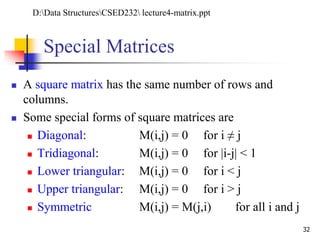
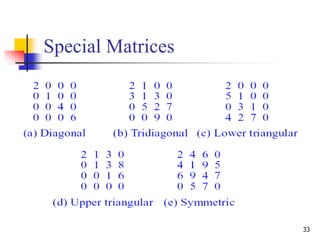
Special Matrices
 A square matrix has the same number of rows and
columns.
 Some special forms of square matrices are
 Diagonal: M(i,j) = 0 for i ≠ j
 Tridiagonal: M(i,j) = 0 for |i-j| < 1
 Lower triangular: M(i,j) = 0 for i < j
 Upper triangular: M(i,j) = 0 for i > j
 Symmetric M(i,j) = M(j,i) for all i and j
D:Data StructuresCSED232 lecture4-matrix.ppt
33
Special Matrices
34
Special Matrices
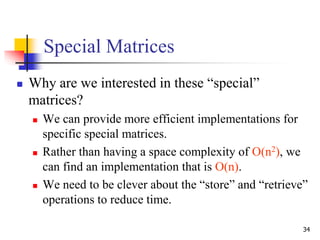
 Why are we interested in these “special”
matrices?
 We can provide more efficient implementations for
specific special matrices.
 Rather than having a space complexity of O(n2), we
can find an implementation that is O(n).
 We need to be clever about the “store” and “retrieve”
operations to reduce time.
35
Diagonal Matrix
 Naive way to represent n x n diagonal matrix
 requires n2 x sizeof (T) bytes of memory where T is
the data type of elements
 Better way
 a[i-1]= 0 for D(i,j) where i = j
0 for D(i,j) where i ≠ j
 requires n x sizeof(T) bytes of memory
DS-1, P-95
36
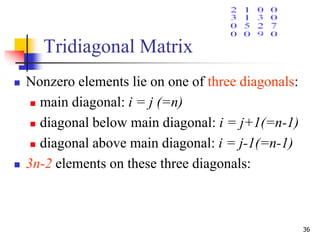
Tridiagonal Matrix
 Nonzero elements lie on one of three diagonals:
 main diagonal: i = j (=n)
 diagonal below main diagonal: i = j+1(=n-1)
 diagonal above main diagonal: i = j-1(=n-1)
 3n-2 elements on these three diagonals:
37
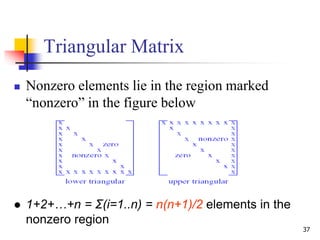
Triangular Matrix
 Nonzero elements lie in the region marked
“nonzero” in the figure below
 1+2+…+n = Σ(i=1..n) = n(n+1)/2 elements in the
nonzero region
38
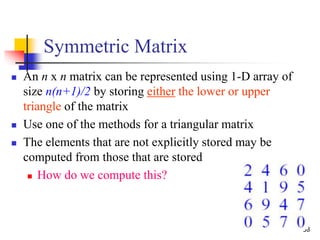
Symmetric Matrix
 An n x n matrix can be represented using 1-D array of
size n(n+1)/2 by storing either the lower or upper
triangle of the matrix
 Use one of the methods for a triangular matrix
 The elements that are not explicitly stored may be
computed from those that are stored
 How do we compute this?
39
Sparse Matrix
 A matrix is sparse if many of its elements are zero
 A matrix that is not sparse is dense
 The boundary is not precisely defined
 Diagonal and tridiagonal matrices are sparse
 We classify triangular matrices as dense
 Two possible representations
 array
 linked list
40
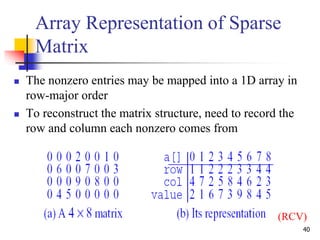
Array Representation of Sparse
Matrix
 The nonzero entries may be mapped into a 1D array in
row-major order
 To reconstruct the matrix structure, need to record the
row and column each nonzero comes from
(RCV)
Linked Representation of Sparse
Matrix (1/2)
 A shortcoming of the 1-D array of a sparse
matrix is that we need to know the number of
nonzero terms in each of the sparse matrices
when the array is created
 A linked representation can overcome this
shortcoming
Dr. Hanif Durad 41
Linked Representation of Sparse
Matrix (2/2)
 A sparse matrix using linked list requires three
structures:
 Head node
 Row node
 Column Node
Dr. Hanif Durad 42
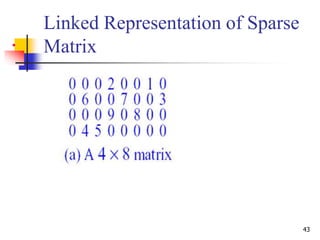
43
•
Linked Representation of Sparse
Matrix
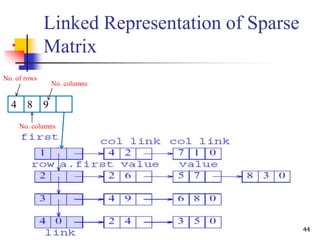
44
•
Linked Representation of Sparse
Matrix
84 9
No. of rows
No. columns
No. columns
Strings in C
D:C LanguageLecturesChapter4_c.ppt
Strings
 Character type array is called string. All
strings end with the NULL character. Use
the %s placeholder in the printf() function
to display string values.
 Declaration:
char name[50];
Dr. Hanif Durad 46
http://lectures-c.blogspot.com/2009/02/strings-in-c.html
Example -1
#include
void main (void )
{
char *st1 = "abcd";
char st2[] = "efgh";
printf( "%sn", st1);
printf( "%sn", st2);
}
Dr. Hanif Durad 47
string1.c
Example-2
void main(void){
char myname[] = { ‘H', ‘a', ‘n', ‘i', ‘f' };
printf("%s n",myname);
}
Dr. Hanif Durad 48
string2.c
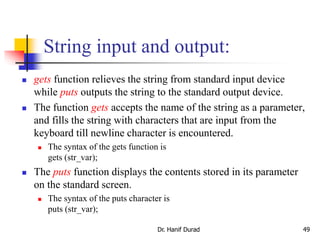
String input and output:
 gets function relieves the string from standard input device
while puts outputs the string to the standard output device.
 The function gets accepts the name of the string as a parameter,
and fills the string with characters that are input from the
keyboard till newline character is encountered.
 The syntax of the gets function is
gets (str_var);
 The puts function displays the contents stored in its parameter
on the standard screen.
 The syntax of the puts character is
puts (str_var);
Dr. Hanif Durad 49
Example-3
#include <stdio.h>
# include <string.h>
void main ( )
{
char myname [40];
printf ("Type your Name :");
gets (myname);
printf ("Your name is :");
puts(myname);
}
Dr. Hanif Durad 50
string3.c
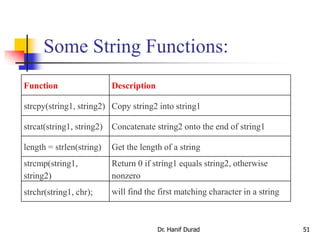
Some String Functions:
Dr. Hanif Durad 51
Function Description
strcpy(string1, string2) Copy string2 into string1
strcat(string1, string2) Concatenate string2 onto the end of string1
length = strlen(string) Get the length of a string
strcmp(string1,
string2)
Return 0 if string1 equals string2, otherwise
nonzero
strchr(string1, chr); will find the first matching character in a string

Chapter 3 ds

  • 1.
    Chapter 3 Arrays andMatrices Dr. Muhammad Hanif Durad Department of Computer and Information Sciences Pakistan Institute Engineering and Applied Sciences hanif@pieas.edu.pk Some slides have bee adapted with thanks from some other lectures available on Internet. It made my life easier, as life is always miserable at PIEAS (Sir Muhammad Yusaf Kakakhil )
  • 2.
    Dr. Hanif Durad2 Lecture Outline (1/2)  Introduction  One-Dimensional Arrays  Representing 1-D arrays in Memory  Operations on arrays  Limitations Of Linear Arrays  Multidimensional Arrays  Row- and Column-Major Mappings
  • 3.
    Dr. Hanif Durad3 Lecture Outline (2/2)  Special Matrices  Diagonal:  Tridiagonal:  Lower triangular:  Upper triangular:  Symmetric  Strings
  • 4.
    3.1 Introduction  Arraysare most frequently used in programming  Data is often available in tabular form  Tabular data is often represented in arrays  Collection of homogenous elements referred by single name  Mathematical problems like linear algebra can easily be handled by 2-dimensional arrays Dr. Hanif Durad 4
  • 5.
    5 3.3 One-Dimensional Arrays(1/2)  Suppose, you need to store years of 100 cars. Will you define 100 variables? int y1, y2,…, y100;  An array is an indexed data structure to represent several variables having the same data type: int y[100]; y[0] y[1] y[2] … y[k-1] y[k] y[k+1] … y[98] y[99] D:Data StructuresHanif_SearchArrays and Matrices Chap5.ppt
  • 6.
    6 One-Dimensional Arrays (2/2) An element of an array is accessed using the array name and an index or subscript, for example: y[5] which can be used like a variable  In C, the subscripts always start with 0 and increment by 1, so y[5] is the sixth element  The name of the array is the address of the first element and the subscript is the offset y[0] y[1] y[2] … y[k-1] y[k] y[k+1] … y[98] y[99]
  • 7.
    7 3.2 Definition andInitialization  An array is defined using a declaration statement. data_type array_name[size];  allocates memory for size elements  subscript of first element is 0  subscript of last element is size-1  size must be a constant
  • 8.
    8 Example int list[5];  allocatesmemory for 5 integer variables  subscript of first element is 0  subscript of last element is 4  C does not check bounds on arrays  list[6] =5; /* may give segmentation fault or overwrite other memory locations*/ list[0] list[1] list[2] list[3] list[4]
  • 9.
    9 Initializing Arrays  Arrayscan be initialized at the time they are declared.  Examples: double taxrate[3] ={0.15, 0.25, 0.3}; char list[5] = {‘h’, ’e’, ’l’, ’l’, ’o’}; double vector[100] = {0.0}; /* assigns zero to all 100 elements */ int s[] = {5,0,-5}; /*the size of s is 3*/
  • 10.
    10 Assigning values toan array For loops are often used to assign values to an array Example: int list[5], i; for(i=0; i<5; i++){ list[i] = i; } list[0] list[3] list[4] list[1] list[2] 0 1 2 3 4 list[0] list[1] list[2] list[3] list[4] OR for(i=0; i<=4; i++){ list[i] = i; }
  • 11.
    11 Assigning values toan array Give a for loop to assign the below values to list int list[5], i; for(i=0; i<5; i++){ list[i] = 4-i; } list[0] list[3] list[4] list[1] list[2] 4 3 2 1 0
  • 12.
    3.4 Representing 1-Darrays in Memory (1/2) Dr. Hanif Durad 12  1-dimensional array x = [a, b, c, d]  map into contiguous memory locations Memory a b c d start • location(x[i]) = start + i D:Data StructuresCSED232lecture3-array.ppt
  • 13.
    Representing 1-D arraysin Memory (2/2) Dr. Hanif Durad 13 space overhead = 4 bytes for start + 4 bytes for x.length = 8 bytes (excludes space needed for the elements of x) Memory a b c d start
  • 14.
    3.5 Operations onarrays  Traversing  Insertion  Deletion  Searching  Concatenation  Merging  Inversion  Sorting Dr. Hanif Durad 14
  • 15.
    3.6 Limitations OfLinear Arrays  The prior knowledge of no. of elements in the linear array is necessary  These are static structures static in the sense that memory is allocated at compilation time, their memory used by them can’t be reduced or extended  Since the elements of this arrays are stored in these arrays are time consuming this is because of moving down or up to create a space of new element or to occupy the space vacated by deleted element Dr. Hanif Durad 15
  • 16.
    3.7 Multidimensional Arrays An array can have many dimensions – if it has more than one dimension, it is called a multidimensional array  Each dimension subdivides the previous one into the specified number of elements  Each dimension has its own length  Memory requirement changes drastically, can result in shortage of memory e.g. int X [3] [4] [5]; Dr. Hanif Durad 16 D:Data StructuresHanif_SearchArrays and Matrices20080714_MultiD.ppt+ D:Data StructuresHanif_SearchArrays and MatricesMultidimensional Arrays.ppt
  • 17.
    3.8 2-D Arrays Theelements of a 2-dimensional array a declared as: int a[3][4]; may be shown as a table a[0][0] a[0][1] a[0][2] a[0][3] a[1][0] a[1][1] a[1][2] a[1][3] a[2][0] a[2][1] a[2][2] a[2][3] Dr. Hanif Durad 17 D:Data StructuresCSED232lecture4-arrays.ppt
  • 18.
    Rows of a2D Array Dr. Hanif Durad 18 a[0][0] a[0][1] a[0][2] a[0][3] row 0 a[1][0] a[1][1] a[1][2] a[1][3] row 1 a[2][0] a[2][1] a[2][2] a[2][3] row 2
  • 19.
    Columns of a2D Array Dr. Hanif Durad 19 a[0][0] a[0][1] a[0][2] a[0][3] a[1][0] a[1][1] a[1][2] a[1][3] a[2][0] a[2][1] a[2][2] a[2][3] column 0 column 1 column 2 column 3
  • 20.
    2D Array Representationin C++ view 2D array as a 1D array of rows x = [row0, row1, row 2] row 0 = [a, b, c, d] row 1 = [e, f, g, h] row 2 = [i, j, k, l] and store as 4 1D arrays 2-dimensional array x a, b, c, d e, f, g, h i, j, k, l
  • 21.
    2D Array Representationin C++ a b c d e f g h i j k l x[] 4 separate 1-dimensional arrays  space overhead = overhead for 4 1D arrays = 4 * 4 bytes = 16 bytes = (number of rows + 1) x 4 bytes
  • 22.
    Array Representation inC++  This representation is called the array-of-arrays representation.  Requires contiguous memory of size 3, 4, 4, and 4 for the 4 1D arrays.  1 memory block of size number of rows and number of rows blocks of size number of columns a b c d e f g h i j k l x[]
  • 23.
    Row-Major Mapping  Example3 x 4 array: a b c d e f g h i j k l  Convert into 1D array y by collecting elements by rows.  Within a row elements are collected from left to right.  Rows are collected from top to bottom.  We get y[] = {a, b, c, d, e, f, g, h, i, j, k, l} row 0 row 1 row 2 … row i 3.9 Representing 2-D arrays in Memory
  • 24.
    Locating Element x[i][j] assume x has r rows and c columns  each row has c elements  i rows to the left of row i  so ic elements to the left of x[i][0]  x[i][j] is mapped to position ic + j of the 1D array row 0 row 1 row 2 … row i 0 c 2c 3c ic 3.10 Address Calculation for 2-D Array
  • 25.
    Space Overhead 4 bytesfor start of 1D array + 4 bytes for c (number of columns) = 8 bytes Note that we need contiguous memory of size rc. row 0 row 1 row 2 … row i
  • 26.
    Column-Major Mapping a bc d e f g h i j k l  Convert into 1D array y by collecting elements by columns.  Within a column elements are collected from top to bottom.  Columns are collected from left to right.  We get y = {a, e, i, b, f, j, c, g, k, d, h, l}
  • 27.
    27 Row- and Column-Major Mappings 2DArray int a[3][6]; a[0][0] a[0][1] a[0][2] a[0][3] a[0][4] a[0][5] a[1][0] a[1][1] a[1][2] a[1][3] a[1][4] a[1][5] a[2][0] a[2][1] a[2][2] a[2][3] a[2][4] a[2][5]
  • 28.
    28 Row- and Column-Major Mappings Row-major order mapping functions map(i1,i2) = i1u2+i2 for 2D arrays map(i1,i2,i3) = i1u2u3+i2u3+i3 for 3D arrays
  • 29.
    29 Matrices  m xn matrix is a table with m rows and n columns.  M(i,j) denotes the element in row i and column j.  Common matrix operations  transpose  addition  multiplication
  • 30.
    30 Matrix Operations  Transpose The result of transposing an m x n matrix is an n x m matrix with property: MT(j,i) = M(i,j), 1 <= i <= m, 1 <= j <= n  Addition  The sum of matrices is only defined for matrices that have the same dimensions.  The sum of two m x n matrices A and B is an m x n matrix with the property: C(i,j) = A(i,j) + B(i,j), 1 <= i <= m, 1 <= j <= n
  • 31.
    31 Matrix Operations  Multiplication The product of matrices A and B is only defined when the number of columns in A is equal to the number of rows in B.  Let A be m x n matrix and B be a n x q matrix. A*B will produce an m x q matrix with the following property: C(i,j) = Σ(k=1…n) A(i,k) * B(k,j) where 1 <= i <= m and 1 <= j <= q
  • 32.
    32 Special Matrices  Asquare matrix has the same number of rows and columns.  Some special forms of square matrices are  Diagonal: M(i,j) = 0 for i ≠ j  Tridiagonal: M(i,j) = 0 for |i-j| < 1  Lower triangular: M(i,j) = 0 for i < j  Upper triangular: M(i,j) = 0 for i > j  Symmetric M(i,j) = M(j,i) for all i and j D:Data StructuresCSED232 lecture4-matrix.ppt
  • 33.
  • 34.
    34 Special Matrices  Whyare we interested in these “special” matrices?  We can provide more efficient implementations for specific special matrices.  Rather than having a space complexity of O(n2), we can find an implementation that is O(n).  We need to be clever about the “store” and “retrieve” operations to reduce time.
  • 35.
    35 Diagonal Matrix  Naiveway to represent n x n diagonal matrix  requires n2 x sizeof (T) bytes of memory where T is the data type of elements  Better way  a[i-1]= 0 for D(i,j) where i = j 0 for D(i,j) where i ≠ j  requires n x sizeof(T) bytes of memory DS-1, P-95
  • 36.
    36 Tridiagonal Matrix  Nonzeroelements lie on one of three diagonals:  main diagonal: i = j (=n)  diagonal below main diagonal: i = j+1(=n-1)  diagonal above main diagonal: i = j-1(=n-1)  3n-2 elements on these three diagonals:
  • 37.
    37 Triangular Matrix  Nonzeroelements lie in the region marked “nonzero” in the figure below  1+2+…+n = Σ(i=1..n) = n(n+1)/2 elements in the nonzero region
  • 38.
    38 Symmetric Matrix  Ann x n matrix can be represented using 1-D array of size n(n+1)/2 by storing either the lower or upper triangle of the matrix  Use one of the methods for a triangular matrix  The elements that are not explicitly stored may be computed from those that are stored  How do we compute this?
  • 39.
    39 Sparse Matrix  Amatrix is sparse if many of its elements are zero  A matrix that is not sparse is dense  The boundary is not precisely defined  Diagonal and tridiagonal matrices are sparse  We classify triangular matrices as dense  Two possible representations  array  linked list
  • 40.
    40 Array Representation ofSparse Matrix  The nonzero entries may be mapped into a 1D array in row-major order  To reconstruct the matrix structure, need to record the row and column each nonzero comes from (RCV)
  • 41.
    Linked Representation ofSparse Matrix (1/2)  A shortcoming of the 1-D array of a sparse matrix is that we need to know the number of nonzero terms in each of the sparse matrices when the array is created  A linked representation can overcome this shortcoming Dr. Hanif Durad 41
  • 42.
    Linked Representation ofSparse Matrix (2/2)  A sparse matrix using linked list requires three structures:  Head node  Row node  Column Node Dr. Hanif Durad 42
  • 43.
  • 44.
    44 • Linked Representation ofSparse Matrix 84 9 No. of rows No. columns No. columns
  • 45.
    Strings in C D:CLanguageLecturesChapter4_c.ppt
  • 46.
    Strings  Character typearray is called string. All strings end with the NULL character. Use the %s placeholder in the printf() function to display string values.  Declaration: char name[50]; Dr. Hanif Durad 46 http://lectures-c.blogspot.com/2009/02/strings-in-c.html
  • 47.
    Example -1 #include void main(void ) { char *st1 = "abcd"; char st2[] = "efgh"; printf( "%sn", st1); printf( "%sn", st2); } Dr. Hanif Durad 47 string1.c
  • 48.
    Example-2 void main(void){ char myname[]= { ‘H', ‘a', ‘n', ‘i', ‘f' }; printf("%s n",myname); } Dr. Hanif Durad 48 string2.c
  • 49.
    String input andoutput:  gets function relieves the string from standard input device while puts outputs the string to the standard output device.  The function gets accepts the name of the string as a parameter, and fills the string with characters that are input from the keyboard till newline character is encountered.  The syntax of the gets function is gets (str_var);  The puts function displays the contents stored in its parameter on the standard screen.  The syntax of the puts character is puts (str_var); Dr. Hanif Durad 49
  • 50.
    Example-3 #include <stdio.h> # include<string.h> void main ( ) { char myname [40]; printf ("Type your Name :"); gets (myname); printf ("Your name is :"); puts(myname); } Dr. Hanif Durad 50 string3.c
  • 51.
    Some String Functions: Dr.Hanif Durad 51 Function Description strcpy(string1, string2) Copy string2 into string1 strcat(string1, string2) Concatenate string2 onto the end of string1 length = strlen(string) Get the length of a string strcmp(string1, string2) Return 0 if string1 equals string2, otherwise nonzero strchr(string1, chr); will find the first matching character in a string