Chapter 8 FILE PROCCESSING 8.1 Introduction 8.2 Introduction to File I/O 8.2.1 declaring FILE variables 8.2.2 opening a Disk Files for I/O   file open verification 8.2.3 reading and writing to Disk File 8.2.4 closing a Disk Files 8.2.5  EOF
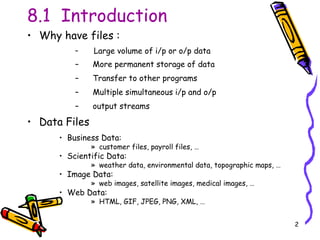
8.1  Introduction Why have files : Large volume of i/p or o/p data More permanent storage of data Transfer to other programs Multiple simultaneous i/p and o/p output streams Data Files Business Data:  customer files, payroll files, … Scientific Data:  weather data, environmental data, topographic maps, … Image Data:  web images, satellite images, medical images, … Web Data:  HTML, GIF, JPEG, PNG, XML, …
8.1  Introduction (cont..) Data Files : a named collection of    records. normally kept in    external storage.  C can process 2 types of files :   (i) Text files   (ii) Binary files
8.1  Introduction (cont..) 3 basic operations : (i) create file (ii) edit file (iii)  read data from file
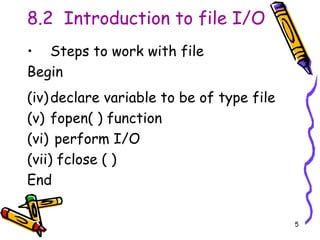
8.2  Introduction to file I/O Steps to work with file Begin declare variable to be of type file fopen( ) function perform I/O fclose ( )  End
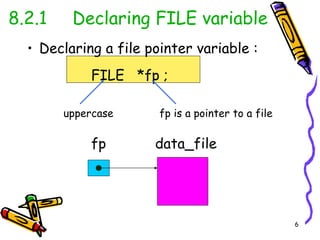
8.2.1 Declaring FILE variable Declaring a file pointer variable : FILE  *fp ;  uppercase fp is a pointer to a file fp data_file
/*a program that able to read name & age and print the data in data file named biodata.dat*/ #include<stdio.h> void main() { FILE *failnama; failnama=fopen(&quot;c:\\biodata2.dat&quot;,&quot;w&quot;); char nama[20]; int umur; fputs(&quot;Nama\t umur\n&quot;,failnama); fputs(&quot;=========================\n&quot;,failnama); for(int i=0;i<=3;i++) { printf(&quot;Nama:&quot;); scanf(&quot;%s&quot;,nama); printf(&quot;Umur:&quot;); scanf(&quot;%d&quot;,&umur); fprintf(failnama,&quot;%s\t %d\n&quot;,nama,umur); } fclose(failnama); }
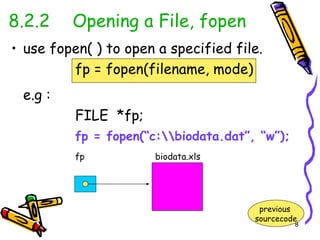
use fopen( ) to open a specified file.  fp = fopen(filename, mode) e.g : FILE  *fp; fp = fopen(“c:\\biodata.dat”, “w”); fp   biodata.xls 8.2.2 Opening a File, fopen previous  sourcecode
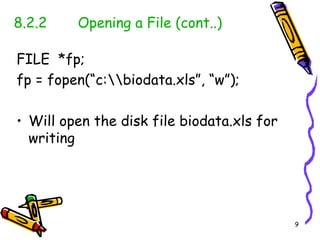
8.2.2 Opening a File (cont..) FILE  *fp; fp = fopen(“c:\\biodata.xls”, “w”); Will open the disk file biodata.xls for writing
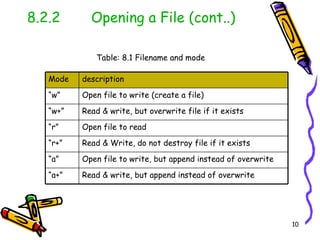
8.2.2 Opening a File (cont..) Table: 8.1 Filename and mode Read & write, but append instead of overwrite “ a+” Open file to write, but append instead of overwrite “ a” Read & Write, do not destroy file if it exists “ r+” Open file to read “ r” Read & write, but overwrite file if it exists “ w+” Open file to write (create a file) “ w” description Mode
mode (r) /*a program that read the data from biodata.dat*/ #include<stdio.h> void main(){ char nama[30]; int umur; FILE *failnama; failnama=fopen(&quot;c:\\biodata.dat&quot;,&quot;r&quot;); printf(&quot;Nama\t umur\n&quot;); printf(&quot;--------------------\n&quot;); for(int i=0;i<=3;i++) { fscanf(failnama,&quot;%s\t %d\n&quot;,nama,&umur); printf(&quot;%s\t %d\n&quot;,nama,umur); } fclose(failnama); }
mode (a) //a program that able to append the data into biodata.dat #include<stdio.h> void main(){ FILE *failnama1; FILE *failnama2; failnama1=fopen(&quot;c:\\biodata.dat&quot;,&quot;a+&quot;); failnama2=fopen(“c:\\student.xls”,”w+”); char nama[20]; int umur; for(int i=0;i<=2;i++) { printf(&quot;Nama:&quot;); scanf(&quot;%s&quot;,nama); printf(&quot;Umur:&quot;); scanf(&quot;%d&quot;,&umur); fprintf(failnama1,&quot;%s\t %d\n&quot;,nama,umur); fprintf(failnama2,&quot;%s\t %d\n&quot;,nama,umur); } fclose(failnama1); fclose(failnama2); }
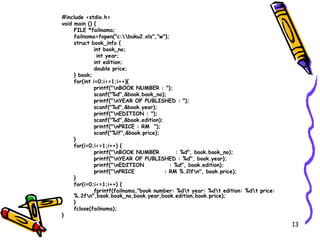
#include <stdio.h> void main () { FILE *failnama; failnama=fopen(&quot;c:\\buku2.xls&quot;,&quot;w&quot;); struct book_info { int book_no;   int year; int edition; double price; } book; for(int i=0;i<=1;i++){ printf(&quot;\nBOOK NUMBER : &quot;); scanf(&quot;%d&quot;,&book.book_no); printf(&quot;\nYEAR OF PUBLISHED : &quot;); scanf(&quot;%d&quot;,&book.year); printf(&quot;\nEDITION : &quot;); scanf(&quot;%d&quot;,&book.edition); printf(&quot;\nPRICE : RM  &quot;); scanf(&quot;%lf&quot;,&book.price); } for(i=0;i<=1;i++) { printf(&quot;\nBOOK NUMBER  : %d&quot;, book.book_no); printf(&quot;\nYEAR OF PUBLISHED : %d&quot;, book.year); printf(&quot;\nEDITION  : %d&quot;, book.edition); printf(&quot;\nPRICE  : RM %.2lf\n&quot;, book.price); } for(i=0;i<=1;i++) { fprintf(failnama,&quot;book number: %d\t year: %d\t edition: %d\t price: %.2f\n&quot;,book.book_no,book.year,book.edition,book.price); } fclose(failnama); }
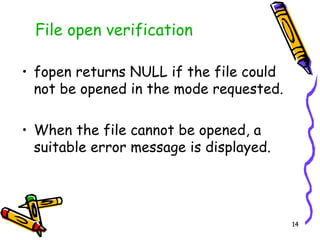
fopen returns NULL if the file could not be opened in the mode requested. When the file cannot be opened, a suitable error message is displayed.  File open verification
File open verification (cont..) #include<stdio.h> #define NULL 0 void main( ) { char nama[30]; int umur; FILE *failnama; failnama = fopen(&quot;c:\\biodata.dat&quot;,&quot;r+&quot;); if (failnama == NULL) printf(&quot;\n ERROR - Can't open the file\n&quot;); else { printf(&quot;Nama\tumur\n&quot;); printf(&quot;--------------------\n&quot;); for(int i=0;i<=3;i++) { fscanf(failnama,&quot;%s\t %d\n&quot;,nama,&umur); printf(&quot;%s\t %d\n&quot;,nama,umur); } } fclose(failnama); }
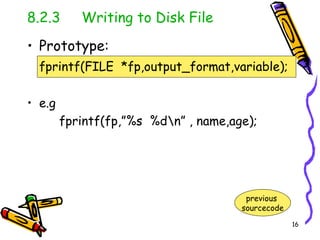
8.2.3  Writing to Disk File Prototype: fprintf(FILE  *fp,output_format,variable); e.g fprintf(fp,”%s  %d\n” , name,age); previous  sourcecode
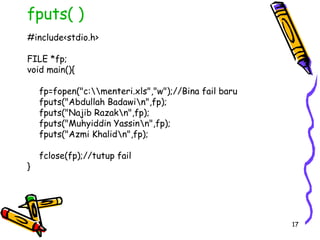
fputs( ) #include<stdio.h> FILE *fp; void main(){ fp=fopen(&quot;c:\\menteri.xls&quot;,&quot;w&quot;);//Bina fail baru fputs(&quot;Abdullah Badawi\n&quot;,fp); fputs(&quot;Najib Razak\n&quot;,fp); fputs(&quot;Muhyiddin Yassin\n&quot;,fp); fputs(&quot;Azmi Khalid\n&quot;,fp); fclose(fp);//tutup fail }
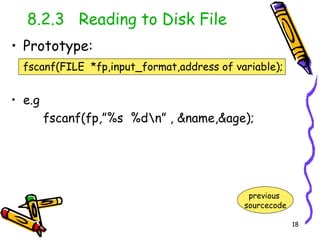
8.2.3  Reading to Disk File Prototype: fscanf(FILE  *fp,input_format,address of variable); e.g fscanf(fp,”%s  %d\n” , &name,&age); previous  sourcecode
fgets( ) #include <stdio.h> #include <string.h> void main ( ) { FILE *filePtr; char person[100]; int bil; filePtr=fopen(&quot;menteri.dat&quot;,&quot;r&quot;); /*baca string dari fail*/ for (bil=1;bil<=7;bil++) { fgets(person,strlen(person),filePtr); puts(person); } fclose(filePtr); }
8.2.4 Closing a Disk File fclose() function closes the file that was opened by a call to the fopen() function Statement: fclose(fp); fp is a pointer file variable
End of File (EOF) eof marker is operating system defined & indicate no more data is to be read. windows <ctrl> z returns 0 if eof not found. otherwise, returns 1.
End of File (EOF) (cont..) #include<stdio.h> #define NULL 0 void main( ) { char nama[30]; int umur; FILE *pelajar; pelajar = fopen(&quot;c:\\biodata2.dat&quot;,&quot;w+&quot;); if (pelajar == NULL) printf(&quot;\n ERROR - Can't open the file\n&quot;); else{ printf(&quot;Enter eof to end input\n&quot;); printf(&quot;Nama\tumur\n&quot;); printf(&quot;--------------------\n&quot;); //while not end of file while ( ! feof( stdin ) ) {    fprintf( pelajar, &quot;%s %d \n&quot;, nama, umur );   printf(&quot;Nama:&quot;);   scanf(&quot;%s&quot;,nama);   printf(&quot;Umur:&quot;);   scanf(&quot;%d&quot;,&umur); }//end while fclose(pelajar); }//end else }

Ch8 file processing

  • 1.
    Chapter 8 FILEPROCCESSING 8.1 Introduction 8.2 Introduction to File I/O 8.2.1 declaring FILE variables 8.2.2 opening a Disk Files for I/O file open verification 8.2.3 reading and writing to Disk File 8.2.4 closing a Disk Files 8.2.5 EOF
  • 2.
    8.1 IntroductionWhy have files : Large volume of i/p or o/p data More permanent storage of data Transfer to other programs Multiple simultaneous i/p and o/p output streams Data Files Business Data: customer files, payroll files, … Scientific Data: weather data, environmental data, topographic maps, … Image Data: web images, satellite images, medical images, … Web Data: HTML, GIF, JPEG, PNG, XML, …
  • 3.
    8.1 Introduction(cont..) Data Files : a named collection of records. normally kept in external storage. C can process 2 types of files : (i) Text files (ii) Binary files
  • 4.
    8.1 Introduction(cont..) 3 basic operations : (i) create file (ii) edit file (iii) read data from file
  • 5.
    8.2 Introductionto file I/O Steps to work with file Begin declare variable to be of type file fopen( ) function perform I/O fclose ( ) End
  • 6.
    8.2.1 Declaring FILEvariable Declaring a file pointer variable : FILE *fp ; uppercase fp is a pointer to a file fp data_file
  • 7.
    /*a program thatable to read name & age and print the data in data file named biodata.dat*/ #include<stdio.h> void main() { FILE *failnama; failnama=fopen(&quot;c:\\biodata2.dat&quot;,&quot;w&quot;); char nama[20]; int umur; fputs(&quot;Nama\t umur\n&quot;,failnama); fputs(&quot;=========================\n&quot;,failnama); for(int i=0;i<=3;i++) { printf(&quot;Nama:&quot;); scanf(&quot;%s&quot;,nama); printf(&quot;Umur:&quot;); scanf(&quot;%d&quot;,&umur); fprintf(failnama,&quot;%s\t %d\n&quot;,nama,umur); } fclose(failnama); }
  • 8.
    use fopen( )to open a specified file. fp = fopen(filename, mode) e.g : FILE *fp; fp = fopen(“c:\\biodata.dat”, “w”); fp biodata.xls 8.2.2 Opening a File, fopen previous sourcecode
  • 9.
    8.2.2 Opening aFile (cont..) FILE *fp; fp = fopen(“c:\\biodata.xls”, “w”); Will open the disk file biodata.xls for writing
  • 10.
    8.2.2 Opening aFile (cont..) Table: 8.1 Filename and mode Read & write, but append instead of overwrite “ a+” Open file to write, but append instead of overwrite “ a” Read & Write, do not destroy file if it exists “ r+” Open file to read “ r” Read & write, but overwrite file if it exists “ w+” Open file to write (create a file) “ w” description Mode
  • 11.
    mode (r) /*aprogram that read the data from biodata.dat*/ #include<stdio.h> void main(){ char nama[30]; int umur; FILE *failnama; failnama=fopen(&quot;c:\\biodata.dat&quot;,&quot;r&quot;); printf(&quot;Nama\t umur\n&quot;); printf(&quot;--------------------\n&quot;); for(int i=0;i<=3;i++) { fscanf(failnama,&quot;%s\t %d\n&quot;,nama,&umur); printf(&quot;%s\t %d\n&quot;,nama,umur); } fclose(failnama); }
  • 12.
    mode (a) //aprogram that able to append the data into biodata.dat #include<stdio.h> void main(){ FILE *failnama1; FILE *failnama2; failnama1=fopen(&quot;c:\\biodata.dat&quot;,&quot;a+&quot;); failnama2=fopen(“c:\\student.xls”,”w+”); char nama[20]; int umur; for(int i=0;i<=2;i++) { printf(&quot;Nama:&quot;); scanf(&quot;%s&quot;,nama); printf(&quot;Umur:&quot;); scanf(&quot;%d&quot;,&umur); fprintf(failnama1,&quot;%s\t %d\n&quot;,nama,umur); fprintf(failnama2,&quot;%s\t %d\n&quot;,nama,umur); } fclose(failnama1); fclose(failnama2); }
  • 13.
    #include <stdio.h> voidmain () { FILE *failnama; failnama=fopen(&quot;c:\\buku2.xls&quot;,&quot;w&quot;); struct book_info { int book_no; int year; int edition; double price; } book; for(int i=0;i<=1;i++){ printf(&quot;\nBOOK NUMBER : &quot;); scanf(&quot;%d&quot;,&book.book_no); printf(&quot;\nYEAR OF PUBLISHED : &quot;); scanf(&quot;%d&quot;,&book.year); printf(&quot;\nEDITION : &quot;); scanf(&quot;%d&quot;,&book.edition); printf(&quot;\nPRICE : RM &quot;); scanf(&quot;%lf&quot;,&book.price); } for(i=0;i<=1;i++) { printf(&quot;\nBOOK NUMBER : %d&quot;, book.book_no); printf(&quot;\nYEAR OF PUBLISHED : %d&quot;, book.year); printf(&quot;\nEDITION : %d&quot;, book.edition); printf(&quot;\nPRICE : RM %.2lf\n&quot;, book.price); } for(i=0;i<=1;i++) { fprintf(failnama,&quot;book number: %d\t year: %d\t edition: %d\t price: %.2f\n&quot;,book.book_no,book.year,book.edition,book.price); } fclose(failnama); }
  • 14.
    fopen returns NULLif the file could not be opened in the mode requested. When the file cannot be opened, a suitable error message is displayed. File open verification
  • 15.
    File open verification(cont..) #include<stdio.h> #define NULL 0 void main( ) { char nama[30]; int umur; FILE *failnama; failnama = fopen(&quot;c:\\biodata.dat&quot;,&quot;r+&quot;); if (failnama == NULL) printf(&quot;\n ERROR - Can't open the file\n&quot;); else { printf(&quot;Nama\tumur\n&quot;); printf(&quot;--------------------\n&quot;); for(int i=0;i<=3;i++) { fscanf(failnama,&quot;%s\t %d\n&quot;,nama,&umur); printf(&quot;%s\t %d\n&quot;,nama,umur); } } fclose(failnama); }
  • 16.
    8.2.3 Writingto Disk File Prototype: fprintf(FILE *fp,output_format,variable); e.g fprintf(fp,”%s %d\n” , name,age); previous sourcecode
  • 17.
    fputs( ) #include<stdio.h>FILE *fp; void main(){ fp=fopen(&quot;c:\\menteri.xls&quot;,&quot;w&quot;);//Bina fail baru fputs(&quot;Abdullah Badawi\n&quot;,fp); fputs(&quot;Najib Razak\n&quot;,fp); fputs(&quot;Muhyiddin Yassin\n&quot;,fp); fputs(&quot;Azmi Khalid\n&quot;,fp); fclose(fp);//tutup fail }
  • 18.
    8.2.3 Readingto Disk File Prototype: fscanf(FILE *fp,input_format,address of variable); e.g fscanf(fp,”%s %d\n” , &name,&age); previous sourcecode
  • 19.
    fgets( ) #include<stdio.h> #include <string.h> void main ( ) { FILE *filePtr; char person[100]; int bil; filePtr=fopen(&quot;menteri.dat&quot;,&quot;r&quot;); /*baca string dari fail*/ for (bil=1;bil<=7;bil++) { fgets(person,strlen(person),filePtr); puts(person); } fclose(filePtr); }
  • 20.
    8.2.4 Closing aDisk File fclose() function closes the file that was opened by a call to the fopen() function Statement: fclose(fp); fp is a pointer file variable
  • 21.
    End of File(EOF) eof marker is operating system defined & indicate no more data is to be read. windows <ctrl> z returns 0 if eof not found. otherwise, returns 1.
  • 22.
    End of File(EOF) (cont..) #include<stdio.h> #define NULL 0 void main( ) { char nama[30]; int umur; FILE *pelajar; pelajar = fopen(&quot;c:\\biodata2.dat&quot;,&quot;w+&quot;); if (pelajar == NULL) printf(&quot;\n ERROR - Can't open the file\n&quot;); else{ printf(&quot;Enter eof to end input\n&quot;); printf(&quot;Nama\tumur\n&quot;); printf(&quot;--------------------\n&quot;); //while not end of file while ( ! feof( stdin ) ) { fprintf( pelajar, &quot;%s %d \n&quot;, nama, umur ); printf(&quot;Nama:&quot;); scanf(&quot;%s&quot;,nama); printf(&quot;Umur:&quot;); scanf(&quot;%d&quot;,&umur); }//end while fclose(pelajar); }//end else }