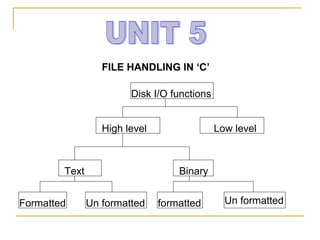
FILE HANDLING IN ‘C’

                        Disk I/O functions


                  High level                 Low level


        Text                       Binary


Formatted      Un formatted    formatted       Un formatted
This works fine as long as the data is small.However, many real
  life problems involve large volumes of data and in such
  situations, the console oriented I/O operations pose two
  major problems.
1. It becomes cumbersome and time consuming to handle large
   volumes of data through terminals.
2. The entire data is lost when either the program is terminated
   or computer is turned off.
o     It is therefore necessary to have a more flexible approach
    where data can be stored on the disks and read whenever
    necessary, without destroying the data.
o The method employs the concept of files to store data. A file
  is place on the disk where a group of related data is stored.
Like most other languages, c supports a number of functions
that have the ability to perform basic file operations, which
include.

                 naming a file
                 opening a file
                 reading data from a file
                 writing data to a file and
                 closing a file.

There are two distinct ways to perform file operations.
    --The first one is known as the low level I/O and uses
UNIX system calls.
    --The second method is referred to as the high level
operation and uses functions in c standard I/O library.
HIGH LEVEL I/O FUNCTIONS

fopen ()  creates a new file for use.
            Opens an existing file for use.
fclose()  closes a file which has been opened for use.
getc()  reads a character from a file .
putc()  writes a character to a file.
fprintf()  writes a set of data values to a file.
fscanf()  reads a set of data value from a file.
getw()  reads an integer from a file.
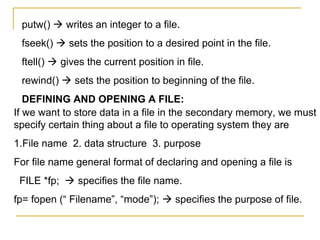
putw()  writes an integer to a file.
 fseek()  sets the position to a desired point in the file.
 ftell()  gives the current position in file.
 rewind()  sets the position to beginning of the file.
   DEFINING AND OPENING A FILE:
If we want to store data in a file in the secondary memory, we must
specify certain thing about a file to operating system they are
1.File name 2. data structure 3. purpose
For file name general format of declaring and opening a file is
 FILE *fp;  specifies the file name.
fp= fopen (“ Filename”, “mode”);  specifies the purpose of file.
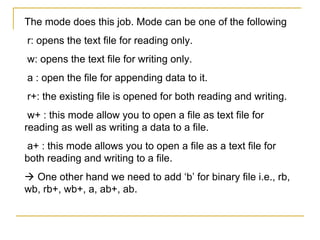
The mode does this job. Mode can be one of the following
r: opens the text file for reading only.
w: opens the text file for writing only.
a : open the file for appending data to it.
r+: the existing file is opened for both reading and writing.
 w+ : this mode allow you to open a file as text file for
reading as well as writing a data to a file.
a+ : this mode allows you to open a file as a text file for
both reading and writing to a file.
 One other hand we need to add ‘b’ for binary file i.e., rb,
wb, rb+, wb+, a, ab+, ab.
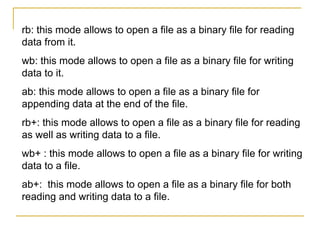
rb: this mode allows to open a file as a binary file for reading
data from it.
wb: this mode allows to open a file as a binary file for writing
data to it.
ab: this mode allows to open a file as a binary file for
appending data at the end of the file.
rb+: this mode allows to open a file as a binary file for reading
as well as writing data to a file.
wb+ : this mode allows to open a file as a binary file for writing
data to a file.
ab+: this mode allows to open a file as a binary file for both
reading and writing data to a file.
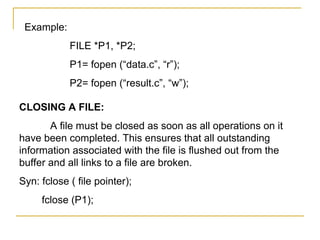
Example:
            FILE *P1, *P2;
            P1= fopen (“data.c”, “r”);
            P2= fopen (“result.c”, “w”);

CLOSING A FILE:
       A file must be closed as soon as all operations on it
have been completed. This ensures that all outstanding
information associated with the file is flushed out from the
buffer and all links to a file are broken.
Syn: fclose ( file pointer);
     fclose (P1);
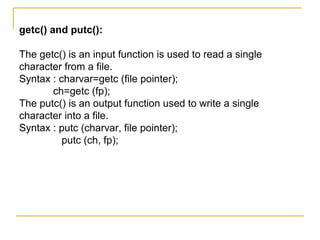
getc() and putc():

The getc() is an input function is used to read a single
character from a file.
Syntax : charvar=getc (file pointer);
       ch=getc (fp);
The putc() is an output function used to write a single
character into a file.
Syntax : putc (charvar, file pointer);
          putc (ch, fp);
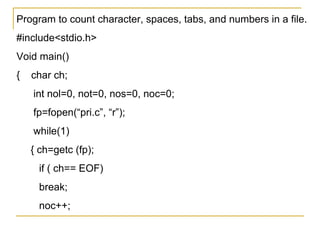
Program to count character, spaces, tabs, and numbers in a file.
#include<stdio.h>
Void main()
{   char ch;
    int nol=0, not=0, nos=0, noc=0;
    fp=fopen(“pri.c”, “r”);
    while(1)
    { ch=getc (fp);
     if ( ch== EOF)
     break;
     noc++;
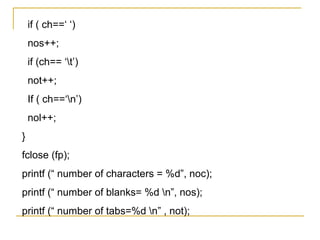
if ( ch==‘ ‘)
    nos++;
    if (ch== ‘t’)
    not++;
    If ( ch==‘n’)
    nol++;
}
fclose (fp);
printf (“ number of characters = %d”, noc);
printf (“ number of blanks= %d n”, nos);
printf (“ number of tabs=%d n” , not);
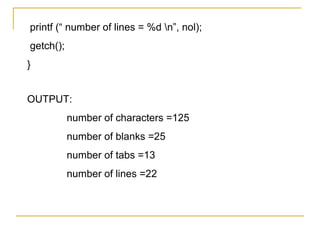
printf (“ number of lines = %d n”, nol);
getch();
}


OUTPUT:
           number of characters =125
           number of blanks =25
           number of tabs =13
           number of lines =22
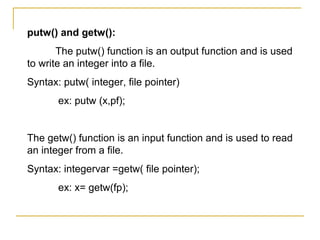
putw() and getw():
       The putw() function is an output function and is used
to write an integer into a file.
Syntax: putw( integer, file pointer)
       ex: putw (x,pf);


The getw() function is an input function and is used to read
an integer from a file.
Syntax: integervar =getw( file pointer);
       ex: x= getw(fp);
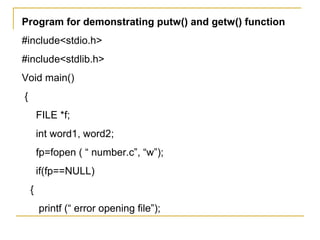
Program for demonstrating putw() and getw() function
#include<stdio.h>
#include<stdlib.h>
Void main()
{
        FILE *f;
        int word1, word2;
        fp=fopen ( “ number.c”, “w”);
        if(fp==NULL)
    {
        printf (“ error opening file”);
exit(1);
}
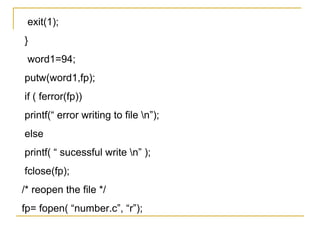
 word1=94;
putw(word1,fp);
if ( ferror(fp))
printf(“ error writing to file n”);
else
printf( “ sucessful write n” );
fclose(fp);
/* reopen the file */
fp= fopen( “number.c”, “r”);
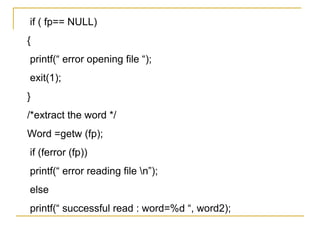
if ( fp== NULL)
{
printf(“ error opening file “);
exit(1);
}
/*extract the word */
Word =getw (fp);
if (ferror (fp))
printf(“ error reading file n”);
else
printf(“ successful read : word=%d “, word2);
/* clean up*/
fclose (fp);
return 0;
}


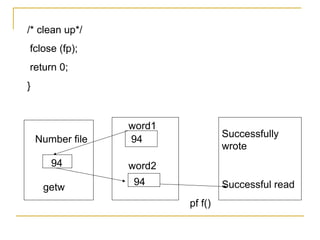
                  word1
                                   Successfully
    Number file   94
                                   wrote
       94         word2
                  94               Successful read
     getw
                          pf f()
fprintf() and fscanf() functions:
   The fprintf() and fscanf() functions group of mixed data
simultaneously.
Syntax: fprintf( fp, “ control string “, list);
     ex: fprintf( %s %d %f “, name, age, 7.5);
Syntax: fscanf(fp, “control string “, list);
     ex: fscanf(“ %s %d”, item, &quantity);
Demonstrating frpintf () and fscanf() functions:
#include<stdio.h>
#include<conio.h>
Void main()
{
    FILE *fp;
    int rno;
    char name[30];
    float marks;
    fp=fopen(“ student.c”, “w”);
    printf( “ enter student record n”);
    scanf(“ %d %s %f “,& rno, name, &marks);
    fprintf( “ fp, “ %d %s %f “, rno, name, marks);
    fclose( fp);
    fp= fopen(“ student.c”, “r”);
printf(“ the student record n”);
fscanf (fp, “%d %s %f”, &rno, name, &marks);
printf(“ %d %s %f”, rno, name, marks);
fclose (fp);
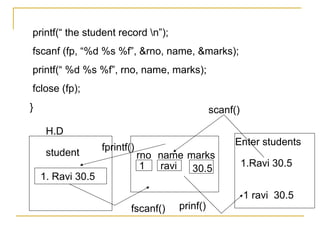
}                                               scanf()

     H.D
                                                     Enter students
                   fprintf()
     student                   rno name marks
                                1  ravi                   1.Ravi 30.5
                                         30.5
    1. Ravi 30.5
                                                          1 ravi 30.5
                           fscanf()   prinf()
RANDOM ACCESS TO FILES:
Sometimes it is required to access only a particular part
of the file and not the complete file.
This can be accomplished by using following function.
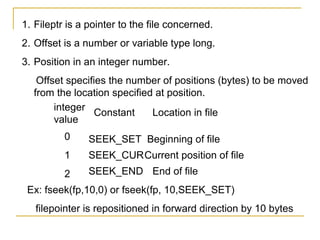
 fseek(): it is a file function. It positions file pointer on the
stream. We can pass three arguments through this
function.
The general format of fseek function is as follows:
              fseek( file pointer, offset, position);
This function is used to move the file position to a desired
location within the file.
1. Fileptr is a pointer to the file concerned.
2. Offset is a number or variable type long.
3. Position in an integer number.
   Offset specifies the number of positions (bytes) to be moved
  from the location specified at position.
       integer
                Constant     Location in file
       value
          0     SEEK_SET Beginning of file
          1     SEEK_CUR Current position of file
          2     SEEK_END End of file
 Ex: fseek(fp,10,0) or fseek(fp, 10,SEEK_SET)
   filepointer is repositioned in forward direction by 10 bytes
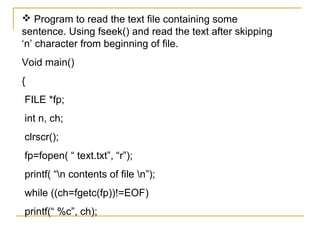
 Program to read the text file containing some
sentence. Using fseek() and read the text after skipping
‘n’ character from beginning of file.
Void main()
{
FILE *fp;
int n, ch;
clrscr();
fp=fopen( “ text.txt”, “r”);
printf( “n contents of file n”);
while ((ch=fgetc(fp))!=EOF)
printf(“ %c”, ch);
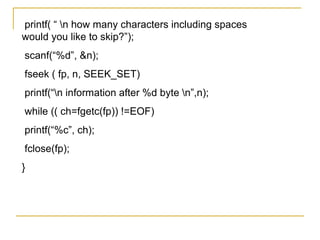
printf( “ n how many characters including spaces
would you like to skip?”);
scanf(“%d”, &n);
fseek ( fp, n, SEEK_SET)
printf(“n information after %d byte n”,n);
while (( ch=fgetc(fp)) !=EOF)
printf(“%c”, ch);
fclose(fp);
}

Unit5

  • 1.
    FILE HANDLING IN‘C’ Disk I/O functions High level Low level Text Binary Formatted Un formatted formatted Un formatted
  • 2.
    This works fineas long as the data is small.However, many real life problems involve large volumes of data and in such situations, the console oriented I/O operations pose two major problems. 1. It becomes cumbersome and time consuming to handle large volumes of data through terminals. 2. The entire data is lost when either the program is terminated or computer is turned off. o It is therefore necessary to have a more flexible approach where data can be stored on the disks and read whenever necessary, without destroying the data. o The method employs the concept of files to store data. A file is place on the disk where a group of related data is stored.
  • 3.
    Like most otherlanguages, c supports a number of functions that have the ability to perform basic file operations, which include.  naming a file  opening a file  reading data from a file  writing data to a file and  closing a file. There are two distinct ways to perform file operations. --The first one is known as the low level I/O and uses UNIX system calls. --The second method is referred to as the high level operation and uses functions in c standard I/O library.
  • 4.
    HIGH LEVEL I/OFUNCTIONS fopen ()  creates a new file for use. Opens an existing file for use. fclose()  closes a file which has been opened for use. getc()  reads a character from a file . putc()  writes a character to a file. fprintf()  writes a set of data values to a file. fscanf()  reads a set of data value from a file. getw()  reads an integer from a file.
  • 5.
    putw()  writesan integer to a file. fseek()  sets the position to a desired point in the file. ftell()  gives the current position in file. rewind()  sets the position to beginning of the file. DEFINING AND OPENING A FILE: If we want to store data in a file in the secondary memory, we must specify certain thing about a file to operating system they are 1.File name 2. data structure 3. purpose For file name general format of declaring and opening a file is FILE *fp;  specifies the file name. fp= fopen (“ Filename”, “mode”);  specifies the purpose of file.
  • 6.
    The mode doesthis job. Mode can be one of the following r: opens the text file for reading only. w: opens the text file for writing only. a : open the file for appending data to it. r+: the existing file is opened for both reading and writing. w+ : this mode allow you to open a file as text file for reading as well as writing a data to a file. a+ : this mode allows you to open a file as a text file for both reading and writing to a file.  One other hand we need to add ‘b’ for binary file i.e., rb, wb, rb+, wb+, a, ab+, ab.
  • 7.
    rb: this modeallows to open a file as a binary file for reading data from it. wb: this mode allows to open a file as a binary file for writing data to it. ab: this mode allows to open a file as a binary file for appending data at the end of the file. rb+: this mode allows to open a file as a binary file for reading as well as writing data to a file. wb+ : this mode allows to open a file as a binary file for writing data to a file. ab+: this mode allows to open a file as a binary file for both reading and writing data to a file.
  • 8.
    Example: FILE *P1, *P2; P1= fopen (“data.c”, “r”); P2= fopen (“result.c”, “w”); CLOSING A FILE: A file must be closed as soon as all operations on it have been completed. This ensures that all outstanding information associated with the file is flushed out from the buffer and all links to a file are broken. Syn: fclose ( file pointer); fclose (P1);
  • 9.
    getc() and putc(): Thegetc() is an input function is used to read a single character from a file. Syntax : charvar=getc (file pointer); ch=getc (fp); The putc() is an output function used to write a single character into a file. Syntax : putc (charvar, file pointer); putc (ch, fp);
  • 10.
    Program to countcharacter, spaces, tabs, and numbers in a file. #include<stdio.h> Void main() { char ch; int nol=0, not=0, nos=0, noc=0; fp=fopen(“pri.c”, “r”); while(1) { ch=getc (fp); if ( ch== EOF) break; noc++;
  • 11.
    if ( ch==‘‘) nos++; if (ch== ‘t’) not++; If ( ch==‘n’) nol++; } fclose (fp); printf (“ number of characters = %d”, noc); printf (“ number of blanks= %d n”, nos); printf (“ number of tabs=%d n” , not);
  • 12.
    printf (“ numberof lines = %d n”, nol); getch(); } OUTPUT: number of characters =125 number of blanks =25 number of tabs =13 number of lines =22
  • 13.
    putw() and getw(): The putw() function is an output function and is used to write an integer into a file. Syntax: putw( integer, file pointer) ex: putw (x,pf); The getw() function is an input function and is used to read an integer from a file. Syntax: integervar =getw( file pointer); ex: x= getw(fp);
  • 14.
    Program for demonstratingputw() and getw() function #include<stdio.h> #include<stdlib.h> Void main() { FILE *f; int word1, word2; fp=fopen ( “ number.c”, “w”); if(fp==NULL) { printf (“ error opening file”);
  • 15.
    exit(1); } word1=94; putw(word1,fp); if (ferror(fp)) printf(“ error writing to file n”); else printf( “ sucessful write n” ); fclose(fp); /* reopen the file */ fp= fopen( “number.c”, “r”);
  • 16.
    if ( fp==NULL) { printf(“ error opening file “); exit(1); } /*extract the word */ Word =getw (fp); if (ferror (fp)) printf(“ error reading file n”); else printf(“ successful read : word=%d “, word2);
  • 17.
    /* clean up*/ fclose(fp); return 0; } word1 Successfully Number file 94 wrote 94 word2 94 Successful read getw pf f()
  • 18.
    fprintf() and fscanf()functions: The fprintf() and fscanf() functions group of mixed data simultaneously. Syntax: fprintf( fp, “ control string “, list); ex: fprintf( %s %d %f “, name, age, 7.5); Syntax: fscanf(fp, “control string “, list); ex: fscanf(“ %s %d”, item, &quantity); Demonstrating frpintf () and fscanf() functions: #include<stdio.h> #include<conio.h> Void main()
  • 19.
    { FILE *fp; int rno; char name[30]; float marks; fp=fopen(“ student.c”, “w”); printf( “ enter student record n”); scanf(“ %d %s %f “,& rno, name, &marks); fprintf( “ fp, “ %d %s %f “, rno, name, marks); fclose( fp); fp= fopen(“ student.c”, “r”);
  • 20.
    printf(“ the studentrecord n”); fscanf (fp, “%d %s %f”, &rno, name, &marks); printf(“ %d %s %f”, rno, name, marks); fclose (fp); } scanf() H.D Enter students fprintf() student rno name marks 1 ravi 1.Ravi 30.5 30.5 1. Ravi 30.5 1 ravi 30.5 fscanf() prinf()
  • 21.
    RANDOM ACCESS TOFILES: Sometimes it is required to access only a particular part of the file and not the complete file. This can be accomplished by using following function. fseek(): it is a file function. It positions file pointer on the stream. We can pass three arguments through this function. The general format of fseek function is as follows: fseek( file pointer, offset, position); This function is used to move the file position to a desired location within the file.
  • 22.
    1. Fileptr isa pointer to the file concerned. 2. Offset is a number or variable type long. 3. Position in an integer number. Offset specifies the number of positions (bytes) to be moved from the location specified at position. integer Constant Location in file value 0 SEEK_SET Beginning of file 1 SEEK_CUR Current position of file 2 SEEK_END End of file Ex: fseek(fp,10,0) or fseek(fp, 10,SEEK_SET) filepointer is repositioned in forward direction by 10 bytes
  • 23.
     Program toread the text file containing some sentence. Using fseek() and read the text after skipping ‘n’ character from beginning of file. Void main() { FILE *fp; int n, ch; clrscr(); fp=fopen( “ text.txt”, “r”); printf( “n contents of file n”); while ((ch=fgetc(fp))!=EOF) printf(“ %c”, ch);
  • 24.
    printf( “ nhow many characters including spaces would you like to skip?”); scanf(“%d”, &n); fseek ( fp, n, SEEK_SET) printf(“n information after %d byte n”,n); while (( ch=fgetc(fp)) !=EOF) printf(“%c”, ch); fclose(fp); }