Brian Kelly UKOLN University of Bath Bath, UK Blogging Practices To  Support Project Work UKOLN is supported by: Acceptable Use Policy Recording this talk, taking photos, discussing the content using Twitter, blogs, etc. is permitted providing distractions to others is minimised. http://www.ukoln.ac.uk/web-focus/events/workshops/blogging-practices-jiscmrd-2011/ Twitter: http://twitter.com/briankelly/ Email: [email_address] Blogs: http://ukwebfocus.wordpress.com/ Twitter: #jiscmrd This work is licensed under a Creative Commons attribution 2.0 licence (but note caveat)
You are free to: copy, share, adapt or re-mix; photograph, film or broadcast; blog, live-blog or post video of this presentation provided that: You attribute the work to its author and respect the rights and licences associated with its components. Idea from Cameron Neylon Slide Concept by Cameron Neylon, who has waived all copyright and related or neighbouring rights. This slide only  CCZero . Social Media Icons adapted with permission from originals by Christopher Ross. Original images are available under GPL at: http://www.thisismyurl.com/free-downloads/15-free-speech-bubble-icons-for-popular-websites
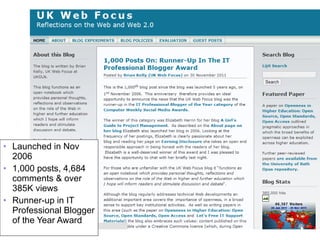
About the UK Web Focus Blog Launched in Nov 2006 1,000 posts, 4,684 comments & over 385K views Runner-up in IT Professional Blogger of the Year Award Introduction
About You How many are: Regular bloggers Occasional bloggers Non-bloggers Your interests: What would you like to see addressed in this session? Introduction Your opportunity to shape the agenda
About This Session Why have a blog? What’s the purpose of your blog? Who contributes? What can go wrong? How can you measure the blog’s success ? What technical issues should I care about? Howe do I ensure the content is usable? How to maximise impact of the blog What additional functionality can we exploit? Managing the blog when the project is over Introduction
Why Have a Blog? Group Exercise: List ~10 reasons why your project should have a blog Report back: Each group to share three reasons for having a blog Please do not repeat reasons already provided! Why Blog?
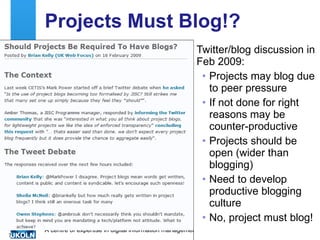
Projects Must Blog!? Twitter/blog discussion in Feb 2009: Projects may blog due to peer pressure If not done for right reasons may be counter-productive Projects should be open (wider than blogging) Need to develop productive blogging culture No, project must blog!
Why Have a Blog? Possible Reasons We have to – it’s in the contact! To disseminate To speculate To challenge To encourage discussion To use as a CMS for content To ensure content can be viewed easily on mobile devices To produce RSS to facilitate reuse To act as a CV To provide a sandbox for experimentation … . Why Blog?
Why Have a Blog? Tip No. 1: Ensure you (and your project team) know the reasons why you are providing a blog. Note This should be done for members of the project team and the funders Why Blog?
What’s the Purpose of Your Blog? The need to publish the blog’s purpose: To help user’s understand what your blog is about To ensure blog authors (possibly distributed) have a shared understanding So your funders understand the purpose So future evaluators /markers understand the purpose  To help in the management of your blog To measure the blog’s effectiveness in achieving its intended purpose What is Your Blog For?
What’s the Purpose of Your Blog? Summary: Brief summary of top left corner of UK Web Focus blog (visible from every page) Detailed description: Detailed summary on page linked to from navigation bar Covers: Purpose Audience Policies … What is Your Blog For?
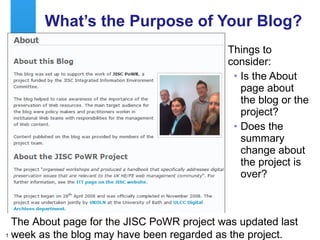
What’s the Purpose of Your Blog? Things to consider: Is the About page about the blog or the project? Does the summary change about the project is over? The About page for the JISC PoWR project was updated last week as the blog may have been regarded as the project.
What’s the Purpose of Your Blog? Tip No. 2: Publish an About page for your blog which is: Easily found Clarifies whether the information is about the blog or the project Makes sense after the project is over  Note This should be done for readers of your blog What is Your Blog For?
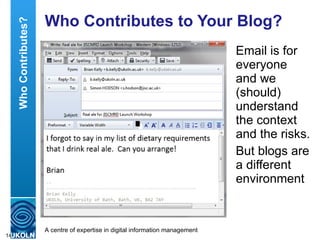
Who Contributes to Your Blog? Email is for everyone and we (should) understand the context and the risks. But blogs are a different environment Who Contributes?
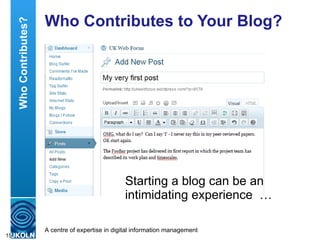
Who Contributes to Your Blog? Starting a blog can be an intimidating experience  … Who Contributes?
Who Contributes to Your Blog? …  but so can writing a peer-reviewed paper Who Contributes?
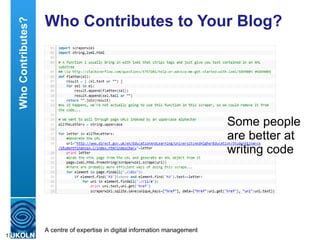
Who Contributes to Your Blog? Some people are better at writing code Who Contributes?
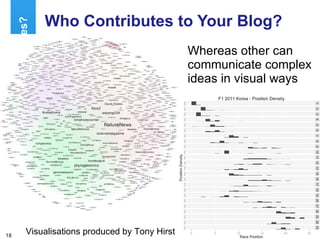
Who Contributes to Your Blog? Whereas other can communicate complex ideas in visual ways Who Contributes? Visualisations produced by Tony Hirst
Who Contributes to Your Blog? Which channels do you prefer?  (choose 1) [ Research papers ] – [synthesis reports] –  [ blogs ] – [briefing papers] – [marketing materials] – [ code ] – [visualisations] Which communication channels are you happy to use?  (choose all that apply) Which communication channels do you try to avoid?  (choose all that apply)
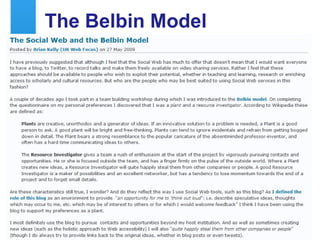
The Belbin Model Blogging and the Belbin Model
Who Contributes to Your Blog? Group Exercise: Provide one (or two) statements describing who will publish posts on your project blog What are the strengthens & weaknesses  of your blog contributor policy? Who Contributes?
Who Contributes to Your Blog? Tip No. 3: Since not everyone should blog but every project must have a blog …  Identify the good, keen bloggers Provide opportunities for reluctant bloggers Consider inviting guest bloggers to add variety  Provide blog profiles to be able to differentiate different ‘voices’ Who Contributes?
Group Exercise: What can go wrong with your blog? Feel free to include: Technical issues Content issues People issues Resourcing issues … When Things Go Wrong When Things Go Wrong
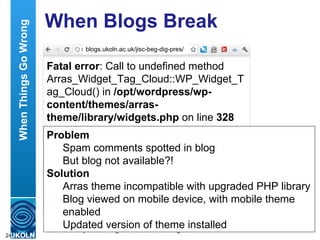
When Blogs Break Fatal error : Call to undefined method Arras_Widget_Tag_Cloud::WP_Widget_Tag_Cloud() in  /opt/wordpress/wp-content/themes/arras-theme/library/widgets.php  on line  328 blogs.ukoln.ac.uk/jisc-beg-dig-pres/ Problem Spam comments spotted in blog But blog not available?! Solution Arras theme incompatible with upgraded PHP library Blog viewed on mobile device, with mobile theme enabled Updated version of theme installed When Things Go Wrong
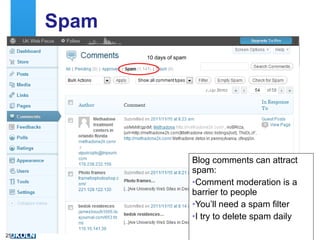
Spam Blog comments can attract spam: Comment moderation is a barrier to people You’ll need a spam filter I try to delete spam daily 10 days of spam
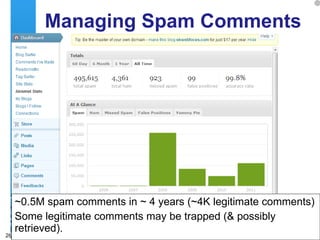
Managing Spam Comments ~0.5M spam comments in ~ 4 years (~4K legitimate comments) Some legitimate comments may be trapped (& possibly retrieved).
When Things Go Wrong Tip No. 4: Things can go wrong, but planning can minimise problems  Spam filters Spam management policies  Managing switch-off of your blog after project ends When Things Go Wrong
Group Exercise: How should we measure the success of a blog? (Why do we need to measure the success of a blog?) Measuring Success  Measuring Success
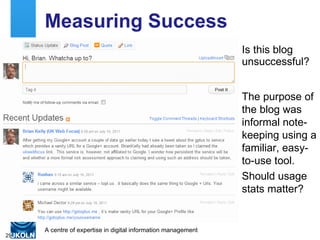
Measuring Success Is this blog unsuccessful? The purpose of the blog was informal note-keeping using a familiar, easy-to-use tool. Should usage stats matter?
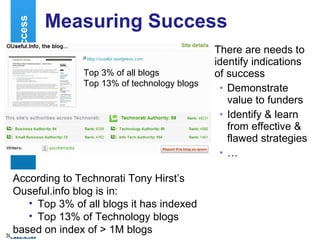
There are needs to identify indications of success  Demonstrate value to funders Identify & learn from effective & flawed strategies … Measuring Success  Measuring Success According to Technorati Tony Hirst’s Ouseful.info blog is in: Top 3% of all blogs it has indexed  Top 13% of Technology blogs based on index of > 1M blogs Top 3% of all blogs Top 13% of technology blogs
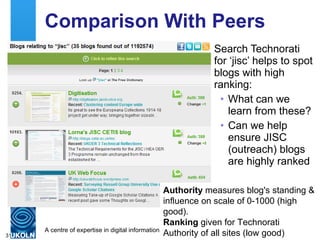
Comparison With Peers Search Technorati for ‘jisc’ helps to spot blogs with high ranking: What can we learn from these? Can we help ensure JISC (outreach) blogs are highly ranked Authority  measures blog's standing & influence on scale of 0-1000 (high good). Ranking  given for Technorati Authority of all sites (low good)
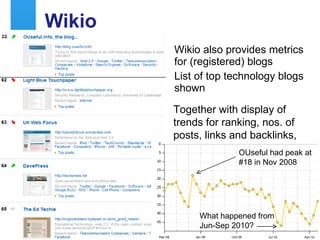
Wikio Wikio also provides metrics for (registered) blogs List of top technology blogs shown Together with display of trends for ranking, nos. of posts, links and backlinks,  OUseful had peak at #18 in Nov 2008 What happened from Jun-Sep 2010?
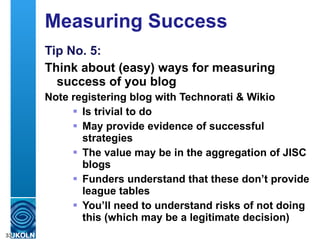
Measuring Success Tip No. 5: Think about (easy) ways for measuring success of you blog Note registering blog with Technorati & Wikio  Is trivial to do May provide evidence of successful strategies The value may be in the aggregation of JISC blogs Funders understand that these don’t provide league tables You’ll need to understand risks of not doing this (which may be a legitimate decision)
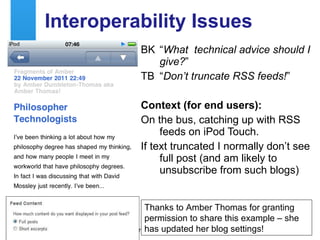
Interoperability Issues BK “ What  technical advice should I give? ” TB “ Don’t truncate RSS feeds! ” Context (for end users): On the bus, catching up with RSS feeds on iPod Touch. If text truncated I normally don’t see full post (and am likely to unsubscribe from such blogs) Thanks to Amber Thomas for granting permission to share this example – she has updated her blog settings!
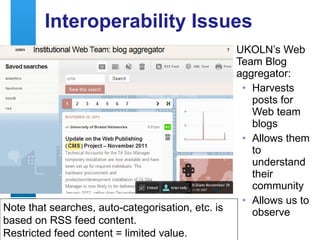
Interoperability Issues UKOLN’s Web Team Blog aggregator: Harvests posts for Web team blogs Allows them to understand their community Allows us to observe Note that searches, auto-categorisation, etc. is based on RSS feed content.  Restricted feed content = limited value.
Interoperability Issues Tip No. 6: Provide a full RSS feed for your blog It’s trivial to do If you don’t: Humans may not see full post, especially if they use offline devices Software will not be able to harvest full post Technical Issues
Which Platform? Which blogging platform should you use? Wordpress.com : My choice. Limited range of plugins. Wordpress.org : Install locally; can install wide range of plugins. Blogger.com :  What else do people use? Platform Issues
Platform Issues Tip No. 7: Several safe options available Wordpress.com or Blogger.com if no  in-house options available WordPress.org if  Wish to use wider range of plugins Technical expertise available Wish to consider use of WP as a technology platform (see later) May be advantages in using same platform as your peers Platform Issues
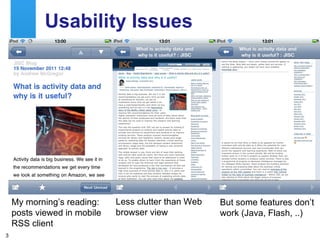
Usability Issues Who normally reads blog posts: On a mobile device On desktop PC My morning’s reading: posts viewed in mobile RSS client Less clutter than Web browser view But some features don’t work (Java, Flash, ..)
Interoperability can be achieved by writing style and links, with no technology needed  
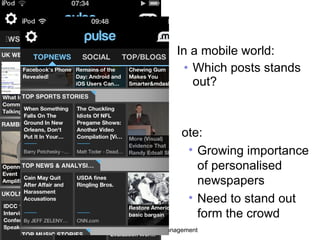
In a mobile world: Which posts stands out? Note: Growing importance of personalised newspapers Need to stand out form the crowd
Usability Tip No. 9: You can’t ignore mobile devices Even if you don’t read blogs on a mobile device, your readers might Mobile usage will grow There are some simple techniques you can use to enhance experiences on mobile device Usability
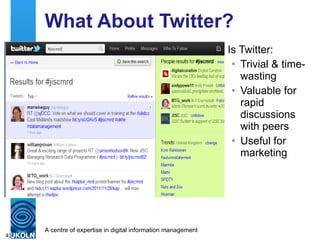
What About Twitter? Is Twitter: Trivial & time-wasting Valuable for rapid discussions with peers Useful for marketing
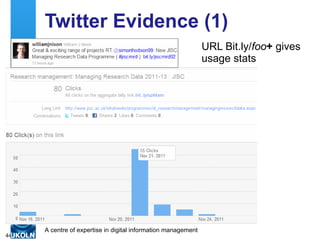
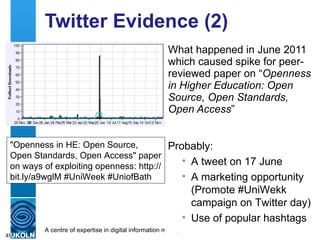
Twitter Evidence (1) URL Bit.ly/ foo +  gives usage stats
Twitter Evidence (2) What happened in June 2011 which caused spike for peer-reviewed paper on “ Openness in Higher Education: Open Source, Open Standards, Open Access ” Probably: A tweet on 17 June  A marketing opportunity (Promote #UniWekk campaign on Twitter day) Use of popular hashtags "Openness in HE: Open Source, Open Standards, Open Access" paper on ways of exploiting openness: http://bit.ly/a9wglM #UniWeek #UniofBath
What About Twitter? Tip No. 10: You can’t ignore Twitter Build up your community (100-500 followers to ensure critical mass) Engage in relevant discussions Tweet about things you care about Tweet links you feel are useful Twitter
Commenting & Linking Many blogs publish automated links to their posts This illustrates benefits of citing posts
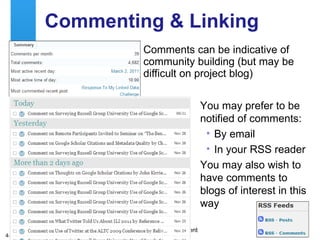
Commenting & Linking Comments can be indicative of community building (but may be difficult on project blog) You may prefer to be notified of comments: By email In your RSS reader You may also wish to have comments to blogs of interest in this way
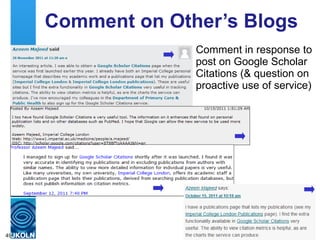
Comment on Other’s Blogs Comment in response to post on Google Scholar Citations (& question on proactive use of service)
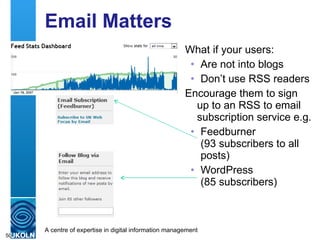
Email Matters What if your users: Are not into blogs Don’t use RSS readers Encourage them to sign up to an RSS to email subscription service e.g. Feedburner (93 subscribers to all posts) WordPress  (85 subscribers)
Comments, Links and Email Tip No. 11: Comments, links and email matter You can encourage comments by your writing style (e.g. open questions Providing links to relevant resources helps users in following ideas Providing links to blog posts can generate traffic back to you blog Posts can be delivered by email (but you’ll have to make it obvious how to do this)
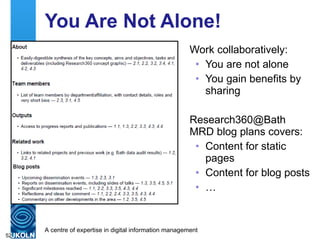
You Are Not Alone! Work collaboratively: You are not alone You gain benefits by sharing Research360@Bath MRD blog plans covers: Content for static pages Content for blog posts …
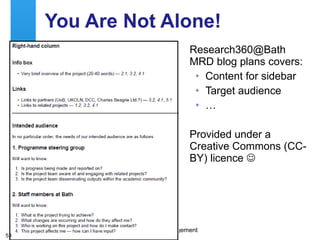
You Are Not Alone! Research360@Bath MRD blog plans covers: Content for sidebar Target audience … Provided under a Creative Commons (CC-BY) licence  
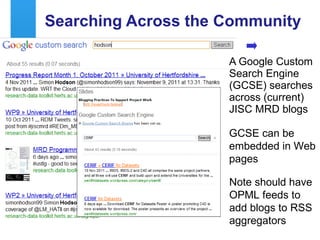
Searching Across the Community A Google Custom Search Engine (GCSE) searches across (current) JISC MRD blogs GCSE can be embedded in Web pages Note should have OPML feeds to add blogs to RSS aggregators
Browsing Across the Community JISC RDM blogs added to Google Reader Google Reader allows: Browsing (shown) Export of OPML file for import to other RSS tools Compare this with the silos of conventional Web sites! Produced by Jez Cope,  [email_address]
You Are Part of a Community Tip No. 12: Don’t reinvent the wheel! Learn from what others are doing Share what you’re doing Why not write a post about how you’ve implemented your blog? Other may find this useful, and they may be motivated to give you suggestions on enhancements
Advanced Blogging Blogs can provide: Easy-to-use content management system Tool for creating mobile-friendly content Mechanism for getting feedback But in addition: Can manage semantic content Content can be created by automated processes …
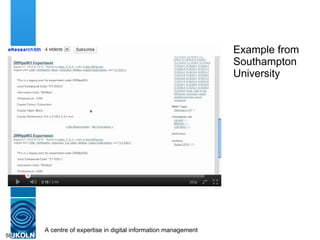
Example from Southampton University
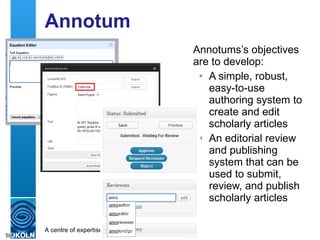
Annotum Annotums’s objectives are to develop: A simple, robust, easy-to-use authoring system to create and edit scholarly articles An editorial review and publishing system that can be used to submit, review, and publish scholarly articles
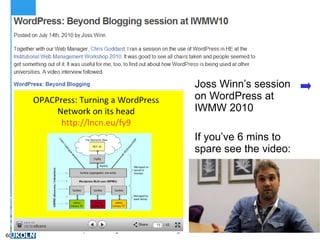
Joss Winn’s session on WordPress at IWMW 2010 If you’ve 6 mins to spare see the video:
Blog Engine as a Platform Tip No. 13: A blog engine can be a powerful technology platform
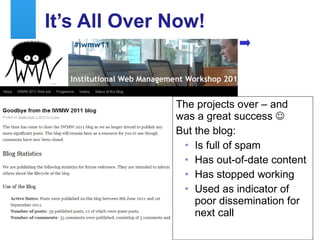
It’s All Over Now! The projects over – and was a great success   But the blog: Is full of spam Has out-of-date content Has stopped working Used as indicator of poor dissemination for next call
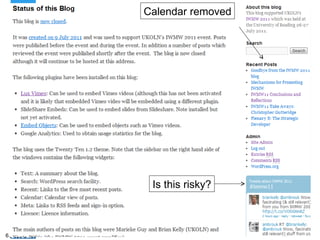
IWMW 2011 blog Calendar removed Is this risky?
A Blog Isn’t Just For Xmas!  Tip No. 14: Your project blog will still be relevant after the project is complete: It can undermine future work if closure isn’t managed It can demonstrate the value of previous work See &quot; Approaches To Archiving Professional Blogs Hosted In The Cloud “, iPres 2010, Kelly, B & Guy, M. <http://opus.bath.ac.uk/20327/>
Conclusions You should  Document blog’s purpose Provide an About page Develop plans for content providers Have a spam management policy Consider ways of gathering metrics Provide a full RSS feed Ensure posts are usable on mobile devices Encourage comments – and comment  Work collaboratively Understand additional opportunities for blog platform Manage the closure of your blog
Questions

Blogging practices to support project work

  • 1.
    Brian Kelly UKOLNUniversity of Bath Bath, UK Blogging Practices To Support Project Work UKOLN is supported by: Acceptable Use Policy Recording this talk, taking photos, discussing the content using Twitter, blogs, etc. is permitted providing distractions to others is minimised. http://www.ukoln.ac.uk/web-focus/events/workshops/blogging-practices-jiscmrd-2011/ Twitter: http://twitter.com/briankelly/ Email: [email_address] Blogs: http://ukwebfocus.wordpress.com/ Twitter: #jiscmrd This work is licensed under a Creative Commons attribution 2.0 licence (but note caveat)
  • 2.
    You are freeto: copy, share, adapt or re-mix; photograph, film or broadcast; blog, live-blog or post video of this presentation provided that: You attribute the work to its author and respect the rights and licences associated with its components. Idea from Cameron Neylon Slide Concept by Cameron Neylon, who has waived all copyright and related or neighbouring rights. This slide only CCZero . Social Media Icons adapted with permission from originals by Christopher Ross. Original images are available under GPL at: http://www.thisismyurl.com/free-downloads/15-free-speech-bubble-icons-for-popular-websites
  • 3.
    About the UKWeb Focus Blog Launched in Nov 2006 1,000 posts, 4,684 comments & over 385K views Runner-up in IT Professional Blogger of the Year Award Introduction
  • 4.
    About You Howmany are: Regular bloggers Occasional bloggers Non-bloggers Your interests: What would you like to see addressed in this session? Introduction Your opportunity to shape the agenda
  • 5.
    About This SessionWhy have a blog? What’s the purpose of your blog? Who contributes? What can go wrong? How can you measure the blog’s success ? What technical issues should I care about? Howe do I ensure the content is usable? How to maximise impact of the blog What additional functionality can we exploit? Managing the blog when the project is over Introduction
  • 6.
    Why Have aBlog? Group Exercise: List ~10 reasons why your project should have a blog Report back: Each group to share three reasons for having a blog Please do not repeat reasons already provided! Why Blog?
  • 7.
    Projects Must Blog!?Twitter/blog discussion in Feb 2009: Projects may blog due to peer pressure If not done for right reasons may be counter-productive Projects should be open (wider than blogging) Need to develop productive blogging culture No, project must blog!
  • 8.
    Why Have aBlog? Possible Reasons We have to – it’s in the contact! To disseminate To speculate To challenge To encourage discussion To use as a CMS for content To ensure content can be viewed easily on mobile devices To produce RSS to facilitate reuse To act as a CV To provide a sandbox for experimentation … . Why Blog?
  • 9.
    Why Have aBlog? Tip No. 1: Ensure you (and your project team) know the reasons why you are providing a blog. Note This should be done for members of the project team and the funders Why Blog?
  • 10.
    What’s the Purposeof Your Blog? The need to publish the blog’s purpose: To help user’s understand what your blog is about To ensure blog authors (possibly distributed) have a shared understanding So your funders understand the purpose So future evaluators /markers understand the purpose To help in the management of your blog To measure the blog’s effectiveness in achieving its intended purpose What is Your Blog For?
  • 11.
    What’s the Purposeof Your Blog? Summary: Brief summary of top left corner of UK Web Focus blog (visible from every page) Detailed description: Detailed summary on page linked to from navigation bar Covers: Purpose Audience Policies … What is Your Blog For?
  • 12.
    What’s the Purposeof Your Blog? Things to consider: Is the About page about the blog or the project? Does the summary change about the project is over? The About page for the JISC PoWR project was updated last week as the blog may have been regarded as the project.
  • 13.
    What’s the Purposeof Your Blog? Tip No. 2: Publish an About page for your blog which is: Easily found Clarifies whether the information is about the blog or the project Makes sense after the project is over Note This should be done for readers of your blog What is Your Blog For?
  • 14.
    Who Contributes toYour Blog? Email is for everyone and we (should) understand the context and the risks. But blogs are a different environment Who Contributes?
  • 15.
    Who Contributes toYour Blog? Starting a blog can be an intimidating experience … Who Contributes?
  • 16.
    Who Contributes toYour Blog? … but so can writing a peer-reviewed paper Who Contributes?
  • 17.
    Who Contributes toYour Blog? Some people are better at writing code Who Contributes?
  • 18.
    Who Contributes toYour Blog? Whereas other can communicate complex ideas in visual ways Who Contributes? Visualisations produced by Tony Hirst
  • 19.
    Who Contributes toYour Blog? Which channels do you prefer? (choose 1) [ Research papers ] – [synthesis reports] – [ blogs ] – [briefing papers] – [marketing materials] – [ code ] – [visualisations] Which communication channels are you happy to use? (choose all that apply) Which communication channels do you try to avoid? (choose all that apply)
  • 20.
    The Belbin ModelBlogging and the Belbin Model
  • 21.
    Who Contributes toYour Blog? Group Exercise: Provide one (or two) statements describing who will publish posts on your project blog What are the strengthens & weaknesses of your blog contributor policy? Who Contributes?
  • 22.
    Who Contributes toYour Blog? Tip No. 3: Since not everyone should blog but every project must have a blog … Identify the good, keen bloggers Provide opportunities for reluctant bloggers Consider inviting guest bloggers to add variety Provide blog profiles to be able to differentiate different ‘voices’ Who Contributes?
  • 23.
    Group Exercise: Whatcan go wrong with your blog? Feel free to include: Technical issues Content issues People issues Resourcing issues … When Things Go Wrong When Things Go Wrong
  • 24.
    When Blogs BreakFatal error : Call to undefined method Arras_Widget_Tag_Cloud::WP_Widget_Tag_Cloud() in  /opt/wordpress/wp-content/themes/arras-theme/library/widgets.php  on line  328 blogs.ukoln.ac.uk/jisc-beg-dig-pres/ Problem Spam comments spotted in blog But blog not available?! Solution Arras theme incompatible with upgraded PHP library Blog viewed on mobile device, with mobile theme enabled Updated version of theme installed When Things Go Wrong
  • 25.
    Spam Blog commentscan attract spam: Comment moderation is a barrier to people You’ll need a spam filter I try to delete spam daily 10 days of spam
  • 26.
    Managing Spam Comments~0.5M spam comments in ~ 4 years (~4K legitimate comments) Some legitimate comments may be trapped (& possibly retrieved).
  • 27.
    When Things GoWrong Tip No. 4: Things can go wrong, but planning can minimise problems Spam filters Spam management policies Managing switch-off of your blog after project ends When Things Go Wrong
  • 28.
    Group Exercise: Howshould we measure the success of a blog? (Why do we need to measure the success of a blog?) Measuring Success Measuring Success
  • 29.
    Measuring Success Isthis blog unsuccessful? The purpose of the blog was informal note-keeping using a familiar, easy-to-use tool. Should usage stats matter?
  • 30.
    There are needsto identify indications of success Demonstrate value to funders Identify & learn from effective & flawed strategies … Measuring Success Measuring Success According to Technorati Tony Hirst’s Ouseful.info blog is in: Top 3% of all blogs it has indexed Top 13% of Technology blogs based on index of > 1M blogs Top 3% of all blogs Top 13% of technology blogs
  • 31.
    Comparison With PeersSearch Technorati for ‘jisc’ helps to spot blogs with high ranking: What can we learn from these? Can we help ensure JISC (outreach) blogs are highly ranked Authority measures blog's standing & influence on scale of 0-1000 (high good). Ranking given for Technorati Authority of all sites (low good)
  • 32.
    Wikio Wikio alsoprovides metrics for (registered) blogs List of top technology blogs shown Together with display of trends for ranking, nos. of posts, links and backlinks, OUseful had peak at #18 in Nov 2008 What happened from Jun-Sep 2010?
  • 33.
    Measuring Success TipNo. 5: Think about (easy) ways for measuring success of you blog Note registering blog with Technorati & Wikio Is trivial to do May provide evidence of successful strategies The value may be in the aggregation of JISC blogs Funders understand that these don’t provide league tables You’ll need to understand risks of not doing this (which may be a legitimate decision)
  • 34.
    Interoperability Issues BK“ What technical advice should I give? ” TB “ Don’t truncate RSS feeds! ” Context (for end users): On the bus, catching up with RSS feeds on iPod Touch. If text truncated I normally don’t see full post (and am likely to unsubscribe from such blogs) Thanks to Amber Thomas for granting permission to share this example – she has updated her blog settings!
  • 35.
    Interoperability Issues UKOLN’sWeb Team Blog aggregator: Harvests posts for Web team blogs Allows them to understand their community Allows us to observe Note that searches, auto-categorisation, etc. is based on RSS feed content. Restricted feed content = limited value.
  • 36.
    Interoperability Issues TipNo. 6: Provide a full RSS feed for your blog It’s trivial to do If you don’t: Humans may not see full post, especially if they use offline devices Software will not be able to harvest full post Technical Issues
  • 37.
    Which Platform? Whichblogging platform should you use? Wordpress.com : My choice. Limited range of plugins. Wordpress.org : Install locally; can install wide range of plugins. Blogger.com : What else do people use? Platform Issues
  • 38.
    Platform Issues TipNo. 7: Several safe options available Wordpress.com or Blogger.com if no in-house options available WordPress.org if Wish to use wider range of plugins Technical expertise available Wish to consider use of WP as a technology platform (see later) May be advantages in using same platform as your peers Platform Issues
  • 39.
    Usability Issues Whonormally reads blog posts: On a mobile device On desktop PC My morning’s reading: posts viewed in mobile RSS client Less clutter than Web browser view But some features don’t work (Java, Flash, ..)
  • 40.
    Interoperability can beachieved by writing style and links, with no technology needed 
  • 41.
    In a mobileworld: Which posts stands out? Note: Growing importance of personalised newspapers Need to stand out form the crowd
  • 42.
    Usability Tip No.9: You can’t ignore mobile devices Even if you don’t read blogs on a mobile device, your readers might Mobile usage will grow There are some simple techniques you can use to enhance experiences on mobile device Usability
  • 43.
    What About Twitter?Is Twitter: Trivial & time-wasting Valuable for rapid discussions with peers Useful for marketing
  • 44.
    Twitter Evidence (1)URL Bit.ly/ foo + gives usage stats
  • 45.
    Twitter Evidence (2)What happened in June 2011 which caused spike for peer-reviewed paper on “ Openness in Higher Education: Open Source, Open Standards, Open Access ” Probably: A tweet on 17 June A marketing opportunity (Promote #UniWekk campaign on Twitter day) Use of popular hashtags &quot;Openness in HE: Open Source, Open Standards, Open Access&quot; paper on ways of exploiting openness: http://bit.ly/a9wglM #UniWeek #UniofBath
  • 46.
    What About Twitter?Tip No. 10: You can’t ignore Twitter Build up your community (100-500 followers to ensure critical mass) Engage in relevant discussions Tweet about things you care about Tweet links you feel are useful Twitter
  • 47.
    Commenting & LinkingMany blogs publish automated links to their posts This illustrates benefits of citing posts
  • 48.
    Commenting & LinkingComments can be indicative of community building (but may be difficult on project blog) You may prefer to be notified of comments: By email In your RSS reader You may also wish to have comments to blogs of interest in this way
  • 49.
    Comment on Other’sBlogs Comment in response to post on Google Scholar Citations (& question on proactive use of service)
  • 50.
    Email Matters Whatif your users: Are not into blogs Don’t use RSS readers Encourage them to sign up to an RSS to email subscription service e.g. Feedburner (93 subscribers to all posts) WordPress (85 subscribers)
  • 51.
    Comments, Links andEmail Tip No. 11: Comments, links and email matter You can encourage comments by your writing style (e.g. open questions Providing links to relevant resources helps users in following ideas Providing links to blog posts can generate traffic back to you blog Posts can be delivered by email (but you’ll have to make it obvious how to do this)
  • 52.
    You Are NotAlone! Work collaboratively: You are not alone You gain benefits by sharing Research360@Bath MRD blog plans covers: Content for static pages Content for blog posts …
  • 53.
    You Are NotAlone! Research360@Bath MRD blog plans covers: Content for sidebar Target audience … Provided under a Creative Commons (CC-BY) licence 
  • 54.
    Searching Across theCommunity A Google Custom Search Engine (GCSE) searches across (current) JISC MRD blogs GCSE can be embedded in Web pages Note should have OPML feeds to add blogs to RSS aggregators
  • 55.
    Browsing Across theCommunity JISC RDM blogs added to Google Reader Google Reader allows: Browsing (shown) Export of OPML file for import to other RSS tools Compare this with the silos of conventional Web sites! Produced by Jez Cope, [email_address]
  • 56.
    You Are Partof a Community Tip No. 12: Don’t reinvent the wheel! Learn from what others are doing Share what you’re doing Why not write a post about how you’ve implemented your blog? Other may find this useful, and they may be motivated to give you suggestions on enhancements
  • 57.
    Advanced Blogging Blogscan provide: Easy-to-use content management system Tool for creating mobile-friendly content Mechanism for getting feedback But in addition: Can manage semantic content Content can be created by automated processes …
  • 58.
  • 59.
    Annotum Annotums’s objectivesare to develop: A simple, robust, easy-to-use authoring system to create and edit scholarly articles An editorial review and publishing system that can be used to submit, review, and publish scholarly articles
  • 60.
    Joss Winn’s sessionon WordPress at IWMW 2010 If you’ve 6 mins to spare see the video:
  • 61.
    Blog Engine asa Platform Tip No. 13: A blog engine can be a powerful technology platform
  • 62.
    It’s All OverNow! The projects over – and was a great success  But the blog: Is full of spam Has out-of-date content Has stopped working Used as indicator of poor dissemination for next call
  • 63.
    IWMW 2011 blogCalendar removed Is this risky?
  • 64.
    A Blog Isn’tJust For Xmas! Tip No. 14: Your project blog will still be relevant after the project is complete: It can undermine future work if closure isn’t managed It can demonstrate the value of previous work See &quot; Approaches To Archiving Professional Blogs Hosted In The Cloud “, iPres 2010, Kelly, B & Guy, M. <http://opus.bath.ac.uk/20327/>
  • 65.
    Conclusions You should Document blog’s purpose Provide an About page Develop plans for content providers Have a spam management policy Consider ways of gathering metrics Provide a full RSS feed Ensure posts are usable on mobile devices Encourage comments – and comment Work collaboratively Understand additional opportunities for blog platform Manage the closure of your blog
  • 66.

Editor's Notes

  • #3 I should add that the slides are available under a Creative Commons licence (although this may not apply to embedded images). In addition a Creative Commons licence is granted to the presentation of this talk as well as the resources themselves.