Introduction to Cloud Storage
A presentation given by Brian Kelly to the
U3A Bath Mac User Group on 2 July 2015
1
Contents
• History of storage systems
• The Cloud
• Popular Cloud storage services
• The risks
• A framework for selecting Cloud services
• Questions
2
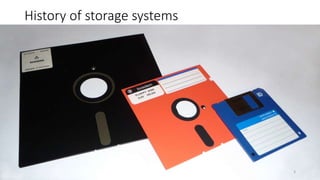
History of storage systems
• xx
3
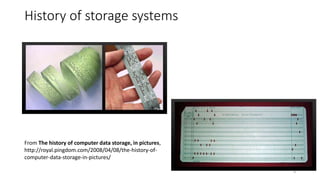
History of storage systems
• xx
From The history of computer data storage, in pictures,
http://royal.pingdom.com/2008/04/08/the-history-of-
computer-data-storage-in-pictures/
4
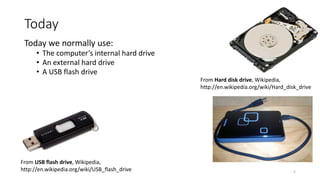
Today
Today we normally use:
• The computer’s internal hard drive
• An external hard drive
• A USB flash drive
From USB flash drive, Wikipedia,
http://en.wikipedia.org/wiki/USB_flash_drive
From Hard disk drive, Wikipedia,
http://en.wikipedia.org/wiki/Hard_disk_drive
5
The Cloud
Previous storage systems:
• Local to PC
• Connected using local networks
Now we can:
• Make use of Internet networking technologies to access remote services (e.g.
located in US) often known as the Cloud
New business models:
• Local storage systems: you buy and own physical item
• Cloud can be used as a ‘rental’ service:
• Software as a Service (SaaS): you ‘rent’ software (e.g. Google Docs)
• Infrastructure as a Service (IaaS): you ‘rent’ CPU cycles, storage, etc.
• Platform as a Service (PaaS): you ‘rent’ a virtual computer 6
See Cloud computing
article in Wikipedia
Popular Cloud Storage Services
Examples of Cloud storage services I use:
• Google Drive
• Apple iCloud
• Dropbox
• Box
• Microsoft Onedrive (was Livedrive)
• BT Cloud
• (Mega)
7
Also:
• Google Photos
• Amazon Music
• Flickr
• …
Google Drive
8
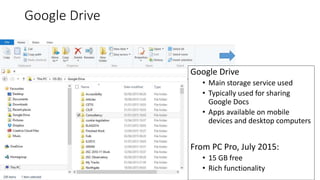
Google Drive
• Main storage service used
• Typically used for sharing
Google Docs
• Apps available on mobile
devices and desktop computers
From PC Pro, July 2015:
• 15 GB free
• Rich functionality
Dropbox
9
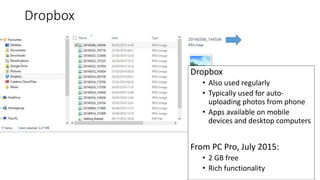
Dropbox
• Also used regularly
• Typically used for auto-
uploading photos from phone
• Apps available on mobile
devices and desktop computers
From PC Pro, July 2015:
• 2 GB free
• Rich functionality
iCloud
10
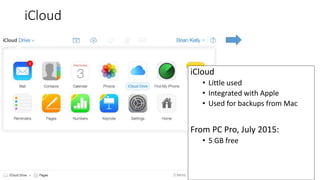
iCloud
• Little used
• Integrated with Apple
• Used for backups from Mac
From PC Pro, July 2015:
• 5 GB free
Box
11
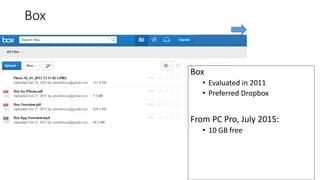
Box
• Evaluated in 2011
• Preferred Dropbox
From PC Pro, July 2015:
• 10 GB free
BT Cloud
12
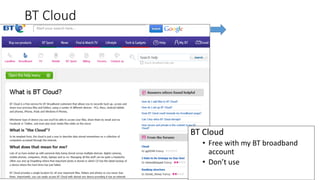
BT Cloud
• Free with my BT broadband
account
• Don’t use
Mega
13
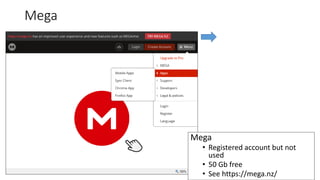
Mega
• Registered account but not
used
• 50 Gb free
• See https://mega.nz/
Beyond General Storage Services: Amazon Music
14
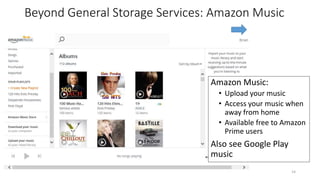
Amazon Music:
• Upload your music
• Access your music when
away from home
• Available free to Amazon
Prime users
Also see Google Play
music
Beyond General Storage Services: Google Photos
15
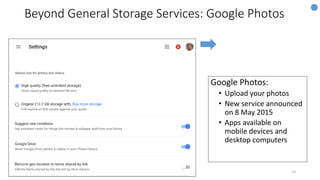
Google Photos:
• Upload your photos
• New service announced
on 8 May 2015
• Apps available on
mobile devices and
desktop computers
Use Cases
Possible uses for Cloud storage services:
• To host the master copy of digital resources
• To provide backup copies
• To maximise access to resources
• To facilitate sharing
• To facilitate access to content across devices
• To store files used by Cloud applications
• …
16
Issues
Main issues:
• Security and robustness
• Privacy/ethical issues
• Selection of service(s): evaluation; complexity; use cases; …
• Anything else?
17
Issues (1)
Are the services secure and robust?
• Will my data be stored safely?
• Will others be able to access my files without permission?
• Will the service be sustainable in the medium/long term
18
Issues (2)
Ownership, privacy and ethical concerns:
• Will my privacy be respected?
• Will I give ownership of my content away?
• Is the service operate in an ethical fashion? Does it pay taxes, …?
19
My Thoughts (1)
• Should you trust your digital content to a third-party service?
• Would you trust your savings to a third-party service or do you keep your
savings under the mattress?!
• Companies such as Google, Microsoft, Amazon, Apple, etc. will
(legitimately) seek to make money by providing useful services to users
• They may choose to withdraw (‘sunset’) services which aren’t felt to be
strategically aligned
• Therefore need to (a) be able to migrate content / have alternative backups
and (b) monitor possible changes to services (including enhancements to
services!)
• The antisocial media line “If you don’t pay your the product, not the user”
20
My Thoughts (2)
What do you think of the argument summarised as:
“if you're not paying for something, you're not the customer; you're the product
being sold”
My view:
• I don’t pay to watch ITV. ITV exists to sell adverts; the content is simply a
means of attracting eyeballs to the adverts
• Other business models for funding for commercial services is nothing new.
• I am willing for my “attention data” (my age, location, etc. to be analysed in
order that personalised adverts can be delivered) to be used rather than
paying for services
• I am not alone!
21
My Thoughts (3)
22
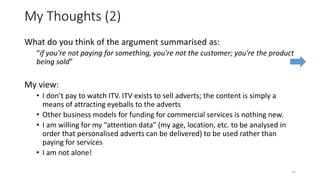
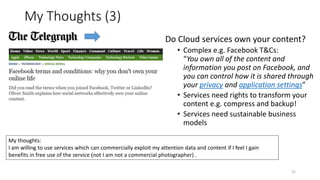
Do Cloud services own your content?
• Complex e.g. Facebook T&Cs:
“You own all of the content and
information you post on Facebook, and
you can control how it is shared through
your privacy and application settings”
• Services need rights to transform your
content e.g. compress and backup!
• Services need sustainable business
models
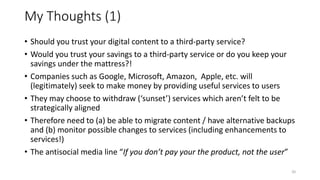
My thoughts:
I am willing to use services which can commercially exploit my attention data and content if I feel I gain
benefits in free use of the service (not I am not a commercial photographer) .
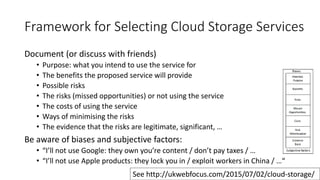
Framework for Selecting Cloud Storage Services
Document (or discuss with friends)
• Purpose: what you intend to use the service for
• The benefits the proposed service will provide
• Possible risks
• The risks (missed opportunities) or not using the service
• The costs of using the service
• Ways of minimising the risks
• The evidence that the risks are legitimate, significant, …
Be aware of biases and subjective factors:
• “I’ll not use Google: they own you’re content / don’t pay taxes / …
• “I’ll not use Apple products: they lock you in / exploit workers in China / …“
23
See http://ukwebfocus.com/2015/07/02/cloud-storage/
Conclusions
To conclude
• Cloud storage is the future
• There are risks; but choosing a bank will have risks too
• Using USB Flash drives, external disk drives, NAS drives have risks
• Choosing the best service for my use is the main challenge
24

Introduction to Cloud Storage

  • 1.
    Introduction to CloudStorage A presentation given by Brian Kelly to the U3A Bath Mac User Group on 2 July 2015 1
  • 2.
    Contents • History ofstorage systems • The Cloud • Popular Cloud storage services • The risks • A framework for selecting Cloud services • Questions 2
  • 3.
    History of storagesystems • xx 3
  • 4.
    History of storagesystems • xx From The history of computer data storage, in pictures, http://royal.pingdom.com/2008/04/08/the-history-of- computer-data-storage-in-pictures/ 4
  • 5.
    Today Today we normallyuse: • The computer’s internal hard drive • An external hard drive • A USB flash drive From USB flash drive, Wikipedia, http://en.wikipedia.org/wiki/USB_flash_drive From Hard disk drive, Wikipedia, http://en.wikipedia.org/wiki/Hard_disk_drive 5
  • 6.
    The Cloud Previous storagesystems: • Local to PC • Connected using local networks Now we can: • Make use of Internet networking technologies to access remote services (e.g. located in US) often known as the Cloud New business models: • Local storage systems: you buy and own physical item • Cloud can be used as a ‘rental’ service: • Software as a Service (SaaS): you ‘rent’ software (e.g. Google Docs) • Infrastructure as a Service (IaaS): you ‘rent’ CPU cycles, storage, etc. • Platform as a Service (PaaS): you ‘rent’ a virtual computer 6 See Cloud computing article in Wikipedia
  • 7.
    Popular Cloud StorageServices Examples of Cloud storage services I use: • Google Drive • Apple iCloud • Dropbox • Box • Microsoft Onedrive (was Livedrive) • BT Cloud • (Mega) 7 Also: • Google Photos • Amazon Music • Flickr • …
  • 8.
    Google Drive 8 Google Drive •Main storage service used • Typically used for sharing Google Docs • Apps available on mobile devices and desktop computers From PC Pro, July 2015: • 15 GB free • Rich functionality
  • 9.
    Dropbox 9 Dropbox • Also usedregularly • Typically used for auto- uploading photos from phone • Apps available on mobile devices and desktop computers From PC Pro, July 2015: • 2 GB free • Rich functionality
  • 10.
    iCloud 10 iCloud • Little used •Integrated with Apple • Used for backups from Mac From PC Pro, July 2015: • 5 GB free
  • 11.
    Box 11 Box • Evaluated in2011 • Preferred Dropbox From PC Pro, July 2015: • 10 GB free
  • 12.
    BT Cloud 12 BT Cloud •Free with my BT broadband account • Don’t use
  • 13.
    Mega 13 Mega • Registered accountbut not used • 50 Gb free • See https://mega.nz/
  • 14.
    Beyond General StorageServices: Amazon Music 14 Amazon Music: • Upload your music • Access your music when away from home • Available free to Amazon Prime users Also see Google Play music
  • 15.
    Beyond General StorageServices: Google Photos 15 Google Photos: • Upload your photos • New service announced on 8 May 2015 • Apps available on mobile devices and desktop computers
  • 16.
    Use Cases Possible usesfor Cloud storage services: • To host the master copy of digital resources • To provide backup copies • To maximise access to resources • To facilitate sharing • To facilitate access to content across devices • To store files used by Cloud applications • … 16
  • 17.
    Issues Main issues: • Securityand robustness • Privacy/ethical issues • Selection of service(s): evaluation; complexity; use cases; … • Anything else? 17
  • 18.
    Issues (1) Are theservices secure and robust? • Will my data be stored safely? • Will others be able to access my files without permission? • Will the service be sustainable in the medium/long term 18
  • 19.
    Issues (2) Ownership, privacyand ethical concerns: • Will my privacy be respected? • Will I give ownership of my content away? • Is the service operate in an ethical fashion? Does it pay taxes, …? 19
  • 20.
    My Thoughts (1) •Should you trust your digital content to a third-party service? • Would you trust your savings to a third-party service or do you keep your savings under the mattress?! • Companies such as Google, Microsoft, Amazon, Apple, etc. will (legitimately) seek to make money by providing useful services to users • They may choose to withdraw (‘sunset’) services which aren’t felt to be strategically aligned • Therefore need to (a) be able to migrate content / have alternative backups and (b) monitor possible changes to services (including enhancements to services!) • The antisocial media line “If you don’t pay your the product, not the user” 20
  • 21.
    My Thoughts (2) Whatdo you think of the argument summarised as: “if you're not paying for something, you're not the customer; you're the product being sold” My view: • I don’t pay to watch ITV. ITV exists to sell adverts; the content is simply a means of attracting eyeballs to the adverts • Other business models for funding for commercial services is nothing new. • I am willing for my “attention data” (my age, location, etc. to be analysed in order that personalised adverts can be delivered) to be used rather than paying for services • I am not alone! 21
  • 22.
    My Thoughts (3) 22 DoCloud services own your content? • Complex e.g. Facebook T&Cs: “You own all of the content and information you post on Facebook, and you can control how it is shared through your privacy and application settings” • Services need rights to transform your content e.g. compress and backup! • Services need sustainable business models My thoughts: I am willing to use services which can commercially exploit my attention data and content if I feel I gain benefits in free use of the service (not I am not a commercial photographer) .
  • 23.
    Framework for SelectingCloud Storage Services Document (or discuss with friends) • Purpose: what you intend to use the service for • The benefits the proposed service will provide • Possible risks • The risks (missed opportunities) or not using the service • The costs of using the service • Ways of minimising the risks • The evidence that the risks are legitimate, significant, … Be aware of biases and subjective factors: • “I’ll not use Google: they own you’re content / don’t pay taxes / … • “I’ll not use Apple products: they lock you in / exploit workers in China / …“ 23 See http://ukwebfocus.com/2015/07/02/cloud-storage/
  • 24.
    Conclusions To conclude • Cloudstorage is the future • There are risks; but choosing a bank will have risks too • Using USB Flash drives, external disk drives, NAS drives have risks • Choosing the best service for my use is the main challenge 24