HUBS FOR
COMMUNICATION AND
COLLABORATION:
BLOGS AND WIKIS
Danielle Mirliss, M.A., Ed.M.
April 13, 2013
Social Media Certificate
Seton Hall University
BLOGS
A web site that can be individually edited using just a
web browser
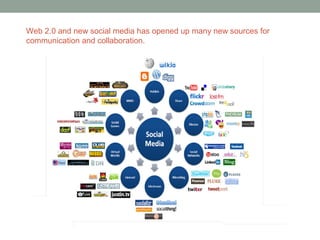
Web 2.0 and new social media has opened up many new sources for
communication and collaboration.
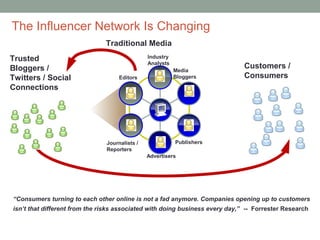
The Influencer Network Is Changing
                               Traditional Media
Trusted                                        Industry
                                               Analysts
Bloggers /                                                Media
                                                                              Customers /
Twitters / Social                   Editors               Bloggers            Consumers
Connections


                               Journalists /              Publishers
                               Reporters
                                               Advertisers


“Consumers turning to each other online is not a fad anymore. Companies opening up to customers
isn’t that different from the risks associated with doing business every day,” -- Forrester Research
Why Blog?
• Establish your
  personal brand
• Enhance your career
• Establish/Strengthen
  your SME credibility
• Expand your personal
  network
• Improve your
  communication skills
Why Blog?
• Attract an audience
• Inform and interact, learn from your audience
   • Share news stories and detailed information
   • Influence and educate others
• Retain your audience
  • Understand the needs of customers and constituents
• Energize your audience and motivate action
  • Refine key messages and selling points
  • Sell more product
• Recruit help, contacts, employees
• Respond to stories and customers
  • Clear up misconceptions in the market
Blog vs…
• Website – static pages of information or sales letters
• Newsletter – Information sent to inbox, drive action
• Forum – Conversation and interaction


      Blogs combine elements of all of the above
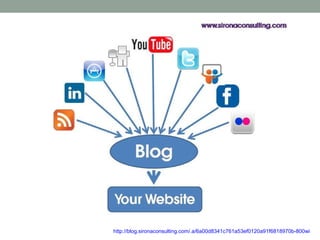
http://blog.sironaconsulting.com/.a/6a00d8341c761a53ef0120a91f6818970b-800wi
Getting Started: Research
• Search for other bloggers
  • Google blog advanced search options lets you fine tune your
    search for the blogs that are specific to your topic area
  • Technorati search is another tool to help you find relevant blogs
• IceRocket is a popular blog and social search tool
• Twithority can also help you identify influencers for your
  topic area
• Search.twitter
• Social Bookmarking sites
Understand that being a blogger is similar to being a journalist who writes a
daily/weekly/monthly column in a newspaper or magazine


     Activities include:
       Researching topics to write about

       Writing & posting updates to your blog

       Reading blog posts by others and commenting there

       Respond to comments posted on your blog


     A good blog is one where posts are fresh and new posts are
     frequent.


10
Your Competitive Edge
• Audience Needs
• Your Positioning
• Brand Experience
  • Serve your audience needs, wants, motivations in a way that is
    uniquely yours
What to Blog About
• Talk about topics you are:
  • Comfortable with
  • Happy to discuss with a wider audience
  • Have knowledge of (unless asking for information)


                  Be prepared for responses
What to Blog About
• That conference you recently attended
• Product announcements
• Product feature previews
• A press release that was just issued
• An analyst report that ranks your company highly (or low)
• Your thoughts on an interesting blog post or article you just
    read
•   The customer visit you’re flying back from
•   A debate the product team is having on whether to include
    feature A or feature B
•   What are you thinking about right now?
•   What will be important in your professional area 5 years from
    now? 10 years from now?
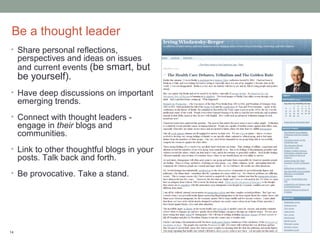
Be a thought leader
• Share personal reflections,
     perspectives and ideas on issues
     and current events (be smart, but
     be yourself).
• Have deep discussions on important
     emerging trends.
• Connect with thought leaders -
     engage in their blogs and
     communities.
• Link to other thoughtful blogs in your
     posts. Talk back and forth.
• Be provocative. Take a stand.


14
Stickiness
• Images = Great Idea!
  • Google Image Search and Flickr (http://flickr.com) – but pay
    attention to reuse rights
• Videos = Yes!!
• Tags = Lots of tags help others find your blog entry
• Links = Lots of them, too
   • The more you link to others, the more others will link to you
   • Promote your company
• Use Surveys and Polls
  • Formstack
  • Polldaddy
  • Survey Monkey
What should you not write about?
 • Anything that can only be shared under a non-
  disclosure agreement (NDA)
 • Revenue or sales figures
   •   Other than what is officially reported by your company

 • Disclosing customer information
   •   If they have not agreed to be a reference

 • Making commitments about product futures

 • Anything that goes against your company’s social
  computing guidelines or business conduct guidelines
 • Anything that you would not want to see reprinted on
  the front page of the Wall Street Journal.
Some Additional Don’ts
• Don’t Me-Me-Me – It’s not all about you
• Don’t force it if it isn’t working
• Don’t over-sell – give first
• Don’t use business talk – and don’t assume
• Don’t try to control the conversation
• Don’t ignore your audience
Single Author vs. Multi-Author
Single Author Blog
•Personal connection
•Readers know what to expect


Multi Author Blog
•Random reading - variety of topics and writing styles
•Quality may vary between blog authors, but this approach
typically produces much more volume of posts than a single
author blog
•Readers may not connect with the writer


A better approach to setting up a Multi Author Blog is to setup a
Single Author Blog and to invite guest writers.
Additional Blogging Tips
• Write about what you know and what you truly care about
• Know your audience, talk about things they want to learn about,
    discuss and find valuable
•   Link when appropriate to other relevant blogs and materials
•   If you quote another blogger be sure to credit the creator
•   When commenting, always be transparent about your identity and
    affiliation
•   Don’t be corporate or overly formal; strive for communication in a
    natural and authentic tone
•   Take the time to know people you want to connect with by reading
    their blogs
•   Start, build upon, contribute to discussions on topics of interest
    amongst the other bloggers
•   There is no "off the record"; any communication with bloggers may
    end up on their blogs
•   Follow your company’s Social Computing and Blogging Guidelines
Activity 1: Make a Plan
• Why are you building a blog?
• Who do you want to attract?
• What story do you have to tell?


Do some research and find out what topics are trending in
 your specific areas of expertise.
BUILDING A BLOG
Planning is a key step to building an effective blog
Wordpress.com vs. Wordpress.org
• Wordpress.com
  • Hosting platform that makes it easy for anyone to publish online
  • Do not have to download software, pay for hosting, or manage a
    web server
  • Has hundreds of themes and includes the functionality of many
    plug ins, but you cannot upload your own plugins or themes
• Wordpress.org
  • free software that you can install on a web server
  • Can install on a web server
  • Can upload and install themes and plugins, run ads, and edit the
    database.
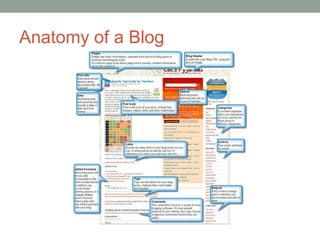
Anatomy of a Blog
Design Considerations
• Choose from over 200 themes
  • http://theme.wordpress.com/
  • To change your theme, head to Appearance → Themes in your
    site’s Dashboard
• Custom Header Image
  • Go to Appearance -> Header in your blog’s dashboard. If you do
    not see the option, this means that your current theme does not
    support the use of a custom image header. Only .jpeg, .gif, and
    .png files can be used.
• Flexible Headers
  • If theme supports a flexible header, go to Appearance → Header
    → upload an image and click the “Skip Cropping, Publish Image
    as Is” button. The header image will be added without any
    cropping.
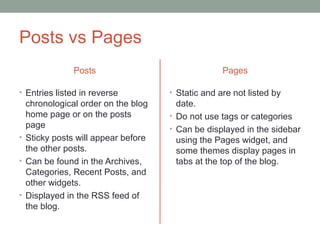
Posts vs Pages
              Posts                               Pages

• Entries listed in reverse         • Static and are not listed by
  chronological order on the blog     date.
  home page or on the posts         • Do not use tags or categories
  page                              • Can be displayed in the sidebar
• Sticky posts will appear before     using the Pages widget, and
  the other posts.                    some themes display pages in
• Can be found in the Archives,       tabs at the top of the blog.
  Categories, Recent Posts, and
  other widgets.
• Displayed in the RSS feed of
  the blog.
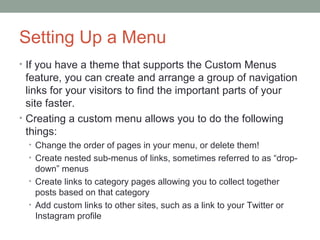
Setting Up a Menu
• If you have a theme that supports the Custom Menus
  feature, you can create and arrange a group of navigation
  links for your visitors to find the important parts of your
  site faster.
• Creating a custom menu allows you to do the following
  things:
  • Change the order of pages in your menu, or delete them!
  • Create nested sub-menus of links, sometimes referred to as “drop-
    down” menus
  • Create links to category pages allowing you to collect together
    posts based on that category
  • Add custom links to other sites, such as a link to your Twitter or
    Instagram profile
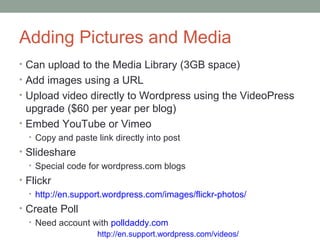
Adding Pictures and Media
• Can upload to the Media Library (3GB space)
• Add images using a URL
• Upload video directly to Wordpress using the VideoPress
  upgrade ($60 per year per blog)
• Embed YouTube or Vimeo
  • Copy and paste link directly into post
• Slideshare
  • Special code for wordpress.com blogs
• Flickr
  • http://en.support.wordpress.com/images/flickr-photos/
• Create Poll
  • Need account with polldaddy.com
                    http://en.support.wordpress.com/videos/
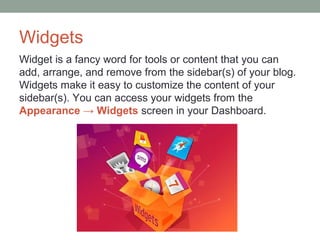
Widgets
Widget is a fancy word for tools or content that you can
add, arrange, and remove from the sidebar(s) of your blog.
Widgets make it easy to customize the content of your
sidebar(s). You can access your widgets from the
Appearance → Widgets screen in your Dashboard.
Recommended Widgets
• Twitter http://en.support.wordpress.com/widgets/twitter-widget/
• About.me http://en.support.wordpress.com/widgets/about-me/
• Blogs I follow
    http://en.support.wordpress.com/widgets/blogs-i-follow-widget/
•   Delicious: http://en.support.wordpress.com/widgets/delicious-widget/
•   Flickr http://en.support.wordpress.com/widgets/flickr-widget/
•   Follow Blog
    http://en.support.wordpress.com/widgets/follow-blog-widget/
•   Tag Cloud:
    http://en.support.wordpress.com/widgets/tag-cloud-widget/
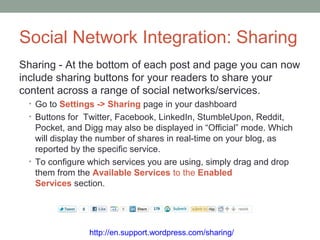
Social Network Integration: Sharing
Sharing - At the bottom of each post and page you can now
include sharing buttons for your readers to share your
content across a range of social networks/services.
 • Go to Settings -> Sharing page in your dashboard
 • Buttons for Twitter, Facebook, LinkedIn, StumbleUpon, Reddit,
   Pocket, and Digg may also be displayed in “Official” mode. Which
   will display the number of shares in real-time on your blog, as
   reported by the specific service.
 • To configure which services you are using, simply drag and drop
   them from the Available Services to the Enabled
   Services section.


                http://en.support.wordpress.com/sharing/
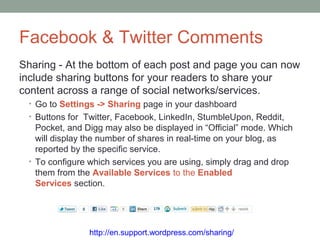
Facebook & Twitter Comments
Sharing - At the bottom of each post and page you can now
include sharing buttons for your readers to share your
content across a range of social networks/services.
 • Go to Settings -> Sharing page in your dashboard
 • Buttons for Twitter, Facebook, LinkedIn, StumbleUpon, Reddit,
   Pocket, and Digg may also be displayed in “Official” mode. Which
   will display the number of shares in real-time on your blog, as
   reported by the specific service.
 • To configure which services you are using, simply drag and drop
   them from the Available Services to the Enabled
   Services section.


                http://en.support.wordpress.com/sharing/
Social Network Integration:
Publicize
Publicize makes it easy to share your WordPress.com
posts on Facebook, Twitter, Tumblr, Linkedin, and Yahoo!.
 • To set up publicize on your WordPress.com blog please go to
   Settings -> Sharing in your site Dashboard.
 • Once you’ve approved a connection to any of the below services,
   you’ll see a Publicize section in the Publish box on your post
   writing screen each time you write a new post.
 • If you want to opt out from any of the Publicize services for a
   specific post, just click the Publicize Edit link. You can then
   uncheck whichever services you want. You can also customize the
   message that gets sent by typing it in to the Custom Message box.


              http://en.support.wordpress.com/publicize/
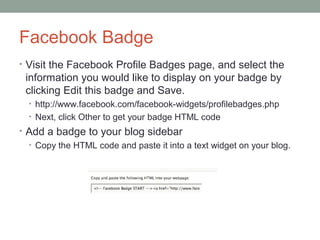
Facebook Badge
• Visit the Facebook Profile Badges page, and select the
 information you would like to display on your badge by
 clicking Edit this badge and Save.
  • http://www.facebook.com/facebook-widgets/profilebadges.php
  • Next, click Other to get your badge HTML code
• Add a badge to your blog sidebar
  • Copy the HTML code and paste it into a text widget on your blog.
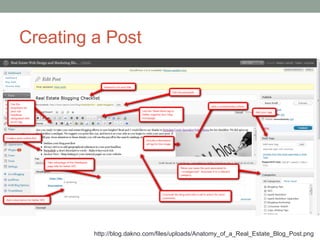
Creating a Post


         http://blog.dakno.com/files/uploads/Anatomy_of_a_Real_Estate_Blog_Post.png
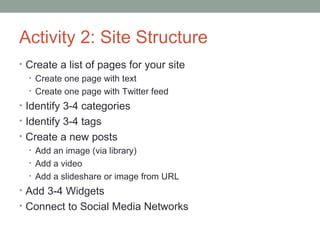
Activity 2: Site Structure
• Create a list of pages for your site
  • Create one page with text
  • Create one page with Twitter feed
• Identify 3-4 categories
• Identify 3-4 tags
• Create a new posts
  • Add an image (via library)
  • Add a video
  • Add a slideshare or image from URL
• Add 3-4 Widgets
• Connect to Social Media Networks
Going Mobile
• Full-featured mobile apps allow you to:
  • Write and Edit Posts
  • Share Photos
  • Manage Comments
  • Read and Discover Blogs
WIKIS
A web site that can be individually or collaboratively
edited using just a web browser
More on Wikis

     http://www.youtube.com/watch?v=-dnL00TdmLY
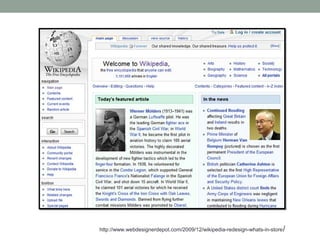
http://www.webdesignerdepot.com/2009/12/wikipedia-redesign-whats-in-store /
Wiki Features
Wikis are great collaboration tools because they:
•allow more than one person to edit each page.
•allow many people to add to and edit the same content.
•allow you to easily connect between pages inside the wiki.

Other great wiki features:
•expandable structure – you can add as many pages as you
need.
•NON-LINEAR - you can jump around easily from page to
page or section to section.
•allow folders as well as pages - great for more complex
projects with lots of sections.
•store FILES – upload .doc, .xls, .ppt, .jpg, etc.
Why Use a Wiki
• Project Management
• Tracking Industry News
• Setting Meeting Agendas
• Content Management System
  • Posting Corporate Policies
  • Creating Strategy Documents
  • Technical Documentation
More Idea for Outside Community:
• Wikis are a great way to get patrons/colleagues to
 participate in building a Web space
  • Resource guides
  • Conference
  • Book reviews
  • Area guides
• You can learn a lot from your patrons and colleagues!


  Example:
   http://prodinstres.pbworks.com/w/page/29501523/FrontPage
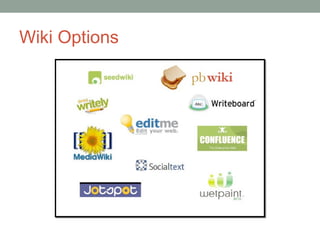
Wiki Options
Wiki Structure
• All wikis start off as a single blank page
• Pages are created and connected by hyperlinks
• No ownership of pages; anyone can change the work of
    others
•   Pages community members can add to or edit (example)
•   Discussion area for each page
•   List of all of the changes made to a particular page
    (version control)
•   List of all changes made to all pages.
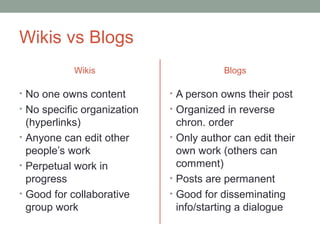
Wikis vs Blogs
           Wikis                         Blogs

• No one owns content        • A person owns their post
• No specific organization   • Organized in reverse
  (hyperlinks)                 chron. order
• Anyone can edit other      • Only author can edit their
  people’s work                own work (others can
• Perpetual work in            comment)
  progress                   • Posts are permanent
• Good for collaborative     • Good for disseminating
  group work                   info/starting a dialogue
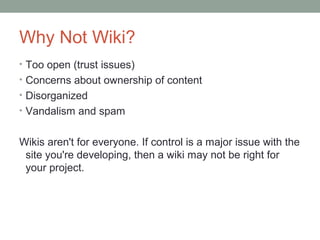
Why Not Wiki?
• Too open (trust issues)
• Concerns about ownership of content
• Disorganized
• Vandalism and spam


Wikis aren't for everyone. If control is a major issue with the
 site you're developing, then a wiki may not be right for
 your project.
Wiki Fun!
Case Studies:
http://pbworks.com/case-studies

Lets Play:
http://socialmediacertificate.pbworks.com/w/page/6533875
5/Welcome%20Page

Hubs for communication and collaboration

  • 1.
    HUBS FOR COMMUNICATION AND COLLABORATION: BLOGSAND WIKIS Danielle Mirliss, M.A., Ed.M. April 13, 2013 Social Media Certificate Seton Hall University
  • 2.
    BLOGS A web sitethat can be individually edited using just a web browser
  • 3.
    Web 2.0 andnew social media has opened up many new sources for communication and collaboration.
  • 4.
    The Influencer NetworkIs Changing Traditional Media Trusted Industry Analysts Bloggers / Media Customers / Twitters / Social Editors Bloggers Consumers Connections Journalists / Publishers Reporters Advertisers “Consumers turning to each other online is not a fad anymore. Companies opening up to customers isn’t that different from the risks associated with doing business every day,” -- Forrester Research
  • 5.
    Why Blog? • Establishyour personal brand • Enhance your career • Establish/Strengthen your SME credibility • Expand your personal network • Improve your communication skills
  • 6.
    Why Blog? • Attractan audience • Inform and interact, learn from your audience • Share news stories and detailed information • Influence and educate others • Retain your audience • Understand the needs of customers and constituents • Energize your audience and motivate action • Refine key messages and selling points • Sell more product • Recruit help, contacts, employees • Respond to stories and customers • Clear up misconceptions in the market
  • 7.
    Blog vs… • Website– static pages of information or sales letters • Newsletter – Information sent to inbox, drive action • Forum – Conversation and interaction Blogs combine elements of all of the above
  • 8.
  • 9.
    Getting Started: Research •Search for other bloggers • Google blog advanced search options lets you fine tune your search for the blogs that are specific to your topic area • Technorati search is another tool to help you find relevant blogs • IceRocket is a popular blog and social search tool • Twithority can also help you identify influencers for your topic area • Search.twitter • Social Bookmarking sites
  • 10.
    Understand that beinga blogger is similar to being a journalist who writes a daily/weekly/monthly column in a newspaper or magazine Activities include: Researching topics to write about Writing & posting updates to your blog Reading blog posts by others and commenting there Respond to comments posted on your blog A good blog is one where posts are fresh and new posts are frequent. 10
  • 11.
    Your Competitive Edge •Audience Needs • Your Positioning • Brand Experience • Serve your audience needs, wants, motivations in a way that is uniquely yours
  • 12.
    What to BlogAbout • Talk about topics you are: • Comfortable with • Happy to discuss with a wider audience • Have knowledge of (unless asking for information) Be prepared for responses
  • 13.
    What to BlogAbout • That conference you recently attended • Product announcements • Product feature previews • A press release that was just issued • An analyst report that ranks your company highly (or low) • Your thoughts on an interesting blog post or article you just read • The customer visit you’re flying back from • A debate the product team is having on whether to include feature A or feature B • What are you thinking about right now? • What will be important in your professional area 5 years from now? 10 years from now?
  • 14.
    Be a thoughtleader • Share personal reflections, perspectives and ideas on issues and current events (be smart, but be yourself). • Have deep discussions on important emerging trends. • Connect with thought leaders - engage in their blogs and communities. • Link to other thoughtful blogs in your posts. Talk back and forth. • Be provocative. Take a stand. 14
  • 15.
    Stickiness • Images =Great Idea! • Google Image Search and Flickr (http://flickr.com) – but pay attention to reuse rights • Videos = Yes!! • Tags = Lots of tags help others find your blog entry • Links = Lots of them, too • The more you link to others, the more others will link to you • Promote your company • Use Surveys and Polls • Formstack • Polldaddy • Survey Monkey
  • 16.
    What should younot write about? • Anything that can only be shared under a non- disclosure agreement (NDA) • Revenue or sales figures • Other than what is officially reported by your company • Disclosing customer information • If they have not agreed to be a reference • Making commitments about product futures • Anything that goes against your company’s social computing guidelines or business conduct guidelines • Anything that you would not want to see reprinted on the front page of the Wall Street Journal.
  • 17.
    Some Additional Don’ts •Don’t Me-Me-Me – It’s not all about you • Don’t force it if it isn’t working • Don’t over-sell – give first • Don’t use business talk – and don’t assume • Don’t try to control the conversation • Don’t ignore your audience
  • 18.
    Single Author vs.Multi-Author Single Author Blog •Personal connection •Readers know what to expect Multi Author Blog •Random reading - variety of topics and writing styles •Quality may vary between blog authors, but this approach typically produces much more volume of posts than a single author blog •Readers may not connect with the writer A better approach to setting up a Multi Author Blog is to setup a Single Author Blog and to invite guest writers.
  • 19.
    Additional Blogging Tips •Write about what you know and what you truly care about • Know your audience, talk about things they want to learn about, discuss and find valuable • Link when appropriate to other relevant blogs and materials • If you quote another blogger be sure to credit the creator • When commenting, always be transparent about your identity and affiliation • Don’t be corporate or overly formal; strive for communication in a natural and authentic tone • Take the time to know people you want to connect with by reading their blogs • Start, build upon, contribute to discussions on topics of interest amongst the other bloggers • There is no "off the record"; any communication with bloggers may end up on their blogs • Follow your company’s Social Computing and Blogging Guidelines
  • 20.
    Activity 1: Makea Plan • Why are you building a blog? • Who do you want to attract? • What story do you have to tell? Do some research and find out what topics are trending in your specific areas of expertise.
  • 21.
    BUILDING A BLOG Planningis a key step to building an effective blog
  • 22.
    Wordpress.com vs. Wordpress.org •Wordpress.com • Hosting platform that makes it easy for anyone to publish online • Do not have to download software, pay for hosting, or manage a web server • Has hundreds of themes and includes the functionality of many plug ins, but you cannot upload your own plugins or themes • Wordpress.org • free software that you can install on a web server • Can install on a web server • Can upload and install themes and plugins, run ads, and edit the database.
  • 23.
  • 24.
    Design Considerations • Choosefrom over 200 themes • http://theme.wordpress.com/ • To change your theme, head to Appearance → Themes in your site’s Dashboard • Custom Header Image • Go to Appearance -> Header in your blog’s dashboard. If you do not see the option, this means that your current theme does not support the use of a custom image header. Only .jpeg, .gif, and .png files can be used. • Flexible Headers • If theme supports a flexible header, go to Appearance → Header → upload an image and click the “Skip Cropping, Publish Image as Is” button. The header image will be added without any cropping.
  • 25.
    Posts vs Pages Posts Pages • Entries listed in reverse • Static and are not listed by chronological order on the blog date. home page or on the posts • Do not use tags or categories page • Can be displayed in the sidebar • Sticky posts will appear before using the Pages widget, and the other posts. some themes display pages in • Can be found in the Archives, tabs at the top of the blog. Categories, Recent Posts, and other widgets. • Displayed in the RSS feed of the blog.
  • 26.
    Setting Up aMenu • If you have a theme that supports the Custom Menus feature, you can create and arrange a group of navigation links for your visitors to find the important parts of your site faster. • Creating a custom menu allows you to do the following things: • Change the order of pages in your menu, or delete them! • Create nested sub-menus of links, sometimes referred to as “drop- down” menus • Create links to category pages allowing you to collect together posts based on that category • Add custom links to other sites, such as a link to your Twitter or Instagram profile
  • 27.
    Adding Pictures andMedia • Can upload to the Media Library (3GB space) • Add images using a URL • Upload video directly to Wordpress using the VideoPress upgrade ($60 per year per blog) • Embed YouTube or Vimeo • Copy and paste link directly into post • Slideshare • Special code for wordpress.com blogs • Flickr • http://en.support.wordpress.com/images/flickr-photos/ • Create Poll • Need account with polldaddy.com http://en.support.wordpress.com/videos/
  • 28.
    Widgets Widget is afancy word for tools or content that you can add, arrange, and remove from the sidebar(s) of your blog. Widgets make it easy to customize the content of your sidebar(s). You can access your widgets from the Appearance → Widgets screen in your Dashboard.
  • 29.
    Recommended Widgets • Twitterhttp://en.support.wordpress.com/widgets/twitter-widget/ • About.me http://en.support.wordpress.com/widgets/about-me/ • Blogs I follow http://en.support.wordpress.com/widgets/blogs-i-follow-widget/ • Delicious: http://en.support.wordpress.com/widgets/delicious-widget/ • Flickr http://en.support.wordpress.com/widgets/flickr-widget/ • Follow Blog http://en.support.wordpress.com/widgets/follow-blog-widget/ • Tag Cloud: http://en.support.wordpress.com/widgets/tag-cloud-widget/
  • 30.
    Social Network Integration:Sharing Sharing - At the bottom of each post and page you can now include sharing buttons for your readers to share your content across a range of social networks/services. • Go to Settings -> Sharing page in your dashboard • Buttons for Twitter, Facebook, LinkedIn, StumbleUpon, Reddit, Pocket, and Digg may also be displayed in “Official” mode. Which will display the number of shares in real-time on your blog, as reported by the specific service. • To configure which services you are using, simply drag and drop them from the Available Services to the Enabled Services section. http://en.support.wordpress.com/sharing/
  • 31.
    Facebook & TwitterComments Sharing - At the bottom of each post and page you can now include sharing buttons for your readers to share your content across a range of social networks/services. • Go to Settings -> Sharing page in your dashboard • Buttons for Twitter, Facebook, LinkedIn, StumbleUpon, Reddit, Pocket, and Digg may also be displayed in “Official” mode. Which will display the number of shares in real-time on your blog, as reported by the specific service. • To configure which services you are using, simply drag and drop them from the Available Services to the Enabled Services section. http://en.support.wordpress.com/sharing/
  • 32.
    Social Network Integration: Publicize Publicizemakes it easy to share your WordPress.com posts on Facebook, Twitter, Tumblr, Linkedin, and Yahoo!. • To set up publicize on your WordPress.com blog please go to Settings -> Sharing in your site Dashboard. • Once you’ve approved a connection to any of the below services, you’ll see a Publicize section in the Publish box on your post writing screen each time you write a new post. • If you want to opt out from any of the Publicize services for a specific post, just click the Publicize Edit link. You can then uncheck whichever services you want. You can also customize the message that gets sent by typing it in to the Custom Message box. http://en.support.wordpress.com/publicize/
  • 33.
    Facebook Badge • Visitthe Facebook Profile Badges page, and select the information you would like to display on your badge by clicking Edit this badge and Save. • http://www.facebook.com/facebook-widgets/profilebadges.php • Next, click Other to get your badge HTML code • Add a badge to your blog sidebar • Copy the HTML code and paste it into a text widget on your blog.
  • 34.
    Creating a Post http://blog.dakno.com/files/uploads/Anatomy_of_a_Real_Estate_Blog_Post.png
  • 35.
    Activity 2: SiteStructure • Create a list of pages for your site • Create one page with text • Create one page with Twitter feed • Identify 3-4 categories • Identify 3-4 tags • Create a new posts • Add an image (via library) • Add a video • Add a slideshare or image from URL • Add 3-4 Widgets • Connect to Social Media Networks
  • 36.
    Going Mobile • Full-featuredmobile apps allow you to: • Write and Edit Posts • Share Photos • Manage Comments • Read and Discover Blogs
  • 37.
    WIKIS A web sitethat can be individually or collaboratively edited using just a web browser
  • 38.
    More on Wikis http://www.youtube.com/watch?v=-dnL00TdmLY
  • 39.
  • 40.
    Wiki Features Wikis aregreat collaboration tools because they: •allow more than one person to edit each page. •allow many people to add to and edit the same content. •allow you to easily connect between pages inside the wiki. Other great wiki features: •expandable structure – you can add as many pages as you need. •NON-LINEAR - you can jump around easily from page to page or section to section. •allow folders as well as pages - great for more complex projects with lots of sections. •store FILES – upload .doc, .xls, .ppt, .jpg, etc.
  • 41.
    Why Use aWiki • Project Management • Tracking Industry News • Setting Meeting Agendas • Content Management System • Posting Corporate Policies • Creating Strategy Documents • Technical Documentation
  • 42.
    More Idea forOutside Community: • Wikis are a great way to get patrons/colleagues to participate in building a Web space • Resource guides • Conference • Book reviews • Area guides • You can learn a lot from your patrons and colleagues! Example: http://prodinstres.pbworks.com/w/page/29501523/FrontPage
  • 43.
  • 44.
    Wiki Structure • Allwikis start off as a single blank page • Pages are created and connected by hyperlinks • No ownership of pages; anyone can change the work of others • Pages community members can add to or edit (example) • Discussion area for each page • List of all of the changes made to a particular page (version control) • List of all changes made to all pages.
  • 45.
    Wikis vs Blogs Wikis Blogs • No one owns content • A person owns their post • No specific organization • Organized in reverse (hyperlinks) chron. order • Anyone can edit other • Only author can edit their people’s work own work (others can • Perpetual work in comment) progress • Posts are permanent • Good for collaborative • Good for disseminating group work info/starting a dialogue
  • 46.
    Why Not Wiki? •Too open (trust issues) • Concerns about ownership of content • Disorganized • Vandalism and spam Wikis aren't for everyone. If control is a major issue with the site you're developing, then a wiki may not be right for your project.
  • 47.
    Wiki Fun! Case Studies: http://pbworks.com/case-studies LetsPlay: http://socialmediacertificate.pbworks.com/w/page/6533875 5/Welcome%20Page

Editor's Notes

  • #9 Blog is the Hub of your content
  • #12 Create Diagram
  • #16 Sticky content  refers to content published on a website, which has the purpose of getting a user to return to that particular website or hold their attention and get them to spend longer periods of time at that site. Webmasters use this method to build up a community of returning visitors to a website.