Qt Quick Best Practices
Part I
Justin Noel
Senior Consulting Engineer
ICS, Inc.
Agenda
• Building Blocks of QML
• Qt Properties
• Declarative Code
• Anchors
Building Blocks of QML
QObject
• Heart and Soul of Qt Object
• Signals and Slots are implemented here
• QObjects can have “child objects”
• Parents have some control over children
• Deleting them, laying them out, etc
• Also Qt Properties!
Introspection
• QObjects can report at runtime
• Class name, Super class
• Lists of signals and list their arguments
• Lists of functions and list their arguments
• Invoke methods by name
• QMetaObject::invokeMethod(objPtr, “function”…)
Meta Object Compiler
• Introspection info is generated by moc
• Reads header files. Writes source code
• moc -o moc_class.cpp class.h
• MetaObject is static
• One instance per QObject subclass
QQuickItem
• Most Qt Objects inherit QObject
• QQuickItem is no exception
• Gets many of it’s features directly from QObject
• We will be leveraging these capabilities
throughout class
Deferred Deletion
• Qt is an event driven GUI toolkit
• Deleting object can be tricky in an event based
system
• Deleting objects from within an event
• Deleting the sender object from a signal and slot
connection
• QObject has a deleteLater() method
deleteLater()
• Posts an event to the event loop
• On the next lap of the loop
• The object is deleted and all events cleared
• destroy() in QML is QObject::deleteLater()
QVariant
• Qt’s “Anything” class
• Think: Typed void*
• Supports most Qt data types out of the box
• Easy to add support for your own types
• Automatically supports all pointer types
QVariant and QML
• QVariant maps to var in JavaScript
• Used to pass data back and forth to C++
• If you register your types correctly you can
attain runtime type safety
QVariant Containers
• QVariantList maps to Array in JavaScript
• QList<QVariantMap> can be used with JSON
syntax JavaScript
• Better off using QJson classes
• If you are using JSON data
• Easier to convert back to JSON
Qt Properties
Qt Properties
• Combination of Get/Set/Notify
• Allows introspection system to use these
functions as one concept
• Properties have been in Qt for a very long time
• Qt Designer is based on properties
• QML is also based on properties
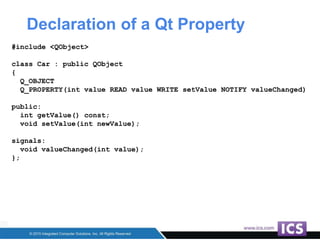
Declaration of a Qt Property
#include <QObject>
class Car : public QObject
{
Q_OBJECT
Q_PROPERTY(int value READ value WRITE setValue NOTIFY valueChanged)
public:
int getValue() const;
void setValue(int newValue);
signals:
void valueChanged(int value);
};
Qt Property with Enum
#include <QObject>
class Car : public QObject
{
Q_OBJECT
Q_ENUMS(KeyState)
Q_PROPERTY(KeyState keyState READ keyState NOTIFY keyStateChanged)
public:
enum KeyState {
KeyOff,
KeyOn,
KeyStart
};
[...]
};
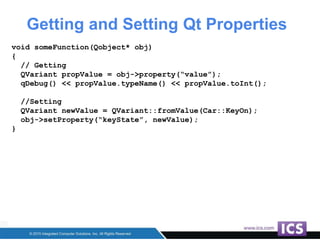
Getting and Setting Qt Properties
void someFunction(Qobject* obj)
{
// Getting
QVariant propValue = obj->property(“value”);
qDebug() << propValue.typeName() << propValue.toInt();
//Setting
QVariant newValue = QVariant::fromValue(Car::KeyOn);
obj->setProperty(“keyState”, newValue);
}
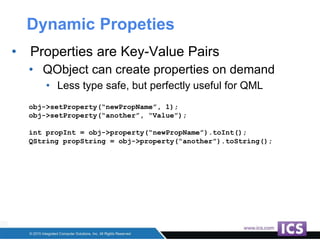
Dynamic Propeties
• Properties are Key-Value Pairs
• QObject can create properties on demand
• Less type safe, but perfectly useful for QML
obj->setProperty(“newPropName”, 1);
obj->setProperty(“another”, “Value”);
int propInt = obj->property(“newPropName”).toInt();
QString propString = obj->property(“another”).toString();
Declarative Code
Basic QML Syntax
• QML is declarative language
• With hooks for procedural JavaScript
• Use as little JavaScript as possible
• QML files a read at runtime
• The declarative parts create C++ instances
• JavaScript is JIT interpreted
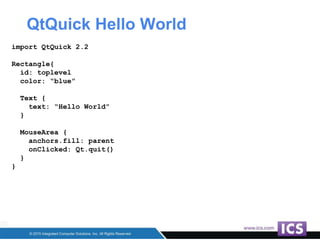
QtQuick Hello World
import QtQuick 2.2
Rectangle{
id: toplevel
color: “blue”
Text {
text: “Hello World”
}
MouseArea {
anchors.fill: parent
onClicked: Qt.quit()
}
}
Qt Quick Items
• Rectangle, Text and MouseArea
• Are implemented in C++
• Instances of QQuickRectangle, QQuickText, Etc
• Loading QML is slower than compiled code
• At runtime performance is great
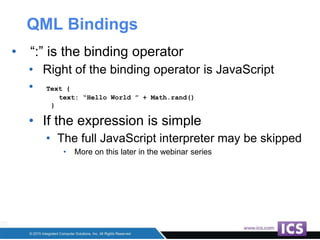
QML Bindings
• “:” is the binding operator
• Right of the binding operator is JavaScript
• Text {
text: “Hello World ” + Math.rand()
}
• If the expression is simple
• The full JavaScript interpreter may be skipped
• More on this later in the webinar series
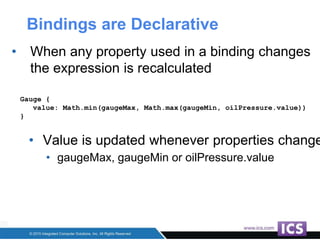
Bindings are Declarative
• When any property used in a binding changes
the expression is recalculated
Gauge {
value: Math.min(gaugeMax, Math.max(gaugeMin, oilPressure.value))
}
• Value is updated whenever properties change
• gaugeMax, gaugeMin or oilPressure.value
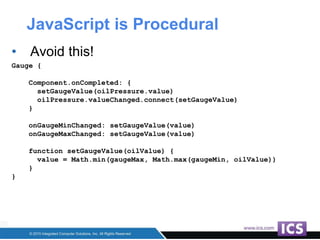
JavaScript is Procedural
• Avoid this!
Gauge {
Component.onCompleted: {
setGaugeValue(oilPressure.value)
oilPressure.valueChanged.connect(setGaugeValue)
}
onGaugeMinChanged: setGaugeValue(value)
onGaugeMaxChanged: setGaugeValue(value)
function setGaugeValue(oilValue) {
value = Math.min(gaugeMax, Math.max(gaugeMin, oilValue))
}
}
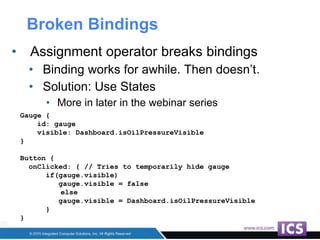
Broken Bindings
• Assignment operator breaks bindings
• Binding works for awhile. Then doesn’t.
• Solution: Use States
• More in later in the webinar series
Gauge {
id: gauge
visible: Dashboard.isOilPressureVisible
}
Button {
onClicked: { // Tries to temporarily hide gauge
if(gauge.visible)
gauge.visible = false
else
gauge.visible = Dashboard.isOilPressureVisible
}
}
Anchors
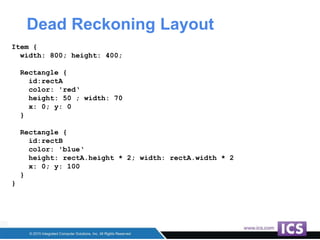
Dead Reckoning Layout
Item {
width: 800; height: 400;
Rectangle {
id:rectA
color: 'red‘
height: 50 ; width: 70
x: 0; y: 0
}
Rectangle {
id:rectB
color: 'blue‘
height: rectA.height * 2; width: rectA.width * 2
x: 0; y: 100
}
}
Why is dead reckoning bad?
• The good:
• It resizes correctly
• It uses bindings so it’s “declarative”
• The bad:
• There are a lot of binding re-calculations
• Each recalculation is run in JavaScript
• Cascading bindings cause intermediate states
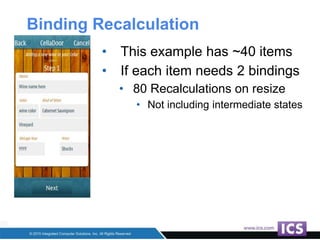
Binding Recalculation
• This example has ~40 items
• If each item needs 2 bindings
• 80 Recalculations on resize
• Not including intermediate states
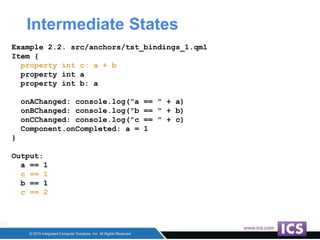
Intermediate States
Example 2.2. src/anchors/tst_bindings_1.qml
Item {
property int c: a + b
property int a
property int b: a
onAChanged: console.log("a == " + a)
onBChanged: console.log("b == " + b)
onCChanged: console.log("c == " + c)
Component.onCompleted: a = 1
}
Output:
a == 1
c == 1
b == 1
c == 2
Anchors Are Better!
• Anchors are stored and calculated in C++
• Remember all Items are actually C++ instances
• Anchors let you attach an item to other items
• Parent item
• Any sibling item
• Anyone remember the Motif Form Widget?
• Eerily similar. What’s old is new again!
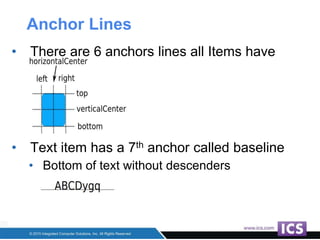
Anchor Lines
• There are 6 anchors lines all Items have
• Text item has a 7th anchor called baseline
• Bottom of text without descenders
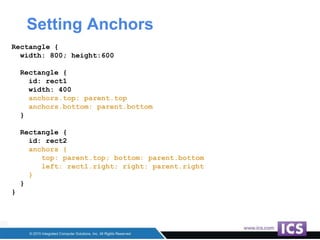
Setting Anchors
Rectangle {
width: 800; height:600
Rectangle {
id: rect1
width: 400
anchors.top: parent.top
anchors.bottom: parent.bottom
}
Rectangle {
id: rect2
anchors {
top: parent.top; bottom: parent.bottom
left: rect1.right; right: parent.right
}
}
}
Anchor Margins
• Each item has 6 adjustable margins
• Not shown are [horizontal|vertical]CenterOffset
• Text has a baselineOffset margin
• anchors.margins sets all outer margins at once
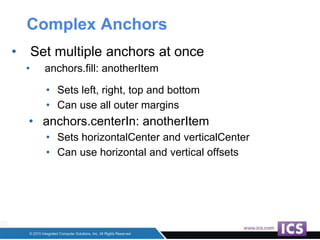
Complex Anchors
• Set multiple anchors at once
• anchors.fill: anotherItem
• Sets left, right, top and bottom
• Can use all outer margins
• anchors.centerIn: anotherItem
• Sets horizontalCenter and verticalCenter
• Can use horizontal and vertical offsets
Upcoming Webinars
• Qt Quick Best Practices
• Part 2 July 9th 1:00 PM EST
• Creating New Items
• States and Transitions
• Part 3 July 23 1:00 PM EST
• C++ Integration
• Creating QML Modules
• Part 4 August 6th 1:00 PM EST
• Dynamic Item Creation
• Keyboard Input Handling
• Performance Tips
Register Now: ics.com/webinars
Thank You!
Justin Noel
Senior Consulting Engineer
ICS, Inc.

Best Practices in Qt Quick/QML - Part I

  • 1.
    Qt Quick BestPractices Part I Justin Noel Senior Consulting Engineer ICS, Inc.
  • 2.
    Agenda • Building Blocksof QML • Qt Properties • Declarative Code • Anchors
  • 3.
  • 4.
    QObject • Heart andSoul of Qt Object • Signals and Slots are implemented here • QObjects can have “child objects” • Parents have some control over children • Deleting them, laying them out, etc • Also Qt Properties!
  • 5.
    Introspection • QObjects canreport at runtime • Class name, Super class • Lists of signals and list their arguments • Lists of functions and list their arguments • Invoke methods by name • QMetaObject::invokeMethod(objPtr, “function”…)
  • 6.
    Meta Object Compiler •Introspection info is generated by moc • Reads header files. Writes source code • moc -o moc_class.cpp class.h • MetaObject is static • One instance per QObject subclass
  • 7.
    QQuickItem • Most QtObjects inherit QObject • QQuickItem is no exception • Gets many of it’s features directly from QObject • We will be leveraging these capabilities throughout class
  • 8.
    Deferred Deletion • Qtis an event driven GUI toolkit • Deleting object can be tricky in an event based system • Deleting objects from within an event • Deleting the sender object from a signal and slot connection • QObject has a deleteLater() method
  • 9.
    deleteLater() • Posts anevent to the event loop • On the next lap of the loop • The object is deleted and all events cleared • destroy() in QML is QObject::deleteLater()
  • 10.
    QVariant • Qt’s “Anything”class • Think: Typed void* • Supports most Qt data types out of the box • Easy to add support for your own types • Automatically supports all pointer types
  • 11.
    QVariant and QML •QVariant maps to var in JavaScript • Used to pass data back and forth to C++ • If you register your types correctly you can attain runtime type safety
  • 12.
    QVariant Containers • QVariantListmaps to Array in JavaScript • QList<QVariantMap> can be used with JSON syntax JavaScript • Better off using QJson classes • If you are using JSON data • Easier to convert back to JSON
  • 13.
  • 14.
    Qt Properties • Combinationof Get/Set/Notify • Allows introspection system to use these functions as one concept • Properties have been in Qt for a very long time • Qt Designer is based on properties • QML is also based on properties
  • 15.
    Declaration of aQt Property #include <QObject> class Car : public QObject { Q_OBJECT Q_PROPERTY(int value READ value WRITE setValue NOTIFY valueChanged) public: int getValue() const; void setValue(int newValue); signals: void valueChanged(int value); };
  • 16.
    Qt Property withEnum #include <QObject> class Car : public QObject { Q_OBJECT Q_ENUMS(KeyState) Q_PROPERTY(KeyState keyState READ keyState NOTIFY keyStateChanged) public: enum KeyState { KeyOff, KeyOn, KeyStart }; [...] };
  • 17.
    Getting and SettingQt Properties void someFunction(Qobject* obj) { // Getting QVariant propValue = obj->property(“value”); qDebug() << propValue.typeName() << propValue.toInt(); //Setting QVariant newValue = QVariant::fromValue(Car::KeyOn); obj->setProperty(“keyState”, newValue); }
  • 18.
    Dynamic Propeties • Propertiesare Key-Value Pairs • QObject can create properties on demand • Less type safe, but perfectly useful for QML obj->setProperty(“newPropName”, 1); obj->setProperty(“another”, “Value”); int propInt = obj->property(“newPropName”).toInt(); QString propString = obj->property(“another”).toString();
  • 19.
  • 20.
    Basic QML Syntax •QML is declarative language • With hooks for procedural JavaScript • Use as little JavaScript as possible • QML files a read at runtime • The declarative parts create C++ instances • JavaScript is JIT interpreted
  • 21.
    QtQuick Hello World importQtQuick 2.2 Rectangle{ id: toplevel color: “blue” Text { text: “Hello World” } MouseArea { anchors.fill: parent onClicked: Qt.quit() } }
  • 22.
    Qt Quick Items •Rectangle, Text and MouseArea • Are implemented in C++ • Instances of QQuickRectangle, QQuickText, Etc • Loading QML is slower than compiled code • At runtime performance is great
  • 23.
    QML Bindings • “:”is the binding operator • Right of the binding operator is JavaScript • Text { text: “Hello World ” + Math.rand() } • If the expression is simple • The full JavaScript interpreter may be skipped • More on this later in the webinar series
  • 24.
    Bindings are Declarative •When any property used in a binding changes the expression is recalculated Gauge { value: Math.min(gaugeMax, Math.max(gaugeMin, oilPressure.value)) } • Value is updated whenever properties change • gaugeMax, gaugeMin or oilPressure.value
  • 25.
    JavaScript is Procedural •Avoid this! Gauge { Component.onCompleted: { setGaugeValue(oilPressure.value) oilPressure.valueChanged.connect(setGaugeValue) } onGaugeMinChanged: setGaugeValue(value) onGaugeMaxChanged: setGaugeValue(value) function setGaugeValue(oilValue) { value = Math.min(gaugeMax, Math.max(gaugeMin, oilValue)) } }
  • 26.
    Broken Bindings • Assignmentoperator breaks bindings • Binding works for awhile. Then doesn’t. • Solution: Use States • More in later in the webinar series Gauge { id: gauge visible: Dashboard.isOilPressureVisible } Button { onClicked: { // Tries to temporarily hide gauge if(gauge.visible) gauge.visible = false else gauge.visible = Dashboard.isOilPressureVisible } }
  • 27.
  • 28.
    Dead Reckoning Layout Item{ width: 800; height: 400; Rectangle { id:rectA color: 'red‘ height: 50 ; width: 70 x: 0; y: 0 } Rectangle { id:rectB color: 'blue‘ height: rectA.height * 2; width: rectA.width * 2 x: 0; y: 100 } }
  • 29.
    Why is deadreckoning bad? • The good: • It resizes correctly • It uses bindings so it’s “declarative” • The bad: • There are a lot of binding re-calculations • Each recalculation is run in JavaScript • Cascading bindings cause intermediate states
  • 30.
    Binding Recalculation • Thisexample has ~40 items • If each item needs 2 bindings • 80 Recalculations on resize • Not including intermediate states
  • 31.
    Intermediate States Example 2.2.src/anchors/tst_bindings_1.qml Item { property int c: a + b property int a property int b: a onAChanged: console.log("a == " + a) onBChanged: console.log("b == " + b) onCChanged: console.log("c == " + c) Component.onCompleted: a = 1 } Output: a == 1 c == 1 b == 1 c == 2
  • 32.
    Anchors Are Better! •Anchors are stored and calculated in C++ • Remember all Items are actually C++ instances • Anchors let you attach an item to other items • Parent item • Any sibling item • Anyone remember the Motif Form Widget? • Eerily similar. What’s old is new again!
  • 33.
    Anchor Lines • Thereare 6 anchors lines all Items have • Text item has a 7th anchor called baseline • Bottom of text without descenders
  • 34.
    Setting Anchors Rectangle { width:800; height:600 Rectangle { id: rect1 width: 400 anchors.top: parent.top anchors.bottom: parent.bottom } Rectangle { id: rect2 anchors { top: parent.top; bottom: parent.bottom left: rect1.right; right: parent.right } } }
  • 35.
    Anchor Margins • Eachitem has 6 adjustable margins • Not shown are [horizontal|vertical]CenterOffset • Text has a baselineOffset margin • anchors.margins sets all outer margins at once
  • 36.
    Complex Anchors • Setmultiple anchors at once • anchors.fill: anotherItem • Sets left, right, top and bottom • Can use all outer margins • anchors.centerIn: anotherItem • Sets horizontalCenter and verticalCenter • Can use horizontal and vertical offsets
  • 37.
    Upcoming Webinars • QtQuick Best Practices • Part 2 July 9th 1:00 PM EST • Creating New Items • States and Transitions • Part 3 July 23 1:00 PM EST • C++ Integration • Creating QML Modules • Part 4 August 6th 1:00 PM EST • Dynamic Item Creation • Keyboard Input Handling • Performance Tips Register Now: ics.com/webinars
  • 38.
    Thank You! Justin Noel SeniorConsulting Engineer ICS, Inc.