Integrated Computer Solutions Inc. www.ics.com
Qt Model / View with QML
July 25th Webinar With Chris Probst & Ryan Hampton
Visit us at http://www.ics.com
Produced by Integrated Computer Solutions
Material based on Qt 5.12
1
Integrated Computer Solutions Inc. www.ics.com
What is MVC?
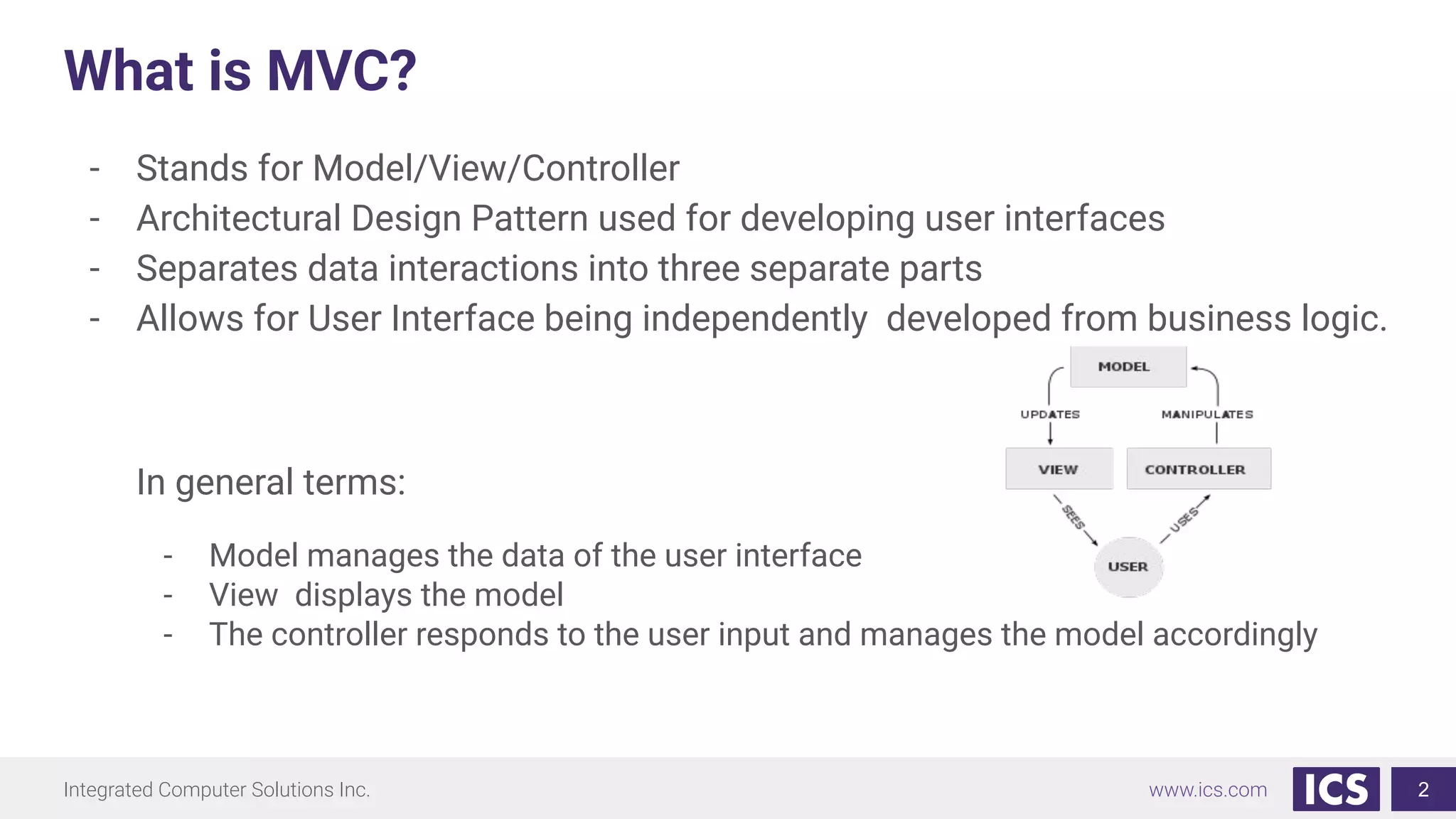
- Stands for Model/View/Controller
- Architectural Design Pattern used for developing user interfaces
- Separates data interactions into three separate parts
- Allows for User Interface being independently developed from business logic.
In general terms:
- Model manages the data of the user interface
- View displays the model
- The controller responds to the user input and manages the model accordingly
2
Integrated Computer Solutions Inc. www.ics.com
Simple QML Example
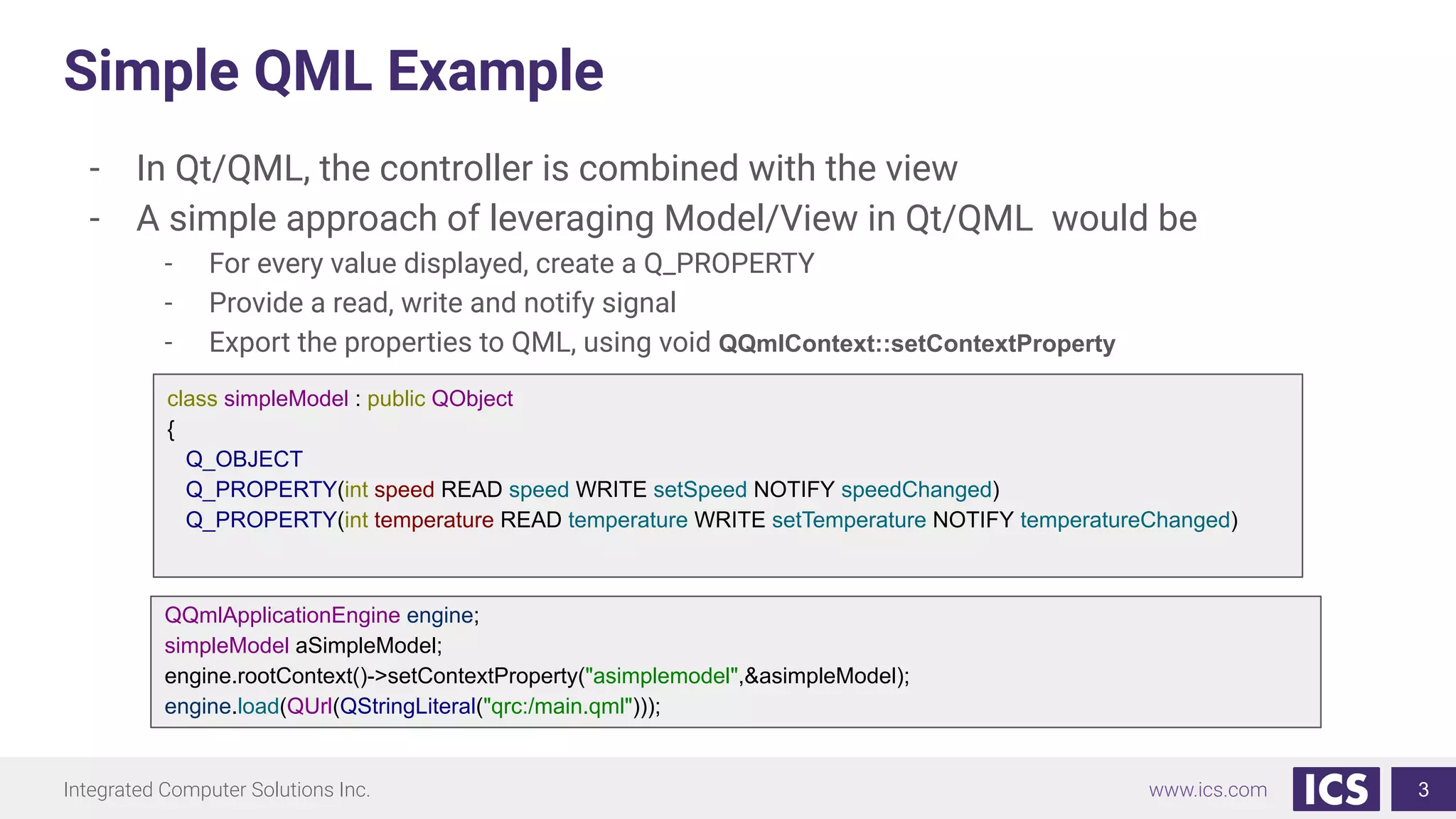
- In Qt/QML, the controller is combined with the view
- A simple approach of leveraging Model/View in Qt/QML would be
- For every value displayed, create a Q_PROPERTY
- Provide a read, write and notify signal
- Export the properties to QML, using void QQmlContext::setContextProperty
3
class simpleModel : public QObject
{
Q_OBJECT
Q_PROPERTY(int speed READ speed WRITE setSpeed NOTIFY speedChanged)
Q_PROPERTY(int temperature READ temperature WRITE setTemperature NOTIFY temperatureChanged)
QQmlApplicationEngine engine;
simpleModel aSimpleModel;
engine.rootContext()->setContextProperty("asimplemodel",&asimpleModel);
engine.load(QUrl(QStringLiteral("qrc:/main.qml")));
Integrated Computer Solutions Inc. www.ics.com
Model View Delegate
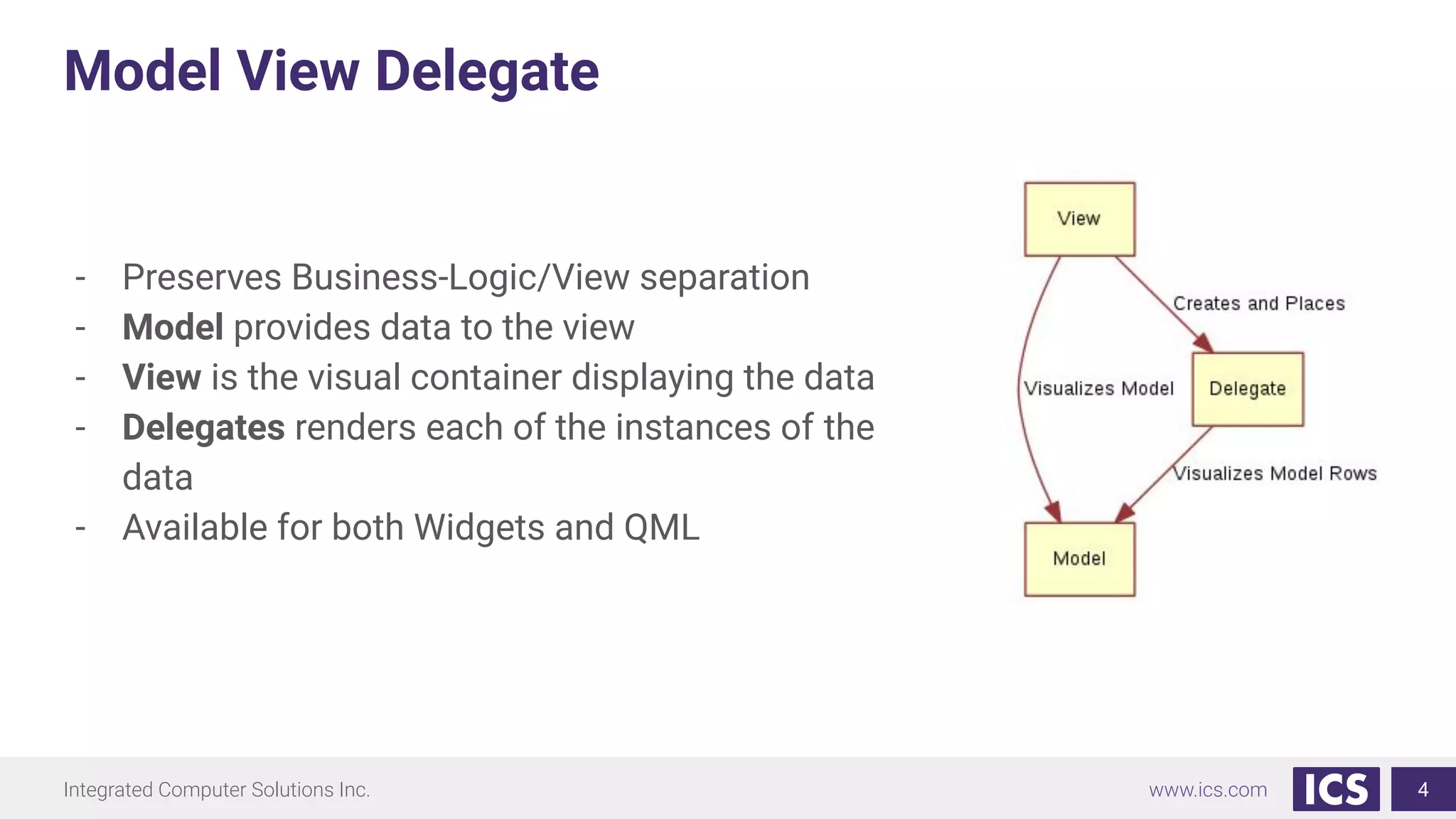
- Preserves Business-Logic/View separation
- Model provides data to the view
- View is the visual container displaying the data
- Delegates renders each of the instances of the
data
- Available for both Widgets and QML
4
Integrated Computer Solutions Inc. www.ics.com
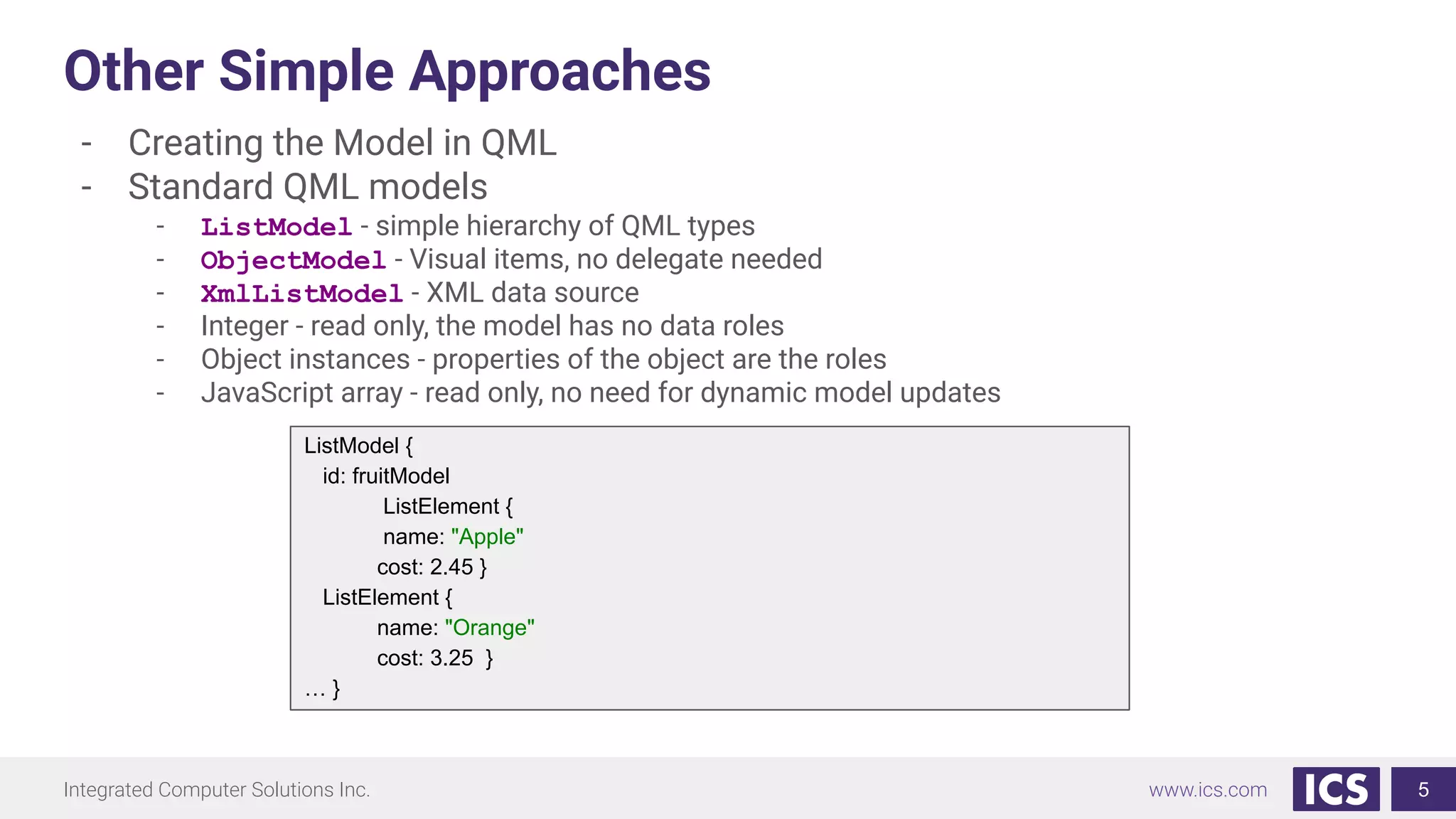
Other Simple Approaches
- Creating the Model in QML
- Standard QML models
- ListModel - simple hierarchy of QML types
- ObjectModel - Visual items, no delegate needed
- XmlListModel - XML data source
- Integer - read only, the model has no data roles
- Object instances - properties of the object are the roles
- JavaScript array - read only, no need for dynamic model updates
5
ListModel {
id: fruitModel
ListElement {
name: "Apple"
cost: 2.45 }
ListElement {
name: "Orange"
cost: 3.25 }
… }
Integrated Computer Solutions Inc. www.ics.com
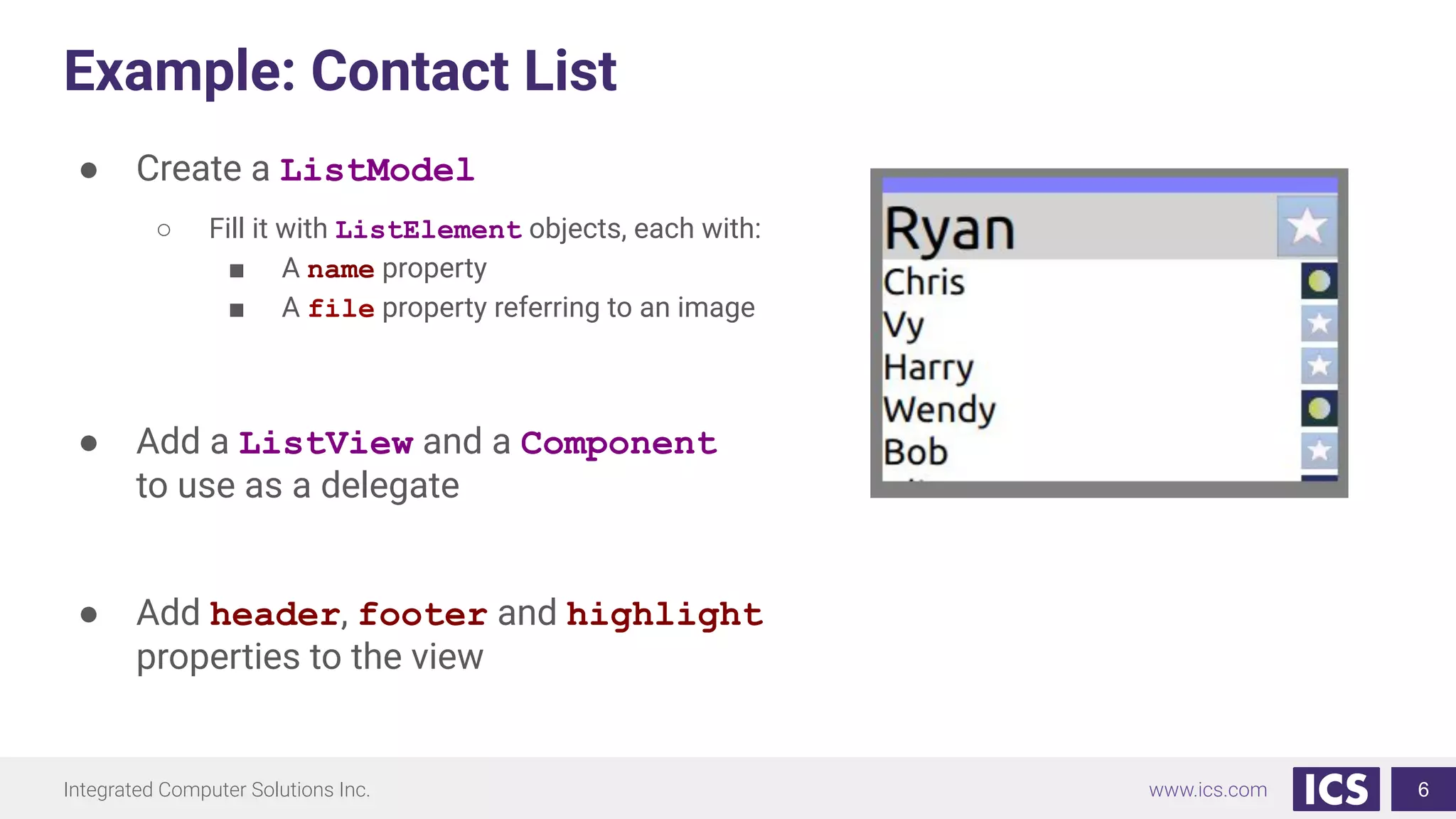
Example: Contact List
● Create a ListModel
○ Fill it with ListElement objects, each with:
■ A name property
■ A file property referring to an image
● Add a ListView and a Component
to use as a delegate
● Add header, footer and highlight
properties to the view
6
Integrated Computer Solutions Inc. www.ics.com
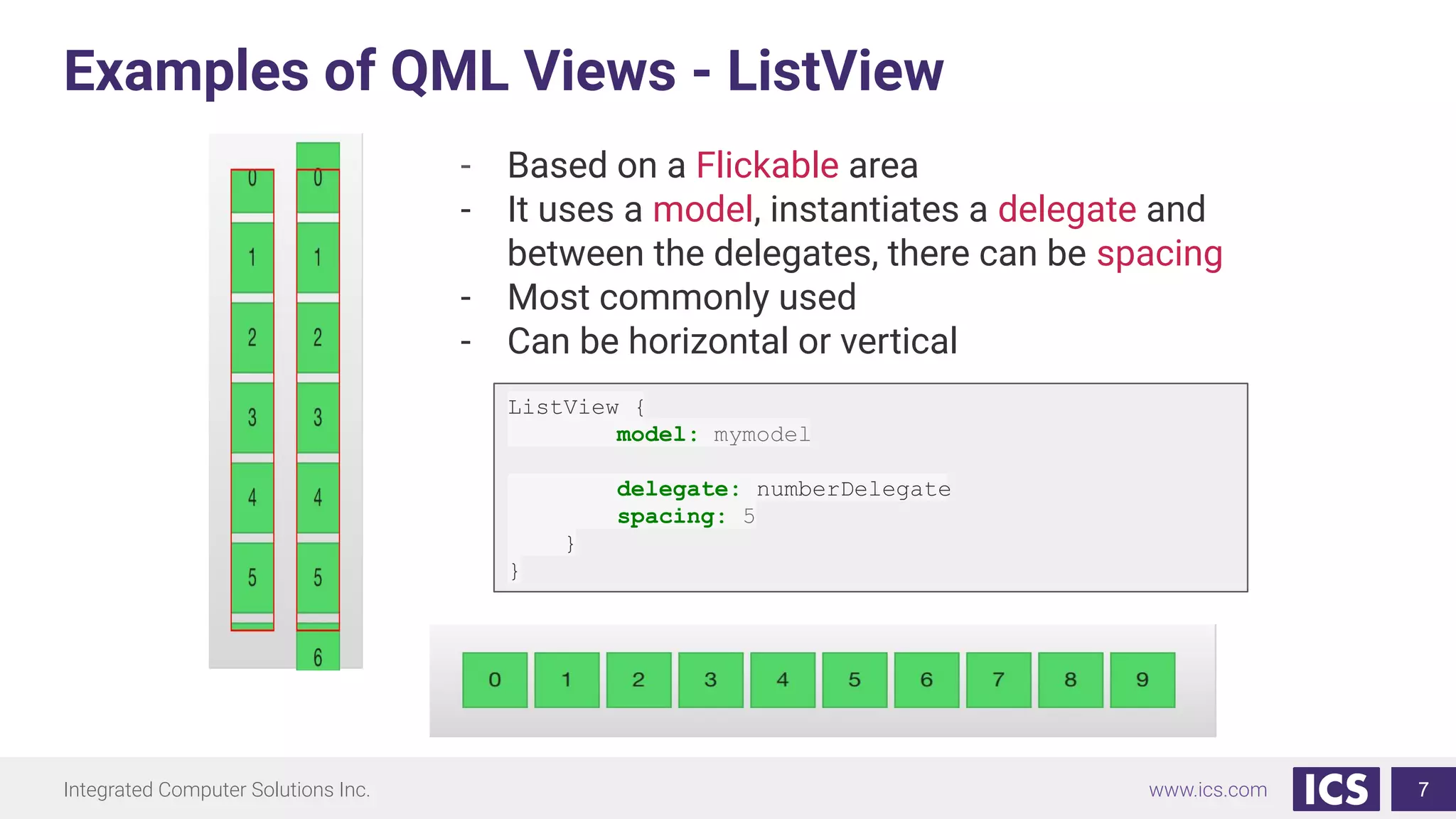
Examples of QML Views - ListView
7
- Based on a Flickable area
- It uses a model, instantiates a delegate and
between the delegates, there can be spacing
- Most commonly used
- Can be horizontal or vertical
ListView {
model: mymodel
delegate: numberDelegate
spacing: 5
}
}
Integrated Computer Solutions Inc. www.ics.com
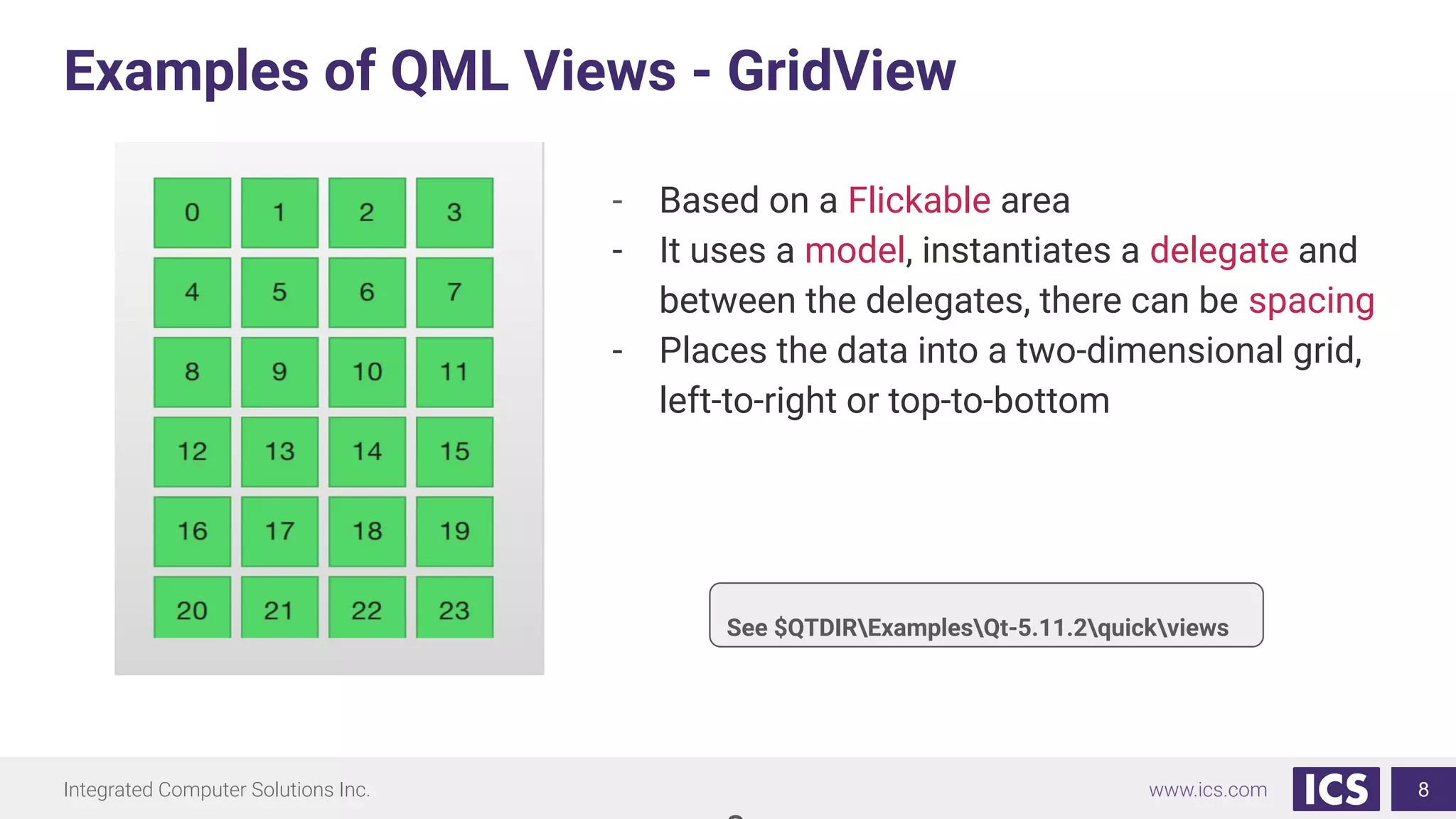
Examples of QML Views - GridView
8
- Based on a Flickable area
- It uses a model, instantiates a delegate and
between the delegates, there can be spacing
- Places the data into a two-dimensional grid,
left-to-right or top-to-bottom
See $QTDIRExamplesQt-5.11.2quickviews
Integrated Computer Solutions Inc. www.ics.com
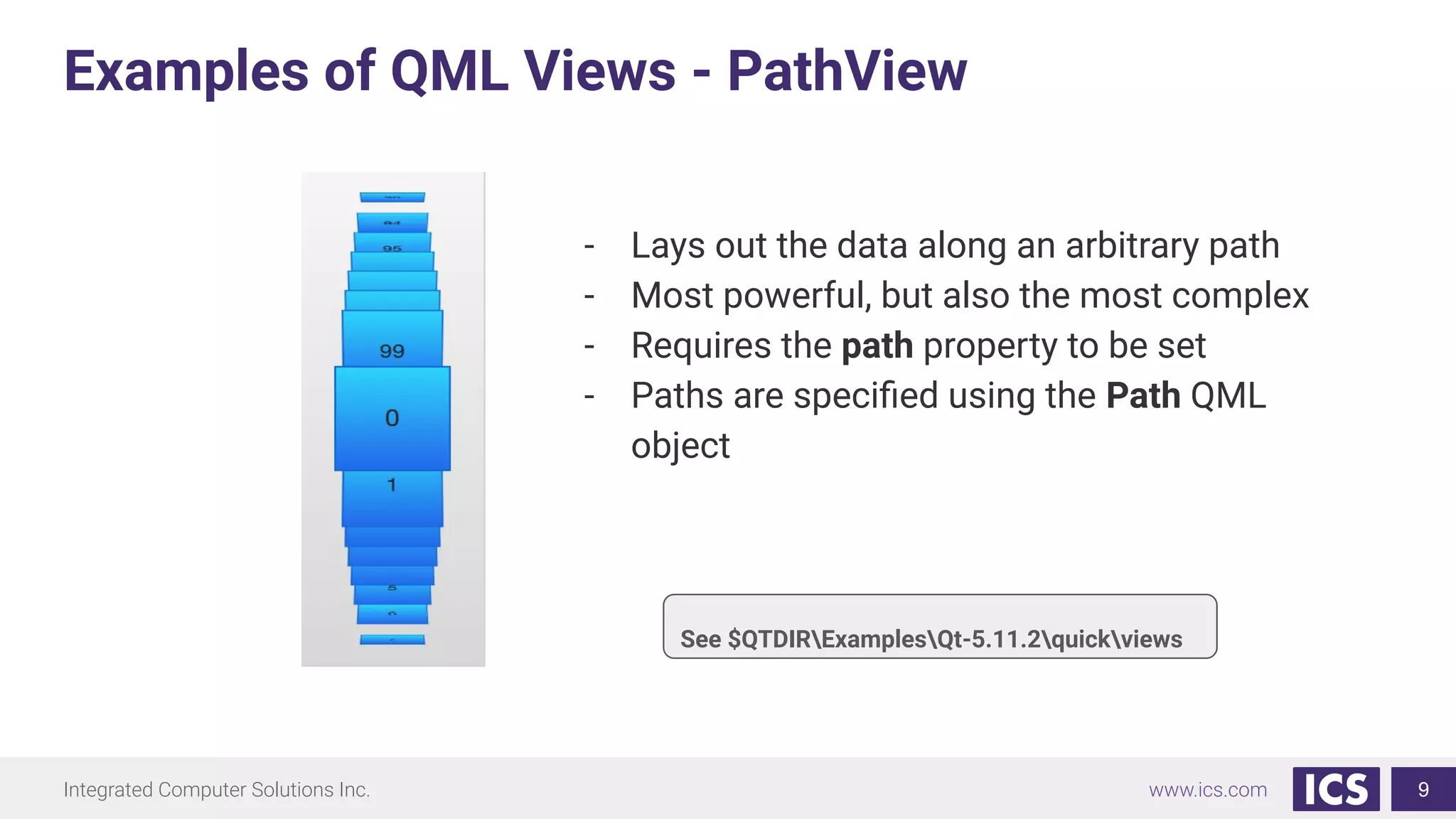
Examples of QML Views - PathView
9
- Lays out the data along an arbitrary path
- Most powerful, but also the most complex
- Requires the path property to be set
- Paths are specified using the Path QML
object
See $QTDIRExamplesQt-5.11.2quickviews
Integrated Computer Solutions Inc. www.ics.com
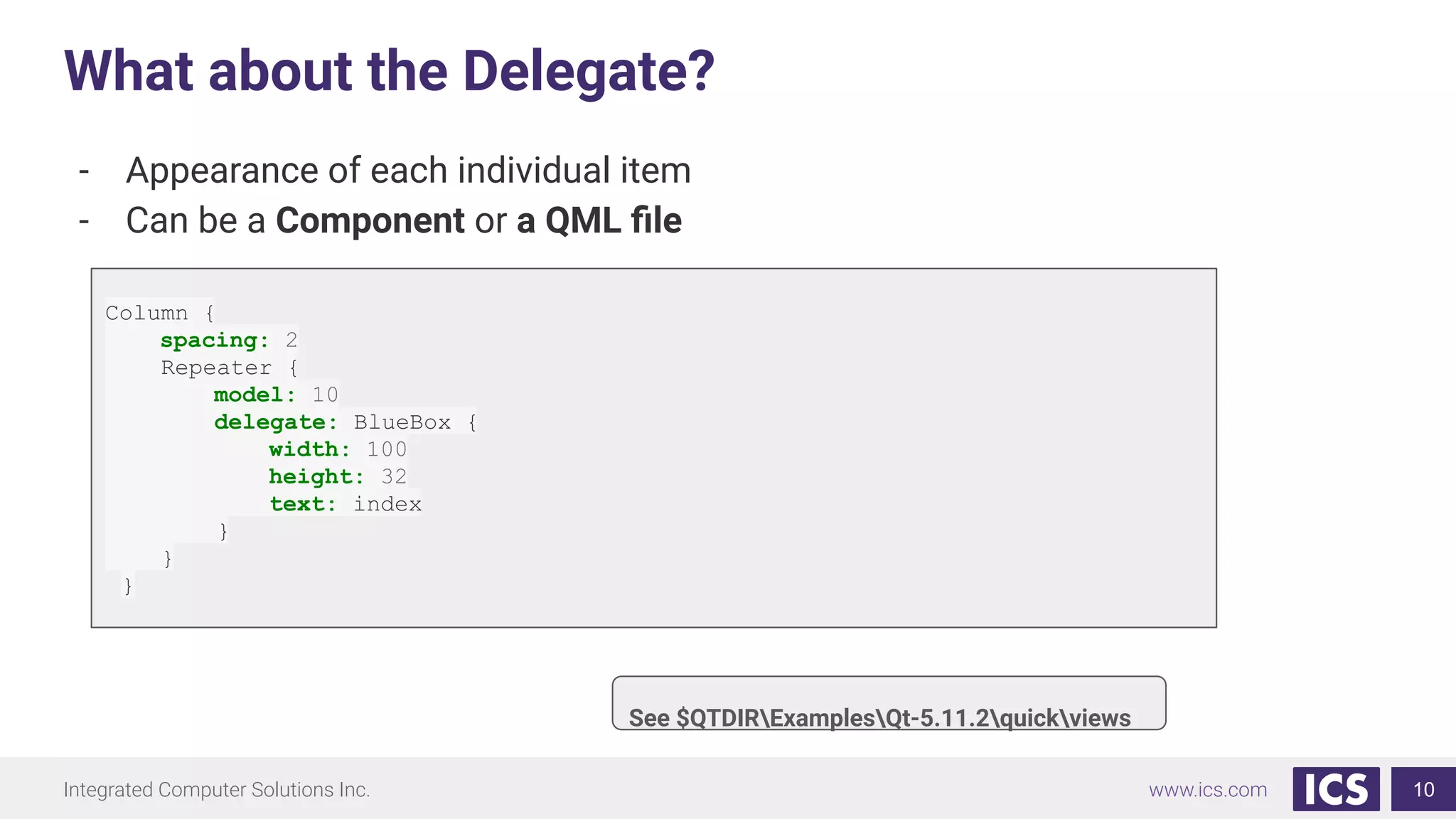
What about the Delegate?
10
- Appearance of each individual item
- Can be a Component or a QML file
See $QTDIRExamplesQt-5.11.2quickviews
Column {
spacing: 2
Repeater {
model: 10
delegate: BlueBox {
width: 100
height: 32
text: index
}
}
}
Integrated Computer Solutions Inc. www.ics.com
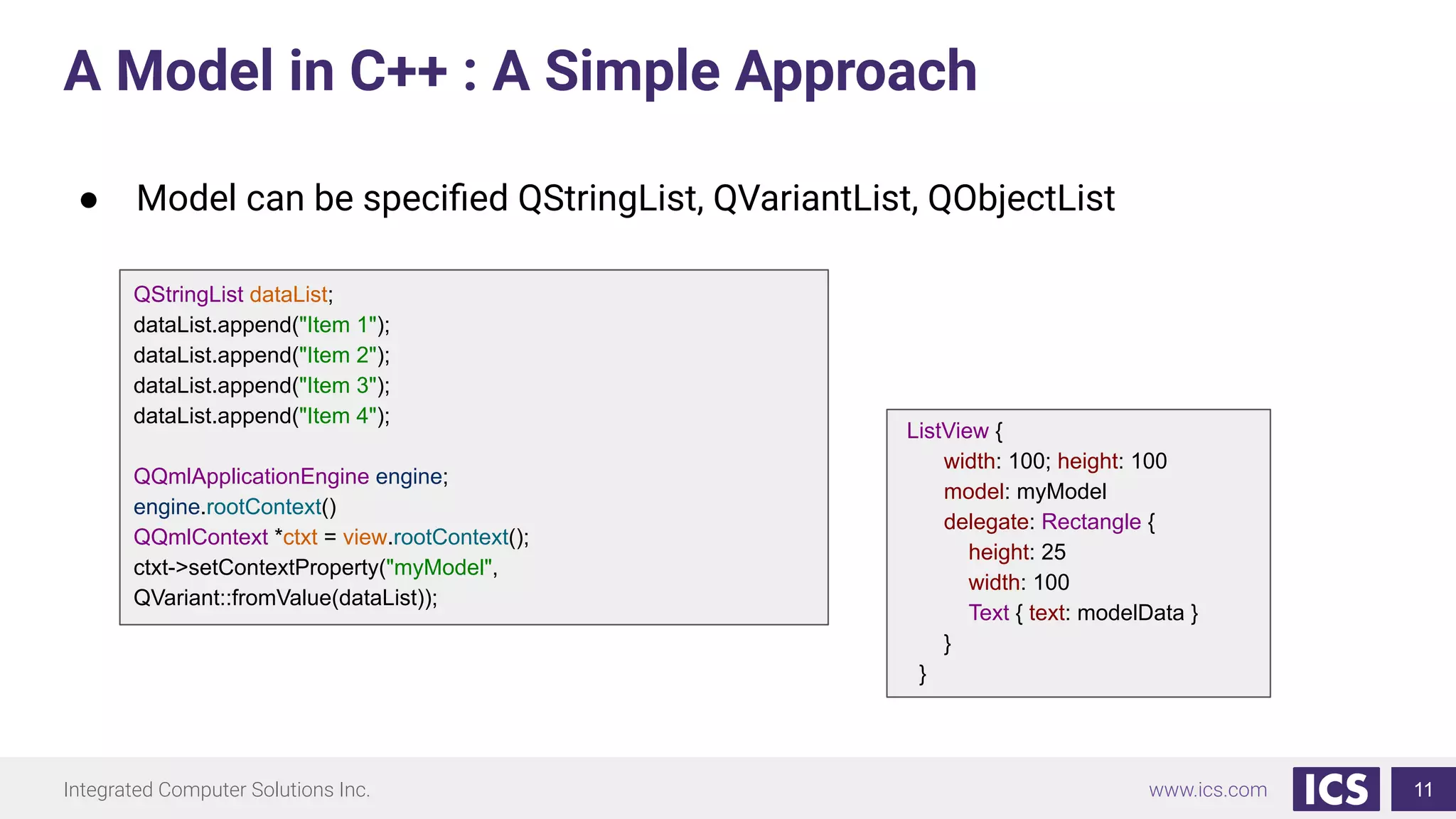
A Model in C++ : A Simple Approach
11
QStringList dataList;
dataList.append("Item 1");
dataList.append("Item 2");
dataList.append("Item 3");
dataList.append("Item 4");
QQmlApplicationEngine engine;
engine.rootContext()
QQmlContext *ctxt = view.rootContext();
ctxt->setContextProperty("myModel",
QVariant::fromValue(dataList));
ListView {
width: 100; height: 100
model: myModel
delegate: Rectangle {
height: 25
width: 100
Text { text: modelData }
}
}
● Model can be specified QStringList, QVariantList, QObjectList
Integrated Computer Solutions Inc. www.ics.com
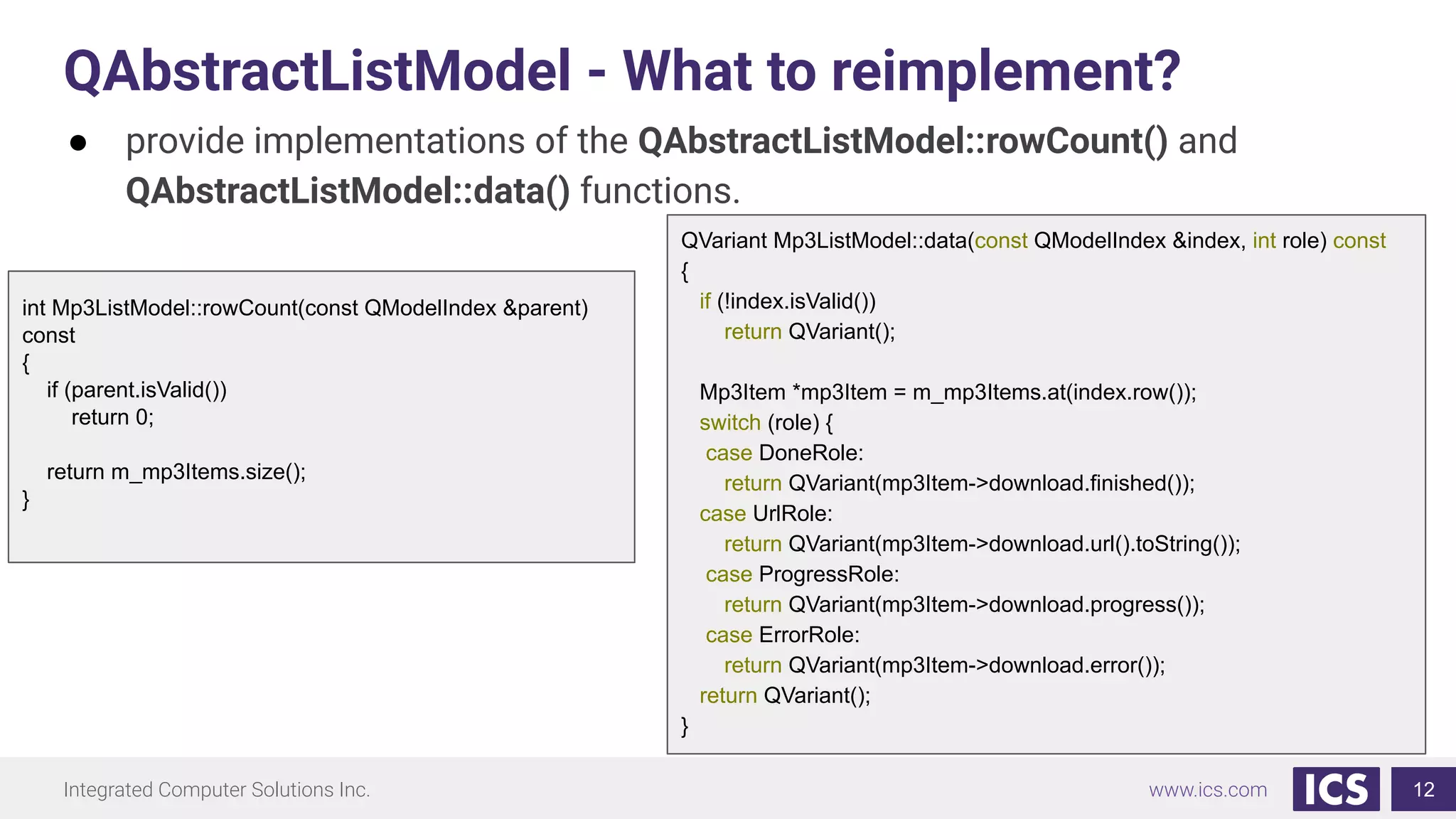
QAbstractListModel - What to reimplement?
12
● provide implementations of the QAbstractListModel::rowCount() and
QAbstractListModel::data() functions.
QVariant Mp3ListModel::data(const QModelIndex &index, int role) const
{
if (!index.isValid())
return QVariant();
Mp3Item *mp3Item = m_mp3Items.at(index.row());
switch (role) {
case DoneRole:
return QVariant(mp3Item->download.finished());
case UrlRole:
return QVariant(mp3Item->download.url().toString());
case ProgressRole:
return QVariant(mp3Item->download.progress());
case ErrorRole:
return QVariant(mp3Item->download.error());
return QVariant();
}
int Mp3ListModel::rowCount(const QModelIndex &parent)
const
{
if (parent.isValid())
return 0;
return m_mp3Items.size();
}
Integrated Computer Solutions Inc. www.ics.com
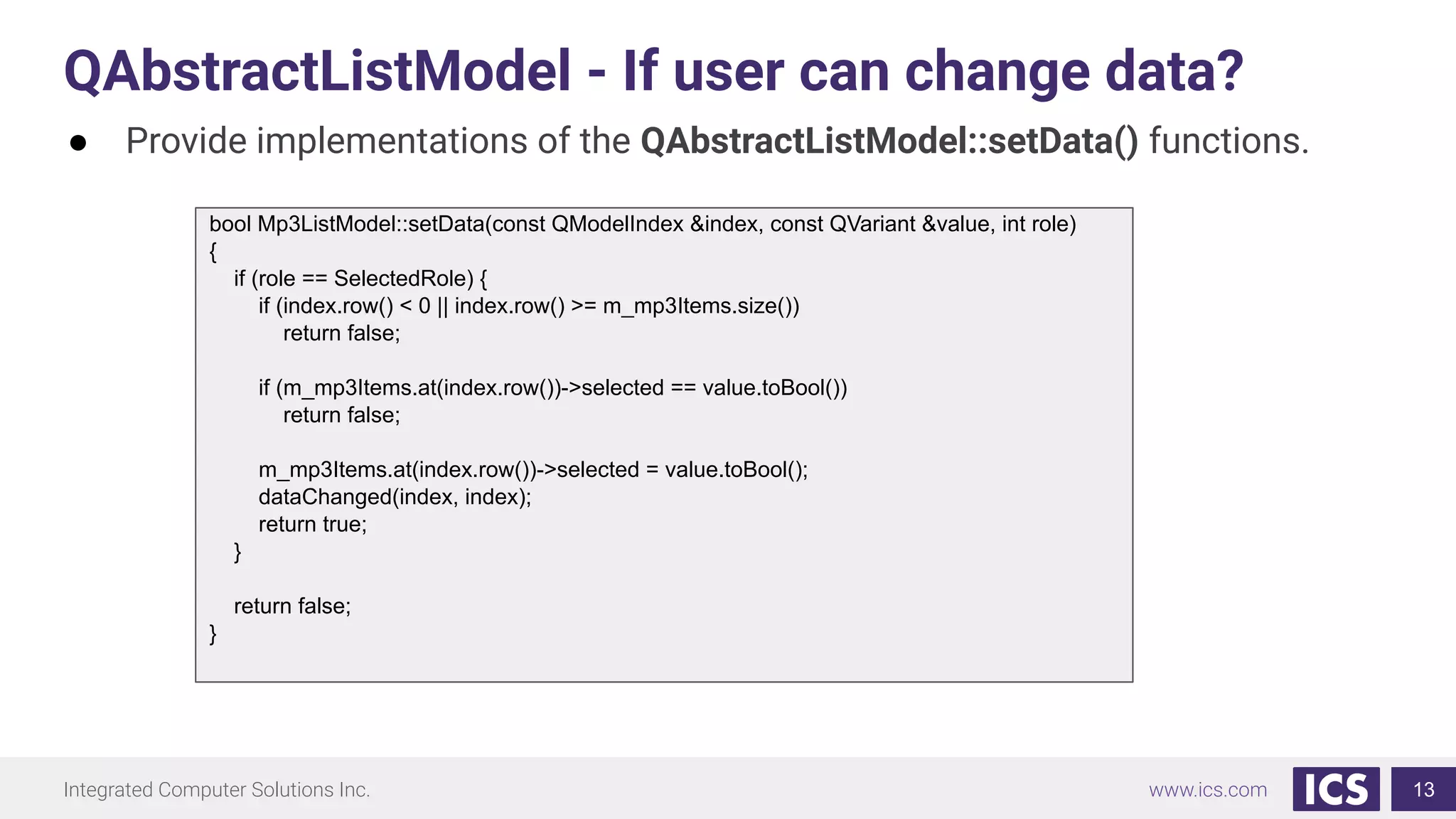
QAbstractListModel - If user can change data?
13
● Provide implementations of the QAbstractListModel::setData() functions.
bool Mp3ListModel::setData(const QModelIndex &index, const QVariant &value, int role)
{
if (role == SelectedRole) {
if (index.row() < 0 || index.row() >= m_mp3Items.size())
return false;
if (m_mp3Items.at(index.row())->selected == value.toBool())
return false;
m_mp3Items.at(index.row())->selected = value.toBool();
dataChanged(index, index);
return true;
}
return false;
}
Integrated Computer Solutions Inc. www.ics.com
QAbstractListModel - A Note on Roles
14
● Along with the QModelIndex, a role is simply an additional selector to
access data in your model.
class Mp3ListModel : public QAbstractListModel
{
Q_OBJECT
public:
explicit Mp3ListModel(QObject *parent = nullptr)
noexcept;
enum {
SelectedRole = Qt::UserRole,
DoneRole,
UrlRole,
... };
QHash<int, QByteArray>
Mp3ListModel::roleNames() const
{
QHash<int, QByteArray> roles;
roles[SelectedRole] = "selected";
roles[DoneRole] = "done";
roles[ProgressRole] = "progress";
roles[UrlRole] = "url";
roles[ErrorRole] = "error";
return roles;
}
ListView {
….
delegate: RowLayout {
spacing: 10
CheckBox {
checked: model.selected
onClicked: model.selected = checked
}
Label {
Layout.fillWidth: true
text: model.error ? qsTr("Error on
Download") : model.url
elide: Text.ElideLeft
...
}
Integrated Computer Solutions Inc. www.ics.com
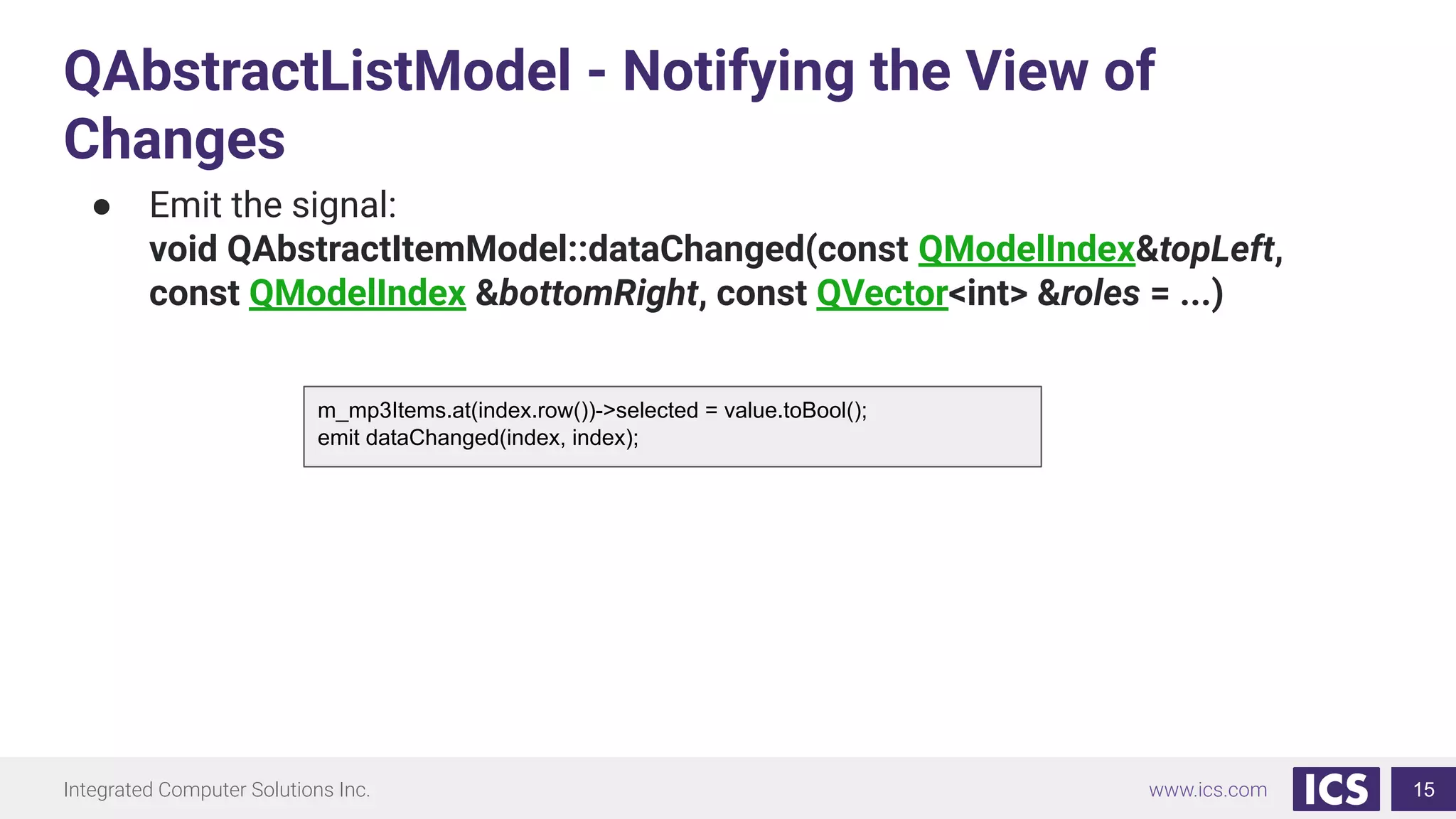
QAbstractListModel - Notifying the View of
Changes
15
● Emit the signal:
void QAbstractItemModel::dataChanged(const QModelIndex&topLeft,
const QModelIndex &bottomRight, const QVector<int> &roles = ...)
m_mp3Items.at(index.row())->selected = value.toBool();
emit dataChanged(index, index);
Integrated Computer Solutions Inc. www.ics.com
Hooking the Model up to the View
16
#include <mp3listmodel>
int main(int argc, char *argv[])
{
QCoreApplication::setAttribute(Qt::AA_DisableHighDpiScaling);
QQmlApplicationEngine engine;
Mp3ListModel mp3ListModel(downloadDirUrl);
engine.rootContext()->setContextProperty("mp3ListModel"), &mp3ListModel);
qmlRegisterUncreatableType<Mp3ListModel>("DownloadManager", 1, 0,
"Mp3ListModel", "Mp3ListModel should not be created in QML");
engine.load("qrc:/main.qml"); // Load blocks
return app.exec();
}
ListView {
anchors.fill: parent
model: mp3ListModel
delegate: Mp3Item {
width: parent.width
}
}
Integrated Computer Solutions Inc. www.ics.com
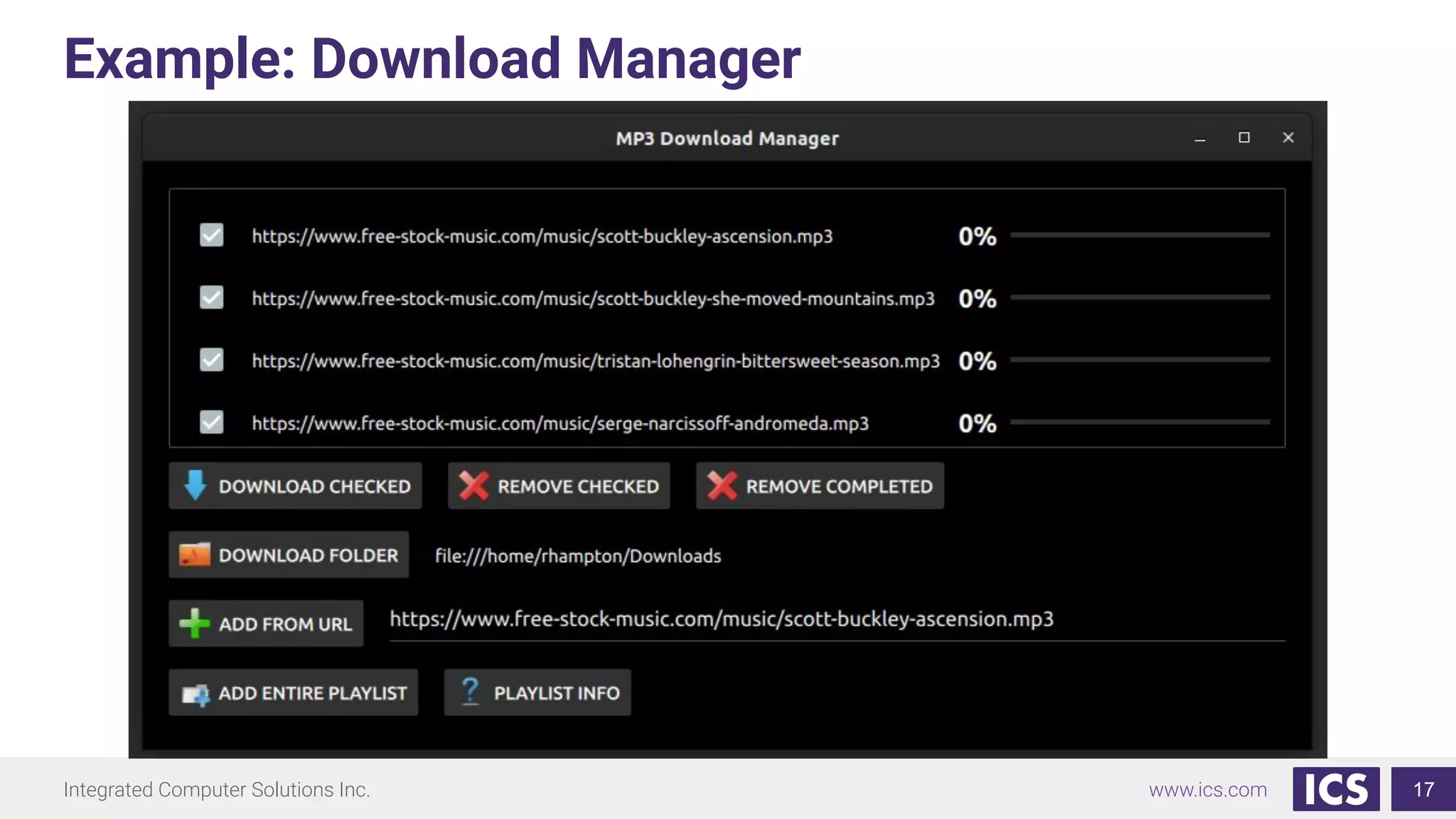
Example: Download Manager
17
Integrated Computer Solutions Inc. www.ics.com
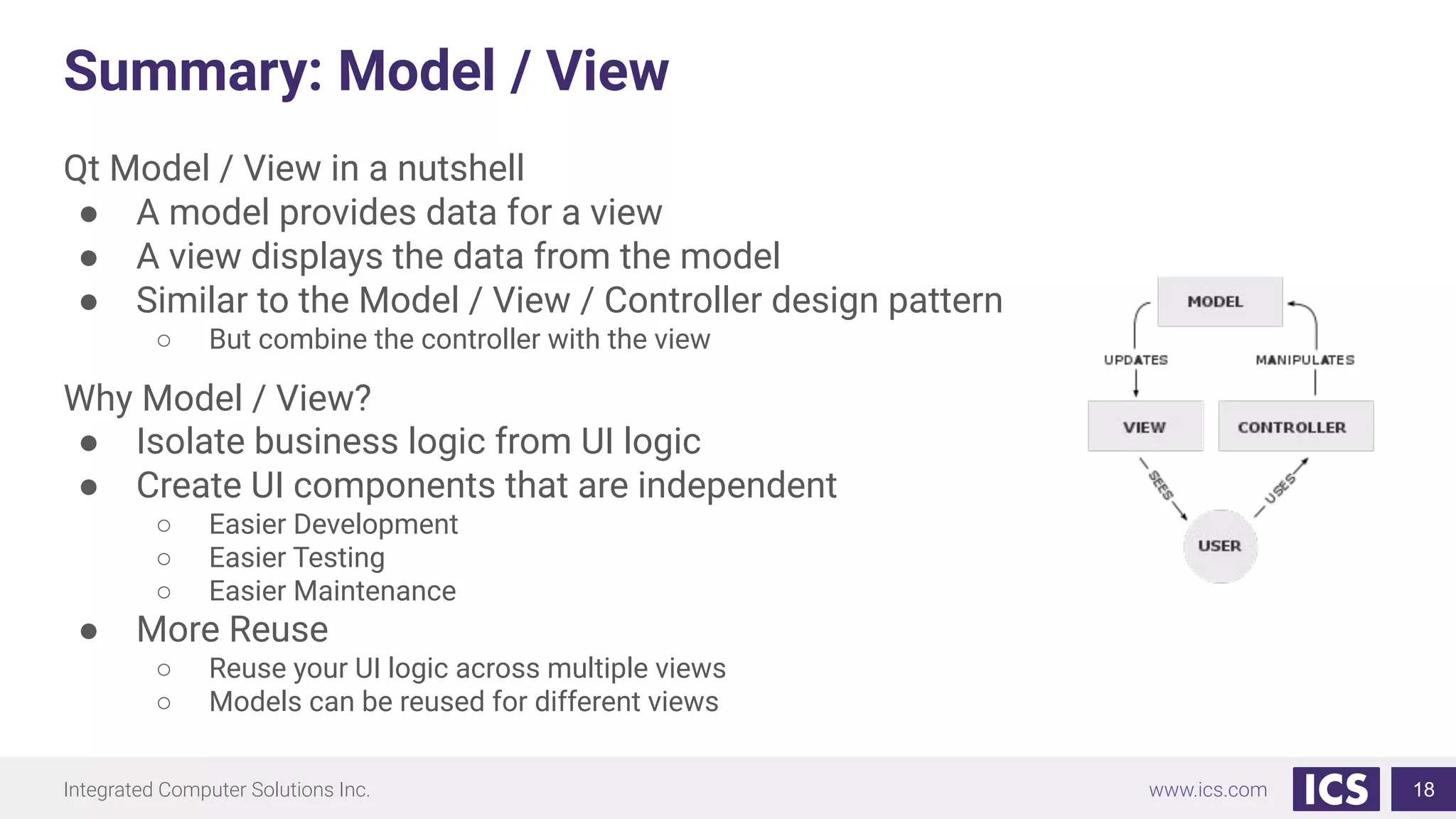
Summary: Model / View
Qt Model / View in a nutshell
● A model provides data for a view
● A view displays the data from the model
● Similar to the Model / View / Controller design pattern
○ But combine the controller with the view
Why Model / View?
● Isolate business logic from UI logic
● Create UI components that are independent
○ Easier Development
○ Easier Testing
○ Easier Maintenance
● More Reuse
○ Reuse your UI logic across multiple views
○ Models can be reused for different views
18
Integrated Computer Solutions Inc. www.ics.com
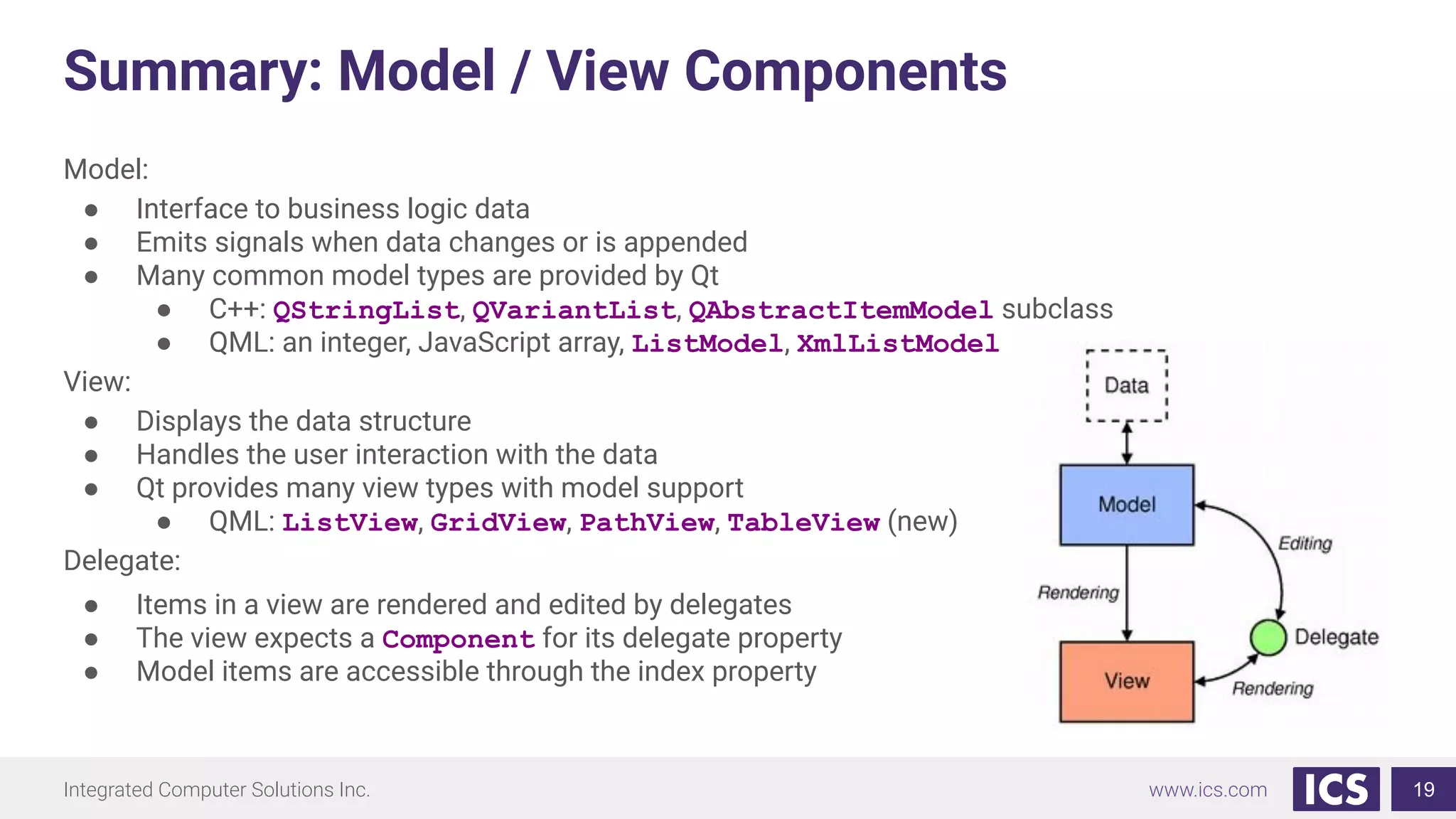
Summary: Model / View Components
Model:
● Interface to business logic data
● Emits signals when data changes or is appended
● Many common model types are provided by Qt
● C++: QStringList, QVariantList, QAbstractItemModel subclass
● QML: an integer, JavaScript array, ListModel, XmlListModel
View:
● Displays the data structure
● Handles the user interaction with the data
● Qt provides many view types with model support
● QML: ListView, GridView, PathView, TableView (new)
Delegate:
● Items in a view are rendered and edited by delegates
● The view expects a Component for its delegate property
● Model items are accessible through the index property
19
Integrated Computer Solutions Inc. www.ics.com
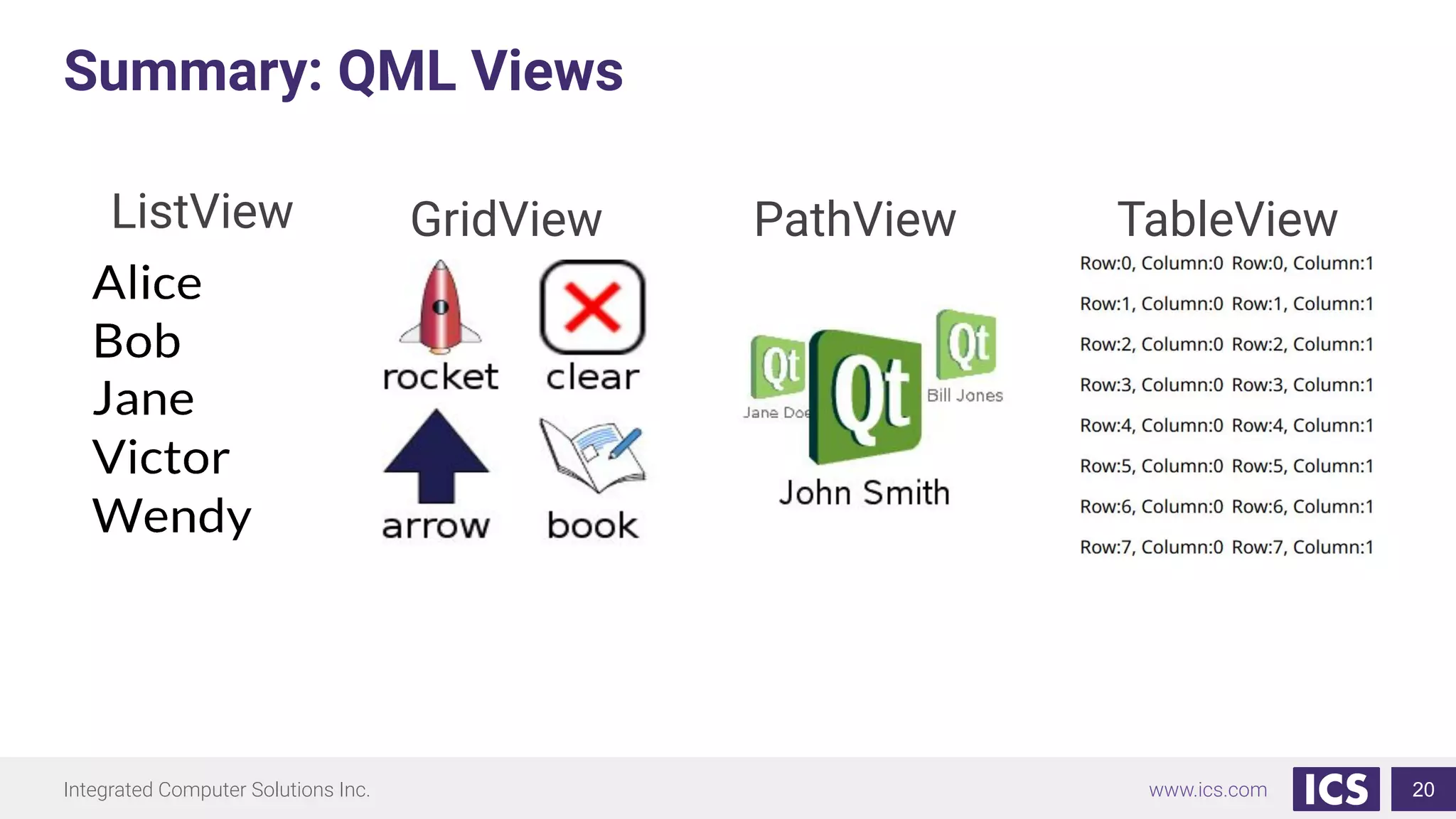
Summary: QML Views
20
ListView GridView TableViewPathView
Integrated Computer Solutions Inc. www.ics.com
Summary: Model Types
21
● Standard QML models
○ ListModel - simple hierarchy of QML types
○ ObjectModel - Visual items, no delegate needed
○ XmlListModel - XML data source
○ Integer - read only, the model has no data roles
○ Object instances - properties of the object are the roles
○ JavaScript array - read only, no need for dynamic model updates
● C++ models (must be implemented in C++ before use)
○ More complex but more fine-tuned control over data access
○ QStringList, QVariantList, QObjectList, QAbstractItemModel (and subclasses)
○ Subclass QAbstractItemModel for complex data-sets
Integrated Computer Solutions Inc. www.ics.com
References
● Qt 5 E-book
● See https://qmlbook.github.io/ch07-modelview/modelview.html
● C++ GUI Programming with Qt 4 (see Model/View chapter)
● Examples: https://gitlab.com/RyanHampton/qml-model-view-framework
Don’t know where to start? Go read the docs!
● Hint - start here: https://doc.qt.io/qt-5/qabstractlistmodel.html
22
Integrated Computer Solutions Inc. www.ics.comIntegrated Computer Solutions Inc.
Thank You!
● https://www.ics.com/blog/exploring-model-view-design-qt-quick
● ICS provides QML training for more in-depth learning
23
Model / View with QML Webinar: The End

In-Depth Model/View with QML

  • 1.
    Integrated Computer SolutionsInc. www.ics.com Qt Model / View with QML July 25th Webinar With Chris Probst & Ryan Hampton Visit us at http://www.ics.com Produced by Integrated Computer Solutions Material based on Qt 5.12 1
  • 2.
    Integrated Computer SolutionsInc. www.ics.com What is MVC? - Stands for Model/View/Controller - Architectural Design Pattern used for developing user interfaces - Separates data interactions into three separate parts - Allows for User Interface being independently developed from business logic. In general terms: - Model manages the data of the user interface - View displays the model - The controller responds to the user input and manages the model accordingly 2
  • 3.
    Integrated Computer SolutionsInc. www.ics.com Simple QML Example - In Qt/QML, the controller is combined with the view - A simple approach of leveraging Model/View in Qt/QML would be - For every value displayed, create a Q_PROPERTY - Provide a read, write and notify signal - Export the properties to QML, using void QQmlContext::setContextProperty 3 class simpleModel : public QObject { Q_OBJECT Q_PROPERTY(int speed READ speed WRITE setSpeed NOTIFY speedChanged) Q_PROPERTY(int temperature READ temperature WRITE setTemperature NOTIFY temperatureChanged) QQmlApplicationEngine engine; simpleModel aSimpleModel; engine.rootContext()->setContextProperty("asimplemodel",&asimpleModel); engine.load(QUrl(QStringLiteral("qrc:/main.qml")));
  • 4.
    Integrated Computer SolutionsInc. www.ics.com Model View Delegate - Preserves Business-Logic/View separation - Model provides data to the view - View is the visual container displaying the data - Delegates renders each of the instances of the data - Available for both Widgets and QML 4
  • 5.
    Integrated Computer SolutionsInc. www.ics.com Other Simple Approaches - Creating the Model in QML - Standard QML models - ListModel - simple hierarchy of QML types - ObjectModel - Visual items, no delegate needed - XmlListModel - XML data source - Integer - read only, the model has no data roles - Object instances - properties of the object are the roles - JavaScript array - read only, no need for dynamic model updates 5 ListModel { id: fruitModel ListElement { name: "Apple" cost: 2.45 } ListElement { name: "Orange" cost: 3.25 } … }
  • 6.
    Integrated Computer SolutionsInc. www.ics.com Example: Contact List ● Create a ListModel ○ Fill it with ListElement objects, each with: ■ A name property ■ A file property referring to an image ● Add a ListView and a Component to use as a delegate ● Add header, footer and highlight properties to the view 6
  • 7.
    Integrated Computer SolutionsInc. www.ics.com Examples of QML Views - ListView 7 - Based on a Flickable area - It uses a model, instantiates a delegate and between the delegates, there can be spacing - Most commonly used - Can be horizontal or vertical ListView { model: mymodel delegate: numberDelegate spacing: 5 } }
  • 8.
    Integrated Computer SolutionsInc. www.ics.com Examples of QML Views - GridView 8 - Based on a Flickable area - It uses a model, instantiates a delegate and between the delegates, there can be spacing - Places the data into a two-dimensional grid, left-to-right or top-to-bottom See $QTDIRExamplesQt-5.11.2quickviews
  • 9.
    Integrated Computer SolutionsInc. www.ics.com Examples of QML Views - PathView 9 - Lays out the data along an arbitrary path - Most powerful, but also the most complex - Requires the path property to be set - Paths are specified using the Path QML object See $QTDIRExamplesQt-5.11.2quickviews
  • 10.
    Integrated Computer SolutionsInc. www.ics.com What about the Delegate? 10 - Appearance of each individual item - Can be a Component or a QML file See $QTDIRExamplesQt-5.11.2quickviews Column { spacing: 2 Repeater { model: 10 delegate: BlueBox { width: 100 height: 32 text: index } } }
  • 11.
    Integrated Computer SolutionsInc. www.ics.com A Model in C++ : A Simple Approach 11 QStringList dataList; dataList.append("Item 1"); dataList.append("Item 2"); dataList.append("Item 3"); dataList.append("Item 4"); QQmlApplicationEngine engine; engine.rootContext() QQmlContext *ctxt = view.rootContext(); ctxt->setContextProperty("myModel", QVariant::fromValue(dataList)); ListView { width: 100; height: 100 model: myModel delegate: Rectangle { height: 25 width: 100 Text { text: modelData } } } ● Model can be specified QStringList, QVariantList, QObjectList
  • 12.
    Integrated Computer SolutionsInc. www.ics.com QAbstractListModel - What to reimplement? 12 ● provide implementations of the QAbstractListModel::rowCount() and QAbstractListModel::data() functions. QVariant Mp3ListModel::data(const QModelIndex &index, int role) const { if (!index.isValid()) return QVariant(); Mp3Item *mp3Item = m_mp3Items.at(index.row()); switch (role) { case DoneRole: return QVariant(mp3Item->download.finished()); case UrlRole: return QVariant(mp3Item->download.url().toString()); case ProgressRole: return QVariant(mp3Item->download.progress()); case ErrorRole: return QVariant(mp3Item->download.error()); return QVariant(); } int Mp3ListModel::rowCount(const QModelIndex &parent) const { if (parent.isValid()) return 0; return m_mp3Items.size(); }
  • 13.
    Integrated Computer SolutionsInc. www.ics.com QAbstractListModel - If user can change data? 13 ● Provide implementations of the QAbstractListModel::setData() functions. bool Mp3ListModel::setData(const QModelIndex &index, const QVariant &value, int role) { if (role == SelectedRole) { if (index.row() < 0 || index.row() >= m_mp3Items.size()) return false; if (m_mp3Items.at(index.row())->selected == value.toBool()) return false; m_mp3Items.at(index.row())->selected = value.toBool(); dataChanged(index, index); return true; } return false; }
  • 14.
    Integrated Computer SolutionsInc. www.ics.com QAbstractListModel - A Note on Roles 14 ● Along with the QModelIndex, a role is simply an additional selector to access data in your model. class Mp3ListModel : public QAbstractListModel { Q_OBJECT public: explicit Mp3ListModel(QObject *parent = nullptr) noexcept; enum { SelectedRole = Qt::UserRole, DoneRole, UrlRole, ... }; QHash<int, QByteArray> Mp3ListModel::roleNames() const { QHash<int, QByteArray> roles; roles[SelectedRole] = "selected"; roles[DoneRole] = "done"; roles[ProgressRole] = "progress"; roles[UrlRole] = "url"; roles[ErrorRole] = "error"; return roles; } ListView { …. delegate: RowLayout { spacing: 10 CheckBox { checked: model.selected onClicked: model.selected = checked } Label { Layout.fillWidth: true text: model.error ? qsTr("Error on Download") : model.url elide: Text.ElideLeft ... }
  • 15.
    Integrated Computer SolutionsInc. www.ics.com QAbstractListModel - Notifying the View of Changes 15 ● Emit the signal: void QAbstractItemModel::dataChanged(const QModelIndex&topLeft, const QModelIndex &bottomRight, const QVector<int> &roles = ...) m_mp3Items.at(index.row())->selected = value.toBool(); emit dataChanged(index, index);
  • 16.
    Integrated Computer SolutionsInc. www.ics.com Hooking the Model up to the View 16 #include <mp3listmodel> int main(int argc, char *argv[]) { QCoreApplication::setAttribute(Qt::AA_DisableHighDpiScaling); QQmlApplicationEngine engine; Mp3ListModel mp3ListModel(downloadDirUrl); engine.rootContext()->setContextProperty("mp3ListModel"), &mp3ListModel); qmlRegisterUncreatableType<Mp3ListModel>("DownloadManager", 1, 0, "Mp3ListModel", "Mp3ListModel should not be created in QML"); engine.load("qrc:/main.qml"); // Load blocks return app.exec(); } ListView { anchors.fill: parent model: mp3ListModel delegate: Mp3Item { width: parent.width } }
  • 17.
    Integrated Computer SolutionsInc. www.ics.com Example: Download Manager 17
  • 18.
    Integrated Computer SolutionsInc. www.ics.com Summary: Model / View Qt Model / View in a nutshell ● A model provides data for a view ● A view displays the data from the model ● Similar to the Model / View / Controller design pattern ○ But combine the controller with the view Why Model / View? ● Isolate business logic from UI logic ● Create UI components that are independent ○ Easier Development ○ Easier Testing ○ Easier Maintenance ● More Reuse ○ Reuse your UI logic across multiple views ○ Models can be reused for different views 18
  • 19.
    Integrated Computer SolutionsInc. www.ics.com Summary: Model / View Components Model: ● Interface to business logic data ● Emits signals when data changes or is appended ● Many common model types are provided by Qt ● C++: QStringList, QVariantList, QAbstractItemModel subclass ● QML: an integer, JavaScript array, ListModel, XmlListModel View: ● Displays the data structure ● Handles the user interaction with the data ● Qt provides many view types with model support ● QML: ListView, GridView, PathView, TableView (new) Delegate: ● Items in a view are rendered and edited by delegates ● The view expects a Component for its delegate property ● Model items are accessible through the index property 19
  • 20.
    Integrated Computer SolutionsInc. www.ics.com Summary: QML Views 20 ListView GridView TableViewPathView
  • 21.
    Integrated Computer SolutionsInc. www.ics.com Summary: Model Types 21 ● Standard QML models ○ ListModel - simple hierarchy of QML types ○ ObjectModel - Visual items, no delegate needed ○ XmlListModel - XML data source ○ Integer - read only, the model has no data roles ○ Object instances - properties of the object are the roles ○ JavaScript array - read only, no need for dynamic model updates ● C++ models (must be implemented in C++ before use) ○ More complex but more fine-tuned control over data access ○ QStringList, QVariantList, QObjectList, QAbstractItemModel (and subclasses) ○ Subclass QAbstractItemModel for complex data-sets
  • 22.
    Integrated Computer SolutionsInc. www.ics.com References ● Qt 5 E-book ● See https://qmlbook.github.io/ch07-modelview/modelview.html ● C++ GUI Programming with Qt 4 (see Model/View chapter) ● Examples: https://gitlab.com/RyanHampton/qml-model-view-framework Don’t know where to start? Go read the docs! ● Hint - start here: https://doc.qt.io/qt-5/qabstractlistmodel.html 22
  • 23.
    Integrated Computer SolutionsInc. www.ics.comIntegrated Computer Solutions Inc. Thank You! ● https://www.ics.com/blog/exploring-model-view-design-qt-quick ● ICS provides QML training for more in-depth learning 23 Model / View with QML Webinar: The End