Development of Cross
Platform Apps using
Qyoto and Qt
Jeff Alstadt
ABOUT CENTARE
         fast. forward. thinking.

 At Centare, every team member:
   Thinks strategically
   Solves complex problems
   Creates scalable solutions
   Is passionate about what we do
OF NOTE
 Agile / ALM / Mobile / Cloud
 Microsoft
     2011 Partner of the Year Finalist
     ALM Gold Competency
     Azure Circle
 Apple / Android / Windows Phone
     iOS, Java, C#, Silverlight/XAML
     Scrum.org Partner
     Certified Professional Scrum Trainers
Good Morning
Why Qt and why Qyoto
AGENDA

         GETTING STARTED WITH Qt
         and Qyoto
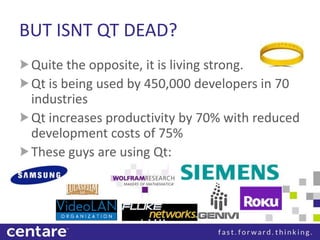
BUT ISNT QT DEAD?
 Quite the opposite, it is living strong.
 Qt is being used by 450,000 developers in 70
 industries
 Qt increases productivity by 70% with reduced
 development costs of 75%
 These guys are using Qt:
WHAT IS QT
  What is Qt?
  How is Qt Cross-Platform?
  How do Qyoto and Qt work
  together?
  How can I use Qyoto in my apps?
WHAT IS QT?
 Qt is a cross-platform UI framework that was
 developed by Trolltech, later acquired by Nokia
 for creating UIs that can run on the Mac, Linux
 and Windows platform
 Qt utilizes a moc compiler known as the Meta
 Object Compiler with several macros to provide
 the Qt specifics of the Qt language
THE FOUNDERS OF QT
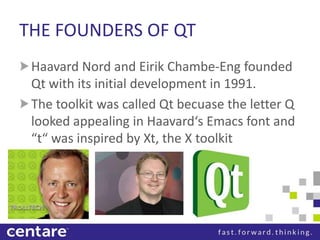
 Haavard Nord and Eirik Chambe-Eng founded
 Qt with its initial development in 1991.
 The toolkit was called Qt becuase the letter Q
 looked appealing in Haavard‘s Emacs font and
 “t“ was inspired by Xt, the X toolkit
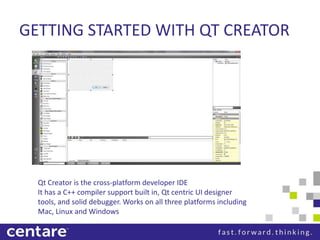
GETTING STARTED WITH QT CREATOR


  Qt Creator is the cross-platform developer IDE
  It has a C++ compiler support built in, Qt centric UI designer
  tools, and solid debugger. Works on all three platforms including
  Mac, Linux and Windows
WHAT IS QYOTO?
 Qyoto is a C# language binding for Qt.
 It is not officially supported by Nokia or Digia
 It is an open source community driven project
 with a lot of the work coming from KDE
 contributors
 The top contributors of Kyoto are Arno Rehn, Ian
 Moore, and Dimitri Dobrev
CONCEPTS OF QT DESIGN
 Signals and Slots
 Qt Property System
 Qt Event System
 Using Model View in Qt
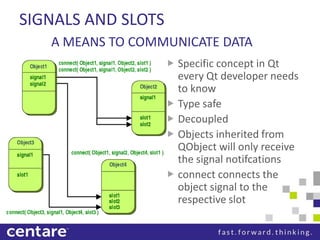
SIGNALS AND SLOTS
     A MEANS TO COMMUNICATE DATA
 Signal                        Specific concept in Qt
    Creates the construct to   every Qt developer needs
                               to know
                               Type safe
                               Decoupled
                               Objects inherited from
                               QObject will only receive
                               the signal notifcations
                               connect connects the
                               object signal to the
                               respective slot
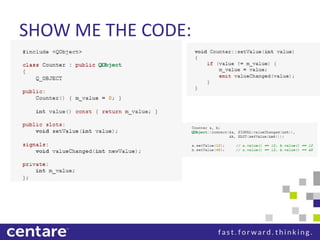
SHOW ME THE CODE:
SHOW ME THE C# CODE
[Q_OBJECT]
public class Counter
{
          public Counter()
          {}
          private int m_value;

         [Q_SLOT]
         public void setValue(int value)
         {
           if ( m_value != value)
           {
               m_value = value;
               emit valueChanged(value);
           }
         }
}
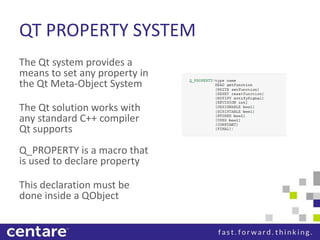
QT PROPERTY SYSTEM
The Qt system provides a
means to set any property in
the Qt Meta-Object System

The Qt solution works with
any standard C++ compiler
Qt supports
Q_PROPERTY is a macro that
is used to declare property

This declaration must be
done inside a QObject
QT EVENT SYSTEM
 An event is an object or a set of objects
 derived from the abstract class QEvent
 Events represent things that have happened
 either within an application or as a result of
 outside activity that the application needs to
 know about
 Events are recieved and handled by instance
 of a derived QObject class
LIST OF COMMON EVENT TYPES
 QResizeEvent (Window Resizing)
 QPaintEvent (Window Repainting)
 QMouseEvent (Mouse Input)
 QKeyEvent    (Keyboard Input)
 QCloseEvent (Window close)
SENDING EVENTS
 In Qt, we can utilize the QCoreApplication to create and send our
 own custom events.
 To do this, we utilize sendEvent() and postEvent().
    sendEvent() processes the event immediatly.
    postEvent() posts the event on queue for later dispatch When Qt‘s
    main event loop runs, it will then dispatch all posted events.
 To create a custom Qt Event type, simpily subclass your event from
 QEvent and ensure it has an event number that is greater than
 QEvent::User (1000 presently in 4.8)
 For all events, check here
USING MODEL VIEW IN QT
 Qt has an advanced Model View archictecture concept
 that was inspired from the MVC approach
 Instead Qt utilizes a delegate instead of a controller
 The delegate is used to provide a fine control over how
 items are rendered and edited
 For Qt specific views, Qt provides the appropriate
 delegate for that view
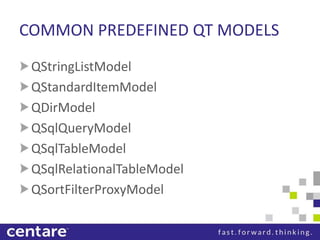
COMMON PREDEFINED QT MODELS
 QStringListModel
 QStandardItemModel
 QDirModel
 QSqlQueryModel
 QSqlTableModel
 QSqlRelationalTableModel
 QSortFilterProxyModel
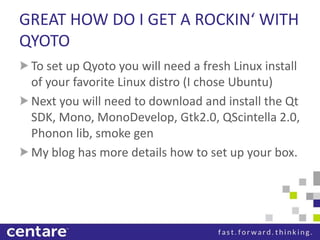
GREAT HOW DO I GET A ROCKIN‘ WITH
QYOTO
 To set up Qyoto you will need a fresh Linux install
 of your favorite Linux distro (I chose Ubuntu)
 Next you will need to download and install the Qt
 SDK, Mono, MonoDevelop, Gtk2.0, QScintella 2.0,
 Phonon lib, smoke gen
 My blog has more details how to set up your box.
QYOTO DEMO
 Overview of using mono develop with qyoto
 Will be shown on Linux
QT IN MOBILE
 Qt on Android
 Qt on iOS
QT ON ANDROID
 The Necessitas project is a community driven
 lighthouse based port of Qt to Android
 It has a plugin for Qt Creator to do Android
 development
 An installer application for Android called
 Ministro exists
   Ministro is responsible for downloading the Qt
   libraries specific to that Android device
QT ON IOS
 The Qt Lighthouse project was an initiative to
 get Qt running on the iOS platforms.
 It has had success, and is being integrated
 with Qt 5.0
ONWARD TO QT 5
 Qt 5 brings on a lot of new changes.
    QML plays a bigger role in UI design
    JavaScript will be heavily used over C++
 Its objectives are
    Make better use of the GPU, allowing you to create smooth (and
    accelerated) graphics performance even with limited resources
    Making your creation of advanced applications and UIs easier
    and faster (with QML and Javascript)
    Make apps connected to the web be as powerful as possible, i.e.
    to embed and power up web content and services into any Qt
    app
    Reduce the complexity and amount of code required to
    maintain and implement a port
VISION FOR QT 5
 “Qt 5 should be the foundation for a new way
 of developing applications. While offering all
 of the power of native Qt using C++, the focus
 should shift to a model, where C++ is mainly
 used to implement modular backend
 functionality for Qt Quick” – Lars Knoll, Qt
 Project
QT 5 ARCHITECTURE CHANGES
 Rearchitecture of the graphics stack
    QtQuick and QML Scenegraph will be the center of the new graphics
    architecture
    QPainter will still be available
    Qt 5 will require OpenGL 2.0
    Qwidgets will be layered on top of the scene graph
 Qt ports will be based on Lighthouse
    Lighthouse provides a better windows abstract system
 Modular repository structure
    Speeds up the integration process of contributions to the Qt
    framework
 Seperation of all QWidget related functionality into its own library
    QML will be the UI defacto, where QWidget will be there to support
    older Qt apps
YOUR NAME
YOUR TITLE
SECOND TITLE LINE, IF NEEDED

SITE: www.centare.comom
EMAIL: first.last@centare.com
TWITTER: @myhandle
BLOG: www.ifyouhaveone.com
LINKEDIN: /yourhandle

Building Cross-Platform Apps using Qt and Qyoto

  • 1.
    Development of Cross PlatformApps using Qyoto and Qt Jeff Alstadt
  • 2.
    ABOUT CENTARE fast. forward. thinking. At Centare, every team member: Thinks strategically Solves complex problems Creates scalable solutions Is passionate about what we do
  • 3.
    OF NOTE Agile/ ALM / Mobile / Cloud Microsoft 2011 Partner of the Year Finalist ALM Gold Competency Azure Circle Apple / Android / Windows Phone iOS, Java, C#, Silverlight/XAML Scrum.org Partner Certified Professional Scrum Trainers
  • 4.
  • 5.
    Why Qt andwhy Qyoto AGENDA GETTING STARTED WITH Qt and Qyoto
  • 6.
    BUT ISNT QTDEAD? Quite the opposite, it is living strong. Qt is being used by 450,000 developers in 70 industries Qt increases productivity by 70% with reduced development costs of 75% These guys are using Qt:
  • 7.
    WHAT IS QT What is Qt? How is Qt Cross-Platform? How do Qyoto and Qt work together? How can I use Qyoto in my apps?
  • 8.
    WHAT IS QT? Qt is a cross-platform UI framework that was developed by Trolltech, later acquired by Nokia for creating UIs that can run on the Mac, Linux and Windows platform Qt utilizes a moc compiler known as the Meta Object Compiler with several macros to provide the Qt specifics of the Qt language
  • 9.
    THE FOUNDERS OFQT Haavard Nord and Eirik Chambe-Eng founded Qt with its initial development in 1991. The toolkit was called Qt becuase the letter Q looked appealing in Haavard‘s Emacs font and “t“ was inspired by Xt, the X toolkit
  • 10.
    GETTING STARTED WITHQT CREATOR Qt Creator is the cross-platform developer IDE It has a C++ compiler support built in, Qt centric UI designer tools, and solid debugger. Works on all three platforms including Mac, Linux and Windows
  • 11.
    WHAT IS QYOTO? Qyoto is a C# language binding for Qt. It is not officially supported by Nokia or Digia It is an open source community driven project with a lot of the work coming from KDE contributors The top contributors of Kyoto are Arno Rehn, Ian Moore, and Dimitri Dobrev
  • 12.
    CONCEPTS OF QTDESIGN Signals and Slots Qt Property System Qt Event System Using Model View in Qt
  • 13.
    SIGNALS AND SLOTS A MEANS TO COMMUNICATE DATA Signal Specific concept in Qt Creates the construct to every Qt developer needs to know Type safe Decoupled Objects inherited from QObject will only receive the signal notifcations connect connects the object signal to the respective slot
  • 14.
  • 15.
    SHOW ME THEC# CODE [Q_OBJECT] public class Counter { public Counter() {} private int m_value; [Q_SLOT] public void setValue(int value) { if ( m_value != value) { m_value = value; emit valueChanged(value); } } }
  • 16.
    QT PROPERTY SYSTEM TheQt system provides a means to set any property in the Qt Meta-Object System The Qt solution works with any standard C++ compiler Qt supports Q_PROPERTY is a macro that is used to declare property This declaration must be done inside a QObject
  • 17.
    QT EVENT SYSTEM An event is an object or a set of objects derived from the abstract class QEvent Events represent things that have happened either within an application or as a result of outside activity that the application needs to know about Events are recieved and handled by instance of a derived QObject class
  • 18.
    LIST OF COMMONEVENT TYPES QResizeEvent (Window Resizing) QPaintEvent (Window Repainting) QMouseEvent (Mouse Input) QKeyEvent (Keyboard Input) QCloseEvent (Window close)
  • 19.
    SENDING EVENTS InQt, we can utilize the QCoreApplication to create and send our own custom events. To do this, we utilize sendEvent() and postEvent(). sendEvent() processes the event immediatly. postEvent() posts the event on queue for later dispatch When Qt‘s main event loop runs, it will then dispatch all posted events. To create a custom Qt Event type, simpily subclass your event from QEvent and ensure it has an event number that is greater than QEvent::User (1000 presently in 4.8) For all events, check here
  • 20.
    USING MODEL VIEWIN QT Qt has an advanced Model View archictecture concept that was inspired from the MVC approach Instead Qt utilizes a delegate instead of a controller The delegate is used to provide a fine control over how items are rendered and edited For Qt specific views, Qt provides the appropriate delegate for that view
  • 21.
    COMMON PREDEFINED QTMODELS QStringListModel QStandardItemModel QDirModel QSqlQueryModel QSqlTableModel QSqlRelationalTableModel QSortFilterProxyModel
  • 22.
    GREAT HOW DOI GET A ROCKIN‘ WITH QYOTO To set up Qyoto you will need a fresh Linux install of your favorite Linux distro (I chose Ubuntu) Next you will need to download and install the Qt SDK, Mono, MonoDevelop, Gtk2.0, QScintella 2.0, Phonon lib, smoke gen My blog has more details how to set up your box.
  • 23.
    QYOTO DEMO Overviewof using mono develop with qyoto Will be shown on Linux
  • 24.
    QT IN MOBILE Qt on Android Qt on iOS
  • 25.
    QT ON ANDROID The Necessitas project is a community driven lighthouse based port of Qt to Android It has a plugin for Qt Creator to do Android development An installer application for Android called Ministro exists Ministro is responsible for downloading the Qt libraries specific to that Android device
  • 26.
    QT ON IOS The Qt Lighthouse project was an initiative to get Qt running on the iOS platforms. It has had success, and is being integrated with Qt 5.0
  • 27.
    ONWARD TO QT5 Qt 5 brings on a lot of new changes. QML plays a bigger role in UI design JavaScript will be heavily used over C++ Its objectives are Make better use of the GPU, allowing you to create smooth (and accelerated) graphics performance even with limited resources Making your creation of advanced applications and UIs easier and faster (with QML and Javascript) Make apps connected to the web be as powerful as possible, i.e. to embed and power up web content and services into any Qt app Reduce the complexity and amount of code required to maintain and implement a port
  • 28.
    VISION FOR QT5 “Qt 5 should be the foundation for a new way of developing applications. While offering all of the power of native Qt using C++, the focus should shift to a model, where C++ is mainly used to implement modular backend functionality for Qt Quick” – Lars Knoll, Qt Project
  • 29.
    QT 5 ARCHITECTURECHANGES Rearchitecture of the graphics stack QtQuick and QML Scenegraph will be the center of the new graphics architecture QPainter will still be available Qt 5 will require OpenGL 2.0 Qwidgets will be layered on top of the scene graph Qt ports will be based on Lighthouse Lighthouse provides a better windows abstract system Modular repository structure Speeds up the integration process of contributions to the Qt framework Seperation of all QWidget related functionality into its own library QML will be the UI defacto, where QWidget will be there to support older Qt apps
  • 30.
    YOUR NAME YOUR TITLE SECONDTITLE LINE, IF NEEDED SITE: www.centare.comom EMAIL: first.last@centare.com TWITTER: @myhandle BLOG: www.ifyouhaveone.com LINKEDIN: /yourhandle