Scripting Your Qt Application
                                09/25/09
About Me (Kent Hansen)

• Working on Qt since 2005
• QtScript
• Qt State Machine framework
• Plays harmonica and Irish whistle


                                      2
Goals For This Talk

• Give overview of QtScript and things related to it
• Show how to embed QtScript into your application


                                                       3
Agenda

• What is application scripting?
• QtScript tour (the essentials)
• Debugger
• Misc.


                                   4
“Scripting Your Application”: What?

• Premise: Core functionality implemented in C++
• Interface(s) exported to scripting environment
• Plugin-based, interactive (console), ...


                                                   5
Golden Example: The Web Browser

• Script loaded as part of web page
• Browser exports tree-based API to page (DOM)
• Script manipulates the page


                                                 6
What is QtScript?

• A Qt module
• A scripting language
• An “engine” for evaluating scripts
• An API for embedding into your application


                                               7
The QtScript Language

• Based on ECMA-262 standard
   –“JavaScript minus DOM”
• Object-oriented, dynamically typed
• Java-like syntax


                                       8
Disclaimer

This is not a JavaScript tutorial!


                                     9
The QtScript Engine

• Executes scripts
• Performs C++ <--> script bridging
• It's re-entrant


                                      10
The QtScript API

• Embed QtScript engine in your application
• Expose C++ objects to script environment
• Work with script values from C++


                                              11
Why should you use QtScript?

• Easy to embed into any Qt application
• Tight integration with rest of Qt
• Easy-to-use API


                                          12
Agenda

• What is application scripting?
• QtScript tour (the essentials)
• Debugger
• Misc.


                                   13
QtScript tour (the essentials)

• Basic embedding (example)
• Working with QScriptValues
• Configuring the script environment
• Qt meta-object system integration


                                       14
Example: Meaning of Life Calculator


   “Our objective: Write an application that uses
     QtScript to calculate the meaning of life”


                                                    15
QScriptEngine object

QScriptEngine engine;

• “Vanilla” environment
• Built-in ECMA objects
   –Array, Math, RegExp, Error, ...
   –parseInt(), parseFloat(), ...
• No Qt-specific script APIs


                                      16
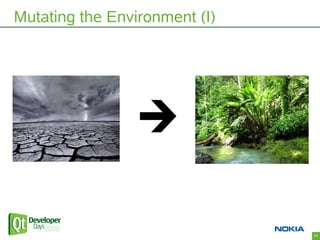
Mutating the Environment (I)


                               17
Mutating the Environment (II)

• Evaluate scripts
• Operate on QtScript values in C++


                                      18
QtScript tour (the essentials)

• Basic embedding (example)
• Working with QScriptValues
• Configuring the script environment
• Qt meta-object system integration


                                       19
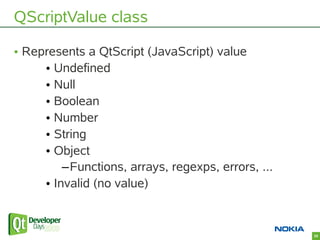
QScriptValue class

• Represents a QtScript (JavaScript) value
     • Undefined
     • Null
     • Boolean
     • Number
     • String
     • Object
         –Functions, arrays, regexps, errors, ...
     • Invalid (no value)


                                                    20
QScriptValue type checks & conversion

• isXXX(): Tests if value is of a certain type
• toXXX(): Converts to Qt/C++ type
• qscriptvalue_cast(): Converts to C++ type


                                                 21
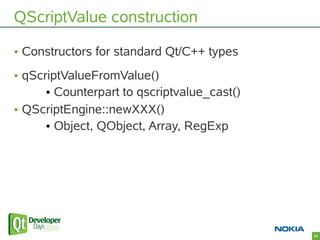
QScriptValue construction

• Constructors for standard Qt/C++ types
• qScriptValueFromValue()
      • Counterpart to qscriptvalue_cast()
• QScriptEngine::newXXX()
      • Object, QObject, Array, RegExp


                                             22
QScriptValue property access


 JS:   myObject.foo = 123;

       myObject['foo'] = 123;


 C++: myObject.setProperty(“foo”, 123);


                                          23
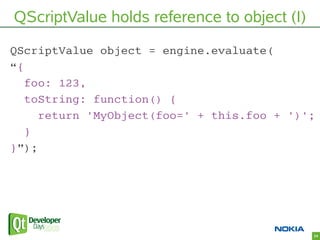
QScriptValue holds reference to object (I)
QScriptValue object = engine.evaluate(
“{
   foo: 123,
   toString: function() {
     return 'MyObject(foo=' + this.foo + ')';
   }
}”);


                                             24
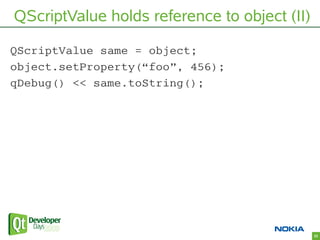
QScriptValue holds reference to object (II)

QScriptValue same = object;
object.setProperty(“foo”, 456);
qDebug() << same.toString();


                                              25
QScriptValue called as function

 JS: myArray.sort(); or
    myArray['sort'].call(myArray);


 C++: myArray.property(“sort”)
     .call(myArray);


                                     26
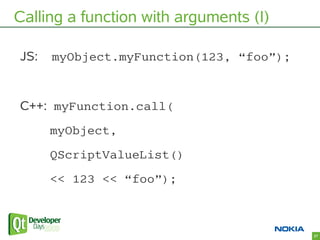
Calling a function with arguments (I)

JS:   myObject.myFunction(123, “foo”);


C++: myFunction.call(
      myObject,
      QScriptValueList()
      << 123 << “foo”);


                                         27
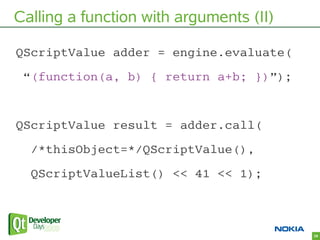
Calling a function with arguments (II)

QScriptValue adder = engine.evaluate(
 “(function(a, b) { return a+b; })”);


QScriptValue result = adder.call(
  /*thisObject=*/QScriptValue(),
  QScriptValueList() << 41 << 1);


                                         28
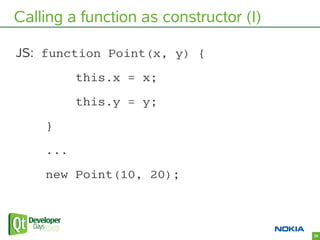
Calling a function as constructor (I)

JS: function Point(x, y) {
          this.x = x;
          this.y = y;
    }
    ...
    new Point(10, 20);


                                        29
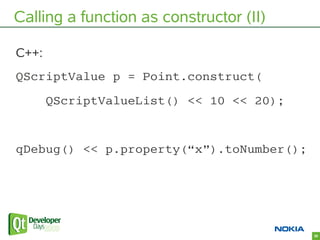
Calling a function as constructor (II)

C++:
QScriptValue p = Point.construct(
       QScriptValueList() << 10 << 20);


qDebug() << p.property(“x”).toNumber();


                                          30
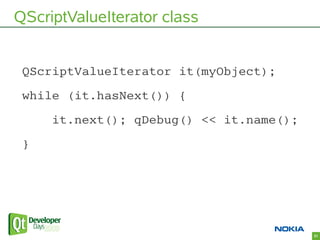
QScriptValueIterator class


 QScriptValueIterator it(myObject);
 while (it.hasNext()) {
     it.next(); qDebug() << it.name();
 }


                                         31
Working with JavaScript Arrays (I)

 JS:

 var a = [10, 20, 30];

 print(a[0], a['0']); // same property

 a.foo = 123;

 a.push(40);

 a[a.length] = 'appended';


                                         32
Working with JavaScript Arrays (II)
 C++:

 QScriptValue a = engine.evaluate(

        “[10, 20, 30]”); // array literal

 qDebug() << a.property(“length”).toInt32();

 qDebug() << a.property(“0”).toNumber();

 // for convenience + speed

 qDebug() << a.property(0).toNumber();


                                               33
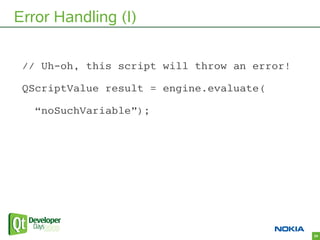
Error Handling (I)

 // Uh-oh, this script will throw an error!

 QScriptValue result = engine.evaluate(

   “noSuchVariable”);


                                              34
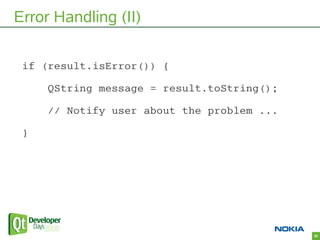
Error Handling (II)

 if (result.isError()) {

     QString message = result.toString();

     // Notify user about the problem ...

 }


                                            35
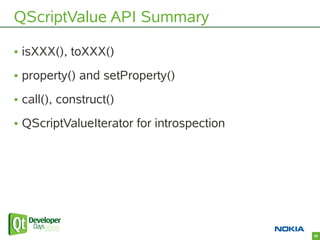
QScriptValue API Summary

• isXXX(), toXXX()
• property() and setProperty()
• call(), construct()
• QScriptValueIterator for introspection


                                           36
QtScript tour (the essentials)

• Basic embedding (example)
• Working with QScriptValues
• Configuring the script environment
• Qt meta-object system integration


                                       37
The Global Object

• A built-in script object
• Every QScriptEngine has one
      • QScriptEngine::globalObject()
• Initially contains properties defined by ECMA-262


                                                      38
Tailoring Scripting to Your Application

• Design “contract” of C++ <--> script interaction
• Set properties of Global Object
• Evaluate scripts that use your API
• (Optional: Call back into script objects as
 appropriate)


                                                     39
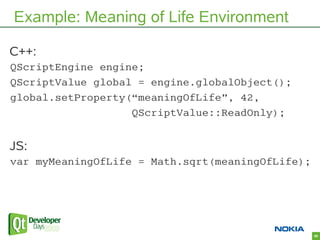
Example: Meaning of Life Environment

C++:
QScriptEngine engine;
QScriptValue global = engine.globalObject();
global.setProperty(“meaningOfLife”, 42,
                   QScriptValue::ReadOnly);


JS:
var myMeaningOfLife = Math.sqrt(meaningOfLife);


                                                  40
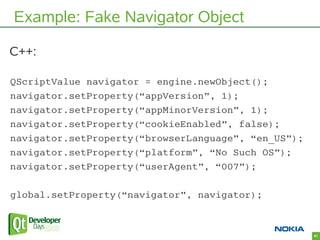
Example: Fake Navigator Object

C++:

QScriptValue navigator = engine.newObject();
navigator.setProperty(“appVersion”, 1);
navigator.setProperty(“appMinorVersion”, 1);
navigator.setProperty(“cookieEnabled”, false);
navigator.setProperty(“browserLanguage”, “en_US”);
navigator.setProperty(“platform”, “No Such OS”);
navigator.setProperty(“userAgent”, “007”);

global.setProperty(“navigator”, navigator);


                                                     41
QtScript tour (the essentials)

• Basic embedding (example)
• Working with QScriptValues
• Configuring the script environment
• Qt meta-object system integration


                                       42
Qt Meta-Object System

• In Qt, QObject-based classes can be introspected
 at runtime
      • Properties
      • Signals & slots
• QObject::connect()
• Qt Designer property editor
• ...


                                                     43
Relax! Leave it to magic


                           44
QtScript <--> QObject Integration (I)

• QScriptEngine::newQObject(QObject*)
• Returns a script object that acts as proxy
• Proxy delegates property access to
 QObject::property() and QObject::setProperty()


                                                  45
QtScript <--> QObject Integration (II)

• Proxy provides signals and slots as properties
• Proxy provides named child objects as properties


                                                     46
QtScript <--> QObject Integration (III)

• Ownership control
• Customize proxy behavior
      • Don't expose child objects
      • Don't expose super class contents


                                            47
Example: Scripting a QLineEdit


                                 48
qScriptConnect() function

• Connect a signal to a script function
• Let scripts define signal handlers
• Application does the “plumbing”


                                          49
Summary of “API essentials”

• QScriptValue
• QScriptEngine
     • evaluate()
     • globalObject()
     • newQObject()
• qScriptConnect()


                              50
Agenda

• What is application scripting?
• QtScript tour (the essentials)
• Debugger
• Misc.


                                   51
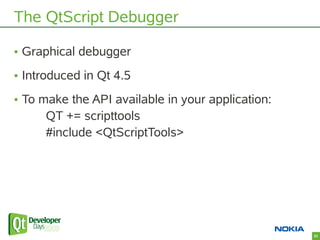
The QtScript Debugger

• Graphical debugger
• Introduced in Qt 4.5
• To make the API available in your application:
      QT += scripttools
      #include <QtScriptTools>


                                                   52
Debugger Demo

Look at the pretty little demo!


                                  53
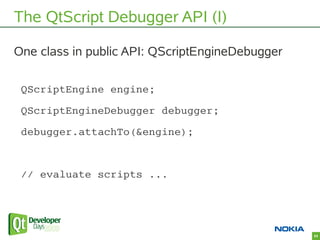
The QtScript Debugger API (I)

One class in public API: QScriptEngineDebugger

 QScriptEngine engine;
 QScriptEngineDebugger debugger;
 debugger.attachTo(&engine);


 // evaluate scripts ...


                                                 54
The QtScript Debugger API (II)

• Debugger actions can be programmatically
 triggered
• Individual debugger widgets are accessible


                                               55
Invoking the Debugger from a Script

• Use the debugger keyword
• Becomes no-op if no debugger is attached

    JS:

    var a = Math.random();
    debugger; // synchronously run debugger
    var b = Math.random();
    debugger;
    return a + b;


                                              56
Agenda

• What is application scripting?
• QtScript tour (the essentials)
• Debugger
• Misc.


                                   57
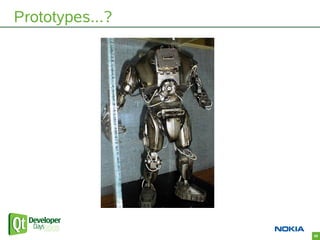
Prototypes...?


                 58
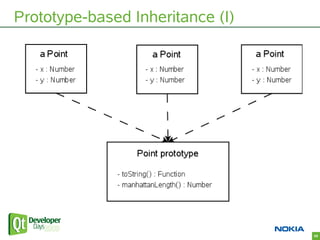
Prototype-based Inheritance (I)


                                  59
Prototype-based Inheritance: Why care?

• Not every QObject member is a property / signal /
 slot
• Not everything is a QObject
• Not everything should/needs to be a QObject
• JS developers are familiar with prototypes


                                                      60
Prototype-based Inheritance: How?

• Create a prototype object for the C++ type
• Register the type with Qt's meta-type system
• Associate prototype object with meta-type ID
• Create QScriptValues from the C++ type
 (qScriptValueFromValue())


                                                 61
Bindings for Qt's APIs (I)

• Available as stand-alone project
• qtscriptgenerator on Qt Labs
 (http://labs.qt.nokia.com)


                                     62
Bindings for Qt's APIs (II)

• Creates plugins that can be imported into a script
 engine
• Provides bindings for most of Qt's classes
• Makes it possible to write pure script applications


                                                        63
Summary

• It's easy to make your Qt application scriptable
 with QtScript
• There's a QtScript debugger (also part of Qt)
• You can achieve a lot by mastering a small API


                                                     64
Thank You!

Questions?


             65

Scripting Your Qt Application

  • 1.
    Scripting Your QtApplication 09/25/09
  • 2.
    About Me (KentHansen) • Working on Qt since 2005 • QtScript • Qt State Machine framework • Plays harmonica and Irish whistle 2
  • 3.
    Goals For ThisTalk • Give overview of QtScript and things related to it • Show how to embed QtScript into your application 3
  • 4.
    Agenda • What isapplication scripting? • QtScript tour (the essentials) • Debugger • Misc. 4
  • 5.
    “Scripting Your Application”:What? • Premise: Core functionality implemented in C++ • Interface(s) exported to scripting environment • Plugin-based, interactive (console), ... 5
  • 6.
    Golden Example: TheWeb Browser • Script loaded as part of web page • Browser exports tree-based API to page (DOM) • Script manipulates the page 6
  • 7.
    What is QtScript? •A Qt module • A scripting language • An “engine” for evaluating scripts • An API for embedding into your application 7
  • 8.
    The QtScript Language •Based on ECMA-262 standard –“JavaScript minus DOM” • Object-oriented, dynamically typed • Java-like syntax 8
  • 9.
    Disclaimer This is nota JavaScript tutorial! 9
  • 10.
    The QtScript Engine •Executes scripts • Performs C++ <--> script bridging • It's re-entrant 10
  • 11.
    The QtScript API •Embed QtScript engine in your application • Expose C++ objects to script environment • Work with script values from C++ 11
  • 12.
    Why should youuse QtScript? • Easy to embed into any Qt application • Tight integration with rest of Qt • Easy-to-use API 12
  • 13.
    Agenda • What isapplication scripting? • QtScript tour (the essentials) • Debugger • Misc. 13
  • 14.
    QtScript tour (theessentials) • Basic embedding (example) • Working with QScriptValues • Configuring the script environment • Qt meta-object system integration 14
  • 15.
    Example: Meaning ofLife Calculator “Our objective: Write an application that uses QtScript to calculate the meaning of life” 15
  • 16.
    QScriptEngine object QScriptEngine engine; •“Vanilla” environment • Built-in ECMA objects –Array, Math, RegExp, Error, ... –parseInt(), parseFloat(), ... • No Qt-specific script APIs 16
  • 17.
  • 18.
    Mutating the Environment(II) • Evaluate scripts • Operate on QtScript values in C++ 18
  • 19.
    QtScript tour (theessentials) • Basic embedding (example) • Working with QScriptValues • Configuring the script environment • Qt meta-object system integration 19
  • 20.
    QScriptValue class • Representsa QtScript (JavaScript) value • Undefined • Null • Boolean • Number • String • Object –Functions, arrays, regexps, errors, ... • Invalid (no value) 20
  • 21.
    QScriptValue type checks& conversion • isXXX(): Tests if value is of a certain type • toXXX(): Converts to Qt/C++ type • qscriptvalue_cast(): Converts to C++ type 21
  • 22.
    QScriptValue construction • Constructorsfor standard Qt/C++ types • qScriptValueFromValue() • Counterpart to qscriptvalue_cast() • QScriptEngine::newXXX() • Object, QObject, Array, RegExp 22
  • 23.
    QScriptValue property access JS: myObject.foo = 123; myObject['foo'] = 123; C++: myObject.setProperty(“foo”, 123); 23
  • 24.
    QScriptValue holds referenceto object (I) QScriptValue object = engine.evaluate( “{ foo: 123, toString: function() { return 'MyObject(foo=' + this.foo + ')'; } }”); 24
  • 25.
    QScriptValue holds referenceto object (II) QScriptValue same = object; object.setProperty(“foo”, 456); qDebug() << same.toString(); 25
  • 26.
    QScriptValue called asfunction JS: myArray.sort(); or myArray['sort'].call(myArray); C++: myArray.property(“sort”) .call(myArray); 26
  • 27.
    Calling a functionwith arguments (I) JS: myObject.myFunction(123, “foo”); C++: myFunction.call( myObject, QScriptValueList() << 123 << “foo”); 27
  • 28.
    Calling a functionwith arguments (II) QScriptValue adder = engine.evaluate( “(function(a, b) { return a+b; })”); QScriptValue result = adder.call( /*thisObject=*/QScriptValue(), QScriptValueList() << 41 << 1); 28
  • 29.
    Calling a functionas constructor (I) JS: function Point(x, y) { this.x = x; this.y = y; } ... new Point(10, 20); 29
  • 30.
    Calling a functionas constructor (II) C++: QScriptValue p = Point.construct( QScriptValueList() << 10 << 20); qDebug() << p.property(“x”).toNumber(); 30
  • 31.
    QScriptValueIterator class QScriptValueIteratorit(myObject); while (it.hasNext()) { it.next(); qDebug() << it.name(); } 31
  • 32.
    Working with JavaScriptArrays (I) JS: var a = [10, 20, 30]; print(a[0], a['0']); // same property a.foo = 123; a.push(40); a[a.length] = 'appended'; 32
  • 33.
    Working with JavaScriptArrays (II) C++: QScriptValue a = engine.evaluate( “[10, 20, 30]”); // array literal qDebug() << a.property(“length”).toInt32(); qDebug() << a.property(“0”).toNumber(); // for convenience + speed qDebug() << a.property(0).toNumber(); 33
  • 34.
    Error Handling (I) // Uh-oh, this script will throw an error! QScriptValue result = engine.evaluate( “noSuchVariable”); 34
  • 35.
    Error Handling (II) if (result.isError()) { QString message = result.toString(); // Notify user about the problem ... } 35
  • 36.
    QScriptValue API Summary •isXXX(), toXXX() • property() and setProperty() • call(), construct() • QScriptValueIterator for introspection 36
  • 37.
    QtScript tour (theessentials) • Basic embedding (example) • Working with QScriptValues • Configuring the script environment • Qt meta-object system integration 37
  • 38.
    The Global Object •A built-in script object • Every QScriptEngine has one • QScriptEngine::globalObject() • Initially contains properties defined by ECMA-262 38
  • 39.
    Tailoring Scripting toYour Application • Design “contract” of C++ <--> script interaction • Set properties of Global Object • Evaluate scripts that use your API • (Optional: Call back into script objects as appropriate) 39
  • 40.
    Example: Meaning ofLife Environment C++: QScriptEngine engine; QScriptValue global = engine.globalObject(); global.setProperty(“meaningOfLife”, 42, QScriptValue::ReadOnly); JS: var myMeaningOfLife = Math.sqrt(meaningOfLife); 40
  • 41.
    Example: Fake NavigatorObject C++: QScriptValue navigator = engine.newObject(); navigator.setProperty(“appVersion”, 1); navigator.setProperty(“appMinorVersion”, 1); navigator.setProperty(“cookieEnabled”, false); navigator.setProperty(“browserLanguage”, “en_US”); navigator.setProperty(“platform”, “No Such OS”); navigator.setProperty(“userAgent”, “007”); global.setProperty(“navigator”, navigator); 41
  • 42.
    QtScript tour (theessentials) • Basic embedding (example) • Working with QScriptValues • Configuring the script environment • Qt meta-object system integration 42
  • 43.
    Qt Meta-Object System •In Qt, QObject-based classes can be introspected at runtime • Properties • Signals & slots • QObject::connect() • Qt Designer property editor • ... 43
  • 44.
    Relax! Leave itto magic 44
  • 45.
    QtScript <--> QObjectIntegration (I) • QScriptEngine::newQObject(QObject*) • Returns a script object that acts as proxy • Proxy delegates property access to QObject::property() and QObject::setProperty() 45
  • 46.
    QtScript <--> QObjectIntegration (II) • Proxy provides signals and slots as properties • Proxy provides named child objects as properties 46
  • 47.
    QtScript <--> QObjectIntegration (III) • Ownership control • Customize proxy behavior • Don't expose child objects • Don't expose super class contents 47
  • 48.
  • 49.
    qScriptConnect() function • Connecta signal to a script function • Let scripts define signal handlers • Application does the “plumbing” 49
  • 50.
    Summary of “APIessentials” • QScriptValue • QScriptEngine • evaluate() • globalObject() • newQObject() • qScriptConnect() 50
  • 51.
    Agenda • What isapplication scripting? • QtScript tour (the essentials) • Debugger • Misc. 51
  • 52.
    The QtScript Debugger •Graphical debugger • Introduced in Qt 4.5 • To make the API available in your application: QT += scripttools #include <QtScriptTools> 52
  • 53.
    Debugger Demo Look atthe pretty little demo! 53
  • 54.
    The QtScript DebuggerAPI (I) One class in public API: QScriptEngineDebugger QScriptEngine engine; QScriptEngineDebugger debugger; debugger.attachTo(&engine); // evaluate scripts ... 54
  • 55.
    The QtScript DebuggerAPI (II) • Debugger actions can be programmatically triggered • Individual debugger widgets are accessible 55
  • 56.
    Invoking the Debuggerfrom a Script • Use the debugger keyword • Becomes no-op if no debugger is attached JS: var a = Math.random(); debugger; // synchronously run debugger var b = Math.random(); debugger; return a + b; 56
  • 57.
    Agenda • What isapplication scripting? • QtScript tour (the essentials) • Debugger • Misc. 57
  • 58.
  • 59.
  • 60.
    Prototype-based Inheritance: Whycare? • Not every QObject member is a property / signal / slot • Not everything is a QObject • Not everything should/needs to be a QObject • JS developers are familiar with prototypes 60
  • 61.
    Prototype-based Inheritance: How? •Create a prototype object for the C++ type • Register the type with Qt's meta-type system • Associate prototype object with meta-type ID • Create QScriptValues from the C++ type (qScriptValueFromValue()) 61
  • 62.
    Bindings for Qt'sAPIs (I) • Available as stand-alone project • qtscriptgenerator on Qt Labs (http://labs.qt.nokia.com) 62
  • 63.
    Bindings for Qt'sAPIs (II) • Creates plugins that can be imported into a script engine • Provides bindings for most of Qt's classes • Makes it possible to write pure script applications 63
  • 64.
    Summary • It's easyto make your Qt application scriptable with QtScript • There's a QtScript debugger (also part of Qt) • You can achieve a lot by mastering a small API 64
  • 65.