Building the run-time
     by Johan Thelin
       Pelagicore


       Copyright©2012 Johan Thelin
                CC-BY-SA
Bio
●   Johan Thelin                                    @e8johan

●   Worked with Qt
    since 10+ years
●   Author
    ●   FoQD
    ●   Articles
    ●   Tutorials
●   Embedded Linux
                      Copyright©2012 Johan Thelin
                               CC-BY-SA
Work


●   Produces an In-Vehicle Infotainment (IVI) framework
●   Open Source / Linux / Qt
●   GENIVI / LinuxFoundation / Ubuntu Core


●   We're hiring!
    ●   http://www.pelagicore.com/career.html
                           Copyright©2012 Johan Thelin
                                    CC-BY-SA
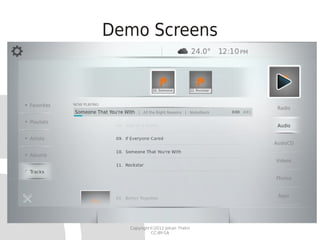
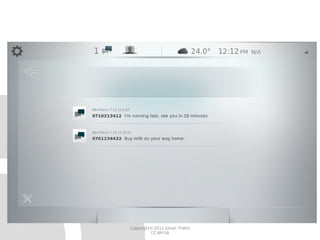
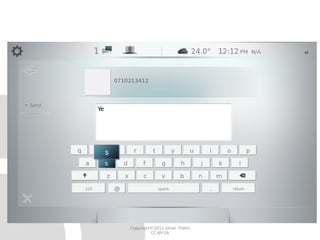
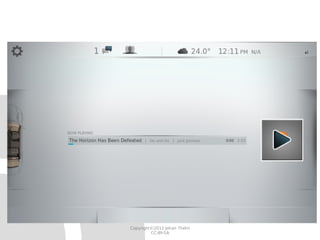
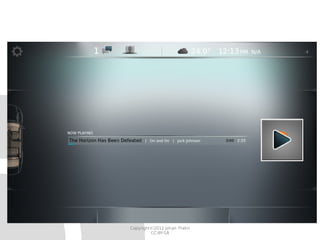
Demo Screens


  Copyright©2012 Johan Thelin
           CC-BY-SA
Copyright©2012 Johan Thelin
         CC-BY-SA
Copyright©2012 Johan Thelin
         CC-BY-SA
Copyright©2012 Johan Thelin
         CC-BY-SA
Copyright©2012 Johan Thelin
         CC-BY-SA
QML is Productive
●   Developed over 2.5 months for CES 2012
    ●   Interaction and graphics design
    ●   Run-time and QML development
    ●   ~5 full time persons involved (team of 15)


●   The code consists of
    ●   5986 loc (4871 / 1115 according to cloc)
    ●   10312 lines of QML (not loc)

                        Copyright©2012 Johan Thelin
                                 CC-BY-SA
QML in Five Slides


    Copyright©2012 Johan Thelin
             CC-BY-SA
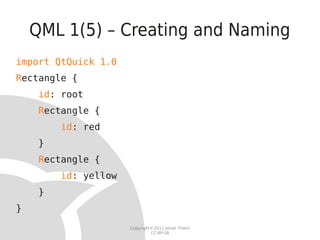
QML 1(5) – Creating and Naming
import QtQuick 1.0
Rectangle {
     id: root
     Rectangle {
         id: red
     }
     Rectangle {
         id: yellow
     }
}
                      Copyright©2012 Johan Thelin
                               CC-BY-SA
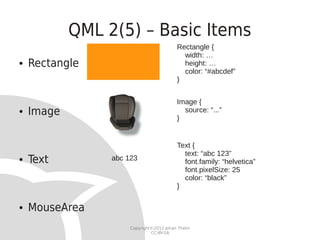
QML 2(5) – Basic Items
                                           Rectangle {
                                             width: …
●   Rectangle                                height: …
                                             color: “#abcdef”
                                           }


                                           Image {
●   Image                                  }
                                             source: “...”


                                           Text {
                                             text: “abc 123”
●   Text         abc 123                     font.family: “helvetica”
                                             font.pixelSize: 25
                                             color: “black”
                                           }

●   MouseArea
                      Copyright©2012 Johan Thelin
                               CC-BY-SA
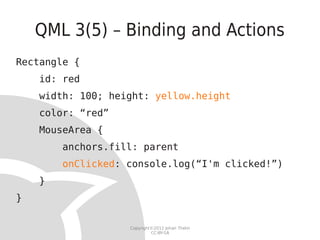
QML 3(5) – Binding and Actions
Rectangle {
    id: red
    width: 100; height: yellow.height
    color: “red”
    MouseArea {
        anchors.fill: parent
        onClicked: console.log(“I'm clicked!”)
    }
}

                   Copyright©2012 Johan Thelin
                            CC-BY-SA
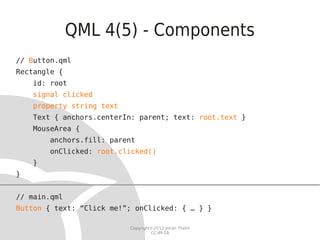
QML 4(5) - Components
// Button.qml
Rectangle {
    id: root
    signal clicked
    property string text
    Text { anchors.centerIn: parent; text: root.text }
    MouseArea {
        anchors.fill: parent
        onClicked: root.clicked()
    }
}


// main.qml
Button { text: “Click me!”; onClicked: { … } }

                           Copyright©2012 Johan Thelin
                                    CC-BY-SA
QML 5(5) – States and Transitions
Rectangle {
    id: r
    states: [
        State { name: “either”
              PropertyChanges { target: r; opacity: 1.0 } },
        State { name: “or”
              PropertyChanges { target: r; opacity: 0.2 } }
    ]
    state: “either”
    transitions: [
        Transition {
              PropertyAnimation { properties: “opacity”; duration: 3000 }
        }
    ]
}

                              Copyright©2012 Johan Thelin
                                       CC-BY-SA
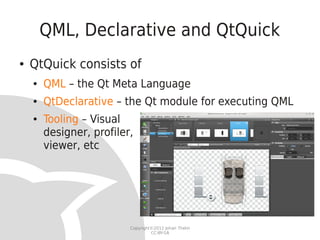
QML, Declarative and QtQuick
●   QtQuick consists of
    ●   QML – the Qt Meta Language
    ●   QtDeclarative – the Qt module for executing QML
    ●   Tooling – Visual
        designer, profiler,
        viewer, etc


                          Copyright©2012 Johan Thelin
                                   CC-BY-SA
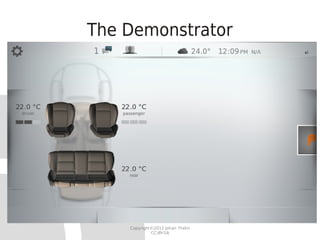
The Demonstrator


    Copyright©2012 Johan Thelin
             CC-BY-SA
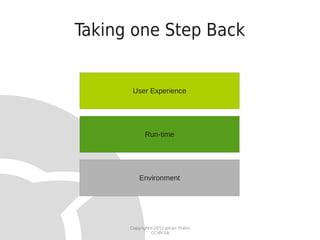
Taking one Step Back


       User Experience


            Run-time


          Environment


      Copyright©2012 Johan Thelin
               CC-BY-SA
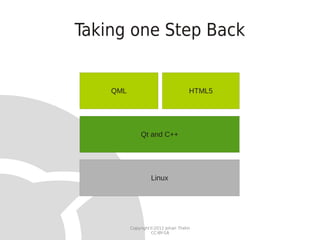
Taking one Step Back


    QML                             HTML5


              Qt and C++


                   Linux


          Copyright©2012 Johan Thelin
                   CC-BY-SA
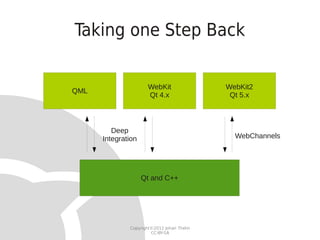
Taking one Step Back


                      WebKit                WebKit2
QML
                      Qt 4.x                 Qt 5.x


         Deep
      Integration                             WebChannels


                    Qt and C++


              Copyright©2012 Johan Thelin
                       CC-BY-SA
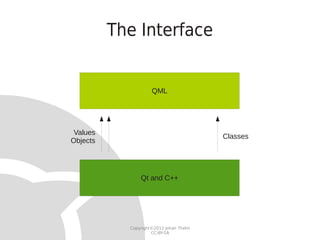
The Interface


                     QML


 Values
                                          Classes
Objects


                Qt and C++


            Copyright©2012 Johan Thelin
                     CC-BY-SA
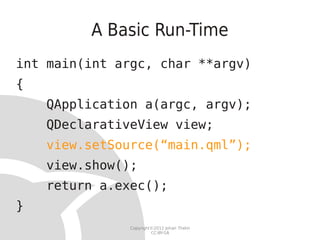
A Basic Run-Time
int main(int argc, char **argv)
{
    QApplication a(argc, argv);
    QDeclarativeView view;
    view.setSource(“main.qml”);
    view.show();
    return a.exec();
}
               Copyright©2012 Johan Thelin
                        CC-BY-SA
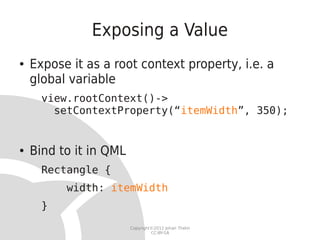
Exposing a Value
●   Expose it as a root context property, i.e. a
    global variable
      view.rootContext()->
        setContextProperty(“itemWidth”, 350);


●   Bind to it in QML
      Rectangle {
          width: itemWidth
      }
                        Copyright©2012 Johan Thelin
                                 CC-BY-SA
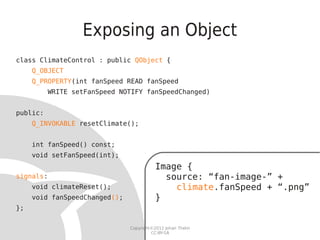
Exposing an Object
class ClimateControl : public QObject {
     Q_OBJECT
     Q_PROPERTY(int fanSpeed READ fanSpeed
          WRITE setFanSpeed NOTIFY fanSpeedChanged)


public:
     Q_INVOKABLE resetClimate();


     int fanSpeed() const;
     void setFanSpeed(int);
                                          Image {
signals:                                    source: “fan-image-” +
     void climateReset();                     climate.fanSpeed + “.png”
     void fanSpeedChanged();              }
};

                               Copyright©2012 Johan Thelin
                                        CC-BY-SA
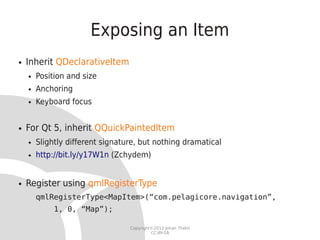
Exposing an Item
●   Inherit QDeclarativeItem
    ●   Position and size
    ●   Anchoring
    ●   Keyboard focus


●   For Qt 5, inherit QQuickPaintedItem
    ●   Slightly different signature, but nothing dramatical
    ●   http://bit.ly/y17W1n (Zchydem)


●   Register using qmlRegisterType
        qmlRegisterType<MapItem>(“com.pelagicore.navigation”,
             1, 0, “Map”);

                                  Copyright©2012 Johan Thelin
                                           CC-BY-SA
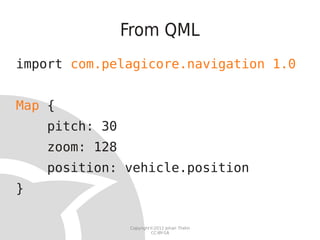
From QML
import com.pelagicore.navigation 1.0


Map {
    pitch: 30
    zoom: 128
    position: vehicle.position
}

                 Copyright©2012 Johan Thelin
                          CC-BY-SA
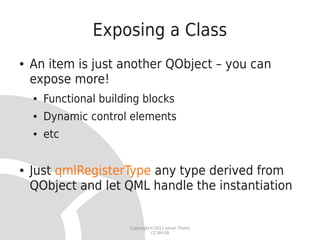
Exposing a Class
●   An item is just another QObject – you can
    expose more!
    ●   Functional building blocks
    ●   Dynamic control elements
    ●   etc


●   Just qmlRegisterType any type derived from
    QObject and let QML handle the instantiation


                         Copyright©2012 Johan Thelin
                                  CC-BY-SA
Models
●   The QAbstractItemModel interface provides a
    standardized way to expose data models in Qt
    ●   Can be exposed both as objects and classes


●   An ideal way to expose lists of data to QML
    ●   The current playlist
    ●   The locations of restaurants in the vicinity
    ●   A list of tweets


                           Copyright©2012 Johan Thelin
                                    CC-BY-SA
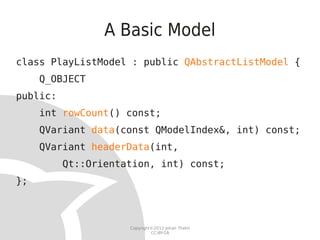
A Basic Model
class PlayListModel : public QAbstractListModel {
     Q_OBJECT
public:
     int rowCount() const;
     QVariant data(const QModelIndex&, int) const;
     QVariant headerData(int,
          Qt::Orientation, int) const;
};


                     Copyright©2012 Johan Thelin
                              CC-BY-SA
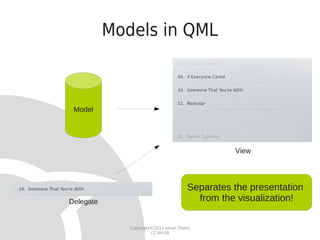
Models in QML


 Model


                                                 View


                                       Separates the presentation
Delegate                                 from the visualization!

              Copyright©2012 Johan Thelin
                       CC-BY-SA
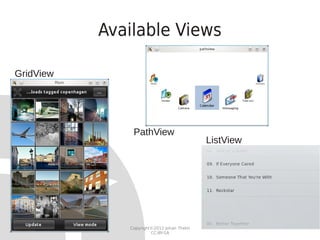
Available Views

GridView


               PathView
                                            ListView


              Copyright©2012 Johan Thelin
                       CC-BY-SA
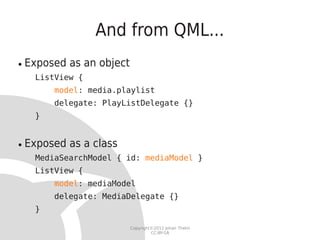
And from QML...
●   Exposed as an object
      ListView {
          model: media.playlist
          delegate: PlayListDelegate {}
      }


●   Exposed as a class
      MediaSearchModel { id: mediaModel }
      ListView {
          model: mediaModel
          delegate: MediaDelegate {}
      }

                           Copyright©2012 Johan Thelin
                                    CC-BY-SA
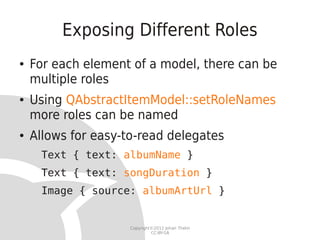
Exposing Different Roles
●   For each element of a model, there can be
    multiple roles
●   Using QAbstractItemModel::setRoleNames
    more roles can be named
●   Allows for easy-to-read delegates
     Text { text: albumName }
     Text { text: songDuration }
     Image { source: albumArtUrl }


                     Copyright©2012 Johan Thelin
                              CC-BY-SA
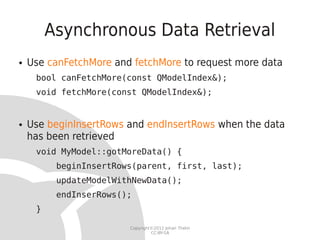
Asynchronous Data Retrieval
●   Use canFetchMore and fetchMore to request more data
     bool canFetchMore(const QModelIndex&);
     void fetchMore(const QModelIndex&);


●   Use beginInsertRows and endInsertRows when the data
    has been retrieved
     void MyModel::gotMoreData() {
          beginInsertRows(parent, first, last);
          updateModelWithNewData();
          endInserRows();
     }

                        Copyright©2012 Johan Thelin
                                 CC-BY-SA
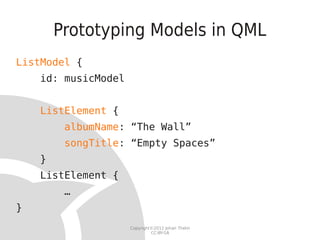
Prototyping Models in QML
ListModel {
    id: musicModel


    ListElement {
         albumName: “The Wall”
         songTitle: “Empty Spaces”
    }
    ListElement {
         …
}
                     Copyright©2012 Johan Thelin
                              CC-BY-SA
When to do what?


   Copyright©2012 Johan Thelin
            CC-BY-SA
The Goals
●   QML controls
    ●   Appearance
    ●   Behaviour
●   The run-time provides
    ●   Functionality                                  CC-BY ekkebus
                                                       http://www.flickr.com/photos/ekkebus/5020840511/
    ●   Access to state and data
●   A well defined interface allows designers and
    run-time developers to work in parallel

                         Copyright©2012 Johan Thelin
                                  CC-BY-SA
The State of the System
●   Use system-wide singletons per function, e.g.
    ●   vehicle, climate, media


●   Rationale
    ●   There is only a single vehicle, so only one state
    ●   Dividing them among functional areas
        –   gives small, clean interfaces
        –   allows limited system access for sandboxed elements


                             Copyright©2012 Johan Thelin
                                      CC-BY-SA
The State of the System
●   Provide properties
    ●   media.masterVolume
●   Provide signals for events
    ●   navigation.onDestinationReached
●   Provide methods for common functions
    ●   media.mute


                       Copyright©2012 Johan Thelin
                                CC-BY-SA
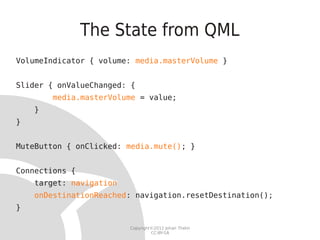
The State from QML
VolumeIndicator { volume: media.masterVolume }


Slider { onValueChanged: {
        media.masterVolume = value;
    }
}


MuteButton { onClicked: media.mute(); }


Connections {
    target: navigation
    onDestinationReached: navigation.resetDestination();
}

                         Copyright©2012 Johan Thelin
                                  CC-BY-SA
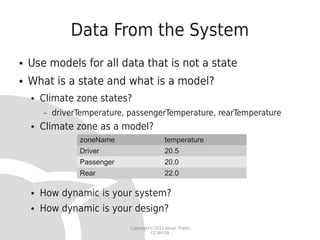
Data From the System
●   Use models for all data that is not a state
●   What is a state and what is a model?
    ●   Climate zone states?
        –   driverTemperature, passengerTemperature, rearTemperature
    ●   Climate zone as a model?
                  zoneName                    temperature
                  Driver                      20.5
                  Passenger                   20.0
                  Rear                        22.0

    ●   How dynamic is your system?
    ●   How dynamic is your design?
                               Copyright©2012 Johan Thelin
                                        CC-BY-SA
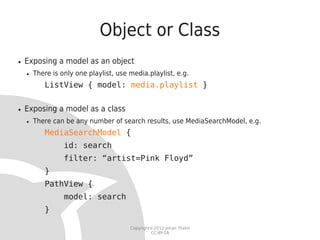
Object or Class
●   Exposing a model as an object
    ●   There is only one playlist, use media.playlist, e.g.
           ListView { model: media.playlist }

●   Exposing a model as a class
    ●   There can be any number of search results, use MediaSearchModel, e.g.
           MediaSearchModel {
                  id: search
                  filter: “artist=Pink Floyd”
           }
           PathView {
                  model: search
           }

                                        Copyright©2012 Johan Thelin
                                                 CC-BY-SA
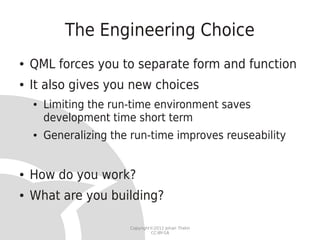
The Engineering Choice
●   QML forces you to separate form and function
●   It also gives you new choices
    ●   Limiting the run-time environment saves
        development time short term
    ●   Generalizing the run-time improves reuseability


●   How do you work?
●   What are you building?

                        Copyright©2012 Johan Thelin
                                 CC-BY-SA
Thank you!
           @e8johan
johan.thelin@pelagicore.com


        Copyright©2012 Johan Thelin
                 CC-BY-SA

Building the QML Run-time

  • 1.
    Building the run-time by Johan Thelin Pelagicore Copyright©2012 Johan Thelin CC-BY-SA
  • 2.
    Bio ● Johan Thelin @e8johan ● Worked with Qt since 10+ years ● Author ● FoQD ● Articles ● Tutorials ● Embedded Linux Copyright©2012 Johan Thelin CC-BY-SA
  • 3.
    Work ● Produces an In-Vehicle Infotainment (IVI) framework ● Open Source / Linux / Qt ● GENIVI / LinuxFoundation / Ubuntu Core ● We're hiring! ● http://www.pelagicore.com/career.html Copyright©2012 Johan Thelin CC-BY-SA
  • 4.
    Demo Screens Copyright©2012 Johan Thelin CC-BY-SA
  • 5.
  • 6.
  • 7.
  • 8.
  • 9.
    QML is Productive ● Developed over 2.5 months for CES 2012 ● Interaction and graphics design ● Run-time and QML development ● ~5 full time persons involved (team of 15) ● The code consists of ● 5986 loc (4871 / 1115 according to cloc) ● 10312 lines of QML (not loc) Copyright©2012 Johan Thelin CC-BY-SA
  • 10.
    QML in FiveSlides Copyright©2012 Johan Thelin CC-BY-SA
  • 11.
    QML 1(5) –Creating and Naming import QtQuick 1.0 Rectangle { id: root Rectangle { id: red } Rectangle { id: yellow } } Copyright©2012 Johan Thelin CC-BY-SA
  • 12.
    QML 2(5) –Basic Items Rectangle { width: … ● Rectangle height: … color: “#abcdef” } Image { ● Image } source: “...” Text { text: “abc 123” ● Text abc 123 font.family: “helvetica” font.pixelSize: 25 color: “black” } ● MouseArea Copyright©2012 Johan Thelin CC-BY-SA
  • 13.
    QML 3(5) –Binding and Actions Rectangle { id: red width: 100; height: yellow.height color: “red” MouseArea { anchors.fill: parent onClicked: console.log(“I'm clicked!”) } } Copyright©2012 Johan Thelin CC-BY-SA
  • 14.
    QML 4(5) -Components // Button.qml Rectangle { id: root signal clicked property string text Text { anchors.centerIn: parent; text: root.text } MouseArea { anchors.fill: parent onClicked: root.clicked() } } // main.qml Button { text: “Click me!”; onClicked: { … } } Copyright©2012 Johan Thelin CC-BY-SA
  • 15.
    QML 5(5) –States and Transitions Rectangle { id: r states: [ State { name: “either” PropertyChanges { target: r; opacity: 1.0 } }, State { name: “or” PropertyChanges { target: r; opacity: 0.2 } } ] state: “either” transitions: [ Transition { PropertyAnimation { properties: “opacity”; duration: 3000 } } ] } Copyright©2012 Johan Thelin CC-BY-SA
  • 16.
    QML, Declarative andQtQuick ● QtQuick consists of ● QML – the Qt Meta Language ● QtDeclarative – the Qt module for executing QML ● Tooling – Visual designer, profiler, viewer, etc Copyright©2012 Johan Thelin CC-BY-SA
  • 17.
    The Demonstrator Copyright©2012 Johan Thelin CC-BY-SA
  • 18.
    Taking one StepBack User Experience Run-time Environment Copyright©2012 Johan Thelin CC-BY-SA
  • 19.
    Taking one StepBack QML HTML5 Qt and C++ Linux Copyright©2012 Johan Thelin CC-BY-SA
  • 20.
    Taking one StepBack WebKit WebKit2 QML Qt 4.x Qt 5.x Deep Integration WebChannels Qt and C++ Copyright©2012 Johan Thelin CC-BY-SA
  • 21.
    The Interface QML Values Classes Objects Qt and C++ Copyright©2012 Johan Thelin CC-BY-SA
  • 22.
    A Basic Run-Time intmain(int argc, char **argv) { QApplication a(argc, argv); QDeclarativeView view; view.setSource(“main.qml”); view.show(); return a.exec(); } Copyright©2012 Johan Thelin CC-BY-SA
  • 23.
    Exposing a Value ● Expose it as a root context property, i.e. a global variable view.rootContext()-> setContextProperty(“itemWidth”, 350); ● Bind to it in QML Rectangle { width: itemWidth } Copyright©2012 Johan Thelin CC-BY-SA
  • 24.
    Exposing an Object classClimateControl : public QObject { Q_OBJECT Q_PROPERTY(int fanSpeed READ fanSpeed WRITE setFanSpeed NOTIFY fanSpeedChanged) public: Q_INVOKABLE resetClimate(); int fanSpeed() const; void setFanSpeed(int); Image { signals: source: “fan-image-” + void climateReset(); climate.fanSpeed + “.png” void fanSpeedChanged(); } }; Copyright©2012 Johan Thelin CC-BY-SA
  • 25.
    Exposing an Item ● Inherit QDeclarativeItem ● Position and size ● Anchoring ● Keyboard focus ● For Qt 5, inherit QQuickPaintedItem ● Slightly different signature, but nothing dramatical ● http://bit.ly/y17W1n (Zchydem) ● Register using qmlRegisterType qmlRegisterType<MapItem>(“com.pelagicore.navigation”, 1, 0, “Map”); Copyright©2012 Johan Thelin CC-BY-SA
  • 26.
    From QML import com.pelagicore.navigation1.0 Map { pitch: 30 zoom: 128 position: vehicle.position } Copyright©2012 Johan Thelin CC-BY-SA
  • 27.
    Exposing a Class ● An item is just another QObject – you can expose more! ● Functional building blocks ● Dynamic control elements ● etc ● Just qmlRegisterType any type derived from QObject and let QML handle the instantiation Copyright©2012 Johan Thelin CC-BY-SA
  • 28.
    Models ● The QAbstractItemModel interface provides a standardized way to expose data models in Qt ● Can be exposed both as objects and classes ● An ideal way to expose lists of data to QML ● The current playlist ● The locations of restaurants in the vicinity ● A list of tweets Copyright©2012 Johan Thelin CC-BY-SA
  • 29.
    A Basic Model classPlayListModel : public QAbstractListModel { Q_OBJECT public: int rowCount() const; QVariant data(const QModelIndex&, int) const; QVariant headerData(int, Qt::Orientation, int) const; }; Copyright©2012 Johan Thelin CC-BY-SA
  • 30.
    Models in QML Model View Separates the presentation Delegate from the visualization! Copyright©2012 Johan Thelin CC-BY-SA
  • 31.
    Available Views GridView PathView ListView Copyright©2012 Johan Thelin CC-BY-SA
  • 32.
    And from QML... ● Exposed as an object ListView { model: media.playlist delegate: PlayListDelegate {} } ● Exposed as a class MediaSearchModel { id: mediaModel } ListView { model: mediaModel delegate: MediaDelegate {} } Copyright©2012 Johan Thelin CC-BY-SA
  • 33.
    Exposing Different Roles ● For each element of a model, there can be multiple roles ● Using QAbstractItemModel::setRoleNames more roles can be named ● Allows for easy-to-read delegates Text { text: albumName } Text { text: songDuration } Image { source: albumArtUrl } Copyright©2012 Johan Thelin CC-BY-SA
  • 34.
    Asynchronous Data Retrieval ● Use canFetchMore and fetchMore to request more data bool canFetchMore(const QModelIndex&); void fetchMore(const QModelIndex&); ● Use beginInsertRows and endInsertRows when the data has been retrieved void MyModel::gotMoreData() { beginInsertRows(parent, first, last); updateModelWithNewData(); endInserRows(); } Copyright©2012 Johan Thelin CC-BY-SA
  • 35.
    Prototyping Models inQML ListModel { id: musicModel ListElement { albumName: “The Wall” songTitle: “Empty Spaces” } ListElement { … } Copyright©2012 Johan Thelin CC-BY-SA
  • 36.
    When to dowhat? Copyright©2012 Johan Thelin CC-BY-SA
  • 37.
    The Goals ● QML controls ● Appearance ● Behaviour ● The run-time provides ● Functionality CC-BY ekkebus http://www.flickr.com/photos/ekkebus/5020840511/ ● Access to state and data ● A well defined interface allows designers and run-time developers to work in parallel Copyright©2012 Johan Thelin CC-BY-SA
  • 38.
    The State ofthe System ● Use system-wide singletons per function, e.g. ● vehicle, climate, media ● Rationale ● There is only a single vehicle, so only one state ● Dividing them among functional areas – gives small, clean interfaces – allows limited system access for sandboxed elements Copyright©2012 Johan Thelin CC-BY-SA
  • 39.
    The State ofthe System ● Provide properties ● media.masterVolume ● Provide signals for events ● navigation.onDestinationReached ● Provide methods for common functions ● media.mute Copyright©2012 Johan Thelin CC-BY-SA
  • 40.
    The State fromQML VolumeIndicator { volume: media.masterVolume } Slider { onValueChanged: { media.masterVolume = value; } } MuteButton { onClicked: media.mute(); } Connections { target: navigation onDestinationReached: navigation.resetDestination(); } Copyright©2012 Johan Thelin CC-BY-SA
  • 41.
    Data From theSystem ● Use models for all data that is not a state ● What is a state and what is a model? ● Climate zone states? – driverTemperature, passengerTemperature, rearTemperature ● Climate zone as a model? zoneName temperature Driver 20.5 Passenger 20.0 Rear 22.0 ● How dynamic is your system? ● How dynamic is your design? Copyright©2012 Johan Thelin CC-BY-SA
  • 42.
    Object or Class ● Exposing a model as an object ● There is only one playlist, use media.playlist, e.g. ListView { model: media.playlist } ● Exposing a model as a class ● There can be any number of search results, use MediaSearchModel, e.g. MediaSearchModel { id: search filter: “artist=Pink Floyd” } PathView { model: search } Copyright©2012 Johan Thelin CC-BY-SA
  • 43.
    The Engineering Choice ● QML forces you to separate form and function ● It also gives you new choices ● Limiting the run-time environment saves development time short term ● Generalizing the run-time improves reuseability ● How do you work? ● What are you building? Copyright©2012 Johan Thelin CC-BY-SA
  • 44.
    Thank you! @e8johan johan.thelin@pelagicore.com Copyright©2012 Johan Thelin CC-BY-SA