



Qt Quick in Depth


Lorenzo Mancini (lmancini@develer.com)
Qt Quick: a case study
   Remake of Vodafone's TVConnect UI
   Developed to demonstrate QQ's:
          Conciseness
          Performance
          Overall toolchain
Qt Creator configuration
   New Qt Quick Application
   Integrate with Mercurial
   Test the Application Viewer
   Create a new run configuration
          Projects->Run
          qmlviewer %{CurrentDocument:FilePath}
          We'll use this to test single pages
Qt Creator configuration
   Enable QML debugging
          Projects->Build
          Build Steps->Link QML debugging library
          (Rebuild all)
   You only have to do all this once
          This is all saved in .pro.user file
The Home menu
   Background image
   No states
   Series of icons following a path
QML Views
   List visualization for models
   Models provide homogeneous data
   Each data is represented by delegates
   Interesting properties:
          model
          highlight
          delegate
ListView
   Standard QML View
          Lays delegates in a list
   A ListView in practice
          Place it on view
          Add a Model
          Define a Delegate
                  E.g. Component / Column / Image + Text
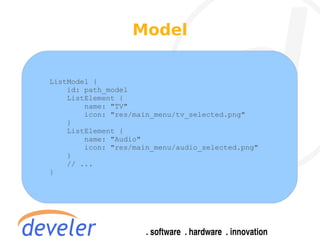
Model


ListModel {
    id: path_model
    ListElement {
        name: "TV"
        icon: "res/main_menu/tv_selected.png"
    }
    ListElement {
        name: "Audio"
        icon: "res/main_menu/audio_selected.png"
    }
    // ...
}
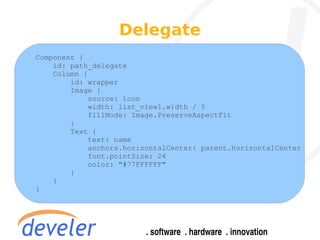
Delegate
Component {
    id: path_delegate
    Column {
        id: wrapper
        Image {
            source: icon
            width: list_view1.width / 5
            fillMode: Image.PreserveAspectFit
        }
        Text {
            text: name
            anchors.horizontalCenter: parent.horizontalCenter
            font.pointSize: 24
            color: "#77FFFFFF"
        }
    }
}
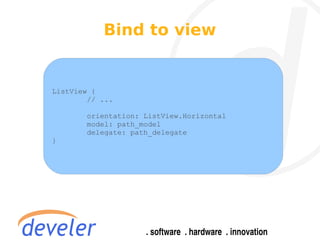
Bind to view


ListView {
        // ...

       orientation: ListView.Horizontal
       model: path_model
       delegate: path_delegate
}
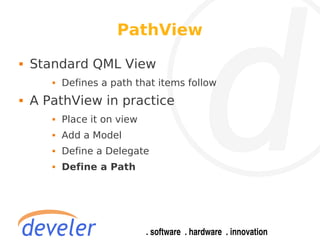
PathView
   Standard QML View
          Defines a path that items follow
   A PathView in practice
          Place it on view
          Add a Model
          Define a Delegate
          Define a Path
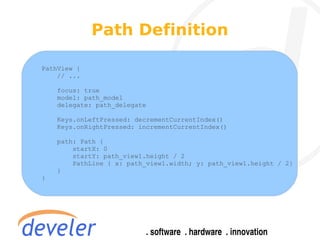
Path Definition

PathView {
    // ...

    focus: true
    model: path_model
    delegate: path_delegate

    Keys.onLeftPressed: decrementCurrentIndex()
    Keys.onRightPressed: incrementCurrentIndex()

    path: Path {
        startX: 0
        startY: path_view1.height / 2
        PathLine { x: path_view1.width; y: path_view1.height / 2}
    }
}
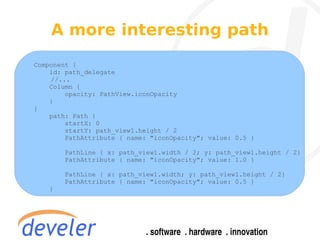
A more interesting path
Component {
    id: path_delegate
    //...
    Column {
        opacity: PathView.iconOpacity
    }
}
    path: Path {
        startX: 0
        startY: path_view1.height / 2
        PathAttribute { name: "iconOpacity"; value: 0.5 }

       PathLine { x: path_view1.width / 2; y: path_view1.height / 2}
       PathAttribute { name: "iconOpacity"; value: 1.0 }

       PathLine { x: path_view1.width; y: path_view1.height / 2}
       PathAttribute { name: "iconOpacity"; value: 0.5 }
   }
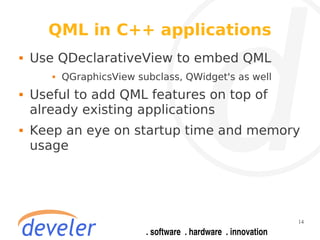
QML in C++ applications
   Use QDeclarativeView to embed QML
          QGraphicsView subclass, QWidget's as well
   Useful to add QML features on top of
    already existing applications
   Keep an eye on startup time and memory
    usage


                                                       14
QML in C++ applications
   QML functions can be called via
    QMetaObject::invokeMethod()
   QML objects can emit signals that C++
    code can QObject::connect()
   → you can define an interface for QML
    objects
   C++ properties / signals / slots are
    exposed to QML via the Meta Object
    System
                                            15
QML Models in C++
   QML doesn't have direct access to
    hardware
   What if we want to retrieve a list of
    channel from a TV tuner?
   We can subclass QAbstractItemModel,
    implement the desired model in C++ and
    use it from QML.


                                            16
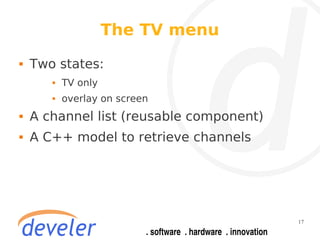
The TV menu
   Two states:
          TV only
          overlay on screen
   A channel list (reusable component)
   A C++ model to retrieve channels


                                          17
Putting it all together
   Fast forward: we have several QML files,
    one for each page
   We would like to “instantiate” and load a
    QML file on-the-fly


                                                18
Dynamic Object Management
   Dynamic object creation from Javascript
   Qt.createComponent(url) → Component
   Component.createObject(parent) → inst
   The QML file can be fetched over the
    network
          Great for implementing live widgets!
          … but the fetch is asynchronous: how do I know
            when it's finished?


                                                            19
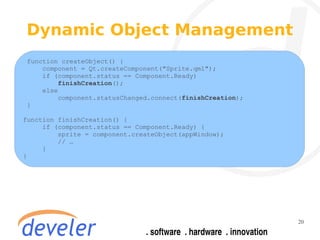
Dynamic Object Management
 function createObject() {
     component = Qt.createComponent("Sprite.qml");
     if (component.status == Component.Ready)
          finishCreation();
     else
          component.statusChanged.connect(finishCreation);
 }

function finishCreation() {
     if (component.status == Component.Ready) {
         sprite = component.createObject(appWindow);
         // …
     }
}


                                                             20
A stack of pages
   In most STBs, pages are in a stack
          Entering a page → push
          Previous page → pop
          Panic button (home menu) → clear
   We need a persistent global state for this


                                                 21
Stack implementation
// Stack.js
var stack = []
// Create a QML object from a given filename and push it on the stack
function openPage(filename) {
    var page_c = Qt.createComponent(filename)
    var page = page_c.createObject(root_window)
    stack.push(page)
    return page
}


// Page.qml
Import “stack.js” as Stack

Page {
    Keys.onReturnPressed: {
        Stack.openPage(“tvmenu.qml”)
    }
}


                                                                        22
Stack implementation
   Sounds great! ...But alas, it doesn't work
          A new execution context is created for the use of
             the importing Component only
   QML JS can't modify global object
    members either
   .pragma library
          Placed at the top of a JS module, tells QML that
             this module is stateless, so it's instance can
             freely shared
          Handle with care
                                                              23
THANKS !
                                Develer S.r.l.
                             Via Mugellese 1/A
                         50013 Campi Bisenzio
                                 Firenze - Italy


Contacts
Mail: info@develer.com
Phone: +39-055-3984627
Fax: +39 178 6003614
http://www.develer.com

Qt Quick in depth

  • 1.
    Qt Quick inDepth Lorenzo Mancini (lmancini@develer.com)
  • 2.
    Qt Quick: acase study  Remake of Vodafone's TVConnect UI  Developed to demonstrate QQ's:  Conciseness  Performance  Overall toolchain
  • 3.
    Qt Creator configuration  New Qt Quick Application  Integrate with Mercurial  Test the Application Viewer  Create a new run configuration  Projects->Run  qmlviewer %{CurrentDocument:FilePath}  We'll use this to test single pages
  • 4.
    Qt Creator configuration  Enable QML debugging  Projects->Build  Build Steps->Link QML debugging library  (Rebuild all)  You only have to do all this once  This is all saved in .pro.user file
  • 5.
    The Home menu  Background image  No states  Series of icons following a path
  • 6.
    QML Views  List visualization for models  Models provide homogeneous data  Each data is represented by delegates  Interesting properties:  model  highlight  delegate
  • 7.
    ListView  Standard QML View  Lays delegates in a list  A ListView in practice  Place it on view  Add a Model  Define a Delegate  E.g. Component / Column / Image + Text
  • 8.
    Model ListModel { id: path_model ListElement { name: "TV" icon: "res/main_menu/tv_selected.png" } ListElement { name: "Audio" icon: "res/main_menu/audio_selected.png" } // ... }
  • 9.
    Delegate Component { id: path_delegate Column { id: wrapper Image { source: icon width: list_view1.width / 5 fillMode: Image.PreserveAspectFit } Text { text: name anchors.horizontalCenter: parent.horizontalCenter font.pointSize: 24 color: "#77FFFFFF" } } }
  • 10.
    Bind to view ListView{ // ... orientation: ListView.Horizontal model: path_model delegate: path_delegate }
  • 11.
    PathView  Standard QML View  Defines a path that items follow  A PathView in practice  Place it on view  Add a Model  Define a Delegate  Define a Path
  • 12.
    Path Definition PathView { // ... focus: true model: path_model delegate: path_delegate Keys.onLeftPressed: decrementCurrentIndex() Keys.onRightPressed: incrementCurrentIndex() path: Path { startX: 0 startY: path_view1.height / 2 PathLine { x: path_view1.width; y: path_view1.height / 2} } }
  • 13.
    A more interestingpath Component { id: path_delegate //... Column { opacity: PathView.iconOpacity } } path: Path { startX: 0 startY: path_view1.height / 2 PathAttribute { name: "iconOpacity"; value: 0.5 } PathLine { x: path_view1.width / 2; y: path_view1.height / 2} PathAttribute { name: "iconOpacity"; value: 1.0 } PathLine { x: path_view1.width; y: path_view1.height / 2} PathAttribute { name: "iconOpacity"; value: 0.5 } }
  • 14.
    QML in C++applications  Use QDeclarativeView to embed QML  QGraphicsView subclass, QWidget's as well  Useful to add QML features on top of already existing applications  Keep an eye on startup time and memory usage 14
  • 15.
    QML in C++applications  QML functions can be called via QMetaObject::invokeMethod()  QML objects can emit signals that C++ code can QObject::connect()  → you can define an interface for QML objects  C++ properties / signals / slots are exposed to QML via the Meta Object System 15
  • 16.
    QML Models inC++  QML doesn't have direct access to hardware  What if we want to retrieve a list of channel from a TV tuner?  We can subclass QAbstractItemModel, implement the desired model in C++ and use it from QML. 16
  • 17.
    The TV menu  Two states:  TV only  overlay on screen  A channel list (reusable component)  A C++ model to retrieve channels 17
  • 18.
    Putting it alltogether  Fast forward: we have several QML files, one for each page  We would like to “instantiate” and load a QML file on-the-fly 18
  • 19.
    Dynamic Object Management  Dynamic object creation from Javascript  Qt.createComponent(url) → Component  Component.createObject(parent) → inst  The QML file can be fetched over the network  Great for implementing live widgets!  … but the fetch is asynchronous: how do I know when it's finished? 19
  • 20.
    Dynamic Object Management function createObject() { component = Qt.createComponent("Sprite.qml"); if (component.status == Component.Ready) finishCreation(); else component.statusChanged.connect(finishCreation); } function finishCreation() { if (component.status == Component.Ready) { sprite = component.createObject(appWindow); // … } } 20
  • 21.
    A stack ofpages  In most STBs, pages are in a stack  Entering a page → push  Previous page → pop  Panic button (home menu) → clear  We need a persistent global state for this 21
  • 22.
    Stack implementation // Stack.js varstack = [] // Create a QML object from a given filename and push it on the stack function openPage(filename) { var page_c = Qt.createComponent(filename) var page = page_c.createObject(root_window) stack.push(page) return page } // Page.qml Import “stack.js” as Stack Page { Keys.onReturnPressed: { Stack.openPage(“tvmenu.qml”) } } 22
  • 23.
    Stack implementation  Sounds great! ...But alas, it doesn't work  A new execution context is created for the use of the importing Component only  QML JS can't modify global object members either  .pragma library  Placed at the top of a JS module, tells QML that this module is stateless, so it's instance can freely shared  Handle with care 23
  • 24.
    THANKS ! Develer S.r.l. Via Mugellese 1/A 50013 Campi Bisenzio Firenze - Italy Contacts Mail: info@develer.com Phone: +39-055-3984627 Fax: +39 178 6003614 http://www.develer.com