Qt Quick – Overview and basic GUI
            SERIOUS ABOUT SOFTWARE
Timo Strömmer, Jan 3, 2011
                                     1
Contents
 • Quick start
    •   Environment installation

 • Qt Quick overview
    •   Qt Quick components

    •   QML language overview

    •   Qt modules overview

 • Programming with QML
    •   Basic concepts and GUI elements

    •   GUI layouts
Creating a hello world project with QtCreator

QUICK START


                                                3
Installation
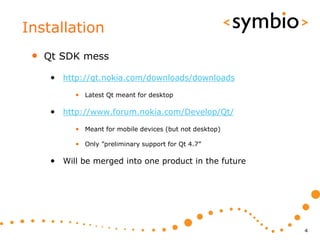
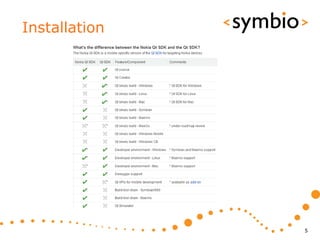
 •   Qt SDK mess

      • http://qt.nokia.com/downloads/downloads
            • Latest Qt meant for desktop

      • http://www.forum.nokia.com/Develop/Qt/
            • Meant for mobile devices (but not desktop)

            • Only ”preliminary support for Qt 4.7”

      • Will be merged into one product in the future


                                                           4
Installation


               5
Installation
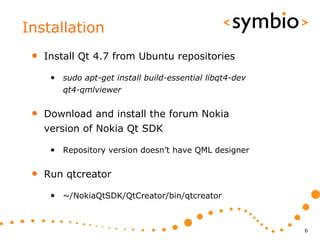
 •   Install Qt 4.7 from Ubuntu repositories

      • sudo apt-get install build-essential libqt4-dev
         qt4-qmlviewer


 •   Download and install the forum Nokia
     version of Nokia Qt SDK

      • Repository version doesn’t have QML designer

 •   Run qtcreator

      • ~/NokiaQtSDK/QtCreator/bin/qtcreator


                                                          6
Installation
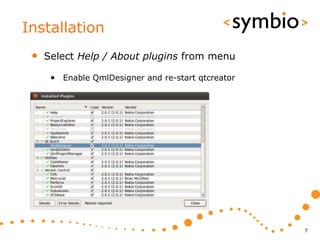
 •   Select Help / About plugins from menu

      • Enable QmlDesigner and re-start qtcreator


                                                    7
Installation
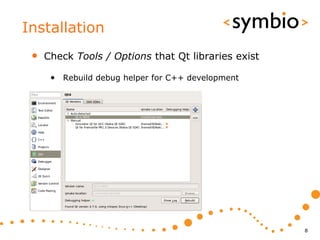
 •   Check Tools / Options that Qt libraries exist

      • Rebuild debug helper for C++ development


                                                     8
Quick start
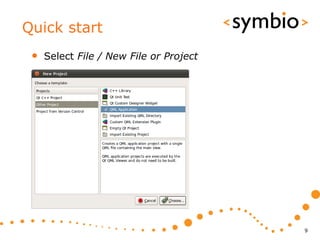
 •   Select File / New File or Project


                                         9
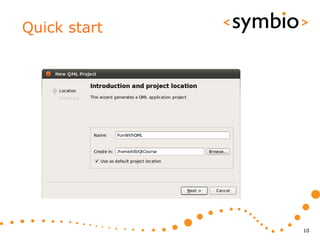
Quick start


              10
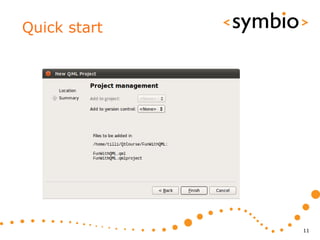
Quick start


              11
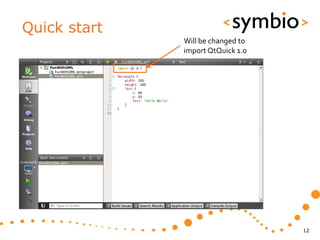
Quick start
              Will be changed to
              import QtQuick 1.0


                                   12
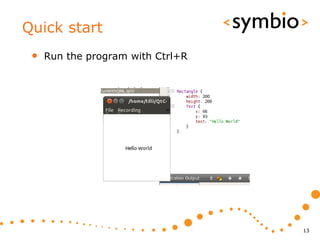
Quick start
 •   Run the program with Ctrl+R


                                   13
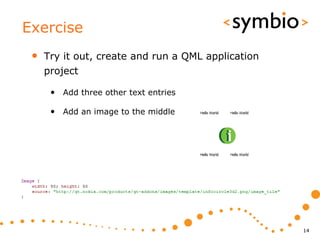
Exercise
 •   Try it out, create and run a QML application
     project

      • Add three other text entries

      • Add an image to the middle


                                                    14
Overview

QT QUICK


           15
What is Qt Quick
 •   QML – a language for UI design and
     development

 •   Qt declarative – Module for integrating QML
     and Qt C++ libraries

 •   Qt Creator tools – Complete development
     environment

      • QML design and code

      • C++ integration

      • Packaging and deployment
                                                   16
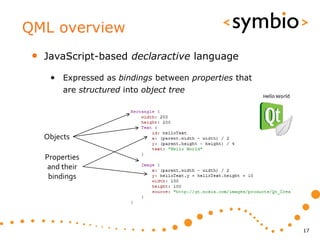
QML overview
 •   JavaScript-based declaractive language

      • Expressed as bindings between properties that
          are structured into object tree


     Objects

     Properties
      and their
      bindings


                                                        17
QML overview
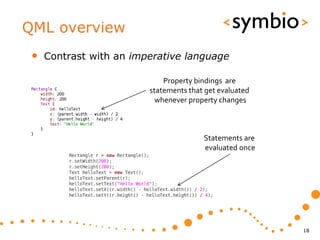
 •   Contrast with an imperative language

                             Property bindings are
                         statements that get evaluated
                           whenever property changes


                                        Statements are
                                        evaluated once


                                                         18
QML overview
 •   JavaScript / JSON, not XML

      • unlike MXML (Flash), XUL (Gecko), XAML (.Net)

      • But, has support for XPath queries, so can easily
         integrate with XML-based web services


                                                            19
Qt Declarative
 •   Declarative module is a C++ framework for
     gluing QML and C++ code together

      • Integrating QML ”scripts” into C++ application

      • Integrating C++ plug-in’s into QML application

 •   Still lacking some basics

      • First official version with Qt4.7 (2010/09/21)

      • GUI component project in development
            • Buttons, dialogs etc.


                                                         20
Qt Creator
 •   Qt Creator integrates C++ and QML
     development into single IDE

      • QML designer for visual editing

      • QML and C++ code editors

      • Same code can be run at desktop or device


                                                    21
Qt Creator intro
 •   This is interactive part…

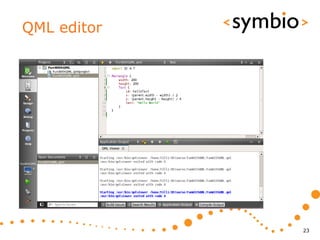
      • QML editor

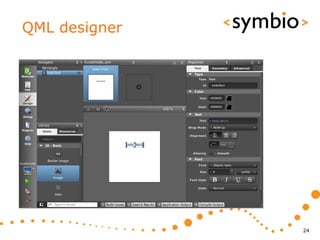
      • QML designer

      • Project management
           • Adding / removing / renaming files

      • Session management


                                                  22
QML editor


             23
QML designer


               24
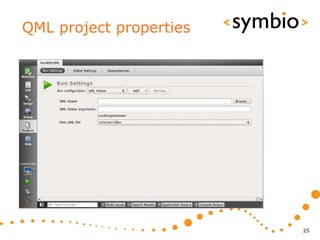
QML project properties


                         25
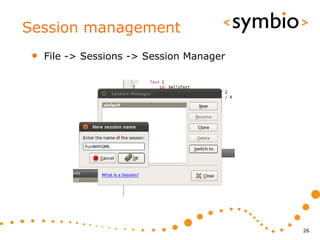
Session management
 •   File -> Sessions -> Session Manager


                                           26
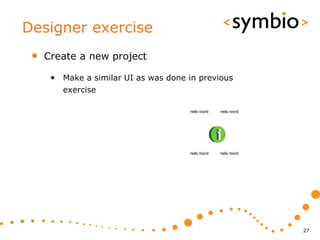
Designer exercise
 •   Create a new project

      • Make a similar UI as was done in previous
         exercise


                                                    27
Overview of what’s in there

QT MODULES


                              28
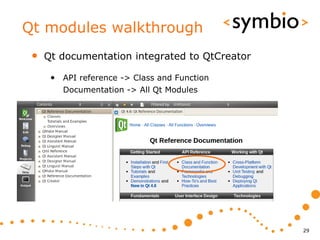
Qt modules walkthrough
 •   Qt documentation integrated to QtCreator

      • API reference -> Class and Function
        Documentation -> All Qt Modules


                                                29
Core module
 •   Frameworks discussed during this course

      • Qt object model (QObject, QMetaObject)

      • Strings (QString, QByteArray)

      • Containers (QList, QMap, QHash, QLinkedList)

      • Data models (QAbstractItemModel & related)


                                                       30
Core module
 •   Frameworks not discussed in this course

      • Multithreading (QFuture & related)

      • I/O devices (QIODevice, Qfile & related)

      • State machines (QStateMachine & related)


                                                   31
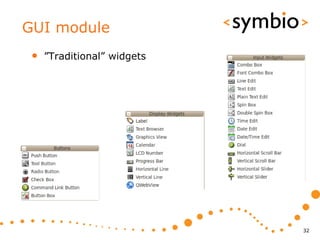
GUI module
 •   ”Traditional” widgets


                             32
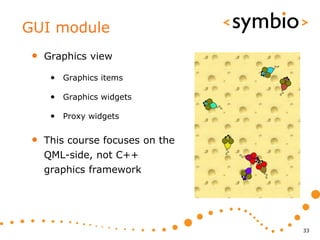
GUI module
 •   Graphics view

      • Graphics items

      • Graphics widgets

      • Proxy widgets

 •   This course focuses on the
     QML-side, not C++
     graphics framework


                                  33
Network module
 •   Sockets, including secure ones

      • QTcpSocket, QSslSocket

 •   Simple HTTP and FTP API’s

      • QNetworkAccessManager


                                      34
Multimedia modules
 •   OpenGL for 3D rendering

 •   OpenVG for 2D rendering

 •   Svg for processing vector graphics files

 •   Phonon multimedia framework

      • Not in mobile devices


                                                35
Scripting modules
 •   QtDeclarative and QtScript

      • QtScript -> Basically QML without the
         declarative parts

      • Different C++ engines

 •   QtDeclarative gets the hype nowadays


                                                36
Other modules
 •   XML

      • SAX and DOM parsers
 •   XmlPatterns

      • XPath, XQuery, XSLT, schemas

 •   WebKit browser engine

 •   SQL for accessing databases


                                       37
Mobile development
 •   Mobility API’s are not part of standard QT

      • GPS, contacts, calendar, messaging, etc.

      • Latest release 1.1:
           • http://qt.nokia.com/products/qt-addons/mobility/

           • Symbian .sis packages available for download

           • N900 package can be installed from repository
                - libqtm-… packages with apt-get install

           • Works in Qt Simulator on PC

      • QML integration in progress


                                                                38
Basic concepts

QML PROGRAMMING


                  39
QML syntax
 •   Based on ECMA-262 specification

      • Operating environment differs from the usual
         web browser

            • DOM vs. QtDeclarative

      • Supports v5 features (notably JSON)

 •   Declarative concepts added on top

      • Quite a lot can be done without any ”scriptiness”


                                                            40
Components
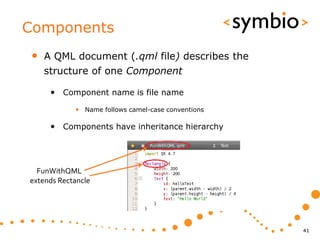
•   A QML document (.qml file) describes the
    structure of one Component

     • Component name is file name
            • Name follows camel-case conventions

     • Components have inheritance hierarchy


  FunWithQML
extends Rectancle


                                                    41
Components
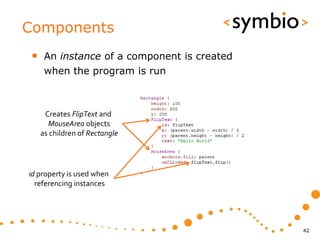
•    An instance of a component is created
     when the program is run


     Creates FlipText and
      MouseArea objects
    as children of Rectangle


id property is used when
  referencing instances


                                             42
Components
•   Internals of component are not
    automatically visible to other components

•   Component’s API is defined via properties,
    functions and signals:

     • Property - expression that evaluates to a value

     • Function - called to perform something

     • Signal - callback from the component


                                                         43
Properties
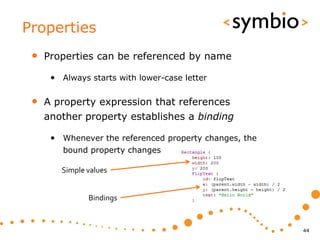
 •   Properties can be referenced by name

      • Always starts with lower-case letter

 •   A property expression that references
     another property establishes a binding

      • Whenever the referenced property changes, the
         bound property changes

        Simple values


               Bindings


                                                        44
Properties
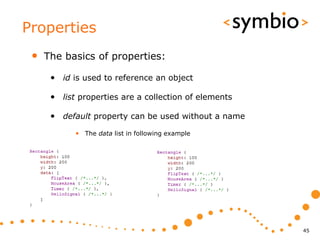
 •   The basics of properties:

      • id is used to reference an object

      • list properties are a collection of elements

      • default property can be used without a name
            • The data list in following example


                                                       45
Properties
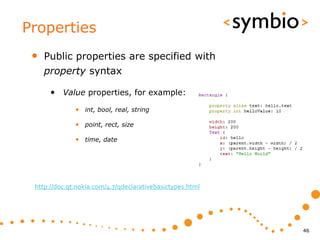
 •   Public properties are specified with
     property syntax

      • Value properties, for example:
              • int, bool, real, string

              • point, rect, size

              • time, date


 http://doc.qt.nokia.com/4.7/qdeclarativebasictypes.html


                                                           46
Alias properties
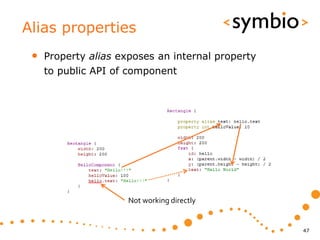
 •   Property alias exposes an internal property
     to public API of component


                      Not working directly


                                                   47
Properties
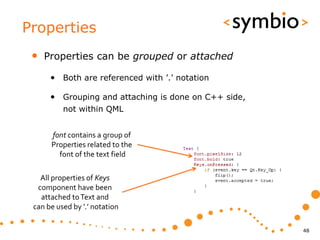
 •   Properties can be grouped or attached

      • Both are referenced with ’.’ notation

      • Grouping and attaching is done on C++ side,
          not within QML


      font contains a group of
      Properties related to the
        font of the text field

   All properties of Keys
  component have been
   attached to Text and
 can be used by ’.’ notation

                                                      48
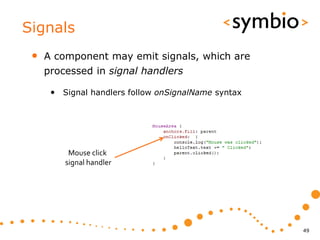
Signals
 •   A component may emit signals, which are
     processed in signal handlers

      • Signal handlers follow onSignalName syntax


          Mouse click
         signal handler


                                                     49
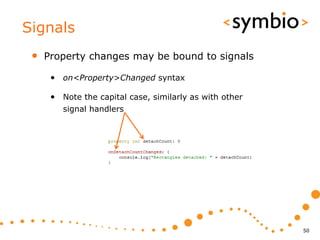
Signals
 •   Property changes may be bound to signals

      • on<Property>Changed syntax

      • Note the capital case, similarly as with other
         signal handlers


                                                         50
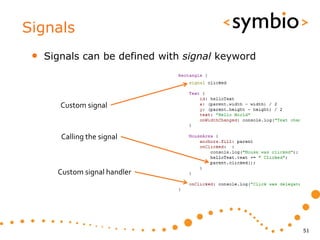
Signals
 •   Signals can be defined with signal keyword


        Custom signal


        Calling the signal


       Custom signal handler


                                                  51
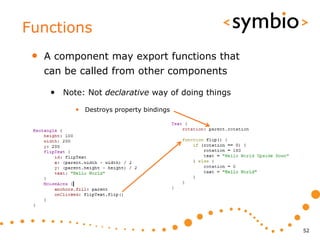
Functions
 •   A component may export functions that
     can be called from other components

      • Note: Not declarative way of doing things
           • Destroys property bindings


                                                    52
Visual GUI items

QML GUI BASICS


                   53
QML Item
 •   Item is a base for all GUI components

 •   Basic properties of an GUI item:

      • Coordinates: x, y, z, width, height, anchors

      • Transforms: rotation, scale, translate

      • Hierarchy: children, parent

      • Visibility: visible, opacity

      • state and transitions

 •   Does not draw anything by itself

                                                       54
Basic visual elements
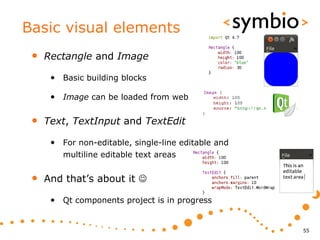
 •   Rectangle and Image

      • Basic building blocks

      • Image can be loaded from web

 •   Text, TextInput and TextEdit

      • For non-editable, single-line editable and
         multiline editable text areas


 •   And that’s about it 

      • Qt components project is in progress


                                                     55
Rectangle
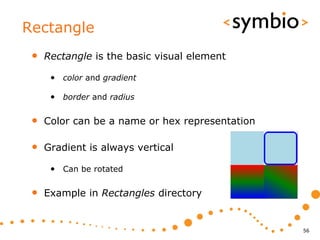
 •   Rectangle is the basic visual element

      • color and gradient

      • border and radius

 •   Color can be a name or hex representation

 •   Gradient is always vertical

      • Can be rotated

 •   Example in Rectangles directory


                                                 56
Image
•   Image element for standard image formats

     • jpg, png, svg…

     • File or URL source
          • Loads web images asynchronously

     • Image has sourceSize
          • Scaled to width and height by default

     • Inherited by AnimatedImage

•   Example in Images directory


                                                    57
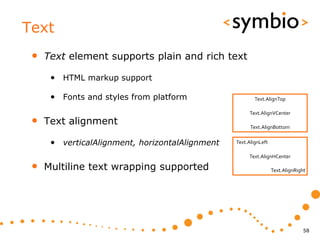
Text
 •   Text element supports plain and rich text

      • HTML markup support

      • Fonts and styles from platform                   Text.AlignTop

                                                      Text.AlignVCenter
 •   Text alignment                                    Text.AlignBottom


      • verticalAlignment, horizontalAlignment   Text.AlignLeft

                                                      Text.AlignHCenter

 •   Multiline text wrapping supported                            Text.AlignRight


                                                                                58
TextInput
 •   TextInput is used for single-line input

      • Font and styles as in Text

      • Text selection supported
            • Integrates with system clipboard

      • Echo modes for password input

      • Text input validators
            • IntValidator, DoubleValidator, RegExpValidator


 •   Example in TextInput directory


                                                               59
TextEdit
 •   TextEdit for multi-line editing

      • Supports both plain and rich text

      • Mostly similar as Text and TextInput

      • Note readOnly and selectByMouse flags
            • Text that can be copied to system clipboard


                                                            60
Item transformations
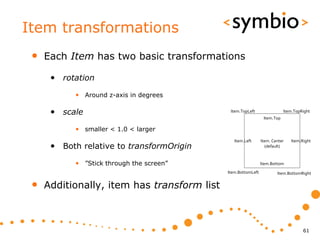
 •   Each Item has two basic transformations

      • rotation
            • Around z-axis in degrees

      • scale                                 Item.TopLeft                 Item.TopRight
                                                                Item.Top

            • smaller < 1.0 < larger
                                                Item.Left      Item. Center   Item.Right
      • Both relative to transformOrigin                         (default)


            • ”Stick through the screen”                       Item.Bottom
                                             Item.BottomLeft           Item.BottomRight


 •   Additionally, item has transform list


                                                                                    61
Item transformations
 •   Transform objects allow more options

      • Rotation in 3-D
            • Around arbitrary axis (x, y, z)

      • Scale
            • Separate scale factors for x and y axis

      • Translate
            • Moves objects without affecting their x and y position


 •   Combination of any above

      • With arbitrary origin points

                                                                       62
Putting the blocks together

ITEM LAYOUTS


                              63
Item layouts
 •   Relative coordinates

 •   Anchors between items

 •   Positioner objects

      • Row, Column, Flow, Grid


                                  64
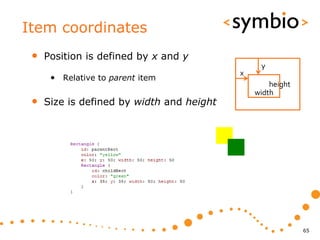
Item coordinates
 •   Position is defined by x and y
                                                y
                                           x
      • Relative to parent item
                                                   height
                                               width
 •   Size is defined by width and height


                                                            65
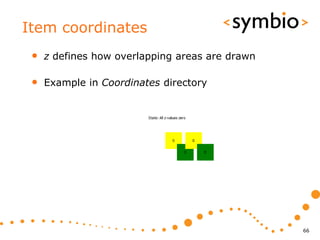
Item coordinates
 •   z defines how overlapping areas are drawn

 •   Example in Coordinates directory


                                                 66
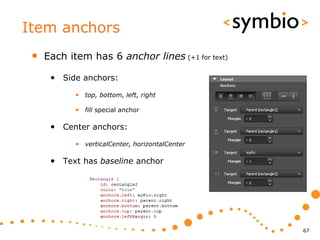
Item anchors
 •   Each item has 6 anchor lines (+1 for text)

      • Side anchors:
            • top, bottom, left, right

            • fill special anchor

      • Center anchors:
            • verticalCenter, horizontalCenter

      • Text has baseline anchor


                                                  67
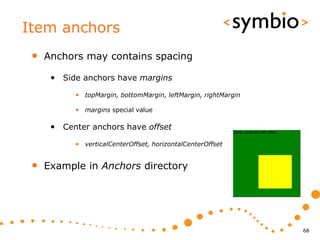
Item anchors
 •   Anchors may contains spacing

      • Side anchors have margins
           • topMargin, bottomMargin, leftMargin, rightMargin

           • margins special value

      • Center anchors have offset
           • verticalCenterOffset, horizontalCenterOffset


 •   Example in Anchors directory


                                                                68
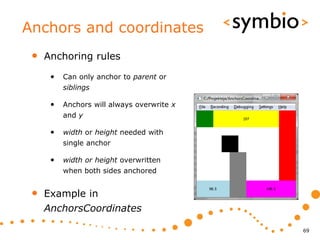
Anchors and coordinates
 •   Anchoring rules

      •   Can only anchor to parent or
          siblings

      •   Anchors will always overwrite x
          and y

      •   width or height needed with
          single anchor

      •   width or height overwritten
          when both sides anchored


 •   Example in
     AnchorsCoordinates

                                            69
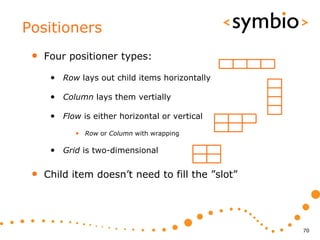
Positioners
 •   Four positioner types:

      • Row lays out child items horizontally

      • Column lays them vertially

      • Flow is either horizontal or vertical
            • Row or Column with wrapping

      • Grid is two-dimensional

 •   Child item doesn’t need to fill the ”slot”


                                                  70
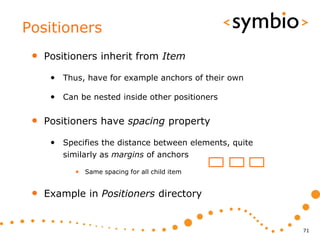
Positioners
 •   Positioners inherit from Item

      • Thus, have for example anchors of their own

      • Can be nested inside other positioners

 •   Positioners have spacing property

      • Specifies the distance between elements, quite
         similarly as margins of anchors

            • Same spacing for all child item


 •   Example in Positioners directory


                                                         71
Getting started with QML

PROGRAMMING EXERCISE


                           72
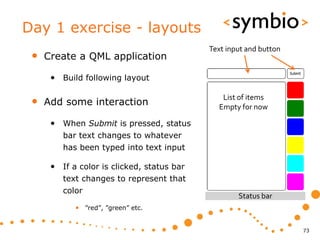
Day 1 exercise - layouts
                                            Text input and button
 •   Create a QML application

      • Build following layout

 •   Add some interaction
                                               List of items
                                              Empty for now

      • When Submit is pressed, status
         bar text changes to whatever
         has been typed into text input

      • If a color is clicked, status bar
         text changes to represent that
         color
                                                    Status bar
            • ”red”, ”green” etc.


                                                                    73
74

QtQuick Day 1

  • 1.
    Qt Quick –Overview and basic GUI SERIOUS ABOUT SOFTWARE Timo Strömmer, Jan 3, 2011 1
  • 2.
    Contents • Quickstart • Environment installation • Qt Quick overview • Qt Quick components • QML language overview • Qt modules overview • Programming with QML • Basic concepts and GUI elements • GUI layouts
  • 3.
    Creating a helloworld project with QtCreator QUICK START 3
  • 4.
    Installation • Qt SDK mess • http://qt.nokia.com/downloads/downloads • Latest Qt meant for desktop • http://www.forum.nokia.com/Develop/Qt/ • Meant for mobile devices (but not desktop) • Only ”preliminary support for Qt 4.7” • Will be merged into one product in the future 4
  • 5.
  • 6.
    Installation • Install Qt 4.7 from Ubuntu repositories • sudo apt-get install build-essential libqt4-dev qt4-qmlviewer • Download and install the forum Nokia version of Nokia Qt SDK • Repository version doesn’t have QML designer • Run qtcreator • ~/NokiaQtSDK/QtCreator/bin/qtcreator 6
  • 7.
    Installation • Select Help / About plugins from menu • Enable QmlDesigner and re-start qtcreator 7
  • 8.
    Installation • Check Tools / Options that Qt libraries exist • Rebuild debug helper for C++ development 8
  • 9.
    Quick start • Select File / New File or Project 9
  • 10.
  • 11.
  • 12.
    Quick start Will be changed to import QtQuick 1.0 12
  • 13.
    Quick start • Run the program with Ctrl+R 13
  • 14.
    Exercise • Try it out, create and run a QML application project • Add three other text entries • Add an image to the middle 14
  • 15.
  • 16.
    What is QtQuick • QML – a language for UI design and development • Qt declarative – Module for integrating QML and Qt C++ libraries • Qt Creator tools – Complete development environment • QML design and code • C++ integration • Packaging and deployment 16
  • 17.
    QML overview • JavaScript-based declaractive language • Expressed as bindings between properties that are structured into object tree Objects Properties and their bindings 17
  • 18.
    QML overview • Contrast with an imperative language Property bindings are statements that get evaluated whenever property changes Statements are evaluated once 18
  • 19.
    QML overview • JavaScript / JSON, not XML • unlike MXML (Flash), XUL (Gecko), XAML (.Net) • But, has support for XPath queries, so can easily integrate with XML-based web services 19
  • 20.
    Qt Declarative • Declarative module is a C++ framework for gluing QML and C++ code together • Integrating QML ”scripts” into C++ application • Integrating C++ plug-in’s into QML application • Still lacking some basics • First official version with Qt4.7 (2010/09/21) • GUI component project in development • Buttons, dialogs etc. 20
  • 21.
    Qt Creator • Qt Creator integrates C++ and QML development into single IDE • QML designer for visual editing • QML and C++ code editors • Same code can be run at desktop or device 21
  • 22.
    Qt Creator intro • This is interactive part… • QML editor • QML designer • Project management • Adding / removing / renaming files • Session management 22
  • 23.
  • 24.
  • 25.
  • 26.
    Session management • File -> Sessions -> Session Manager 26
  • 27.
    Designer exercise • Create a new project • Make a similar UI as was done in previous exercise 27
  • 28.
    Overview of what’sin there QT MODULES 28
  • 29.
    Qt modules walkthrough • Qt documentation integrated to QtCreator • API reference -> Class and Function Documentation -> All Qt Modules 29
  • 30.
    Core module • Frameworks discussed during this course • Qt object model (QObject, QMetaObject) • Strings (QString, QByteArray) • Containers (QList, QMap, QHash, QLinkedList) • Data models (QAbstractItemModel & related) 30
  • 31.
    Core module • Frameworks not discussed in this course • Multithreading (QFuture & related) • I/O devices (QIODevice, Qfile & related) • State machines (QStateMachine & related) 31
  • 32.
    GUI module • ”Traditional” widgets 32
  • 33.
    GUI module • Graphics view • Graphics items • Graphics widgets • Proxy widgets • This course focuses on the QML-side, not C++ graphics framework 33
  • 34.
    Network module • Sockets, including secure ones • QTcpSocket, QSslSocket • Simple HTTP and FTP API’s • QNetworkAccessManager 34
  • 35.
    Multimedia modules • OpenGL for 3D rendering • OpenVG for 2D rendering • Svg for processing vector graphics files • Phonon multimedia framework • Not in mobile devices 35
  • 36.
    Scripting modules • QtDeclarative and QtScript • QtScript -> Basically QML without the declarative parts • Different C++ engines • QtDeclarative gets the hype nowadays 36
  • 37.
    Other modules • XML • SAX and DOM parsers • XmlPatterns • XPath, XQuery, XSLT, schemas • WebKit browser engine • SQL for accessing databases 37
  • 38.
    Mobile development • Mobility API’s are not part of standard QT • GPS, contacts, calendar, messaging, etc. • Latest release 1.1: • http://qt.nokia.com/products/qt-addons/mobility/ • Symbian .sis packages available for download • N900 package can be installed from repository - libqtm-… packages with apt-get install • Works in Qt Simulator on PC • QML integration in progress 38
  • 39.
  • 40.
    QML syntax • Based on ECMA-262 specification • Operating environment differs from the usual web browser • DOM vs. QtDeclarative • Supports v5 features (notably JSON) • Declarative concepts added on top • Quite a lot can be done without any ”scriptiness” 40
  • 41.
    Components • A QML document (.qml file) describes the structure of one Component • Component name is file name • Name follows camel-case conventions • Components have inheritance hierarchy FunWithQML extends Rectancle 41
  • 42.
    Components • An instance of a component is created when the program is run Creates FlipText and MouseArea objects as children of Rectangle id property is used when referencing instances 42
  • 43.
    Components • Internals of component are not automatically visible to other components • Component’s API is defined via properties, functions and signals: • Property - expression that evaluates to a value • Function - called to perform something • Signal - callback from the component 43
  • 44.
    Properties • Properties can be referenced by name • Always starts with lower-case letter • A property expression that references another property establishes a binding • Whenever the referenced property changes, the bound property changes Simple values Bindings 44
  • 45.
    Properties • The basics of properties: • id is used to reference an object • list properties are a collection of elements • default property can be used without a name • The data list in following example 45
  • 46.
    Properties • Public properties are specified with property syntax • Value properties, for example: • int, bool, real, string • point, rect, size • time, date http://doc.qt.nokia.com/4.7/qdeclarativebasictypes.html 46
  • 47.
    Alias properties • Property alias exposes an internal property to public API of component Not working directly 47
  • 48.
    Properties • Properties can be grouped or attached • Both are referenced with ’.’ notation • Grouping and attaching is done on C++ side, not within QML font contains a group of Properties related to the font of the text field All properties of Keys component have been attached to Text and can be used by ’.’ notation 48
  • 49.
    Signals • A component may emit signals, which are processed in signal handlers • Signal handlers follow onSignalName syntax Mouse click signal handler 49
  • 50.
    Signals • Property changes may be bound to signals • on<Property>Changed syntax • Note the capital case, similarly as with other signal handlers 50
  • 51.
    Signals • Signals can be defined with signal keyword Custom signal Calling the signal Custom signal handler 51
  • 52.
    Functions • A component may export functions that can be called from other components • Note: Not declarative way of doing things • Destroys property bindings 52
  • 53.
    Visual GUI items QMLGUI BASICS 53
  • 54.
    QML Item • Item is a base for all GUI components • Basic properties of an GUI item: • Coordinates: x, y, z, width, height, anchors • Transforms: rotation, scale, translate • Hierarchy: children, parent • Visibility: visible, opacity • state and transitions • Does not draw anything by itself 54
  • 55.
    Basic visual elements • Rectangle and Image • Basic building blocks • Image can be loaded from web • Text, TextInput and TextEdit • For non-editable, single-line editable and multiline editable text areas • And that’s about it  • Qt components project is in progress 55
  • 56.
    Rectangle • Rectangle is the basic visual element • color and gradient • border and radius • Color can be a name or hex representation • Gradient is always vertical • Can be rotated • Example in Rectangles directory 56
  • 57.
    Image • Image element for standard image formats • jpg, png, svg… • File or URL source • Loads web images asynchronously • Image has sourceSize • Scaled to width and height by default • Inherited by AnimatedImage • Example in Images directory 57
  • 58.
    Text • Text element supports plain and rich text • HTML markup support • Fonts and styles from platform Text.AlignTop Text.AlignVCenter • Text alignment Text.AlignBottom • verticalAlignment, horizontalAlignment Text.AlignLeft Text.AlignHCenter • Multiline text wrapping supported Text.AlignRight 58
  • 59.
    TextInput • TextInput is used for single-line input • Font and styles as in Text • Text selection supported • Integrates with system clipboard • Echo modes for password input • Text input validators • IntValidator, DoubleValidator, RegExpValidator • Example in TextInput directory 59
  • 60.
    TextEdit • TextEdit for multi-line editing • Supports both plain and rich text • Mostly similar as Text and TextInput • Note readOnly and selectByMouse flags • Text that can be copied to system clipboard 60
  • 61.
    Item transformations • Each Item has two basic transformations • rotation • Around z-axis in degrees • scale Item.TopLeft Item.TopRight Item.Top • smaller < 1.0 < larger Item.Left Item. Center Item.Right • Both relative to transformOrigin (default) • ”Stick through the screen” Item.Bottom Item.BottomLeft Item.BottomRight • Additionally, item has transform list 61
  • 62.
    Item transformations • Transform objects allow more options • Rotation in 3-D • Around arbitrary axis (x, y, z) • Scale • Separate scale factors for x and y axis • Translate • Moves objects without affecting their x and y position • Combination of any above • With arbitrary origin points 62
  • 63.
    Putting the blockstogether ITEM LAYOUTS 63
  • 64.
    Item layouts • Relative coordinates • Anchors between items • Positioner objects • Row, Column, Flow, Grid 64
  • 65.
    Item coordinates • Position is defined by x and y y x • Relative to parent item height width • Size is defined by width and height 65
  • 66.
    Item coordinates • z defines how overlapping areas are drawn • Example in Coordinates directory 66
  • 67.
    Item anchors • Each item has 6 anchor lines (+1 for text) • Side anchors: • top, bottom, left, right • fill special anchor • Center anchors: • verticalCenter, horizontalCenter • Text has baseline anchor 67
  • 68.
    Item anchors • Anchors may contains spacing • Side anchors have margins • topMargin, bottomMargin, leftMargin, rightMargin • margins special value • Center anchors have offset • verticalCenterOffset, horizontalCenterOffset • Example in Anchors directory 68
  • 69.
    Anchors and coordinates • Anchoring rules • Can only anchor to parent or siblings • Anchors will always overwrite x and y • width or height needed with single anchor • width or height overwritten when both sides anchored • Example in AnchorsCoordinates 69
  • 70.
    Positioners • Four positioner types: • Row lays out child items horizontally • Column lays them vertially • Flow is either horizontal or vertical • Row or Column with wrapping • Grid is two-dimensional • Child item doesn’t need to fill the ”slot” 70
  • 71.
    Positioners • Positioners inherit from Item • Thus, have for example anchors of their own • Can be nested inside other positioners • Positioners have spacing property • Specifies the distance between elements, quite similarly as margins of anchors • Same spacing for all child item • Example in Positioners directory 71
  • 72.
    Getting started withQML PROGRAMMING EXERCISE 72
  • 73.
    Day 1 exercise- layouts Text input and button • Create a QML application • Build following layout • Add some interaction List of items Empty for now • When Submit is pressed, status bar text changes to whatever has been typed into text input • If a color is clicked, status bar text changes to represent that color Status bar • ”red”, ”green” etc. 73
  • 74.