QtQml
Outline
• What is Qt ?
• What is Qml?
• Qml Elements
• Qt creator
• Qt on Android
What is Qt ?
• Cross-platform GUI application framework
• Written in C++
• Open Source
• Qt modules: Qt Core, Qt GUI, Qt QML, Qt Quick, Qt
Network, Qt Multimedia, Qt WebKit, Qt SQL …
• Software developed by Qt
– Perforce , tesla , VLC , google earth, Mathematica,
jewelrybox …
What is Qml ?
• Qt Meta Language
• JavaScript-based, declarative language for
designing user interface–centric app
• Support by QtQuick (the standard library for
writing QML applications)
• Mainly for mobile app
• Qml element easily to be extended by javascript
and C++ class
• Qml can use various qt modules
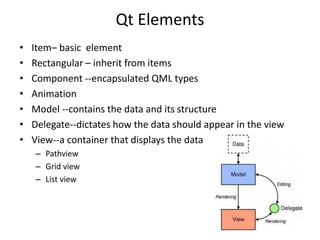
Qt Elements
• Item– basic element
• Rectangular – inherit from items
• Component --encapsulated QML types
• Animation
• Model --contains the data and its structure
• Delegate--dictates how the data should appear in the view
• View--a container that displays the data
– Pathview
– Grid view
– List view
Qt creator
• IDE
• Layout
• Example :
– calqlatr (java script)
– Calendar (c++)
QML on Android
• Support for native android style with Qt Quick Controls ,not
yet included material design
– http://doc.qt.io/qt-5/android-support.html
– http://doc.qt.io/qt-5/qtquickcontrols-
platformnotes.html#android-style
• Support most of Qt modules: multimedia , sensor reading,
GPS , bluetooth…
– http://doc.qt.io/qt-5/examples-android.html
• Develop on Qt creator
Qt Android Extras
• The way to call the android java api
• Example : qt notifier
http://doc.qt.io/qt-5/qtandroidextras-
notification-notificationclient-cpp.html
• Qt thread & Android thread
– http://www.kdab.com/qt-android-episode-7/
Pros
• Cross-platform
• powerful UI libraries
• IDE: Qt Creator
• Native-look
• Performance is the same with (maybe better than)
native app
– Qt Core is written in high performance C++
– Utilize hardware acceleration
– http://stackoverflow.com/questions/22460127/how-slow-or-fast-is-qt-
mobile-for-android
– http://www.developereconomics.com/cross-platform-apps-qt-vs-
html5/
– http://v-play.net/2014/10/qt-vs-html5-cross-platform-apps/
cons
• Size is large
– 35MB for hello world
– http://achipa.blogspot.tw/2014/11/native-ui-in-
qt-on-android-without.html
• Need to compile QMl
• Licensing is confusing
– https://blog.qt.io/blog/2009/11/30/qt-making-
the-right-licensing-decision/

Qt Qml

  • 1.
  • 2.
    Outline • What isQt ? • What is Qml? • Qml Elements • Qt creator • Qt on Android
  • 3.
    What is Qt? • Cross-platform GUI application framework • Written in C++ • Open Source • Qt modules: Qt Core, Qt GUI, Qt QML, Qt Quick, Qt Network, Qt Multimedia, Qt WebKit, Qt SQL … • Software developed by Qt – Perforce , tesla , VLC , google earth, Mathematica, jewelrybox …
  • 4.
    What is Qml? • Qt Meta Language • JavaScript-based, declarative language for designing user interface–centric app • Support by QtQuick (the standard library for writing QML applications) • Mainly for mobile app • Qml element easily to be extended by javascript and C++ class • Qml can use various qt modules
  • 5.
    Qt Elements • Item–basic element • Rectangular – inherit from items • Component --encapsulated QML types • Animation • Model --contains the data and its structure • Delegate--dictates how the data should appear in the view • View--a container that displays the data – Pathview – Grid view – List view
  • 6.
    Qt creator • IDE •Layout • Example : – calqlatr (java script) – Calendar (c++)
  • 7.
    QML on Android •Support for native android style with Qt Quick Controls ,not yet included material design – http://doc.qt.io/qt-5/android-support.html – http://doc.qt.io/qt-5/qtquickcontrols- platformnotes.html#android-style • Support most of Qt modules: multimedia , sensor reading, GPS , bluetooth… – http://doc.qt.io/qt-5/examples-android.html • Develop on Qt creator
  • 8.
    Qt Android Extras •The way to call the android java api • Example : qt notifier http://doc.qt.io/qt-5/qtandroidextras- notification-notificationclient-cpp.html • Qt thread & Android thread – http://www.kdab.com/qt-android-episode-7/
  • 9.
    Pros • Cross-platform • powerfulUI libraries • IDE: Qt Creator • Native-look • Performance is the same with (maybe better than) native app – Qt Core is written in high performance C++ – Utilize hardware acceleration – http://stackoverflow.com/questions/22460127/how-slow-or-fast-is-qt- mobile-for-android – http://www.developereconomics.com/cross-platform-apps-qt-vs- html5/ – http://v-play.net/2014/10/qt-vs-html5-cross-platform-apps/
  • 10.
    cons • Size islarge – 35MB for hello world – http://achipa.blogspot.tw/2014/11/native-ui-in- qt-on-android-without.html • Need to compile QMl • Licensing is confusing – https://blog.qt.io/blog/2009/11/30/qt-making- the-right-licensing-decision/