© Integrated Computer Solutions, Inc. All Rights Reserved
Fun with QML
July 19, 2018
Qt for Beginners Summer Webinar Series
Part III
Copyright 201 , Integrated Computers Solutions, Inc.
This work may not be reproduced in whole or in part without the express written consent of Integrated
Computer Solutions, Inc.
© Integrated Computer Solutions, Inc. All Rights Reserved
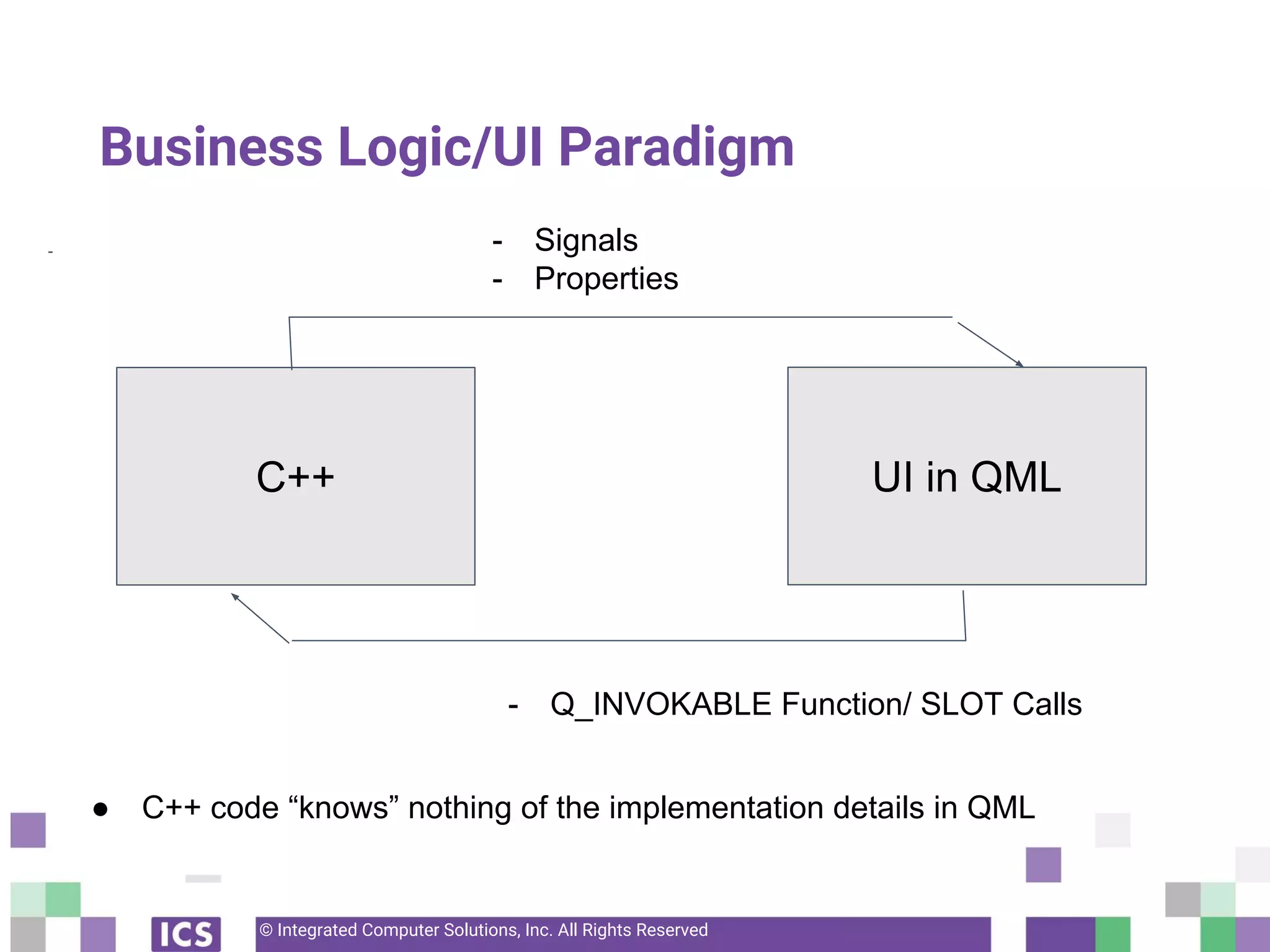
Business Logic/UI Paradigm
-
C++ UI in QML
- Signals
- Properties
- Q_INVOKABLE Function/ SLOT Calls
● C++ code “knows” nothing of the implementation details in QML
© Integrated Computer Solutions, Inc. All Rights Reserved
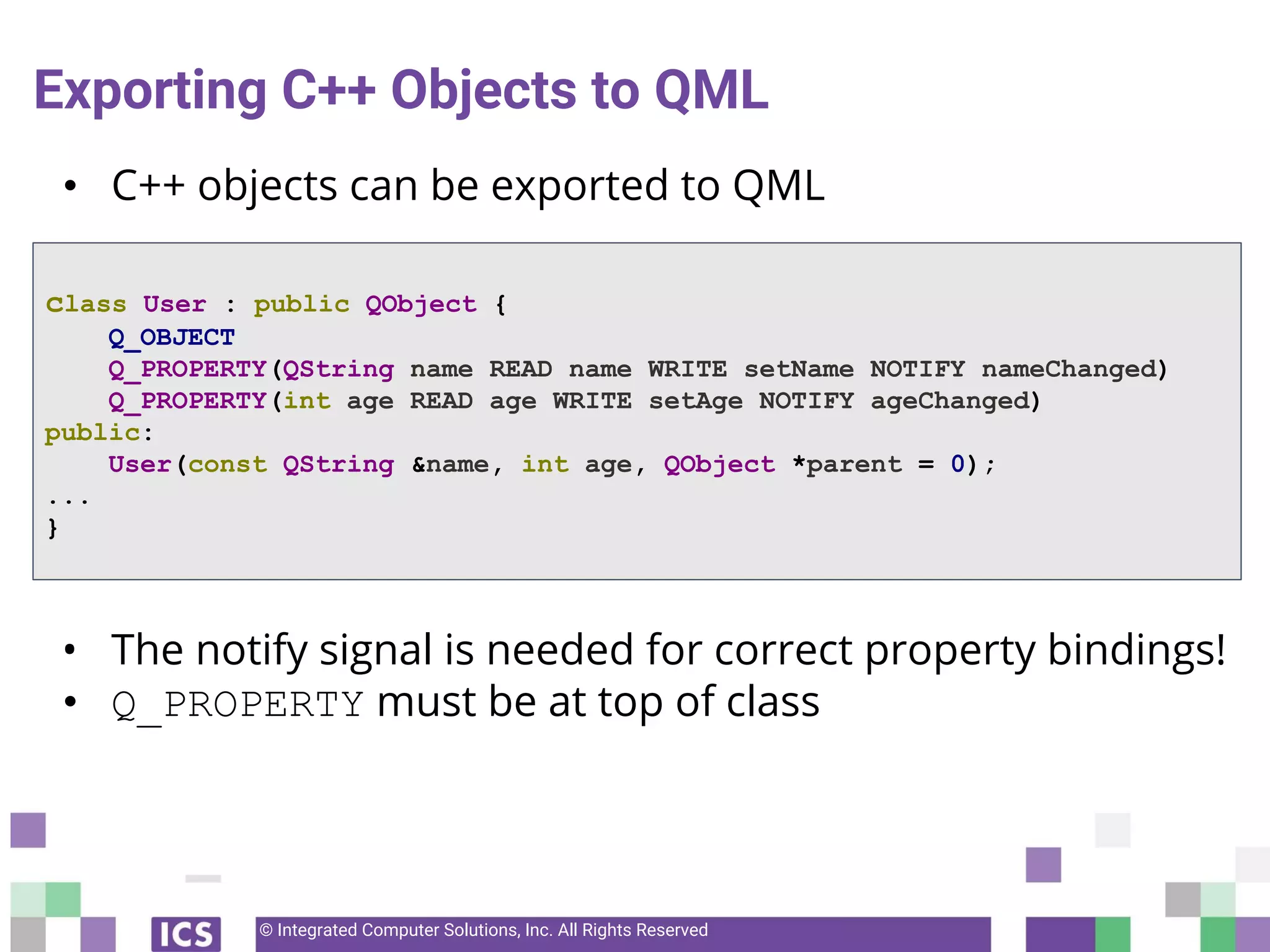
Exporting C++ Objects to QML
• C++ objects can be exported to QML
• The notify signal is needed for correct property bindings!
• Q_PROPERTY must be at top of class
class User : public QObject {
Q_OBJECT
Q_PROPERTY(QString name READ name WRITE setName NOTIFY nameChanged)
Q_PROPERTY(int age READ age WRITE setAge NOTIFY ageChanged)
public:
User(const QString &name, int age, QObject *parent = 0);
...
}
© 2018 Integrated Computer Solutions, Inc., The Qt Company
All Rights Reserved
Exporting C++ Objects to QML
• Class QQmlContext exports the instance to QML.
4
int main(int argc, char *argv[])
{
QGuiApplication app(argc, argv);
BusinessLogic myBusiness;
QQmlApplicationEngine engine;
engine.rootContext()->setContextProperty("myBusinessLogic", &myBusiness)
engine.load("qrc:/main.qml");
return app.exec();
}
© 2018 Integrated Computer Solutions, Inc., The Qt Company
All Rights Reserved
Exporting C++ Objects to QML through Registration
5
#include "businessLogic.h"
#include <QGuiApplication>
#include <qqml.h> // for qmlRegisterType
#include <QQmlApplicationEngine>
int main(int argc, char *argv[]) {
QGuiApplication app(argc, argv);
// Expose the class
qmlRegisterType<BusinessLogic>("CustomComponents", 1, 0, "BL”);
QQmlApplicationEngine engine;
engine.load(QUrl(QStringLiteral("qrc:/main.qml")));
return app.exec();
}
© 2018 Integrated Computer Solutions, Inc., The Qt Company
All Rights Reserved
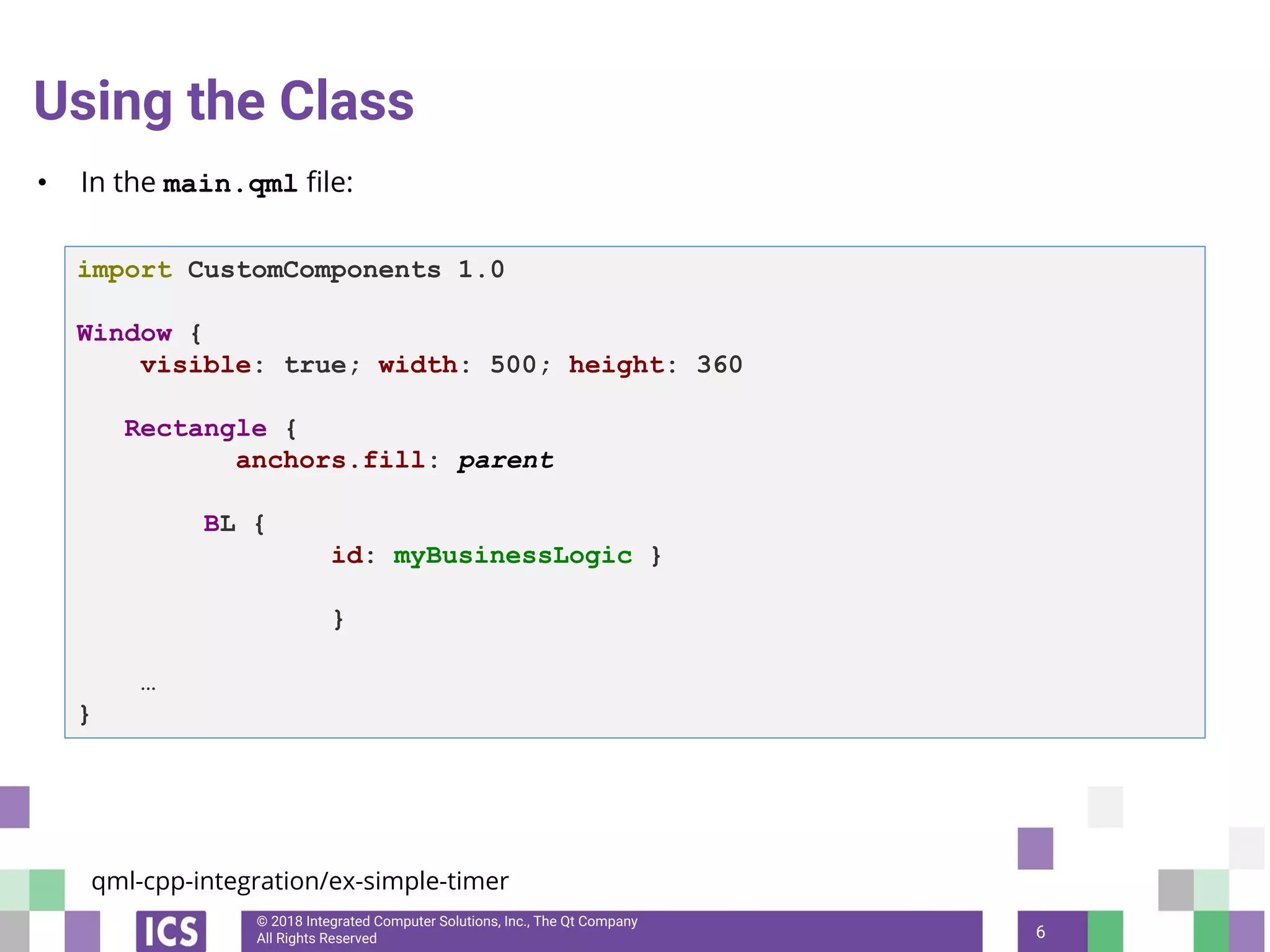
Using the Class
• In the main.qml file:
6
import CustomComponents 1.0
Window {
visible: true; width: 500; height: 360
Rectangle {
anchors.fill: parent
BL {
id: myBusinessLogic }
}
…
}
qml-cpp-integration/ex-simple-timer
© 2018 Integrated Computer Solutions, Inc., The Qt Company
All Rights Reserved
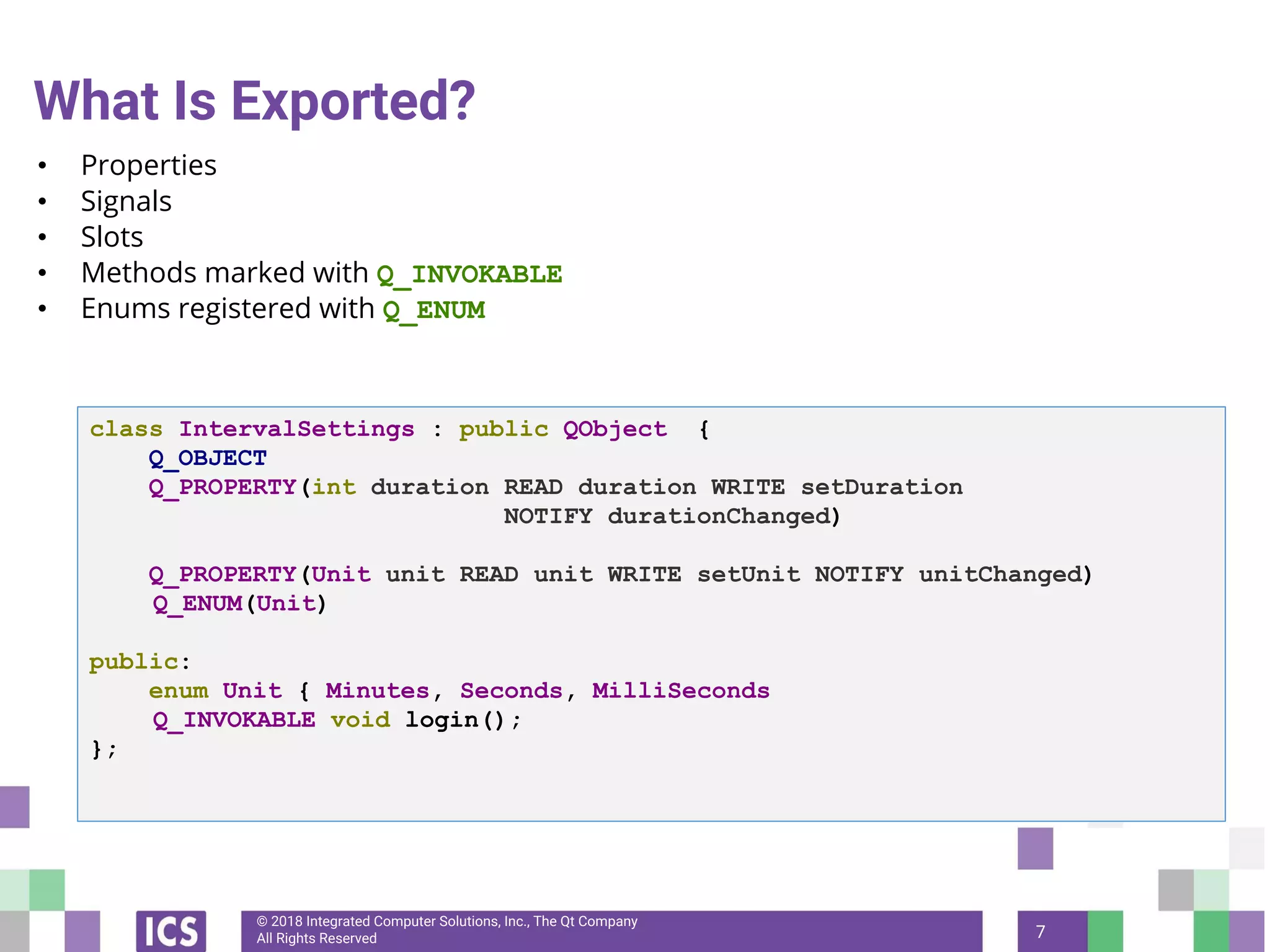
What Is Exported?
• Properties
• Signals
• Slots
• Methods marked with Q_INVOKABLE
• Enums registered with Q_ENUM
7
class IntervalSettings : public QObject {
Q_OBJECT
Q_PROPERTY(int duration READ duration WRITE setDuration
NOTIFY durationChanged)
Q_PROPERTY(Unit unit READ unit WRITE setUnit NOTIFY unitChanged)
Q_ENUM(Unit)
public:
enum Unit { Minutes, Seconds, MilliSeconds
Q_INVOKABLE void login();
};
© 2018 Integrated Computer Solutions, Inc., The Qt Company
All Rights Reserved
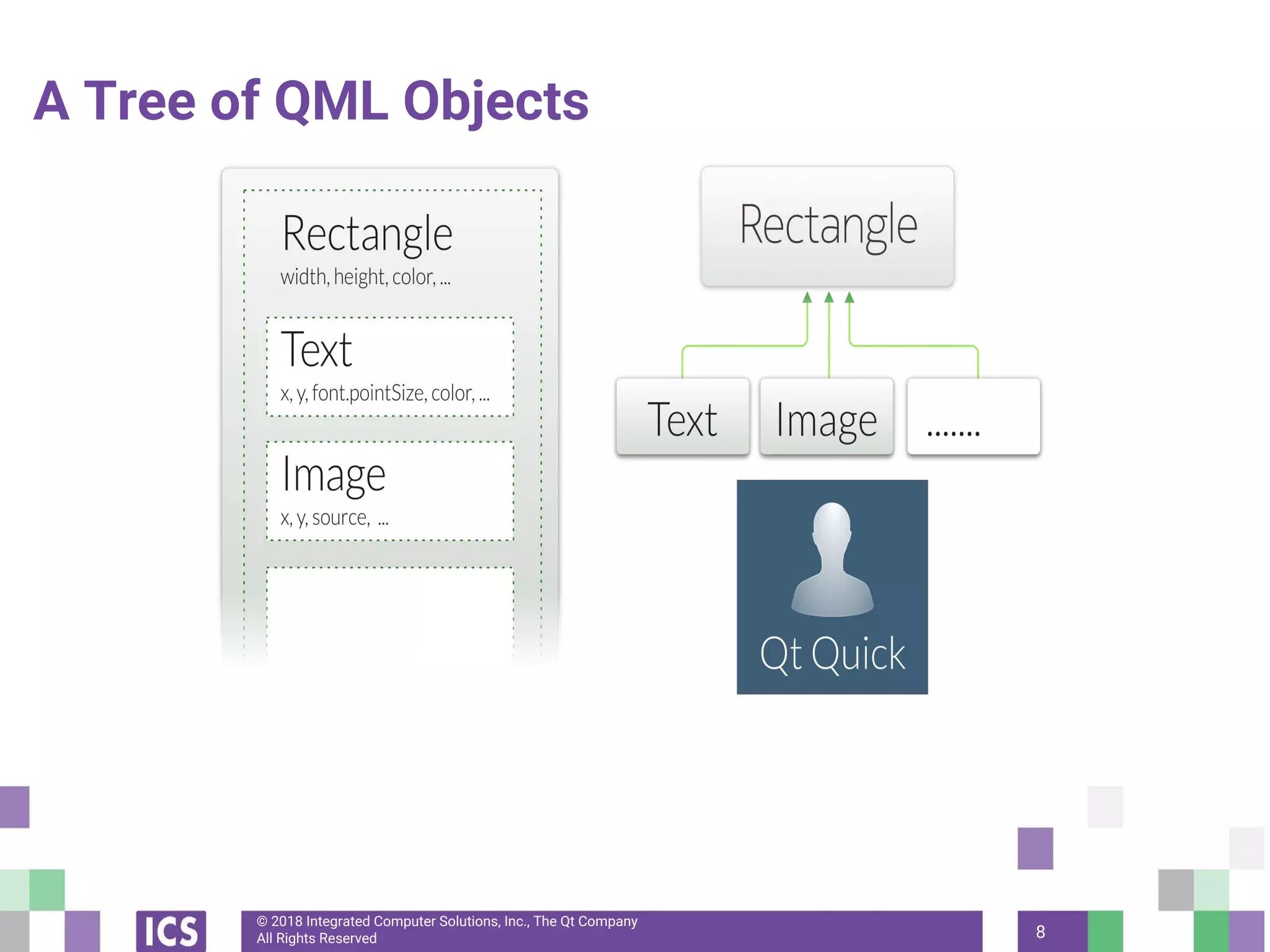
A Tree of QML Objects
8
© 2018 Integrated Computer Solutions, Inc., The Qt Company
All Rights Reserved 9
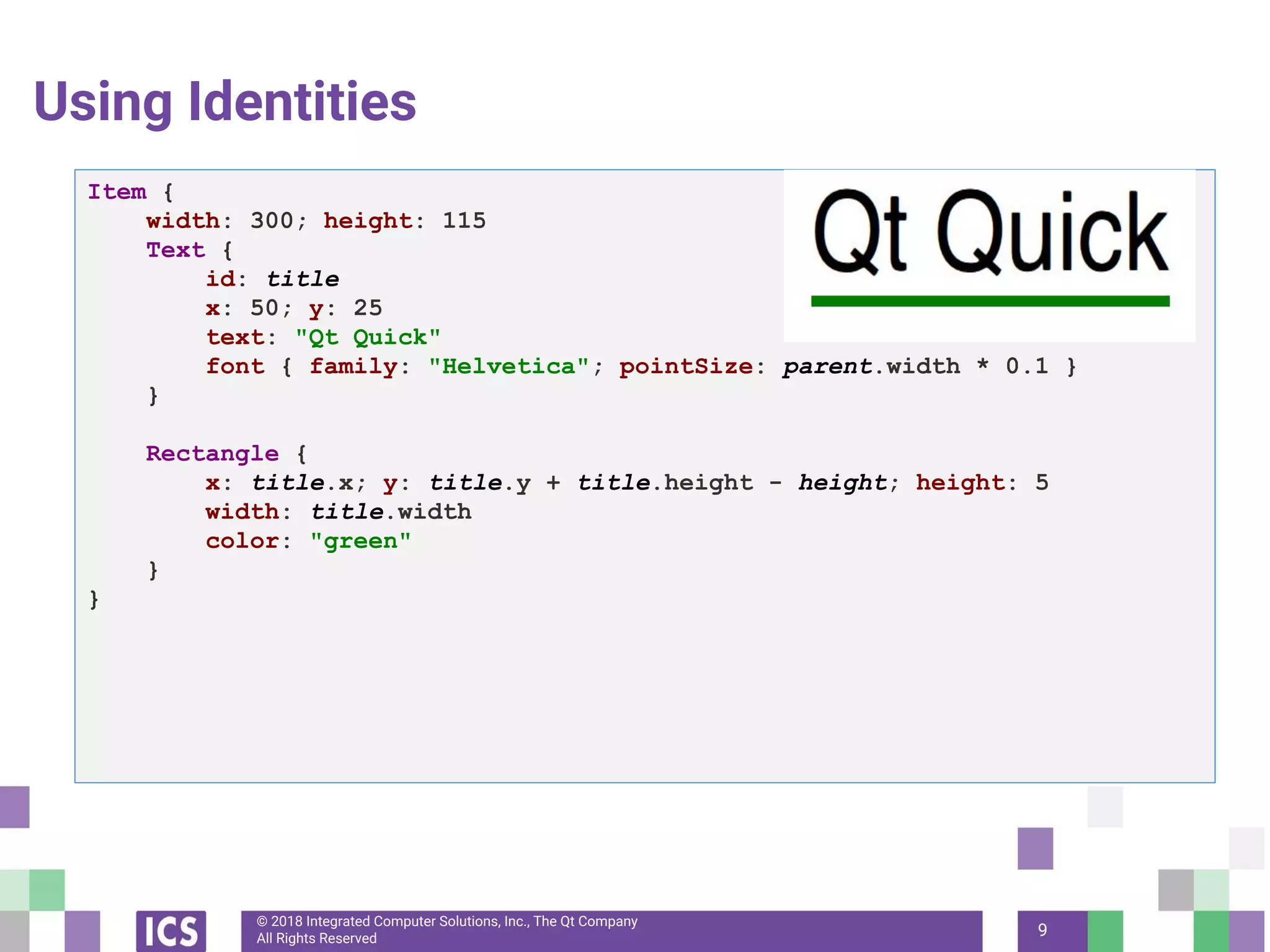
Using Identities
Item {
width: 300; height: 115
Text {
id: title
x: 50; y: 25
text: "Qt Quick"
font { family: "Helvetica"; pointSize: parent.width * 0.1 }
}
Rectangle {
x: title.x; y: title.y + title.height - height; height: 5
width: title.width
color: "green"
}
}
© 2018 Integrated Computer Solutions, Inc., The Qt Company
All Rights Reserved
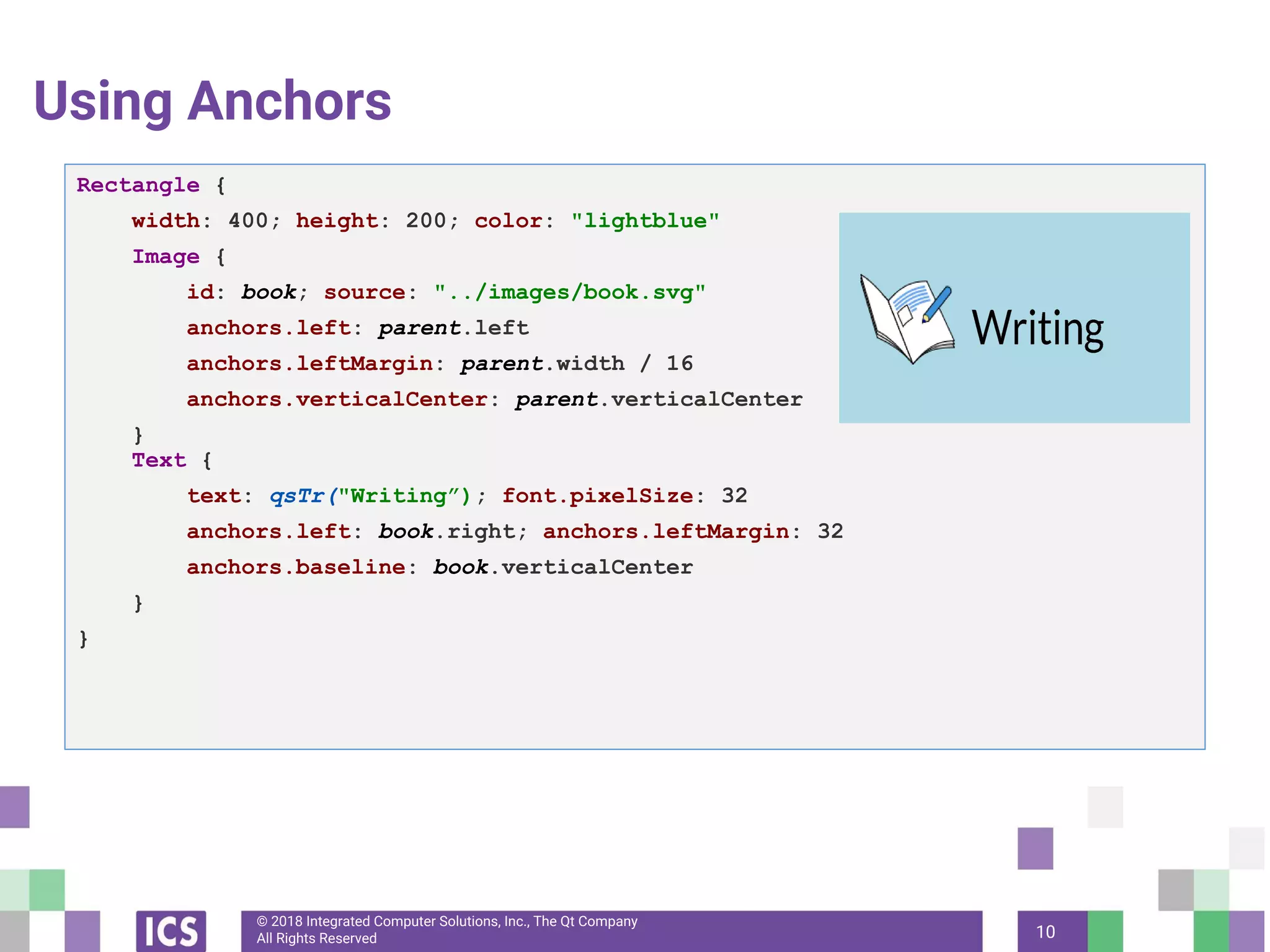
Using Anchors
10
Rectangle {
width: 400; height: 200; color: "lightblue"
Image {
id: book; source: "../images/book.svg"
anchors.left: parent.left
anchors.leftMargin: parent.width / 16
anchors.verticalCenter: parent.verticalCenter
}
Text {
text: qsTr("Writing”); font.pixelSize: 32
anchors.left: book.right; anchors.leftMargin: 32
anchors.baseline: book.verticalCenter
}
}
© 2018 Integrated Computer Solutions, Inc., The Qt Company
All Rights Reserved
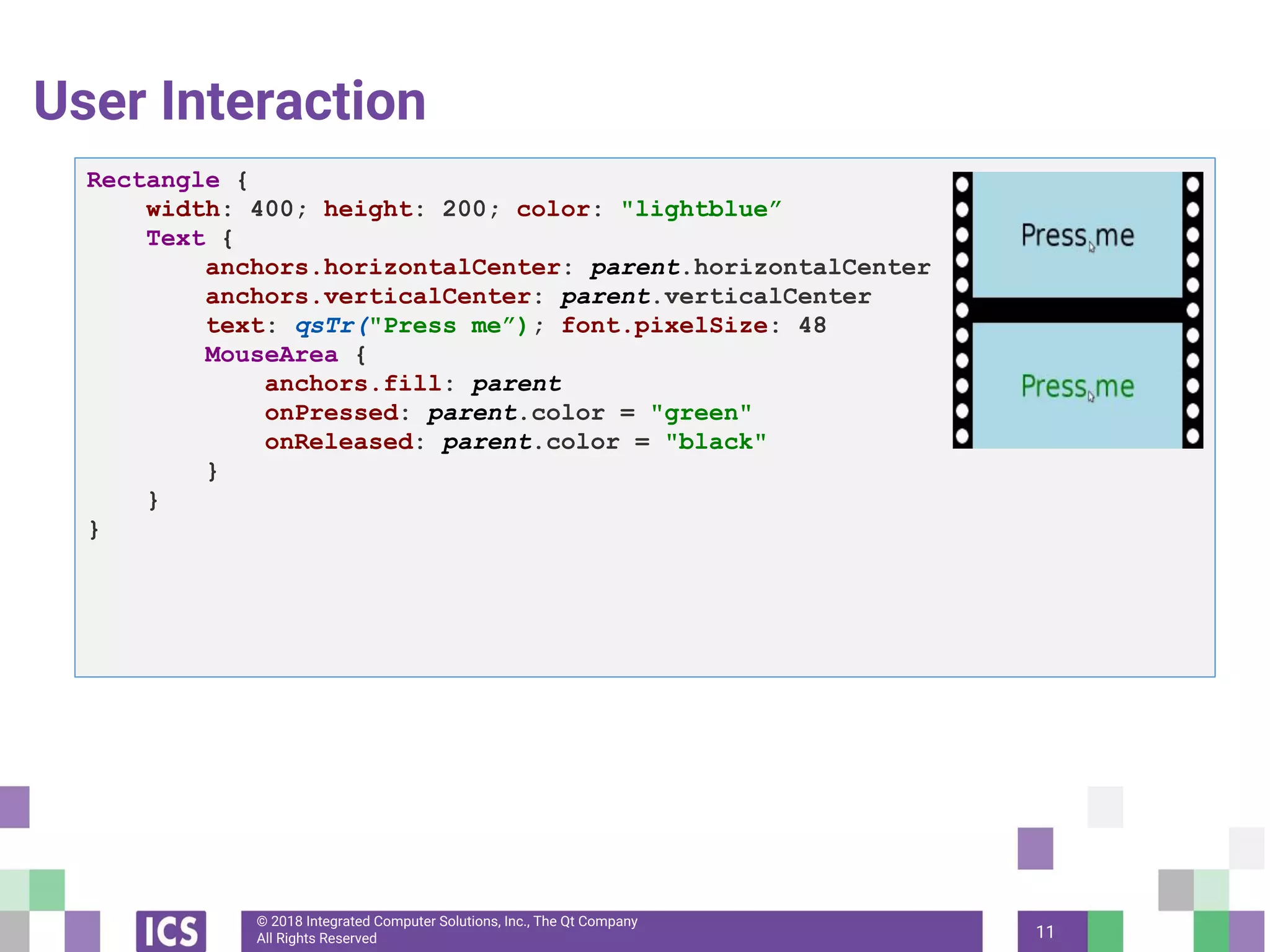
User Interaction
11
Rectangle {
width: 400; height: 200; color: "lightblue”
Text {
anchors.horizontalCenter: parent.horizontalCenter
anchors.verticalCenter: parent.verticalCenter
text: qsTr("Press me”); font.pixelSize: 48
MouseArea {
anchors.fill: parent
onPressed: parent.color = "green"
onReleased: parent.color = "black"
}
}
}
© 2018 Integrated Computer Solutions, Inc., The Qt Company
All Rights Reserved
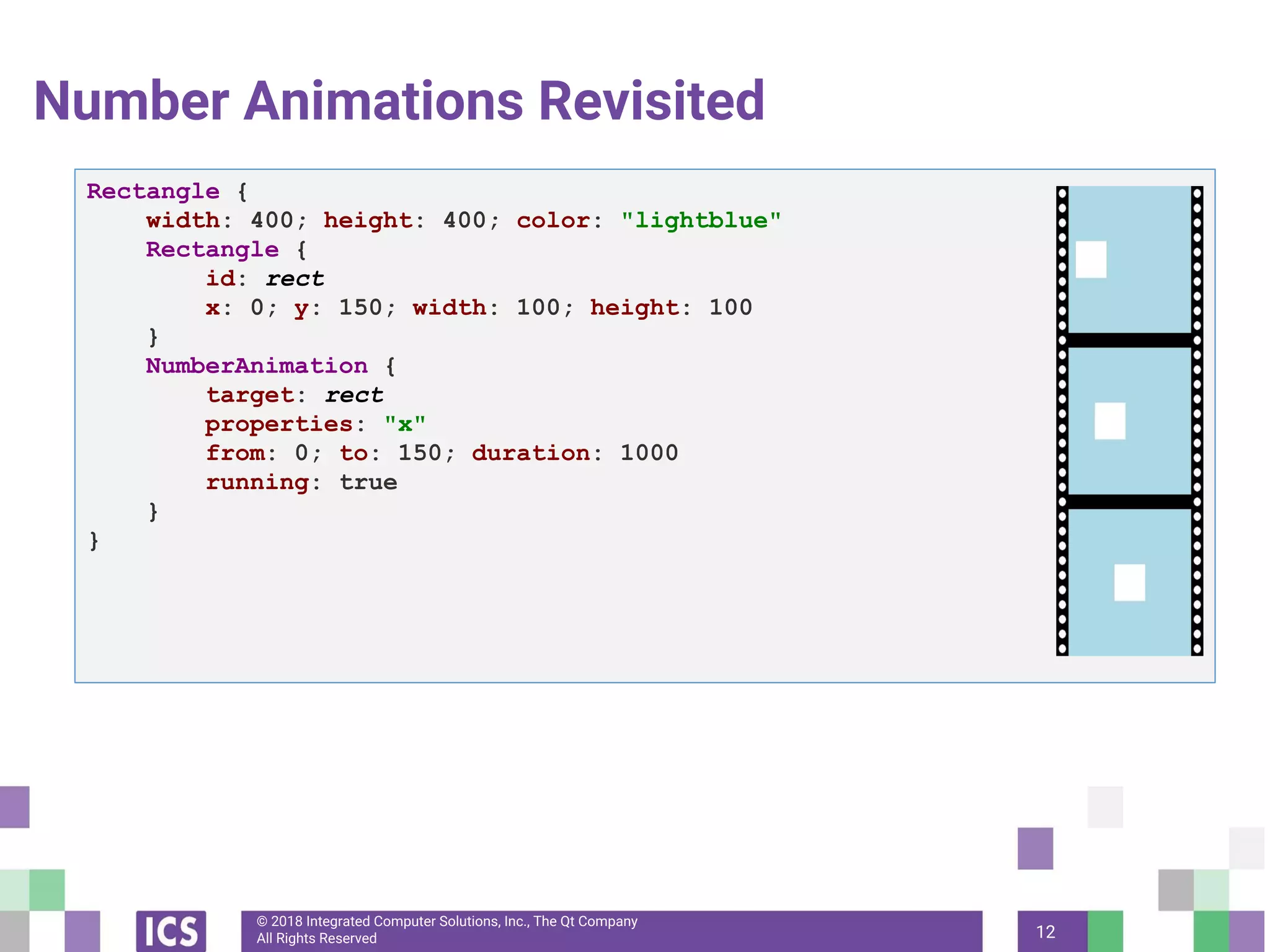
Number Animations Revisited
12
Rectangle {
width: 400; height: 400; color: "lightblue"
Rectangle {
id: rect
x: 0; y: 150; width: 100; height: 100
}
NumberAnimation {
target: rect
properties: "x"
from: 0; to: 150; duration: 1000
running: true
}
}
© 2018 Integrated Computer Solutions, Inc., The Qt Company
All Rights Reserved
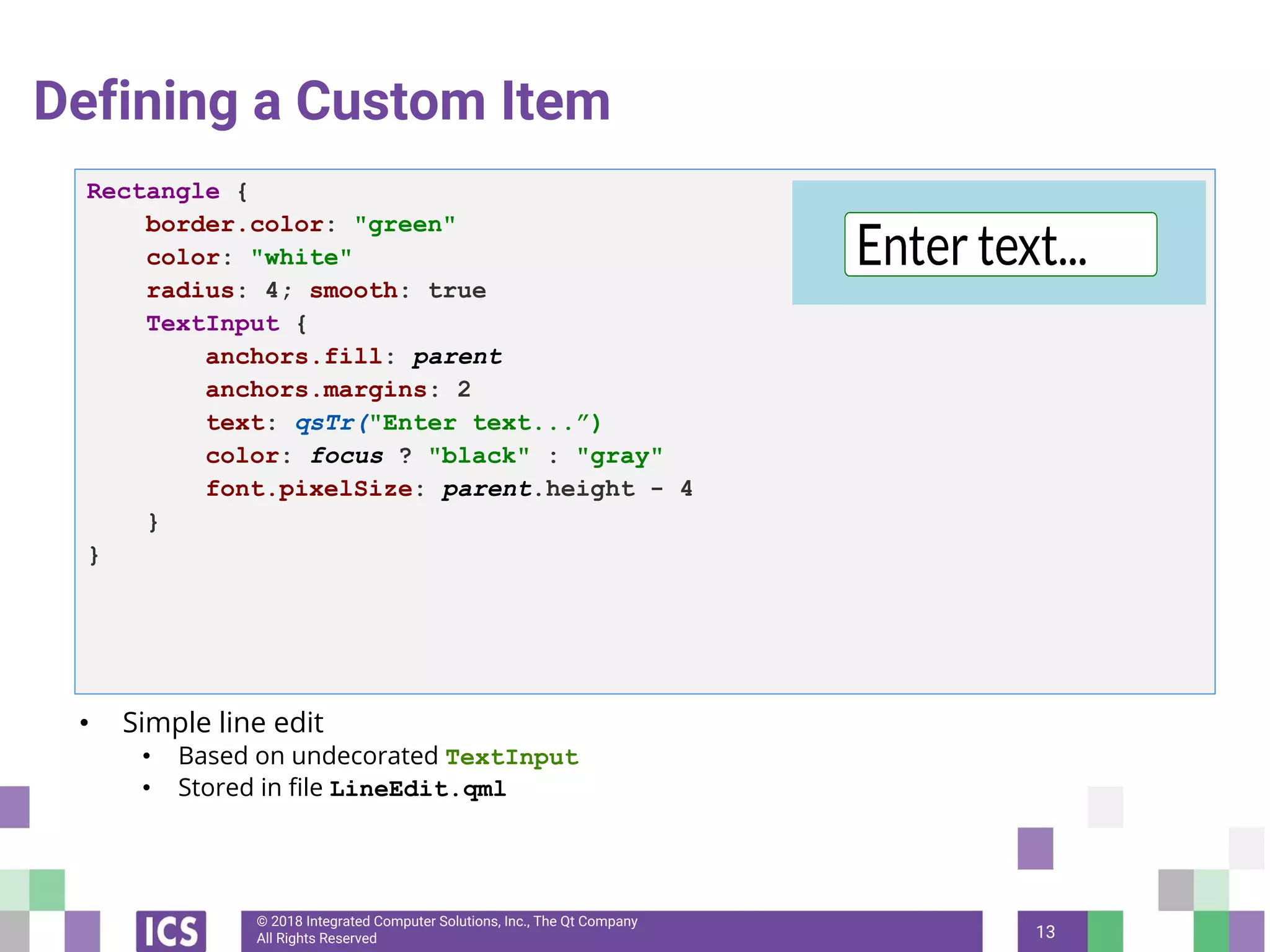
Defining a Custom Item
• Simple line edit
• Based on undecorated TextInput
• Stored in file LineEdit.qml
13
Rectangle {
border.color: "green"
color: "white"
radius: 4; smooth: true
TextInput {
anchors.fill: parent
anchors.margins: 2
text: qsTr("Enter text...”)
color: focus ? "black" : "gray"
font.pixelSize: parent.height - 4
}
}
© 2018 Integrated Computer Solutions, Inc., The Qt Company
All Rights Reserved
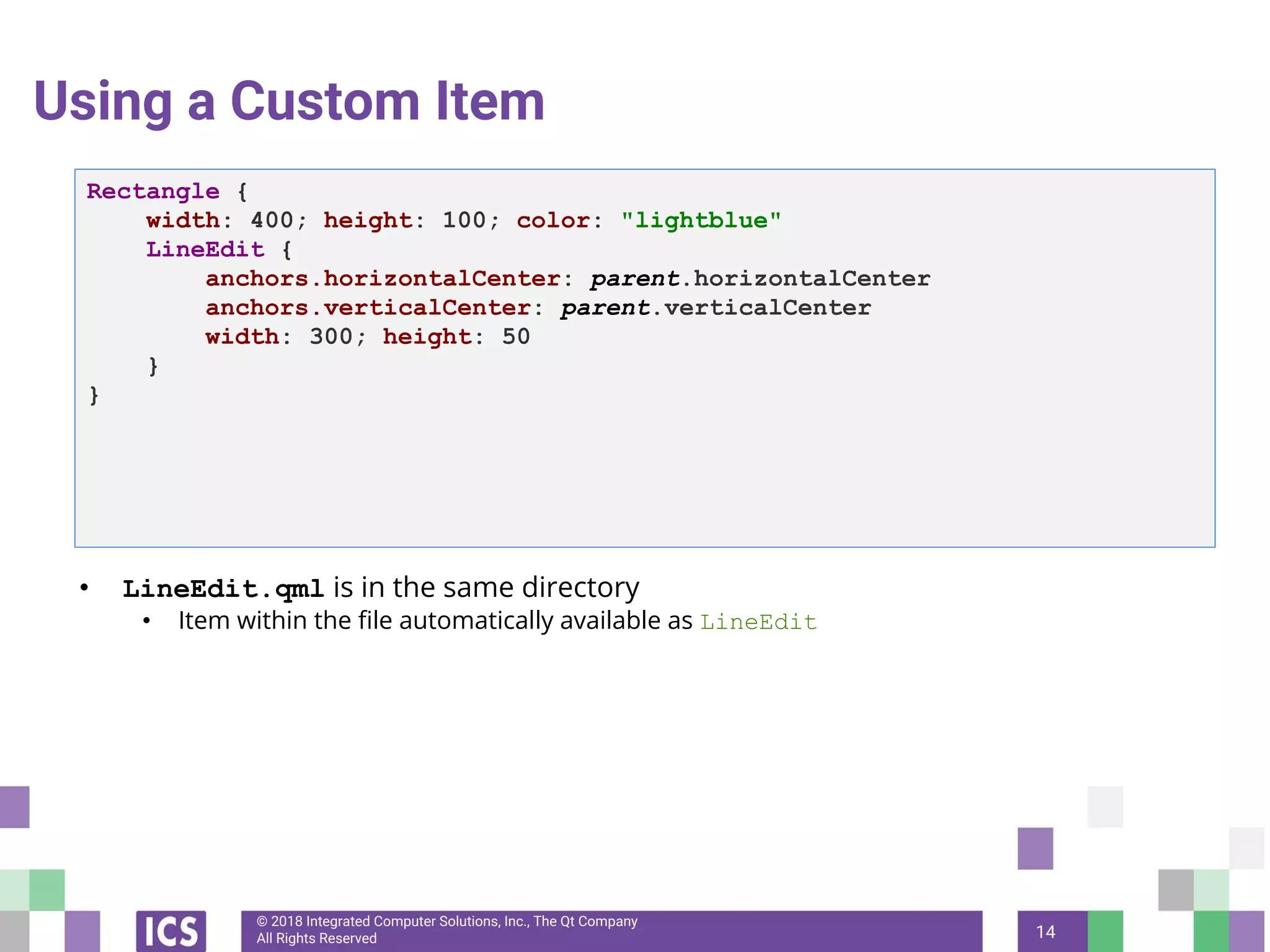
Using a Custom Item
• LineEdit.qml is in the same directory
• Item within the file automatically available as LineEdit
14
Rectangle {
width: 400; height: 100; color: "lightblue"
LineEdit {
anchors.horizontalCenter: parent.horizontalCenter
anchors.verticalCenter: parent.verticalCenter
width: 300; height: 50
}
}
© 2018 Integrated Computer Solutions, Inc., The Qt Company
All Rights Reserved
In the Next Webinar
This five-part webinar series will also cover:
• QWidgets — August 2
• Model/View — August 16
So Tune in, Same Qt Channel, Same Qt Time!
15
© Integrated Computer Solutions, Inc. All Rights Reserved
© Integrated Computer Solutions
This document is based on a Creative Commons training course, written by a
community of Certified Qt Training Partners. It is provided "as is" with no
warranty whatsoever.
Prior to 2012, parts of this document were written or further developed by people
who are or were employed by Trolltech, KDAB, Nokia, ICS, and possibly others.
Since 2013, this particular fork is maintained by ICS.
Qt is developed by The Qt Company ( subsidiary of Digia) together with the Qt
Project under open governance.

Fun with QML

  • 1.
    © Integrated ComputerSolutions, Inc. All Rights Reserved Fun with QML July 19, 2018 Qt for Beginners Summer Webinar Series Part III Copyright 201 , Integrated Computers Solutions, Inc. This work may not be reproduced in whole or in part without the express written consent of Integrated Computer Solutions, Inc.
  • 2.
    © Integrated ComputerSolutions, Inc. All Rights Reserved Business Logic/UI Paradigm - C++ UI in QML - Signals - Properties - Q_INVOKABLE Function/ SLOT Calls ● C++ code “knows” nothing of the implementation details in QML
  • 3.
    © Integrated ComputerSolutions, Inc. All Rights Reserved Exporting C++ Objects to QML • C++ objects can be exported to QML • The notify signal is needed for correct property bindings! • Q_PROPERTY must be at top of class class User : public QObject { Q_OBJECT Q_PROPERTY(QString name READ name WRITE setName NOTIFY nameChanged) Q_PROPERTY(int age READ age WRITE setAge NOTIFY ageChanged) public: User(const QString &name, int age, QObject *parent = 0); ... }
  • 4.
    © 2018 IntegratedComputer Solutions, Inc., The Qt Company All Rights Reserved Exporting C++ Objects to QML • Class QQmlContext exports the instance to QML. 4 int main(int argc, char *argv[]) { QGuiApplication app(argc, argv); BusinessLogic myBusiness; QQmlApplicationEngine engine; engine.rootContext()->setContextProperty("myBusinessLogic", &myBusiness) engine.load("qrc:/main.qml"); return app.exec(); }
  • 5.
    © 2018 IntegratedComputer Solutions, Inc., The Qt Company All Rights Reserved Exporting C++ Objects to QML through Registration 5 #include "businessLogic.h" #include <QGuiApplication> #include <qqml.h> // for qmlRegisterType #include <QQmlApplicationEngine> int main(int argc, char *argv[]) { QGuiApplication app(argc, argv); // Expose the class qmlRegisterType<BusinessLogic>("CustomComponents", 1, 0, "BL”); QQmlApplicationEngine engine; engine.load(QUrl(QStringLiteral("qrc:/main.qml"))); return app.exec(); }
  • 6.
    © 2018 IntegratedComputer Solutions, Inc., The Qt Company All Rights Reserved Using the Class • In the main.qml file: 6 import CustomComponents 1.0 Window { visible: true; width: 500; height: 360 Rectangle { anchors.fill: parent BL { id: myBusinessLogic } } … } qml-cpp-integration/ex-simple-timer
  • 7.
    © 2018 IntegratedComputer Solutions, Inc., The Qt Company All Rights Reserved What Is Exported? • Properties • Signals • Slots • Methods marked with Q_INVOKABLE • Enums registered with Q_ENUM 7 class IntervalSettings : public QObject { Q_OBJECT Q_PROPERTY(int duration READ duration WRITE setDuration NOTIFY durationChanged) Q_PROPERTY(Unit unit READ unit WRITE setUnit NOTIFY unitChanged) Q_ENUM(Unit) public: enum Unit { Minutes, Seconds, MilliSeconds Q_INVOKABLE void login(); };
  • 8.
    © 2018 IntegratedComputer Solutions, Inc., The Qt Company All Rights Reserved A Tree of QML Objects 8
  • 9.
    © 2018 IntegratedComputer Solutions, Inc., The Qt Company All Rights Reserved 9 Using Identities Item { width: 300; height: 115 Text { id: title x: 50; y: 25 text: "Qt Quick" font { family: "Helvetica"; pointSize: parent.width * 0.1 } } Rectangle { x: title.x; y: title.y + title.height - height; height: 5 width: title.width color: "green" } }
  • 10.
    © 2018 IntegratedComputer Solutions, Inc., The Qt Company All Rights Reserved Using Anchors 10 Rectangle { width: 400; height: 200; color: "lightblue" Image { id: book; source: "../images/book.svg" anchors.left: parent.left anchors.leftMargin: parent.width / 16 anchors.verticalCenter: parent.verticalCenter } Text { text: qsTr("Writing”); font.pixelSize: 32 anchors.left: book.right; anchors.leftMargin: 32 anchors.baseline: book.verticalCenter } }
  • 11.
    © 2018 IntegratedComputer Solutions, Inc., The Qt Company All Rights Reserved User Interaction 11 Rectangle { width: 400; height: 200; color: "lightblue” Text { anchors.horizontalCenter: parent.horizontalCenter anchors.verticalCenter: parent.verticalCenter text: qsTr("Press me”); font.pixelSize: 48 MouseArea { anchors.fill: parent onPressed: parent.color = "green" onReleased: parent.color = "black" } } }
  • 12.
    © 2018 IntegratedComputer Solutions, Inc., The Qt Company All Rights Reserved Number Animations Revisited 12 Rectangle { width: 400; height: 400; color: "lightblue" Rectangle { id: rect x: 0; y: 150; width: 100; height: 100 } NumberAnimation { target: rect properties: "x" from: 0; to: 150; duration: 1000 running: true } }
  • 13.
    © 2018 IntegratedComputer Solutions, Inc., The Qt Company All Rights Reserved Defining a Custom Item • Simple line edit • Based on undecorated TextInput • Stored in file LineEdit.qml 13 Rectangle { border.color: "green" color: "white" radius: 4; smooth: true TextInput { anchors.fill: parent anchors.margins: 2 text: qsTr("Enter text...”) color: focus ? "black" : "gray" font.pixelSize: parent.height - 4 } }
  • 14.
    © 2018 IntegratedComputer Solutions, Inc., The Qt Company All Rights Reserved Using a Custom Item • LineEdit.qml is in the same directory • Item within the file automatically available as LineEdit 14 Rectangle { width: 400; height: 100; color: "lightblue" LineEdit { anchors.horizontalCenter: parent.horizontalCenter anchors.verticalCenter: parent.verticalCenter width: 300; height: 50 } }
  • 15.
    © 2018 IntegratedComputer Solutions, Inc., The Qt Company All Rights Reserved In the Next Webinar This five-part webinar series will also cover: • QWidgets — August 2 • Model/View — August 16 So Tune in, Same Qt Channel, Same Qt Time! 15
  • 16.
    © Integrated ComputerSolutions, Inc. All Rights Reserved © Integrated Computer Solutions This document is based on a Creative Commons training course, written by a community of Certified Qt Training Partners. It is provided "as is" with no warranty whatsoever. Prior to 2012, parts of this document were written or further developed by people who are or were employed by Trolltech, KDAB, Nokia, ICS, and possibly others. Since 2013, this particular fork is maintained by ICS. Qt is developed by The Qt Company ( subsidiary of Digia) together with the Qt Project under open governance.