Optimizing Performance in
     Qt Applications
                            11/16/09
Introduction

• Bjørn Erik Nilsen
  – Software Engineer / Qt Widget Team

  – The architect behind Alien Widgets

  – Rewrote the Backing Store for Qt 4.5

  – One of the guys implementing
    WidgetsOnGraphicsView

  – Author of QMdiArea/QMdiSubWindow

  – Author of QGraphicsEffect/QGraphicsEffectSource

                                                      2
Agenda

• Why Performance Matters

• Performance Improvements in Qt 4.6

• How You Can Improve Performance


                                       3
Why Performance Matters

• Attractive to users

• Looks more professional

• Help you get things done more efficiently

• Keeps the flow


                                              4
Why Performance Matters
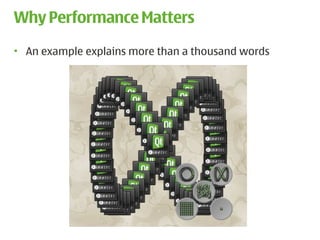
• An example explains more than a thousand words


                                                   5
Why Performance Matters

• Performance is more important than ever before
   – Dynamic user interfaces

• Qt Everywhere
  – Desktop
  – Embedded platforms with limited hardware

• We cannot just buy better hardware anymore

• Clock speed vs. number of cores


                                                   6
Why Performance Matters

• Not all applications can take advantage of
  multiple cores

• And some will actually run slower:
   – Each core in the processor is slower

   – Most applications not programmed to be multi-
     threaded

• Multi-core crisis?


                                                     7
Agenda

• Why Performance Matters

• Performance Improvements in Qt 4.6

• How You Can Improve Performance


                                       8
Performance Improvements in Qt 4.6
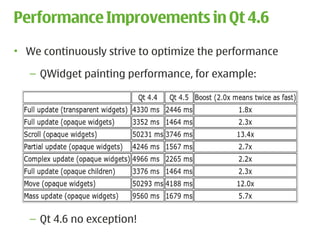
• We continuously strive to optimize the performance

   – QWidget painting performance, for example:


   – Qt 4.6 no exception!
                                                       9
Performance Improvements in Qt 4.6


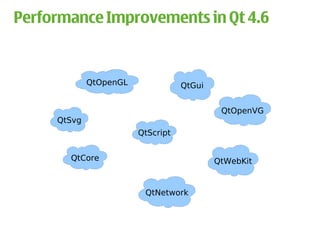
             QtOpenGL              QtGui


                                            QtOpenVG
     QtSvg
                        QtScript


       QtCore                              QtWebKit


                         QtNetwork


                                                       10
Performance Improvements in Qt 4.6
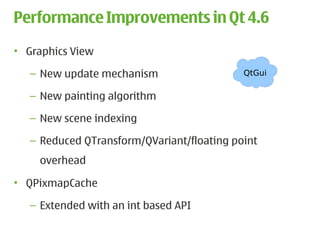
• Graphics View

   – New update mechanism                   QtGui

   – New painting algorithm

   – New scene indexing

   – Reduced QTransform/QVariant/floating point
    overhead

• QPixmapCache

   – Extended with an int based API

                                                    11
Performance Improvements in Qt 4.6
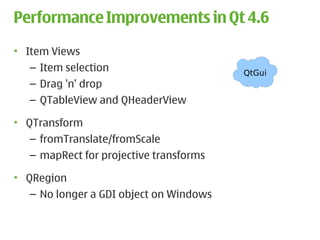
• Item Views
   – Item selection                      QtGui
   – Drag 'n' drop
   – QTableView and QHeaderView

• QTransform
   – fromTranslate/fromScale
   – mapRect for projective transforms

• QRegion
   – No longer a GDI object on Windows


                                                 12
Performance Improvements in Qt 4.6
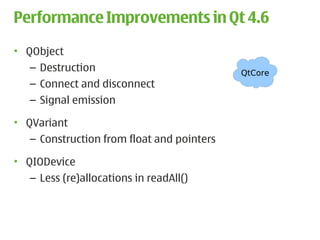
• QObject
   – Destruction                            QtCore
   – Connect and disconnect
   – Signal emission

• QVariant
   – Construction from float and pointers

• QIODevice
   – Less (re)allocations in readAll()


                                                     13
Performance Improvements in Qt 4.6
• QNetworkAccessManager
   – HTTP back-end                           QtNetwork

• QHttpNetworkConnectionChannel
   – Pipelining HTTP requests (off by default)

• QHttpNetworkConnection
   – Increased the number of concurrent connections

• QLocalSocket
   – New Windows implementation
   – Major performance improvements


                                                         14
Performance Improvements in Qt 4.6


                                             QtScript


• QtScript now uses JavaScriptCore as the back-end!
   – Still the same API, but with JSC performance


                                                        15
Performance Improvements in Qt 4.6
• New OpenGL 2.x paint engine

• General improvements          QtOpenGL

   – Clipping
  – Text drawing


                                           16
Performance Improvements in Qt 4.6
• New OpenVG paint engine                      New module!

   – Uses Khronos EGL API                      QtOpenVG
   – Configure Qt with “-openvg”

• Support for hardware-accelerated 2D vector graphics on:
   – Embedded, mobile and consumer electronic devices
   – Desktop

• More info: http://labs.trolltech.com/blogs


                                                             17
Performance Improvements in Qt 4.6


                                          Embedded


• Improved support for DirectFB
   – Enabling hardware graphics acceleration on
     embedded platforms

• Maemo Harmattan optimizations


                                                     18
Agenda

• Why Performance Matters

• Performance Improvements in Qt 4.6

• How You Can Improve Performance


                                       19
How You Can Improve Performance
• Theory of Constraints (TOC) by Eliyahu M. Goldratt
• The theory is based on the idea that in any complex
  system, there is usually one aspect of that system that
  limits its ability to achieve its goal or optimal
  functioning. To achieve any significant improvement of
  the system, the constraint must be identified and
  resolved.

• Applications will perform as fast as their bottlenecks


                                                            20
Theory of Constraints
• Define a goal:
   – For example: This application must run at 30 FPS

• Then:
   1) Identify the constraint
   2) Decide how to exploit the constraint
   3) Improve
   4) If goal not reached, go back to 1)
   5) Done


                                                        21
Identifying hot spots (1)
• The number one and most important task

• Make sure you have plausible data

• Don't randomly start looking for slow code paths!
   – An O(n2) algorithm isn't necessarily bad
   – Don't spend time on making it O(n log n) just for fun

• Don't spend time on optimizing bubble sort


                                                             22
Identifying hot spots (1)
                      • “Bottlenecks occur in
                        surprising places, so
                        don't try second guess
                        and put in a speed hack
                        until you have proven
                        that is where the
                        bottleneck is” -- Rob Pike


                                                     23
Identifying hot spots (1)
• The right approach for identifying hot spots:

   – Any profiler suitable for your platform
      • Shark (Mac OSX)
      • Valgrind (X11)
      • Visual Studio Profiler (Windows)
      • Embedded Trace Macrocell (ETM) (ARM devices)
• NB! Always profile in release mode


                                                       24
Identifying hot spots (1)
• Run application: “valgrind --tool=callgrind ./application”

• This will collect data and information about the program

• Data saved to file: callgrind.out.<pid>

• Beware:
   – I/O costs won't show up
   – Cache misses (--simulate-cache=yes)
• The next step is to analyze the data/profile
• Example


                                                               25
Identifying hot spots (1)
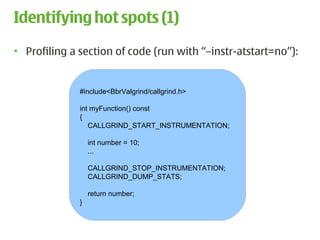
• Profiling a section of code (run with “–instr-atstart=no”):


              #include<BbrValgrind/callgrind.h>

              int myFunction() const
              {
                 CALLGRIND_START_INSTRUMENTATION;

                  int number = 10;
                  ...

                  CALLGRIND_STOP_INSTRUMENTATION;
                  CALLGRIND_DUMP_STATS;

                  return number;
              }


                                                                26
Identifying hot spots (1)
• When a hot-spot is identified:
  – Look at the code and ask yourself: Is this the right
    algorithm for this task?

• Once the best algorithm is selected, you can exploit the
  constraint


                                                             27
How to exploit the constraint (2)
• Optimize
   – Design level
   – Source code level
   – Compile level

• Optimization trade-offs:
   – Memory consumption, cache misses
   – Code clarity and conciseness


                                        28
How to exploit the constraint (2)
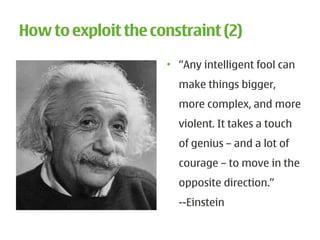
                     • “Any intelligent fool can
                       make things bigger,
                       more complex, and more
                       violent. It takes a touch
                       of genius – and a lot of
                       courage – to move in the
                       opposite direction.”
                       --Einstein

                                                   29
How to exploit the constraint (2)
• Wouldn't it be great to have a cross-platform tool to
  measure performance?


                                                          30
QTestLib
• Say hello to QBENCHMARK

• Extension to the QTestLib framework

• Cross-platform

• Straight forward: QBENCHMARK { <code here> }

• Code will then be measured based on
   – Walltime (default)
   – CPU tick counter (-tickcounter)
   – Valgrind/Callgrind (-callgrind)
   – Event counter (-eventcounter)

                                                 31
QTestLib
• Let's create a benchmark

• Run with ./mytest -xml -o results.xml

• git clone git://gitorious.org/qt-labs/qtestlib-tools.git

• Visualize with
   – Graph (generatereport results.xml)
   – BMCompare (bmcompare results1.xml results2.xml)

• Now that we have tool, it is easier to measure and
  decide which algorithm to use


                                                             32
How to exploit the constraint (2)
• General tricks:
   – Caching
   – Delay a computation until the result is required
   – Reduce computation in tight loops
   – Compiler optimizations

• Optimization Techniques for Qt:
   – Choose the right container
   – Use implicit data sharing efficiently
   – Discover the magic flags


                                                        33
Implicit data sharing in Qt
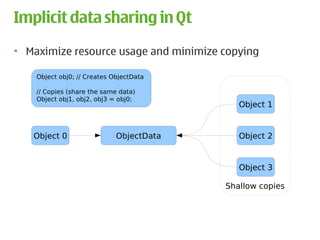
• Maximize resource usage and minimize copying

    Object obj0; // Creates ObjectData

    // Copies (share the same data)
    Object obj1, obj2, obj3 = obj0;
                                             Object 1


   Object 0                  ObjectData      Object 2


                                             Object 3

                                          Shallow copies


                                                           34
Implicit data sharing in Qt
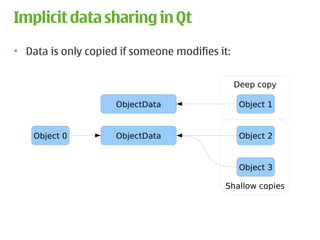
• Data is only copied if someone modifies it:


                                                Deep copy

                     ObjectData                  Object 1


    Object 0         ObjectData                  Object 2


                                                 Object 3

                                           Shallow copies


                                                            35
Implicit data sharing in Qt
• How to avoid deep-copy:
   – Only use const operators and functions if possible
   – Be careful with the foreach keyword
• For classes that are not implicitly shared:
   – Always pass them around as const references
   – Passing const references is a good habit in any case
• Examples


                                                            36
Implicit data sharing in Qt
            Original                            Optimized

T *readOnly = list[index];           T *readOnly = list.at(index);


QList<T>::iterator i;                QList<T>::const_iterator i;
i = list.begin();                    i = list.constBegin();


foreach (QString s, strings)         foreach (const QString &s, strings)


                NB! QTransform is not implicitly shared!


void foo(QTransform t);              void foo(const QTransform &t);


                                                                           37
Implicit data sharing in Qt
• See the “Implicitly Shared Classes” documentation for a
  complete list of implicitly shared classes in Qt

• http://doc.trolltech.com/4.6-snapshot/shared.html

• Note: All Qt containers are implicitly shared


                                                            38
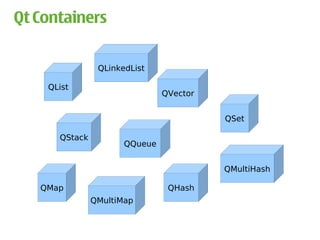
Qt Containers

                QLinkedList

    QList
                               QVector


                                         QSet

      QStack
                      QQueue


                                         QMultiHash

   QMap                         QHash
               QMultiMap


                                                      39
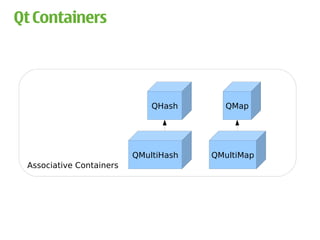
Qt Containers


                              QHash      QMap


                          QMultiHash   QMultiMap
 Associative Containers


                                                   40
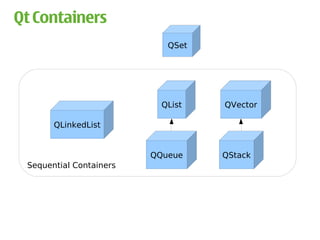
Qt Containers
                            QSet


                           QList   QVector

       QLinkedList


                         QQueue    QStack
 Sequential Containers


                                             41
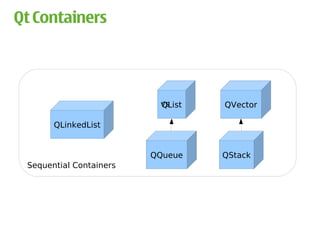
Qt Containers


                          vs
                          QList   QVector

       QLinkedList


                         QQueue   QStack
 Sequential Containers


                                            42
QVector<T>
• Items are stored contiguously in memory

• One block of memory is allocated:


    QBasicAtomicInt    int     int   uint        T               T

         ref          alloc   size   flags   array[0] ... array[alloc - 1]
    QVectorTypedData<T>


               d
       QVector<T>


                                                                             43
QVector<T>
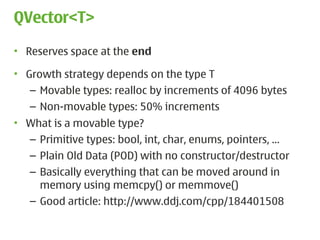
• Reserves space at the end

• Growth strategy depends on the type T
   – Movable types: realloc by increments of 4096 bytes
   – Non-movable types: 50% increments
• What is a movable type?
  – Primitive types: bool, int, char, enums, pointers, …
   – Plain Old Data (POD) with no constructor/destructor
   – Basically everything that can be moved around in
     memory using memcpy() or memmove()
   – Good article: http://www.ddj.com/cpp/184401508


                                                           44
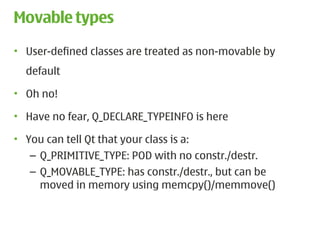
Movable types
• User-defined classes are treated as non-movable by
  default

• Oh no!

• Have no fear, Q_DECLARE_TYPEINFO is here

• You can tell Qt that your class is a:
   – Q_PRIMITIVE_TYPE: POD with no constr./destr.
   – Q_MOVABLE_TYPE: has constr./destr., but can be
     moved in memory using memcpy()/memmove()


                                                       45
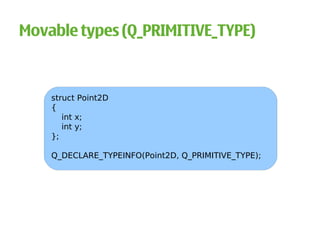
Movable types (Q_PRIMITIVE_TYPE)


    struct Point2D
    {
       int x;
       int y;
    };

    Q_DECLARE_TYPEINFO(Point2D, Q_PRIMITIVE_TYPE);


                                                     46
Movable types (Q_MOVABLE_TYPE)

     class Point2D
     {
     public:
        Point2D() { data = new int[2]; }
        Point2D(const Point2D &other) { … }
        ~Point2D() { delete [] data; }

       Point2D &operator=(const Point2D &other) { … }

       int x() const { return data[0]; }
       int y() const { return data[1]; }

     private:
        int *data;
     };

     Q_DECLARE_TYPEINFO(Point2D, Q_MOVABLE_TYPE);

                                                        47
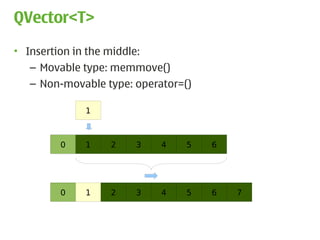
QVector<T>
• Insertion in the middle:
   – Movable type: memmove()
  – Non-movable type: operator=()

            1


        0   1    2    3    4    5   6


        0   1    2    3    4    5   6   7


                                            48
QList<T>
• Two representations

• Array of pointers to items on the heap (general case)


   QBasicAtomicInt    int   int   int   uint       void *       void *

        ref          alloc begin end flags array[0] ... array[alloc - 1]
   QListData::Data


                                               T            T

              d
      QList<T>


                                                                           49
QList<T>
• Special case: T is movable and sizeof(T) <= sizeof(void *)

• Items are stored directly (same as QVector)


   QBasicAtomicInt    int   int   int   uint   T                T

        ref          alloc begin end flags array[0] ... array[alloc - 1]
   QListData::Data


              d
      QList<T>


                                                                           50
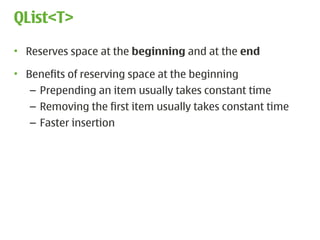
QList<T>
• Reserves space at the beginning and at the end

• Benefits of reserving space at the beginning
   – Prepending an item usually takes constant time
   – Removing the first item usually takes constant time
   – Faster insertion


                                                           51
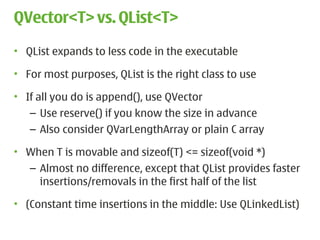
QVector<T> vs. QList<T>
• QList expands to less code in the executable

• For most purposes, QList is the right class to use

• If all you do is append(), use QVector
   – Use reserve() if you know the size in advance
   – Also consider QVarLengthArray or plain C array

• When T is movable and sizeof(T) <= sizeof(void *)
  – Almost no difference, except that QList provides faster
    insertions/removals in the first half of the list

• (Constant time insertions in the middle: Use QLinkedList)

                                                              52
General Qt Container Advices
• Avoid deep copies, e.g:
   – Use at() rather than operator[]
   – constData()/constBegin()/constEnd()
   – Basically: limit usage of non-const functions

• When you know the size in advance:
  – Use reserve()

• Let Qt know whether your class is movable or not
   – Q_DECLARE_TYPEINFO

• Choose the right container for the right circumstance


                                                          53
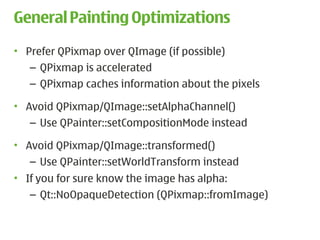
General Painting Optimizations
• Prefer QPixmap over QImage (if possible)
   – QPixmap is accelerated
   – QPixmap caches information about the pixels

• Avoid QPixmap/QImage::setAlphaChannel()
   – Use QPainter::setCompositionMode instead

• Avoid QPixmap/QImage::transformed()
   – Use QPainter::setWorldTransform instead
• If you for sure know the image has alpha:
   – Qt::NoOpaqueDetection (QPixmap::fromImage)


                                                   54
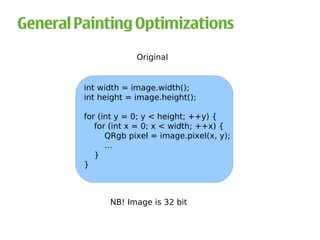
General Painting Optimizations
                      Original


         int width = image.width();
         int height = image.height();

         for (int y = 0; y < height; ++y) {
            for (int x = 0; x < width; ++x) {
               QRgb pixel = image.pixel(x, y);
               …
            }
         }


               NB! Image is 32 bit


                                                 55
General Painting Optimizations
                           Optimized


  int width = image.width();
  int height = image.height();

  for (int y = 0; y < height; ++y) {
     QRgb *line = reinterpret_cast<QRgb *>(image.scanLine(y));
     for (int x = 0; x < width; ++x) {
        QRgb pixel = line[x];
        …
     }
  }


                                                                 56
General Painting Optimizations
                     Even more optimized


   int numPixels = image.width() * image.height();
   QRgb *pixels = reinterpret_cast<QRgb *>(image.bits());

   for (int i = 0; i < numPixels; ++i) {
        QRgb pixel = pixels[i];
         …
      }
   }


                                                            57
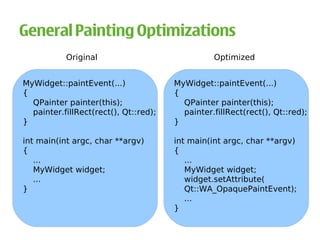
General Painting Optimizations
           Original                              Optimized


MyWidget::paintEvent(...)              MyWidget::paintEvent(...)
{                                      {
  QPainter painter(this);                QPainter painter(this);
  painter.fillRect(rect(), Qt::red);     painter.fillRect(rect(), Qt::red);
}                                      }

int main(int argc, char **argv)        int main(int argc, char **argv)
{                                      {
   ...                                    ...
   MyWidget widget;                       MyWidget widget;
   ...                                    widget.setAttribute(
}                                         Qt::WA_OpaquePaintEvent);
                                          ...
                                       }


                                                                              58
General Painting Optimizations
            Original                        Optimized

painter.drawLine(line1);         QLine lines[3];
painter.drawLine(line2);         ...
painter.drawLine(line3);         painter.drawLines(lines, 3);


painter.drawPoint(point1);       QPoint points[3];
painter.drawPoint(point2);       ...
painter.drawPoint(point3);       painter.drawPoints(points, 3);


QString key(“abcd”);             QPixmapCache::Key key;
QPixmapCache::insert(key, pm);   key = QPixmapCache::insert(pm);
QPixmapCache::find(key, pm);     pm = QPixmapCache::find(key);


                                                                   59
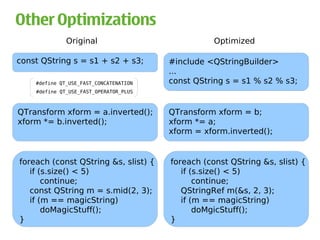
Other Optimizations
              Original                             Optimized

const QString s = s1 + s2 + s3;         #include <QStringBuilder>
                                        ...
    #define QT_USE_FAST_CONCATENATION   const QString s = s1 % s2 % s3;
    #define QT_USE_FAST_OPERATOR_PLUS


QTransform xform = a.inverted();        QTransform xform = b;
xform *= b.inverted();                  xform *= a;
                                        xform = xform.inverted();


foreach (const QString &s, slist) {     foreach (const QString &s, slist) {
   if (s.size() < 5)                       if (s.size() < 5)
       continue;                               continue;
   const QString m = s.mid(2, 3);          QStringRef m(&s, 2, 3);
   if (m == magicString)                   if (m == magicString)
       doMagicStuff();                         doMgicStuff();
}                                       }
                                                                              60
Other Optimizations
            Original                              Optimized

qFuzzyCompare(opacity+1, 1));          qFuzzyIsNull(opacity));


int nRects = qregion.rects().size();   int nRects = qregion.numRects();

if (expensive() && cheap())            if (cheap() && expensive())


#button1 { background:red }             #button1,
#button2 { background:red }             #button2 { background:red }

*[readOnly=”1”] { color:blue }          /* Only QLineEdit can possibly be
                                           read-only in my application
                                        */
                                        QLineEdit[readOnly = “1”]
                                        { color:blue }


                                                                            61
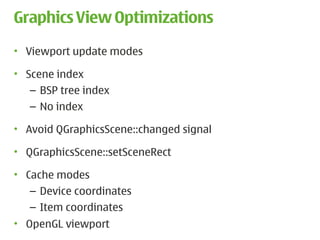
Graphics View Optimizations
• Viewport update modes

• Scene index
   – BSP tree index
   – No index

• Avoid QGraphicsScene::changed signal

• QGraphicsScene::setSceneRect

• Cache modes
   – Device coordinates
   – Item coordinates
• OpenGL viewport
                                         62
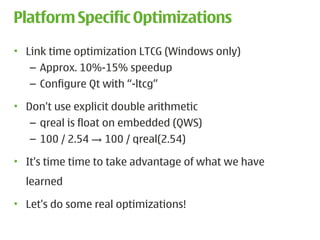
Platform Specific Optimizations
• Link time optimization LTCG (Windows only)
   – Approx. 10%-15% speedup
   – Configure Qt with “-ltcg”

• Don't use explicit double arithmetic
   – qreal is float on embedded (QWS)
   – 100 / 2.54 → 100 / qreal(2.54)

• It's time time to take advantage of what we have
  learned

• Let's do some real optimizations!

                                                     63
Theory of Constraints
• Define a goal:
   – For example: This application must run at 30 FPS

• Then:
   1) Identify the constraint
   2) Decide how to exploit the constraint
   3) Improve
   4) If goal not reached, go back to 1)
   5) Done


                                                        65
Agenda

• Why Performance Matters

• Performance Improvements in Qt 4.6

• How You Can Improve Performance


                                       66
Questions?

Optimizing Performance in Qt-Based Applications

  • 1.
    Optimizing Performance in Qt Applications 11/16/09
  • 2.
    Introduction • Bjørn ErikNilsen – Software Engineer / Qt Widget Team – The architect behind Alien Widgets – Rewrote the Backing Store for Qt 4.5 – One of the guys implementing WidgetsOnGraphicsView – Author of QMdiArea/QMdiSubWindow – Author of QGraphicsEffect/QGraphicsEffectSource 2
  • 3.
    Agenda • Why PerformanceMatters • Performance Improvements in Qt 4.6 • How You Can Improve Performance 3
  • 4.
    Why Performance Matters •Attractive to users • Looks more professional • Help you get things done more efficiently • Keeps the flow 4
  • 5.
    Why Performance Matters •An example explains more than a thousand words 5
  • 6.
    Why Performance Matters •Performance is more important than ever before – Dynamic user interfaces • Qt Everywhere – Desktop – Embedded platforms with limited hardware • We cannot just buy better hardware anymore • Clock speed vs. number of cores 6
  • 7.
    Why Performance Matters •Not all applications can take advantage of multiple cores • And some will actually run slower: – Each core in the processor is slower – Most applications not programmed to be multi- threaded • Multi-core crisis? 7
  • 8.
    Agenda • Why PerformanceMatters • Performance Improvements in Qt 4.6 • How You Can Improve Performance 8
  • 9.
    Performance Improvements inQt 4.6 • We continuously strive to optimize the performance – QWidget painting performance, for example: – Qt 4.6 no exception! 9
  • 10.
    Performance Improvements inQt 4.6 QtOpenGL QtGui QtOpenVG QtSvg QtScript QtCore QtWebKit QtNetwork 10
  • 11.
    Performance Improvements inQt 4.6 • Graphics View – New update mechanism QtGui – New painting algorithm – New scene indexing – Reduced QTransform/QVariant/floating point overhead • QPixmapCache – Extended with an int based API 11
  • 12.
    Performance Improvements inQt 4.6 • Item Views – Item selection QtGui – Drag 'n' drop – QTableView and QHeaderView • QTransform – fromTranslate/fromScale – mapRect for projective transforms • QRegion – No longer a GDI object on Windows 12
  • 13.
    Performance Improvements inQt 4.6 • QObject – Destruction QtCore – Connect and disconnect – Signal emission • QVariant – Construction from float and pointers • QIODevice – Less (re)allocations in readAll() 13
  • 14.
    Performance Improvements inQt 4.6 • QNetworkAccessManager – HTTP back-end QtNetwork • QHttpNetworkConnectionChannel – Pipelining HTTP requests (off by default) • QHttpNetworkConnection – Increased the number of concurrent connections • QLocalSocket – New Windows implementation – Major performance improvements 14
  • 15.
    Performance Improvements inQt 4.6 QtScript • QtScript now uses JavaScriptCore as the back-end! – Still the same API, but with JSC performance 15
  • 16.
    Performance Improvements inQt 4.6 • New OpenGL 2.x paint engine • General improvements QtOpenGL – Clipping – Text drawing 16
  • 17.
    Performance Improvements inQt 4.6 • New OpenVG paint engine New module! – Uses Khronos EGL API QtOpenVG – Configure Qt with “-openvg” • Support for hardware-accelerated 2D vector graphics on: – Embedded, mobile and consumer electronic devices – Desktop • More info: http://labs.trolltech.com/blogs 17
  • 18.
    Performance Improvements inQt 4.6 Embedded • Improved support for DirectFB – Enabling hardware graphics acceleration on embedded platforms • Maemo Harmattan optimizations 18
  • 19.
    Agenda • Why PerformanceMatters • Performance Improvements in Qt 4.6 • How You Can Improve Performance 19
  • 20.
    How You CanImprove Performance • Theory of Constraints (TOC) by Eliyahu M. Goldratt • The theory is based on the idea that in any complex system, there is usually one aspect of that system that limits its ability to achieve its goal or optimal functioning. To achieve any significant improvement of the system, the constraint must be identified and resolved. • Applications will perform as fast as their bottlenecks 20
  • 21.
    Theory of Constraints •Define a goal: – For example: This application must run at 30 FPS • Then: 1) Identify the constraint 2) Decide how to exploit the constraint 3) Improve 4) If goal not reached, go back to 1) 5) Done 21
  • 22.
    Identifying hot spots(1) • The number one and most important task • Make sure you have plausible data • Don't randomly start looking for slow code paths! – An O(n2) algorithm isn't necessarily bad – Don't spend time on making it O(n log n) just for fun • Don't spend time on optimizing bubble sort 22
  • 23.
    Identifying hot spots(1) • “Bottlenecks occur in surprising places, so don't try second guess and put in a speed hack until you have proven that is where the bottleneck is” -- Rob Pike 23
  • 24.
    Identifying hot spots(1) • The right approach for identifying hot spots: – Any profiler suitable for your platform • Shark (Mac OSX) • Valgrind (X11) • Visual Studio Profiler (Windows) • Embedded Trace Macrocell (ETM) (ARM devices) • NB! Always profile in release mode 24
  • 25.
    Identifying hot spots(1) • Run application: “valgrind --tool=callgrind ./application” • This will collect data and information about the program • Data saved to file: callgrind.out.<pid> • Beware: – I/O costs won't show up – Cache misses (--simulate-cache=yes) • The next step is to analyze the data/profile • Example 25
  • 26.
    Identifying hot spots(1) • Profiling a section of code (run with “–instr-atstart=no”): #include<BbrValgrind/callgrind.h> int myFunction() const { CALLGRIND_START_INSTRUMENTATION; int number = 10; ... CALLGRIND_STOP_INSTRUMENTATION; CALLGRIND_DUMP_STATS; return number; } 26
  • 27.
    Identifying hot spots(1) • When a hot-spot is identified: – Look at the code and ask yourself: Is this the right algorithm for this task? • Once the best algorithm is selected, you can exploit the constraint 27
  • 28.
    How to exploitthe constraint (2) • Optimize – Design level – Source code level – Compile level • Optimization trade-offs: – Memory consumption, cache misses – Code clarity and conciseness 28
  • 29.
    How to exploitthe constraint (2) • “Any intelligent fool can make things bigger, more complex, and more violent. It takes a touch of genius – and a lot of courage – to move in the opposite direction.” --Einstein 29
  • 30.
    How to exploitthe constraint (2) • Wouldn't it be great to have a cross-platform tool to measure performance? 30
  • 31.
    QTestLib • Say helloto QBENCHMARK • Extension to the QTestLib framework • Cross-platform • Straight forward: QBENCHMARK { <code here> } • Code will then be measured based on – Walltime (default) – CPU tick counter (-tickcounter) – Valgrind/Callgrind (-callgrind) – Event counter (-eventcounter) 31
  • 32.
    QTestLib • Let's createa benchmark • Run with ./mytest -xml -o results.xml • git clone git://gitorious.org/qt-labs/qtestlib-tools.git • Visualize with – Graph (generatereport results.xml) – BMCompare (bmcompare results1.xml results2.xml) • Now that we have tool, it is easier to measure and decide which algorithm to use 32
  • 33.
    How to exploitthe constraint (2) • General tricks: – Caching – Delay a computation until the result is required – Reduce computation in tight loops – Compiler optimizations • Optimization Techniques for Qt: – Choose the right container – Use implicit data sharing efficiently – Discover the magic flags 33
  • 34.
    Implicit data sharingin Qt • Maximize resource usage and minimize copying Object obj0; // Creates ObjectData // Copies (share the same data) Object obj1, obj2, obj3 = obj0; Object 1 Object 0 ObjectData Object 2 Object 3 Shallow copies 34
  • 35.
    Implicit data sharingin Qt • Data is only copied if someone modifies it: Deep copy ObjectData Object 1 Object 0 ObjectData Object 2 Object 3 Shallow copies 35
  • 36.
    Implicit data sharingin Qt • How to avoid deep-copy: – Only use const operators and functions if possible – Be careful with the foreach keyword • For classes that are not implicitly shared: – Always pass them around as const references – Passing const references is a good habit in any case • Examples 36
  • 37.
    Implicit data sharingin Qt Original Optimized T *readOnly = list[index]; T *readOnly = list.at(index); QList<T>::iterator i; QList<T>::const_iterator i; i = list.begin(); i = list.constBegin(); foreach (QString s, strings) foreach (const QString &s, strings) NB! QTransform is not implicitly shared! void foo(QTransform t); void foo(const QTransform &t); 37
  • 38.
    Implicit data sharingin Qt • See the “Implicitly Shared Classes” documentation for a complete list of implicitly shared classes in Qt • http://doc.trolltech.com/4.6-snapshot/shared.html • Note: All Qt containers are implicitly shared 38
  • 39.
    Qt Containers QLinkedList QList QVector QSet QStack QQueue QMultiHash QMap QHash QMultiMap 39
  • 40.
    Qt Containers QHash QMap QMultiHash QMultiMap Associative Containers 40
  • 41.
    Qt Containers QSet QList QVector QLinkedList QQueue QStack Sequential Containers 41
  • 42.
    Qt Containers vs QList QVector QLinkedList QQueue QStack Sequential Containers 42
  • 43.
    QVector<T> • Items arestored contiguously in memory • One block of memory is allocated: QBasicAtomicInt int int uint T T ref alloc size flags array[0] ... array[alloc - 1] QVectorTypedData<T> d QVector<T> 43
  • 44.
    QVector<T> • Reserves spaceat the end • Growth strategy depends on the type T – Movable types: realloc by increments of 4096 bytes – Non-movable types: 50% increments • What is a movable type? – Primitive types: bool, int, char, enums, pointers, … – Plain Old Data (POD) with no constructor/destructor – Basically everything that can be moved around in memory using memcpy() or memmove() – Good article: http://www.ddj.com/cpp/184401508 44
  • 45.
    Movable types • User-definedclasses are treated as non-movable by default • Oh no! • Have no fear, Q_DECLARE_TYPEINFO is here • You can tell Qt that your class is a: – Q_PRIMITIVE_TYPE: POD with no constr./destr. – Q_MOVABLE_TYPE: has constr./destr., but can be moved in memory using memcpy()/memmove() 45
  • 46.
    Movable types (Q_PRIMITIVE_TYPE) struct Point2D { int x; int y; }; Q_DECLARE_TYPEINFO(Point2D, Q_PRIMITIVE_TYPE); 46
  • 47.
    Movable types (Q_MOVABLE_TYPE) class Point2D { public: Point2D() { data = new int[2]; } Point2D(const Point2D &other) { … } ~Point2D() { delete [] data; } Point2D &operator=(const Point2D &other) { … } int x() const { return data[0]; } int y() const { return data[1]; } private: int *data; }; Q_DECLARE_TYPEINFO(Point2D, Q_MOVABLE_TYPE); 47
  • 48.
    QVector<T> • Insertion inthe middle: – Movable type: memmove() – Non-movable type: operator=() 1 0 1 2 3 4 5 6 0 1 2 3 4 5 6 7 48
  • 49.
    QList<T> • Two representations •Array of pointers to items on the heap (general case) QBasicAtomicInt int int int uint void * void * ref alloc begin end flags array[0] ... array[alloc - 1] QListData::Data T T d QList<T> 49
  • 50.
    QList<T> • Special case:T is movable and sizeof(T) <= sizeof(void *) • Items are stored directly (same as QVector) QBasicAtomicInt int int int uint T T ref alloc begin end flags array[0] ... array[alloc - 1] QListData::Data d QList<T> 50
  • 51.
    QList<T> • Reserves spaceat the beginning and at the end • Benefits of reserving space at the beginning – Prepending an item usually takes constant time – Removing the first item usually takes constant time – Faster insertion 51
  • 52.
    QVector<T> vs. QList<T> •QList expands to less code in the executable • For most purposes, QList is the right class to use • If all you do is append(), use QVector – Use reserve() if you know the size in advance – Also consider QVarLengthArray or plain C array • When T is movable and sizeof(T) <= sizeof(void *) – Almost no difference, except that QList provides faster insertions/removals in the first half of the list • (Constant time insertions in the middle: Use QLinkedList) 52
  • 53.
    General Qt ContainerAdvices • Avoid deep copies, e.g: – Use at() rather than operator[] – constData()/constBegin()/constEnd() – Basically: limit usage of non-const functions • When you know the size in advance: – Use reserve() • Let Qt know whether your class is movable or not – Q_DECLARE_TYPEINFO • Choose the right container for the right circumstance 53
  • 54.
    General Painting Optimizations •Prefer QPixmap over QImage (if possible) – QPixmap is accelerated – QPixmap caches information about the pixels • Avoid QPixmap/QImage::setAlphaChannel() – Use QPainter::setCompositionMode instead • Avoid QPixmap/QImage::transformed() – Use QPainter::setWorldTransform instead • If you for sure know the image has alpha: – Qt::NoOpaqueDetection (QPixmap::fromImage) 54
  • 55.
    General Painting Optimizations Original int width = image.width(); int height = image.height(); for (int y = 0; y < height; ++y) { for (int x = 0; x < width; ++x) { QRgb pixel = image.pixel(x, y); … } } NB! Image is 32 bit 55
  • 56.
    General Painting Optimizations Optimized int width = image.width(); int height = image.height(); for (int y = 0; y < height; ++y) { QRgb *line = reinterpret_cast<QRgb *>(image.scanLine(y)); for (int x = 0; x < width; ++x) { QRgb pixel = line[x]; … } } 56
  • 57.
    General Painting Optimizations Even more optimized int numPixels = image.width() * image.height(); QRgb *pixels = reinterpret_cast<QRgb *>(image.bits()); for (int i = 0; i < numPixels; ++i) { QRgb pixel = pixels[i]; … } } 57
  • 58.
    General Painting Optimizations Original Optimized MyWidget::paintEvent(...) MyWidget::paintEvent(...) { { QPainter painter(this); QPainter painter(this); painter.fillRect(rect(), Qt::red); painter.fillRect(rect(), Qt::red); } } int main(int argc, char **argv) int main(int argc, char **argv) { { ... ... MyWidget widget; MyWidget widget; ... widget.setAttribute( } Qt::WA_OpaquePaintEvent); ... } 58
  • 59.
    General Painting Optimizations Original Optimized painter.drawLine(line1); QLine lines[3]; painter.drawLine(line2); ... painter.drawLine(line3); painter.drawLines(lines, 3); painter.drawPoint(point1); QPoint points[3]; painter.drawPoint(point2); ... painter.drawPoint(point3); painter.drawPoints(points, 3); QString key(“abcd”); QPixmapCache::Key key; QPixmapCache::insert(key, pm); key = QPixmapCache::insert(pm); QPixmapCache::find(key, pm); pm = QPixmapCache::find(key); 59
  • 60.
    Other Optimizations Original Optimized const QString s = s1 + s2 + s3; #include <QStringBuilder> ... #define QT_USE_FAST_CONCATENATION const QString s = s1 % s2 % s3; #define QT_USE_FAST_OPERATOR_PLUS QTransform xform = a.inverted(); QTransform xform = b; xform *= b.inverted(); xform *= a; xform = xform.inverted(); foreach (const QString &s, slist) { foreach (const QString &s, slist) { if (s.size() < 5) if (s.size() < 5) continue; continue; const QString m = s.mid(2, 3); QStringRef m(&s, 2, 3); if (m == magicString) if (m == magicString) doMagicStuff(); doMgicStuff(); } } 60
  • 61.
    Other Optimizations Original Optimized qFuzzyCompare(opacity+1, 1)); qFuzzyIsNull(opacity)); int nRects = qregion.rects().size(); int nRects = qregion.numRects(); if (expensive() && cheap()) if (cheap() && expensive()) #button1 { background:red } #button1, #button2 { background:red } #button2 { background:red } *[readOnly=”1”] { color:blue } /* Only QLineEdit can possibly be read-only in my application */ QLineEdit[readOnly = “1”] { color:blue } 61
  • 62.
    Graphics View Optimizations •Viewport update modes • Scene index – BSP tree index – No index • Avoid QGraphicsScene::changed signal • QGraphicsScene::setSceneRect • Cache modes – Device coordinates – Item coordinates • OpenGL viewport 62
  • 63.
    Platform Specific Optimizations •Link time optimization LTCG (Windows only) – Approx. 10%-15% speedup – Configure Qt with “-ltcg” • Don't use explicit double arithmetic – qreal is float on embedded (QWS) – 100 / 2.54 → 100 / qreal(2.54) • It's time time to take advantage of what we have learned • Let's do some real optimizations! 63
  • 65.
    Theory of Constraints •Define a goal: – For example: This application must run at 30 FPS • Then: 1) Identify the constraint 2) Decide how to exploit the constraint 3) Improve 4) If goal not reached, go back to 1) 5) Done 65
  • 66.
    Agenda • Why PerformanceMatters • Performance Improvements in Qt 4.6 • How You Can Improve Performance 66
  • 67.