Necessitas
 Qt on Android

   Johan Thelin
    Pelagicore
Biography
●   Johan Thelin


●   Worked with Qt for 10+ years
●   Foundations in Qt Development
●   Also worked embedded, embedded Linux, enterprise software, web


●   Today – senior developer at Pelagicore
Pelagicore
●   Open source based in-vehicle infotainment
    ●   Member of Linux Foundation
    ●   Ubuntu Core member
    ●   GENIVI member
    ●   Active within MeeGo, etc


●   Uses Qt and QtQuick extensively
    ●   Also HTML5, JavaScript and Android
What is Qt

        “Code less, create more, deploy everywhere”

●   A great framework for creating applications
●   Truly cross-platform
    ●   Desktop
    ●   Devices
●   Licensed for everyone – GPL, LGPL or closed
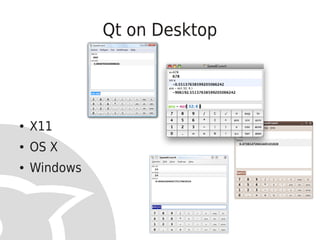
Qt on Desktop


●   X11
●   OS X
●   Windows
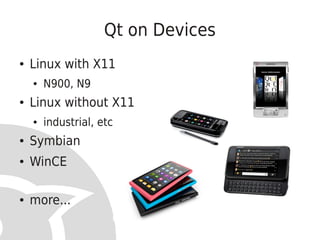
Qt on Devices
●   Linux with X11
    ●   N900, N9
●   Linux without X11
    ●   industrial, etc
●   Symbian
●   WinCE

●   more...
Who runs Qt?
●   Trolltech
●   Bought by Nokia
●   Nokia Qt Development Frameworks


●   Digia develops and licenses Qt Commercial


●   Qt is open source – www.qt-project.org
●   True open governance!
Qt on Devices
●   More than the official ports
    ●   Android


    ●   RIM Blackberry
    ●   WebOS
    ●   iOS
    ●   Kindle


    ●   WP7 can support native code mid-2012 :-)
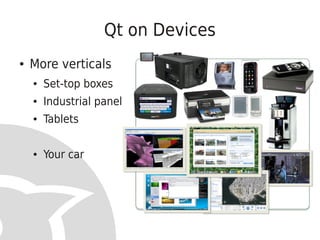
Qt on Devices
●   More verticals
    ●   Set-top boxes
    ●   Industrial panels
    ●   Tablets

    ●   Your car
Finding the Roots of Qt


        Backends
Backends
●   Backends for OS primitives
    ●   Atomic operations, files, etc
●   Backends for graphics rendering
    ●   Soft, OpenGL, OpenGL ES, GDI, etc
●   Backends for image handling
●   Backends for accessibility
●   Backends for ...
Why Backends


  Portability!
Portability between Devices
●   QPA – Qt Platform Architecture – or something
    ●   Formerly known as Lighthouse


●   A backend for porting Qt to new platforms
    ●   Focused at minimal effort, but with possibilities
Qt on Android
●   Based on Android SDK / NDK
●   QPA
    ●   Necessitas - the actual Qt Port
●   QtCreator (IDE) adaptations
    ●   The tooling
●   Ministro
    ●   The deployment
Current Status
●   Alpha 3 was just released
    ●   Most of Qt is ported
    ●   OpenGL rendering
    ●   WebKit


●   Missing
    ●   Mobility (for many Android Versions)
    ●   Rewriting soft keyboard support
    ●   Android Style and Android Menus
    ●   Development support in non-Linux environments
    ●   Documentation
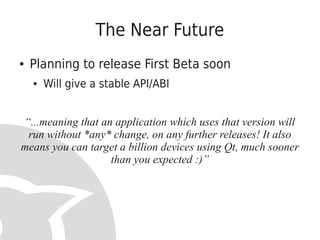
The Near Future
●   Planning to release First Beta soon
    ●   Will give a stable API/ABI


“...meaning that an application which uses that version will
 run without *any* change, on any further releases! It also
means you can target a billion devices using Qt, much sooner
                   than you expected :)”
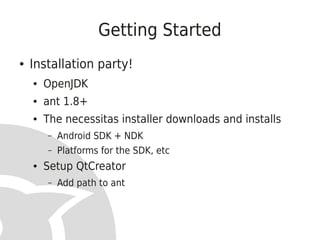
Getting Started
●   Installation party!
    ●   OpenJDK
    ●   ant 1.8+
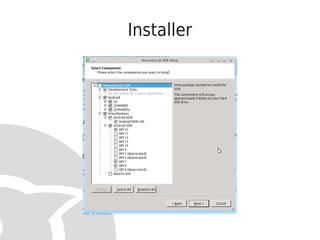
    ●   The necessitas installer downloads and installs
        –   Android SDK + NDK
        –   Platforms for the SDK, etc
    ●   Setup QtCreator
        –   Add path to ant
Installer
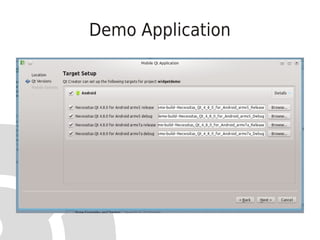
Demo Application
Demo Application
●   Strip out some of the crud from the template
    source code – it refers to Symbian
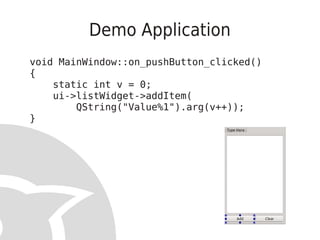
Demo Application
void MainWindow::on_pushButton_clicked()
{
    static int v = 0;
    ui->listWidget->addItem(
        QString("Value%1").arg(v++));
}
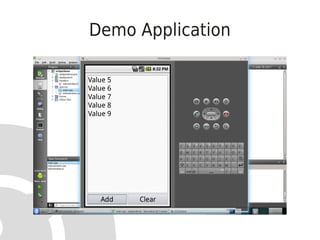
Demo Application
Demo Application
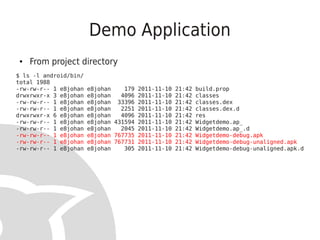
 ●   From project directory
$ ls -l android/bin/
total 1988
-rw-rw-r-- 1 e8johan   e8johan    179 2011-11-10 21:42 build.prop
drwxrwxr-x 3 e8johan   e8johan   4096 2011-11-10 21:42 classes
-rw-rw-r-- 1 e8johan   e8johan 33396 2011-11-10 21:42 classes.dex
-rw-rw-r-- 1 e8johan   e8johan   2251 2011-11-10 21:42 classes.dex.d
drwxrwxr-x 6 e8johan   e8johan   4096 2011-11-10 21:42 res
-rw-rw-r-- 1 e8johan   e8johan 431594 2011-11-10 21:42 Widgetdemo.ap_
-rw-rw-r-- 1 e8johan   e8johan   2045 2011-11-10 21:42 Widgetdemo.ap_.d
-rw-rw-r-- 1 e8johan   e8johan 767735 2011-11-10 21:42 Widgetdemo-debug.apk
-rw-rw-r-- 1 e8johan   e8johan 767731 2011-11-10 21:42 Widgetdemo-debug-unaligned.apk
-rw-rw-r-- 1 e8johan   e8johan    305 2011-11-10 21:42 Widgetdemo-debug-unaligned.apk.d
First Run on Phone
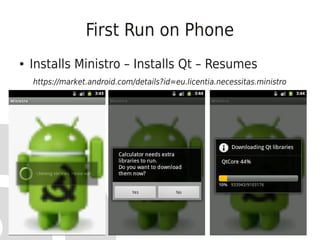
●   Installs Ministro – Installs Qt – Resumes
    https://market.android.com/details?id=eu.licentia.necessitas.ministro
Second Run


It simply works!
More on Ministro
●   Qt libraries are shared among all Qt apps on
    the device
●   From the beta release, the ABI is stable, i.e. Qt
    can be upgraded separately from apps
Configurability
●   Android target SDK
    ●   API levels
●   Application icon
●   Permissions
    ●   What your app wants to be able to do
●   Libraries
    ●   Which Qt modules are needed
●   More...
Debugging
●   Yes! :-)


●   Android NDK comes with gdb
    ●   Works with QtCreator
●   Requires some tweaking
    ●   Described in the Necessitas Wiki
Qt and Device UIs


 Got to show you this!
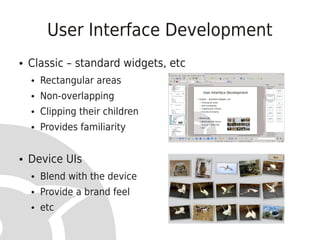
User Interface Development
●   Classic – standard widgets, etc
    ●   Rectangular areas
    ●   Non-overlapping
    ●   Clipping their children
    ●   Provides familiarity


●   Device UIs
    ●   Blend with the device
    ●   Provide a brand feel
    ●   etc
Building Modern UIs
●   No more widgets!
    ●   Canvas / scene
●   Timers everywhere
●   Multiple simultaneous transitions
●   Complex, interconnected state machines


●   Pain! :-)
History of Qt and Modern UIs
●   QCanvas
●   QGraphicsView
●   QTimeLine
●   QGraphicsItemAnimation
●   An animation framework
●   A state machine framework
●   The birth of QtQuick
QtQuick
●   What is QtQuick?
    ●   A run-time for QML
    ●   Tooling


●   What is QML
    ●   Declarative
    ●   JavaScript
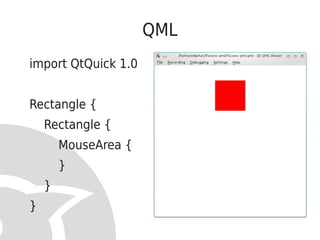
QML
import QtQuick 1.0


Rectangle {
    Rectangle {
        MouseArea {
        }
    }
}
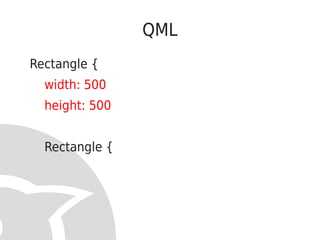
QML
Rectangle {
  width: 500
  height: 500


  Rectangle {
QML
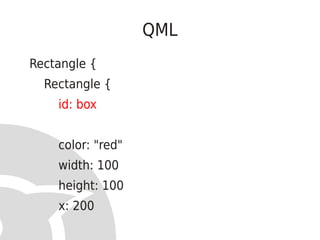
Rectangle {
  Rectangle {
    id: box


    color: "red"
    width: 100
    height: 100
    x: 200
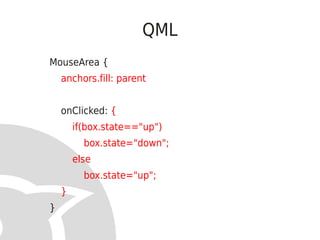
QML
MouseArea {
    anchors.fill: parent


    onClicked: {
        if(box.state=="up")
          box.state="down";
        else
          box.state="up";
    }
}
QML
Rectangle {
  state: "up"
  states: [
      State {
           name: "up"
           PropertyChanges { target: box; y: 50 }
      },
      State {
           name: "down"
           PropertyChanges { target: box; y: 350 }
      }
  ]
Demo
QML
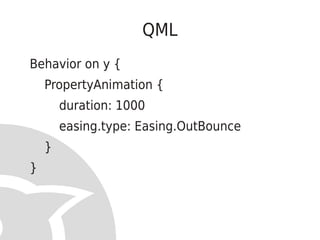
Behavior on y {
    PropertyAnimation {
        duration: 1000
        easing.type: Easing.OutBounce
    }
}
Demo
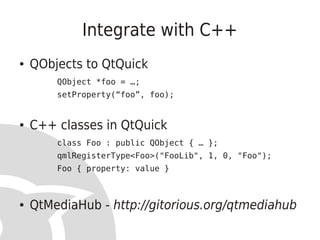
Integrate with C++
●   QObjects to QtQuick
        QObject *foo = …;
        setProperty(“foo”, foo);


●   C++ classes in QtQuick
        class Foo : public QObject { … };
        qmlRegisterType<Foo>("FooLib", 1, 0, "Foo");
        Foo { property: value }


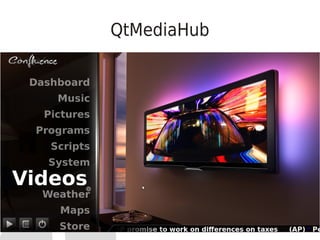
●   QtMediaHub - http://gitorious.org/qtmediahub
QtMediaHub
Of course QtQuick works on Android too.
  With hardware accelerated graphics.
Qt 5
●   A great opportunity to …
    ●   … get rid of API limitations
    ●   … split the repos into more independent parts
    ●   … take advantage of modern C++


●   Widgets and QML are peers
●   More acceleration, shaders, etc – amazing
    performance
A new Dawn
●   Truly Open Source – a www.qt-project.org
●   Qt for Desktop
    ●   Windows / X11 / OS X... more
●   Qt for Devices
    ●   Symbian / Maemo / MeeGo / Android / Blackberry /
        iOS / Kindle... more
Thank you!

 johan.thelin@pelagicore.com


           We're hiring!
http://pelagicore.com/career.html

Necessitas - Qt on Android - from FSCONS 2011

  • 1.
    Necessitas Qt onAndroid Johan Thelin Pelagicore
  • 2.
    Biography ● Johan Thelin ● Worked with Qt for 10+ years ● Foundations in Qt Development ● Also worked embedded, embedded Linux, enterprise software, web ● Today – senior developer at Pelagicore
  • 3.
    Pelagicore ● Open source based in-vehicle infotainment ● Member of Linux Foundation ● Ubuntu Core member ● GENIVI member ● Active within MeeGo, etc ● Uses Qt and QtQuick extensively ● Also HTML5, JavaScript and Android
  • 4.
    What is Qt “Code less, create more, deploy everywhere” ● A great framework for creating applications ● Truly cross-platform ● Desktop ● Devices ● Licensed for everyone – GPL, LGPL or closed
  • 5.
    Qt on Desktop ● X11 ● OS X ● Windows
  • 6.
    Qt on Devices ● Linux with X11 ● N900, N9 ● Linux without X11 ● industrial, etc ● Symbian ● WinCE ● more...
  • 7.
    Who runs Qt? ● Trolltech ● Bought by Nokia ● Nokia Qt Development Frameworks ● Digia develops and licenses Qt Commercial ● Qt is open source – www.qt-project.org ● True open governance!
  • 8.
    Qt on Devices ● More than the official ports ● Android ● RIM Blackberry ● WebOS ● iOS ● Kindle ● WP7 can support native code mid-2012 :-)
  • 9.
    Qt on Devices ● More verticals ● Set-top boxes ● Industrial panels ● Tablets ● Your car
  • 10.
    Finding the Rootsof Qt Backends
  • 11.
    Backends ● Backends for OS primitives ● Atomic operations, files, etc ● Backends for graphics rendering ● Soft, OpenGL, OpenGL ES, GDI, etc ● Backends for image handling ● Backends for accessibility ● Backends for ...
  • 12.
    Why Backends Portability!
  • 13.
    Portability between Devices ● QPA – Qt Platform Architecture – or something ● Formerly known as Lighthouse ● A backend for porting Qt to new platforms ● Focused at minimal effort, but with possibilities
  • 14.
    Qt on Android ● Based on Android SDK / NDK ● QPA ● Necessitas - the actual Qt Port ● QtCreator (IDE) adaptations ● The tooling ● Ministro ● The deployment
  • 15.
    Current Status ● Alpha 3 was just released ● Most of Qt is ported ● OpenGL rendering ● WebKit ● Missing ● Mobility (for many Android Versions) ● Rewriting soft keyboard support ● Android Style and Android Menus ● Development support in non-Linux environments ● Documentation
  • 16.
    The Near Future ● Planning to release First Beta soon ● Will give a stable API/ABI “...meaning that an application which uses that version will run without *any* change, on any further releases! It also means you can target a billion devices using Qt, much sooner than you expected :)”
  • 17.
    Getting Started ● Installation party! ● OpenJDK ● ant 1.8+ ● The necessitas installer downloads and installs – Android SDK + NDK – Platforms for the SDK, etc ● Setup QtCreator – Add path to ant
  • 18.
  • 19.
  • 20.
    Demo Application ● Strip out some of the crud from the template source code – it refers to Symbian
  • 21.
    Demo Application void MainWindow::on_pushButton_clicked() { static int v = 0; ui->listWidget->addItem( QString("Value%1").arg(v++)); }
  • 22.
  • 23.
    Demo Application ● From project directory $ ls -l android/bin/ total 1988 -rw-rw-r-- 1 e8johan e8johan 179 2011-11-10 21:42 build.prop drwxrwxr-x 3 e8johan e8johan 4096 2011-11-10 21:42 classes -rw-rw-r-- 1 e8johan e8johan 33396 2011-11-10 21:42 classes.dex -rw-rw-r-- 1 e8johan e8johan 2251 2011-11-10 21:42 classes.dex.d drwxrwxr-x 6 e8johan e8johan 4096 2011-11-10 21:42 res -rw-rw-r-- 1 e8johan e8johan 431594 2011-11-10 21:42 Widgetdemo.ap_ -rw-rw-r-- 1 e8johan e8johan 2045 2011-11-10 21:42 Widgetdemo.ap_.d -rw-rw-r-- 1 e8johan e8johan 767735 2011-11-10 21:42 Widgetdemo-debug.apk -rw-rw-r-- 1 e8johan e8johan 767731 2011-11-10 21:42 Widgetdemo-debug-unaligned.apk -rw-rw-r-- 1 e8johan e8johan 305 2011-11-10 21:42 Widgetdemo-debug-unaligned.apk.d
  • 24.
    First Run onPhone ● Installs Ministro – Installs Qt – Resumes https://market.android.com/details?id=eu.licentia.necessitas.ministro
  • 25.
  • 26.
    More on Ministro ● Qt libraries are shared among all Qt apps on the device ● From the beta release, the ABI is stable, i.e. Qt can be upgraded separately from apps
  • 27.
    Configurability ● Android target SDK ● API levels ● Application icon ● Permissions ● What your app wants to be able to do ● Libraries ● Which Qt modules are needed ● More...
  • 28.
    Debugging ● Yes! :-) ● Android NDK comes with gdb ● Works with QtCreator ● Requires some tweaking ● Described in the Necessitas Wiki
  • 29.
    Qt and DeviceUIs Got to show you this!
  • 30.
    User Interface Development ● Classic – standard widgets, etc ● Rectangular areas ● Non-overlapping ● Clipping their children ● Provides familiarity ● Device UIs ● Blend with the device ● Provide a brand feel ● etc
  • 31.
    Building Modern UIs ● No more widgets! ● Canvas / scene ● Timers everywhere ● Multiple simultaneous transitions ● Complex, interconnected state machines ● Pain! :-)
  • 32.
    History of Qtand Modern UIs ● QCanvas ● QGraphicsView ● QTimeLine ● QGraphicsItemAnimation ● An animation framework ● A state machine framework ● The birth of QtQuick
  • 33.
    QtQuick ● What is QtQuick? ● A run-time for QML ● Tooling ● What is QML ● Declarative ● JavaScript
  • 34.
    QML import QtQuick 1.0 Rectangle{ Rectangle { MouseArea { } } }
  • 35.
    QML Rectangle { width: 500 height: 500 Rectangle {
  • 36.
    QML Rectangle { Rectangle { id: box color: "red" width: 100 height: 100 x: 200
  • 37.
    QML MouseArea { anchors.fill: parent onClicked: { if(box.state=="up") box.state="down"; else box.state="up"; } }
  • 38.
    QML Rectangle { state: "up" states: [ State { name: "up" PropertyChanges { target: box; y: 50 } }, State { name: "down" PropertyChanges { target: box; y: 350 } } ]
  • 39.
  • 40.
    QML Behavior on y{ PropertyAnimation { duration: 1000 easing.type: Easing.OutBounce } }
  • 41.
  • 42.
    Integrate with C++ ● QObjects to QtQuick QObject *foo = …; setProperty(“foo”, foo); ● C++ classes in QtQuick class Foo : public QObject { … }; qmlRegisterType<Foo>("FooLib", 1, 0, "Foo"); Foo { property: value } ● QtMediaHub - http://gitorious.org/qtmediahub
  • 43.
  • 44.
    Of course QtQuickworks on Android too. With hardware accelerated graphics.
  • 45.
    Qt 5 ● A great opportunity to … ● … get rid of API limitations ● … split the repos into more independent parts ● … take advantage of modern C++ ● Widgets and QML are peers ● More acceleration, shaders, etc – amazing performance
  • 46.
    A new Dawn ● Truly Open Source – a www.qt-project.org ● Qt for Desktop ● Windows / X11 / OS X... more ● Qt for Devices ● Symbian / Maemo / MeeGo / Android / Blackberry / iOS / Kindle... more
  • 47.
    Thank you! johan.thelin@pelagicore.com We're hiring! http://pelagicore.com/career.html