Future-Proofing
Embedded Device
Capabilities with the
Qt 6 Plugin Mechanism
1
Chris Probst
January 23, 2025
About ICS
Established in 1987, Integrated Computer
Solutions, Inc. (ICS) delivers innovative
software solutions with a full suite of services
to accelerate development of successful
next-gen products.
ICS is headquartered outside Boston in
Waltham, Mass. with offices in California,
Canada and Europe. Currently 160 people.
Our Context
● A Main User-Interface that prompts other user-interfaces (Sub User-Interfaces).
● The Main User-Interface can relinquish control to the to the Sub User-Interface it
prompts.
● Once the prompted Sub User-Interface is doned, control is handed back over to the
Main User Interface.
● The Main User-Interface is implemented, however the Sub User-Interfaces are not
necessarily implemented nor available.
● Sub User-Interfaces provided by third party or separate group.
3
Examples of our Context
4
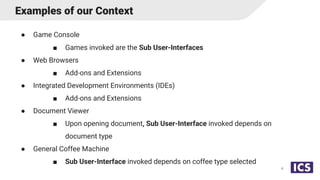
● Game Console
■ Games invoked are the Sub User-Interfaces
● Web Browsers
■ Add-ons and Extensions
● Integrated Development Environments (IDEs)
■ Add-ons and Extensions
● Document Viewer
■ Upon opening document, Sub User-Interface invoked depends on
document type
● General Coffee Machine
■ Sub User-Interface invoked depends on coffee type selected
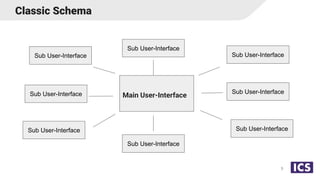
Classic Schema
5
Main User-Interface
Sub User-Interface
Sub User-Interface
Sub User-Interface
Sub User-Interface
Sub User-Interface
Sub User-Interface
Sub User-Interface
Sub User-Interface
Ways of Tackling Issue
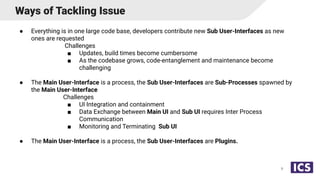
● Everything is in one large code base, developers contribute new Sub User-Interfaces as new
ones are requested
Challenges
■ Updates, build times become cumbersome
■ As the codebase grows, code-entanglement and maintenance become
challenging
● The Main User-Interface is a process, the Sub User-Interfaces are Sub-Processes spawned by
the Main User-Interface
Challenges
■ UI Integration and containment
■ Data Exchange between Main UI and Sub UI requires Inter Process
Communication
■ Monitoring and Terminating Sub UI
● The Main User-Interface is a process, the Sub User-Interfaces are Plugins.
6
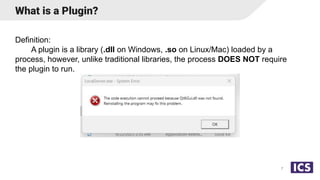
What is a Plugin?
Definition:
A plugin is a library (.dll on Windows, .so on Linux/Mac) loaded by a
process, however, unlike traditional libraries, the process DOES NOT require
the plugin to run.
7
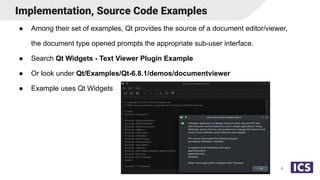
● Among their set of examples, Qt provides the source of a document editor/viewer,
the document type opened prompts the appropriate sub-user interface.
● Search Qt Widgets - Text Viewer Plugin Example
● Or look under Qt/Examples/Qt-6.8.1/demos/documentviewer
● Example uses Qt Widgets
Implementation, Source Code Examples
8
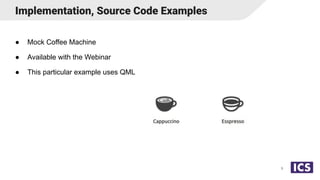
● Mock Coffee Machine
● Available with the Webinar
● This particular example uses QML
Implementation, Source Code Examples
9
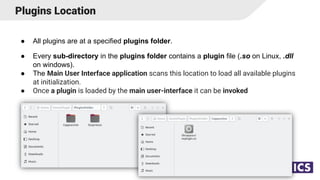
Plugins Location
● All plugins are at a specified plugins folder.
● Every sub-directory in the plugins folder contains a plugin file (.so on Linux, .dll
on windows).
● The Main User Interface application scans this location to load all available plugins
at initialization.
● Once a plugin is loaded by the main user-interface it can be invoked
10
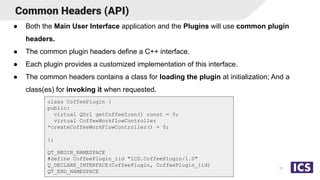
Common Headers (API)
● Both the Main User Interface application and the Plugins will use common plugin
headers.
● The common plugin headers define a C++ interface.
● Each plugin provides a customized implementation of this interface.
● The common headers contains a class for loading the plugin at initialization; And a
class(es) for invoking it when requested.
11
class CoffeePlugin {
public:
virtual QUrl getCoffeeIcon() const = 0;
virtual CoffeeWorkflowController
*createCoffeeWorkFlowController() = 0;
};
QT_BEGIN_NAMESPACE
#define CoffeePlugin_iid "ICS.CoffeePlugin/1.0"
Q_DECLARE_INTERFACE(CoffeePlugin, CoffeePlugin_iid)
QT_END_NAMESPACE
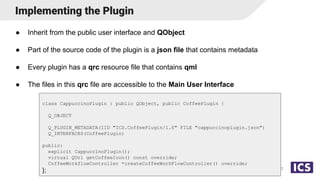
Implementing the Plugin
● Inherit from the public user interface and QObject
● Part of the source code of the plugin is a json file that contains metadata
● Every plugin has a qrc resource file that contains qml
● The files in this qrc file are accessible to the Main User Interface
12
class CappuccinoPlugin : public QObject, public CoffeePlugin {
Q_OBJECT
Q_PLUGIN_METADATA(IID "ICS.CoffeePlugin/1.0" FILE "cappuccinoplugin.json")
Q_INTERFACES(CoffeePlugin)
public:
explicit CappuccinoPlugin();
virtual QUrl getCoffeeIcon() const override;
CoffeeWorkflowController *createCoffeeWorkFlowController() override;
};
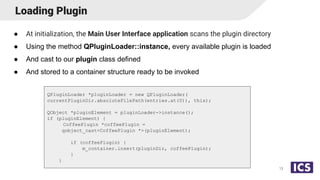
Loading Plugin
● At initialization, the Main User Interface application scans the plugin directory
● Using the method QPluginLoader::instance, every available plugin is loaded
● And cast to our plugin class defined
● And stored to a container structure ready to be invoked
13
QPluginLoader *pluginLoader = new QPluginLoader(
currentPluginDir.absoluteFilePath(entries.at(0)), this);
QObject *pluginElement = pluginLoader->instance();
if (pluginElement) {
CoffeePlugin *coffeePlugin =
qobject_cast<CoffeePlugin *>(pluginElement);
if (coffeePlugin) {
m_container.insert(pluginDir, coffeePlugin);
}
}
Invoking The Plugin
● Invocation of plugin occurs through a Controller
● Interface of Controller is part of declaration of common headers
● Controller gets created at plugin invocation
● Controller provides a QML temporary screen to Main User Interface
● Main User Interface loads this screen in a QML Loader
● Controller also provides a temporary context property to the QML engine
● This Context property contains the properties and Q_INVOKABLE that the
temporary QML screen
● Controller is destroyed when plugin relinquishes control back to Main User
Interface
14
Communication with Plugin
● When plugin is invoked through Controller::startWorkflow() method, the plugin
decides when it ultimately grabs and relinquishes control.
● The grab and relinquishing of controls occurs through
void Controller::beginUiWorkflow() and void Controller::endUiWorkFlow();
● These methods are implemented in the Main User Interface and through call-backs
emit the signal to display and load/unload the qml screen provided by the
Controller.
15
EsspressoCoffeeWorkflowController::EsspressoCoffeeWorkflowController(
QObject *parent)
: QObject(parent), CoffeeWorkflowController(),
m_EsspressoWorkflowData(new EsspressoWorkflowQMLData(this)) {
connect(m_EsspressoWorkflowData,
&EsspressoWorkflowQMLData::notifyQuitPluginRequest, this,
[this] { endUiWorkFlow(); });
}
void EsspressoCoffeeWorkflowController::startWork(const QVariantMap &) {
beginUiWorkflow();
}
Developing the Plugin
● The grab and relinquishing of controls occurs through
void Controller::beginUiWorkflow() and void Controller::endUiWorkFlow();
● These methods are implemented in the Main User Interface and through call-backs
emit the signal to display and load/unload the qml screen provided by the
Controller.
● Controller also provides a temporary context property to the QML engine
● This context property is a QObject containing the properties and Q_INVOKABLE
that the temporary QML screen
16
m_currentCoffeeWorkflowController =
coffeePlugin->createCoffeeWorkFlowController();
if (m_currentCoffeeWorkflowController) {
m_qmlContext->setContextProperty(
"controller", m_currentCoffeeWorkflowController->qmlPresenterData());
m_currentCoffeeWorkflowController->setBeginUiWorkflowCallback([this]() {
setCurrentScreen(m_currentCoffeeWorkflowController->mainPanelQmlUrl());
});
m_currentCoffeeWorkflowController->setEndUiWorkflowCallback([this]() {
emit pluginDone();
m_currentCoffeeWorkflowController->destroy();
m_currentCoffeeWorkflowController = nullptr;
});
m_currentCoffeeWorkflowController->startWork(QVariantMap());
Debugging Notes and Further Reading
● Qt Version of plugin should match Qt Version of main ui
● Debug variable QT_DEBUG_PLUGINS (a non-zero value makes Qt print out
diagnostic information about each (C++) plugin it tries to load)
● All plugins and the user interface share the same name space, requires some
contract/agreement to avoid namespace collision
● https://doc.qt.io/qt-6/plugins-howto.html
17
Any questions?

Future-Proofing Embedded Device Capabilities with the Qt 6 Plugin Mechanism.pdf

  • 1.
    Future-Proofing Embedded Device Capabilities withthe Qt 6 Plugin Mechanism 1 Chris Probst January 23, 2025
  • 2.
    About ICS Established in1987, Integrated Computer Solutions, Inc. (ICS) delivers innovative software solutions with a full suite of services to accelerate development of successful next-gen products. ICS is headquartered outside Boston in Waltham, Mass. with offices in California, Canada and Europe. Currently 160 people.
  • 3.
    Our Context ● AMain User-Interface that prompts other user-interfaces (Sub User-Interfaces). ● The Main User-Interface can relinquish control to the to the Sub User-Interface it prompts. ● Once the prompted Sub User-Interface is doned, control is handed back over to the Main User Interface. ● The Main User-Interface is implemented, however the Sub User-Interfaces are not necessarily implemented nor available. ● Sub User-Interfaces provided by third party or separate group. 3
  • 4.
    Examples of ourContext 4 ● Game Console ■ Games invoked are the Sub User-Interfaces ● Web Browsers ■ Add-ons and Extensions ● Integrated Development Environments (IDEs) ■ Add-ons and Extensions ● Document Viewer ■ Upon opening document, Sub User-Interface invoked depends on document type ● General Coffee Machine ■ Sub User-Interface invoked depends on coffee type selected
  • 5.
    Classic Schema 5 Main User-Interface SubUser-Interface Sub User-Interface Sub User-Interface Sub User-Interface Sub User-Interface Sub User-Interface Sub User-Interface Sub User-Interface
  • 6.
    Ways of TacklingIssue ● Everything is in one large code base, developers contribute new Sub User-Interfaces as new ones are requested Challenges ■ Updates, build times become cumbersome ■ As the codebase grows, code-entanglement and maintenance become challenging ● The Main User-Interface is a process, the Sub User-Interfaces are Sub-Processes spawned by the Main User-Interface Challenges ■ UI Integration and containment ■ Data Exchange between Main UI and Sub UI requires Inter Process Communication ■ Monitoring and Terminating Sub UI ● The Main User-Interface is a process, the Sub User-Interfaces are Plugins. 6
  • 7.
    What is aPlugin? Definition: A plugin is a library (.dll on Windows, .so on Linux/Mac) loaded by a process, however, unlike traditional libraries, the process DOES NOT require the plugin to run. 7
  • 8.
    ● Among theirset of examples, Qt provides the source of a document editor/viewer, the document type opened prompts the appropriate sub-user interface. ● Search Qt Widgets - Text Viewer Plugin Example ● Or look under Qt/Examples/Qt-6.8.1/demos/documentviewer ● Example uses Qt Widgets Implementation, Source Code Examples 8
  • 9.
    ● Mock CoffeeMachine ● Available with the Webinar ● This particular example uses QML Implementation, Source Code Examples 9
  • 10.
    Plugins Location ● Allplugins are at a specified plugins folder. ● Every sub-directory in the plugins folder contains a plugin file (.so on Linux, .dll on windows). ● The Main User Interface application scans this location to load all available plugins at initialization. ● Once a plugin is loaded by the main user-interface it can be invoked 10
  • 11.
    Common Headers (API) ●Both the Main User Interface application and the Plugins will use common plugin headers. ● The common plugin headers define a C++ interface. ● Each plugin provides a customized implementation of this interface. ● The common headers contains a class for loading the plugin at initialization; And a class(es) for invoking it when requested. 11 class CoffeePlugin { public: virtual QUrl getCoffeeIcon() const = 0; virtual CoffeeWorkflowController *createCoffeeWorkFlowController() = 0; }; QT_BEGIN_NAMESPACE #define CoffeePlugin_iid "ICS.CoffeePlugin/1.0" Q_DECLARE_INTERFACE(CoffeePlugin, CoffeePlugin_iid) QT_END_NAMESPACE
  • 12.
    Implementing the Plugin ●Inherit from the public user interface and QObject ● Part of the source code of the plugin is a json file that contains metadata ● Every plugin has a qrc resource file that contains qml ● The files in this qrc file are accessible to the Main User Interface 12 class CappuccinoPlugin : public QObject, public CoffeePlugin { Q_OBJECT Q_PLUGIN_METADATA(IID "ICS.CoffeePlugin/1.0" FILE "cappuccinoplugin.json") Q_INTERFACES(CoffeePlugin) public: explicit CappuccinoPlugin(); virtual QUrl getCoffeeIcon() const override; CoffeeWorkflowController *createCoffeeWorkFlowController() override; };
  • 13.
    Loading Plugin ● Atinitialization, the Main User Interface application scans the plugin directory ● Using the method QPluginLoader::instance, every available plugin is loaded ● And cast to our plugin class defined ● And stored to a container structure ready to be invoked 13 QPluginLoader *pluginLoader = new QPluginLoader( currentPluginDir.absoluteFilePath(entries.at(0)), this); QObject *pluginElement = pluginLoader->instance(); if (pluginElement) { CoffeePlugin *coffeePlugin = qobject_cast<CoffeePlugin *>(pluginElement); if (coffeePlugin) { m_container.insert(pluginDir, coffeePlugin); } }
  • 14.
    Invoking The Plugin ●Invocation of plugin occurs through a Controller ● Interface of Controller is part of declaration of common headers ● Controller gets created at plugin invocation ● Controller provides a QML temporary screen to Main User Interface ● Main User Interface loads this screen in a QML Loader ● Controller also provides a temporary context property to the QML engine ● This Context property contains the properties and Q_INVOKABLE that the temporary QML screen ● Controller is destroyed when plugin relinquishes control back to Main User Interface 14
  • 15.
    Communication with Plugin ●When plugin is invoked through Controller::startWorkflow() method, the plugin decides when it ultimately grabs and relinquishes control. ● The grab and relinquishing of controls occurs through void Controller::beginUiWorkflow() and void Controller::endUiWorkFlow(); ● These methods are implemented in the Main User Interface and through call-backs emit the signal to display and load/unload the qml screen provided by the Controller. 15 EsspressoCoffeeWorkflowController::EsspressoCoffeeWorkflowController( QObject *parent) : QObject(parent), CoffeeWorkflowController(), m_EsspressoWorkflowData(new EsspressoWorkflowQMLData(this)) { connect(m_EsspressoWorkflowData, &EsspressoWorkflowQMLData::notifyQuitPluginRequest, this, [this] { endUiWorkFlow(); }); } void EsspressoCoffeeWorkflowController::startWork(const QVariantMap &) { beginUiWorkflow(); }
  • 16.
    Developing the Plugin ●The grab and relinquishing of controls occurs through void Controller::beginUiWorkflow() and void Controller::endUiWorkFlow(); ● These methods are implemented in the Main User Interface and through call-backs emit the signal to display and load/unload the qml screen provided by the Controller. ● Controller also provides a temporary context property to the QML engine ● This context property is a QObject containing the properties and Q_INVOKABLE that the temporary QML screen 16 m_currentCoffeeWorkflowController = coffeePlugin->createCoffeeWorkFlowController(); if (m_currentCoffeeWorkflowController) { m_qmlContext->setContextProperty( "controller", m_currentCoffeeWorkflowController->qmlPresenterData()); m_currentCoffeeWorkflowController->setBeginUiWorkflowCallback([this]() { setCurrentScreen(m_currentCoffeeWorkflowController->mainPanelQmlUrl()); }); m_currentCoffeeWorkflowController->setEndUiWorkflowCallback([this]() { emit pluginDone(); m_currentCoffeeWorkflowController->destroy(); m_currentCoffeeWorkflowController = nullptr; }); m_currentCoffeeWorkflowController->startWork(QVariantMap());
  • 17.
    Debugging Notes andFurther Reading ● Qt Version of plugin should match Qt Version of main ui ● Debug variable QT_DEBUG_PLUGINS (a non-zero value makes Qt print out diagnostic information about each (C++) plugin it tries to load) ● All plugins and the user interface share the same name space, requires some contract/agreement to avoid namespace collision ● https://doc.qt.io/qt-6/plugins-howto.html 17
  • 18.