ARGUS
PATIENT SCREEN
01/29/17
Katalyst Healthcares & Life Sciences
1
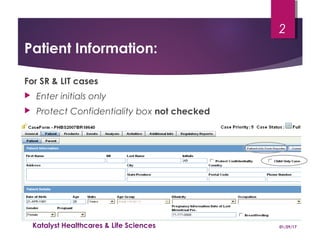
Patient Information:
For SR & LIT cases
 Enter initials only
 Protect Confidentiality box not checked
01/29/17Katalyst Healthcares & Life Sciences
2
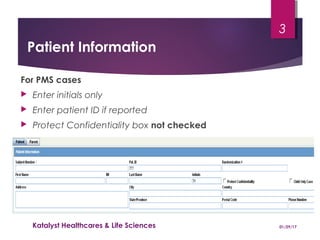
Patient Information
For PMS cases
 Enter initials only
 Enter patient ID if reported
 Protect Confidentiality box not checked
01/29/17Katalyst Healthcares & Life Sciences
3
Patient Information (cont)Patient Information (cont)
 Enter date of birth. If incomplete type in hyphen for missing
information. eg ‘-’ ‘-’ 1994
 Patient age:
Age and age group will only be calculated automatically if the
date of birth and a full event onset date are entered.
 If partial onset date has been entered enter the age and age
group manually.
 Ethnicity: SR - To be entered as locally required
CT - Entered if information provided
01/29/17Katalyst Healthcares & Life Sciences
4
Other Relevant History:Other Relevant History:
 Enter relevant medical history including current medical
conditions.
 As a general rule, indications of suspect drugs should not be
entered as relevant history. However there are exceptions
where the condition has happened more than once eg.
Transplant.
 The indications of co-medications should be entered and
coded in the relevant medical history field as they highlight
the current condition of the patient.
01/29/17Katalyst Healthcares & Life Sciences
5
Other Relevant History (Cont)Other Relevant History (Cont)
 The following ‘Condition Type’ are used by Novartis:
- Current Condition
- Historical Condition
- Historical Drug
- Drug Reaction History
- Family History
Leave blank if unknown
 Repeat ‘Description’ verbatim term in the Notes field if the Preferred
Term is not specific enough.
01/29/17Katalyst Healthcares & Life Sciences
6
Medical History Field
 Historical drugs can be represented in the medical history
field if required.
 Select ‘Historical Drug’ as condition type.
 The drug name can then be coded against the WHO
dictionary.
 The Indication for the ‘Historical Drug’ can be entered as
well as the reaction if known
01/29/17Katalyst Healthcares & Life Sciences
7
‘Historical Drugs’ Condition type
When to Use:
 This condition should be used only in the following
situations:
− Historical drugs that have been highlighted by the reporter as
medically relevant to the patient’s status.
− Specific historical drugs/therapies highlighted by the Novartis
medical safety physician as medically relevant and requiring
routine screening.
01/29/17Katalyst Healthcares & Life Sciences
8
Definition of a historical drug:
 The decision as to whether a medication is historical
or not should be based on the following:
− If unlikely that the product is still in the body system and there are
no biological effects known or suspected in the patient, enter as a
‘Historical Drug’ in the Other Relevant History.
− If the drug is still in the body system and there is a suggestion of
biological activity (even if the kinetics suggest complete
elimination), the product should be entered as a co-medication in
the Product tab
− If in doubt, consult the PVL.
‘Historical Drugs’ Condition type
01/29/17Katalyst Healthcares & Life Sciences
9
Other Relevant History (Cont)Other Relevant History (Cont)
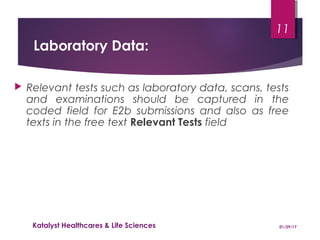
 To enter more patient history data click on the Add button
 To delete a history record, click on the Delete button
 Ongoing checkbox: Not used by Novartis
01/29/17Katalyst Healthcares & Life Sciences
10
Laboratory Data:
 Relevant tests such as laboratory data, scans, tests
and examinations should be captured in the
coded field for E2b submissions and also as free
texts in the free text Relevant Tests field
01/29/17Katalyst Healthcares & Life Sciences
11
Coded Lab Data Field:
 Only enter test results that are relevant to the events being
reported. The coded field should summarise the essential test results
and should only include tests which:
 Show abnormalities outside of the normal range relevant to the events being
reported.
 Disprove a diagnosis or suspected underlying cause for the event
 Support or confirm a diagnosis
 Show trends, e.g. increasing white blood cell count during an infection. Always
include a baseline value if provided followed by the peak and resolution values
 Show a normalisation of previously abnormal test results
 Do not include tests which:
 Show abnormal values that are normal/baseline in the specific patient population
under study.
 Are not relevant to the events being reported.
01/29/17Katalyst Healthcares & Life Sciences
12
Coded Lab Data Field:
 Type in the test name as reported
and click on ‚Encode‘
 Click on units field and select the
appropriate units if reported
 Enter the Normal range if reported
 To enter a test result and
click on ‚Add test‘
01/29/17
Katalyst Healthcares & Life Sciences
13
Coded Lab Data Field:
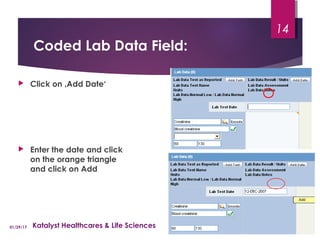
 Click on ‚Add Date‘
 Enter the date and click
on the orange triangle
and click on Add
01/29/17 Katalyst Healthcares & Life Sciences
14
Coded Lab Data Field:
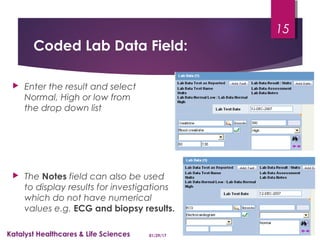
 Enter the result and select
Normal, High or low from
the drop down list
 The Notes field can also be used
to display results for investigations
which do not have numerical
values e.g. ECG and biopsy results.
01/29/17Katalyst Healthcares & Life Sciences
15
Relevant Test Field:
 In the event that a test can not be coded or captured appropriately in the
coded text field, it can be entered as free text in the relevant test field.
 Enter date or relevant time point of test in brackets, e.g. (14 Mar 2007) or (10
days post transplant) or (Date unknown)
 Enter test specification followed by test result, e.g. Haemoglobin 9.4
 Enter test units if reported, e.g. Haemoglobin 9.4 g/dL
 If the same test is repeated over a number of days, a normal range should only
be entered next to the first entry as shown in the example.
 Group similar laboratory tests. Abbreviations can be used if the test is fully
defined for the first result or in the case narrative.
 Enter repeated tests in date order so that any trend over time can be clearly
seen
 Example:
(Date unknown) AST 20 U/L (normal range 15-30)
(Date unknown) AST 150 U/L
(Date unknown) AST 40 U/L
01/29/17Katalyst Healthcares & Life Sciences
16
Thank YouThank You
&&
QuestionsQuestions
17
Contact:
Katalyst Healthcare’s & Life Sciences
South Plainfield, NJ, USA 07080.
E-Mail: info@KatalystHLS.com

Argus Patient Screen Tab Training - Katalyst HLS

  • 1.
  • 2.
    Patient Information: For SR& LIT cases  Enter initials only  Protect Confidentiality box not checked 01/29/17Katalyst Healthcares & Life Sciences 2
  • 3.
    Patient Information For PMScases  Enter initials only  Enter patient ID if reported  Protect Confidentiality box not checked 01/29/17Katalyst Healthcares & Life Sciences 3
  • 4.
    Patient Information (cont)PatientInformation (cont)  Enter date of birth. If incomplete type in hyphen for missing information. eg ‘-’ ‘-’ 1994  Patient age: Age and age group will only be calculated automatically if the date of birth and a full event onset date are entered.  If partial onset date has been entered enter the age and age group manually.  Ethnicity: SR - To be entered as locally required CT - Entered if information provided 01/29/17Katalyst Healthcares & Life Sciences 4
  • 5.
    Other Relevant History:OtherRelevant History:  Enter relevant medical history including current medical conditions.  As a general rule, indications of suspect drugs should not be entered as relevant history. However there are exceptions where the condition has happened more than once eg. Transplant.  The indications of co-medications should be entered and coded in the relevant medical history field as they highlight the current condition of the patient. 01/29/17Katalyst Healthcares & Life Sciences 5
  • 6.
    Other Relevant History(Cont)Other Relevant History (Cont)  The following ‘Condition Type’ are used by Novartis: - Current Condition - Historical Condition - Historical Drug - Drug Reaction History - Family History Leave blank if unknown  Repeat ‘Description’ verbatim term in the Notes field if the Preferred Term is not specific enough. 01/29/17Katalyst Healthcares & Life Sciences 6
  • 7.
    Medical History Field Historical drugs can be represented in the medical history field if required.  Select ‘Historical Drug’ as condition type.  The drug name can then be coded against the WHO dictionary.  The Indication for the ‘Historical Drug’ can be entered as well as the reaction if known 01/29/17Katalyst Healthcares & Life Sciences 7
  • 8.
    ‘Historical Drugs’ Conditiontype When to Use:  This condition should be used only in the following situations: − Historical drugs that have been highlighted by the reporter as medically relevant to the patient’s status. − Specific historical drugs/therapies highlighted by the Novartis medical safety physician as medically relevant and requiring routine screening. 01/29/17Katalyst Healthcares & Life Sciences 8
  • 9.
    Definition of ahistorical drug:  The decision as to whether a medication is historical or not should be based on the following: − If unlikely that the product is still in the body system and there are no biological effects known or suspected in the patient, enter as a ‘Historical Drug’ in the Other Relevant History. − If the drug is still in the body system and there is a suggestion of biological activity (even if the kinetics suggest complete elimination), the product should be entered as a co-medication in the Product tab − If in doubt, consult the PVL. ‘Historical Drugs’ Condition type 01/29/17Katalyst Healthcares & Life Sciences 9
  • 10.
    Other Relevant History(Cont)Other Relevant History (Cont)  To enter more patient history data click on the Add button  To delete a history record, click on the Delete button  Ongoing checkbox: Not used by Novartis 01/29/17Katalyst Healthcares & Life Sciences 10
  • 11.
    Laboratory Data:  Relevanttests such as laboratory data, scans, tests and examinations should be captured in the coded field for E2b submissions and also as free texts in the free text Relevant Tests field 01/29/17Katalyst Healthcares & Life Sciences 11
  • 12.
    Coded Lab DataField:  Only enter test results that are relevant to the events being reported. The coded field should summarise the essential test results and should only include tests which:  Show abnormalities outside of the normal range relevant to the events being reported.  Disprove a diagnosis or suspected underlying cause for the event  Support or confirm a diagnosis  Show trends, e.g. increasing white blood cell count during an infection. Always include a baseline value if provided followed by the peak and resolution values  Show a normalisation of previously abnormal test results  Do not include tests which:  Show abnormal values that are normal/baseline in the specific patient population under study.  Are not relevant to the events being reported. 01/29/17Katalyst Healthcares & Life Sciences 12
  • 13.
    Coded Lab DataField:  Type in the test name as reported and click on ‚Encode‘  Click on units field and select the appropriate units if reported  Enter the Normal range if reported  To enter a test result and click on ‚Add test‘ 01/29/17 Katalyst Healthcares & Life Sciences 13
  • 14.
    Coded Lab DataField:  Click on ‚Add Date‘  Enter the date and click on the orange triangle and click on Add 01/29/17 Katalyst Healthcares & Life Sciences 14
  • 15.
    Coded Lab DataField:  Enter the result and select Normal, High or low from the drop down list  The Notes field can also be used to display results for investigations which do not have numerical values e.g. ECG and biopsy results. 01/29/17Katalyst Healthcares & Life Sciences 15
  • 16.
    Relevant Test Field: In the event that a test can not be coded or captured appropriately in the coded text field, it can be entered as free text in the relevant test field.  Enter date or relevant time point of test in brackets, e.g. (14 Mar 2007) or (10 days post transplant) or (Date unknown)  Enter test specification followed by test result, e.g. Haemoglobin 9.4  Enter test units if reported, e.g. Haemoglobin 9.4 g/dL  If the same test is repeated over a number of days, a normal range should only be entered next to the first entry as shown in the example.  Group similar laboratory tests. Abbreviations can be used if the test is fully defined for the first result or in the case narrative.  Enter repeated tests in date order so that any trend over time can be clearly seen  Example: (Date unknown) AST 20 U/L (normal range 15-30) (Date unknown) AST 150 U/L (Date unknown) AST 40 U/L 01/29/17Katalyst Healthcares & Life Sciences 16
  • 17.
    Thank YouThank You && QuestionsQuestions 17 Contact: KatalystHealthcare’s & Life Sciences South Plainfield, NJ, USA 07080. E-Mail: info@KatalystHLS.com

Editor's Notes

  • #5 Remember to check after entering event onset date that age and age group have been entered. Remember that if you later receive a complete onset date, the age or age group must be deleted for Argus to calculate these fields automatically.
  • #6 Other relevant history is encoded by MedDRA therefore it is not necessary to enter the verbatim in description as the preferred term populates the field when relevant history is encoded. The red cross is replaced by a green tick to show the field is encoded.