ANDROID
TUTORIAL
W
AQAS
AHM
ED
waqasahmed@aptechnn.com
TOOLS
1. Phone
2. Eclipse ( http://www.eclipse.org/downloads/ )
Android Plugin (ADT)
1. Android SDK (
http://developer.android.com/sdk/index.html )
2. JDK
ANDROID SDK
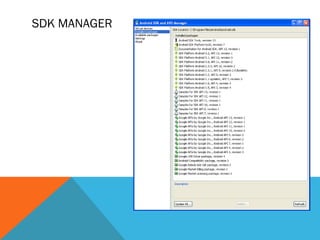
Once installed open the SDK Manager
Install the desired packages
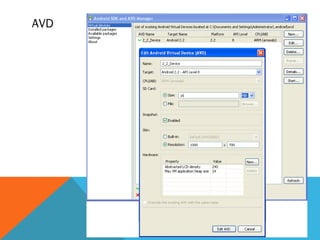
Create an Android Virtual Device (AVD)
SDK MANAGER
AVD
ADT PLUGIN (1)
In Eclipse, go to Help -> Install New Software
Click ‘Add’ in top right
Enter:
 Name: ADT Plugin
 Location: https://dl-ssl.google.com/android/eclipse/
Click OK, then select ‘Developer Tools’, click
Next
Click Next and then Finish
Afterwards, restart Eclipse
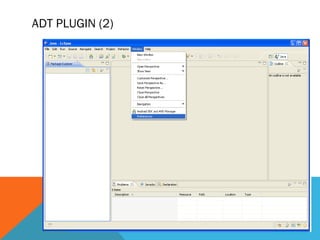
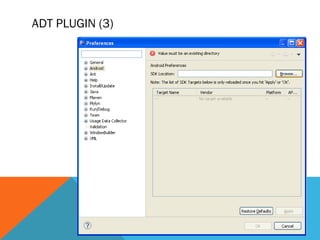
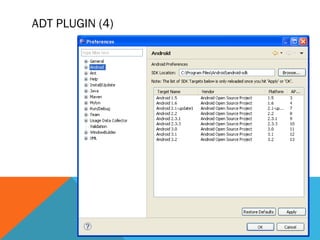
Specify SDK location (next 3 slides)
 Must do this every time start a new project in a new location (at
least in Windows)
ADT PLUGIN (2)
ADT PLUGIN (3)
ADT PLUGIN (4)
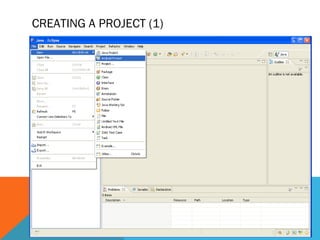
CREATING A PROJECT (1)
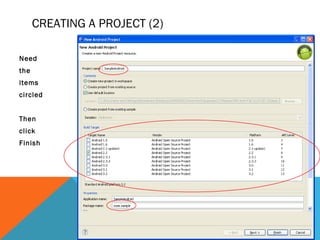
CREATING A PROJECT (2)
Need
the
items
circled
Then
click
Finish
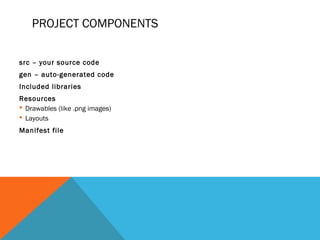
PROJECT COMPONENTS
src – your source code
gen – auto-generated code
Included libraries
Resources
 Drawables (like .png images)
 Layouts
Manifest file
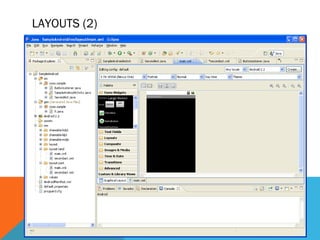
LAYOUTS (1)
Eclipse has a great UI creator
 Generates the XML for you
Composed of View objects
Can be specified for portrait and landscape mode
 Use same file name, so can make completely different UIs for the orientations
without modifying any code
LAYOUTS (2)
ACTIVITIES (1)
The basis of android applications
A single Activity defines a single viewable screen
 the actions, not the layout
Can have multiple per application
Each is a separate entity
They have a structured life cycle
 Different events in their life happen either via the user touching buttons or
programmatically

Android tutorial

  • 1.
  • 2.
    TOOLS 1. Phone 2. Eclipse( http://www.eclipse.org/downloads/ ) Android Plugin (ADT) 1. Android SDK ( http://developer.android.com/sdk/index.html ) 2. JDK
  • 3.
    ANDROID SDK Once installedopen the SDK Manager Install the desired packages Create an Android Virtual Device (AVD)
  • 4.
  • 5.
  • 6.
    ADT PLUGIN (1) InEclipse, go to Help -> Install New Software Click ‘Add’ in top right Enter:  Name: ADT Plugin  Location: https://dl-ssl.google.com/android/eclipse/ Click OK, then select ‘Developer Tools’, click Next Click Next and then Finish Afterwards, restart Eclipse Specify SDK location (next 3 slides)  Must do this every time start a new project in a new location (at least in Windows)
  • 7.
  • 8.
  • 9.
  • 10.
  • 11.
    CREATING A PROJECT(2) Need the items circled Then click Finish
  • 12.
    PROJECT COMPONENTS src –your source code gen – auto-generated code Included libraries Resources  Drawables (like .png images)  Layouts Manifest file
  • 13.
    LAYOUTS (1) Eclipse hasa great UI creator  Generates the XML for you Composed of View objects Can be specified for portrait and landscape mode  Use same file name, so can make completely different UIs for the orientations without modifying any code
  • 14.
  • 15.
    ACTIVITIES (1) The basisof android applications A single Activity defines a single viewable screen  the actions, not the layout Can have multiple per application Each is a separate entity They have a structured life cycle  Different events in their life happen either via the user touching buttons or programmatically