

 The GROUP BY clause is used to organize
output rows into groups.
 Group by clause can be used with different
clauses. That are given below
 Group by with where
 Group by with null
 Group by with all
 Group by with having
 The where clause can be used with group by
clause to restrict the row for grouping.
 The rows that satisfy the search condition are
considered fro grouping.
 Example :
 Select cust_id ,sum(salary) from customer
where cust_name like ‘m%’ group by cust_id.
 If the grouping column contain a null value,
that row become a separate group in the
result set.
 Example:
 select student_class,count(student_class)
from student where student_class=‘null'
group by student_class
 ALL is significant only when the SELECT has a
WHERE clause. When ALL is used. It includes
all the group by clause produces. It even
includes those groups which do not meet the
search conditions.
 Example:
 Select job,sum(salary) from emp where job
like 's%' or job like 'c% 'group by all job
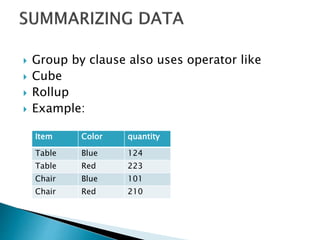
 Group by clause also uses operator like
 Cube
 Rollup
 Example:
Item Color quantity
Table Blue 124
Table Red 223
Chair Blue 101
Chair Red 210
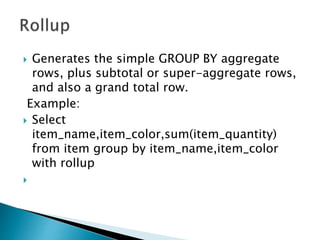
 Generates the simple GROUP BY aggregate
rows, plus subtotal or super-aggregate rows,
and also a grand total row.
Example:
 Select
item_name,item_color,sum(item_quantity)
from item group by item_name,item_color
with rollup

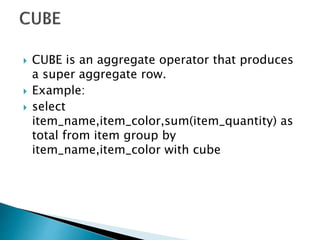
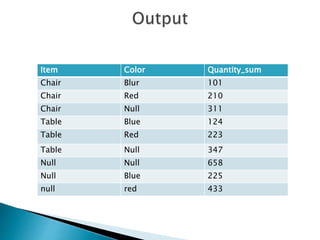
 CUBE is an aggregate operator that produces
a super aggregate row.
 Example:
 select
item_name,item_color,sum(item_quantity) as
total from item group by
item_name,item_color with cube
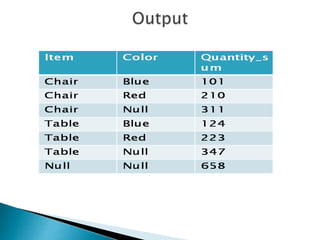
Item Color Quantity_sum
Chair Blur 101
Chair Red 210
Chair Null 311
Table Blue 124
Table Red 223
Table Null 347
Null Null 658
Null Blue 225
null red 433
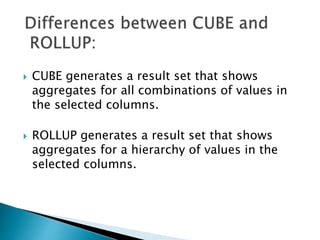
 CUBE generates a result set that shows
aggregates for all combinations of values in
the selected columns.
 ROLLUP generates a result set that shows
aggregates for a hierarchy of values in the
selected columns.

Sql server ___________session_10(group by clause)

  • 2.
     The GROUPBY clause is used to organize output rows into groups.  Group by clause can be used with different clauses. That are given below  Group by with where  Group by with null  Group by with all  Group by with having
  • 3.
     The whereclause can be used with group by clause to restrict the row for grouping.  The rows that satisfy the search condition are considered fro grouping.  Example :  Select cust_id ,sum(salary) from customer where cust_name like ‘m%’ group by cust_id.
  • 4.
     If thegrouping column contain a null value, that row become a separate group in the result set.  Example:  select student_class,count(student_class) from student where student_class=‘null' group by student_class
  • 5.
     ALL issignificant only when the SELECT has a WHERE clause. When ALL is used. It includes all the group by clause produces. It even includes those groups which do not meet the search conditions.  Example:  Select job,sum(salary) from emp where job like 's%' or job like 'c% 'group by all job
  • 6.
     Group byclause also uses operator like  Cube  Rollup  Example: Item Color quantity Table Blue 124 Table Red 223 Chair Blue 101 Chair Red 210
  • 7.
     Generates thesimple GROUP BY aggregate rows, plus subtotal or super-aggregate rows, and also a grand total row. Example:  Select item_name,item_color,sum(item_quantity) from item group by item_name,item_color with rollup 
  • 9.
     CUBE isan aggregate operator that produces a super aggregate row.  Example:  select item_name,item_color,sum(item_quantity) as total from item group by item_name,item_color with cube
  • 10.
    Item Color Quantity_sum ChairBlur 101 Chair Red 210 Chair Null 311 Table Blue 124 Table Red 223 Table Null 347 Null Null 658 Null Blue 225 null red 433
  • 11.
     CUBE generatesa result set that shows aggregates for all combinations of values in the selected columns.  ROLLUP generates a result set that shows aggregates for a hierarchy of values in the selected columns.