Building
  “HelloWorld”
Android Application
  Step by Step.


                      1
Topics
• Building blocks of Android Application
  > Activities
  > Layout resource files
  > AndroidManifest.xml
  > Resource files - strings.xml
  > R.java
Building Blocks of
Android Application
Building Blocks of Android Application
• Activity classes
• Layout resource files
• Resource files
  > strings.xml
• AndroidManifest.xml
• R.java (automatically created from resource
  files)
• Android library (automatically configured)
Building Blocks of Android Application
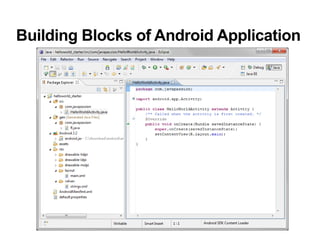
Activity Class
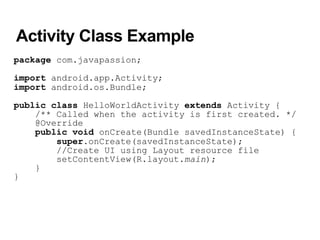
• Each Activity class typically represents a screen
  > Like a JSP page in a Web application
• The onCreate() method of Activity class gets
  called by the Android system when your
  Activity starts
  > You create your UI inside the onCreate() method
• Every Activity has to be described in the
  AndroidManifest.xml file
• An Activity is typically chosen as a starting one
  of your application - like a class that has a
  main() method in Java
  > Special configuration in AndroidManifest.xml
Activity Class Example
package com.javapassion;

import android.app.Activity;
import android.os.Bundle;

public class HelloWorldActivity extends Activity {
    /** Called when the activity is first created. */
    @Override
    public void onCreate(Bundle savedInstanceState) {
        super.onCreate(savedInstanceState);
        //Create UI using Layout resource file
        setContentView(R.layout.main);
    }
}
Layout Resource Files
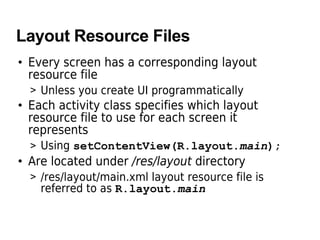
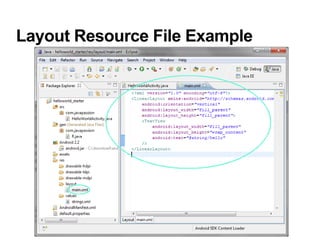
• Every screen has a corresponding layout
  resource file
  > Unless you create UI programmatically
• Each activity class specifies which layout
  resource file to use for each screen it
  represents
  > Using setContentView(R.layout.main);
• Are located under /res/layout directory
  > /res/layout/main.xml layout resource file is
    referred to as R.layout.main
Layout Resource File Example
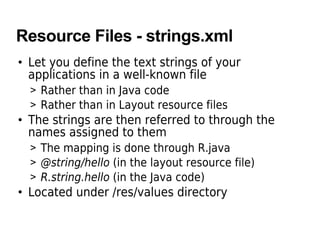
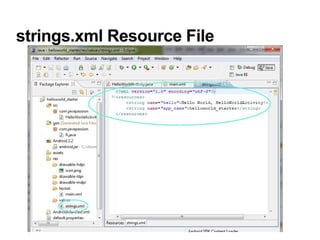
Resource Files - strings.xml
• Let you define the text strings of your
  applications in a well-known file
  > Rather than in Java code
  > Rather than in Layout resource files
• The strings are then referred to through the
  names assigned to them
  > The mapping is done through R.java
  > @string/hello (in the layout resource file)
  > R.string.hello (in the Java code)
• Located under /res/values directory
strings.xml Resource File
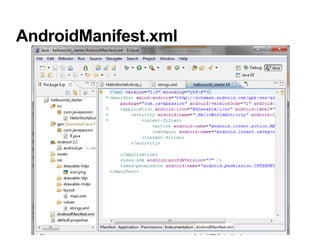
AndroidManifest.xml file
• Every application must have a manifest file
  called AndroidManifest.xml file (with precisely
  that name) in its root directory.
• The manifest presents essential information
  about the application to the Android system,
  information the system must have before it can
  run any of the application's code.
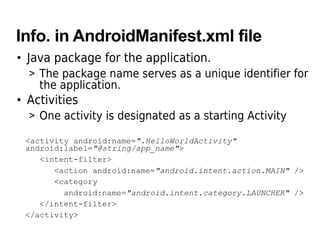
Info. in AndroidManifest.xml file
• Java package for the application.
  > The package name serves as a unique identifier for
    the application.
• Activities
  > One activity is designated as a starting Activity

 <activity android:name=".HelloWorldActivity"
 android:label="@string/app_name">
    <intent-filter>
       <action android:name="android.intent.action.MAIN" />
       <category
         android:name="android.intent.category.LAUNCHER" />
    </intent-filter>
 </activity>
AndroidManifest.xml
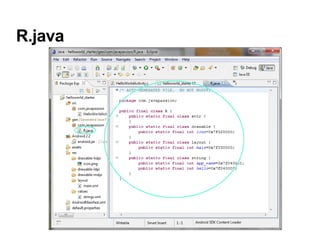
R.java
• Automatically created by Android system for all
  resources defined
R.java
Thank you

Android stepbystep

  • 1.
    Building “HelloWorld” AndroidApplication Step by Step. 1
  • 2.
    Topics • Building blocksof Android Application > Activities > Layout resource files > AndroidManifest.xml > Resource files - strings.xml > R.java
  • 3.
  • 4.
    Building Blocks ofAndroid Application • Activity classes • Layout resource files • Resource files > strings.xml • AndroidManifest.xml • R.java (automatically created from resource files) • Android library (automatically configured)
  • 5.
    Building Blocks ofAndroid Application
  • 6.
    Activity Class • EachActivity class typically represents a screen > Like a JSP page in a Web application • The onCreate() method of Activity class gets called by the Android system when your Activity starts > You create your UI inside the onCreate() method • Every Activity has to be described in the AndroidManifest.xml file • An Activity is typically chosen as a starting one of your application - like a class that has a main() method in Java > Special configuration in AndroidManifest.xml
  • 7.
    Activity Class Example packagecom.javapassion; import android.app.Activity; import android.os.Bundle; public class HelloWorldActivity extends Activity { /** Called when the activity is first created. */ @Override public void onCreate(Bundle savedInstanceState) { super.onCreate(savedInstanceState); //Create UI using Layout resource file setContentView(R.layout.main); } }
  • 8.
    Layout Resource Files •Every screen has a corresponding layout resource file > Unless you create UI programmatically • Each activity class specifies which layout resource file to use for each screen it represents > Using setContentView(R.layout.main); • Are located under /res/layout directory > /res/layout/main.xml layout resource file is referred to as R.layout.main
  • 9.
  • 10.
    Resource Files -strings.xml • Let you define the text strings of your applications in a well-known file > Rather than in Java code > Rather than in Layout resource files • The strings are then referred to through the names assigned to them > The mapping is done through R.java > @string/hello (in the layout resource file) > R.string.hello (in the Java code) • Located under /res/values directory
  • 11.
  • 12.
    AndroidManifest.xml file • Everyapplication must have a manifest file called AndroidManifest.xml file (with precisely that name) in its root directory. • The manifest presents essential information about the application to the Android system, information the system must have before it can run any of the application's code.
  • 13.
    Info. in AndroidManifest.xmlfile • Java package for the application. > The package name serves as a unique identifier for the application. • Activities > One activity is designated as a starting Activity <activity android:name=".HelloWorldActivity" android:label="@string/app_name"> <intent-filter> <action android:name="android.intent.action.MAIN" /> <category android:name="android.intent.category.LAUNCHER" /> </intent-filter> </activity>
  • 14.
  • 15.
    R.java • Automatically createdby Android system for all resources defined
  • 16.
  • 17.