Module 16: Securing a Microsoft ASP.NET Web Application
Overview Web Application Security Overview Working with Windows-Based Authentication Working with Forms-Based Authentication Overview of Microsoft Passport Authentication
Lesson: Web Application Security Overview Authentication vs. Authorization What Are ASP.NET Authentication Methods? Multimedia: ASP.NET Authentication Methods Comparing the ASP.NET Authentication Methods What Are the IIS Authentication Mechanisms? Demonstration: Using IIS Authentication Mechanisms What Is Secure Sockets Layer?
Authentication vs. Authorization Authentication Accepts credentials from a user Validates the credentials Authorization Given the authentication credentials supplied, determines the right to access a resource  Can be assigned by user name or by role
What Are ASP.NET Authentication Methods? Windows-based authentication Relies on the Windows operating system and IIS User requests a secure Web page and the request goes through IIS After credentials are verified by IIS, the secure Web page is returned Forms-based authentication Unauthenticated requests are redirected to an HTML form User provides credentials and submits the HTML form After credentials are verified, an authentication cookie is issued Microsoft Passport authentication Centralized authentication service that offers a single logon option Microsoft Passport is an XML Web service
Multimedia: ASP.NET Authentication Methods
Comparing the ASP.NET Authentication Methods Single sign in for many Internet sites No need to maintain a database to store user information Allows developers to customize the appearance of the registration page  Good for Internet applications Supports all client types Uses existing Windows infrastructure Controls access to sensitive information Advantages Based on cookies Fees involved Microsoft Passport Authentication Based on cookies Forms-based Authentication Not appropriate for most Internet applications Windows-based Authentication Disadvantages Method
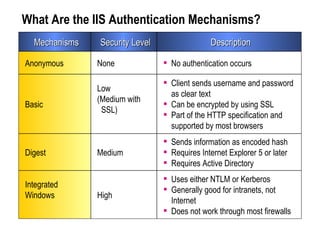
What Are the IIS Authentication Mechanisms? High Medium Low  (Medium with SSL) None Security Level Uses either NTLM or Kerberos Generally good for intranets, not Internet Does not work through most firewalls Integrated Windows Sends information as encoded hash Requires Internet Explorer 5 or later Requires Active Directory Digest Client sends username and password as clear text Can be encrypted by using SSL Part of the HTTP specification and supported by most browsers  Basic No authentication occurs Anonymous Description Mechanisms
Demonstration: Using IIS Authentication Mechanisms Right-click Mod16 and then click Properties Click Directory Security tab Click Edit Show the authentication methods
What Is Secure Sockets Layer? SSL is a protocol used for transmitting data securely across a network. SSL secures data through: Data encryption -Ensures that the data sent is read only by a secure target server Server authentication -Ensures that data is sent to the correct server -Uses the server and client certificates Data integrity -Protects the integrity of the data -Includes a message authentication code that detects whether a message is altered  Uses Hypertext Transfer Protocol Secure to retrieve an ASP.NET Web page
Lesson: Working with Windows-Based Authentication How to Enable Windows-Based Authentication Reading User Information Demonstration: Using Windows-Based Authentication
How to Enable Windows-Based Authentication Configure IIS to use one or more of the following authentication mechanisms: Basic Digest Integrated Windows security Set Windows-based authentication in Web.config 1 2 <system.web> <authentication mode=&quot;Windows&quot; /> </system.web>
How to Enable Windows-Based Authentication ( continued ) Set up authorization in Web.config When users access the  Web Form, IIS requests  logon information <location path=&quot;ShoppingCart.aspx&quot;> <system.web> <authorization>   <deny users=&quot;?&quot;/> </authorization> </system.web> </location> 4 3
Reading User Information After authentication, the Web server can read the user identity lblAuthUser.Text = User.Identity.Name lblAuthType.Text = User.Identity.AuthenticationType lblIsAuth.Text = User.Identity.IsAuthenticated lblAuthUser.Text = User.Identity.Name; lblAuthType.Text = User.Identity.AuthenticationType; lblIsAuth.Text = User.Identity.IsAuthenticated;
Demonstration: Using Windows-Based Authentication Open IIS and configure with Anonymous authentication only Create a new user on the local machine Open Web.config and configure it for authentication and authorization Run the secure ASP.NET Web application Students can access the secure ASP.NET Web application on the Instructor machine
Lesson: Working with Forms-Based Authentication Overview of Forms-Based Authentication Multimedia: Forms-Based Authentication How to Enable Forms-Based Authentication Creating a Logon Page Demonstration: Using Forms-Based Authentication
Overview of Forms-Based Authentication Client requests page Authorized ASP.NET Forms Authentication Not  Authenticated Authenticated Logon Page (Users enter  their credentials) Authenticated Authentication Cookie Authorized Not  Authenticated Access Denied Requested Secure Page IIS Username Password Someone *********** Submit 1 2 3 4 6 5 7  
Multimedia: Forms-Based Authentication
How to Enable Forms-Based Authentication Configure IIS to use Anonymous authentication Set Forms-based authentication in Web.config  Set up authorization Build a Logon Web Form 1 2 3 4 <authentication mode=&quot;Forms&quot; > < forms name=&quot;.namesuffix&quot;  loginUrl=&quot;login.aspx&quot; /> </authentication>
Reference System.Web.Security Logon page v erifies and checks the credentials of a user Reading user credentials from a cookie User.Identity.Name  returns the value saved by  FormsAuthentication.RedirectFromLoginPage Creating a Logon Page Sub cmdLogin_Click(s As Object, e As eventArgs) If (login(txtEmail.Text, txtPassword.Text)) FormsAuthentication.RedirectFromLoginPage(txtEmail.Text, False)  End If End Sub   private void cmdLogin_Click(object sender, EventArgs e) { if (login(txtEmail.Text, txtPassword.Text)) FormsAuthentication.RedirectFromLoginPage(txtEmail.Text, false); }
Demonstration: Using Forms-Based Authentication Open IIS and configure for Anonymous authentication Open Web.config and configure for  authentication and authorization Open logon page and show code Run the ASP.NET Web application Students can access the secure ASP.NET Web application on the Instructor machine
Lesson: Overview of Microsoft Passport Authentication How Microsoft Passport Works Other Microsoft Passport Resources
How Microsoft Passport Works Website.msft Client Passport.com The client requests a page from the host 1 2 3 4 5 The site redirects the client to Passport.com The client is redirected and logs on to Passport.com Passport returns a cookie with the ticket information 6 The client accesses the host, this time with ticket information The host returns a Web Form and possibly a new cookie that it can read and write
Other Microsoft Passport Resources Web sites http://www.passport.com http://msdn.microsoft.com
Review Web Application Security Overview Working with Windows-Based Authentication Working with Forms-Based Authentication Overview of Microsoft Passport Authentication
Lab 16: Securing a Microsoft ASP.NET Web Application  Medical Medical.aspx Benefits Home Page Default.aspx Life Insurance Life.aspx Retirement Retirement.aspx Dental Dental.aspx Dentists Doctors Doctors.aspx  Doctors Logon Page Login.aspx Registration Register.aspx Coho Winery Prospectus Prospectus.aspx XML Web  Service dentalService1.asmx  Page Header Header.ascx ASPState tempdb Lab Web Application User Control namedate.ascx Menu  Component Class1.vb or Class1.cs XML Files Web. config

2310 b 16

  • 1.
    Module 16: Securinga Microsoft ASP.NET Web Application
  • 2.
    Overview Web ApplicationSecurity Overview Working with Windows-Based Authentication Working with Forms-Based Authentication Overview of Microsoft Passport Authentication
  • 3.
    Lesson: Web ApplicationSecurity Overview Authentication vs. Authorization What Are ASP.NET Authentication Methods? Multimedia: ASP.NET Authentication Methods Comparing the ASP.NET Authentication Methods What Are the IIS Authentication Mechanisms? Demonstration: Using IIS Authentication Mechanisms What Is Secure Sockets Layer?
  • 4.
    Authentication vs. AuthorizationAuthentication Accepts credentials from a user Validates the credentials Authorization Given the authentication credentials supplied, determines the right to access a resource Can be assigned by user name or by role
  • 5.
    What Are ASP.NETAuthentication Methods? Windows-based authentication Relies on the Windows operating system and IIS User requests a secure Web page and the request goes through IIS After credentials are verified by IIS, the secure Web page is returned Forms-based authentication Unauthenticated requests are redirected to an HTML form User provides credentials and submits the HTML form After credentials are verified, an authentication cookie is issued Microsoft Passport authentication Centralized authentication service that offers a single logon option Microsoft Passport is an XML Web service
  • 6.
  • 7.
    Comparing the ASP.NETAuthentication Methods Single sign in for many Internet sites No need to maintain a database to store user information Allows developers to customize the appearance of the registration page Good for Internet applications Supports all client types Uses existing Windows infrastructure Controls access to sensitive information Advantages Based on cookies Fees involved Microsoft Passport Authentication Based on cookies Forms-based Authentication Not appropriate for most Internet applications Windows-based Authentication Disadvantages Method
  • 8.
    What Are theIIS Authentication Mechanisms? High Medium Low (Medium with SSL) None Security Level Uses either NTLM or Kerberos Generally good for intranets, not Internet Does not work through most firewalls Integrated Windows Sends information as encoded hash Requires Internet Explorer 5 or later Requires Active Directory Digest Client sends username and password as clear text Can be encrypted by using SSL Part of the HTTP specification and supported by most browsers Basic No authentication occurs Anonymous Description Mechanisms
  • 9.
    Demonstration: Using IISAuthentication Mechanisms Right-click Mod16 and then click Properties Click Directory Security tab Click Edit Show the authentication methods
  • 10.
    What Is SecureSockets Layer? SSL is a protocol used for transmitting data securely across a network. SSL secures data through: Data encryption -Ensures that the data sent is read only by a secure target server Server authentication -Ensures that data is sent to the correct server -Uses the server and client certificates Data integrity -Protects the integrity of the data -Includes a message authentication code that detects whether a message is altered Uses Hypertext Transfer Protocol Secure to retrieve an ASP.NET Web page
  • 11.
    Lesson: Working withWindows-Based Authentication How to Enable Windows-Based Authentication Reading User Information Demonstration: Using Windows-Based Authentication
  • 12.
    How to EnableWindows-Based Authentication Configure IIS to use one or more of the following authentication mechanisms: Basic Digest Integrated Windows security Set Windows-based authentication in Web.config 1 2 <system.web> <authentication mode=&quot;Windows&quot; /> </system.web>
  • 13.
    How to EnableWindows-Based Authentication ( continued ) Set up authorization in Web.config When users access the Web Form, IIS requests logon information <location path=&quot;ShoppingCart.aspx&quot;> <system.web> <authorization> <deny users=&quot;?&quot;/> </authorization> </system.web> </location> 4 3
  • 14.
    Reading User InformationAfter authentication, the Web server can read the user identity lblAuthUser.Text = User.Identity.Name lblAuthType.Text = User.Identity.AuthenticationType lblIsAuth.Text = User.Identity.IsAuthenticated lblAuthUser.Text = User.Identity.Name; lblAuthType.Text = User.Identity.AuthenticationType; lblIsAuth.Text = User.Identity.IsAuthenticated;
  • 15.
    Demonstration: Using Windows-BasedAuthentication Open IIS and configure with Anonymous authentication only Create a new user on the local machine Open Web.config and configure it for authentication and authorization Run the secure ASP.NET Web application Students can access the secure ASP.NET Web application on the Instructor machine
  • 16.
    Lesson: Working withForms-Based Authentication Overview of Forms-Based Authentication Multimedia: Forms-Based Authentication How to Enable Forms-Based Authentication Creating a Logon Page Demonstration: Using Forms-Based Authentication
  • 17.
    Overview of Forms-BasedAuthentication Client requests page Authorized ASP.NET Forms Authentication Not Authenticated Authenticated Logon Page (Users enter their credentials) Authenticated Authentication Cookie Authorized Not Authenticated Access Denied Requested Secure Page IIS Username Password Someone *********** Submit 1 2 3 4 6 5 7  
  • 18.
  • 19.
    How to EnableForms-Based Authentication Configure IIS to use Anonymous authentication Set Forms-based authentication in Web.config Set up authorization Build a Logon Web Form 1 2 3 4 <authentication mode=&quot;Forms&quot; > < forms name=&quot;.namesuffix&quot; loginUrl=&quot;login.aspx&quot; /> </authentication>
  • 20.
    Reference System.Web.Security Logonpage v erifies and checks the credentials of a user Reading user credentials from a cookie User.Identity.Name returns the value saved by FormsAuthentication.RedirectFromLoginPage Creating a Logon Page Sub cmdLogin_Click(s As Object, e As eventArgs) If (login(txtEmail.Text, txtPassword.Text)) FormsAuthentication.RedirectFromLoginPage(txtEmail.Text, False) End If End Sub private void cmdLogin_Click(object sender, EventArgs e) { if (login(txtEmail.Text, txtPassword.Text)) FormsAuthentication.RedirectFromLoginPage(txtEmail.Text, false); }
  • 21.
    Demonstration: Using Forms-BasedAuthentication Open IIS and configure for Anonymous authentication Open Web.config and configure for authentication and authorization Open logon page and show code Run the ASP.NET Web application Students can access the secure ASP.NET Web application on the Instructor machine
  • 22.
    Lesson: Overview ofMicrosoft Passport Authentication How Microsoft Passport Works Other Microsoft Passport Resources
  • 23.
    How Microsoft PassportWorks Website.msft Client Passport.com The client requests a page from the host 1 2 3 4 5 The site redirects the client to Passport.com The client is redirected and logs on to Passport.com Passport returns a cookie with the ticket information 6 The client accesses the host, this time with ticket information The host returns a Web Form and possibly a new cookie that it can read and write
  • 24.
    Other Microsoft PassportResources Web sites http://www.passport.com http://msdn.microsoft.com
  • 25.
    Review Web ApplicationSecurity Overview Working with Windows-Based Authentication Working with Forms-Based Authentication Overview of Microsoft Passport Authentication
  • 26.
    Lab 16: Securinga Microsoft ASP.NET Web Application Medical Medical.aspx Benefits Home Page Default.aspx Life Insurance Life.aspx Retirement Retirement.aspx Dental Dental.aspx Dentists Doctors Doctors.aspx Doctors Logon Page Login.aspx Registration Register.aspx Coho Winery Prospectus Prospectus.aspx XML Web Service dentalService1.asmx Page Header Header.ascx ASPState tempdb Lab Web Application User Control namedate.ascx Menu Component Class1.vb or Class1.cs XML Files Web. config