Module 13: Consuming and Creating  XML Web Services
Overview Overview of Using XML Web Services Calling an XML Web Service Using HTTP Using a Proxy to Call an XML Web Service Creating an XML Web Service
Lesson: Overview of Using XML Web Services What is an XML Web Service? Why use XML Web Services? Finding an XML Web Service  Multimedia: XML Web Service Execution Model
What is an XML Web Service? Programmable logic accessible by standard Web protocols Allows applications to send and receive information across the Internet Language, protocol, and platform independent Stateless architecture Can be asynchronous Based on an evolving W3C standard
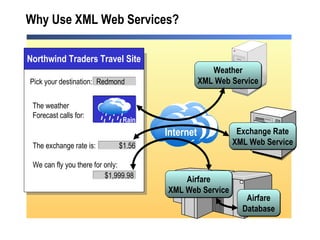
Why Use XML Web Services? Internet Weather XML Web Service Exchange Rate XML Web Service Pick your destination: The weather Forecast calls for: The exchange rate is: We can fly you there for only: Rain Redmond $1.56 $1,999.98 Airfare Database Airfare XML Web Service Northwind Traders Travel Site
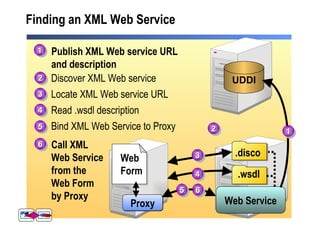
Finding an XML Web Service Publish XML Web service URL  and description .disco .wsdl Web Service Proxy Web Form UDDI 1 2 3 4 5 6 1 2 3 4 5 Discover XML Web service Locate XML Web service URL Read .wsdl description Bind XML Web Service to Proxy Call XML  Web Service  from the  Web Form by Proxy 6
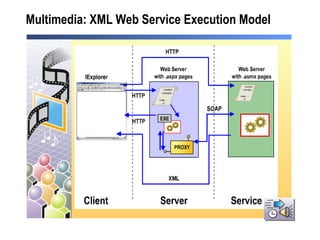
Multimedia:  XML Web Service Execution Model
Lesson: Calling an XML Web Service Using HTTP How to Call an XML Web Service Using HTTP Practice: Calling an XML Web Service Using HTTP
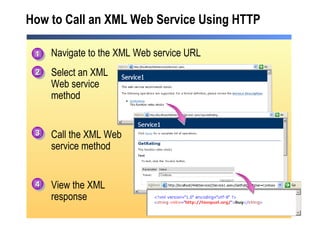
How to Call an XML Web Service Using HTTP Navigate to the XML Web service URL Select an XML Web service method Call the XML Web  service method View the XML response 1 2 3 4
Practice: Calling an XML Web Service Using HTTP The Student will: Enter an XML Web Service URL on the instructor machine Select the XML Web service method to call Enter values for parameters View the returned XML Time: 5 Minutes
Lesson: Using a Proxy to Call an XML Web Service Using Proxies to Call XML Web Services  How to Use a Proxy to Call an XML Web Service Instructor-Led Practice: Using a Proxy to Call an XML Web Service XML Web Service Error Handling Demonstration: Testing the Availability of an XML Web Service
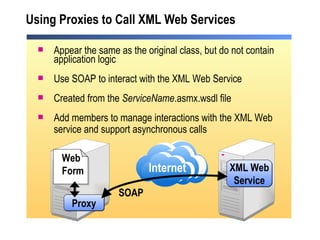
Using Proxies to Call XML Web Services  Appear the same as the original class, but do not contain application logic Use SOAP to interact with the XML Web Service Created from the  ServiceName .asmx.wsdl file Add members to manage interactions with the XML Web service and support asynchronous calls Internet XML Web Service Proxy Web Form SOAP
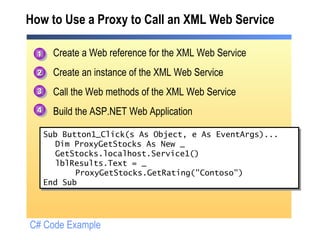
How to Use a Proxy to Call an XML Web Service Create a Web reference for the XML Web Service Create an instance of the XML Web Service Call the Web methods of the XML Web Service Build the ASP.NET Web Application Sub Button1_Click(s As Object, e As EventArgs)... Dim ProxyGetStocks As New _  GetStocks.localhost.Service1() lblResults.Text = _ ProxyGetStocks.GetRating("Contoso") End Sub 1 2 3 4 C# Code Example
Instructor-Led Practice: Using a Proxy to Call an XML Web Service Create a new ASP.NET Web Application project Create a proxy for an XML Web service Test with a browser  View the reference.vb or reference.cs file
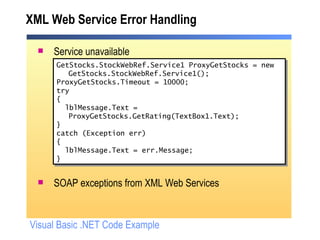
XML Web Service Error Handling Service unavailable SOAP exceptions from XML Web Services GetStocks.StockWebRef.Service1 ProxyGetStocks = new GetStocks.StockWebRef.Service1(); ProxyGetStocks.Timeout = 10000; try { lblMessage.Text = ProxyGetStocks.GetRating(TextBox1.Text); } catch (Exception err) { lblMessage.Text = err.Message; }  Visual Basic .NET Code Example
Demonstration: Testing the Availability of a XML Web Service Set a timeout error handling Try…Catch statement  Slow the Web service Test the exception
Lesson: Creating an XML Web Service How to Create an XML Web Service  XML Web Service Code Instructor-Led Practice: Creating an XML Web Service
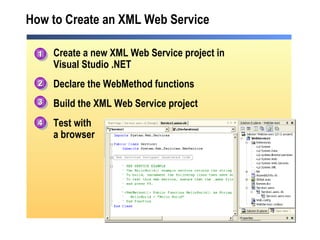
How to Create an XML Web Service Create a new XML Web Service project in Visual Studio .NET Declare the WebMethod functions Build the XML Web Service project Test with a browser 1 2 3 4
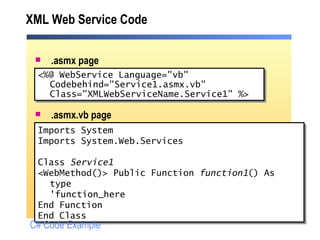
XML Web Service Code .asmx page .asmx.vb page <%@ WebService Language=&quot;vb&quot;  Codebehind=&quot;Service1.asmx.vb&quot; Class=&quot;XMLWebServiceName.Service1&quot; %> Imports System Imports System.Web.Services  Class  Service1 <WebMethod()> Public Function  function1 () As type 'function_here End Function End Class C# Code Example
Instructor-Led Practice: Creating an XML Web Service Create an XML Web Service  Test the XML Web Service  Change the Namespace
Review Overview of Using XML Web Services Calling an XML Web Service Using HTTP Using a Proxy to Call an XML Web Service Creating an XML Web Service
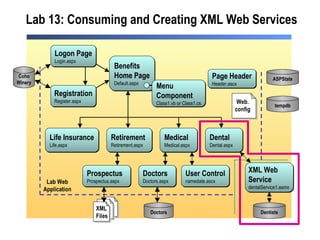
Lab 13: Consuming and Creating XML Web Services Medical Medical.aspx Benefits Home Page Default.aspx Life Insurance Life.aspx Retirement Retirement.aspx Dental Dental.aspx Dentists Doctors Doctors.aspx  Doctors Logon Page Login.aspx Registration Register.aspx Coho Winery Prospectus Prospectus.aspx XML Web  Service dentalService1.asmx  Page Header Header.ascx ASPState tempdb Lab Web Application User Control namedate.ascx Menu  Component Class1.vb or Class1.cs XML Files Web. config

2310 b 13

  • 1.
    Module 13: Consumingand Creating XML Web Services
  • 2.
    Overview Overview ofUsing XML Web Services Calling an XML Web Service Using HTTP Using a Proxy to Call an XML Web Service Creating an XML Web Service
  • 3.
    Lesson: Overview ofUsing XML Web Services What is an XML Web Service? Why use XML Web Services? Finding an XML Web Service Multimedia: XML Web Service Execution Model
  • 4.
    What is anXML Web Service? Programmable logic accessible by standard Web protocols Allows applications to send and receive information across the Internet Language, protocol, and platform independent Stateless architecture Can be asynchronous Based on an evolving W3C standard
  • 5.
    Why Use XMLWeb Services? Internet Weather XML Web Service Exchange Rate XML Web Service Pick your destination: The weather Forecast calls for: The exchange rate is: We can fly you there for only: Rain Redmond $1.56 $1,999.98 Airfare Database Airfare XML Web Service Northwind Traders Travel Site
  • 6.
    Finding an XMLWeb Service Publish XML Web service URL and description .disco .wsdl Web Service Proxy Web Form UDDI 1 2 3 4 5 6 1 2 3 4 5 Discover XML Web service Locate XML Web service URL Read .wsdl description Bind XML Web Service to Proxy Call XML Web Service from the Web Form by Proxy 6
  • 7.
    Multimedia: XMLWeb Service Execution Model
  • 8.
    Lesson: Calling anXML Web Service Using HTTP How to Call an XML Web Service Using HTTP Practice: Calling an XML Web Service Using HTTP
  • 9.
    How to Callan XML Web Service Using HTTP Navigate to the XML Web service URL Select an XML Web service method Call the XML Web service method View the XML response 1 2 3 4
  • 10.
    Practice: Calling anXML Web Service Using HTTP The Student will: Enter an XML Web Service URL on the instructor machine Select the XML Web service method to call Enter values for parameters View the returned XML Time: 5 Minutes
  • 11.
    Lesson: Using aProxy to Call an XML Web Service Using Proxies to Call XML Web Services How to Use a Proxy to Call an XML Web Service Instructor-Led Practice: Using a Proxy to Call an XML Web Service XML Web Service Error Handling Demonstration: Testing the Availability of an XML Web Service
  • 12.
    Using Proxies toCall XML Web Services Appear the same as the original class, but do not contain application logic Use SOAP to interact with the XML Web Service Created from the ServiceName .asmx.wsdl file Add members to manage interactions with the XML Web service and support asynchronous calls Internet XML Web Service Proxy Web Form SOAP
  • 13.
    How to Usea Proxy to Call an XML Web Service Create a Web reference for the XML Web Service Create an instance of the XML Web Service Call the Web methods of the XML Web Service Build the ASP.NET Web Application Sub Button1_Click(s As Object, e As EventArgs)... Dim ProxyGetStocks As New _ GetStocks.localhost.Service1() lblResults.Text = _ ProxyGetStocks.GetRating(&quot;Contoso&quot;) End Sub 1 2 3 4 C# Code Example
  • 14.
    Instructor-Led Practice: Usinga Proxy to Call an XML Web Service Create a new ASP.NET Web Application project Create a proxy for an XML Web service Test with a browser View the reference.vb or reference.cs file
  • 15.
    XML Web ServiceError Handling Service unavailable SOAP exceptions from XML Web Services GetStocks.StockWebRef.Service1 ProxyGetStocks = new GetStocks.StockWebRef.Service1(); ProxyGetStocks.Timeout = 10000; try { lblMessage.Text = ProxyGetStocks.GetRating(TextBox1.Text); } catch (Exception err) { lblMessage.Text = err.Message; } Visual Basic .NET Code Example
  • 16.
    Demonstration: Testing theAvailability of a XML Web Service Set a timeout error handling Try…Catch statement Slow the Web service Test the exception
  • 17.
    Lesson: Creating anXML Web Service How to Create an XML Web Service XML Web Service Code Instructor-Led Practice: Creating an XML Web Service
  • 18.
    How to Createan XML Web Service Create a new XML Web Service project in Visual Studio .NET Declare the WebMethod functions Build the XML Web Service project Test with a browser 1 2 3 4
  • 19.
    XML Web ServiceCode .asmx page .asmx.vb page <%@ WebService Language=&quot;vb&quot; Codebehind=&quot;Service1.asmx.vb&quot; Class=&quot;XMLWebServiceName.Service1&quot; %> Imports System Imports System.Web.Services Class Service1 <WebMethod()> Public Function function1 () As type 'function_here End Function End Class C# Code Example
  • 20.
    Instructor-Led Practice: Creatingan XML Web Service Create an XML Web Service Test the XML Web Service Change the Namespace
  • 21.
    Review Overview ofUsing XML Web Services Calling an XML Web Service Using HTTP Using a Proxy to Call an XML Web Service Creating an XML Web Service
  • 22.
    Lab 13: Consumingand Creating XML Web Services Medical Medical.aspx Benefits Home Page Default.aspx Life Insurance Life.aspx Retirement Retirement.aspx Dental Dental.aspx Dentists Doctors Doctors.aspx Doctors Logon Page Login.aspx Registration Register.aspx Coho Winery Prospectus Prospectus.aspx XML Web Service dentalService1.asmx Page Header Header.ascx ASPState tempdb Lab Web Application User Control namedate.ascx Menu Component Class1.vb or Class1.cs XML Files Web. config