Module 2:Using  Microsoft  Visual Studio .NET
Overview Overview of Visual Studio .NET Creating an ASP.NET Web Application Project
Lesson: Overview of Visual Studio .NET  Why Visual Studio .NET? Start Page Available Project Templates Practice: Select the Project Template Integrated Development Environment (IDE) Demonstration: Using the Visual Studio .NET IDE Practice: Using the Visual Studio .NET IDE
Why Visual Studio .NET? One IDE for multiple languages and multiple project types Multiple languages within a project Multiple project types within a solution Integrated browser Debugging support Customizable interface
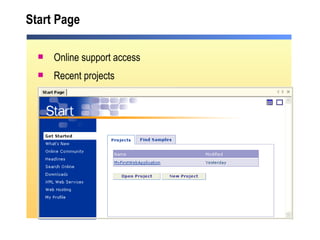
Start Page Online support access Recent projects
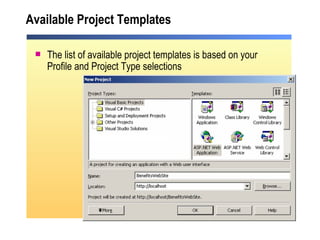
Available Project Templates The list of available project templates is based on your Profile and Project Type selections
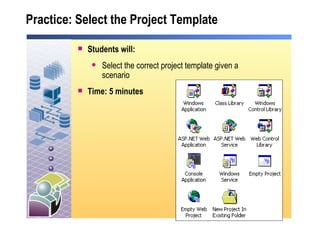
Practice: Select the Project Template  Students will: Select the correct project template given a scenario Time: 5 minutes
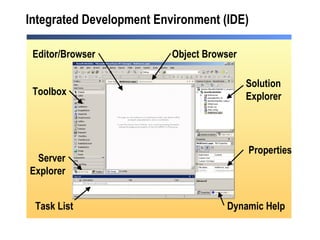
Integrated Development Environment (IDE) Toolbox Task List Solution Explorer Dynamic Help Editor/Browser Properties Server Explorer Object Browser
Demonstration: Using the Visual Studio .NET IDE  Open Visual Studio .NET  Create a new ASP.NET Web Application Rename the Web Application Add tasks to the Task List Use Dynamic Help
Practice: Using the Visual Studio .NET IDE  Students will: Perform tasks with the Visual Studio .NET IDE Timing 5 minutes
Lesson: Creating an ASP.NET Web Application Project  The Development Process Web Application Files Web Application File Structure Demonstration: Creating a Web Application Project
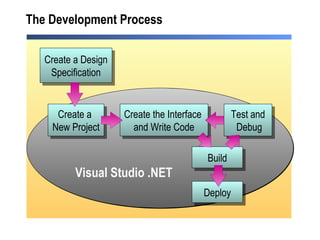
The Development Process Create a Design Specification Build Test and  Debug Create the Interface  and Write Code Create a  New Project Visual Studio .NET Deploy
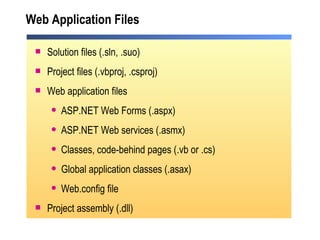
Web Application Files Solution files (.sln, .suo) Project files (.vbproj, .csproj) Web application files ASP.NET Web Forms (.aspx) ASP.NET Web services (.asmx) Classes, code-behind pages (.vb or .cs) Global application classes (.asax) Web.config file Project assembly (.dll)
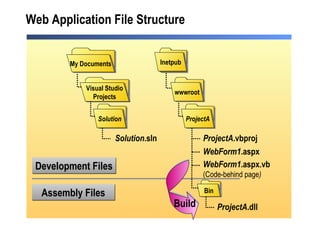
Web Application File Structure wwwroot Bin Inetpub ProjectA My Documents Development Files Assembly Files WebForm1 .aspx WebForm1 .aspx.vb (Code-behind page ) Visual Studio Projects Solution Solution .sln ProjectA .vbproj ProjectA .dll Build
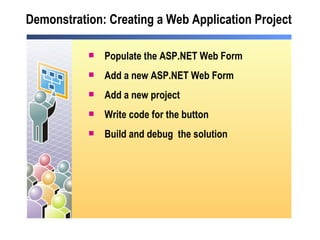
Demonstration: Creating a Web Application Project  Populate the ASP.NET Web Form  Add a new ASP.NET Web Form Add a new project Write code for the button Build and debug  the solution
Review Overview of Visual Studio .NET Creating an ASP.NET Web Application Project
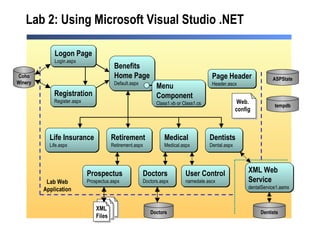
Lab 2: Using Microsoft Visual Studio .NET Medical Medical.aspx Benefits Home Page Default.aspx Life Insurance Life.aspx Retirement Retirement.aspx Dentists Dental.aspx Dentists Doctors Doctors.aspx  Doctors Logon Page Login.aspx Registration Register.aspx Coho Winery Prospectus Prospectus.aspx XML Web  Service dentalService1.asmx  Page Header Header.ascx ASPState tempdb Lab Web Application User Control namedate.ascx Menu  Component Class1.vb or Class1.cs XML Files Web. config

2310 b 02

  • 1.
    Module 2:Using Microsoft Visual Studio .NET
  • 2.
    Overview Overview ofVisual Studio .NET Creating an ASP.NET Web Application Project
  • 3.
    Lesson: Overview ofVisual Studio .NET Why Visual Studio .NET? Start Page Available Project Templates Practice: Select the Project Template Integrated Development Environment (IDE) Demonstration: Using the Visual Studio .NET IDE Practice: Using the Visual Studio .NET IDE
  • 4.
    Why Visual Studio.NET? One IDE for multiple languages and multiple project types Multiple languages within a project Multiple project types within a solution Integrated browser Debugging support Customizable interface
  • 5.
    Start Page Onlinesupport access Recent projects
  • 6.
    Available Project TemplatesThe list of available project templates is based on your Profile and Project Type selections
  • 7.
    Practice: Select theProject Template Students will: Select the correct project template given a scenario Time: 5 minutes
  • 8.
    Integrated Development Environment(IDE) Toolbox Task List Solution Explorer Dynamic Help Editor/Browser Properties Server Explorer Object Browser
  • 9.
    Demonstration: Using theVisual Studio .NET IDE Open Visual Studio .NET Create a new ASP.NET Web Application Rename the Web Application Add tasks to the Task List Use Dynamic Help
  • 10.
    Practice: Using theVisual Studio .NET IDE Students will: Perform tasks with the Visual Studio .NET IDE Timing 5 minutes
  • 11.
    Lesson: Creating anASP.NET Web Application Project The Development Process Web Application Files Web Application File Structure Demonstration: Creating a Web Application Project
  • 12.
    The Development ProcessCreate a Design Specification Build Test and Debug Create the Interface and Write Code Create a New Project Visual Studio .NET Deploy
  • 13.
    Web Application FilesSolution files (.sln, .suo) Project files (.vbproj, .csproj) Web application files ASP.NET Web Forms (.aspx) ASP.NET Web services (.asmx) Classes, code-behind pages (.vb or .cs) Global application classes (.asax) Web.config file Project assembly (.dll)
  • 14.
    Web Application FileStructure wwwroot Bin Inetpub ProjectA My Documents Development Files Assembly Files WebForm1 .aspx WebForm1 .aspx.vb (Code-behind page ) Visual Studio Projects Solution Solution .sln ProjectA .vbproj ProjectA .dll Build
  • 15.
    Demonstration: Creating aWeb Application Project Populate the ASP.NET Web Form Add a new ASP.NET Web Form Add a new project Write code for the button Build and debug the solution
  • 16.
    Review Overview ofVisual Studio .NET Creating an ASP.NET Web Application Project
  • 17.
    Lab 2: UsingMicrosoft Visual Studio .NET Medical Medical.aspx Benefits Home Page Default.aspx Life Insurance Life.aspx Retirement Retirement.aspx Dentists Dental.aspx Dentists Doctors Doctors.aspx Doctors Logon Page Login.aspx Registration Register.aspx Coho Winery Prospectus Prospectus.aspx XML Web Service dentalService1.asmx Page Header Header.ascx ASPState tempdb Lab Web Application User Control namedate.ascx Menu Component Class1.vb or Class1.cs XML Files Web. config