Mo dule 8: Creating User Controls
Overview Adding User Controls to an ASP.NET Web Form Creating User Controls
Lesson: Adding User Controls to an ASP.NET Web Form What is a User Control? Why Use User Controls? Practice: Listing User Controls Adding a User Control Demonstration: Creating a User Control
What is a User Control? User controls simplify the reuse of code and UI components within a Web application  A user control is a user-defined Web server control with an .ascx extension Contains HTML, but not the <HTML>, <BODY>, or <FORM> tags or Contains code to handle its own events <%@ Control Language=&quot;vb&quot; %> <%@ Control Language=&quot;c#&quot; %>
Why Use User Controls? Reuse user interface and code Page3.aspx Application A Application B Page2.aspx Control1.ascx Page1.aspx
Practice: Listing User Controls Students will: List examples of when it is appropriate to use user controls Time: 5 minutes
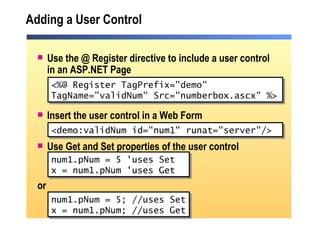
Adding a User Control Use the @ Register directive to include a user control in an ASP.NET Page Insert the user control in a Web Form Use Get and Set properties of the user control or <%@ Register TagPrefix=&quot;demo&quot;  TagName=&quot;validNum&quot; Src=&quot;numberbox.ascx&quot; %> <demo:validNum id=&quot;num1&quot; runat=&quot;server&quot;/>  num1.pNum = 5 'uses Set x = num1.pNum 'uses Get num1.pNum = 5; //uses Set x = num1.pNum; //uses Get
Demonstration: Creating a User Control Create a new user control Create a property
Lesson: Creating User Controls Creating a User Control Demonstration: Using a User Control
Creating a User Control Two methods for user control creation: Create a new user control using Visual Studio .NET Convert an existing ASP.NET page to a user control Host page interacts with the control using properties Host page should use flow layout  Public Property pNum() As Integer Get   Return Convert.ToInt32(txtNum.Text) End Get Set (ByVal value As Integer) txtNum.Text = CStr(value) End Set End Property public int pNum { get { return  Convert.ToInt32(txtNum.Text); } set { txtNum.Text = Convert.ToString(value); } }
Demonstration: Using a User Control Insert a user control on a page Use the user controls in the code-behind page
Review Adding User Controls to an ASP.NET Web Form Creating User Controls
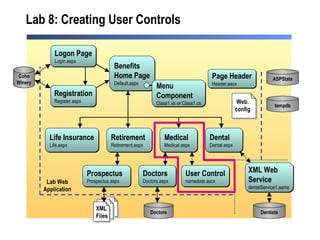
Lab  8:  Creating User Controls Medical Medical.aspx Benefits Home Page Default.aspx Life Insurance Life.aspx Retirement Retirement.aspx Dental Dental.aspx Dentists Doctors Doctors.aspx  Doctors Logon Page Login.aspx Registration Register.aspx Coho Winery Prospectus Prospectus.aspx XML Web  Service dentalService1.asmx  Page Header Header.ascx ASPState tempdb Lab Web Application User Control namedate.ascx Menu  Component Class1.vb or Class1.cs XML Files Web. config

2310 b 08

  • 1.
    Mo dule 8:Creating User Controls
  • 2.
    Overview Adding UserControls to an ASP.NET Web Form Creating User Controls
  • 3.
    Lesson: Adding UserControls to an ASP.NET Web Form What is a User Control? Why Use User Controls? Practice: Listing User Controls Adding a User Control Demonstration: Creating a User Control
  • 4.
    What is aUser Control? User controls simplify the reuse of code and UI components within a Web application A user control is a user-defined Web server control with an .ascx extension Contains HTML, but not the <HTML>, <BODY>, or <FORM> tags or Contains code to handle its own events <%@ Control Language=&quot;vb&quot; %> <%@ Control Language=&quot;c#&quot; %>
  • 5.
    Why Use UserControls? Reuse user interface and code Page3.aspx Application A Application B Page2.aspx Control1.ascx Page1.aspx
  • 6.
    Practice: Listing UserControls Students will: List examples of when it is appropriate to use user controls Time: 5 minutes
  • 7.
    Adding a UserControl Use the @ Register directive to include a user control in an ASP.NET Page Insert the user control in a Web Form Use Get and Set properties of the user control or <%@ Register TagPrefix=&quot;demo&quot; TagName=&quot;validNum&quot; Src=&quot;numberbox.ascx&quot; %> <demo:validNum id=&quot;num1&quot; runat=&quot;server&quot;/> num1.pNum = 5 'uses Set x = num1.pNum 'uses Get num1.pNum = 5; //uses Set x = num1.pNum; //uses Get
  • 8.
    Demonstration: Creating aUser Control Create a new user control Create a property
  • 9.
    Lesson: Creating UserControls Creating a User Control Demonstration: Using a User Control
  • 10.
    Creating a UserControl Two methods for user control creation: Create a new user control using Visual Studio .NET Convert an existing ASP.NET page to a user control Host page interacts with the control using properties Host page should use flow layout Public Property pNum() As Integer Get Return Convert.ToInt32(txtNum.Text) End Get Set (ByVal value As Integer) txtNum.Text = CStr(value) End Set End Property public int pNum { get { return Convert.ToInt32(txtNum.Text); } set { txtNum.Text = Convert.ToString(value); } }
  • 11.
    Demonstration: Using aUser Control Insert a user control on a page Use the user controls in the code-behind page
  • 12.
    Review Adding UserControls to an ASP.NET Web Form Creating User Controls
  • 13.
    Lab 8: Creating User Controls Medical Medical.aspx Benefits Home Page Default.aspx Life Insurance Life.aspx Retirement Retirement.aspx Dental Dental.aspx Dentists Doctors Doctors.aspx Doctors Logon Page Login.aspx Registration Register.aspx Coho Winery Prospectus Prospectus.aspx XML Web Service dentalService1.asmx Page Header Header.ascx ASPState tempdb Lab Web Application User Control namedate.ascx Menu Component Class1.vb or Class1.cs XML Files Web. config