Module 7: Validating User Input
Overview Overview of User Input Validation Using Validation Controls Page Validation
Lesson:  Overview of User Input Validation What Is Input Validation? Client-Side and Server-Side Validation ASP.NET Validation Controls
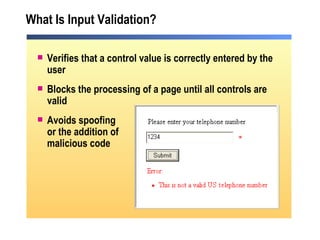
What Is Input Validation? Verifies that a control value is correctly entered by the user Blocks the processing of a page until all controls are valid  Avoids spoofing or the addition of malicious code
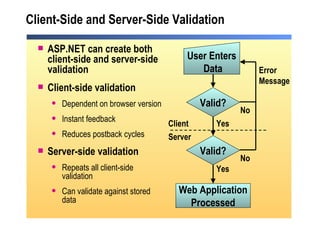
Client-Side and Server-Side Validation ASP.NET can create both client-side and server-side validation Client-side validation  Dependent on browser version Instant feedback Reduces postback cycles Server-side validation Repeats all client-side validation Can validate against stored data Valid? Valid? User Enters  Data No No Yes Yes Error  Message Client Server Web Application Processed
ASP.NET Validation Controls ASP.NET provides validation controls to: Compare values Compare to a custom formula Compare to a range Compare to a regular expression pattern Require user input Summarize the validation controls on a page
Lesson:  Using Validation Controls Adding Validation Controls to a Web Form Positioning Validation Controls on a Web Form Combining Validation Controls Input Validation Controls Using the RegularExpressionValidator Control Demonstration: Using Validation Controls Using the CustomValidator Control Demonstration: Using the CustomValidator Control
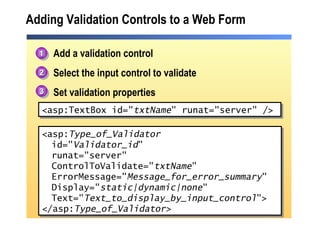
Adding Validation Controls to a Web Form Add a validation control Select the input control to validate Set validation properties <asp: Type_of_Validator   id=&quot; Validator_id &quot; runat=&quot;server&quot; ControlToValidate=&quot; txtName &quot; ErrorMessage=&quot; Message_for_error_summary &quot; Display=&quot; static|dynamic|none &quot; Text=&quot; Text_to_display_by_input_control &quot;> </asp: Type_of_Validator> <asp:TextBox id=&quot; txtName &quot; runat=&quot;server&quot; /> 1 2 3
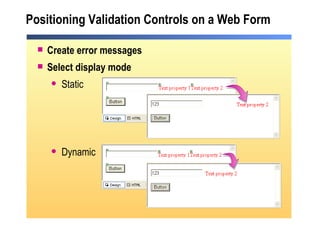
Positioning Validation Controls on a Web Form Create error messages Select display mode Static Dynamic
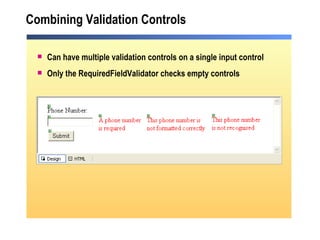
Combining Validation Controls Can have multiple validation controls on a single input control Only the RequiredFieldValidator checks empty controls
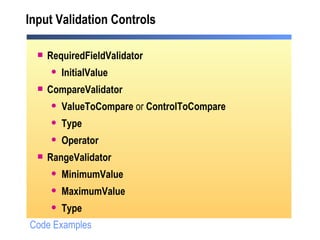
Input Validation Controls RequiredFieldValidator InitialValue   CompareValidator ValueToCompare  or  ControlToCompare Type Operator   RangeValidator MinimumValue MaximumValue Type   Code Examples
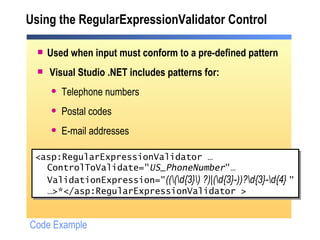
Using the RegularExpressionValidator Control Used when input must conform to a pre-defined pattern Visual Studio .NET includes patterns for: Telephone numbers Postal codes E-mail addresses <asp:RegularExpressionValidator … ControlToValidate=&quot; US_PhoneNumber &quot;… ValidationExpression=&quot; ((\(\d{3}\) ?)|(\d{3}-))?\d{3}-\d{4}  &quot; … >*</asp:RegularExpressionValidator > Code Example
Demonstration: Using Validation Controls Create an ASP.NET Web Form with TextBox and Button controls Add a RequiredFieldValidator control Add a RangeValidator control Add a RegularExpressionValidator control
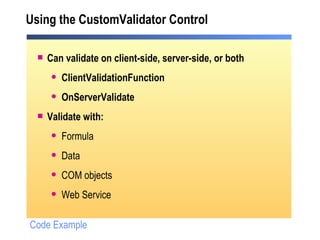
Using the CustomValidator Control Can validate on client-side, server-side, or both ClientValidationFunction OnServerValidate Validate with:  Formula Data COM objects Web Service Code Example
Demonstration: Using the CustomValidator Control Add a CustomValidator control Write the server-side code Write the client-side script Test the result
Lesson: Page  Validation  Using the Page.IsValid Property Using the ValidationSummary Control Demonstration: Using the Page.IsValid Property and the ValidationSummary Control
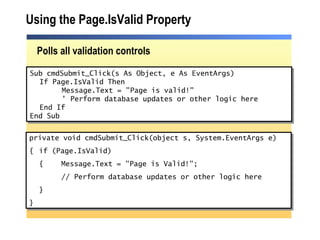
Using the Page.IsValid Property Polls all validation controls Sub cmdSubmit_Click(s As Object, e As EventArgs) If Page.IsValid Then Message.Text = &quot;Page is valid!&quot; ' Perform database updates or other logic here  End If End Sub private void cmdSubmit_Click(object s, System.EventArgs e) { if (Page.IsValid) { Message.Text = &quot;Page is Valid!&quot;; // Perform database updates or other logic here } }
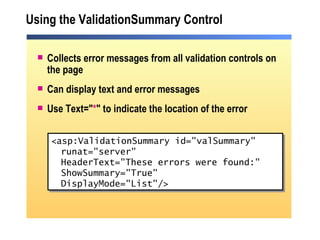
Using the ValidationSummary Control Collects error messages from all validation controls on the page Can display text and error messages  Use Text=&quot; * &quot; to indicate the location of the error <asp:ValidationSummary id=&quot;valSummary&quot; runat=&quot;server&quot; HeaderText=&quot;These errors were found:&quot; ShowSummary=&quot;True&quot;  DisplayMode=&quot;List&quot;/>
Demonstration: Using the Page.IsValid Property and the ValidationSummary Control Open an ASP.NET page with multiple TextBox and validation controls Add a ValidationSummary control Add a script that uses the Page.IsValid property
Review Overview of User Input Validation Using Validation Controls Page Validation
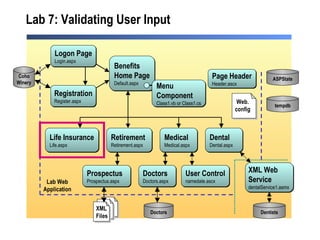
Lab 7: Validating User Input Medical Medical.aspx Benefits Home Page Default.aspx Life Insurance Life.aspx Retirement Retirement.aspx Dental Dental.aspx Dentists Doctors Doctors.aspx  Doctors Logon Page Login.aspx Registration Register.aspx Coho Winery Prospectus Prospectus.aspx XML Web  Service dentalService1.asmx  Page Header Header.ascx ASPState tempdb Lab Web Application User Control namedate.ascx Menu  Component Class1.vb or Class1.cs XML Files Web. config

2310 b 07

  • 1.
  • 2.
    Overview Overview ofUser Input Validation Using Validation Controls Page Validation
  • 3.
    Lesson: Overviewof User Input Validation What Is Input Validation? Client-Side and Server-Side Validation ASP.NET Validation Controls
  • 4.
    What Is InputValidation? Verifies that a control value is correctly entered by the user Blocks the processing of a page until all controls are valid Avoids spoofing or the addition of malicious code
  • 5.
    Client-Side and Server-SideValidation ASP.NET can create both client-side and server-side validation Client-side validation Dependent on browser version Instant feedback Reduces postback cycles Server-side validation Repeats all client-side validation Can validate against stored data Valid? Valid? User Enters Data No No Yes Yes Error Message Client Server Web Application Processed
  • 6.
    ASP.NET Validation ControlsASP.NET provides validation controls to: Compare values Compare to a custom formula Compare to a range Compare to a regular expression pattern Require user input Summarize the validation controls on a page
  • 7.
    Lesson: UsingValidation Controls Adding Validation Controls to a Web Form Positioning Validation Controls on a Web Form Combining Validation Controls Input Validation Controls Using the RegularExpressionValidator Control Demonstration: Using Validation Controls Using the CustomValidator Control Demonstration: Using the CustomValidator Control
  • 8.
    Adding Validation Controlsto a Web Form Add a validation control Select the input control to validate Set validation properties <asp: Type_of_Validator id=&quot; Validator_id &quot; runat=&quot;server&quot; ControlToValidate=&quot; txtName &quot; ErrorMessage=&quot; Message_for_error_summary &quot; Display=&quot; static|dynamic|none &quot; Text=&quot; Text_to_display_by_input_control &quot;> </asp: Type_of_Validator> <asp:TextBox id=&quot; txtName &quot; runat=&quot;server&quot; /> 1 2 3
  • 9.
    Positioning Validation Controlson a Web Form Create error messages Select display mode Static Dynamic
  • 10.
    Combining Validation ControlsCan have multiple validation controls on a single input control Only the RequiredFieldValidator checks empty controls
  • 11.
    Input Validation ControlsRequiredFieldValidator InitialValue CompareValidator ValueToCompare or ControlToCompare Type Operator RangeValidator MinimumValue MaximumValue Type Code Examples
  • 12.
    Using the RegularExpressionValidatorControl Used when input must conform to a pre-defined pattern Visual Studio .NET includes patterns for: Telephone numbers Postal codes E-mail addresses <asp:RegularExpressionValidator … ControlToValidate=&quot; US_PhoneNumber &quot;… ValidationExpression=&quot; ((\(\d{3}\) ?)|(\d{3}-))?\d{3}-\d{4} &quot; … >*</asp:RegularExpressionValidator > Code Example
  • 13.
    Demonstration: Using ValidationControls Create an ASP.NET Web Form with TextBox and Button controls Add a RequiredFieldValidator control Add a RangeValidator control Add a RegularExpressionValidator control
  • 14.
    Using the CustomValidatorControl Can validate on client-side, server-side, or both ClientValidationFunction OnServerValidate Validate with: Formula Data COM objects Web Service Code Example
  • 15.
    Demonstration: Using theCustomValidator Control Add a CustomValidator control Write the server-side code Write the client-side script Test the result
  • 16.
    Lesson: Page Validation Using the Page.IsValid Property Using the ValidationSummary Control Demonstration: Using the Page.IsValid Property and the ValidationSummary Control
  • 17.
    Using the Page.IsValidProperty Polls all validation controls Sub cmdSubmit_Click(s As Object, e As EventArgs) If Page.IsValid Then Message.Text = &quot;Page is valid!&quot; ' Perform database updates or other logic here End If End Sub private void cmdSubmit_Click(object s, System.EventArgs e) { if (Page.IsValid) { Message.Text = &quot;Page is Valid!&quot;; // Perform database updates or other logic here } }
  • 18.
    Using the ValidationSummaryControl Collects error messages from all validation controls on the page Can display text and error messages Use Text=&quot; * &quot; to indicate the location of the error <asp:ValidationSummary id=&quot;valSummary&quot; runat=&quot;server&quot; HeaderText=&quot;These errors were found:&quot; ShowSummary=&quot;True&quot; DisplayMode=&quot;List&quot;/>
  • 19.
    Demonstration: Using thePage.IsValid Property and the ValidationSummary Control Open an ASP.NET page with multiple TextBox and validation controls Add a ValidationSummary control Add a script that uses the Page.IsValid property
  • 20.
    Review Overview ofUser Input Validation Using Validation Controls Page Validation
  • 21.
    Lab 7: ValidatingUser Input Medical Medical.aspx Benefits Home Page Default.aspx Life Insurance Life.aspx Retirement Retirement.aspx Dental Dental.aspx Dentists Doctors Doctors.aspx Doctors Logon Page Login.aspx Registration Register.aspx Coho Winery Prospectus Prospectus.aspx XML Web Service dentalService1.asmx Page Header Header.ascx ASPState tempdb Lab Web Application User Control namedate.ascx Menu Component Class1.vb or Class1.cs XML Files Web. config