


Have fun with
CodeIgniter Framework
23 April 2016
& Ahmad Arif
About Me
 Pendidikan
 1998-2004 SDN 1 Kertamulya, Karawang
 2004-2007 SMPN 2 Rengasdengklok, Karawang
 2007-2010 SMAN 1 Rengasdengklok, Karawang
 2010-2014 Informatika Universitas Jenderal Achman Yani
 2015-???? Informatika Institut Teknologi Bandung
 Minat
 Programming
 Machine Learning
 Artificial Intelligent
 Game Technology
 Entertainment
 Etc
What is framework?
 Framework = Kerangka kerja
 Menyediakan struktur umum aplikasi sehingga
memudahkan pengembang dalam menyimpan kode
dalam aplikasi
 Menangani tugas umum
– Database
– Business logic
– Form handling
What is CodeIgniter?
 CodeIgniter framework aplikasi web ringan yang ditulis
dalam bahasa pemrograman PHP, dan mengadopsi
pendekatan Model-View-Controller.
Kenapa menggunakan CodeIgniter?
 Feature rich
 Lightweight/small
 Open source
 Well-supported by an active community
 Excellent “by example” documentation
 Easy to configure (nearly zero configuration)
 Supports multiple databases
 Cleaner code
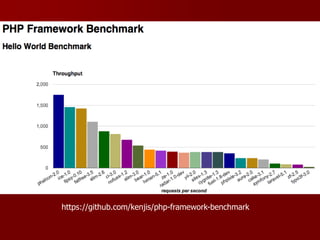
 High Performance
https://github.com/kenjis/php-framework-benchmark
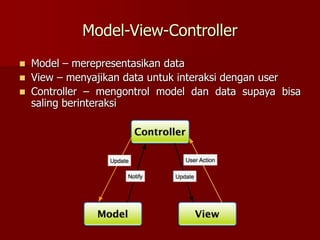
Model-View-Controller
 Model – merepresentasikan data
 View – menyajikan data untuk interaksi dengan user
 Controller – mengontrol model dan data supaya bisa
saling berinteraksi
CodeIgniter Classes
 CI’s built-in classes berisi fungsi dasar yang sering
digunakan oleh aplikasi web
 Beberapa kelas yang sering digunakan:
– Database
– Input
– Loader
– URI
– Validation
Database Class
 Mengolah queri menggunakan the Active Record / ORM
Pattern
 Menyediakan metode “chaining” untuk kemudahan query
 $this->db->where(‘name’,$name);
Input Class
 Menyediakan akses ke input pengguna dan data lainnya:
– Form fields (POST)
– Cookies
– Server variables
 $this->input->post(‘fieldname’);
Loader Class
 Membuat berbagai resource:
– Databases
– Views
– Helpers
– Plugins
 $this->load->view(‘viewname’);
URI Class
 Menyediakan akses ke bagian-bagian tertentu dari String
URI
 Berguna untuk membangung RESTful API
 $this->uri->segment(n);
Other Classes
 Benchmarking
 Calendaring
 Email
 Encryption
 File uploading
 FTP
 HTML Table
 Image Manipulation
 Language
(internationalization)
 Output
 Pagination
 Session
 Trackback
 Unit testing
 XML-RPC
 Zip encoding
Helpers and Plugins
 CodeIgniter dilengkapi dengan berbagai “helper” yaitu
fungsi yang menambahkan kenyamanan terhadap
aplikasi dan memberikan kemudahan reuse code.
 $this->load->helper(‘helper_name’);
 CodeIgniter juga memungkinkan untuk penggunaan
kustom add-on yang disebut “plugins”.
 $this->load->plugin(‘plugin_name’);
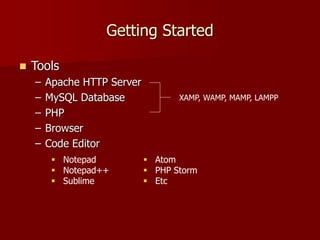
Getting Started
 Tools
– Apache HTTP Server
– MySQL Database
– PHP
– Browser
– Code Editor
XAMP, WAMP, MAMP, LAMPP
 Notepad
 Notepad++
 Sublime
 Atom
 PHP Storm
 Etc
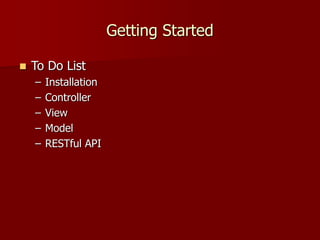
Getting Started
 To Do List
– Installation
– Controller
– View
– Model
– RESTful API
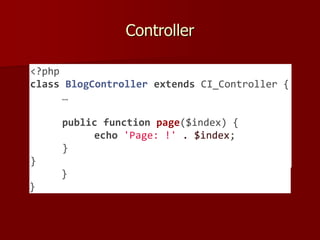
Controller
<?php
class BlogController extends CI_Controller {
public function index() {
echo 'Hello World!';
}
public function comments() {
echo 'Look at this!';
}
}
<?php
class BlogController extends CI_Controller {
…
public function page($index) {
echo 'Page: !' . $index;
}
}
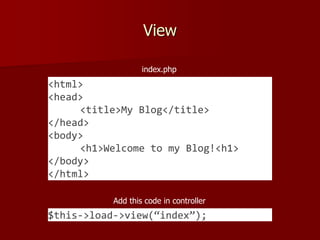
View
<html>
<head>
<title>My Blog</title>
</head>
<body>
<h1>Welcome to my Blog!<h1>
</body>
</html>
index.php
$this->load->view(“index”);
Add this code in controller
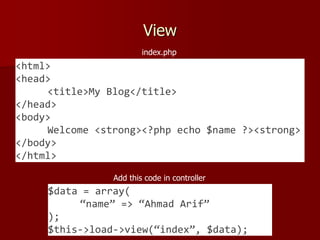
View
<html>
<head>
<title>My Blog</title>
</head>
<body>
Welcome <strong><?php echo $name ?><strong>
</body>
</html>
index.php
$data = array(
“name” => “Ahmad Arif”
);
$this->load->view(“index”, $data);
Add this code in controller
Model
 Create database and table
 Setting database (config/database.php)
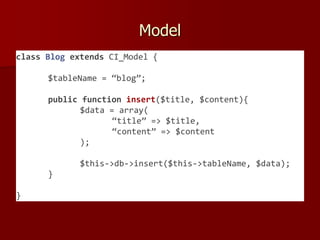
Model
class Blog extends CI_Model {
$tableName = “blog”;
public function insert($title, $content){
$data = array(
“title” => $title,
“content” => $content
);
$this->db->insert($this->tableName, $data);
}
}
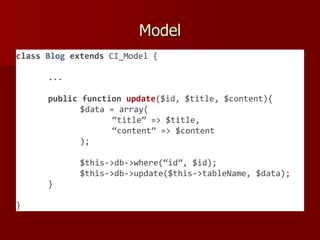
Model
class Blog extends CI_Model {
...
public function update($id, $title, $content){
$data = array(
“title” => $title,
“content” => $content
);
$this->db->where(“id”, $id);
$this->db->update($this->tableName, $data);
}
}
Model
class Blog extends CI_Model {
...
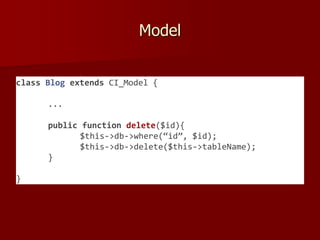
public function delete($id){
$this->db->where(“id”, $id);
$this->db->delete($this->tableName);
}
}
Model
class Blog extends CI_Model {
...
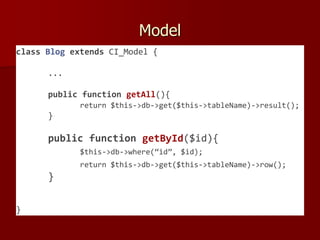
public function getAll(){
return $this->db->get($this->tableName)->result();
}
public function getById($id){
$this->db->where(“id”, $id);
return $this->db->get($this->tableName)->row();
}
}
Using Model
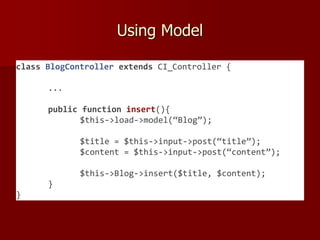
class BlogController extends CI_Controller {
...
public function insert(){
$this->load->model(“Blog”);
$title = $this->input->post(“title”);
$content = $this->input->post(“content”);
$this->Blog->insert($title, $content);
}
}
RESTful API
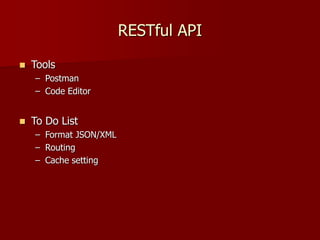
 Tools
– Postman
– Code Editor
 To Do List
– Format JSON/XML
– Routing
– Cache setting
References
 https://codeigniter.com
 https://google.com
 https://github.com/ahmadarif
Tank You

Having fun with code igniter

  • 1.
    Have fun with CodeIgniterFramework 23 April 2016 & Ahmad Arif
  • 2.
    About Me  Pendidikan 1998-2004 SDN 1 Kertamulya, Karawang  2004-2007 SMPN 2 Rengasdengklok, Karawang  2007-2010 SMAN 1 Rengasdengklok, Karawang  2010-2014 Informatika Universitas Jenderal Achman Yani  2015-???? Informatika Institut Teknologi Bandung  Minat  Programming  Machine Learning  Artificial Intelligent  Game Technology  Entertainment  Etc
  • 3.
    What is framework? Framework = Kerangka kerja  Menyediakan struktur umum aplikasi sehingga memudahkan pengembang dalam menyimpan kode dalam aplikasi  Menangani tugas umum – Database – Business logic – Form handling
  • 4.
    What is CodeIgniter? CodeIgniter framework aplikasi web ringan yang ditulis dalam bahasa pemrograman PHP, dan mengadopsi pendekatan Model-View-Controller.
  • 5.
    Kenapa menggunakan CodeIgniter? Feature rich  Lightweight/small  Open source  Well-supported by an active community  Excellent “by example” documentation  Easy to configure (nearly zero configuration)  Supports multiple databases  Cleaner code  High Performance https://github.com/kenjis/php-framework-benchmark
  • 6.
    Model-View-Controller  Model –merepresentasikan data  View – menyajikan data untuk interaksi dengan user  Controller – mengontrol model dan data supaya bisa saling berinteraksi
  • 7.
    CodeIgniter Classes  CI’sbuilt-in classes berisi fungsi dasar yang sering digunakan oleh aplikasi web  Beberapa kelas yang sering digunakan: – Database – Input – Loader – URI – Validation
  • 8.
    Database Class  Mengolahqueri menggunakan the Active Record / ORM Pattern  Menyediakan metode “chaining” untuk kemudahan query  $this->db->where(‘name’,$name);
  • 9.
    Input Class  Menyediakanakses ke input pengguna dan data lainnya: – Form fields (POST) – Cookies – Server variables  $this->input->post(‘fieldname’);
  • 10.
    Loader Class  Membuatberbagai resource: – Databases – Views – Helpers – Plugins  $this->load->view(‘viewname’);
  • 11.
    URI Class  Menyediakanakses ke bagian-bagian tertentu dari String URI  Berguna untuk membangung RESTful API  $this->uri->segment(n);
  • 12.
    Other Classes  Benchmarking Calendaring  Email  Encryption  File uploading  FTP  HTML Table  Image Manipulation  Language (internationalization)  Output  Pagination  Session  Trackback  Unit testing  XML-RPC  Zip encoding
  • 13.
    Helpers and Plugins CodeIgniter dilengkapi dengan berbagai “helper” yaitu fungsi yang menambahkan kenyamanan terhadap aplikasi dan memberikan kemudahan reuse code.  $this->load->helper(‘helper_name’);  CodeIgniter juga memungkinkan untuk penggunaan kustom add-on yang disebut “plugins”.  $this->load->plugin(‘plugin_name’);
  • 14.
    Getting Started  Tools –Apache HTTP Server – MySQL Database – PHP – Browser – Code Editor XAMP, WAMP, MAMP, LAMPP  Notepad  Notepad++  Sublime  Atom  PHP Storm  Etc
  • 15.
    Getting Started  ToDo List – Installation – Controller – View – Model – RESTful API
  • 16.
    Controller <?php class BlogController extendsCI_Controller { public function index() { echo 'Hello World!'; } public function comments() { echo 'Look at this!'; } } <?php class BlogController extends CI_Controller { … public function page($index) { echo 'Page: !' . $index; } }
  • 17.
    View <html> <head> <title>My Blog</title> </head> <body> <h1>Welcome tomy Blog!<h1> </body> </html> index.php $this->load->view(“index”); Add this code in controller
  • 18.
    View <html> <head> <title>My Blog</title> </head> <body> Welcome <strong><?phpecho $name ?><strong> </body> </html> index.php $data = array( “name” => “Ahmad Arif” ); $this->load->view(“index”, $data); Add this code in controller
  • 19.
    Model  Create databaseand table  Setting database (config/database.php)
  • 20.
    Model class Blog extendsCI_Model { $tableName = “blog”; public function insert($title, $content){ $data = array( “title” => $title, “content” => $content ); $this->db->insert($this->tableName, $data); } }
  • 21.
    Model class Blog extendsCI_Model { ... public function update($id, $title, $content){ $data = array( “title” => $title, “content” => $content ); $this->db->where(“id”, $id); $this->db->update($this->tableName, $data); } }
  • 22.
    Model class Blog extendsCI_Model { ... public function delete($id){ $this->db->where(“id”, $id); $this->db->delete($this->tableName); } }
  • 23.
    Model class Blog extendsCI_Model { ... public function getAll(){ return $this->db->get($this->tableName)->result(); } public function getById($id){ $this->db->where(“id”, $id); return $this->db->get($this->tableName)->row(); } }
  • 24.
    Using Model class BlogControllerextends CI_Controller { ... public function insert(){ $this->load->model(“Blog”); $title = $this->input->post(“title”); $content = $this->input->post(“content”); $this->Blog->insert($title, $content); } }
  • 25.
    RESTful API  Tools –Postman – Code Editor  To Do List – Format JSON/XML – Routing – Cache setting
  • 26.
  • 27.

Editor's Notes