Module 10:  Accessing Data with Microsoft ADO.NET
Overview Introduction to Using ADO.NET Connecting to a Database Accessing Data with DataSets Using Multiple Tables Accessing Data with DataReaders
Lesson: Introduction to Using ADO.NET Multimedia: The ADO.NET Object Model Using DataSets vs. DataReaders Practice: When to Use DataSets or DataReaders
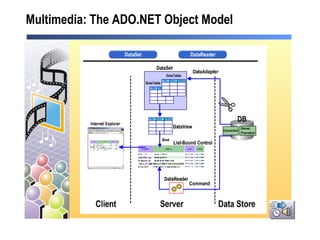
Multimedia: The ADO.NET Object Model
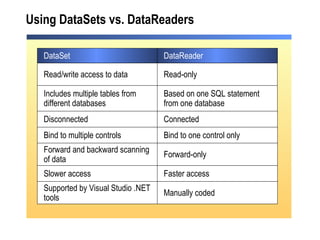
Using DataSets vs. DataReaders Supported by Visual Studio .NET tools Slower access Forward-only Bind to one control only Based on one SQL statement from one database Read-only Manually coded Faster access Forward and backward scanning of data Bind to multiple controls Includes multiple tables from different databases Read/write access to data DataReader DataSet Disconnected Connected
Practice: When to Use DataSets or DataReaders Students will: Select the best data access choice for given scenarios Time: 5 Minutes
Lesson: Connecting to a Database SQL Server Security Creating the Connection Demonstration: Setting SQL Server Security
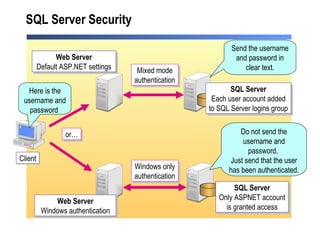
SQL Server Security Client Send the username and password in clear text. Do not send the username and password.  Just send that the user has been authenticated. Mixed mode authentication Windows only authentication SQL Server Only ASPNET account is granted access Web Server Windows authentication or… SQL Server Each user account added to SQL Server logins group Web Server Default ASP.NET settings Here is the username and password
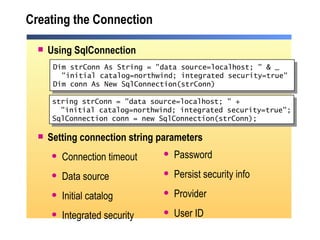
Creating the Connection Using SqlConnection Setting connection string parameters Connection timeout Data source Initial catalog Integrated security Dim strConn As String = "data source=localhost; " & _ "initial catalog=northwind; integrated security=true" Dim conn As New SqlConnection(strConn) Password Persist security info Provider User ID string strConn = "data source=localhost; " + "initial catalog=northwind; integrated security=true"; SqlConnection conn = new SqlConnection(strConn);
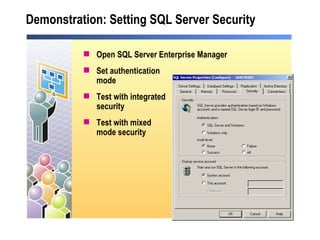
Demonstration: Setting SQL Server Security Open SQL Server Enterprise Manager Set authentication  mode Test with integrated  security Test with mixed  mode security
Lesson: Accessing Data with DataSets Creating a DataAdapter Creating a DataSet Demonstration: Programmatically Using a DataSet Using a DataView Practice: Organizing Code to Create a DataSet Binding a DataSet to a List-Bound Control Instructor-Led Practice: Displaying a DataSet Handling Errors
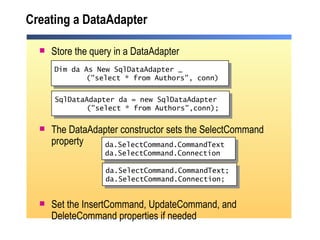
Creating a DataAdapter Store the query in a DataAdapter The DataAdapter constructor sets the SelectCommand property Set the InsertCommand, UpdateCommand, and DeleteCommand properties if needed Dim da As New SqlDataAdapter _ ("select * from Authors", conn) da.SelectCommand.CommandText  da.SelectCommand.Connection SqlDataAdapter da = new SqlDataAdapter ("select * from Authors",conn); da.SelectCommand.CommandText; da.SelectCommand.Connection;
Creating a DataSet Create and populate a DataSet with DataTables Fill  method executes the  SelectCommand Access a DataTable Dim ds As New DataSet() da.Fill(ds, "Authors") Dim r As DataRow Dim str As String For Each r in _ ds.Tables("Authors").Rows str &= r(2) str &= r("au_lname") Next ds.Tables("Authors").Rows.Count DataSet ds = new DataSet(); da.Fill(ds, "Authors"); ds.Tables["Authors"].Rows.Count; string str=""; foreach(DataRow r in  ds.Tables["Authors"].Rows) { str += r[2]; str += r["au_lname"]; }
Demonstration: Programmatically Using a DataSet Create a Connection Create DataAdapter Create DataSet Read data from DataSet programmatically
Using a DataView A DataView can be customized to present a subset of data from a DataTable The DefaultView property returns the  default DataView of the table Setting up a different view of a DataSet DataView dv = new DataView(ds.Tables["Authors"]); dv.RowFilter = "state = 'CA'"; Dim dv As DataView = ds.Tables("Authors").DefaultView   Dim dv As New DataView (ds.Tables("Authors")) dv.RowFilter = "state = 'CA'"  DataView dv = ds.Tables["Authors"].DefaultView;
Practice: Organizing Code to Create a DataSet Student will: Reorder lines of code to create a  DataSet Time: 5 Minutes
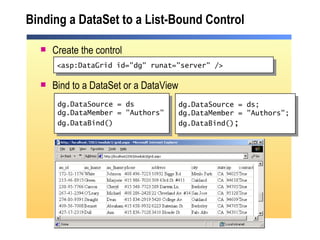
Binding a DataSet to a List-Bound Control Create the control Bind to a DataSet or a DataView dg.DataSource = ds dg.DataMember = &quot;Authors&quot; dg.DataBind()   <asp:DataGrid id=&quot;dg&quot; runat=&quot;server&quot; /> dg.DataSource = ds; dg.DataMember = &quot;Authors&quot;; dg.DataBind() ;
Instructor-Led Practice: Displaying a DataSet Create a Connection Create a DataAdapter Create a DataSet Create a DataView Bind both the DataSet and DataView to DataGrid controls
Handling Errors Connection will not open Connection string is invalid Server or database not found Login failed DataAdapter cannot create a DataSet Invalid SQL syntax Invalid table or field name Code Example
Lesson: Using Multiple Tables Storing Multiple Tables Creating Relationships Programmatically Navigating Between Tables Using Relationships Visually Navigating Between Tables Using Relationships Instructor-Led Practice: Displaying Data from Multiple Tables
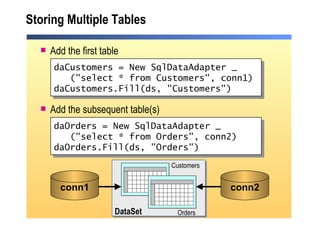
Storing Multiple Tables  Add the first table Add the subsequent table(s) daCustomers = New SqlDataAdapter _ (&quot;select * from Customers&quot;, conn1) daCustomers.Fill(ds, &quot;Customers&quot;) Orders Customers daOrders = New SqlDataAdapter _ (&quot;select * from Orders&quot;, conn2) daOrders.Fill(ds, &quot;Orders&quot;) conn2 conn1 DataSet
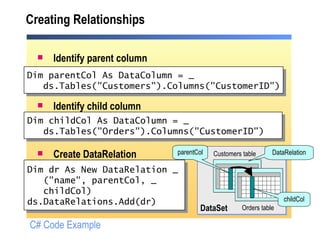
Creating Relationships Identify parent column Identify child column Create DataRelation Dim dr As New DataRelation _ (&quot;name&quot;, parentCol, _   childCol) ds.DataRelations.Add(dr) Dim parentCol As DataColumn = _ ds.Tables(&quot;Customers&quot;).Columns(&quot;CustomerID&quot;) Dim childCol As DataColumn = _ ds.Tables(&quot;Orders&quot;).Columns(&quot;CustomerID&quot;) Orders table Customers table DataSet parentCol childCol DataRelation C# Code Example
Programmatically Navigating Between Tables Using Relationships ds.Tables( index ).Rows( index ).GetChildRows(&quot; relation &quot;) ds.Tables( index ).Rows( index ).GetParentRow(&quot; relation &quot;) Customers Orders GetChildRows GetParentRow DataSet ds.Tables[ index ].Rows[ index] .GetChildRows(&quot; relation &quot;); ds.Tables[ index] .Rows[ index] .GetParentRow(&quot; relation &quot;);
Visually Navigating Between Tables Using Relationships Dim tableView As DataView Dim currentRowView As DataRowView tableView = New DataView(ds.Tables(&quot;Customers&quot;)) currentRowView = tableView(dgCustomers.SelectedIndex) dgChild.DataSource = currentRowView.CreateChildView(&quot;CustOrders&quot;) Customers Orders CreateChildView DataRowView DataView DataSet DataView tableView; DataRowView currentRowView; tableView = new DataView(ds.Tables[&quot;Customers&quot;]); currentRowView = tableView[dgCustomers.SelectedIndex]; dgChild.DataSource = currentRowView.CreateChildView(&quot;CustOrders&quot;);
Instructor-Led Practice: Displaying Data from Multiple Tables Programmatically: Create a  DataSet Create a  DataRelation Display child records using the  DataRelation Visually: Call  CreateChildView
Lesson: Accessing Data with DataReaders What is a DataReader? Creating a DataReader Reading Data from a DataReader Binding a DataReader to a List-Bound Control Practice: Organizing Code to Create a DataReader Demonstration: Displaying Data Using DataReaders
What is a DataReader? Forward-only, read-only  Fast access to data Connected to a data source Manage the connection yourself  Manage the data yourself, or bind it to a list-bound control Uses fewer server resources
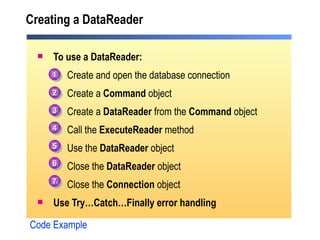
Creating a DataReader To use a DataReader: Create and open the database connection Create a  Command  object Create a  DataReader  from the  Command  object Call the  ExecuteReader  method Use the  DataReader  object Close the  DataReader  object Close the  Connection  object Use Try…Catch…Finally error handling Code Example 1 2 3 4 5 6 7
Reading Data from a DataReader Call Read for each record Returns false when there are no more records Access fields Parameter is the ordinal position or name of the field Get  functions give best performance Close the DataReader Close the connection Do While myReader.Read() str &= myReader(1) str &= myReader(&quot;field&quot;)  str &= myReader.GetDateTime(2) Loop while (myReader.Read()) { str += myReader[1]; str += myReader[&quot;field&quot;]; str += myReader.GetDateTime(2); }
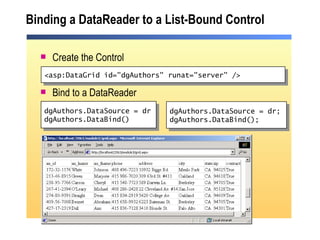
Binding a DataReader to a List-Bound Control Create the Control Bind to a DataReader dgAuthors.DataSource = dr dgAuthors.DataBind()  <asp:DataGrid id=&quot;dgAuthors&quot; runat=&quot;server&quot; /> dgAuthors.DataSource = dr; dgAuthors.DataBind();
Practice: Organizing Code to Create a DataReader Students will: Reorder lines of code to create a  DataReader Time: 5 Minutes
Demonstration: Displaying Data Using DataReaders Create a SqlConnection Create a DataReader Bind the DataReader to a ListBox Build ListBox items from data supplied by the DataReader
Review Introduction to Using ADO.NET Connecting to a Database Accessing Data with DataSets Using Multiple Tables Accessing Data with DataReaders
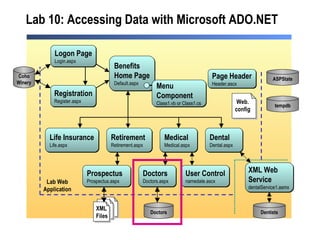
Lab 10: Accessing Data with Microsoft ADO.NET Medical Medical.aspx Benefits Home Page Default.aspx Life Insurance Life.aspx Retirement Retirement.aspx Dental Dental.aspx Dentists Doctors Doctors.aspx  Doctors Logon Page Login.aspx Registration Register.aspx Coho Winery Prospectus Prospectus.aspx XML Web  Service dentalService1.asmx  Page Header Header.ascx ASPState tempdb Lab Web Application User Control namedate.ascx Menu  Component Class1.vb or Class1.cs XML Files Web. config

2310 b 10

  • 1.
    Module 10: Accessing Data with Microsoft ADO.NET
  • 2.
    Overview Introduction toUsing ADO.NET Connecting to a Database Accessing Data with DataSets Using Multiple Tables Accessing Data with DataReaders
  • 3.
    Lesson: Introduction toUsing ADO.NET Multimedia: The ADO.NET Object Model Using DataSets vs. DataReaders Practice: When to Use DataSets or DataReaders
  • 4.
  • 5.
    Using DataSets vs.DataReaders Supported by Visual Studio .NET tools Slower access Forward-only Bind to one control only Based on one SQL statement from one database Read-only Manually coded Faster access Forward and backward scanning of data Bind to multiple controls Includes multiple tables from different databases Read/write access to data DataReader DataSet Disconnected Connected
  • 6.
    Practice: When toUse DataSets or DataReaders Students will: Select the best data access choice for given scenarios Time: 5 Minutes
  • 7.
    Lesson: Connecting toa Database SQL Server Security Creating the Connection Demonstration: Setting SQL Server Security
  • 8.
    SQL Server SecurityClient Send the username and password in clear text. Do not send the username and password. Just send that the user has been authenticated. Mixed mode authentication Windows only authentication SQL Server Only ASPNET account is granted access Web Server Windows authentication or… SQL Server Each user account added to SQL Server logins group Web Server Default ASP.NET settings Here is the username and password
  • 9.
    Creating the ConnectionUsing SqlConnection Setting connection string parameters Connection timeout Data source Initial catalog Integrated security Dim strConn As String = &quot;data source=localhost; &quot; & _ &quot;initial catalog=northwind; integrated security=true&quot; Dim conn As New SqlConnection(strConn) Password Persist security info Provider User ID string strConn = &quot;data source=localhost; &quot; + &quot;initial catalog=northwind; integrated security=true&quot;; SqlConnection conn = new SqlConnection(strConn);
  • 10.
    Demonstration: Setting SQLServer Security Open SQL Server Enterprise Manager Set authentication mode Test with integrated security Test with mixed mode security
  • 11.
    Lesson: Accessing Datawith DataSets Creating a DataAdapter Creating a DataSet Demonstration: Programmatically Using a DataSet Using a DataView Practice: Organizing Code to Create a DataSet Binding a DataSet to a List-Bound Control Instructor-Led Practice: Displaying a DataSet Handling Errors
  • 12.
    Creating a DataAdapterStore the query in a DataAdapter The DataAdapter constructor sets the SelectCommand property Set the InsertCommand, UpdateCommand, and DeleteCommand properties if needed Dim da As New SqlDataAdapter _ (&quot;select * from Authors&quot;, conn) da.SelectCommand.CommandText da.SelectCommand.Connection SqlDataAdapter da = new SqlDataAdapter (&quot;select * from Authors&quot;,conn); da.SelectCommand.CommandText; da.SelectCommand.Connection;
  • 13.
    Creating a DataSetCreate and populate a DataSet with DataTables Fill method executes the SelectCommand Access a DataTable Dim ds As New DataSet() da.Fill(ds, &quot;Authors&quot;) Dim r As DataRow Dim str As String For Each r in _ ds.Tables(&quot;Authors&quot;).Rows str &= r(2) str &= r(&quot;au_lname&quot;) Next ds.Tables(&quot;Authors&quot;).Rows.Count DataSet ds = new DataSet(); da.Fill(ds, &quot;Authors&quot;); ds.Tables[&quot;Authors&quot;].Rows.Count; string str=&quot;&quot;; foreach(DataRow r in ds.Tables[&quot;Authors&quot;].Rows) { str += r[2]; str += r[&quot;au_lname&quot;]; }
  • 14.
    Demonstration: Programmatically Usinga DataSet Create a Connection Create DataAdapter Create DataSet Read data from DataSet programmatically
  • 15.
    Using a DataViewA DataView can be customized to present a subset of data from a DataTable The DefaultView property returns the default DataView of the table Setting up a different view of a DataSet DataView dv = new DataView(ds.Tables[&quot;Authors&quot;]); dv.RowFilter = &quot;state = 'CA'&quot;; Dim dv As DataView = ds.Tables(&quot;Authors&quot;).DefaultView Dim dv As New DataView (ds.Tables(&quot;Authors&quot;)) dv.RowFilter = &quot;state = 'CA'&quot; DataView dv = ds.Tables[&quot;Authors&quot;].DefaultView;
  • 16.
    Practice: Organizing Codeto Create a DataSet Student will: Reorder lines of code to create a DataSet Time: 5 Minutes
  • 17.
    Binding a DataSetto a List-Bound Control Create the control Bind to a DataSet or a DataView dg.DataSource = ds dg.DataMember = &quot;Authors&quot; dg.DataBind() <asp:DataGrid id=&quot;dg&quot; runat=&quot;server&quot; /> dg.DataSource = ds; dg.DataMember = &quot;Authors&quot;; dg.DataBind() ;
  • 18.
    Instructor-Led Practice: Displayinga DataSet Create a Connection Create a DataAdapter Create a DataSet Create a DataView Bind both the DataSet and DataView to DataGrid controls
  • 19.
    Handling Errors Connectionwill not open Connection string is invalid Server or database not found Login failed DataAdapter cannot create a DataSet Invalid SQL syntax Invalid table or field name Code Example
  • 20.
    Lesson: Using MultipleTables Storing Multiple Tables Creating Relationships Programmatically Navigating Between Tables Using Relationships Visually Navigating Between Tables Using Relationships Instructor-Led Practice: Displaying Data from Multiple Tables
  • 21.
    Storing Multiple Tables Add the first table Add the subsequent table(s) daCustomers = New SqlDataAdapter _ (&quot;select * from Customers&quot;, conn1) daCustomers.Fill(ds, &quot;Customers&quot;) Orders Customers daOrders = New SqlDataAdapter _ (&quot;select * from Orders&quot;, conn2) daOrders.Fill(ds, &quot;Orders&quot;) conn2 conn1 DataSet
  • 22.
    Creating Relationships Identifyparent column Identify child column Create DataRelation Dim dr As New DataRelation _ (&quot;name&quot;, parentCol, _ childCol) ds.DataRelations.Add(dr) Dim parentCol As DataColumn = _ ds.Tables(&quot;Customers&quot;).Columns(&quot;CustomerID&quot;) Dim childCol As DataColumn = _ ds.Tables(&quot;Orders&quot;).Columns(&quot;CustomerID&quot;) Orders table Customers table DataSet parentCol childCol DataRelation C# Code Example
  • 23.
    Programmatically Navigating BetweenTables Using Relationships ds.Tables( index ).Rows( index ).GetChildRows(&quot; relation &quot;) ds.Tables( index ).Rows( index ).GetParentRow(&quot; relation &quot;) Customers Orders GetChildRows GetParentRow DataSet ds.Tables[ index ].Rows[ index] .GetChildRows(&quot; relation &quot;); ds.Tables[ index] .Rows[ index] .GetParentRow(&quot; relation &quot;);
  • 24.
    Visually Navigating BetweenTables Using Relationships Dim tableView As DataView Dim currentRowView As DataRowView tableView = New DataView(ds.Tables(&quot;Customers&quot;)) currentRowView = tableView(dgCustomers.SelectedIndex) dgChild.DataSource = currentRowView.CreateChildView(&quot;CustOrders&quot;) Customers Orders CreateChildView DataRowView DataView DataSet DataView tableView; DataRowView currentRowView; tableView = new DataView(ds.Tables[&quot;Customers&quot;]); currentRowView = tableView[dgCustomers.SelectedIndex]; dgChild.DataSource = currentRowView.CreateChildView(&quot;CustOrders&quot;);
  • 25.
    Instructor-Led Practice: DisplayingData from Multiple Tables Programmatically: Create a DataSet Create a DataRelation Display child records using the DataRelation Visually: Call CreateChildView
  • 26.
    Lesson: Accessing Datawith DataReaders What is a DataReader? Creating a DataReader Reading Data from a DataReader Binding a DataReader to a List-Bound Control Practice: Organizing Code to Create a DataReader Demonstration: Displaying Data Using DataReaders
  • 27.
    What is aDataReader? Forward-only, read-only Fast access to data Connected to a data source Manage the connection yourself Manage the data yourself, or bind it to a list-bound control Uses fewer server resources
  • 28.
    Creating a DataReaderTo use a DataReader: Create and open the database connection Create a Command object Create a DataReader from the Command object Call the ExecuteReader method Use the DataReader object Close the DataReader object Close the Connection object Use Try…Catch…Finally error handling Code Example 1 2 3 4 5 6 7
  • 29.
    Reading Data froma DataReader Call Read for each record Returns false when there are no more records Access fields Parameter is the ordinal position or name of the field Get functions give best performance Close the DataReader Close the connection Do While myReader.Read() str &= myReader(1) str &= myReader(&quot;field&quot;) str &= myReader.GetDateTime(2) Loop while (myReader.Read()) { str += myReader[1]; str += myReader[&quot;field&quot;]; str += myReader.GetDateTime(2); }
  • 30.
    Binding a DataReaderto a List-Bound Control Create the Control Bind to a DataReader dgAuthors.DataSource = dr dgAuthors.DataBind() <asp:DataGrid id=&quot;dgAuthors&quot; runat=&quot;server&quot; /> dgAuthors.DataSource = dr; dgAuthors.DataBind();
  • 31.
    Practice: Organizing Codeto Create a DataReader Students will: Reorder lines of code to create a DataReader Time: 5 Minutes
  • 32.
    Demonstration: Displaying DataUsing DataReaders Create a SqlConnection Create a DataReader Bind the DataReader to a ListBox Build ListBox items from data supplied by the DataReader
  • 33.
    Review Introduction toUsing ADO.NET Connecting to a Database Accessing Data with DataSets Using Multiple Tables Accessing Data with DataReaders
  • 34.
    Lab 10: AccessingData with Microsoft ADO.NET Medical Medical.aspx Benefits Home Page Default.aspx Life Insurance Life.aspx Retirement Retirement.aspx Dental Dental.aspx Dentists Doctors Doctors.aspx Doctors Logon Page Login.aspx Registration Register.aspx Coho Winery Prospectus Prospectus.aspx XML Web Service dentalService1.asmx Page Header Header.ascx ASPState tempdb Lab Web Application User Control namedate.ascx Menu Component Class1.vb or Class1.cs XML Files Web. config