WinAppDriver Development
Jeremy Kao (about.me/imsardine) @ KKBOX SQA

17/12/2014
Agenda
• Environment Setup

• JSON Wire/WebDriver Protocol
and Routing

• WinAppDriver Components

• TODO
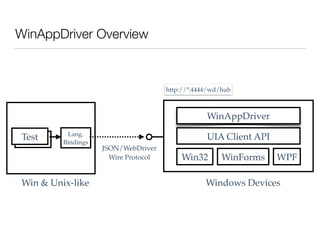
WinAppDriver Overview
Test
WinAppDriver
UIA Client API
WPFWinFormsWin32
http://*:4444/wd/hub
Test
Windows DevicesWin & Unix-like
JSON/WebDriver!
Wire Protocol
Lang.
Bindings
DEV Environment Setup
• Prerequisites
• .NET Framework 3.0 (Vista) and above.
• Windows SDK
• Configure PATH environment variable

SET PATH=%PATH%;C:WindowsMicrosoft.NETFramework<VERSION>;C:
Program Files (x86)Windows Kits<VERSION>bin<ARCH>
• Get the source code from GitHub

git clone git@github.com:imsardine/winappdriver.git
• Build the project

msbuild.exe src/ActivateStoreApp/ActivateStoreApp.csproj

msbuild.exe src/WinAppDriver/WinAppDriver.csproj
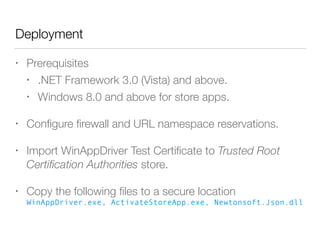
Deployment
• Prerequisites
• .NET Framework 3.0 (Vista) and above.
• Windows 8.0 and above for store apps.
• Configure firewall and URL namespace reservations.
• Import WinAppDriver Test Certificate to Trusted Root
Certification Authorities store.
• Copy the following files to a secure location

WinAppDriver.exe, ActivateStoreApp.exe, Newtonsoft.Json.dll
JSON/WebDriver Wire Protocol
• The WebDriver Wire Protocol - Selenium
• For example
• Find an element

POST session/:sessionId/element
• Click an element

POST session/:sessionId/element/:id/click
Routing
• Endpoints

POST session/:sessionId/element
• Handlers with Route attribute (WinAppDriver.RouteAttribute)

[Route("POST", "/session/:sessionId/element")]

class FindElementHandler : IHandler {

...

}
• RequestManager.AddHandler(handler)
Handler
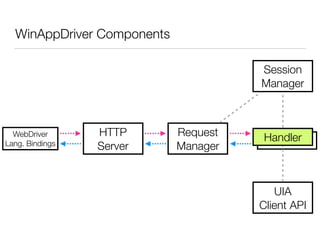
WinAppDriver Components
HTTP
Server
Request

Manager
Session

Manager
Handler
UIA

Client API
WebDriver
Lang. Bindings
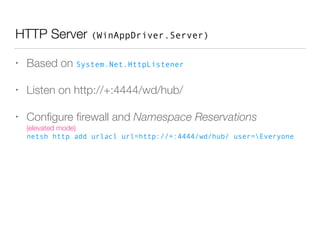
HTTP Server (WinAppDriver.Server)
• Based on System.Net.HttpListener
• Listen on http://+:4444/wd/hub/
• Configure firewall and Namespace Reservations

(elevated mode)

netsh http add urlacl url=http://+:4444/wd/hub/ user=Everyone
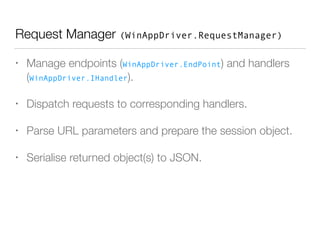
Request Manager (WinAppDriver.RequestManager)
• Manage endpoints (WinAppDriver.EndPoint) and handlers
(WinAppDriver.IHandler).
• Dispatch requests to corresponding handlers.
• Parse URL parameters and prepare the session object.
• Serialise returned object(s) to JSON.
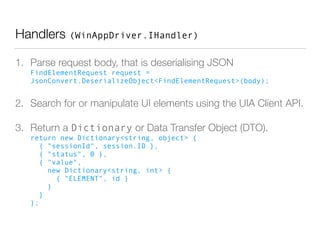
Handlers (WinAppDriver.IHandler)
1. Parse request body, that is deserialising JSON

FindElementRequest request =
JsonConvert.DeserializeObject<FindElementRequest>(body);
2. Search for or manipulate UI elements using the UIA Client API.
3. Return a Dictionary or Data Transfer Object (DTO).

return new Dictionary<string, object> {

{ "sessionId", session.ID },

{ "status", 0 },

{ "value",

new Dictionary<string, int> {

{ "ELEMENT", id }

}

}

};
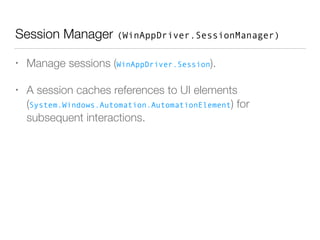
Session Manager (WinAppDriver.SessionManager)
• Manage sessions (WinAppDriver.Session).
• A session caches references to UI elements
(System.Windows.Automation.AutomationElement) for
subsequent interactions.
TODO
• Build system
• Solution file (.sln)
• Remove third-party assemblies from Git repo.
• Travis CI build (low priority)
• Exception handling, e.g., throw new ElementNotFoundException()
• Discover and register all handlers automatically.
• Download, install and uninstall app packages automatically.
• Implement remaining commands defined in the protocol. (logs, screenshots,
…)
• Fast reset - clear data without uninstalling the package
References
• Configuring HTTP and HTTPS - MSDN
• MSBuild
• P of EAA: Data Transfer Object

WinAppDriver Development

  • 1.
    WinAppDriver Development Jeremy Kao(about.me/imsardine) @ KKBOX SQA
 17/12/2014
  • 2.
    Agenda • Environment Setup •JSON Wire/WebDriver Protocol and Routing • WinAppDriver Components • TODO
  • 3.
    WinAppDriver Overview Test WinAppDriver UIA ClientAPI WPFWinFormsWin32 http://*:4444/wd/hub Test Windows DevicesWin & Unix-like JSON/WebDriver! Wire Protocol Lang. Bindings
  • 4.
    DEV Environment Setup •Prerequisites • .NET Framework 3.0 (Vista) and above. • Windows SDK • Configure PATH environment variable
 SET PATH=%PATH%;C:WindowsMicrosoft.NETFramework<VERSION>;C: Program Files (x86)Windows Kits<VERSION>bin<ARCH> • Get the source code from GitHub
 git clone git@github.com:imsardine/winappdriver.git • Build the project
 msbuild.exe src/ActivateStoreApp/ActivateStoreApp.csproj
 msbuild.exe src/WinAppDriver/WinAppDriver.csproj
  • 5.
    Deployment • Prerequisites • .NETFramework 3.0 (Vista) and above. • Windows 8.0 and above for store apps. • Configure firewall and URL namespace reservations. • Import WinAppDriver Test Certificate to Trusted Root Certification Authorities store. • Copy the following files to a secure location
 WinAppDriver.exe, ActivateStoreApp.exe, Newtonsoft.Json.dll
  • 6.
    JSON/WebDriver Wire Protocol •The WebDriver Wire Protocol - Selenium • For example • Find an element
 POST session/:sessionId/element • Click an element
 POST session/:sessionId/element/:id/click
  • 7.
    Routing • Endpoints
 POST session/:sessionId/element •Handlers with Route attribute (WinAppDriver.RouteAttribute)
 [Route("POST", "/session/:sessionId/element")]
 class FindElementHandler : IHandler {
 ...
 } • RequestManager.AddHandler(handler)
  • 8.
  • 9.
    HTTP Server (WinAppDriver.Server) •Based on System.Net.HttpListener • Listen on http://+:4444/wd/hub/ • Configure firewall and Namespace Reservations
 (elevated mode)
 netsh http add urlacl url=http://+:4444/wd/hub/ user=Everyone
  • 10.
    Request Manager (WinAppDriver.RequestManager) •Manage endpoints (WinAppDriver.EndPoint) and handlers (WinAppDriver.IHandler). • Dispatch requests to corresponding handlers. • Parse URL parameters and prepare the session object. • Serialise returned object(s) to JSON.
  • 11.
    Handlers (WinAppDriver.IHandler) 1. Parserequest body, that is deserialising JSON
 FindElementRequest request = JsonConvert.DeserializeObject<FindElementRequest>(body); 2. Search for or manipulate UI elements using the UIA Client API. 3. Return a Dictionary or Data Transfer Object (DTO).
 return new Dictionary<string, object> {
 { "sessionId", session.ID },
 { "status", 0 },
 { "value",
 new Dictionary<string, int> {
 { "ELEMENT", id }
 }
 }
 };
  • 12.
    Session Manager (WinAppDriver.SessionManager) •Manage sessions (WinAppDriver.Session). • A session caches references to UI elements (System.Windows.Automation.AutomationElement) for subsequent interactions.
  • 13.
    TODO • Build system •Solution file (.sln) • Remove third-party assemblies from Git repo. • Travis CI build (low priority) • Exception handling, e.g., throw new ElementNotFoundException() • Discover and register all handlers automatically. • Download, install and uninstall app packages automatically. • Implement remaining commands defined in the protocol. (logs, screenshots, …) • Fast reset - clear data without uninstalling the package
  • 14.
    References • Configuring HTTPand HTTPS - MSDN • MSBuild • P of EAA: Data Transfer Object