Module  3: Using Microsoft .NET- Based Languages
Overview Overview of the .NET-Based Languages Comparison of the .NET-Based Languages Creating a Component Using Visual Studio .NET
Lesson: Overview of the .NET-Based Languages Multiple Language Support The Common Language Runtime The Common Language Runtime Components Runtime Compilation and Execution What are Namespaces? Using Namespaces
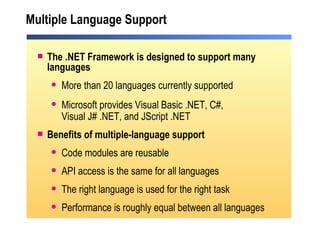
Multiple Language Support The .NET Framework is designed to support many languages More than 20 languages currently supported Microsoft provides Visual Basic .NET, C#,  Visual J# .NET, and JScript .NET Benefits of multiple-language support Code modules are reusable API access is the same for all languages The right language is used for the right task Performance is roughly equal between all languages
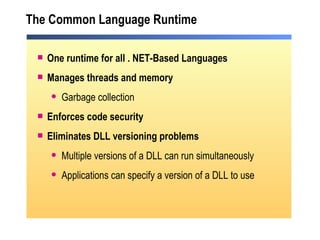
The Common Language Runtime One runtime for all . NET-Based Languages Manages threads and memory Garbage collection Enforces code security Eliminates DLL versioning problems Multiple versions of a DLL can run simultaneously Applications can specify a version of a DLL to use
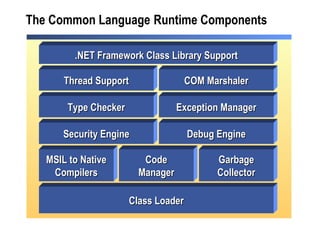
The Common Language   Runtime Components .NET Framework Class Library Support Thread Support COM Marshaler MSIL to Native Compilers Code Manager Garbage Collector Security Engine Debug Engine Class Loader Type Checker Exception Manager
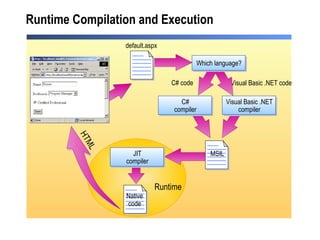
Runtime Compilation and Execution Native code C# code Visual Basic .NET code default.aspx Runtime HTML Which language? Visual Basic .NET compiler C# compiler MSIL JIT compiler
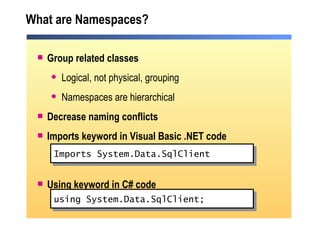
What are Namespaces? Group related classes Logical, not physical, grouping Namespaces are hierarchical Decrease naming conflicts Imports keyword in Visual Basic .NET code Using keyword in C# code Imports System.Data.SqlClient using System.Data.SqlClient;
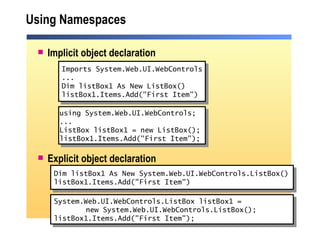
Using Namespaces Implicit object declaration Explicit object declaration Dim listBox1 As New System.Web.UI.WebControls.ListBox() listBox1.Items.Add("First Item") Imports System.Web.UI.WebControls ... Dim listBox1 As New ListBox() listBox1.Items.Add("First Item") using System.Web.UI.WebControls; ... ListBox listBox1 = new ListBox(); listBox1.Items.Add("First Item");  System.Web.UI.WebControls.ListBox listBox1 =  new System.Web.UI.WebControls.ListBox(); listBox1.Items.Add("First Item");
Lesson: Comparison of the .NET-Based Languages Visual Basic .NET C# Choosing a Language Practice: Language Translation
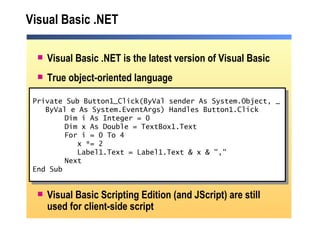
Visual Basic .NET Visual Basic .NET is the latest version of Visual Basic True object-oriented language Visual Basic Scripting Edition (and JScript) are still used for client-side script Private Sub Button1_Click(ByVal sender As System.Object, _ ByVal e As System.EventArgs) Handles Button1.Click Dim i As Integer = 0 Dim x As Double = TextBox1.Text For i = 0 To 4   x *= 2   Label1.Text = Label1.Text & x & "," Next End Sub
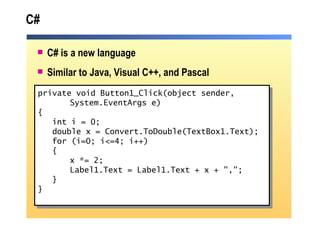
C# C# is a new language Similar to Java, Visual C++, and Pascal private void Button1_Click(object sender,  System.EventArgs e) { int i = 0; double x = Convert.ToDouble(TextBox1.Text); for (i=0; i<=4; i++) { x *= 2; Label1.Text = Label1.Text + x + &quot;,&quot;; } }
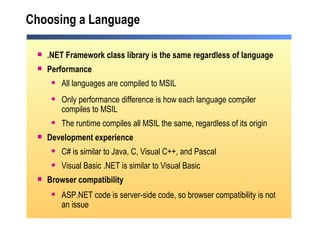
Choosing a Language .NET Framework class library is the same regardless of language Performance All languages are compiled to MSIL Only performance difference is how each language compiler compiles to MSIL The runtime compiles all MSIL the same, regardless of its origin Development experience C# is similar to Java, C, Visual C++, and Pascal Visual Basic .NET is similar to Visual Basic Browser compatibility ASP.NET code is server-side code, so browser compatibility is not an issue
Practice: Language Translation Students are: Given code in C#, and will then translate it into Visual Basic .NET Given code in Visual Basic .NET, and will then translate it into C# Time: 5 minutes
Lesson: Creating a Component Using Visual Studio .NET What are Classes and Components? Creating a Class Using Components in an ASP.NET Web Form Demonstration: Creating a Class in Visual Studio .NET
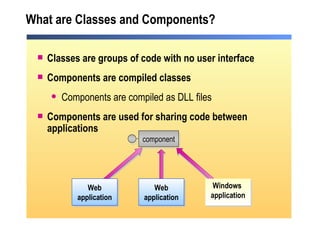
What are Classes and Components? Classes are groups of code with no user interface Components are compiled classes Components are compiled as DLL files Components are used for sharing code between applications Web application Windows  application Web application component
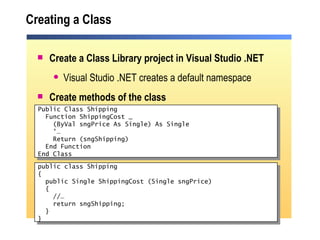
Create a Class Library project in Visual Studio .NET Visual Studio .NET creates a default namespace Create methods of the class Creating a Class Public Class Shipping Function ShippingCost _ (ByVal sngPrice As Single) As Single ' … Return (sngShipping) End Function End Class public class Shipping { public Single ShippingCost (Single sngPrice) { //… return sngShipping;  } }
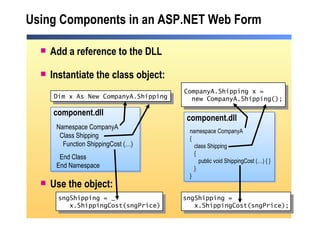
Using Components in an ASP.NET Web Form Add a reference to the DLL Instantiate the class object: Use the object:  sngShipping =  x.ShippingCost(sngPrice); Dim x As New CompanyA.Shipping Namespace CompanyA   Class Shipping   Function ShippingCost (…) End Class End Namespace component.dll sngShipping = _ x.ShippingCost(sngPrice) CompanyA.Shipping x = new CompanyA.Shipping(); namespace CompanyA { class Shipping { public void ShippingCost (…) { } } } component.dll
Demonstration: Creating a Class in Visual Studio .NET Create a new Class Library project Create a “Hello World” method Call it from an ASP.NET page
Review Overview of the .NET-Based Languages Comparison of the .NET-Based Languages Creating a Component Using Visual Studio .NET
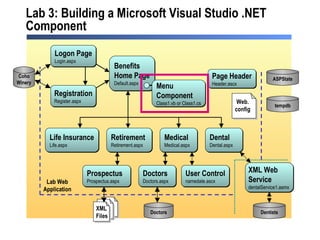
Lab 3: Building a Microsoft Visual Studio .NET Component Medical Medical.aspx Benefits Home Page Default.aspx Life Insurance Life.aspx Retirement Retirement.aspx Dental Dental.aspx Dentists Doctors Doctors.aspx  Doctors Logon Page Login.aspx Registration Register.aspx Coho Winery Prospectus Prospectus.aspx XML Web  Service dentalService1.asmx  Page Header Header.ascx ASPState tempdb Lab Web Application User Control namedate.ascx Menu  Component Class1.vb XML Files Web. config Medical Medical.aspx Benefits Home Page Default.aspx Life Insurance Life.aspx Retirement Retirement.aspx Dental Dental.aspx Dentists Doctors Doctors.aspx  Doctors Logon Page Login.aspx Registration Register.aspx Prospectus Prospectus.aspx XML Web  Service dentalService1.asmx  Page Header Header.ascx ASPState tempdb Lab Web Application User Control namedate.ascx Menu  Component Class1.vb or Class1.cs XML Files Web. config

2310 b 03

  • 1.
    Module 3:Using Microsoft .NET- Based Languages
  • 2.
    Overview Overview ofthe .NET-Based Languages Comparison of the .NET-Based Languages Creating a Component Using Visual Studio .NET
  • 3.
    Lesson: Overview ofthe .NET-Based Languages Multiple Language Support The Common Language Runtime The Common Language Runtime Components Runtime Compilation and Execution What are Namespaces? Using Namespaces
  • 4.
    Multiple Language SupportThe .NET Framework is designed to support many languages More than 20 languages currently supported Microsoft provides Visual Basic .NET, C#, Visual J# .NET, and JScript .NET Benefits of multiple-language support Code modules are reusable API access is the same for all languages The right language is used for the right task Performance is roughly equal between all languages
  • 5.
    The Common LanguageRuntime One runtime for all . NET-Based Languages Manages threads and memory Garbage collection Enforces code security Eliminates DLL versioning problems Multiple versions of a DLL can run simultaneously Applications can specify a version of a DLL to use
  • 6.
    The Common Language Runtime Components .NET Framework Class Library Support Thread Support COM Marshaler MSIL to Native Compilers Code Manager Garbage Collector Security Engine Debug Engine Class Loader Type Checker Exception Manager
  • 7.
    Runtime Compilation andExecution Native code C# code Visual Basic .NET code default.aspx Runtime HTML Which language? Visual Basic .NET compiler C# compiler MSIL JIT compiler
  • 8.
    What are Namespaces?Group related classes Logical, not physical, grouping Namespaces are hierarchical Decrease naming conflicts Imports keyword in Visual Basic .NET code Using keyword in C# code Imports System.Data.SqlClient using System.Data.SqlClient;
  • 9.
    Using Namespaces Implicitobject declaration Explicit object declaration Dim listBox1 As New System.Web.UI.WebControls.ListBox() listBox1.Items.Add(&quot;First Item&quot;) Imports System.Web.UI.WebControls ... Dim listBox1 As New ListBox() listBox1.Items.Add(&quot;First Item&quot;) using System.Web.UI.WebControls; ... ListBox listBox1 = new ListBox(); listBox1.Items.Add(&quot;First Item&quot;); System.Web.UI.WebControls.ListBox listBox1 = new System.Web.UI.WebControls.ListBox(); listBox1.Items.Add(&quot;First Item&quot;);
  • 10.
    Lesson: Comparison ofthe .NET-Based Languages Visual Basic .NET C# Choosing a Language Practice: Language Translation
  • 11.
    Visual Basic .NETVisual Basic .NET is the latest version of Visual Basic True object-oriented language Visual Basic Scripting Edition (and JScript) are still used for client-side script Private Sub Button1_Click(ByVal sender As System.Object, _ ByVal e As System.EventArgs) Handles Button1.Click Dim i As Integer = 0 Dim x As Double = TextBox1.Text For i = 0 To 4 x *= 2 Label1.Text = Label1.Text & x & &quot;,&quot; Next End Sub
  • 12.
    C# C# isa new language Similar to Java, Visual C++, and Pascal private void Button1_Click(object sender, System.EventArgs e) { int i = 0; double x = Convert.ToDouble(TextBox1.Text); for (i=0; i<=4; i++) { x *= 2; Label1.Text = Label1.Text + x + &quot;,&quot;; } }
  • 13.
    Choosing a Language.NET Framework class library is the same regardless of language Performance All languages are compiled to MSIL Only performance difference is how each language compiler compiles to MSIL The runtime compiles all MSIL the same, regardless of its origin Development experience C# is similar to Java, C, Visual C++, and Pascal Visual Basic .NET is similar to Visual Basic Browser compatibility ASP.NET code is server-side code, so browser compatibility is not an issue
  • 14.
    Practice: Language TranslationStudents are: Given code in C#, and will then translate it into Visual Basic .NET Given code in Visual Basic .NET, and will then translate it into C# Time: 5 minutes
  • 15.
    Lesson: Creating aComponent Using Visual Studio .NET What are Classes and Components? Creating a Class Using Components in an ASP.NET Web Form Demonstration: Creating a Class in Visual Studio .NET
  • 16.
    What are Classesand Components? Classes are groups of code with no user interface Components are compiled classes Components are compiled as DLL files Components are used for sharing code between applications Web application Windows application Web application component
  • 17.
    Create a ClassLibrary project in Visual Studio .NET Visual Studio .NET creates a default namespace Create methods of the class Creating a Class Public Class Shipping Function ShippingCost _ (ByVal sngPrice As Single) As Single ' … Return (sngShipping) End Function End Class public class Shipping { public Single ShippingCost (Single sngPrice) { //… return sngShipping; } }
  • 18.
    Using Components inan ASP.NET Web Form Add a reference to the DLL Instantiate the class object: Use the object: sngShipping = x.ShippingCost(sngPrice); Dim x As New CompanyA.Shipping Namespace CompanyA Class Shipping Function ShippingCost (…) End Class End Namespace component.dll sngShipping = _ x.ShippingCost(sngPrice) CompanyA.Shipping x = new CompanyA.Shipping(); namespace CompanyA { class Shipping { public void ShippingCost (…) { } } } component.dll
  • 19.
    Demonstration: Creating aClass in Visual Studio .NET Create a new Class Library project Create a “Hello World” method Call it from an ASP.NET page
  • 20.
    Review Overview ofthe .NET-Based Languages Comparison of the .NET-Based Languages Creating a Component Using Visual Studio .NET
  • 21.
    Lab 3: Buildinga Microsoft Visual Studio .NET Component Medical Medical.aspx Benefits Home Page Default.aspx Life Insurance Life.aspx Retirement Retirement.aspx Dental Dental.aspx Dentists Doctors Doctors.aspx Doctors Logon Page Login.aspx Registration Register.aspx Coho Winery Prospectus Prospectus.aspx XML Web Service dentalService1.asmx Page Header Header.ascx ASPState tempdb Lab Web Application User Control namedate.ascx Menu Component Class1.vb XML Files Web. config Medical Medical.aspx Benefits Home Page Default.aspx Life Insurance Life.aspx Retirement Retirement.aspx Dental Dental.aspx Dentists Doctors Doctors.aspx Doctors Logon Page Login.aspx Registration Register.aspx Prospectus Prospectus.aspx XML Web Service dentalService1.asmx Page Header Header.ascx ASPState tempdb Lab Web Application User Control namedate.ascx Menu Component Class1.vb or Class1.cs XML Files Web. config