Android Application DevelopmentGoogle Map ViewAhsanul Karimahsanul.karim@sentinelbd.comSentinel Solutions Ltd.http://www.sentinelbd.com
Google Map ViewUsing the Google Maps library, we can create our own map-viewing ActivityOur simple map application will have 2 parts:We show a map where user can move and zoomWe’ll add overlay items to show points of interestPrerequisites:External Google Maps library installed in your SDK environment. The Maps library is included with the Google APIs add-on, which you can install using the Android SDK and AVD Manager.Map API KEYSet up a new AVD that uses the same Google APIs deployment target
Google Map ViewAdvantages of using MapView and MapActivityIntegrate Google maps in application easilyIt provides built-in map downloading, rendering, and caching of Maps tilesProvides variety of display options and controlsprovides a wrapper around the Google Maps API that lets your application request and manipulate Google Maps data through class methods, and it lets you work with Maps data as you would other types of Views.
Google Map ViewPart 1: Creating a Map ActivityCreate a project HelloGoogleMapsUsing Google APIsUsing Google APIs the default.propertiesfile:
Google Map ViewPart 1: Creating a Map Activity (Contd.)2. Because the Maps library is not a part of the standard Android library, we must declare it in the Android Manifest. Open the AndroidManifest.xml file and add the following as a child of the <application> element3. Add INTERNET permission too
Google Map ViewPart 1: Creating a Map Activity (Contd.)4. Open the res/layout/main.xml file and add a single com.google.android.maps.MapView as the root node:Now we’ll have to obtain the Maps API key5. Now open the HelloGoogleMaps.java file. For this Activity, extend MapActivity (instead of Activity)6. Inside every MapActivity, the isRouteDisplayed() method is required, so we override This methodSo HelloGoogleMaps.java looks like:
Google Map ViewPart 1: Creating a Map Activity (Contd.)HelloGoogleMaps.javaisRouteDisplayed() is required for some accounting from the Maps service to see if we are currently displaying any route information. In this case, we are not, so return false.
Google Map ViewPart 1: Creating a Map Activity (Contd.)6. This loads the layout file created above. We add built in zoom option with setBuiltInZoomControls(boolean). Do this at the end of the onCreate() method:
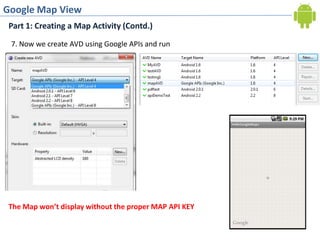
Google Map ViewPart 1: Creating a Map Activity (Contd.)7. Now we create AVD using Google APIs and runThe Map won’t display without the proper MAP API KEY
Google Map ViewObtaining a Maps API KeyMapView gives access to Google Maps data, so need to register with the Google Maps service and agree to the applicable Terms of Service before your MapView will be able to obtain data from Google Maps. This will apply whether you are developing your application on the emulator or preparing your application for deployment to mobile devices.Registering for a Maps API Key is simple, free, and has two parts:Registering the MD5 fingerprint of the certificate that you will use to sign your application. The Maps registration service then provides you a Maps API Key that is associated with your application's signer certificate.Adding a reference to the Maps API Key in each MapView, whether declared in XML or instantiated directly from code. You can use the same Maps API Key for any MapView in any Android application, provided that the application is signed with the certificate whose fingerprint you registered with the service.We’ll use debug certificate here
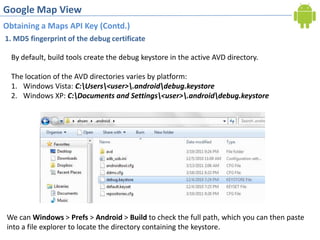
Google Map ViewObtaining a Maps API Key (Contd.)1. MD5 fingerprint of the debug certificateBy default, build tools create the debug keystore in the active AVD directory.The location of the AVD directories varies by platform:Windows Vista: C:\Users\<user>\.android\debug.keystoreWindows XP: C:\Documents and Settings\<user>\.android\debug.keystore  We can Windows > Prefs > Android > Build to check the full path, which you can then paste   into a file explorer to locate the directory containing the keystore.
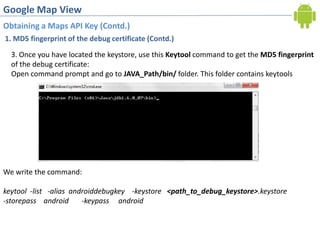
Google Map ViewObtaining a Maps API Key (Contd.)1. MD5 fingerprint of the debug certificate (Contd.)3. Once you have located the keystore, use this Keytool command to get the MD5 fingerprint of the debug certificate:Open command prompt and go to JAVA_Path/bin/ folder. This folder contains keytoolsWe write the command:keytool  -list   -alias  androiddebugkey    -keystore<path_to_debug_keystore>.keystore-storepass    android       -keypass     android
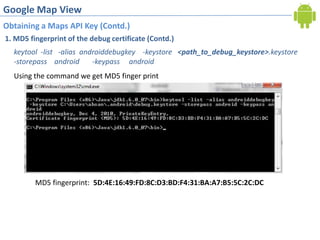
Google Map ViewObtaining a Maps API Key (Contd.)1. MD5 fingerprint of the debug certificate (Contd.)keytool  -list   -alias  androiddebugkey    -keystore<path_to_debug_keystore>.keystore-storepass    android       -keypass     androidUsing the command we get MD5 finger printMD5 fingerprint:  5D:4E:16:49:FD:8C:D3:BD:F4:31:BA:A7:B5:5C:2C:DC
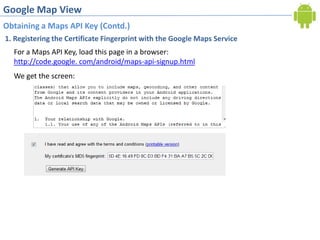
Google Map ViewObtaining a Maps API Key (Contd.)1. Registering the Certificate Fingerprint with the Google Maps ServiceFor a Maps API Key, load this page in a browser:http://code.google. com/android/maps-api-signup.htmlWe get the screen:
Google Map ViewObtaining a Maps API Key (Contd.)1. Registering the Certificate Fingerprint with the Google Maps ServiceNow we getNow, we place the api key in main.xml  and run the app again
Google Map ViewPart 1: Creating a Map Activity (Contd.)
Google Map ViewPart 2: Adding Overlay ItemsNow we’ll position overlay items and markersCreate a new Java class named HelloItemizedOverlay that implements ItemizedOverlay.When using Eclipse, right-click the package name in the Eclipse Package Explorer, and select New > Class. Fill-in the Name field as HelloItemizedOverlay.2. First, you need an OverlayItem ArrayList, in which you'll put each of the OverlayItem objects you want on the map. Add this at the top of the HelloItemizedOverlay class3. Now define the HelloItemizedOverlay constructors. The constructor must define the default marker for each of the OverlayItems. In order for the Drawable to actually get drawn, it must have its bounds defined. Most commonly, you want the center-point at the bottom of the image to be the point at which it's attached to the map coordinates. This is handled for you with the boundCenterBottom() method. Wrap this around our defaultMarker
Google Map ViewPart 2: Adding Overlay Items
Google Map ViewPart 2: Adding Overlay ItemsNow we’ll position overlay items and markers4. In order to add new OverlayItems to the ArrayList, you need a new method:Each time you add a new OverlayItem to the ArrayList, you must call populate() for the ItemizedOverlay, which will read each of the OverlayItems and prepare them to be drawn.When the populate() method executes, it will call createItem(int) in the ItemizedOverlay to retrieve each OverlayItem.5. Then override the onTap(int) callback method, which will handle the event when an item is tapped by the user:
Google Map ViewPart 2: Adding Overlay ItemsNow we use HelloItemizedOverlay1. At the end of your existing onCreate() method, instantiate :All overlay elements on a map are held by the MapView, so when you want to add some, have to get a list from the getOverlays() method. Then instantiate the Drawable used for the map marker, which was saved in the res/drawable/ directory. 2. Now create a GeoPoint that defines the map coordinates for the first overlay item, and pass it to a new OverlayItem:GeoPoint coordinates are specified in microdegrees (degrees * 1e6). The OverlayItem constructor accepts the GeoPoint location, a string for the item's title, and a string for the item's snippet text,3. All that's left is to add this OverlayItem to your collection in the HelloItemizedOverlay instance, then add the HelloItemizedOverlay to the MapView
Google Map ViewPart 2: Adding Overlay ItemsWe can add more geopoints hereWe can take these points from location listeners
Google Map View

Android MapView and MapActivity

  • 1.
    Android Application DevelopmentGoogleMap ViewAhsanul Karimahsanul.karim@sentinelbd.comSentinel Solutions Ltd.http://www.sentinelbd.com
  • 2.
    Google Map ViewUsingthe Google Maps library, we can create our own map-viewing ActivityOur simple map application will have 2 parts:We show a map where user can move and zoomWe’ll add overlay items to show points of interestPrerequisites:External Google Maps library installed in your SDK environment. The Maps library is included with the Google APIs add-on, which you can install using the Android SDK and AVD Manager.Map API KEYSet up a new AVD that uses the same Google APIs deployment target
  • 3.
    Google Map ViewAdvantagesof using MapView and MapActivityIntegrate Google maps in application easilyIt provides built-in map downloading, rendering, and caching of Maps tilesProvides variety of display options and controlsprovides a wrapper around the Google Maps API that lets your application request and manipulate Google Maps data through class methods, and it lets you work with Maps data as you would other types of Views.
  • 4.
    Google Map ViewPart1: Creating a Map ActivityCreate a project HelloGoogleMapsUsing Google APIsUsing Google APIs the default.propertiesfile:
  • 5.
    Google Map ViewPart1: Creating a Map Activity (Contd.)2. Because the Maps library is not a part of the standard Android library, we must declare it in the Android Manifest. Open the AndroidManifest.xml file and add the following as a child of the <application> element3. Add INTERNET permission too
  • 6.
    Google Map ViewPart1: Creating a Map Activity (Contd.)4. Open the res/layout/main.xml file and add a single com.google.android.maps.MapView as the root node:Now we’ll have to obtain the Maps API key5. Now open the HelloGoogleMaps.java file. For this Activity, extend MapActivity (instead of Activity)6. Inside every MapActivity, the isRouteDisplayed() method is required, so we override This methodSo HelloGoogleMaps.java looks like:
  • 7.
    Google Map ViewPart1: Creating a Map Activity (Contd.)HelloGoogleMaps.javaisRouteDisplayed() is required for some accounting from the Maps service to see if we are currently displaying any route information. In this case, we are not, so return false.
  • 8.
    Google Map ViewPart1: Creating a Map Activity (Contd.)6. This loads the layout file created above. We add built in zoom option with setBuiltInZoomControls(boolean). Do this at the end of the onCreate() method:
  • 9.
    Google Map ViewPart1: Creating a Map Activity (Contd.)7. Now we create AVD using Google APIs and runThe Map won’t display without the proper MAP API KEY
  • 10.
    Google Map ViewObtaininga Maps API KeyMapView gives access to Google Maps data, so need to register with the Google Maps service and agree to the applicable Terms of Service before your MapView will be able to obtain data from Google Maps. This will apply whether you are developing your application on the emulator or preparing your application for deployment to mobile devices.Registering for a Maps API Key is simple, free, and has two parts:Registering the MD5 fingerprint of the certificate that you will use to sign your application. The Maps registration service then provides you a Maps API Key that is associated with your application's signer certificate.Adding a reference to the Maps API Key in each MapView, whether declared in XML or instantiated directly from code. You can use the same Maps API Key for any MapView in any Android application, provided that the application is signed with the certificate whose fingerprint you registered with the service.We’ll use debug certificate here
  • 11.
    Google Map ViewObtaininga Maps API Key (Contd.)1. MD5 fingerprint of the debug certificateBy default, build tools create the debug keystore in the active AVD directory.The location of the AVD directories varies by platform:Windows Vista: C:\Users\<user>\.android\debug.keystoreWindows XP: C:\Documents and Settings\<user>\.android\debug.keystore We can Windows > Prefs > Android > Build to check the full path, which you can then paste into a file explorer to locate the directory containing the keystore.
  • 12.
    Google Map ViewObtaininga Maps API Key (Contd.)1. MD5 fingerprint of the debug certificate (Contd.)3. Once you have located the keystore, use this Keytool command to get the MD5 fingerprint of the debug certificate:Open command prompt and go to JAVA_Path/bin/ folder. This folder contains keytoolsWe write the command:keytool -list -alias androiddebugkey -keystore<path_to_debug_keystore>.keystore-storepass android -keypass android
  • 13.
    Google Map ViewObtaininga Maps API Key (Contd.)1. MD5 fingerprint of the debug certificate (Contd.)keytool -list -alias androiddebugkey -keystore<path_to_debug_keystore>.keystore-storepass android -keypass androidUsing the command we get MD5 finger printMD5 fingerprint: 5D:4E:16:49:FD:8C:D3:BD:F4:31:BA:A7:B5:5C:2C:DC
  • 14.
    Google Map ViewObtaininga Maps API Key (Contd.)1. Registering the Certificate Fingerprint with the Google Maps ServiceFor a Maps API Key, load this page in a browser:http://code.google. com/android/maps-api-signup.htmlWe get the screen:
  • 15.
    Google Map ViewObtaininga Maps API Key (Contd.)1. Registering the Certificate Fingerprint with the Google Maps ServiceNow we getNow, we place the api key in main.xml and run the app again
  • 16.
    Google Map ViewPart1: Creating a Map Activity (Contd.)
  • 17.
    Google Map ViewPart2: Adding Overlay ItemsNow we’ll position overlay items and markersCreate a new Java class named HelloItemizedOverlay that implements ItemizedOverlay.When using Eclipse, right-click the package name in the Eclipse Package Explorer, and select New > Class. Fill-in the Name field as HelloItemizedOverlay.2. First, you need an OverlayItem ArrayList, in which you'll put each of the OverlayItem objects you want on the map. Add this at the top of the HelloItemizedOverlay class3. Now define the HelloItemizedOverlay constructors. The constructor must define the default marker for each of the OverlayItems. In order for the Drawable to actually get drawn, it must have its bounds defined. Most commonly, you want the center-point at the bottom of the image to be the point at which it's attached to the map coordinates. This is handled for you with the boundCenterBottom() method. Wrap this around our defaultMarker
  • 18.
    Google Map ViewPart2: Adding Overlay Items
  • 19.
    Google Map ViewPart2: Adding Overlay ItemsNow we’ll position overlay items and markers4. In order to add new OverlayItems to the ArrayList, you need a new method:Each time you add a new OverlayItem to the ArrayList, you must call populate() for the ItemizedOverlay, which will read each of the OverlayItems and prepare them to be drawn.When the populate() method executes, it will call createItem(int) in the ItemizedOverlay to retrieve each OverlayItem.5. Then override the onTap(int) callback method, which will handle the event when an item is tapped by the user:
  • 20.
    Google Map ViewPart2: Adding Overlay ItemsNow we use HelloItemizedOverlay1. At the end of your existing onCreate() method, instantiate :All overlay elements on a map are held by the MapView, so when you want to add some, have to get a list from the getOverlays() method. Then instantiate the Drawable used for the map marker, which was saved in the res/drawable/ directory. 2. Now create a GeoPoint that defines the map coordinates for the first overlay item, and pass it to a new OverlayItem:GeoPoint coordinates are specified in microdegrees (degrees * 1e6). The OverlayItem constructor accepts the GeoPoint location, a string for the item's title, and a string for the item's snippet text,3. All that's left is to add this OverlayItem to your collection in the HelloItemizedOverlay instance, then add the HelloItemizedOverlay to the MapView
  • 21.
    Google Map ViewPart2: Adding Overlay ItemsWe can add more geopoints hereWe can take these points from location listeners
  • 22.