Android Application Development
Service
Ahsanul Karim
ahsanul.karim@sentinelbd.com
Sentinel Solutions Ltd.
http://www.sentinelbd.com
Application Building Blocks
• UI Component Typically
Corresponding to one screen.
Activity
• Responds to notifications or status
changes. Can wake up your process.
IntentReceiver
• Faceless task that runs in the
background.
Service
• Enable applications to share data.ContentProvider
Android Application Anatomy
Activities
1. Provides User Interface
2. Usually represents a Single Screen
3. Can contain one/more Views
4. Extends the Activity Base class
Services
1. No User Interface
2. Runs in Background
3. Extends the Service Base Class
Application= Set of Android Components
Content Provider
1. Makes application data available
to other apps
2. Data stored in SQLite database
3. Extends the ContentProvider
Base class
Intent/Broadcast Receiver
1. Receives and Reacts to broadcast
Intents
2. No UI but can start an Activity
3. Extends the BroadcastReceiver
Base Class
Service
What is Service?
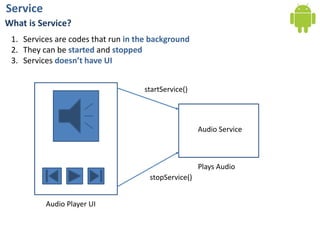
1. Services are codes that run in the background
2. They can be started and stopped
3. Services doesn’t have UI
Audio Service
startService()
stopService()
Audio Player UI
Plays Audio
Service
What a Service is NOT?
There are some confusions:
1. A Service is not a separate process. The Service object itself does not imply it is
running in its own process; unless otherwise specified, it runs in the same
process as the application it is part of.
2. A Service is not a thread. It is not a means itself to do work off of the main
thread (to avoid Application Not Responding errors).
Main Features of Service
1. to tell the system about something it wants to be doing in the background (even when
the user is not directly interacting with the application)
2. to calls to Context.startService(), which ask the system to schedule work for the service,
to be run until the service or someone else explicitly stop it.
Service
Service Example
We’ll create a simple ServiceDemo application which runs in background and shows
notification in the upper Notification Bar with a period of specified time
1. We create a project with following:
Project Name: ServiceDemo
Build Target: 1.6
Application name: ServiceDemo
Package name:
com.basistraining.servicedemo
Create Activity:
ServiceDemoActivity
Min SDK Version: 4
Service
Service Example (Contd.)
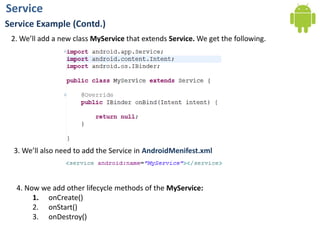
2. We’ll add a new class MyService that extends Service. We get the following.
3. We’ll also need to add the Service in AndroidMenifest.xml
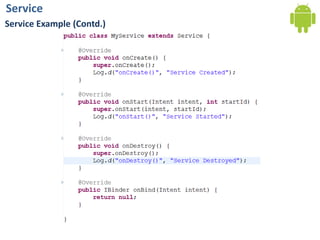
4. Now we add other lifecycle methods of the MyService:
1. onCreate()
2. onStart()
3. onDestroy()
Service
Service Example (Contd.)
Service
Service Example (Contd.)
Service
Service Example (Contd.)
Now let’s make the Layout res/layout/main.xml to have 2 buttons to start and stop the
Service
There are only 2 buttons with id “@+id/btnStart” and “@+id/btnStop”
Service
Service Example (Contd.)
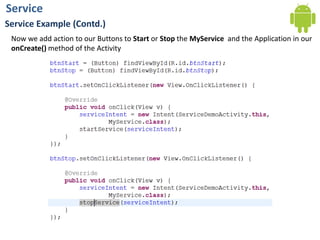
Now we add action to our Buttons to Start or Stop the MyService and the Application in our
onCreate() method of the Activity
Service
Service Example (Contd.)
If we run the app and test we’ll see our buttons are starting and stopping the service in LogCat
Service
Service Example (Contd.)
Now to do something on Starting of our Service, we do following:
Now to stop the timer, we do following:
Service
Service Example (Contd.)
If we run the app and test we’ll see our buttons are starting and stopping the service in LogCat
Service
Service Example (Contd.)
Now, Let we want to show a notification in the Notification Bar instead of just LogCat
Service
Service Example (Contd.)
If we run the app and test we’ll see our buttons are starting and stopping the service in
Notification

Day 15: Working in Background

  • 1.
    Android Application Development Service AhsanulKarim ahsanul.karim@sentinelbd.com Sentinel Solutions Ltd. http://www.sentinelbd.com
  • 2.
    Application Building Blocks •UI Component Typically Corresponding to one screen. Activity • Responds to notifications or status changes. Can wake up your process. IntentReceiver • Faceless task that runs in the background. Service • Enable applications to share data.ContentProvider
  • 3.
    Android Application Anatomy Activities 1.Provides User Interface 2. Usually represents a Single Screen 3. Can contain one/more Views 4. Extends the Activity Base class Services 1. No User Interface 2. Runs in Background 3. Extends the Service Base Class Application= Set of Android Components Content Provider 1. Makes application data available to other apps 2. Data stored in SQLite database 3. Extends the ContentProvider Base class Intent/Broadcast Receiver 1. Receives and Reacts to broadcast Intents 2. No UI but can start an Activity 3. Extends the BroadcastReceiver Base Class
  • 4.
    Service What is Service? 1.Services are codes that run in the background 2. They can be started and stopped 3. Services doesn’t have UI Audio Service startService() stopService() Audio Player UI Plays Audio
  • 5.
    Service What a Serviceis NOT? There are some confusions: 1. A Service is not a separate process. The Service object itself does not imply it is running in its own process; unless otherwise specified, it runs in the same process as the application it is part of. 2. A Service is not a thread. It is not a means itself to do work off of the main thread (to avoid Application Not Responding errors). Main Features of Service 1. to tell the system about something it wants to be doing in the background (even when the user is not directly interacting with the application) 2. to calls to Context.startService(), which ask the system to schedule work for the service, to be run until the service or someone else explicitly stop it.
  • 6.
    Service Service Example We’ll createa simple ServiceDemo application which runs in background and shows notification in the upper Notification Bar with a period of specified time 1. We create a project with following: Project Name: ServiceDemo Build Target: 1.6 Application name: ServiceDemo Package name: com.basistraining.servicedemo Create Activity: ServiceDemoActivity Min SDK Version: 4
  • 7.
    Service Service Example (Contd.) 2.We’ll add a new class MyService that extends Service. We get the following. 3. We’ll also need to add the Service in AndroidMenifest.xml 4. Now we add other lifecycle methods of the MyService: 1. onCreate() 2. onStart() 3. onDestroy()
  • 8.
  • 9.
  • 10.
    Service Service Example (Contd.) Nowlet’s make the Layout res/layout/main.xml to have 2 buttons to start and stop the Service There are only 2 buttons with id “@+id/btnStart” and “@+id/btnStop”
  • 11.
    Service Service Example (Contd.) Nowwe add action to our Buttons to Start or Stop the MyService and the Application in our onCreate() method of the Activity
  • 12.
    Service Service Example (Contd.) Ifwe run the app and test we’ll see our buttons are starting and stopping the service in LogCat
  • 13.
    Service Service Example (Contd.) Nowto do something on Starting of our Service, we do following: Now to stop the timer, we do following:
  • 14.
    Service Service Example (Contd.) Ifwe run the app and test we’ll see our buttons are starting and stopping the service in LogCat
  • 15.
    Service Service Example (Contd.) Now,Let we want to show a notification in the Notification Bar instead of just LogCat
  • 16.
    Service Service Example (Contd.) Ifwe run the app and test we’ll see our buttons are starting and stopping the service in Notification