Android Application Development
    Android Internals: A Quick Overview


                                                  Ahsanul Karim
                               http://androidstream.wordpress.com
What is Android?
An Open Platform for Mobile Development
Google’s Andy Rubin describes Android as:

The first truly open and comprehensive platform for mobile
devices, all of the software to run a mobile phone but without   the
proprietary obstacles that have hindered mobile innovation

  Android is a software    stack for wide range of devices
  including mobiles, tablets and televisions that includes an
         Operating System
         Middleware
         Key Applications.
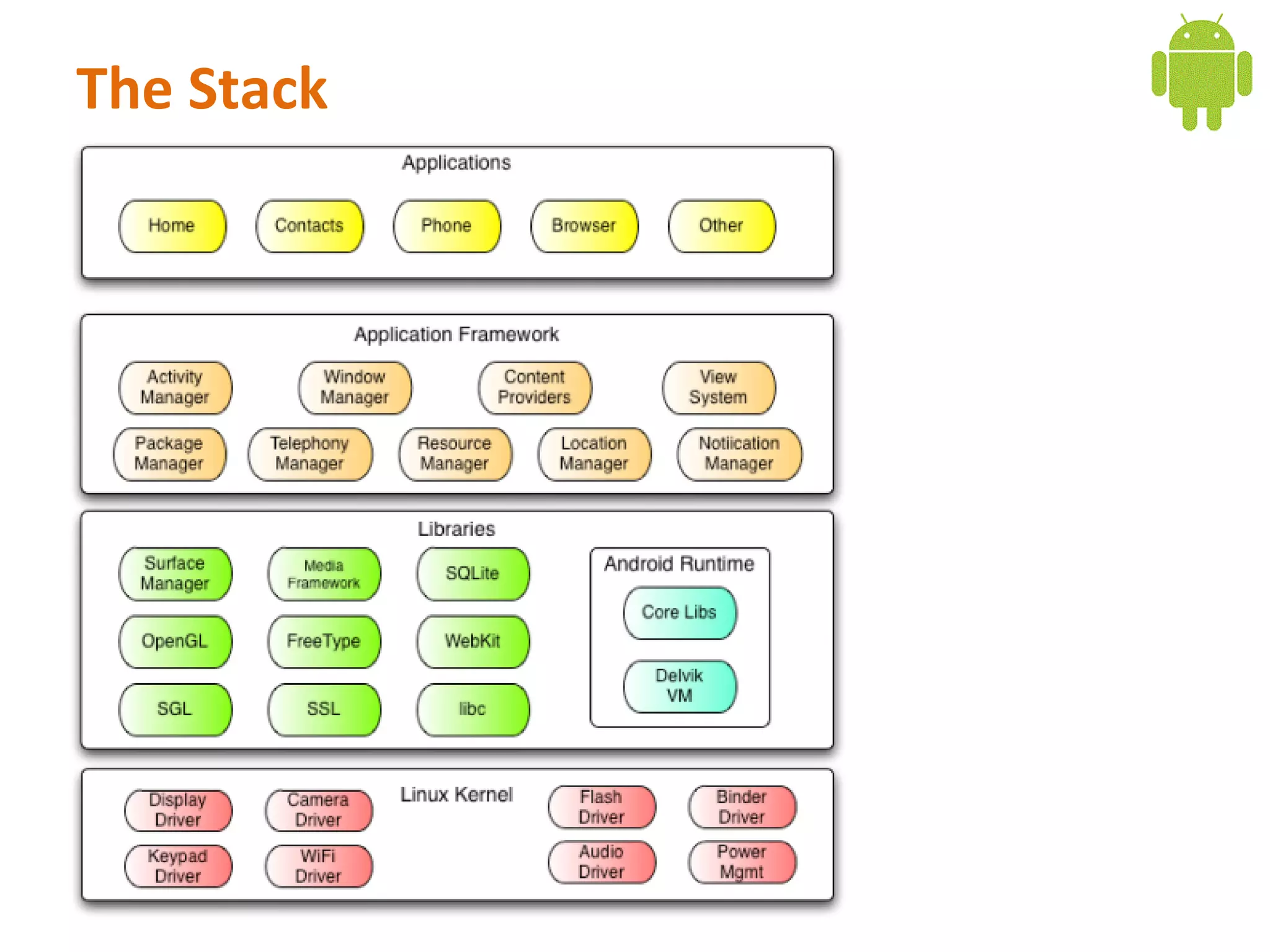
The Stack
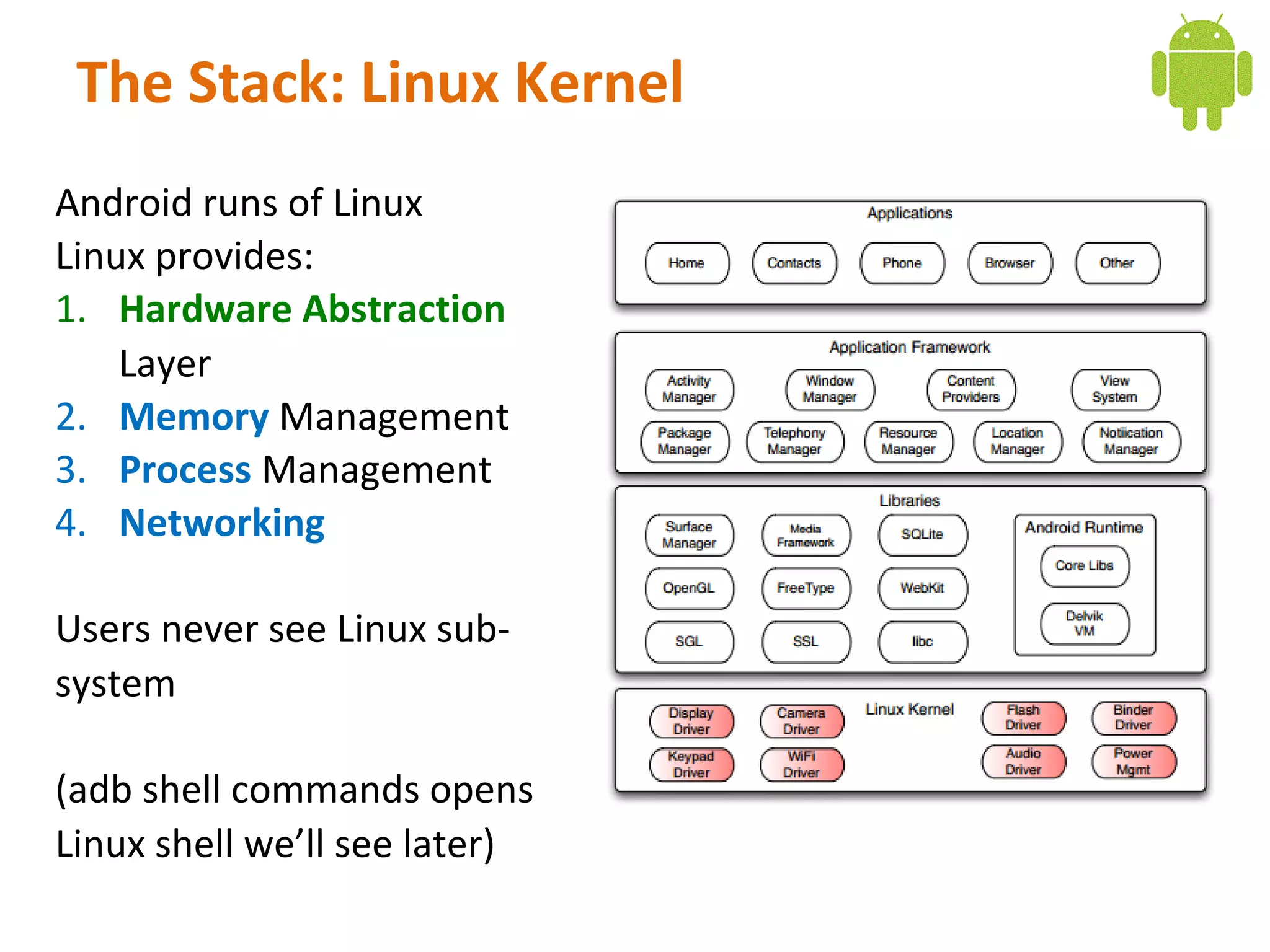
The Stack: Linux Kernel
Android runs of Linux
Linux provides:
1. Hardware Abstraction
    Layer
2. Memory Management
3. Process Management
4. Networking

Users never see Linux sub-
system

(adb shell commands opens
Linux shell we’ll see later)
The Stack: Linux Kernel
Android runs of Linux
Linux provides:
1. Hardware Abstraction
    Layer
2. Memory Management
3. Process Management
4. Networking

Users never see Linux sub-
system

(adb shell commands opens
Linux shell we’ll see later)
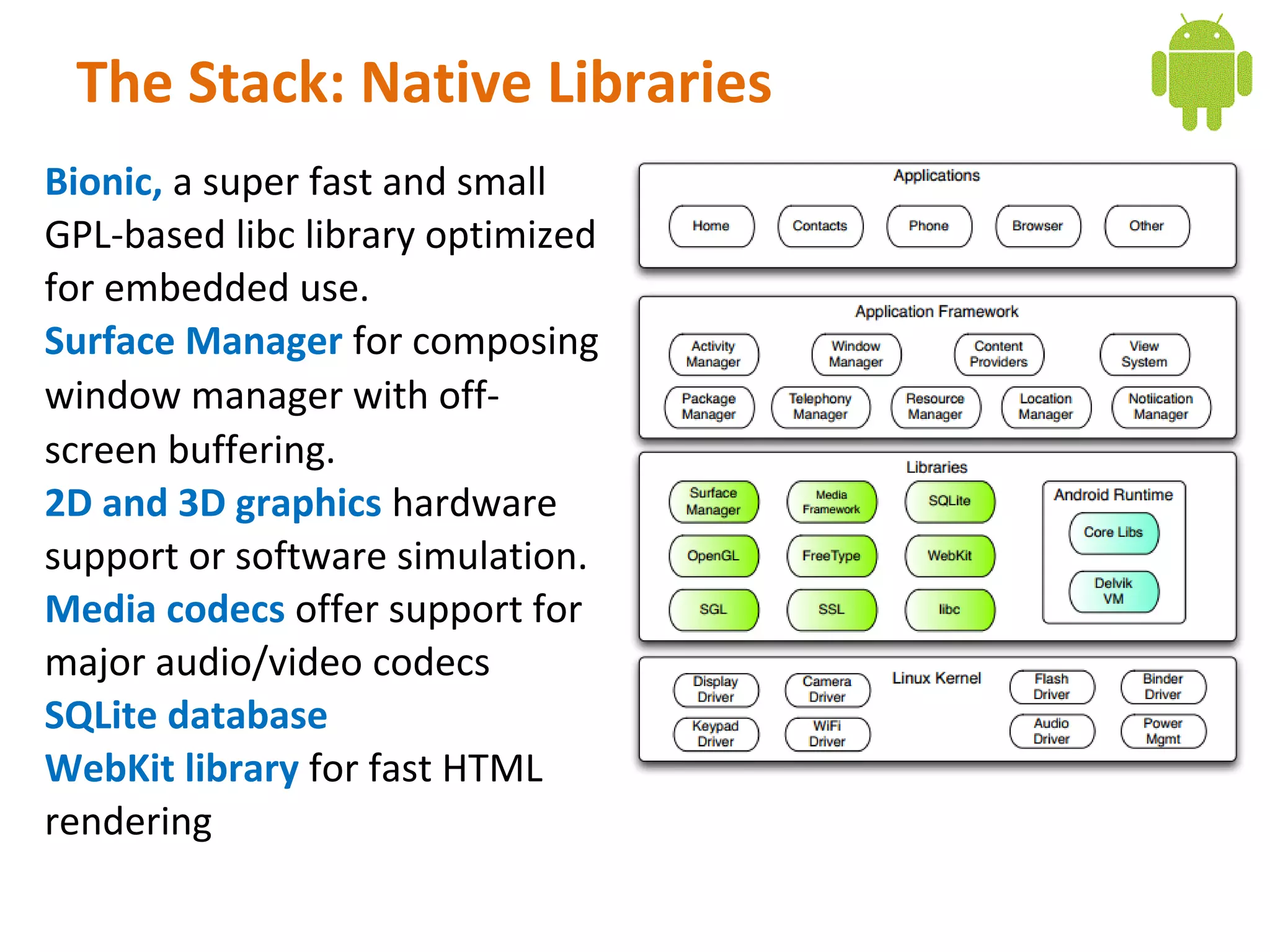
The Stack: Native Libraries
Bionic, a super fast and small
GPL-based libc library optimized
for embedded use.
Surface Manager for composing
window manager with off-
screen buffering.
2D and 3D graphics hardware
support or software simulation.
Media codecs offer support for
major audio/video codecs
SQLite database
WebKit library for fast HTML
rendering
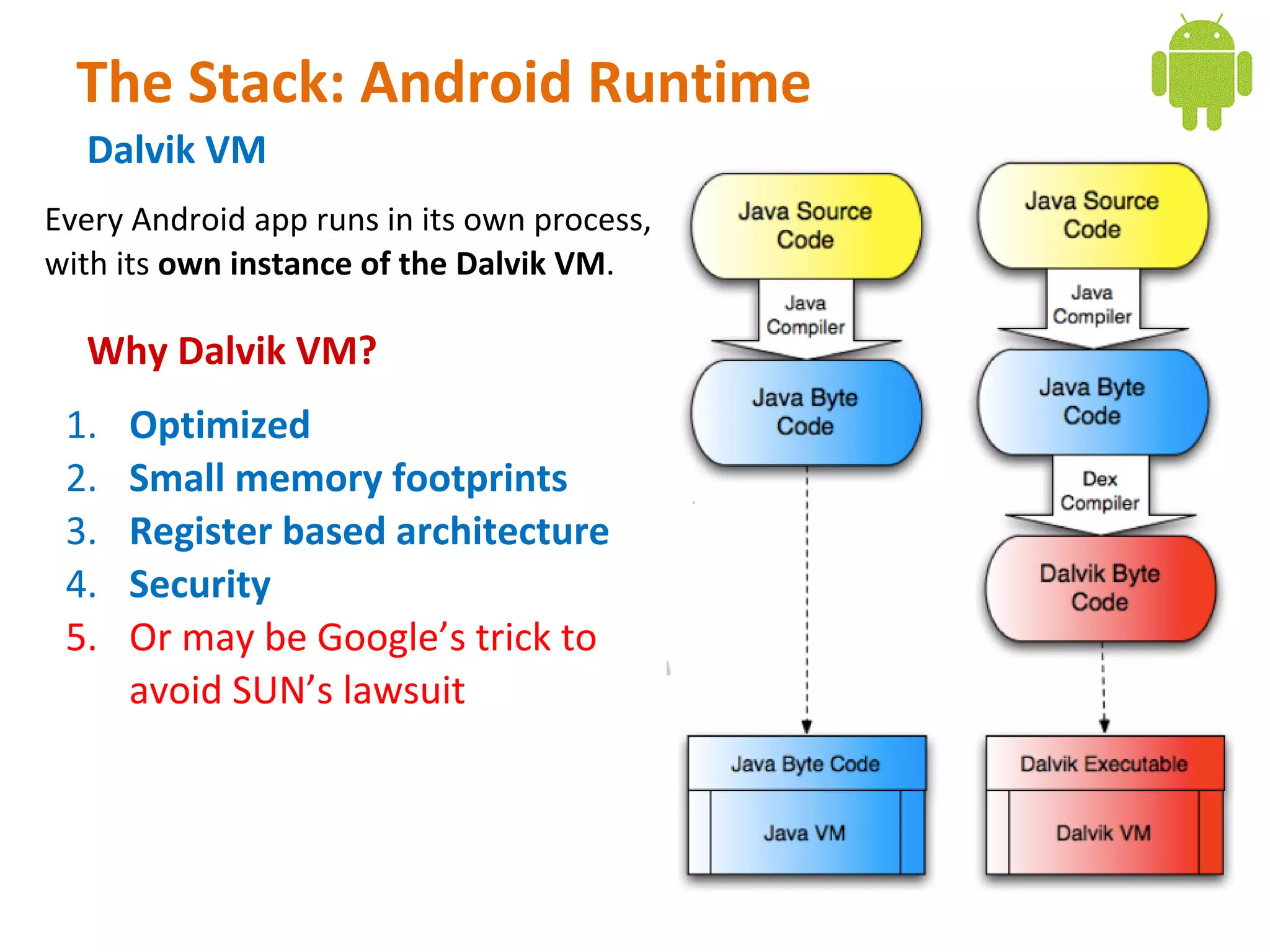
The Stack: Android Runtime
  Dalvik VM
Every Android app runs in its own process,
with its own instance of the Dalvik VM.

  Why Dalvik VM?
 1.   Optimized
 2.   Small memory footprints
 3.   Register based architecture
 4.   Security
 5.   Or may be Google’s trick to
      avoid SUN’s lawsuit
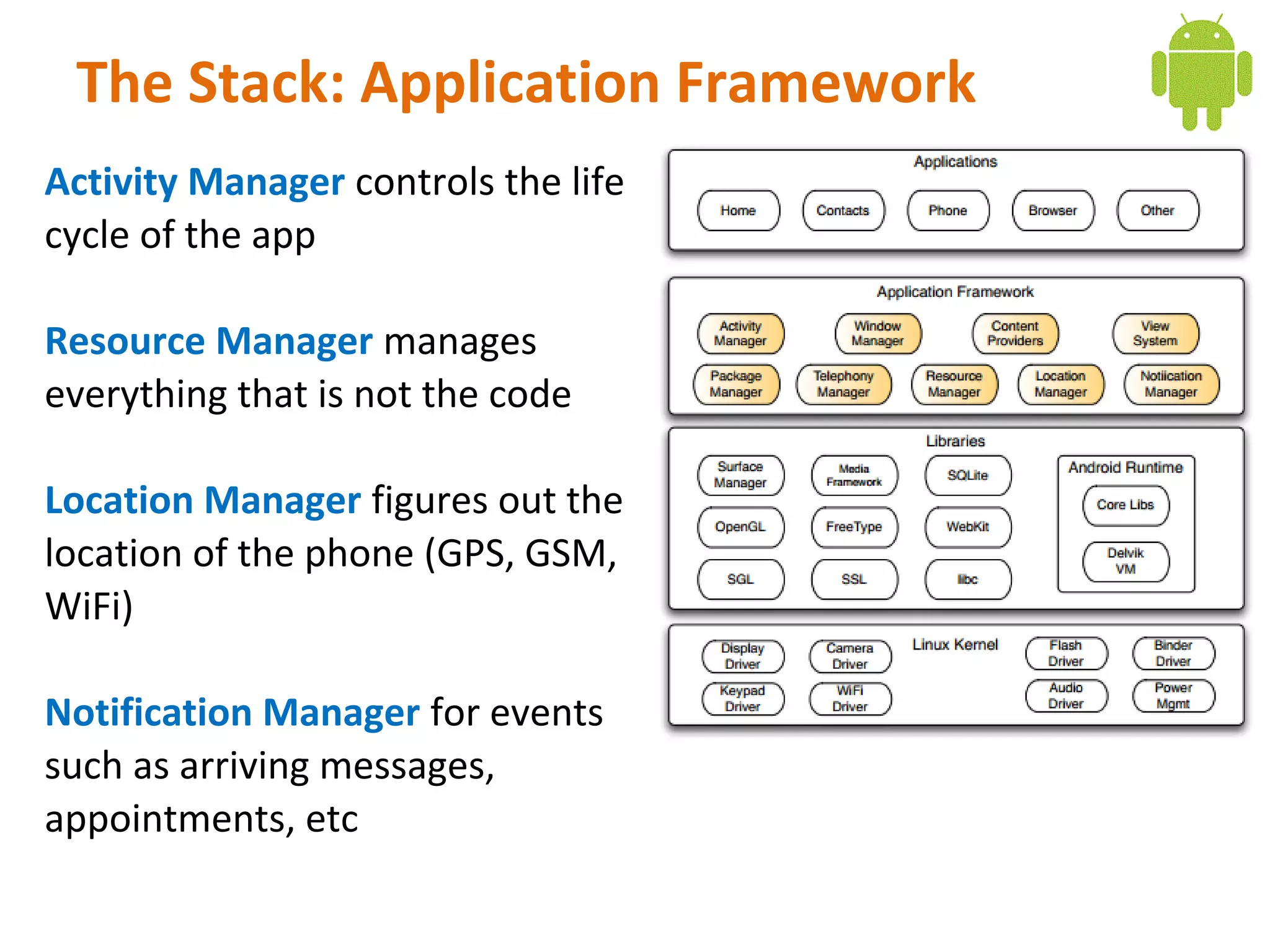
The Stack: Application Framework
Activity Manager controls the life
cycle of the app

Resource Manager manages
everything that is not the code

Location Manager figures out the
location of the phone (GPS, GSM,
WiFi)

Notification Manager for events
such as arriving messages,
appointments, etc
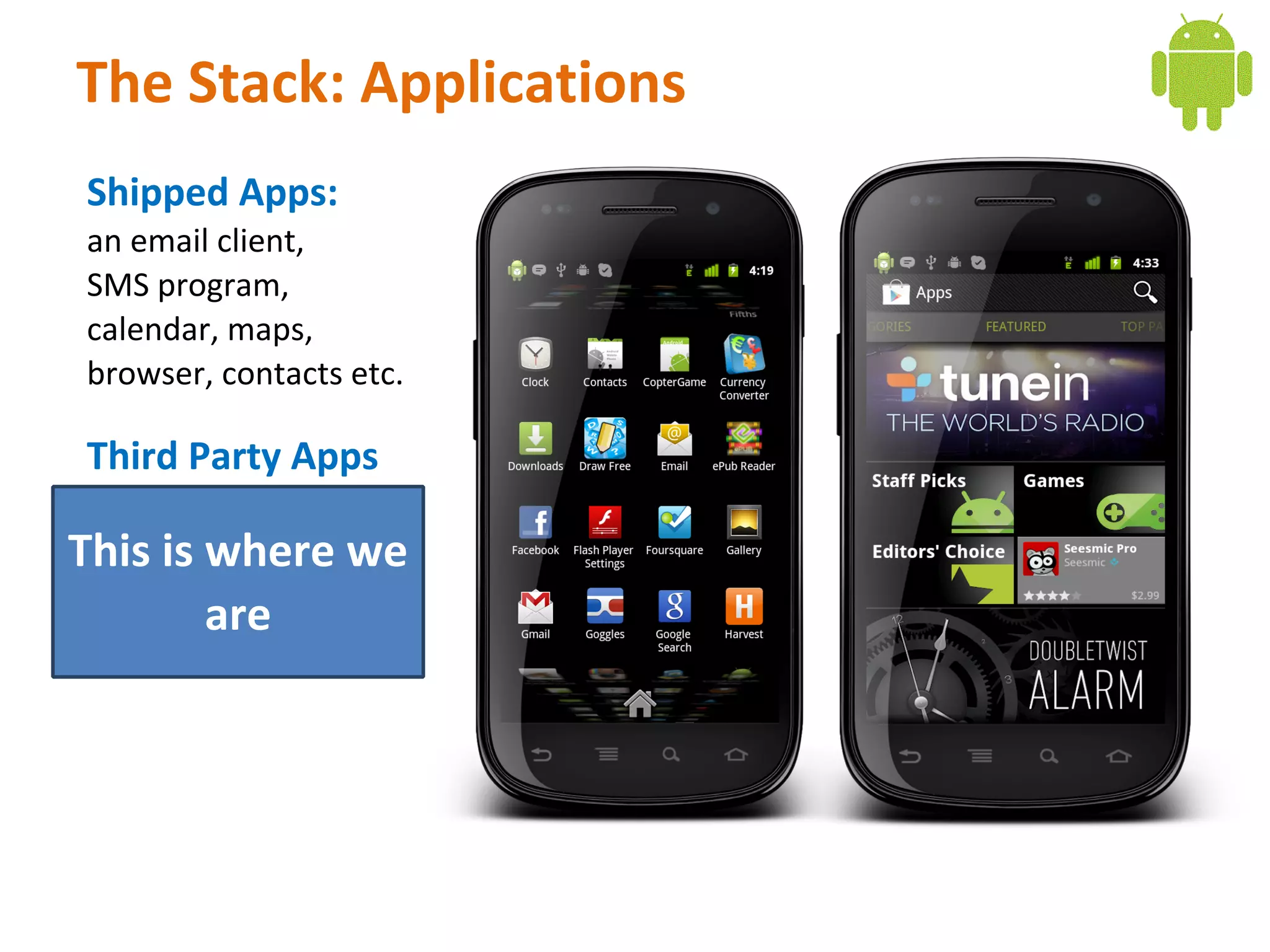
The Stack: Applications
Shipped Apps:
an email client,
SMS program,
calendar, maps,
browser, contacts etc.

Third Party Apps

This is where we
        are
What is Android SDK
Provides all necessary tools to develop Android applications. This includes
1.   a compiler,
2.   debugger
3.   a device emulator,
4.   Own virtual machine to run Android programs.


     background processing rich user interface library
        OpenGL libraries access to the file system
                     embedded    SQLite database
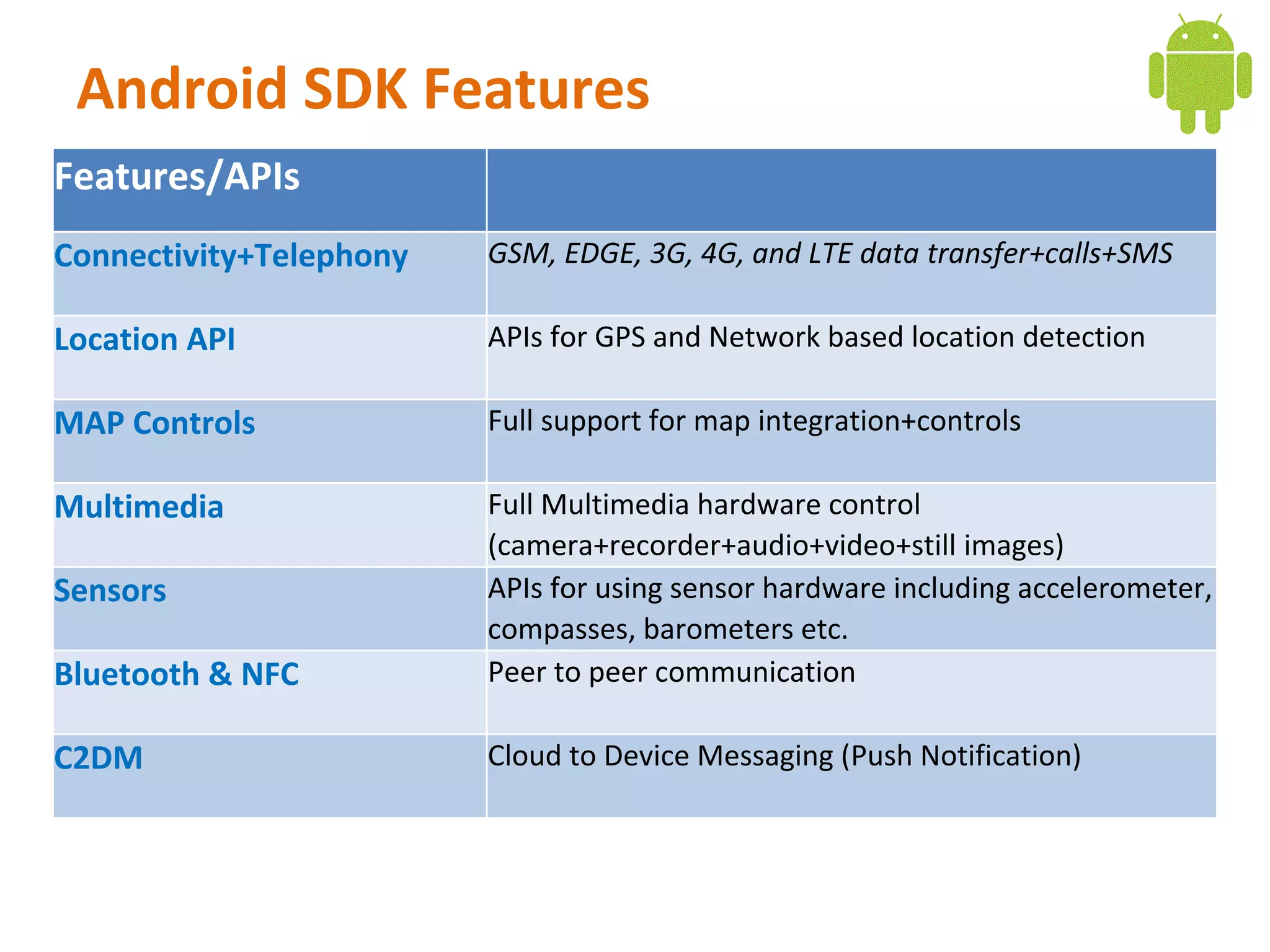
Android SDK Features
Features/APIs
Connectivity+Telephony   GSM, EDGE, 3G, 4G, and LTE data transfer+calls+SMS

Location API             APIs for GPS and Network based location detection

MAP Controls             Full support for map integration+controls

Multimedia               Full Multimedia hardware control
                         (camera+recorder+audio+video+still images)
Sensors                  APIs for using sensor hardware including accelerometer,
                         compasses, barometers etc.
Bluetooth & NFC          Peer to peer communication

C2DM                     Cloud to Device Messaging (Push Notification)
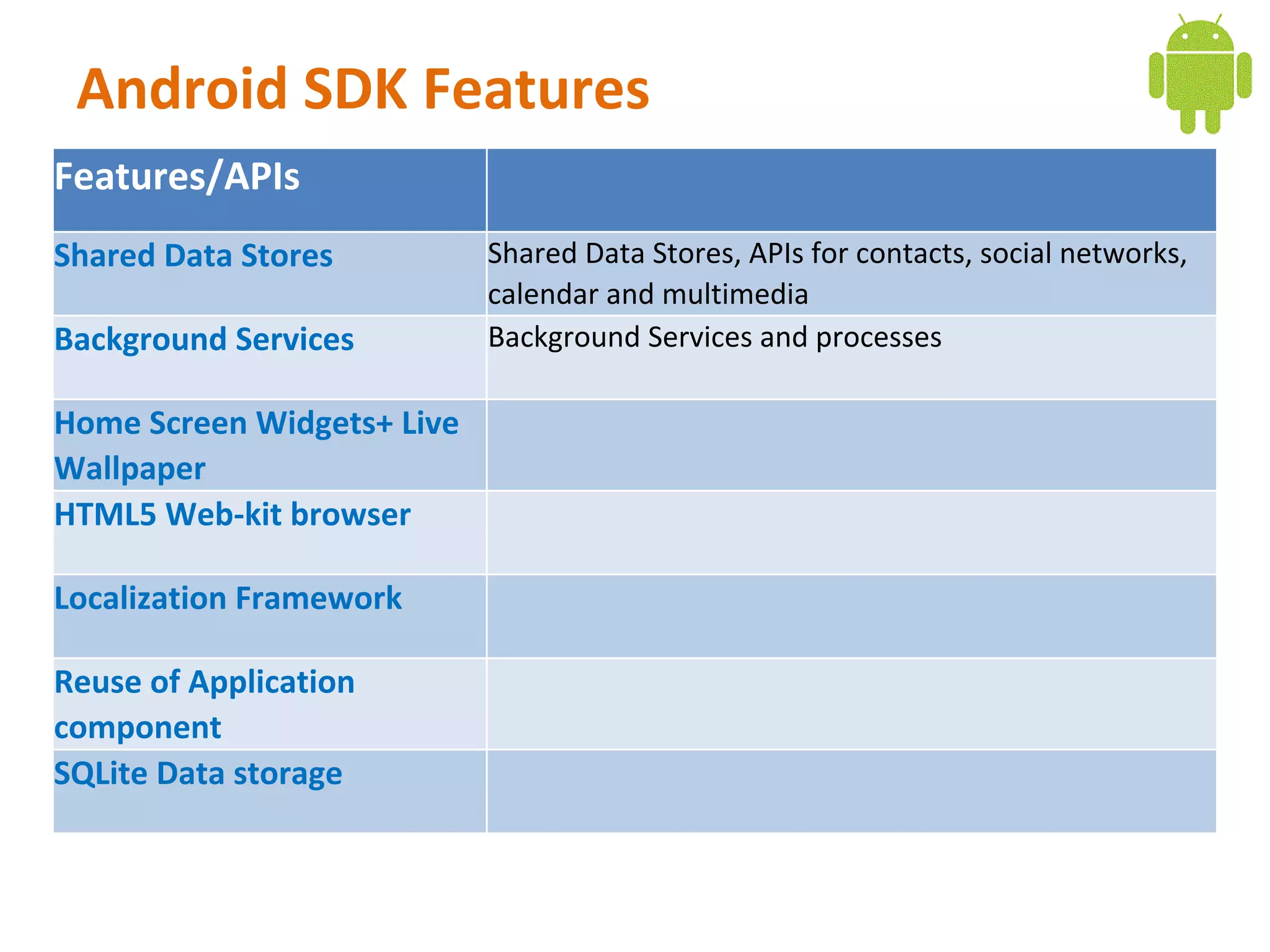
Android SDK Features
Features/APIs
Shared Data Stores          Shared Data Stores, APIs for contacts, social networks,
                            calendar and multimedia
Background Services         Background Services and processes

Home Screen Widgets+ Live
Wallpaper
HTML5 Web-kit browser

Localization Framework

Reuse of Application
component
SQLite Data storage
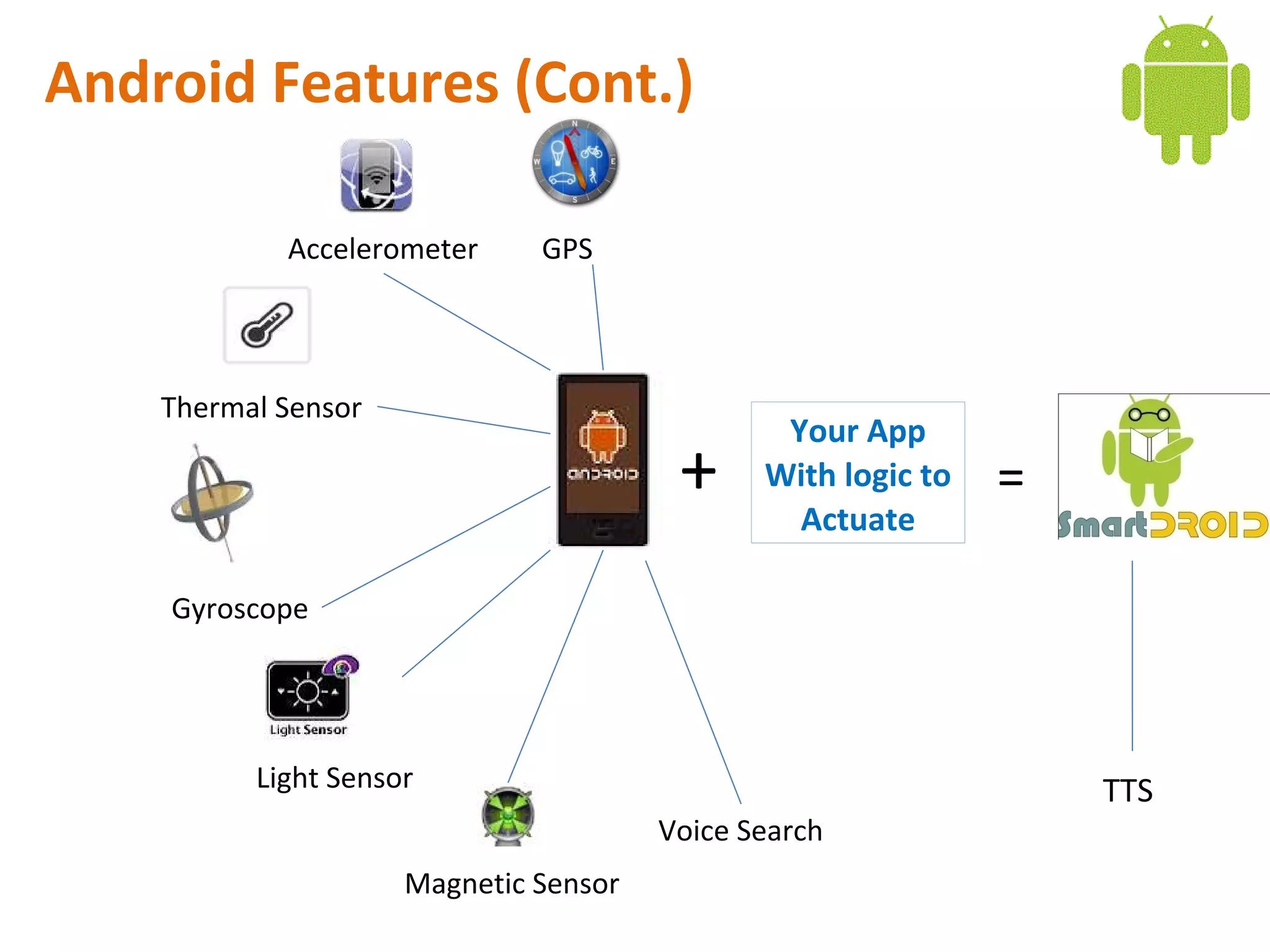
Android Features (Cont.)

            Accelerometer     GPS


    Thermal Sensor
                                               Your App
                                        +     With logic to
                                                Actuate
                                                              =

    Gyroscope


          Light Sensor                                            TTS
                                       Voice Search
                     Magnetic Sensor

Day 2 android internals a quick overview

  • 1.
    Android Application Development Android Internals: A Quick Overview Ahsanul Karim http://androidstream.wordpress.com
  • 2.
    What is Android? AnOpen Platform for Mobile Development Google’s Andy Rubin describes Android as: The first truly open and comprehensive platform for mobile devices, all of the software to run a mobile phone but without the proprietary obstacles that have hindered mobile innovation Android is a software stack for wide range of devices including mobiles, tablets and televisions that includes an Operating System Middleware Key Applications.
  • 3.
  • 4.
    The Stack: LinuxKernel Android runs of Linux Linux provides: 1. Hardware Abstraction Layer 2. Memory Management 3. Process Management 4. Networking Users never see Linux sub- system (adb shell commands opens Linux shell we’ll see later)
  • 5.
    The Stack: LinuxKernel Android runs of Linux Linux provides: 1. Hardware Abstraction Layer 2. Memory Management 3. Process Management 4. Networking Users never see Linux sub- system (adb shell commands opens Linux shell we’ll see later)
  • 6.
    The Stack: NativeLibraries Bionic, a super fast and small GPL-based libc library optimized for embedded use. Surface Manager for composing window manager with off- screen buffering. 2D and 3D graphics hardware support or software simulation. Media codecs offer support for major audio/video codecs SQLite database WebKit library for fast HTML rendering
  • 7.
    The Stack: AndroidRuntime Dalvik VM Every Android app runs in its own process, with its own instance of the Dalvik VM. Why Dalvik VM? 1. Optimized 2. Small memory footprints 3. Register based architecture 4. Security 5. Or may be Google’s trick to avoid SUN’s lawsuit
  • 8.
    The Stack: ApplicationFramework Activity Manager controls the life cycle of the app Resource Manager manages everything that is not the code Location Manager figures out the location of the phone (GPS, GSM, WiFi) Notification Manager for events such as arriving messages, appointments, etc
  • 9.
    The Stack: Applications ShippedApps: an email client, SMS program, calendar, maps, browser, contacts etc. Third Party Apps This is where we are
  • 10.
    What is AndroidSDK Provides all necessary tools to develop Android applications. This includes 1. a compiler, 2. debugger 3. a device emulator, 4. Own virtual machine to run Android programs. background processing rich user interface library OpenGL libraries access to the file system embedded SQLite database
  • 11.
    Android SDK Features Features/APIs Connectivity+Telephony GSM, EDGE, 3G, 4G, and LTE data transfer+calls+SMS Location API APIs for GPS and Network based location detection MAP Controls Full support for map integration+controls Multimedia Full Multimedia hardware control (camera+recorder+audio+video+still images) Sensors APIs for using sensor hardware including accelerometer, compasses, barometers etc. Bluetooth & NFC Peer to peer communication C2DM Cloud to Device Messaging (Push Notification)
  • 12.
    Android SDK Features Features/APIs SharedData Stores Shared Data Stores, APIs for contacts, social networks, calendar and multimedia Background Services Background Services and processes Home Screen Widgets+ Live Wallpaper HTML5 Web-kit browser Localization Framework Reuse of Application component SQLite Data storage
  • 13.
    Android Features (Cont.) Accelerometer GPS Thermal Sensor Your App + With logic to Actuate = Gyroscope Light Sensor TTS Voice Search Magnetic Sensor