Android offers three types of application menus: options menus which appear when the user presses the menu button and contains the primary menu items for an activity; context menus which open with a long press on a view; and submenus which are nested menus that appear when an options menu item is selected. Options menus can be icon menus displaying the first six items or expanded menus showing additional items, and Android provides methods for creating, updating, and responding to selection of menu items. Context menus also allow registering views for long press context menus and handling item selection.
Menus are vital for user interaction in apps; Android provides Options Menu, Context Menu, and Submenu.
Options Menus are primary user actions; types include Icon and Expanded Menus. Key methods are onCreateOptionsMenu() and onOptionsItemSelected().
Context Menus enhance user interaction by providing options on long-press actions. Important methods include registerForContextMenu() and onCreateContextMenu().
Sub Menus offer nested options within a menu; added dynamically with addSubMenu() and accessed using onOptionsItemSelected().
Examples illustrate Options Menu and Context Menu, showcasing distinct functionalities triggered by user interactions.
Menus
• Menus arean important part of an activity's user
interface, which provide users a familiar way to perform
actions.
• Android offers a simple framework for you to add
standard menus to your application.
• There are three types of application menus:
• Options Menu
• Context Menu
• Submenu
3.
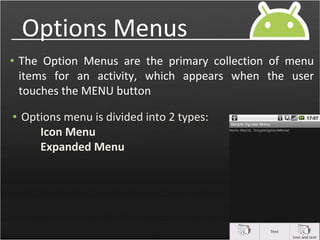
Options Menus
• TheOption Menus are the primary collection of menu
items for an activity, which appears when the user
touches the MENU button
• Options menu is divided into 2 types:
Icon Menu
Expanded Menu
4.
Options Menus
Icon Menu
Optionsmenu can have any number of menu options, but
only the first six options are shown directly when the
MENU key is clicked and this is called as Icon Menu.
Expanded Menu
In case there are more than six options then first five are
shows directly and remaining are available when more
button is clicked and is called as Expanded Menu
5.
Methods of OptionMenus
onCreateOptionsMenu()
This method of the Activity is called when the user
clicks the Menu Key of the device.
onOptionItemSelected()
This method of the activity is called when a particular
Item/Option of the menu is clicked.
add()
Multiple add() methods are available. Use the one that
accepts itemId as a parameter.
setIcon() : This is used for assigning icon with the option
6.
Context Menus
Android providesthe facility to open a menu in context
with the object clicked. A Long-press on the view will bring
up the registered Context menu.
registerForContextMenu()
Using this method view is registered for context menu.
onCreateContextMenu()
This method will call when we Click on(long press) registered
view
onCreateContextMenu()
This method will call when ever we select the item/option
7.
Sub Menus
• Afloating list of menu items that appears when the user
touches a menu item that contains a nested menu.
addSubMenu()
By this method we will dynamically add a submenu to an
existing Menu
onOptionsItemSelected()
This method is called when a submenu item is selected.
8.
Examples on Menus
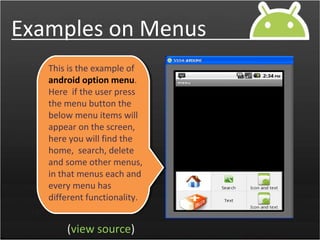
Thisis the example of
android option menu.
Here if the user press
the menu button the
below menu items will
appear on the screen,
here you will find the
home, search, delete
and some other menus,
in that menus each and
every menu has
different functionality.
(view source)
9.
Examples on Menus
(viewsource)
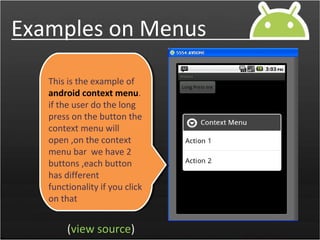
This is the example of
android context menu.
if the user do the long
press on the button the
context menu will
open ,on the context
menu bar we have 2
buttons ,each button
has different
functionality if you click
on that