Android Application DevelopmentAndroid and InternetAhsanul Karimahsanul.karim@sentinelbd.comSentinel Solutions Ltd.http://www.sentinelbd.com
Connecting to the InternetHttp Connection ExampleIn this example we’ll see:How to use HttpClient object to send http requestsHow to get response data and show themFor manipulating HTTP requests/responses in an Android environment, the standard classes from the java.net package can be used. Thus, classes such as URL, URLConnection, HttpURLConnection etc., can all be used in the known way.
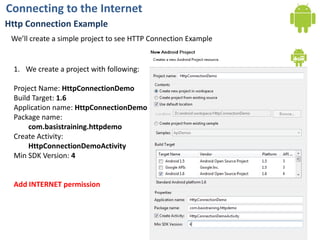
Connecting to the InternetHttp Connection ExampleWe’ll create a simple project to see HTTP Connection ExampleWe create a project with following:Project Name: HttpConnectionDemoBuild Target: 1.6Application name:HttpConnectionDemoPackage name: com.basistraining.httpdemoCreate Activity:HttpConnectionDemoActivityMin SDK Version: 4Add INTERNET permission
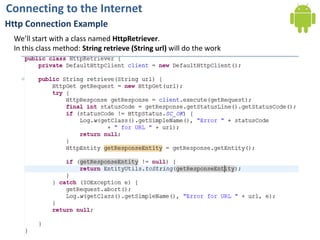
Connecting to the InternetHttp Connection ExampleWe’ll start with a class named HttpRetriever.In this class method: String retrieve (String url) will do the work
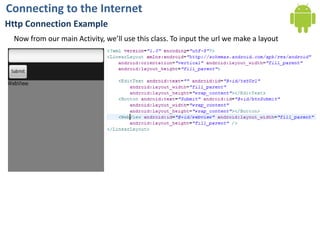
Connecting to the InternetHttp Connection ExampleNow from our main Activity, we’ll use this class. To input the url we make a layout
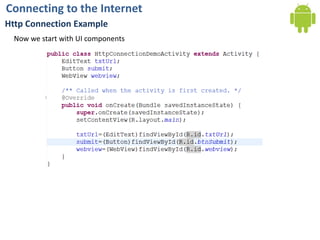
Connecting to the InternetHttp Connection ExampleNow we start with UI components
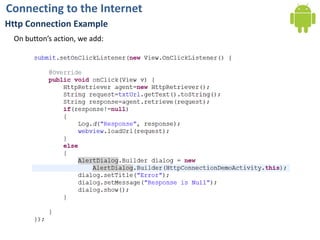
Connecting to the InternetHttp Connection ExampleOn button’s action, we add:
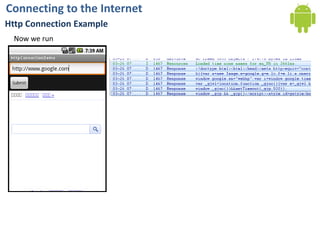
Connecting to the InternetHttp Connection ExampleNow we run
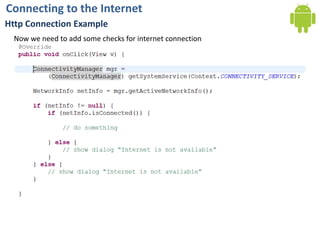
Connecting to the InternetHttp Connection ExampleNow we need to add some checks for internet connection
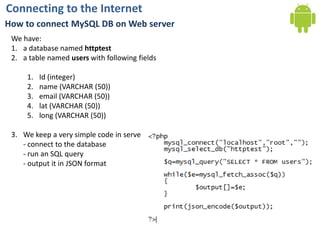
Connecting to the InternetHow to connect MySQL DB on Web serverWe have: a database named httptesta table named users with following fieldsId (integer)name (VARCHAR (50))email (VARCHAR (50))lat (VARCHAR (50))long (VARCHAR (50))We keep a very simple code in server side- connect to the database- run an SQL query- output it in JSON format
Connecting to the InternetHow to connect MySQL DB on Web serverAs response we get JSON data:[{“id”:”1”,"name":"john",       "email":"john@a.com",       "lat":"23.4567",       "long":"90.86777"},{“id”:”2”,"name":"smith",        "email":"smith@b.com",        "lat":"23.6767",        "long":"90.986765"}]
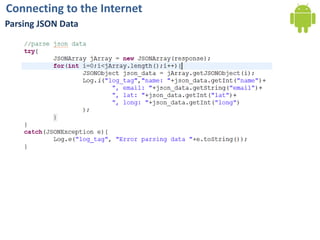
Connecting to the InternetParsing JSON Data

Client-Server

  • 1.
    Android Application DevelopmentAndroidand InternetAhsanul Karimahsanul.karim@sentinelbd.comSentinel Solutions Ltd.http://www.sentinelbd.com
  • 2.
    Connecting to theInternetHttp Connection ExampleIn this example we’ll see:How to use HttpClient object to send http requestsHow to get response data and show themFor manipulating HTTP requests/responses in an Android environment, the standard classes from the java.net package can be used. Thus, classes such as URL, URLConnection, HttpURLConnection etc., can all be used in the known way.
  • 3.
    Connecting to theInternetHttp Connection ExampleWe’ll create a simple project to see HTTP Connection ExampleWe create a project with following:Project Name: HttpConnectionDemoBuild Target: 1.6Application name:HttpConnectionDemoPackage name: com.basistraining.httpdemoCreate Activity:HttpConnectionDemoActivityMin SDK Version: 4Add INTERNET permission
  • 4.
    Connecting to theInternetHttp Connection ExampleWe’ll start with a class named HttpRetriever.In this class method: String retrieve (String url) will do the work
  • 5.
    Connecting to theInternetHttp Connection ExampleNow from our main Activity, we’ll use this class. To input the url we make a layout
  • 6.
    Connecting to theInternetHttp Connection ExampleNow we start with UI components
  • 7.
    Connecting to theInternetHttp Connection ExampleOn button’s action, we add:
  • 8.
    Connecting to theInternetHttp Connection ExampleNow we run
  • 9.
    Connecting to theInternetHttp Connection ExampleNow we need to add some checks for internet connection
  • 10.
    Connecting to theInternetHow to connect MySQL DB on Web serverWe have: a database named httptesta table named users with following fieldsId (integer)name (VARCHAR (50))email (VARCHAR (50))lat (VARCHAR (50))long (VARCHAR (50))We keep a very simple code in server side- connect to the database- run an SQL query- output it in JSON format
  • 11.
    Connecting to theInternetHow to connect MySQL DB on Web serverAs response we get JSON data:[{“id”:”1”,"name":"john", "email":"john@a.com", "lat":"23.4567", "long":"90.86777"},{“id”:”2”,"name":"smith", "email":"smith@b.com", "lat":"23.6767", "long":"90.986765"}]
  • 12.
    Connecting to theInternetParsing JSON Data