Android application development 
Broadcast 
Receiver
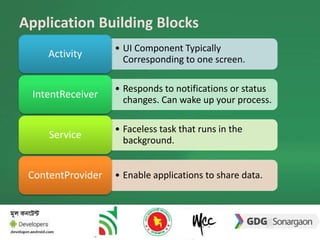
Application Building Blocks 
• UI Component Typically 
Corresponding to one screen. 
Activity 
• Responds to notifications or status 
changes. Can wake up your process. 
IntentReceiver 
• Faceless task that runs in the 
background. 
Service 
ContentProvider • Enable applications to share data.
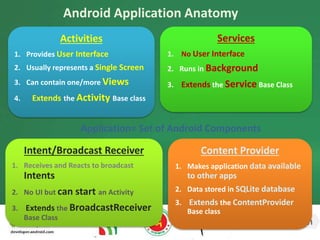
Android Application Anatomy 
Activities 
1. Provides User Interface 
2. Usually represents a Single Screen 
3. Can contain one/more Views 
4. Extends the Activity Base class 
Services 
1. No User Interface 
2. Runs in Background 
3. Extends the Service Base Class 
Application= Set of Android Components 
Content Provider 
1. Makes application data available 
to other apps 
2. Data stored in SQLite database 
3. Extends the ContentProvider 
Base class 
Intent/Broadcast Receiver 
1. Receives and Reacts to broadcast 
Intents 
2. No UI but can start an Activity 
3. Extends the BroadcastReceiver 
Base Class
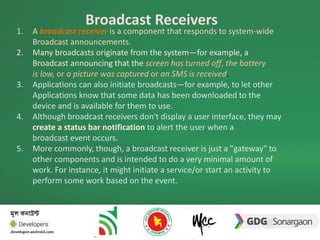
Broadcast Receivers 
1. A broadcast receiver is a component that responds to system-wide 
Broadcast announcements. 
2. Many broadcasts originate from the system—for example, a 
Broadcast announcing that the screen has turned off, the battery 
is low, or a picture was captured or an SMS is received. 
3. Applications can also initiate broadcasts—for example, to let other 
Applications know that some data has been downloaded to the 
device and is available for them to use. 
4. Although broadcast receivers don't display a user interface, they may 
create a status bar notification to alert the user when a 
broadcast event occurs. 
5. More commonly, though, a broadcast receiver is just a "gateway" to 
other components and is intended to do a very minimal amount of 
work. For instance, it might initiate a service/or start an activity to 
perform some work based on the event.
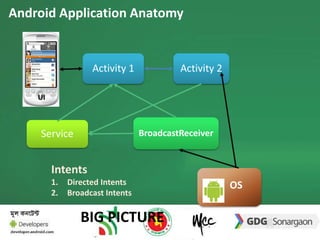
Android Application Anatomy 
UI 
Activity 1 
Service 
Activity 2 
BroadcastReceiver 
OS 
Intents 
1. Directed Intents 
2. Broadcast Intents 
BIG PICTURE
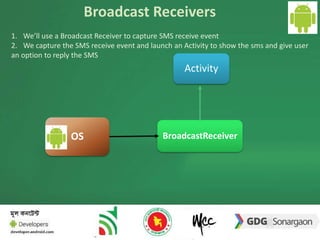
Broadcast Receivers 
1. We’ll use a Broadcast Receiver to capture SMS receive event 
2. We capture the SMS receive event and launch an Activity to show the sms and give user 
an option to reply the SMS 
Activity 
OS BroadcastReceiver
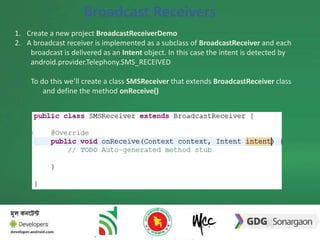
Broadcast Receivers 
1. Create a new project BroadcastReceiverDemo 
2. A broadcast receiver is implemented as a subclass of BroadcastReceiver and each 
broadcast is delivered as an Intent object. In this case the intent is detected by 
android.provider.Telephony.SMS_RECEIVED 
To do this we’ll create a class SMSReceiver that extends BroadcastReceiver class 
and define the method onReceive() 
BroadcastReceiver
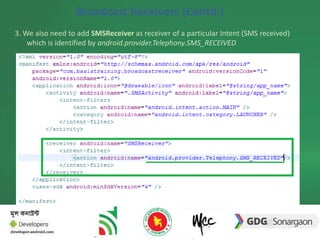
Broadcast Receivers (Contd.) 
3. We also need to add SMSReceiver as receiver of a particular Intent (SMS received) 
which is identified by android.provider.Telephony.SMS_RECEIVED 
BroadcastReceiver
Broadcast Receivers (Contd.) 
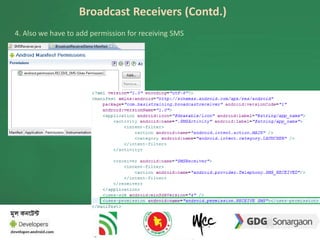
4. Also we have to add permission for receiving SMS 
BroadcastReceiver
Broadcast Receivers (Contd.) 
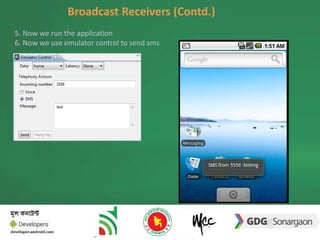
5. Now we run the application 
6. Now we use emulator control to send sms
Receiving SMS 
Bundle bundle = intent.getExtras(); 
SmsMessage[] msgs = null; 
String str = ""; 
String address=""; 
if (bundle != null) 
{ 
//---retrieve the SMS message received--- 
Object[] pdus = (Object[]) bundle.get("pdus"); 
msgs = new SmsMessage[pdus.length]; 
for (int i=0; i<msgs.length; i++) 
{ 
msgs[i] = SmsMessage.createFromPdu((byte[])pdus[i]); 
str += "SMS from " + msgs[i].getOriginatingAddress(); 
str += " :"; 
str += msgs[i].getMessageBody().toString(); 
str += "n"; 
address=msgs[i].getOriginatingAddress(); 
Toast.makeText(context, str, Toast.LENGTH_LONG).show(); 
}
Sending SMS 
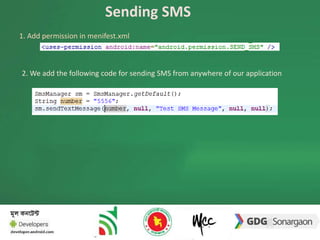
1. Add permission in menifest.xml 
2. We add the following code for sending SMS from anywhere of our application
Exercise 
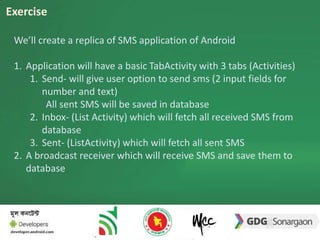
We’ll create a replica of SMS application of Android 
1. Application will have a basic TabActivity with 3 tabs (Activities) 
1. Send- will give user option to send sms (2 input fields for 
number and text) 
All sent SMS will be saved in database 
2. Inbox- (List Activity) which will fetch all received SMS from 
database 
3. Sent- (ListActivity) which will fetch all sent SMS 
2. A broadcast receiver which will receive SMS and save them to 
database
Thank You.

Broadcast Receiver

  • 1.
  • 2.
    Application Building Blocks • UI Component Typically Corresponding to one screen. Activity • Responds to notifications or status changes. Can wake up your process. IntentReceiver • Faceless task that runs in the background. Service ContentProvider • Enable applications to share data.
  • 3.
    Android Application Anatomy Activities 1. Provides User Interface 2. Usually represents a Single Screen 3. Can contain one/more Views 4. Extends the Activity Base class Services 1. No User Interface 2. Runs in Background 3. Extends the Service Base Class Application= Set of Android Components Content Provider 1. Makes application data available to other apps 2. Data stored in SQLite database 3. Extends the ContentProvider Base class Intent/Broadcast Receiver 1. Receives and Reacts to broadcast Intents 2. No UI but can start an Activity 3. Extends the BroadcastReceiver Base Class
  • 4.
    Broadcast Receivers 1.A broadcast receiver is a component that responds to system-wide Broadcast announcements. 2. Many broadcasts originate from the system—for example, a Broadcast announcing that the screen has turned off, the battery is low, or a picture was captured or an SMS is received. 3. Applications can also initiate broadcasts—for example, to let other Applications know that some data has been downloaded to the device and is available for them to use. 4. Although broadcast receivers don't display a user interface, they may create a status bar notification to alert the user when a broadcast event occurs. 5. More commonly, though, a broadcast receiver is just a "gateway" to other components and is intended to do a very minimal amount of work. For instance, it might initiate a service/or start an activity to perform some work based on the event.
  • 5.
    Android Application Anatomy UI Activity 1 Service Activity 2 BroadcastReceiver OS Intents 1. Directed Intents 2. Broadcast Intents BIG PICTURE
  • 6.
    Broadcast Receivers 1.We’ll use a Broadcast Receiver to capture SMS receive event 2. We capture the SMS receive event and launch an Activity to show the sms and give user an option to reply the SMS Activity OS BroadcastReceiver
  • 7.
    Broadcast Receivers 1.Create a new project BroadcastReceiverDemo 2. A broadcast receiver is implemented as a subclass of BroadcastReceiver and each broadcast is delivered as an Intent object. In this case the intent is detected by android.provider.Telephony.SMS_RECEIVED To do this we’ll create a class SMSReceiver that extends BroadcastReceiver class and define the method onReceive() BroadcastReceiver
  • 8.
    Broadcast Receivers (Contd.) 3. We also need to add SMSReceiver as receiver of a particular Intent (SMS received) which is identified by android.provider.Telephony.SMS_RECEIVED BroadcastReceiver
  • 9.
    Broadcast Receivers (Contd.) 4. Also we have to add permission for receiving SMS BroadcastReceiver
  • 10.
    Broadcast Receivers (Contd.) 5. Now we run the application 6. Now we use emulator control to send sms
  • 11.
    Receiving SMS Bundlebundle = intent.getExtras(); SmsMessage[] msgs = null; String str = ""; String address=""; if (bundle != null) { //---retrieve the SMS message received--- Object[] pdus = (Object[]) bundle.get("pdus"); msgs = new SmsMessage[pdus.length]; for (int i=0; i<msgs.length; i++) { msgs[i] = SmsMessage.createFromPdu((byte[])pdus[i]); str += "SMS from " + msgs[i].getOriginatingAddress(); str += " :"; str += msgs[i].getMessageBody().toString(); str += "n"; address=msgs[i].getOriginatingAddress(); Toast.makeText(context, str, Toast.LENGTH_LONG).show(); }
  • 12.
    Sending SMS 1.Add permission in menifest.xml 2. We add the following code for sending SMS from anywhere of our application
  • 13.
    Exercise We’ll createa replica of SMS application of Android 1. Application will have a basic TabActivity with 3 tabs (Activities) 1. Send- will give user option to send sms (2 input fields for number and text) All sent SMS will be saved in database 2. Inbox- (List Activity) which will fetch all received SMS from database 3. Sent- (ListActivity) which will fetch all sent SMS 2. A broadcast receiver which will receive SMS and save them to database
  • 14.