JAVA MEDIA FRAMEWORK
Ms. Vishwakarma Payal Rambali Shailkumari
M.Sc.-II (Computer Science)
Roll No: 05
Outline
 What is Java Media Framework?
 Creating Media Player .
 Prefetching the Media .
 Adding the Player to your Application .
 Registering the Applet as a Listener .
 Starting the Player .
 Cleaning up and Stopping the Player .
 The States of the Player .
 Adding Controls to the Player .
 Setting the Media Time and Changing Rate .
 Features of JMF .
What is Java Media Framework ?
 The java media framework provides the means to present all
kinds of interesting media type.
 The java media framework is an API for integrating
advanced media formats into java, such as video and
sound.
 The media framework has several components, including
media players, media capture, and conferencing .
 A key to any of these topics is in providing a timing
mechanism, which determines when the next part of the
media should be played. It is important to have a
mechanism to keep a video stream playing at the same
speed as accompanying sound stream.
Creating a Media Player
 By creating an applet that uses a media player. Putting the
media into applet involve a few basic steps:
1. Create the URL for media file.
2. Create the player for the media.
3. Tell the player to prefetch .
4. Add the player to the applet.
5. Start the player.
Creating a Media Player
 To create the player you utilize the Manager class. The
Manager class is actually the hub for getting both the
timebase and the players.
 The first task is to create an URL for file then to create the
player.
 Example : In the BasicPlayer class, following are happens in
the init() method.
Creating a Player and it’s
associated URL
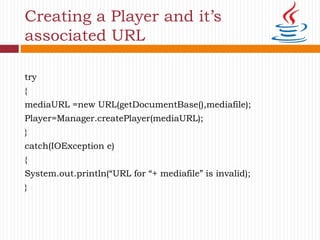
try
{
mediaURL =new URL(getDocumentBase(),mediafile);
Player=Manager.createPlayer(mediaURL);
}
catch(IOException e)
{
System.out.println(“URL for “+ mediafile” is invalid);
}
Prefetching the Media
 Prefetching causes two things:
1. The player goes through a process called realization.
2. It then starts to download the media file so that some of it
can be cached.
 This reduces the latency time before the player can start
actually playing the media.
 Example : In the BasicPlayer class, following are happens in
the start() method.
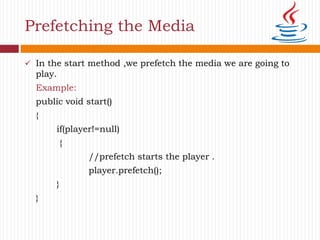
 In the start method ,we prefetch the media we are going to
play.
Example:
public void start()
{
if(player!=null)
{
//prefetch starts the player .
player.prefetch();
}
}
Prefetching the Media
Adding Player to your Application
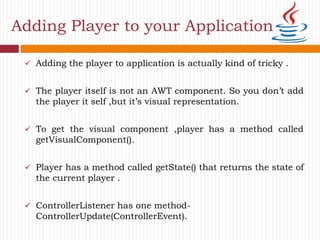
 Adding the player to application is actually kind of tricky .
 The player itself is not an AWT component. So you don’t add
the player it self ,but it’s visual representation.
 To get the visual component ,player has a method called
getVisualComponent().
 Player has a method called getState() that returns the state of
the current player .
 ControllerListener has one method-
ControllerUpdate(ControllerEvent).
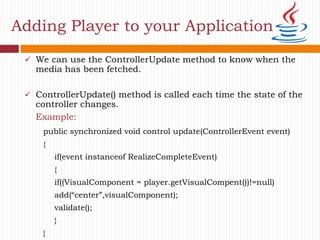
 We can use the ControllerUpdate method to know when the
media has been fetched.
 ControllerUpdate() method is called each time the state of the
controller changes.
Example:
Adding Player to your Application
public synchronized void control update(ControllerEvent event)
{
if(event instanceof RealizeCompleteEvent)
{
if((VisualComponent = player.getVisualCompent())!=null)
add(“center”,visualComponent);
validate();
}
}
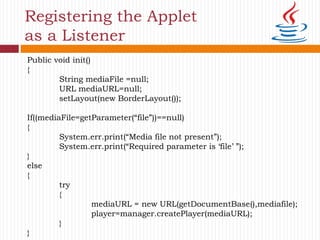
Registering the Applet
as a Listener
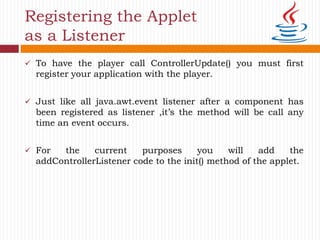
 To have the player call ControllerUpdate() you must first
register your application with the player.
 Just like all java.awt.event listener after a component has
been registered as listener ,it’s the method will be call any
time an event occurs.
 For the current purposes you will add the
addControllerListener code to the init() method of the applet.
Public void init()
{
String mediaFile =null;
URL mediaURL=null;
setLayout(new BorderLayout());
If((mediaFile=getParameter(“file”))==null)
{
System.err.print(“Media file not present”);
System.err.print(“Required parameter is ‘file’ ”);
}
else
{
try
{
mediaURL = new URL(getDocumentBase(),mediafile);
player=manager.createPlayer(mediaURL);
}
}
Registering the Applet
as a Listener
Starting the Player
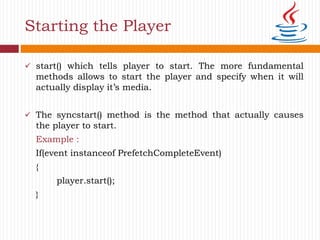
 start() which tells player to start. The more fundamental
methods allows to start the player and specify when it will
actually display it’s media.
 The syncstart() method is the method that actually causes
the player to start.
Example :
If(event instanceof PrefetchCompleteEvent)
{
player.start();
}
Cleaning Up and Stopping the
Player
 stop() method must be used to stop the media player and
clean up.
 The stop() method is called when browser leaves the current
web pages. After browser leaves the page, we should stop
playing the current media.
 One addition step we should take-removing the media from
memory. The player has deallocate() method. As soon as you
know that you no longer need a media ,you should tell the
player to deallocate it so that it can be garbage collected.
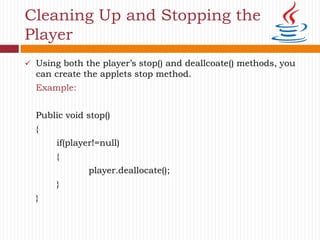
 Using both the player’s stop() and deallcoate() methods, you
can create the applets stop method.
Example:
Public void stop()
{
if(player!=null)
{
player.deallocate();
}
}
Cleaning Up and Stopping the
Player
States of the Players
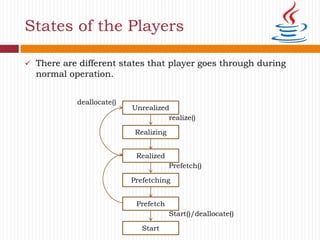
 There are different states that player goes through during
normal operation.
Unrealized
realize()
Realizing
Realized
Prefetch()
Prefetching
Prefetch
Start()/deallocate()
Start
deallocate()
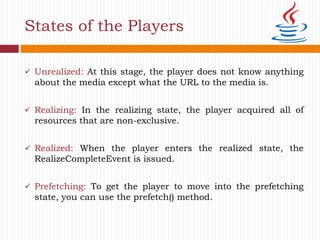
 Unrealized: At this stage, the player does not know anything
about the media except what the URL to the media is.
 Realizing: In the realizing state, the player acquired all of
resources that are non-exclusive.
 Realized: When the player enters the realized state, the
RealizeCompleteEvent is issued.
 Prefetching: To get the player to move into the prefetching
state, you can use the prefetch() method.
States of the Players
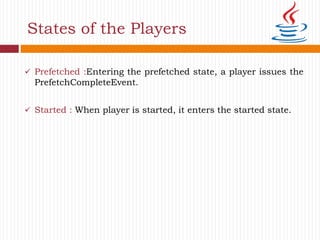
 Prefetched :Entering the prefetched state, a player issues the
PrefetchCompleteEvent.
 Started : When player is started, it enters the started state.
States of the Players
Adding Controls to the Players
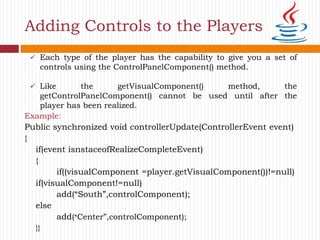
Example:
Public synchronized void controllerUpdate(ControllerEvent event)
{
if(event isnstaceofRealizeCompleteEvent)
{
if((visualComponent =player.getVisualComponent())!=null)
if(visualComponent!=null)
add(“South”,controlComponent);
else
add(“Center”,controlComponent);
}}
 Each type of the player has the capability to give you a set of
controls using the ControlPanelComponent() method.
 Like the getVisualComponent() method, the
getControlPanelComponent() cannot be used until after the
player has been realized.
Setting the media time and
Changing rate
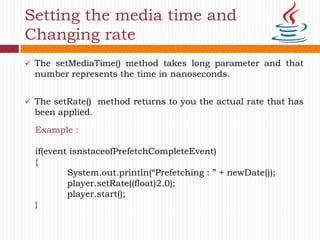
 The setMediaTime() method takes long parameter and that
number represents the time in nanoseconds.
 The setRate() method returns to you the actual rate that has
been applied.
Example :
if(event isnstaceofPrefetchCompleteEvent)
{
System.out.println(“Prefetching : ” + newDate());
player.setRate((float)2.0);
player.start();
}
Features of JMF
 JMF supports many popular media formats such as JPEG,
MPEG-1, MPEG-2, QuickTime, AVI, WAV, MP3, GSM, G723,
H263, and MIDI.
 JMF supports popular media access protocols such as file,
HTTP, HTTPS, FTP, RTP, and RTSP.
 JMF uses a well-defined event reporting mechanism that follows
the “Observer” design pattern. JMF uses the “Factory” design
pattern that simplifies the creation of JMF objects.
 The JMF support the reception and transmission of media
streams using Real-time Transport Protocol (RTP) and JMF
supports management of RTP sessions.
References
 Book:
Advanced JAVA
 Websites:
 http://www.programming.com/GepBook/Chapter7/M3L1.p
pt
 https://web.cs.dal.ca/~mheywood/CSCI6506/HandOuts/N
04-Deception.pdf
Thank you . . .!!!!!

Java media framework

  • 1.
    JAVA MEDIA FRAMEWORK Ms.Vishwakarma Payal Rambali Shailkumari M.Sc.-II (Computer Science) Roll No: 05
  • 2.
    Outline  What isJava Media Framework?  Creating Media Player .  Prefetching the Media .  Adding the Player to your Application .  Registering the Applet as a Listener .  Starting the Player .  Cleaning up and Stopping the Player .  The States of the Player .  Adding Controls to the Player .  Setting the Media Time and Changing Rate .  Features of JMF .
  • 3.
    What is JavaMedia Framework ?  The java media framework provides the means to present all kinds of interesting media type.  The java media framework is an API for integrating advanced media formats into java, such as video and sound.  The media framework has several components, including media players, media capture, and conferencing .  A key to any of these topics is in providing a timing mechanism, which determines when the next part of the media should be played. It is important to have a mechanism to keep a video stream playing at the same speed as accompanying sound stream.
  • 4.
    Creating a MediaPlayer  By creating an applet that uses a media player. Putting the media into applet involve a few basic steps: 1. Create the URL for media file. 2. Create the player for the media. 3. Tell the player to prefetch . 4. Add the player to the applet. 5. Start the player.
  • 5.
    Creating a MediaPlayer  To create the player you utilize the Manager class. The Manager class is actually the hub for getting both the timebase and the players.  The first task is to create an URL for file then to create the player.  Example : In the BasicPlayer class, following are happens in the init() method.
  • 6.
    Creating a Playerand it’s associated URL try { mediaURL =new URL(getDocumentBase(),mediafile); Player=Manager.createPlayer(mediaURL); } catch(IOException e) { System.out.println(“URL for “+ mediafile” is invalid); }
  • 7.
    Prefetching the Media Prefetching causes two things: 1. The player goes through a process called realization. 2. It then starts to download the media file so that some of it can be cached.  This reduces the latency time before the player can start actually playing the media.  Example : In the BasicPlayer class, following are happens in the start() method.
  • 8.
     In thestart method ,we prefetch the media we are going to play. Example: public void start() { if(player!=null) { //prefetch starts the player . player.prefetch(); } } Prefetching the Media
  • 9.
    Adding Player toyour Application  Adding the player to application is actually kind of tricky .  The player itself is not an AWT component. So you don’t add the player it self ,but it’s visual representation.  To get the visual component ,player has a method called getVisualComponent().  Player has a method called getState() that returns the state of the current player .  ControllerListener has one method- ControllerUpdate(ControllerEvent).
  • 10.
     We canuse the ControllerUpdate method to know when the media has been fetched.  ControllerUpdate() method is called each time the state of the controller changes. Example: Adding Player to your Application public synchronized void control update(ControllerEvent event) { if(event instanceof RealizeCompleteEvent) { if((VisualComponent = player.getVisualCompent())!=null) add(“center”,visualComponent); validate(); } }
  • 11.
    Registering the Applet asa Listener  To have the player call ControllerUpdate() you must first register your application with the player.  Just like all java.awt.event listener after a component has been registered as listener ,it’s the method will be call any time an event occurs.  For the current purposes you will add the addControllerListener code to the init() method of the applet.
  • 12.
    Public void init() { StringmediaFile =null; URL mediaURL=null; setLayout(new BorderLayout()); If((mediaFile=getParameter(“file”))==null) { System.err.print(“Media file not present”); System.err.print(“Required parameter is ‘file’ ”); } else { try { mediaURL = new URL(getDocumentBase(),mediafile); player=manager.createPlayer(mediaURL); } } Registering the Applet as a Listener
  • 13.
    Starting the Player start() which tells player to start. The more fundamental methods allows to start the player and specify when it will actually display it’s media.  The syncstart() method is the method that actually causes the player to start. Example : If(event instanceof PrefetchCompleteEvent) { player.start(); }
  • 14.
    Cleaning Up andStopping the Player  stop() method must be used to stop the media player and clean up.  The stop() method is called when browser leaves the current web pages. After browser leaves the page, we should stop playing the current media.  One addition step we should take-removing the media from memory. The player has deallocate() method. As soon as you know that you no longer need a media ,you should tell the player to deallocate it so that it can be garbage collected.
  • 15.
     Using boththe player’s stop() and deallcoate() methods, you can create the applets stop method. Example: Public void stop() { if(player!=null) { player.deallocate(); } } Cleaning Up and Stopping the Player
  • 16.
    States of thePlayers  There are different states that player goes through during normal operation. Unrealized realize() Realizing Realized Prefetch() Prefetching Prefetch Start()/deallocate() Start deallocate()
  • 17.
     Unrealized: Atthis stage, the player does not know anything about the media except what the URL to the media is.  Realizing: In the realizing state, the player acquired all of resources that are non-exclusive.  Realized: When the player enters the realized state, the RealizeCompleteEvent is issued.  Prefetching: To get the player to move into the prefetching state, you can use the prefetch() method. States of the Players
  • 18.
     Prefetched :Enteringthe prefetched state, a player issues the PrefetchCompleteEvent.  Started : When player is started, it enters the started state. States of the Players
  • 19.
    Adding Controls tothe Players Example: Public synchronized void controllerUpdate(ControllerEvent event) { if(event isnstaceofRealizeCompleteEvent) { if((visualComponent =player.getVisualComponent())!=null) if(visualComponent!=null) add(“South”,controlComponent); else add(“Center”,controlComponent); }}  Each type of the player has the capability to give you a set of controls using the ControlPanelComponent() method.  Like the getVisualComponent() method, the getControlPanelComponent() cannot be used until after the player has been realized.
  • 20.
    Setting the mediatime and Changing rate  The setMediaTime() method takes long parameter and that number represents the time in nanoseconds.  The setRate() method returns to you the actual rate that has been applied. Example : if(event isnstaceofPrefetchCompleteEvent) { System.out.println(“Prefetching : ” + newDate()); player.setRate((float)2.0); player.start(); }
  • 21.
    Features of JMF JMF supports many popular media formats such as JPEG, MPEG-1, MPEG-2, QuickTime, AVI, WAV, MP3, GSM, G723, H263, and MIDI.  JMF supports popular media access protocols such as file, HTTP, HTTPS, FTP, RTP, and RTSP.  JMF uses a well-defined event reporting mechanism that follows the “Observer” design pattern. JMF uses the “Factory” design pattern that simplifies the creation of JMF objects.  The JMF support the reception and transmission of media streams using Real-time Transport Protocol (RTP) and JMF supports management of RTP sessions.
  • 22.
    References  Book: Advanced JAVA Websites:  http://www.programming.com/GepBook/Chapter7/M3L1.p pt  https://web.cs.dal.ca/~mheywood/CSCI6506/HandOuts/N 04-Deception.pdf
  • 23.
    Thank you .. .!!!!!