Android Application Life Cycle and
SavedInstanceState
Presented by Gino Osahon
Developer/Startup Evangelist
Founder @ GDG Port Harcourt
Lead Community Manager @GDG Cloud Port Harcourt
Hub Manager @ Ken Saro-Wiwa Innovation Hub
I Tweet @Ginowinne
Focused On Building For The Android Platform
ABOUT GINO
Android Applications
An application consists of one or more components that are
defined in the application's manifest file. A component can be one
of the following:
1. An Activity
2. A Service
3. A broadcast Receiver
4. A content provider
Android Applications
An activity is a single, focused thing that the user can do. Almost all
activities interact with the user, so the Activity class takes care of
creating a window for you in which you can place your UI with
setContentView(View).
Although activities work together to form a cohesive user interface, each
activity is independent of the others
Moving from one activity to another is accomplished by have the current
activity start the next one through an intent
Activity
Android Applications
A Service is an application component that can perform long-running
operations in the background, and it does not provide a user interface.
Another application component can start a service, and it continues to
run in the background even if the user switches to another application
Services are used for repetitive and potentially long running operations,
i.e., Internet downloads, checking for new data, data processing,
updating content providers and the like.
Service
Android Applications
A broadcast receiver is a component that does nothing but receives and
react to broadcast announcements.
The Android system automatically sends broadcasts when various system
events occur, such as when the system switches in and out of airplane
mode. System broadcasts are sent to all apps that are subscribed to
receive the event.
Broadcast receivers do not display a user interface, However, they may
start an activity in response to the information they receive, or as a
service do, they may use the notification manager to alert the user
Broadcast Receiver
Android Applications
A content provider is an Android Component that manages access to a
central repository of data. A provider is part of an Android application,
which often provides its own UI for working with the data.
The data usually is stored in the file system, or in an SQLite database
The Content Provider class provides a set of methods that allows you to
perform query, insert, update, and delete operations on data stored in
the file system or SQLite database
Content Provider
Android Applications
Whenever there's a request that should be handled by a particular
component,
● Android makes sure that the application process of the component is
running
● Start it if necessary
● That an appropriate instance of the component is available, creating
the instance if necessary.
Every Android application runs in its own process
Android App Life Cycle
A linux process encapsulating an Android Application is created for the
application when some of it's code needs to be run, and will remain
running until
● it is no longer needed, OR
● The system needs to reclaim its memory for use by other
applications.
Android App Life Cycle
Instead, it is determined by the system through a
combination of
● How important these things are to the user, and
● How much overall memory is available in the system
An unusual and fundamental feature of Android is that an application
processes lifetime is not directly controlled by the application itself.
Android Activity Life Cycle
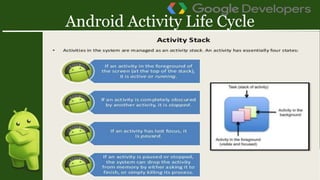
● Each time a new activity starts, the previous activity is
stopped, but the system preserves the activity in a
stack.
● When a new activity starts, it takes user focus
Android Activity Life Cycle
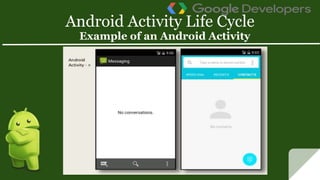
Example of an Android Activity
Android Activity Life Cycle
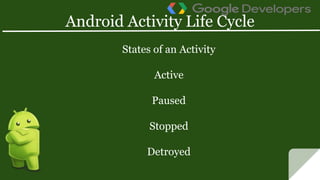
States of an Activity
Active
Paused
Stopped
Detroyed
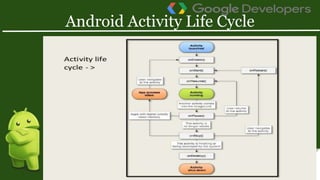
Activity Life Cycle Methods
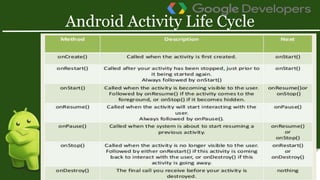
● Called when the activity is first created
● This is where you should do all of your normal
static set up like create views, bind data to lists,
and so on
● This method is passed a bundle object containing
the activities previous state, if that state was
captured
● Always followed by onState()
Method: onCreate()
Activity Life Cycle Methods
● Called after the activity has been stopped, just
prior to it being started again
● Always followed by onStart()
Method: onRestart()
Activity Life Cycle Methods
● Called just before the activity becomes visible to
the user
● Followed by onResume() if the activity comes to
the foreground, or onStop() if it becomes hidden
Method: onStart()
Activity Life Cycle Methods
● Called just before the activity starts interacting
with the user
● At this point the activity is at the top of the
activity stack, with user input going to it
● Always followed by onPause()
Method: onResume()
Activity Life Cycle Methods
● Called when the system is about to start resuming another
activity
● This method is typically used to commit unsaved changes
to persistent data, stop animation and other things that
may be consuming CPU and so on
● it should do whatever it does very quickly, because the next
activity will not be resumed until it returns
● followed either by onResume() if the activity returns back
to the
● The activity in this state is killable by the system
Method: onPause()
Activity Life Cycle Methods
● Called when the activity is no longer visible to the user
● This may happen because it is being destroyed, or because
another activity (either an existing one or a new one) has
been resumed and is covering it
● The activity in this state is killable by the system
Method: onStop()
Activity Life Cycle Methods
● Called before the activity is destroyed
● This is the final call that the activity will receive
● It could be called either because the activity is finishing
(someone called finish() on it), or because the system is
temporarily destroying this instance of the activity to save
space
● The activity in this state is killable by the system
Method: onDestroy()
Saving and Restoring the state of a user interface
● An activity, has the capability to save dynamic state information
via a call from the runtime system to the activity’s implementation
of the onSaveInstanceState() method
● Bundle object are used to store any dynamic data that needs to be
saved
● The State of an Activity can be saved by implementing the
onSaveInstanceState() method
● The State of an Activity can be restored in the onCreate() and
onRestoreInstanceState() methods
Saving Dynamic State
Saving and Restoring the state of a user interface
● To enable saving and restoring an Activity's state,
the onSavedInstance and onRestoreInstanceState
methods must be implemented.
Saving Dynamic State
Saving and Restoring the state of a user interface
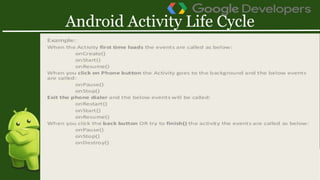
When you enter text in an editText View and then rotate the device,
the following state change sequence life cycle callBack methods are
called.
● onPause
● onSaveInstanceState
● onStop
● onDestroy
● onCreate
● onStart
● onRestoreInstanceState
● onResume
This result in the activity being destroyed and re-created.
Default Saving of User Interface State
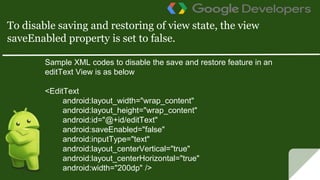
Sample XML codes to disable the save and restore feature in an
editText View is as below
<EditText
android:layout_width="wrap_content"
android:layout_height="wrap_content"
android:id="@+id/editText"
android:saveEnabled="false"
android:inputType="text"
android:layout_centerVertical="true"
android:layout_centerHorizontal="true"
android:width="200dp" />
To disable saving and restoring of view state, the view
saveEnabled property is set to false.
Presentation on Android application life cycle and saved instancestate

Presentation on Android application life cycle and saved instancestate

  • 1.
    Android Application LifeCycle and SavedInstanceState Presented by Gino Osahon
  • 2.
    Developer/Startup Evangelist Founder @GDG Port Harcourt Lead Community Manager @GDG Cloud Port Harcourt Hub Manager @ Ken Saro-Wiwa Innovation Hub I Tweet @Ginowinne Focused On Building For The Android Platform ABOUT GINO
  • 3.
    Android Applications An applicationconsists of one or more components that are defined in the application's manifest file. A component can be one of the following: 1. An Activity 2. A Service 3. A broadcast Receiver 4. A content provider
  • 4.
    Android Applications An activityis a single, focused thing that the user can do. Almost all activities interact with the user, so the Activity class takes care of creating a window for you in which you can place your UI with setContentView(View). Although activities work together to form a cohesive user interface, each activity is independent of the others Moving from one activity to another is accomplished by have the current activity start the next one through an intent Activity
  • 5.
    Android Applications A Serviceis an application component that can perform long-running operations in the background, and it does not provide a user interface. Another application component can start a service, and it continues to run in the background even if the user switches to another application Services are used for repetitive and potentially long running operations, i.e., Internet downloads, checking for new data, data processing, updating content providers and the like. Service
  • 6.
    Android Applications A broadcastreceiver is a component that does nothing but receives and react to broadcast announcements. The Android system automatically sends broadcasts when various system events occur, such as when the system switches in and out of airplane mode. System broadcasts are sent to all apps that are subscribed to receive the event. Broadcast receivers do not display a user interface, However, they may start an activity in response to the information they receive, or as a service do, they may use the notification manager to alert the user Broadcast Receiver
  • 7.
    Android Applications A contentprovider is an Android Component that manages access to a central repository of data. A provider is part of an Android application, which often provides its own UI for working with the data. The data usually is stored in the file system, or in an SQLite database The Content Provider class provides a set of methods that allows you to perform query, insert, update, and delete operations on data stored in the file system or SQLite database Content Provider
  • 8.
    Android Applications Whenever there'sa request that should be handled by a particular component, ● Android makes sure that the application process of the component is running ● Start it if necessary ● That an appropriate instance of the component is available, creating the instance if necessary. Every Android application runs in its own process
  • 9.
    Android App LifeCycle A linux process encapsulating an Android Application is created for the application when some of it's code needs to be run, and will remain running until ● it is no longer needed, OR ● The system needs to reclaim its memory for use by other applications.
  • 10.
    Android App LifeCycle Instead, it is determined by the system through a combination of ● How important these things are to the user, and ● How much overall memory is available in the system An unusual and fundamental feature of Android is that an application processes lifetime is not directly controlled by the application itself.
  • 11.
    Android Activity LifeCycle ● Each time a new activity starts, the previous activity is stopped, but the system preserves the activity in a stack. ● When a new activity starts, it takes user focus
  • 12.
    Android Activity LifeCycle Example of an Android Activity
  • 13.
  • 14.
  • 15.
  • 16.
  • 17.
    Android Activity LifeCycle States of an Activity Active Paused Stopped Detroyed
  • 18.
    Activity Life CycleMethods ● Called when the activity is first created ● This is where you should do all of your normal static set up like create views, bind data to lists, and so on ● This method is passed a bundle object containing the activities previous state, if that state was captured ● Always followed by onState() Method: onCreate()
  • 19.
    Activity Life CycleMethods ● Called after the activity has been stopped, just prior to it being started again ● Always followed by onStart() Method: onRestart()
  • 20.
    Activity Life CycleMethods ● Called just before the activity becomes visible to the user ● Followed by onResume() if the activity comes to the foreground, or onStop() if it becomes hidden Method: onStart()
  • 21.
    Activity Life CycleMethods ● Called just before the activity starts interacting with the user ● At this point the activity is at the top of the activity stack, with user input going to it ● Always followed by onPause() Method: onResume()
  • 22.
    Activity Life CycleMethods ● Called when the system is about to start resuming another activity ● This method is typically used to commit unsaved changes to persistent data, stop animation and other things that may be consuming CPU and so on ● it should do whatever it does very quickly, because the next activity will not be resumed until it returns ● followed either by onResume() if the activity returns back to the ● The activity in this state is killable by the system Method: onPause()
  • 23.
    Activity Life CycleMethods ● Called when the activity is no longer visible to the user ● This may happen because it is being destroyed, or because another activity (either an existing one or a new one) has been resumed and is covering it ● The activity in this state is killable by the system Method: onStop()
  • 24.
    Activity Life CycleMethods ● Called before the activity is destroyed ● This is the final call that the activity will receive ● It could be called either because the activity is finishing (someone called finish() on it), or because the system is temporarily destroying this instance of the activity to save space ● The activity in this state is killable by the system Method: onDestroy()
  • 25.
    Saving and Restoringthe state of a user interface ● An activity, has the capability to save dynamic state information via a call from the runtime system to the activity’s implementation of the onSaveInstanceState() method ● Bundle object are used to store any dynamic data that needs to be saved ● The State of an Activity can be saved by implementing the onSaveInstanceState() method ● The State of an Activity can be restored in the onCreate() and onRestoreInstanceState() methods Saving Dynamic State
  • 26.
    Saving and Restoringthe state of a user interface ● To enable saving and restoring an Activity's state, the onSavedInstance and onRestoreInstanceState methods must be implemented. Saving Dynamic State
  • 27.
    Saving and Restoringthe state of a user interface When you enter text in an editText View and then rotate the device, the following state change sequence life cycle callBack methods are called. ● onPause ● onSaveInstanceState ● onStop ● onDestroy ● onCreate ● onStart ● onRestoreInstanceState ● onResume This result in the activity being destroyed and re-created. Default Saving of User Interface State
  • 28.
    Sample XML codesto disable the save and restore feature in an editText View is as below <EditText android:layout_width="wrap_content" android:layout_height="wrap_content" android:id="@+id/editText" android:saveEnabled="false" android:inputType="text" android:layout_centerVertical="true" android:layout_centerHorizontal="true" android:width="200dp" /> To disable saving and restoring of view state, the view saveEnabled property is set to false.