Intro. to Google Maps API

     ericsk @ Taipei GTUG
          2009/09/30
Agenda

 Google Maps Features
   My Map & Mapplet
   Directions
   Streetview
 Google Maps API Tutorials
   How to start
   Maps API demos
   Maps API v3 for iPhone/Android
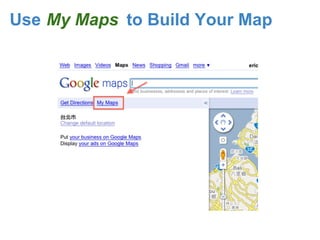
Use My Maps to Build Your Map
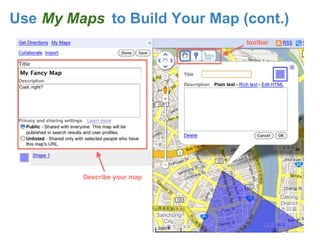
Use My Maps to Build Your Map (cont.)
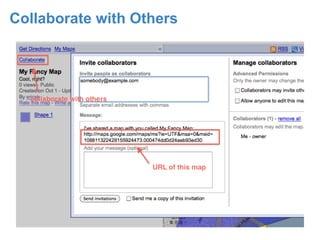
Collaborate with Others
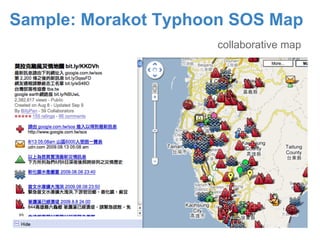
Sample: Morakot Typhoon SOS Map
                     collaborative map
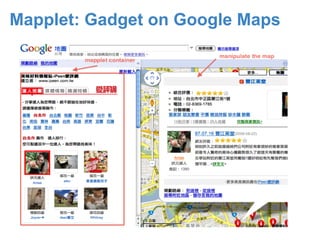
Mapplet: Gadget on Google Maps
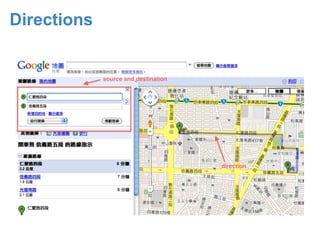
Directions
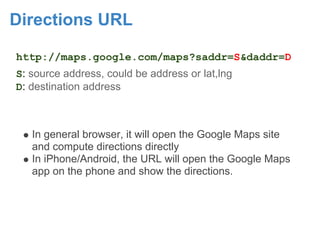
Directions URL

http://maps.google.com/maps?saddr=S&daddr=D
S: source address, could be address or lat,lng
D: destination address


   In general browser, it will open the Google Maps site
   and compute directions directly
   In iPhone/Android, the URL will open the Google Maps
   app on the phone and show the directions.
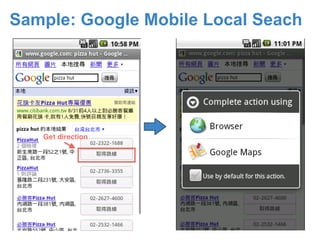
Sample: Google Mobile Local Seach
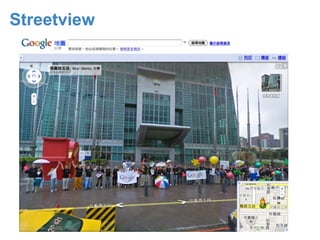
Streetview
Google Maps API

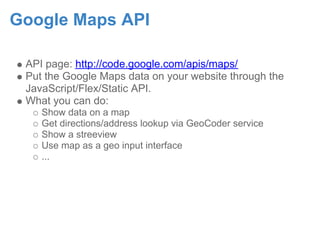
 API page: http://code.google.com/apis/maps/
 Put the Google Maps data on your website through the
 JavaScript/Flex/Static API.
 What you can do:
    Show data on a map
    Get directions/address lookup via GeoCoder service
    Show a streeview
    Use map as a geo input interface
    ...
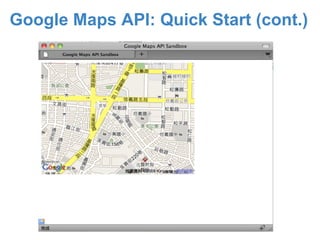
Google Maps API: Quick Start

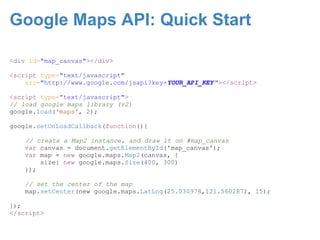
<div id="map_canvas"></div>

<script type="text/javascript"
    src="http://www.google.com/jsapi?key=YOUR_API_KEY "></script>

<script type="text/javascript">
// load google maps library (v2)
google.load('maps', 2);

google.setOnLoadCallback(function(){

    // create a Map2 instance, and draw it on #map_canvas
    var canvas = document.getElementById('map_canvas');
    var map = new google.maps.Map2(canvas, {
        size: new google.maps.Size(400, 300)
    });

    // set the center of the map
    map.setCenter(new google.maps.LatLng(25.030978,121.560287), 15);

});
</script>
Google Maps API: Quick Start (cont.)
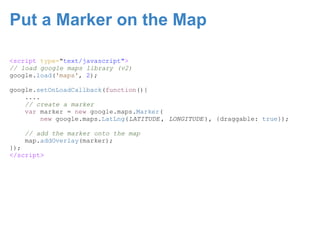
Put a Marker on the Map

<script type="text/javascript">
// load google maps library (v2)
google.load('maps', 2);

google.setOnLoadCallback(function(){
    ....
    // create a marker
    var marker = new google.maps.Marker(
         new google.maps.LatLng(LATITUDE , LONGITUDE ), {draggable: true});

    // add the marker onto the map
    map.addOverlay(marker);
});
</script>
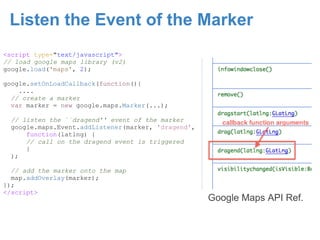
Listen the Event of the Marker
<script type="text/javascript">
// load google maps library (v2)
google.load('maps', 2);

google.setOnLoadCallback(function(){
    ....
  // create a marker
  var marker = new google.maps.Marker(...);

  // listen the ``dragend'' event of the marker
  google.maps.Event.addListener(marker, 'dragend',
      function(latlng) {
      // call on the dragend event is triggered
      }
  );

  // add the marker onto the map
  map.addOverlay(marker);
});
</script>
                                                     Google Maps API Ref.
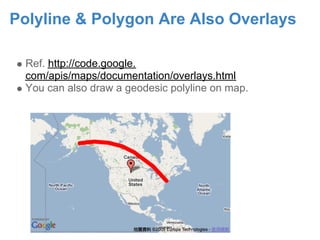
Polyline & Polygon Are Also Overlays

  Ref. http://code.google.
  com/apis/maps/documentation/overlays.html
  You can also draw a geodesic polyline on map.
Google Maps Services API

 Ref. http://code.google.
 com/apis/maps/documentation/services.html
 Supported services:
    Lookup address/latlng
    Streeview Panorama object
    Load KML/GeoRSS
    AdSense on Maps
    Directions
    Traffics
 Never forget to check out Google Geo Developer Blog.
Google Static Map API

 Ref. http://code.google.
 com/apis/maps/documentation/staticmaps/
 This API is a web service that generates a map image
    Use <img src="http://....." alt=""> to use this
    API
    One client can only access 1000 times/day
 Lack of map controls but easy to use
Google Maps API v3

 Ref: http://code.google.com/apis/maps/documentation/v3/
 More efficient, smaller code size, adapted to
 iPhone/Android.
 Still preview release
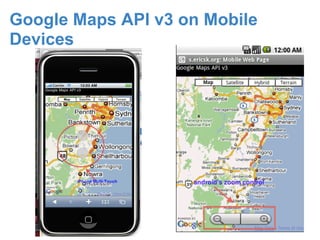
Google Maps API v3 on Mobile
Devices
Q. & A.

Intro To Google Maps

  • 1.
    Intro. to GoogleMaps API ericsk @ Taipei GTUG 2009/09/30
  • 2.
    Agenda Google MapsFeatures My Map & Mapplet Directions Streetview Google Maps API Tutorials How to start Maps API demos Maps API v3 for iPhone/Android
  • 3.
    Use My Mapsto Build Your Map
  • 4.
    Use My Mapsto Build Your Map (cont.)
  • 5.
  • 6.
    Sample: Morakot TyphoonSOS Map collaborative map
  • 7.
    Mapplet: Gadget onGoogle Maps
  • 8.
  • 9.
    Directions URL http://maps.google.com/maps?saddr=S&daddr=D S: sourceaddress, could be address or lat,lng D: destination address In general browser, it will open the Google Maps site and compute directions directly In iPhone/Android, the URL will open the Google Maps app on the phone and show the directions.
  • 10.
  • 11.
  • 12.
    Google Maps API API page: http://code.google.com/apis/maps/ Put the Google Maps data on your website through the JavaScript/Flex/Static API. What you can do: Show data on a map Get directions/address lookup via GeoCoder service Show a streeview Use map as a geo input interface ...
  • 13.
    Google Maps API:Quick Start <div id="map_canvas"></div> <script type="text/javascript" src="http://www.google.com/jsapi?key=YOUR_API_KEY "></script> <script type="text/javascript"> // load google maps library (v2) google.load('maps', 2); google.setOnLoadCallback(function(){ // create a Map2 instance, and draw it on #map_canvas var canvas = document.getElementById('map_canvas'); var map = new google.maps.Map2(canvas, { size: new google.maps.Size(400, 300) }); // set the center of the map map.setCenter(new google.maps.LatLng(25.030978,121.560287), 15); }); </script>
  • 14.
    Google Maps API:Quick Start (cont.)
  • 15.
    Put a Markeron the Map <script type="text/javascript"> // load google maps library (v2) google.load('maps', 2); google.setOnLoadCallback(function(){ .... // create a marker var marker = new google.maps.Marker( new google.maps.LatLng(LATITUDE , LONGITUDE ), {draggable: true}); // add the marker onto the map map.addOverlay(marker); }); </script>
  • 16.
    Listen the Eventof the Marker <script type="text/javascript"> // load google maps library (v2) google.load('maps', 2); google.setOnLoadCallback(function(){ .... // create a marker var marker = new google.maps.Marker(...); // listen the ``dragend'' event of the marker google.maps.Event.addListener(marker, 'dragend', function(latlng) { // call on the dragend event is triggered } ); // add the marker onto the map map.addOverlay(marker); }); </script> Google Maps API Ref.
  • 17.
    Polyline & PolygonAre Also Overlays Ref. http://code.google. com/apis/maps/documentation/overlays.html You can also draw a geodesic polyline on map.
  • 18.
    Google Maps ServicesAPI Ref. http://code.google. com/apis/maps/documentation/services.html Supported services: Lookup address/latlng Streeview Panorama object Load KML/GeoRSS AdSense on Maps Directions Traffics Never forget to check out Google Geo Developer Blog.
  • 19.
    Google Static MapAPI Ref. http://code.google. com/apis/maps/documentation/staticmaps/ This API is a web service that generates a map image Use <img src="http://....." alt=""> to use this API One client can only access 1000 times/day Lack of map controls but easy to use
  • 20.
    Google Maps APIv3 Ref: http://code.google.com/apis/maps/documentation/v3/ More efficient, smaller code size, adapted to iPhone/Android. Still preview release
  • 21.
    Google Maps APIv3 on Mobile Devices
  • 22.