ppt14
AJAX
(Asynchronous JavaScript and
XML)• The term Ajax was coined on 18 February 2005 by Jesse
James Garrett in an article entitled "Ajax: A New Approach to
Web Applications", based on techniques used on Google
pages.
• On 5 April 2006, the World Wide Web Consortium (W3C)
released the first draft specification for the XMLHttpRequest
object in an attempt to create an official web standard.
• With an HTTP request, a web page can make a request to,
and get a response from a web server - without reloading the
page.
• The user will stay on the same page, and he or she will not
notice that scripts request pages, or send data to a server in
the background.
Ajax Applications
• Some prime examples of Web 2.0 are web sites such as
Google Maps and Flickr. Google Maps offers a highly
responsive user interface (UI). For instance, you can view a
map, then move your cursor across it to see adjacent areas
almost immediately.
• Other Web 2.0 sites provide a similarly rich user experience
by doing things such as integrating services from other web
sites or incorporating a steady stream of new information.
– For example, the Google map service can be brought into another
web site, such as a site for purchasing cars, to present a map that
highlights the location of auto dealerships that sell a particular car
model. The term used for these site integrations is "mashups“.
Characteristics of Conventional
Web Applications
• “Click, wait, and refresh” user interaction
– Page refreshes from the server needed for all
events, data submissions, and navigation
• Synchronous “request/response”
communication model
– The user has to wait for the response
• Page-driven: Workflow is based on pages
– Page-navigation logic is determined by the server
Source: Sang Shin, 18-week "Free" AJAX and Web 2.0 Programming (with Passion!)
Online Course, www.javapassion.com/ajaxcodecamp
Issues of Conventional Web
Application
• Interruption of user operation
– Users cannot perform any operation while waiting for a response
• Loss of operational context during refresh
– Loss of information on the screen
– Loss of scrolled position
• No instant feedback's to user activities
– A user has to wait for the next page
• Constrained by HTML
– Lack of useful widgets
• These are the reasons why Rich Internet Application (RIA)
technologies were born.
What is Ajax?
• Ajax can help increase the speed and usability
of an application's web pages by updating
only part of the page at a time, rather than
requiring the entire page to be reloaded after
a user-initiated change.
• Using Ajax, the pages of your application can
exchange small amounts of data with the
server without going through a form submit.
Source: http://java.sun.com/javaee/javaserverfaces/ajax/tutorial.jsp
The Ajax Technique
• The Ajax technique accomplishes this by using
the following technologies:
– JavaScript that allows for interaction with the
browser and responding to events.
– DOM for accessing and manipulating the structure of
the HTML of the page.
– XML which represents the data passed between the
server and client.
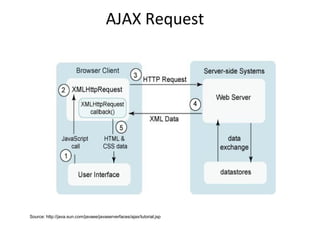
– An XMLHttpRequest object for asynchronously
exchanging the XML data between the client and the
server.
AJAX Request
Source: http://java.sun.com/javaee/javaserverfaces/ajax/tutorial.jsp
Why Ajax
• Interactive contents
• HTML and HTTP limitations
• Browser-based active contents?
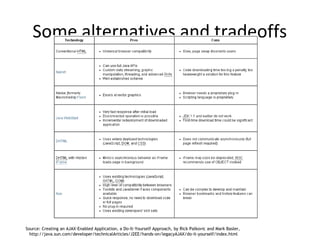
Some alternatives and tradeoffs
Source: Creating an AJAX-Enabled Application, a Do-It-Yourself Approach, by Rick Palkovic and Mark Basler,
http://java.sun.com/developer/technicalArticles/J2EE/hands-on/legacyAJAX/do-it-yourself/index.html
Defining a Request Object
var request;
function getRequestObject() {
if (window.ActiveXObject) {
return(new ActiveXObject("Microsoft.XMLHTTP"));
} else if (window.XMLHttpRequest) {
return(new XMLHttpRequest());
} else {
return(null);
}
}
Source: J2EE training: http://courses.coreservlets.com
Handle Response
function handleResponse() {
if (request.readyState == 4) {
alert(request.responseText);
}
}
Source: J2EE training: http://courses.coreservlets.com
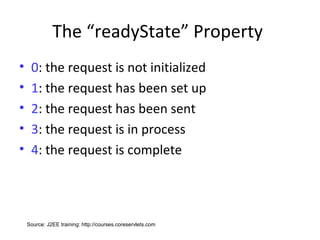
The “readyState” Property
• 0: the request is not initialized
• 1: the request has been set up
• 2: the request has been sent
• 3: the request is in process
• 4: the request is complete
Source: J2EE training: http://courses.coreservlets.com
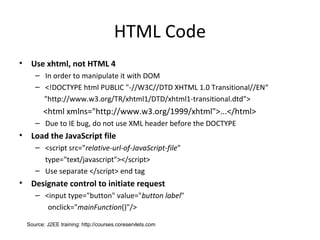
HTML Code
• Use xhtml, not HTML 4
– In order to manipulate it with DOM
– <!DOCTYPE html PUBLIC "-//W3C//DTD XHTML 1.0 Transitional//EN“
"http://www.w3.org/TR/xhtml1/DTD/xhtml1-transitional.dtd">
<html xmlns="http://www.w3.org/1999/xhtml">...</html>
– Due to IE bug, do not use XML header before the DOCTYPE
• Load the JavaScript file
– <script src="relative-url-of-JavaScript-file"
type="text/javascript"></script>
– Use separate </script> end tag
• Designate control to initiate request
– <input type="button" value="button label"
onclick="mainFunction()"/>
Source: J2EE training: http://courses.coreservlets.com
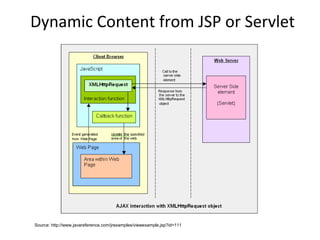
Dynamic Content from JSP or Servlet
Source: http://www.javareference.com/jrexamples/viewexample.jsp?id=111
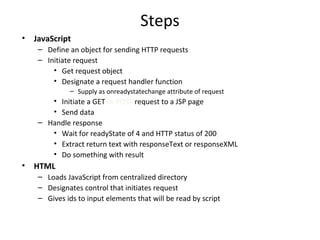
Steps
• JavaScript
– Define an object for sending HTTP requests
– Initiate request
• Get request object
• Designate a request handler function
– Supply as onreadystatechange attribute of request
• Initiate a GET or POST request to a JSP page
• Send data
– Handle response
• Wait for readyState of 4 and HTTP status of 200
• Extract return text with responseText or responseXML
• Do something with result
• HTML
– Loads JavaScript from centralized directory
– Designates control that initiates request
– Gives ids to input elements that will be read by script
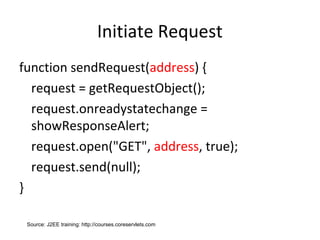
Initiate Request
function sendRequest(address) {
request = getRequestObject();
request.onreadystatechange =
showResponseAlert;
request.open("GET", address, true);
request.send(null);
}
Source: J2EE training: http://courses.coreservlets.com
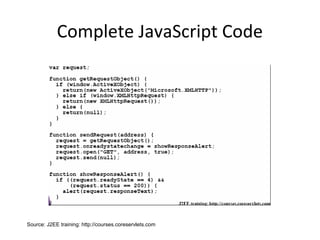
Complete JavaScript Code
Source: J2EE training: http://courses.coreservlets.com
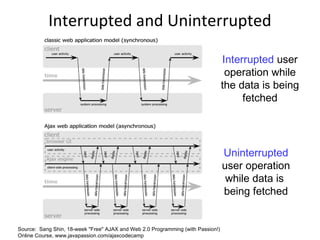
Interrupted and Uninterrupted
Operations
Interrupted user
operation while
the data is being
fetched
Uninterrupted
user operation
while data is
being fetched
Source: Sang Shin, 18-week "Free" AJAX and Web 2.0 Programming (with Passion!)
Online Course, www.javapassion.com/ajaxcodecamp
PHP Example
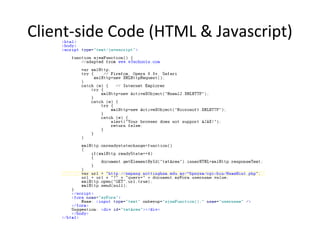
Client-side Code (HTML & Javascript)
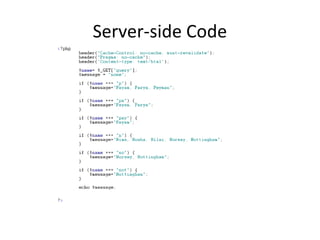
Server-side Code
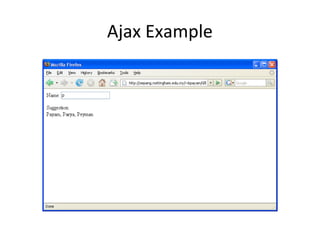
Ajax Example
Resources
• AJAX Tutorial, http://www.w3schools.com/ajax/
• Ajax: The Basics, Customized J2EE Training:
http://courses.coreservlets.com
• Ajax Design Strategies, Ed Ort and Mark Basler ,
http://java.sun.com/developer/technicalArticles/J2EE/AJAX/DesignStrategies/
• Creating an AJAX-Enabled Application, a Do-It-Yourself
Approach, by Rick Palkovic and Mark Basler,
http://java.sun.com/developer/technicalArticles/J2EE/hands-on/legacyAJAX/do-it-yourself/index.html
• Sang Shin, 18-week "Free" AJAX and Web 2.0 Programming
(with Passion!) Online Course, www.javapassion.com/ajaxcodecamp
• Including AJAX Functionality in a Custom JavaServer Faces
Component, by Gregory Murray and Jennifer Ball,
http://java.sun.com/javaee/javaserverfaces/ajax/tutorial.jsp

Ajax

  • 1.
  • 2.
    AJAX (Asynchronous JavaScript and XML)•The term Ajax was coined on 18 February 2005 by Jesse James Garrett in an article entitled "Ajax: A New Approach to Web Applications", based on techniques used on Google pages. • On 5 April 2006, the World Wide Web Consortium (W3C) released the first draft specification for the XMLHttpRequest object in an attempt to create an official web standard. • With an HTTP request, a web page can make a request to, and get a response from a web server - without reloading the page. • The user will stay on the same page, and he or she will not notice that scripts request pages, or send data to a server in the background.
  • 3.
    Ajax Applications • Someprime examples of Web 2.0 are web sites such as Google Maps and Flickr. Google Maps offers a highly responsive user interface (UI). For instance, you can view a map, then move your cursor across it to see adjacent areas almost immediately. • Other Web 2.0 sites provide a similarly rich user experience by doing things such as integrating services from other web sites or incorporating a steady stream of new information. – For example, the Google map service can be brought into another web site, such as a site for purchasing cars, to present a map that highlights the location of auto dealerships that sell a particular car model. The term used for these site integrations is "mashups“.
  • 4.
    Characteristics of Conventional WebApplications • “Click, wait, and refresh” user interaction – Page refreshes from the server needed for all events, data submissions, and navigation • Synchronous “request/response” communication model – The user has to wait for the response • Page-driven: Workflow is based on pages – Page-navigation logic is determined by the server Source: Sang Shin, 18-week "Free" AJAX and Web 2.0 Programming (with Passion!) Online Course, www.javapassion.com/ajaxcodecamp
  • 5.
    Issues of ConventionalWeb Application • Interruption of user operation – Users cannot perform any operation while waiting for a response • Loss of operational context during refresh – Loss of information on the screen – Loss of scrolled position • No instant feedback's to user activities – A user has to wait for the next page • Constrained by HTML – Lack of useful widgets • These are the reasons why Rich Internet Application (RIA) technologies were born.
  • 6.
    What is Ajax? •Ajax can help increase the speed and usability of an application's web pages by updating only part of the page at a time, rather than requiring the entire page to be reloaded after a user-initiated change. • Using Ajax, the pages of your application can exchange small amounts of data with the server without going through a form submit. Source: http://java.sun.com/javaee/javaserverfaces/ajax/tutorial.jsp
  • 7.
    The Ajax Technique •The Ajax technique accomplishes this by using the following technologies: – JavaScript that allows for interaction with the browser and responding to events. – DOM for accessing and manipulating the structure of the HTML of the page. – XML which represents the data passed between the server and client. – An XMLHttpRequest object for asynchronously exchanging the XML data between the client and the server.
  • 8.
  • 9.
    Why Ajax • Interactivecontents • HTML and HTTP limitations • Browser-based active contents?
  • 10.
    Some alternatives andtradeoffs Source: Creating an AJAX-Enabled Application, a Do-It-Yourself Approach, by Rick Palkovic and Mark Basler, http://java.sun.com/developer/technicalArticles/J2EE/hands-on/legacyAJAX/do-it-yourself/index.html
  • 11.
    Defining a RequestObject var request; function getRequestObject() { if (window.ActiveXObject) { return(new ActiveXObject("Microsoft.XMLHTTP")); } else if (window.XMLHttpRequest) { return(new XMLHttpRequest()); } else { return(null); } } Source: J2EE training: http://courses.coreservlets.com
  • 12.
    Handle Response function handleResponse(){ if (request.readyState == 4) { alert(request.responseText); } } Source: J2EE training: http://courses.coreservlets.com
  • 13.
    The “readyState” Property •0: the request is not initialized • 1: the request has been set up • 2: the request has been sent • 3: the request is in process • 4: the request is complete Source: J2EE training: http://courses.coreservlets.com
  • 14.
    HTML Code • Usexhtml, not HTML 4 – In order to manipulate it with DOM – <!DOCTYPE html PUBLIC "-//W3C//DTD XHTML 1.0 Transitional//EN“ "http://www.w3.org/TR/xhtml1/DTD/xhtml1-transitional.dtd"> <html xmlns="http://www.w3.org/1999/xhtml">...</html> – Due to IE bug, do not use XML header before the DOCTYPE • Load the JavaScript file – <script src="relative-url-of-JavaScript-file" type="text/javascript"></script> – Use separate </script> end tag • Designate control to initiate request – <input type="button" value="button label" onclick="mainFunction()"/> Source: J2EE training: http://courses.coreservlets.com
  • 15.
    Dynamic Content fromJSP or Servlet Source: http://www.javareference.com/jrexamples/viewexample.jsp?id=111
  • 16.
    Steps • JavaScript – Definean object for sending HTTP requests – Initiate request • Get request object • Designate a request handler function – Supply as onreadystatechange attribute of request • Initiate a GET or POST request to a JSP page • Send data – Handle response • Wait for readyState of 4 and HTTP status of 200 • Extract return text with responseText or responseXML • Do something with result • HTML – Loads JavaScript from centralized directory – Designates control that initiates request – Gives ids to input elements that will be read by script
  • 17.
    Initiate Request function sendRequest(address){ request = getRequestObject(); request.onreadystatechange = showResponseAlert; request.open("GET", address, true); request.send(null); } Source: J2EE training: http://courses.coreservlets.com
  • 18.
    Complete JavaScript Code Source:J2EE training: http://courses.coreservlets.com
  • 19.
    Interrupted and Uninterrupted Operations Interrupteduser operation while the data is being fetched Uninterrupted user operation while data is being fetched Source: Sang Shin, 18-week "Free" AJAX and Web 2.0 Programming (with Passion!) Online Course, www.javapassion.com/ajaxcodecamp
  • 20.
  • 21.
  • 22.
  • 23.
  • 24.
    Resources • AJAX Tutorial,http://www.w3schools.com/ajax/ • Ajax: The Basics, Customized J2EE Training: http://courses.coreservlets.com • Ajax Design Strategies, Ed Ort and Mark Basler , http://java.sun.com/developer/technicalArticles/J2EE/AJAX/DesignStrategies/ • Creating an AJAX-Enabled Application, a Do-It-Yourself Approach, by Rick Palkovic and Mark Basler, http://java.sun.com/developer/technicalArticles/J2EE/hands-on/legacyAJAX/do-it-yourself/index.html • Sang Shin, 18-week "Free" AJAX and Web 2.0 Programming (with Passion!) Online Course, www.javapassion.com/ajaxcodecamp • Including AJAX Functionality in a Custom JavaServer Faces Component, by Gregory Murray and Jennifer Ball, http://java.sun.com/javaee/javaserverfaces/ajax/tutorial.jsp