Introduction to AJAX
Nir Elbaz
IntroductiontoAJAX
Nir
Elbaz
Introduction to AJAX
• Index
• What is AJAX?
• MakingAJAX requests with raw JavaScript
• MakingAJAX requests with jQuery
• AJAX & ASP.net
• AJAX security
IntroductiontoAJAX
Nir
Elbaz
What is AJAX
• AJAX stands for Asynchronous JavaScript And XML
• Allows web pages or parts of them to be updated asynchronously
• Based on XML HTTP request object (AKA XHR)
• Requires basic understanding of:
• (X)HTML – displaying the data
• CSS – styling the data
• JavaScript – manipulating the DOM
• XML / JSON – received / sent data format (also HTML & text)
Also refers dynamic content
IntroductiontoAJAX
Nir
Elbaz
What is AJAX
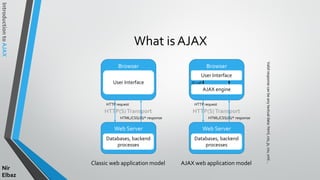
Browser
User Interface
Web Server
Databases, backend
processes
HTTP(S)Transport
HTTP request
HTML/CSS/JS/* response
Classic web application model
Browser
User Interface
Web Server
Databases, backend
processes
HTTP(S)Transport
HTTP request
HTML/CSS/JS/* response
AJAX web application model
AJAX engine
JS call
Validresponsecanbeanytextualdata:html,css,js,csv,xml…
IntroductiontoAJAX
Nir
Elbaz
What is AJAX
Classic web application model AJAX web application model
User
Front end
Back end
IntroductiontoAJAX
Nir
Elbaz
What is AJAX
• Usage samples
• Autocomplete search textboxes (sample)
• Cascading dropdown list boxes (sample)
• Real-time - Continuous data refresh (long polling, chat systems…)
• Immediate forms validation feedback (sample)
• Conditional display / dynamic content (sample)
• Auto save user information (Google Docs, Facebook)
• Ratings, voting & other instant actions (sample)
IntroductiontoAJAX
Nir
Elbaz
What is AJAX
• Browser support
• Mozilla Firefox 1.0 and above
• Google Chrome
• Apple Safari 1.2 and above
• Microsoft Internet Exporer 5 and above (ActiveXObject for lte IE6)
• Opera 7.6 and above
IntroductiontoAJAX
Nir
Elbaz
What is AJAX
• Pros
• Better interactivity & responsiveness
• Impressive UX
• Reduced connections to the web server (partial rendering)
• Reduced bandwidth
• Its “cool” 
IntroductiontoAJAX
Nir
Elbaz
What is AJAX
• Cons
• The back and refresh button are rendered useless
• Bookmarking is useless (HTML 5 History API to the rescue)
• Requires JavaScript to be enabled on browsers
• SEO & analytics unfriendly
• Screen readers unfriendly – affects accessibility
• Callbacks can lead to complex code
• Network latency may break usability
IntroductiontoAJAX
Nir
Elbaz
Making AJAX requests with raw JavaScript
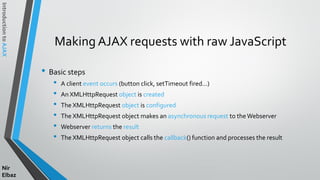
• Basic steps
• A client event occurs (button click, setTimeout fired…)
• An XMLHttpRequest object is created
• The XMLHttpRequest object is configured
• The XMLHttpRequest object makes an asynchronous request to theWebserver
• Webserver returns the result
• The XMLHttpRequest object calls the callback() function and processes the result
IntroductiontoAJAX
Nir
Elbaz
MakingAJAXrequestswithrawJavaScript
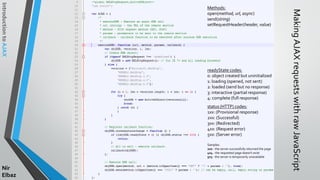
readyState codes:
0: object created but uninitialized
1: loading (opened, not sent)
2: loaded (send but no response)
3: interactive (partial response)
4: complete (full response)
status (HTTP) codes:
1xx: (Provisional response)
2xx: (Successful)
3xx: (Redirected)
4xx: (Request error)
5xx: (Server error)
Samples:
200 - the server successfully returned the page
404 - the requested page doesn't exist
503 - the server is temporarily unavailable
Methods:
open(method, url, async)
send(string)
setRequestHeader(header, value)
IntroductiontoAJAX
Nir
Elbaz
Making AJAX requests with raw JavaScript
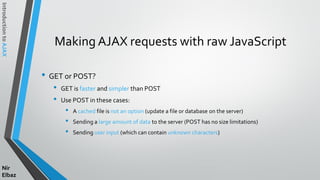
• GET or POST?
• GET is faster and simpler than POST
• Use POST in these cases:
• A cached file is not an option (update a file or database on the server)
• Sending a large amount of data to the server (POST has no size limitations)
• Sending user input (which can contain unknown characters)
IntroductiontoAJAX
Nir
Elbaz
Making AJAX requests with raw JavaScript
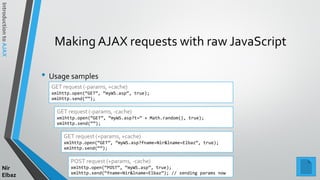
• Usage samples
GET request (-params, +cache)
xmlhttp.open(“GET”, “myWS.asp”, true);
xmlhttp.send(“”);
GET request (-params, -cache)
xmlhttp.open(“GET”, “myWS.asp?t=” + Math.random(), true);
xmlhttp.send(“”);
GET request (+params, +cache)
xmlhttp.open(“GET”, “myWS.asp?fname=Nir&lname=Elbaz”, true);
xmlhttp.send(“”);
POST request (+params, -cache)
xmlhttp.open(“POST”, “myWS.asp”, true);
xmlhttp.send(“fname=Nir&lname=Elbaz”); // sending params now
IntroductiontoAJAX
Nir
Elbaz
Making AJAX requests with raw JavaScript
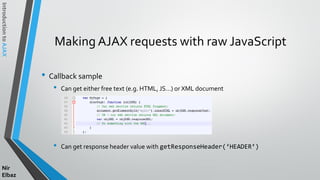
• Callback sample
• Can get either free text (e.g. HTML, JS…) or XML document
• Can get response header value with getResponseHeader(‘HEADER’)
IntroductiontoAJAX
Nir
Elbaz
Making AJAX requests with raw JavaScript
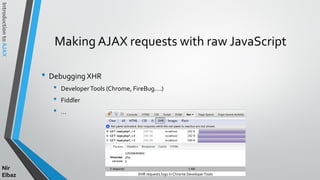
• Debugging XHR
• DeveloperTools (Chrome, FireBug….)
• Fiddler
• …
XHR requests logs in Chrome DeveloperTools
IntroductiontoAJAX
Nir
Elbaz
Making AJAX requests with jQuery
• jQuery provides great support forAJAX & simplify usage:
• load(url, data, callback): Load a piece of html into a container DOM
• $.getJSON(url, data, callback): Load a JSON with GET method
• $.getScript(url, callback): Load a JavaScript
• $.get(url, data, callback, type):GenericAJAX GET request
• $.post(url, data, callback, type): Generic AJAX GET request
• $.ajax(options):All purpose AJAX request (higher level abstractions)
Syntacticsugarof$.ajax
GET, POST
GET
GET
POST
GET, POST
IntroductiontoAJAX
Nir
Elbaz
Making AJAX requests with jQuery
• Usage samples
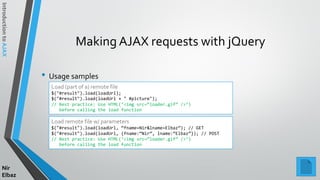
Load (part of a) remote file
$("#result").load(loadUrl);
$("#result").load(loadUrl + " #picture");
// Best practice: Use HTML(‘<img src=“loader.gif” />’)
before calling the load function
Load remote file w/ parameters
$("#result").load(loadUrl, “fname=Nir&lname=Elbaz”); // GET
$("#result").load(loadUrl, {fname:“Nir”, lname:“Elbaz”}); // POST
// Best practice: Use HTML(‘<img src=“loader.gif” />’)
before calling the load function
IntroductiontoAJAX
Nir
Elbaz
Making AJAX requests with jQuery
• Usage samples
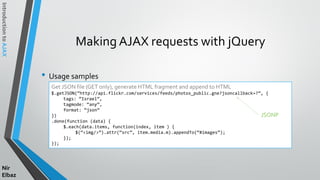
Get JSON file (GET only), generate HTML fragment and append to HTML
$.getJSON(“http://api.flickr.com/services/feeds/photos_public.gne?jsoncallback=?”, {
tags: “Israel”,
tagmode: “any”,
format: “json”
})
.done(function (data) {
$.each(data.items, function(index, item ) {
$(“<img/>”).attr(“src”, item.media.m).appendTo(“#images”);
});
});
JSONP
IntroductiontoAJAX
Nir
Elbaz
Making AJAX requests with jQuery
• Usage samples
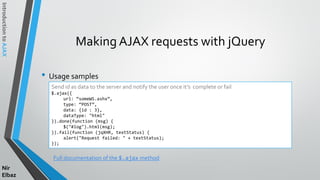
Full documentation of the $.ajax method
Send id as data to the server and notify the user once it’s complete or fail
$.ajax({
url: “someWS.ashx”,
type: “POST”,
data: {id : 3},
dataType: "html"
}).done(function (msg) {
$("#log").html(msg);
}).fail(function (jqXHR, textStatus) {
alert("Request failed: " + textStatus);
});
IntroductiontoAJAX
Nir
Elbaz
Making AJAX requests with jQuery
• More jQueryAJAX aid methods
• $.ajaxSetup(): Sets the default values for future AJAX requests
• $.param():Creates a serialized representation of an array or object
• ajaxStart(): Specifies a function to run when the first AJAX request begins
• ajaxError(): Specifies a function to run when AJAX request completes with an error
• serialize(): Encodes a set of form elements as a string for submission
• …
IntroductiontoAJAX
Nir
Elbaz
AJAX & ASP.net
• Formerly known as projectATLAS
• Released on 2007 as part of ASP.net v.2
• AJAX is even more crucial onASP.net
web applications (LC,ViewState…)
• Provides few server side controls to
simplify AJAX development but considered
insufficient
IntroductiontoAJAX
Nir
Elbaz
AJAX & ASP.net
• AJAX built-in server side controls
• ScriptManager - Manages script resources for client components
• UpdatePanel * - enables you to refresh selected parts of the page
• UpdateProgress * - Provides status information about partial-page updates in
UpdatePanel controls
• Timer * - Performs postbacks at defined intervals (w or w/o UpdatePanel)
• AJAX ControlsToolkit
• Set of additional server controls which provide highly responsive and interactiveAjax-
enabledWeb applications (link)
* ScriptManager control is required in order to use the UpdatePanel, UpdateProgress, andTimer controls
IntroductiontoAJAX
Nir
Elbaz
AJAX&ASP.net
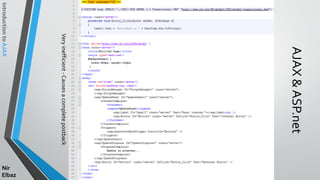
Veryinefficient-Causesacompletepostback
IntroductiontoAJAX
Nir
Elbaz
AJAX&ASP.net
IntroductiontoAJAX
Nir
Elbaz
AJAX Security
• Server side:
• Same as regular web applications in all aspects
• Client side:
• JS code is visible to a user/hacker, which can use it to search for exploits
IntroductiontoAJAX
Nir
Elbaz
BehindThe Scenes (In a Nutshell)
• A web service is any piece of SW that makes itself available over the internet
• Could be based on various technologies server pages (php, asp|m|hx, sc…)
asmx ashx wcf
IntroductiontoAJAX
Nir
Elbaz
Resources
• http://www.w3schools.com/ajax/
• http://www.tutorialspoint.com/ajax/
• http://en.wikipedia.org/wiki/Ajax_(programming)
• http://net.tutsplus.com/
• http://www.w3schools.com/jquery/jquery_ref_ajax.asp
• http://api.jquery.com/jQuery.ajax/
• http://msdn.microsoft.com/en-us/library/bb398874(v=vs.100).aspx

Introduction to ajax

  • 1.
  • 2.
    IntroductiontoAJAX Nir Elbaz Introduction to AJAX •Index • What is AJAX? • MakingAJAX requests with raw JavaScript • MakingAJAX requests with jQuery • AJAX & ASP.net • AJAX security
  • 3.
    IntroductiontoAJAX Nir Elbaz What is AJAX •AJAX stands for Asynchronous JavaScript And XML • Allows web pages or parts of them to be updated asynchronously • Based on XML HTTP request object (AKA XHR) • Requires basic understanding of: • (X)HTML – displaying the data • CSS – styling the data • JavaScript – manipulating the DOM • XML / JSON – received / sent data format (also HTML & text) Also refers dynamic content
  • 4.
    IntroductiontoAJAX Nir Elbaz What is AJAX Browser UserInterface Web Server Databases, backend processes HTTP(S)Transport HTTP request HTML/CSS/JS/* response Classic web application model Browser User Interface Web Server Databases, backend processes HTTP(S)Transport HTTP request HTML/CSS/JS/* response AJAX web application model AJAX engine JS call Validresponsecanbeanytextualdata:html,css,js,csv,xml…
  • 5.
    IntroductiontoAJAX Nir Elbaz What is AJAX Classicweb application model AJAX web application model User Front end Back end
  • 6.
    IntroductiontoAJAX Nir Elbaz What is AJAX •Usage samples • Autocomplete search textboxes (sample) • Cascading dropdown list boxes (sample) • Real-time - Continuous data refresh (long polling, chat systems…) • Immediate forms validation feedback (sample) • Conditional display / dynamic content (sample) • Auto save user information (Google Docs, Facebook) • Ratings, voting & other instant actions (sample)
  • 7.
    IntroductiontoAJAX Nir Elbaz What is AJAX •Browser support • Mozilla Firefox 1.0 and above • Google Chrome • Apple Safari 1.2 and above • Microsoft Internet Exporer 5 and above (ActiveXObject for lte IE6) • Opera 7.6 and above
  • 8.
    IntroductiontoAJAX Nir Elbaz What is AJAX •Pros • Better interactivity & responsiveness • Impressive UX • Reduced connections to the web server (partial rendering) • Reduced bandwidth • Its “cool” 
  • 9.
    IntroductiontoAJAX Nir Elbaz What is AJAX •Cons • The back and refresh button are rendered useless • Bookmarking is useless (HTML 5 History API to the rescue) • Requires JavaScript to be enabled on browsers • SEO & analytics unfriendly • Screen readers unfriendly – affects accessibility • Callbacks can lead to complex code • Network latency may break usability
  • 10.
    IntroductiontoAJAX Nir Elbaz Making AJAX requestswith raw JavaScript • Basic steps • A client event occurs (button click, setTimeout fired…) • An XMLHttpRequest object is created • The XMLHttpRequest object is configured • The XMLHttpRequest object makes an asynchronous request to theWebserver • Webserver returns the result • The XMLHttpRequest object calls the callback() function and processes the result
  • 11.
    IntroductiontoAJAX Nir Elbaz MakingAJAXrequestswithrawJavaScript readyState codes: 0: objectcreated but uninitialized 1: loading (opened, not sent) 2: loaded (send but no response) 3: interactive (partial response) 4: complete (full response) status (HTTP) codes: 1xx: (Provisional response) 2xx: (Successful) 3xx: (Redirected) 4xx: (Request error) 5xx: (Server error) Samples: 200 - the server successfully returned the page 404 - the requested page doesn't exist 503 - the server is temporarily unavailable Methods: open(method, url, async) send(string) setRequestHeader(header, value)
  • 12.
    IntroductiontoAJAX Nir Elbaz Making AJAX requestswith raw JavaScript • GET or POST? • GET is faster and simpler than POST • Use POST in these cases: • A cached file is not an option (update a file or database on the server) • Sending a large amount of data to the server (POST has no size limitations) • Sending user input (which can contain unknown characters)
  • 13.
    IntroductiontoAJAX Nir Elbaz Making AJAX requestswith raw JavaScript • Usage samples GET request (-params, +cache) xmlhttp.open(“GET”, “myWS.asp”, true); xmlhttp.send(“”); GET request (-params, -cache) xmlhttp.open(“GET”, “myWS.asp?t=” + Math.random(), true); xmlhttp.send(“”); GET request (+params, +cache) xmlhttp.open(“GET”, “myWS.asp?fname=Nir&lname=Elbaz”, true); xmlhttp.send(“”); POST request (+params, -cache) xmlhttp.open(“POST”, “myWS.asp”, true); xmlhttp.send(“fname=Nir&lname=Elbaz”); // sending params now
  • 14.
    IntroductiontoAJAX Nir Elbaz Making AJAX requestswith raw JavaScript • Callback sample • Can get either free text (e.g. HTML, JS…) or XML document • Can get response header value with getResponseHeader(‘HEADER’)
  • 15.
    IntroductiontoAJAX Nir Elbaz Making AJAX requestswith raw JavaScript • Debugging XHR • DeveloperTools (Chrome, FireBug….) • Fiddler • … XHR requests logs in Chrome DeveloperTools
  • 16.
    IntroductiontoAJAX Nir Elbaz Making AJAX requestswith jQuery • jQuery provides great support forAJAX & simplify usage: • load(url, data, callback): Load a piece of html into a container DOM • $.getJSON(url, data, callback): Load a JSON with GET method • $.getScript(url, callback): Load a JavaScript • $.get(url, data, callback, type):GenericAJAX GET request • $.post(url, data, callback, type): Generic AJAX GET request • $.ajax(options):All purpose AJAX request (higher level abstractions) Syntacticsugarof$.ajax GET, POST GET GET POST GET, POST
  • 17.
    IntroductiontoAJAX Nir Elbaz Making AJAX requestswith jQuery • Usage samples Load (part of a) remote file $("#result").load(loadUrl); $("#result").load(loadUrl + " #picture"); // Best practice: Use HTML(‘<img src=“loader.gif” />’) before calling the load function Load remote file w/ parameters $("#result").load(loadUrl, “fname=Nir&lname=Elbaz”); // GET $("#result").load(loadUrl, {fname:“Nir”, lname:“Elbaz”}); // POST // Best practice: Use HTML(‘<img src=“loader.gif” />’) before calling the load function
  • 18.
    IntroductiontoAJAX Nir Elbaz Making AJAX requestswith jQuery • Usage samples Get JSON file (GET only), generate HTML fragment and append to HTML $.getJSON(“http://api.flickr.com/services/feeds/photos_public.gne?jsoncallback=?”, { tags: “Israel”, tagmode: “any”, format: “json” }) .done(function (data) { $.each(data.items, function(index, item ) { $(“<img/>”).attr(“src”, item.media.m).appendTo(“#images”); }); }); JSONP
  • 19.
    IntroductiontoAJAX Nir Elbaz Making AJAX requestswith jQuery • Usage samples Full documentation of the $.ajax method Send id as data to the server and notify the user once it’s complete or fail $.ajax({ url: “someWS.ashx”, type: “POST”, data: {id : 3}, dataType: "html" }).done(function (msg) { $("#log").html(msg); }).fail(function (jqXHR, textStatus) { alert("Request failed: " + textStatus); });
  • 20.
    IntroductiontoAJAX Nir Elbaz Making AJAX requestswith jQuery • More jQueryAJAX aid methods • $.ajaxSetup(): Sets the default values for future AJAX requests • $.param():Creates a serialized representation of an array or object • ajaxStart(): Specifies a function to run when the first AJAX request begins • ajaxError(): Specifies a function to run when AJAX request completes with an error • serialize(): Encodes a set of form elements as a string for submission • …
  • 21.
    IntroductiontoAJAX Nir Elbaz AJAX & ASP.net •Formerly known as projectATLAS • Released on 2007 as part of ASP.net v.2 • AJAX is even more crucial onASP.net web applications (LC,ViewState…) • Provides few server side controls to simplify AJAX development but considered insufficient
  • 22.
    IntroductiontoAJAX Nir Elbaz AJAX & ASP.net •AJAX built-in server side controls • ScriptManager - Manages script resources for client components • UpdatePanel * - enables you to refresh selected parts of the page • UpdateProgress * - Provides status information about partial-page updates in UpdatePanel controls • Timer * - Performs postbacks at defined intervals (w or w/o UpdatePanel) • AJAX ControlsToolkit • Set of additional server controls which provide highly responsive and interactiveAjax- enabledWeb applications (link) * ScriptManager control is required in order to use the UpdatePanel, UpdateProgress, andTimer controls
  • 23.
  • 24.
  • 25.
    IntroductiontoAJAX Nir Elbaz AJAX Security • Serverside: • Same as regular web applications in all aspects • Client side: • JS code is visible to a user/hacker, which can use it to search for exploits
  • 26.
    IntroductiontoAJAX Nir Elbaz BehindThe Scenes (Ina Nutshell) • A web service is any piece of SW that makes itself available over the internet • Could be based on various technologies server pages (php, asp|m|hx, sc…) asmx ashx wcf
  • 27.
    IntroductiontoAJAX Nir Elbaz Resources • http://www.w3schools.com/ajax/ • http://www.tutorialspoint.com/ajax/ •http://en.wikipedia.org/wiki/Ajax_(programming) • http://net.tutsplus.com/ • http://www.w3schools.com/jquery/jquery_ref_ajax.asp • http://api.jquery.com/jQuery.ajax/ • http://msdn.microsoft.com/en-us/library/bb398874(v=vs.100).aspx