ppt15
1
Topics for today
 Java Applets
2
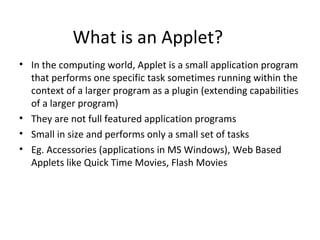
What is an Applet?
• In the computing world, Applet is a small application program
that performs one specific task sometimes running within the
context of a larger program as a plugin (extending capabilities
of a larger program)
• They are not full featured application programs
• Small in size and performs only a small set of tasks
• Eg. Accessories (applications in MS Windows), Web Based
Applets like Quick Time Movies, Flash Movies
Features of Applet
• Applets execute only on the "client" platform environment of
a system, as contrasted from "servlet". As such, an applet
provides functionality or performance beyond the default
capabilities of its container (the browser).
• The container (class) restricts applets' capabilities.
• Applets are written in a language different from the scripting
or HTML language which invokes it. The applet is written in a
compiled language, while the scripting language of the
container is an interpreted language, hence the greater
performance or functionality of the applet. Unlike a
"subroutine", a complete web component can be
implemented as an applet.
What is Java Applet?
• An Java applet is a program written in the Java programming
language that can be included in an HTML page, much in the
same way an image is included in a page and can run in Java
Virtual Machine or Sun’s Applet Viewer
• Java applets were introduced in the first version of the Java
language in 1995
• They can also be written in other form of languages
• Java Applets do not have main() method as an entry point but
instead, have several methods to control specific aspects
of applet execution.
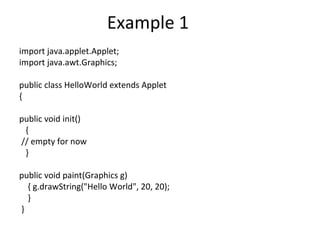
Example 1
import java.applet.Applet;
import java.awt.Graphics;
public class HelloWorld extends Applet
{
public void init()
{
// empty for now
}
public void paint(Graphics g)
{ g.drawString("Hello World", 20, 20);
}
}
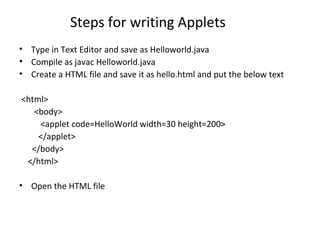
Steps for writing Applets
• Type in Text Editor and save as Helloworld.java
• Compile as javac Helloworld.java
• Create a HTML file and save it as hello.html and put the below text
<html>
<body>
<applet code=HelloWorld width=30 height=200>
</applet>
</body>
</html>
• Open the HTML file
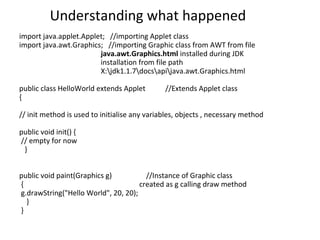
Understanding what happened
import java.applet.Applet; //importing Applet class
import java.awt.Graphics; //importing Graphic class from AWT from file
java.awt.Graphics.html installed during JDK
installation from file path
X:jdk1.1.7docsapijava.awt.Graphics.html
public class HelloWorld extends Applet //Extends Applet class
{
// init method is used to initialise any variables, objects , necessary method
public void init() {
// empty for now
}
public void paint(Graphics g) //Instance of Graphic class
{ created as g calling draw method
g.drawString("Hello World", 20, 20);
}
}
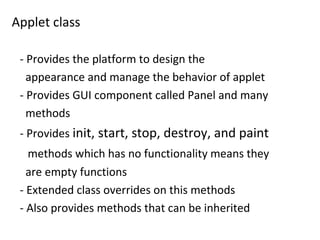
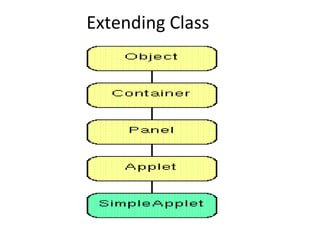
Applet class
- Provides the platform to design the
appearance and manage the behavior of applet
- Provides GUI component called Panel and many
methods
- Provides init, start, stop, destroy, and paint
methods which has no functionality means they
are empty functions
- Extended class overrides on this methods
- Also provides methods that can be inherited
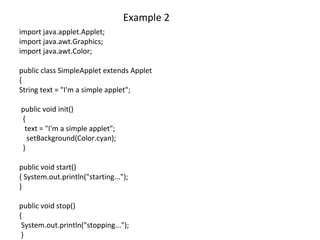
Example 2
import java.applet.Applet;
import java.awt.Graphics;
import java.awt.Color;
public class SimpleApplet extends Applet
{
String text = "I'm a simple applet";
public void init()
{
text = "I'm a simple applet";
setBackground(Color.cyan);
}
public void start()
{ System.out.println("starting...");
}
public void stop()
{
System.out.println("stopping...");
}
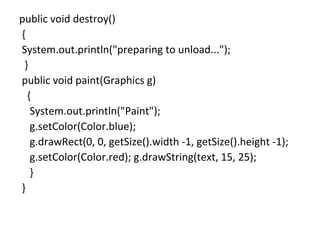
public void destroy()
{
System.out.println("preparing to unload...");
}
public void paint(Graphics g)
{
System.out.println("Paint");
g.setColor(Color.blue);
g.drawRect(0, 0, getSize().width -1, getSize().height -1);
g.setColor(Color.red); g.drawString(text, 15, 25);
}
}
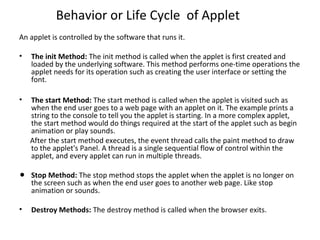
Behavior or Life Cycle of Applet
An applet is controlled by the software that runs it.
• The init Method: The init method is called when the applet is first created and
loaded by the underlying software. This method performs one-time operations the
applet needs for its operation such as creating the user interface or setting the
font.
• The start Method: The start method is called when the applet is visited such as
when the end user goes to a web page with an applet on it. The example prints a
string to the console to tell you the applet is starting. In a more complex applet,
the start method would do things required at the start of the applet such as begin
animation or play sounds.
After the start method executes, the event thread calls the paint method to draw
to the applet's Panel. A thread is a single sequential flow of control within the
applet, and every applet can run in multiple threads.
• Stop Method: The stop method stops the applet when the applet is no longer on
the screen such as when the end user goes to another web page. Like stop
animation or sounds.
• Destroy Methods: The destroy method is called when the browser exits.
Extending Class
Packages
• Import statement used in Java applet program
calls the class which are stored in different
packages
• eg. java.applet is a Package and Applet is a
ready made precompiled JavaAPI class for
import java.applet.Applet statement
• eg. java.lang.* calls all the packages within
that package
Advantages of using Java Applet
• Provides web applications with interactive features that cannot be
provided by HTML
• Can be executed by most browsers in any platforms due to Java
bytecodes independence
• The same applet can work on "all" installed versions of Java at the
same time, rather than just the latest plug-in version only
• It can move the work from the server to the client, making a web
solution more scalable with the number of users/clients
Technique to refer with HTML
Using <APPLET> tag
Disadvantages of Java Applet
• It requires the Java plug-in and for organizations that only
allow software installed by the administrators by contacting
the administrator to request installation of the Java plug-in.
• Some applets require a specific JRE or newer JRE and if
required than available on the system the user running it the
first time will need to wait for the large JRE download to
complete.
• Java automatic installation or update may fail if a proxy server
is used to access the web. This makes applets with specific
requirements impossible to run unless Java is manually
updated. The Java automatic updater that is part of a Java
installation also may be complex to configure if it must work
through a proxy.
Jsp applet

Jsp applet

  • 1.
  • 2.
    Topics for today Java Applets 2
  • 3.
    What is anApplet? • In the computing world, Applet is a small application program that performs one specific task sometimes running within the context of a larger program as a plugin (extending capabilities of a larger program) • They are not full featured application programs • Small in size and performs only a small set of tasks • Eg. Accessories (applications in MS Windows), Web Based Applets like Quick Time Movies, Flash Movies
  • 4.
    Features of Applet •Applets execute only on the "client" platform environment of a system, as contrasted from "servlet". As such, an applet provides functionality or performance beyond the default capabilities of its container (the browser). • The container (class) restricts applets' capabilities. • Applets are written in a language different from the scripting or HTML language which invokes it. The applet is written in a compiled language, while the scripting language of the container is an interpreted language, hence the greater performance or functionality of the applet. Unlike a "subroutine", a complete web component can be implemented as an applet.
  • 5.
    What is JavaApplet? • An Java applet is a program written in the Java programming language that can be included in an HTML page, much in the same way an image is included in a page and can run in Java Virtual Machine or Sun’s Applet Viewer • Java applets were introduced in the first version of the Java language in 1995 • They can also be written in other form of languages • Java Applets do not have main() method as an entry point but instead, have several methods to control specific aspects of applet execution.
  • 6.
    Example 1 import java.applet.Applet; importjava.awt.Graphics; public class HelloWorld extends Applet { public void init() { // empty for now } public void paint(Graphics g) { g.drawString("Hello World", 20, 20); } }
  • 7.
    Steps for writingApplets • Type in Text Editor and save as Helloworld.java • Compile as javac Helloworld.java • Create a HTML file and save it as hello.html and put the below text <html> <body> <applet code=HelloWorld width=30 height=200> </applet> </body> </html> • Open the HTML file
  • 8.
    Understanding what happened importjava.applet.Applet; //importing Applet class import java.awt.Graphics; //importing Graphic class from AWT from file java.awt.Graphics.html installed during JDK installation from file path X:jdk1.1.7docsapijava.awt.Graphics.html public class HelloWorld extends Applet //Extends Applet class { // init method is used to initialise any variables, objects , necessary method public void init() { // empty for now } public void paint(Graphics g) //Instance of Graphic class { created as g calling draw method g.drawString("Hello World", 20, 20); } }
  • 9.
    Applet class - Providesthe platform to design the appearance and manage the behavior of applet - Provides GUI component called Panel and many methods - Provides init, start, stop, destroy, and paint methods which has no functionality means they are empty functions - Extended class overrides on this methods - Also provides methods that can be inherited
  • 10.
    Example 2 import java.applet.Applet; importjava.awt.Graphics; import java.awt.Color; public class SimpleApplet extends Applet { String text = "I'm a simple applet"; public void init() { text = "I'm a simple applet"; setBackground(Color.cyan); } public void start() { System.out.println("starting..."); } public void stop() { System.out.println("stopping..."); }
  • 11.
    public void destroy() { System.out.println("preparingto unload..."); } public void paint(Graphics g) { System.out.println("Paint"); g.setColor(Color.blue); g.drawRect(0, 0, getSize().width -1, getSize().height -1); g.setColor(Color.red); g.drawString(text, 15, 25); } }
  • 12.
    Behavior or LifeCycle of Applet An applet is controlled by the software that runs it. • The init Method: The init method is called when the applet is first created and loaded by the underlying software. This method performs one-time operations the applet needs for its operation such as creating the user interface or setting the font. • The start Method: The start method is called when the applet is visited such as when the end user goes to a web page with an applet on it. The example prints a string to the console to tell you the applet is starting. In a more complex applet, the start method would do things required at the start of the applet such as begin animation or play sounds. After the start method executes, the event thread calls the paint method to draw to the applet's Panel. A thread is a single sequential flow of control within the applet, and every applet can run in multiple threads. • Stop Method: The stop method stops the applet when the applet is no longer on the screen such as when the end user goes to another web page. Like stop animation or sounds. • Destroy Methods: The destroy method is called when the browser exits.
  • 13.
  • 14.
    Packages • Import statementused in Java applet program calls the class which are stored in different packages • eg. java.applet is a Package and Applet is a ready made precompiled JavaAPI class for import java.applet.Applet statement • eg. java.lang.* calls all the packages within that package
  • 15.
    Advantages of usingJava Applet • Provides web applications with interactive features that cannot be provided by HTML • Can be executed by most browsers in any platforms due to Java bytecodes independence • The same applet can work on "all" installed versions of Java at the same time, rather than just the latest plug-in version only • It can move the work from the server to the client, making a web solution more scalable with the number of users/clients Technique to refer with HTML Using <APPLET> tag
  • 16.
    Disadvantages of JavaApplet • It requires the Java plug-in and for organizations that only allow software installed by the administrators by contacting the administrator to request installation of the Java plug-in. • Some applets require a specific JRE or newer JRE and if required than available on the system the user running it the first time will need to wait for the large JRE download to complete. • Java automatic installation or update may fail if a proxy server is used to access the web. This makes applets with specific requirements impossible to run unless Java is manually updated. The Java automatic updater that is part of a Java installation also may be complex to configure if it must work through a proxy.