



AJAX -  Mahesh Shitole -  Associate Software Engineer -  Knowledge Quest Infotech
What is AJAX? AJAX stands for  Asynchronous  Java Script and XML . AJAX is a type of programming made popular in  2005  by  Google. Ajax is not a new programming language, but a new  way to use  existing standards .  It is a web development technique for creating  better, faster, and more interactive web  applications. AJAX is based on  JavaScript  and  HTTP requests .
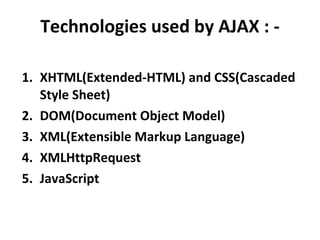
Technologies used by AJAX : - XHTML(Extended-HTML) and CSS(Cascaded Style Sheet) DOM(Document Object Model) XML(Extensible Markup Language) XMLHttpRequest JavaScript
Uses of AJAX : - Real-time form data validation. Auto completion. Load on demand. Partial submit. Saving Time.
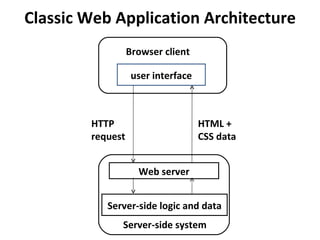
Classic Web Application Architecture user interface Web server Server-side logic and data Browser client Server-side system HTTP  request HTML + CSS data
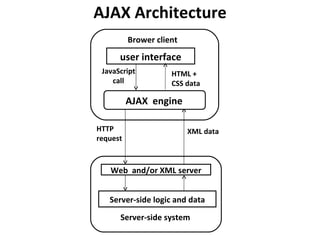
AJAX Architecture user interface Web  and/or XML server Server-side logic and data Brower client Server-side system HTTP  request XML data AJAX  engine JavaScript call HTML + CSS data
 
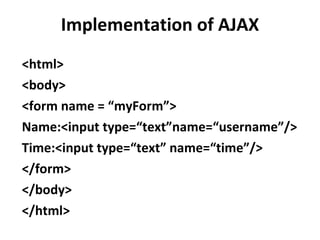
Implementation of AJAX <html> <body> <form name = “myForm”> Name:<input type=“text”name=“username”/> Time:<input type=“text” name=“time”/> </form> </body> </html>
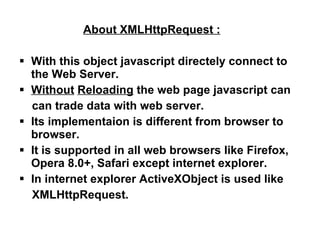
About XMLHttpRequest : With this object javascript directely connect to the Web Server. Without   Reloading  the web page javascript can can trade data with web server. Its implementaion is different from browser to browser. It is supported in all web browsers like Firefox, Opera 8.0+, Safari except internet explorer. In internet explorer ActiveXObject is used like XMLHttpRequest.
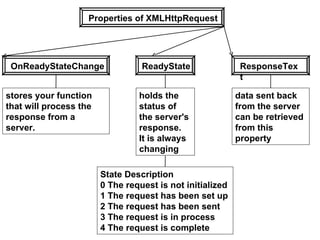
Properties of XMLHttpRequest OnReadyStateChange ReadyState ResponseText stores your function that will process the response from a server. holds the status of the server's response. It is always changing State Description  0 The request is not initialized  1 The request has been set up  2 The request has been sent  3 The request is in process  4 The request is complete data sent back from the server can be retrieved from this property
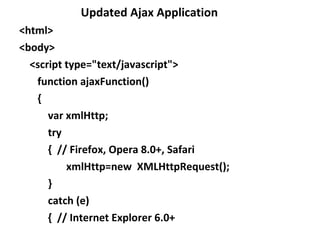
Updated Ajax Application <html>  <body> <script type=&quot;text/javascript&quot;> function ajaxFunction() {  var xmlHttp; try {  // Firefox, Opera 8.0+, Safari  xmlHttp=new  XMLHttpRequest(); } catch (e) {  // Internet Explorer 6.0+
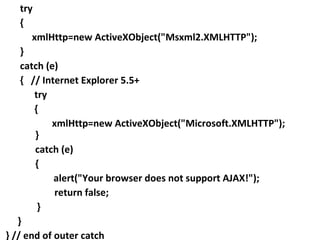
try {  xmlHttp=new ActiveXObject(&quot;Msxml2.XMLHTTP&quot;);  } catch (e) {  // Internet Explorer 5.5+ try {    xmlHttp=new ActiveXObject(&quot;Microsoft.XMLHTTP&quot;);  } catch (e) {  alert(&quot;Your browser does not support AJAX!&quot;);    return false;  } }  } // end of outer catch
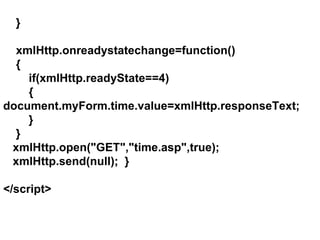
} xmlHttp.onreadystatechange=function() { if(xmlHttp.readyState==4) {    document.myForm.time.value=xmlHttp.responseText; } } xmlHttp.open(&quot;GET&quot;,&quot;time.asp&quot;,true); xmlHttp.send(null);  } </script>
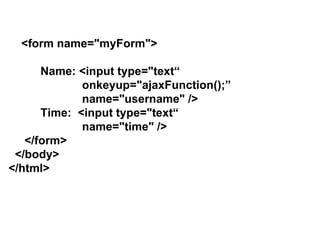
<form name=&quot;myForm&quot;> Name: <input type=&quot;text“    onkeyup=&quot;ajaxFunction();”   name=&quot;username&quot; /> Time:  <input type=&quot;text“    name=&quot;time&quot; /> </form> </body> </html>
<% response.expires=-1 response.write(time) %>  Server Side Code The Expires property sets how long (in minutes) a  page will be cached on a browser before it expires.  Response.Expires=-1 indicates that the page will  never be cached.
Advantages of AJAX : - The XMLHttpRequest object is supported in Internet  Explorer 5.0+ ,  Safari 1.2 ,  Mozilla 1.0/ Firefox ,  Opera 8+   and  Netscape 7 . Not only JavaScript but also other languages like  VBScript ,  ASP.net ,  PHP  scripting languages used for implementing an AJAX application.  Using AJAX, a web application can request only the content that needs to be updated, thus reducing  bandwidth usage .
Because only  sections  of pages need to be  reloaded, Ajax allows for much more  responsive web applications, giving  users  the  feeling  that changes are happening  instantaneously. The use of AJAX can  reduce the connections  to the server , since  scripts and style sheets  only have to requested once .  The AJAX technique makes Internet  applications  smaller ,  faster  and  more user-friendly . AJAX is a browser technology  independent  of  web server software.
Disadvantages of AJAX : - Dynamically created pages do not  register   themselves with the browsers history engine, so  clicking the browsers  “back”  button would not  return the user to an earlier state of the Ajax-  enabled page, but would instead return them to the  last page visited before it . Internet Explorer  uses an  ActiveXObject , while other  browsers uses the built-in JavaScript object called  XMLHttpRequest  .
Thank You

Ajax

  • 1.
    AJAX - Mahesh Shitole - Associate Software Engineer - Knowledge Quest Infotech
  • 2.
    What is AJAX?AJAX stands for Asynchronous Java Script and XML . AJAX is a type of programming made popular in 2005 by Google. Ajax is not a new programming language, but a new way to use existing standards . It is a web development technique for creating better, faster, and more interactive web applications. AJAX is based on JavaScript and HTTP requests .
  • 3.
    Technologies used byAJAX : - XHTML(Extended-HTML) and CSS(Cascaded Style Sheet) DOM(Document Object Model) XML(Extensible Markup Language) XMLHttpRequest JavaScript
  • 4.
    Uses of AJAX: - Real-time form data validation. Auto completion. Load on demand. Partial submit. Saving Time.
  • 5.
    Classic Web ApplicationArchitecture user interface Web server Server-side logic and data Browser client Server-side system HTTP request HTML + CSS data
  • 6.
    AJAX Architecture userinterface Web and/or XML server Server-side logic and data Brower client Server-side system HTTP request XML data AJAX engine JavaScript call HTML + CSS data
  • 7.
  • 8.
    Implementation of AJAX<html> <body> <form name = “myForm”> Name:<input type=“text”name=“username”/> Time:<input type=“text” name=“time”/> </form> </body> </html>
  • 9.
    About XMLHttpRequest :With this object javascript directely connect to the Web Server. Without Reloading the web page javascript can can trade data with web server. Its implementaion is different from browser to browser. It is supported in all web browsers like Firefox, Opera 8.0+, Safari except internet explorer. In internet explorer ActiveXObject is used like XMLHttpRequest.
  • 10.
    Properties of XMLHttpRequestOnReadyStateChange ReadyState ResponseText stores your function that will process the response from a server. holds the status of the server's response. It is always changing State Description 0 The request is not initialized 1 The request has been set up 2 The request has been sent 3 The request is in process 4 The request is complete data sent back from the server can be retrieved from this property
  • 11.
    Updated Ajax Application<html> <body> <script type=&quot;text/javascript&quot;> function ajaxFunction() { var xmlHttp; try { // Firefox, Opera 8.0+, Safari xmlHttp=new XMLHttpRequest(); } catch (e) { // Internet Explorer 6.0+
  • 12.
    try { xmlHttp=new ActiveXObject(&quot;Msxml2.XMLHTTP&quot;); } catch (e) { // Internet Explorer 5.5+ try { xmlHttp=new ActiveXObject(&quot;Microsoft.XMLHTTP&quot;); } catch (e) { alert(&quot;Your browser does not support AJAX!&quot;); return false; } } } // end of outer catch
  • 13.
    } xmlHttp.onreadystatechange=function() {if(xmlHttp.readyState==4) { document.myForm.time.value=xmlHttp.responseText; } } xmlHttp.open(&quot;GET&quot;,&quot;time.asp&quot;,true); xmlHttp.send(null); } </script>
  • 14.
    <form name=&quot;myForm&quot;> Name:<input type=&quot;text“ onkeyup=&quot;ajaxFunction();” name=&quot;username&quot; /> Time: <input type=&quot;text“ name=&quot;time&quot; /> </form> </body> </html>
  • 15.
    <% response.expires=-1 response.write(time)%> Server Side Code The Expires property sets how long (in minutes) a page will be cached on a browser before it expires. Response.Expires=-1 indicates that the page will never be cached.
  • 16.
    Advantages of AJAX: - The XMLHttpRequest object is supported in Internet Explorer 5.0+ , Safari 1.2 , Mozilla 1.0/ Firefox , Opera 8+ and Netscape 7 . Not only JavaScript but also other languages like VBScript , ASP.net , PHP scripting languages used for implementing an AJAX application. Using AJAX, a web application can request only the content that needs to be updated, thus reducing bandwidth usage .
  • 17.
    Because only sections of pages need to be reloaded, Ajax allows for much more responsive web applications, giving users the feeling that changes are happening instantaneously. The use of AJAX can reduce the connections to the server , since scripts and style sheets only have to requested once . The AJAX technique makes Internet applications smaller , faster and more user-friendly . AJAX is a browser technology independent of web server software.
  • 18.
    Disadvantages of AJAX: - Dynamically created pages do not register themselves with the browsers history engine, so clicking the browsers “back” button would not return the user to an earlier state of the Ajax- enabled page, but would instead return them to the last page visited before it . Internet Explorer uses an ActiveXObject , while other browsers uses the built-in JavaScript object called XMLHttpRequest .
  • 19.