UNIT 2
AJAX
AJAX Introduction
AJAX is a developer's dream, because you can:
• Update a web page without reloading the page
• Request data from a server - after the page has
loaded
• Receive data from a server - after the page has
loaded
• Send data to a server - in the background
What is AJAX?
• AJAX = Asynchronous JavaScript And XML.
• AJAX is not a programming language.
• AJAX just uses a combination of:
• A browser built-in XMLHttpRequest object (to request data
from a web server)
• JavaScript and HTML DOM (to display or use the data)
• AJAX is a misleading name. AJAX applications might use
XML to transport data, but it is equally common to
transport data as plain text or JSON text.
• AJAX allows web pages to be updated asynchronously by
exchanging data with a web server behind the scenes. This
means that it is possible to update parts of a web page,
without reloading the whole page.
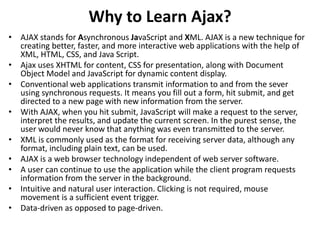
Why to Learn Ajax?
• AJAX stands for Asynchronous JavaScript and XML. AJAX is a new technique for
creating better, faster, and more interactive web applications with the help of
XML, HTML, CSS, and Java Script.
• Ajax uses XHTML for content, CSS for presentation, along with Document
Object Model and JavaScript for dynamic content display.
• Conventional web applications transmit information to and from the sever
using synchronous requests. It means you fill out a form, hit submit, and get
directed to a new page with new information from the server.
• With AJAX, when you hit submit, JavaScript will make a request to the server,
interpret the results, and update the current screen. In the purest sense, the
user would never know that anything was even transmitted to the server.
• XML is commonly used as the format for receiving server data, although any
format, including plain text, can be used.
• AJAX is a web browser technology independent of web server software.
• A user can continue to use the application while the client program requests
information from the server in the background.
• Intuitive and natural user interaction. Clicking is not required, mouse
movement is a sufficient event trigger.
• Data-driven as opposed to page-driven.
Rich Internet Application Technology
• AJAX is the most viable Rich Internet Application (RIA)
technology so far. It is getting tremendous industry
momentum and several tool kit and frameworks are
emerging. But at the same time, AJAX has browser
incompatibility and it is supported by JavaScript, which is
hard to maintain and debug.
AJAX is Based on Open Standards
• AJAX is based on the following open standards −
• Browser-based presentation using HTML and Cascading
Style Sheets (CSS).
• Data is stored in XML format and fetched from the server.
• Behind-the-scenes data fetches using XMLHttpRequest
objects in the browser.
• JavaScript to make everything happen.
AJAX - Technologies
• AJAX cannot work independently. It is used in combination with other
technologies to create interactive webpages.
JavaScript
• Loosely typed scripting language.
• JavaScript function is called when an event occurs in a page.
• Glue for the whole AJAX operation.
DOM
• API for accessing and manipulating structured documents.
• Represents the structure of XML and HTML documents.
CSS
• Allows for a clear separation of the presentation style from the content and
may be changed programmatically by JavaScript
XMLHttpRequest
• JavaScript object that performs asynchronous interaction with the server.
AJAX - Examples
Here is a list of some famous web applications that make use of AJAX.
Google Maps
• A user can drag an entire map by using the mouse, rather than clicking
on a button.
• https://maps.google.com/
Google Suggest
• As you type, Google offers suggestions. Use the arrow keys to navigate
the results.
• https://www.google.com/webhp?complete=1&hl=en
Gmail
• Gmail is a webmail built on the idea that emails can be more intuitive,
efficient, and useful.
• https://gmail.com/
Yahoo Maps (new)
• Now it's even easier and more fun to get where you're going!
• https://maps.yahoo.com/
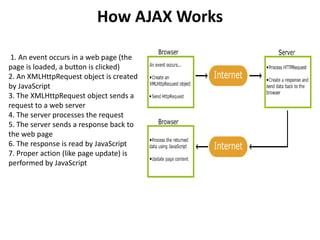
How AJAX Works
1. An event occurs in a web page (the
page is loaded, a button is clicked)
2. An XMLHttpRequest object is created
by JavaScript
3. The XMLHttpRequest object sends a
request to a web server
4. The server processes the request
5. The server sends a response back to
the web page
6. The response is read by JavaScript
7. Proper action (like page update) is
performed by JavaScript
AJAX - The XMLHttpRequest Object
• The keystone of AJAX is the XMLHttpRequest object.
The XMLHttpRequest Object
• All modern browsers support the XMLHttpRequest object.
• The XMLHttpRequest object can be used to exchange data
with a server behind the scenes. This means that it is
possible to update parts of a web page, without reloading
the whole page.
Create an XMLHttpRequest Object
• All modern browsers (Chrome, Firefox, Edge (and IE7+),
Safari, Opera) have a built-in XMLHttpRequest object.
• Syntax for creating an XMLHttpRequest object:
var xhttp = new XMLHttpRequest();
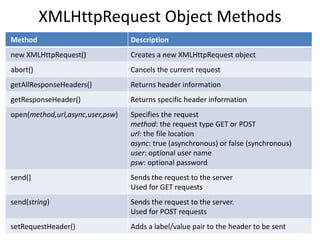
XMLHttpRequest Object Methods
Method Description
new XMLHttpRequest() Creates a new XMLHttpRequest object
abort() Cancels the current request
getAllResponseHeaders() Returns header information
getResponseHeader() Returns specific header information
open(method,url,async,user,psw) Specifies the request
method: the request type GET or POST
url: the file location
async: true (asynchronous) or false (synchronous)
user: optional user name
psw: optional password
send() Sends the request to the server
Used for GET requests
send(string) Sends the request to the server.
Used for POST requests
setRequestHeader() Adds a label/value pair to the header to be sent
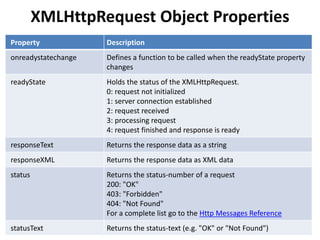
XMLHttpRequest Object Properties
Property Description
onreadystatechange Defines a function to be called when the readyState property
changes
readyState Holds the status of the XMLHttpRequest.
0: request not initialized
1: server connection established
2: request received
3: processing request
4: request finished and response is ready
responseText Returns the response data as a string
responseXML Returns the response data as XML data
status Returns the status-number of a request
200: "OK"
403: "Forbidden"
404: "Not Found"
For a complete list go to the Http Messages Reference
statusText Returns the status-text (e.g. "OK" or "Not Found")
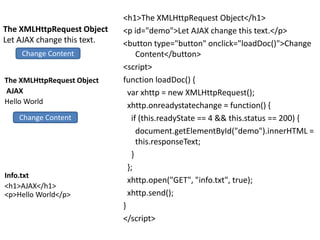
The XMLHttpRequest Object
Let AJAX change this text.
<h1>The XMLHttpRequest Object</h1>
<p id="demo">Let AJAX change this text.</p>
<button type="button" onclick="loadDoc()">Change
Content</button>
<script>
function loadDoc() {
var xhttp = new XMLHttpRequest();
xhttp.onreadystatechange = function() {
if (this.readyState == 4 && this.status == 200) {
document.getElementById("demo").innerHTML =
this.responseText;
}
};
xhttp.open("GET", "info.txt", true);
xhttp.send();
}
</script>
The XMLHttpRequest Object
AJAX
Hello World
Info.txt
<h1>AJAX</h1>
<p>Hello World</p>
Change Content
Change Content
AJAX - Send a Request To a Server
• The XMLHttpRequest object is used to exchange data with a
server.
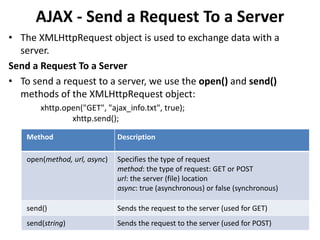
Send a Request To a Server
• To send a request to a server, we use the open() and send()
methods of the XMLHttpRequest object:
xhttp.open("GET", "ajax_info.txt", true);
xhttp.send();
Method Description
open(method, url, async) Specifies the type of request
method: the type of request: GET or POST
url: the server (file) location
async: true (asynchronous) or false (synchronous)
send() Sends the request to the server (used for GET)
send(string) Sends the request to the server (used for POST)
POST Requests
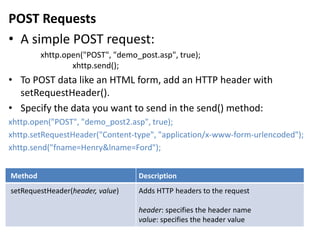
• A simple POST request:
xhttp.open("POST", "demo_post.asp", true);
xhttp.send();
• To POST data like an HTML form, add an HTTP header with
setRequestHeader().
• Specify the data you want to send in the send() method:
xhttp.open("POST", "demo_post2.asp", true);
xhttp.setRequestHeader("Content-type", "application/x-www-form-urlencoded");
xhttp.send("fname=Henry&lname=Ford");
Method Description
setRequestHeader(header, value) Adds HTTP headers to the request
header: specifies the header name
value: specifies the header value
The url - A File On a Server
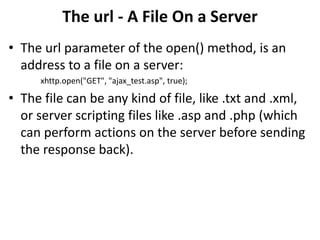
• The url parameter of the open() method, is an
address to a file on a server:
xhttp.open("GET", "ajax_test.asp", true);
• The file can be any kind of file, like .txt and .xml,
or server scripting files like .asp and .php (which
can perform actions on the server before sending
the response back).
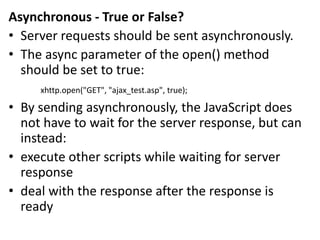
Asynchronous - True or False?
• Server requests should be sent asynchronously.
• The async parameter of the open() method
should be set to true:
xhttp.open("GET", "ajax_test.asp", true);
• By sending asynchronously, the JavaScript does
not have to wait for the server response, but can
instead:
• execute other scripts while waiting for server
response
• deal with the response after the response is
ready
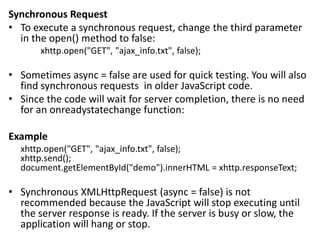
Synchronous Request
• To execute a synchronous request, change the third parameter
in the open() method to false:
xhttp.open("GET", "ajax_info.txt", false);
• Sometimes async = false are used for quick testing. You will also
find synchronous requests in older JavaScript code.
• Since the code will wait for server completion, there is no need
for an onreadystatechange function:
Example
xhttp.open("GET", "ajax_info.txt", false);
xhttp.send();
document.getElementById("demo").innerHTML = xhttp.responseText;
• Synchronous XMLHttpRequest (async = false) is not
recommended because the JavaScript will stop executing until
the server response is ready. If the server is busy or slow, the
application will hang or stop.
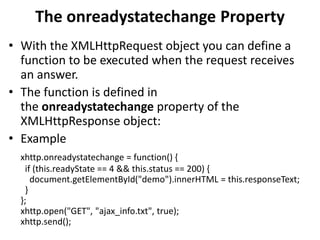
The onreadystatechange Property
• With the XMLHttpRequest object you can define a
function to be executed when the request receives
an answer.
• The function is defined in
the onreadystatechange property of the
XMLHttpResponse object:
• Example
xhttp.onreadystatechange = function() {
if (this.readyState == 4 && this.status == 200) {
document.getElementById("demo").innerHTML = this.responseText;
}
};
xhttp.open("GET", "ajax_info.txt", true);
xhttp.send();
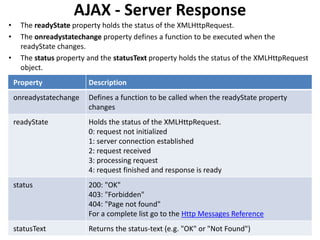
AJAX - Server Response
• The readyState property holds the status of the XMLHttpRequest.
• The onreadystatechange property defines a function to be executed when the
readyState changes.
• The status property and the statusText property holds the status of the XMLHttpRequest
object.
Property Description
onreadystatechange Defines a function to be called when the readyState property
changes
readyState Holds the status of the XMLHttpRequest.
0: request not initialized
1: server connection established
2: request received
3: processing request
4: request finished and response is ready
status 200: "OK"
403: "Forbidden"
404: "Page not found"
For a complete list go to the Http Messages Reference
statusText Returns the status-text (e.g. "OK" or "Not Found")
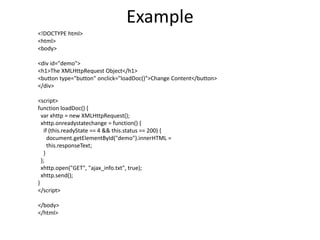
Example
<!DOCTYPE html>
<html>
<body>
<div id="demo">
<h1>The XMLHttpRequest Object</h1>
<button type="button" onclick="loadDoc()">Change Content</button>
</div>
<script>
function loadDoc() {
var xhttp = new XMLHttpRequest();
xhttp.onreadystatechange = function() {
if (this.readyState == 4 && this.status == 200) {
document.getElementById("demo").innerHTML =
this.responseText;
}
};
xhttp.open("GET", "ajax_info.txt", true);
xhttp.send();
}
</script>
</body>
</html>

AJAX.pptx

  • 1.
  • 2.
    AJAX Introduction AJAX isa developer's dream, because you can: • Update a web page without reloading the page • Request data from a server - after the page has loaded • Receive data from a server - after the page has loaded • Send data to a server - in the background
  • 3.
    What is AJAX? •AJAX = Asynchronous JavaScript And XML. • AJAX is not a programming language. • AJAX just uses a combination of: • A browser built-in XMLHttpRequest object (to request data from a web server) • JavaScript and HTML DOM (to display or use the data) • AJAX is a misleading name. AJAX applications might use XML to transport data, but it is equally common to transport data as plain text or JSON text. • AJAX allows web pages to be updated asynchronously by exchanging data with a web server behind the scenes. This means that it is possible to update parts of a web page, without reloading the whole page.
  • 4.
    Why to LearnAjax? • AJAX stands for Asynchronous JavaScript and XML. AJAX is a new technique for creating better, faster, and more interactive web applications with the help of XML, HTML, CSS, and Java Script. • Ajax uses XHTML for content, CSS for presentation, along with Document Object Model and JavaScript for dynamic content display. • Conventional web applications transmit information to and from the sever using synchronous requests. It means you fill out a form, hit submit, and get directed to a new page with new information from the server. • With AJAX, when you hit submit, JavaScript will make a request to the server, interpret the results, and update the current screen. In the purest sense, the user would never know that anything was even transmitted to the server. • XML is commonly used as the format for receiving server data, although any format, including plain text, can be used. • AJAX is a web browser technology independent of web server software. • A user can continue to use the application while the client program requests information from the server in the background. • Intuitive and natural user interaction. Clicking is not required, mouse movement is a sufficient event trigger. • Data-driven as opposed to page-driven.
  • 5.
    Rich Internet ApplicationTechnology • AJAX is the most viable Rich Internet Application (RIA) technology so far. It is getting tremendous industry momentum and several tool kit and frameworks are emerging. But at the same time, AJAX has browser incompatibility and it is supported by JavaScript, which is hard to maintain and debug. AJAX is Based on Open Standards • AJAX is based on the following open standards − • Browser-based presentation using HTML and Cascading Style Sheets (CSS). • Data is stored in XML format and fetched from the server. • Behind-the-scenes data fetches using XMLHttpRequest objects in the browser. • JavaScript to make everything happen.
  • 6.
    AJAX - Technologies •AJAX cannot work independently. It is used in combination with other technologies to create interactive webpages. JavaScript • Loosely typed scripting language. • JavaScript function is called when an event occurs in a page. • Glue for the whole AJAX operation. DOM • API for accessing and manipulating structured documents. • Represents the structure of XML and HTML documents. CSS • Allows for a clear separation of the presentation style from the content and may be changed programmatically by JavaScript XMLHttpRequest • JavaScript object that performs asynchronous interaction with the server.
  • 7.
    AJAX - Examples Hereis a list of some famous web applications that make use of AJAX. Google Maps • A user can drag an entire map by using the mouse, rather than clicking on a button. • https://maps.google.com/ Google Suggest • As you type, Google offers suggestions. Use the arrow keys to navigate the results. • https://www.google.com/webhp?complete=1&hl=en Gmail • Gmail is a webmail built on the idea that emails can be more intuitive, efficient, and useful. • https://gmail.com/ Yahoo Maps (new) • Now it's even easier and more fun to get where you're going! • https://maps.yahoo.com/
  • 8.
    How AJAX Works 1.An event occurs in a web page (the page is loaded, a button is clicked) 2. An XMLHttpRequest object is created by JavaScript 3. The XMLHttpRequest object sends a request to a web server 4. The server processes the request 5. The server sends a response back to the web page 6. The response is read by JavaScript 7. Proper action (like page update) is performed by JavaScript
  • 9.
    AJAX - TheXMLHttpRequest Object • The keystone of AJAX is the XMLHttpRequest object. The XMLHttpRequest Object • All modern browsers support the XMLHttpRequest object. • The XMLHttpRequest object can be used to exchange data with a server behind the scenes. This means that it is possible to update parts of a web page, without reloading the whole page. Create an XMLHttpRequest Object • All modern browsers (Chrome, Firefox, Edge (and IE7+), Safari, Opera) have a built-in XMLHttpRequest object. • Syntax for creating an XMLHttpRequest object: var xhttp = new XMLHttpRequest();
  • 10.
    XMLHttpRequest Object Methods MethodDescription new XMLHttpRequest() Creates a new XMLHttpRequest object abort() Cancels the current request getAllResponseHeaders() Returns header information getResponseHeader() Returns specific header information open(method,url,async,user,psw) Specifies the request method: the request type GET or POST url: the file location async: true (asynchronous) or false (synchronous) user: optional user name psw: optional password send() Sends the request to the server Used for GET requests send(string) Sends the request to the server. Used for POST requests setRequestHeader() Adds a label/value pair to the header to be sent
  • 11.
    XMLHttpRequest Object Properties PropertyDescription onreadystatechange Defines a function to be called when the readyState property changes readyState Holds the status of the XMLHttpRequest. 0: request not initialized 1: server connection established 2: request received 3: processing request 4: request finished and response is ready responseText Returns the response data as a string responseXML Returns the response data as XML data status Returns the status-number of a request 200: "OK" 403: "Forbidden" 404: "Not Found" For a complete list go to the Http Messages Reference statusText Returns the status-text (e.g. "OK" or "Not Found")
  • 12.
    The XMLHttpRequest Object LetAJAX change this text. <h1>The XMLHttpRequest Object</h1> <p id="demo">Let AJAX change this text.</p> <button type="button" onclick="loadDoc()">Change Content</button> <script> function loadDoc() { var xhttp = new XMLHttpRequest(); xhttp.onreadystatechange = function() { if (this.readyState == 4 && this.status == 200) { document.getElementById("demo").innerHTML = this.responseText; } }; xhttp.open("GET", "info.txt", true); xhttp.send(); } </script> The XMLHttpRequest Object AJAX Hello World Info.txt <h1>AJAX</h1> <p>Hello World</p> Change Content Change Content
  • 13.
    AJAX - Senda Request To a Server • The XMLHttpRequest object is used to exchange data with a server. Send a Request To a Server • To send a request to a server, we use the open() and send() methods of the XMLHttpRequest object: xhttp.open("GET", "ajax_info.txt", true); xhttp.send(); Method Description open(method, url, async) Specifies the type of request method: the type of request: GET or POST url: the server (file) location async: true (asynchronous) or false (synchronous) send() Sends the request to the server (used for GET) send(string) Sends the request to the server (used for POST)
  • 14.
    POST Requests • Asimple POST request: xhttp.open("POST", "demo_post.asp", true); xhttp.send(); • To POST data like an HTML form, add an HTTP header with setRequestHeader(). • Specify the data you want to send in the send() method: xhttp.open("POST", "demo_post2.asp", true); xhttp.setRequestHeader("Content-type", "application/x-www-form-urlencoded"); xhttp.send("fname=Henry&lname=Ford"); Method Description setRequestHeader(header, value) Adds HTTP headers to the request header: specifies the header name value: specifies the header value
  • 15.
    The url -A File On a Server • The url parameter of the open() method, is an address to a file on a server: xhttp.open("GET", "ajax_test.asp", true); • The file can be any kind of file, like .txt and .xml, or server scripting files like .asp and .php (which can perform actions on the server before sending the response back).
  • 16.
    Asynchronous - Trueor False? • Server requests should be sent asynchronously. • The async parameter of the open() method should be set to true: xhttp.open("GET", "ajax_test.asp", true); • By sending asynchronously, the JavaScript does not have to wait for the server response, but can instead: • execute other scripts while waiting for server response • deal with the response after the response is ready
  • 17.
    Synchronous Request • Toexecute a synchronous request, change the third parameter in the open() method to false: xhttp.open("GET", "ajax_info.txt", false); • Sometimes async = false are used for quick testing. You will also find synchronous requests in older JavaScript code. • Since the code will wait for server completion, there is no need for an onreadystatechange function: Example xhttp.open("GET", "ajax_info.txt", false); xhttp.send(); document.getElementById("demo").innerHTML = xhttp.responseText; • Synchronous XMLHttpRequest (async = false) is not recommended because the JavaScript will stop executing until the server response is ready. If the server is busy or slow, the application will hang or stop.
  • 18.
    The onreadystatechange Property •With the XMLHttpRequest object you can define a function to be executed when the request receives an answer. • The function is defined in the onreadystatechange property of the XMLHttpResponse object: • Example xhttp.onreadystatechange = function() { if (this.readyState == 4 && this.status == 200) { document.getElementById("demo").innerHTML = this.responseText; } }; xhttp.open("GET", "ajax_info.txt", true); xhttp.send();
  • 19.
    AJAX - ServerResponse • The readyState property holds the status of the XMLHttpRequest. • The onreadystatechange property defines a function to be executed when the readyState changes. • The status property and the statusText property holds the status of the XMLHttpRequest object. Property Description onreadystatechange Defines a function to be called when the readyState property changes readyState Holds the status of the XMLHttpRequest. 0: request not initialized 1: server connection established 2: request received 3: processing request 4: request finished and response is ready status 200: "OK" 403: "Forbidden" 404: "Page not found" For a complete list go to the Http Messages Reference statusText Returns the status-text (e.g. "OK" or "Not Found")
  • 20.
    Example <!DOCTYPE html> <html> <body> <div id="demo"> <h1>TheXMLHttpRequest Object</h1> <button type="button" onclick="loadDoc()">Change Content</button> </div> <script> function loadDoc() { var xhttp = new XMLHttpRequest(); xhttp.onreadystatechange = function() { if (this.readyState == 4 && this.status == 200) { document.getElementById("demo").innerHTML = this.responseText; } }; xhttp.open("GET", "ajax_info.txt", true); xhttp.send(); } </script> </body> </html>