AJAX Basics
History of AJAX


 Starts with web pages

 Static web pages

 Static html page is loaded

 No interaction with user

 Dynamic web pages

 html page is generated dynamically

 Interaction with user

 Becomes slower as functionality increases

 Speed becomes untolerable, so AJAX has been born
What is AJAX?


 Asynchronous JavaScript and XML (AJAX).

 Not a stand-alone language or technology.

 Combines a set of known technologies in order to create faster and
more user friendly web pages.

 Client side technology.

 Makes web pages more responsive by exchanging small amounts of
data.

 Allows the web page to change its content without refreshing the
whole page.

 Web browser technology independent of web server software.
What is So Cool about AJAX?


 Connection between client side script and server side script.

 Better user experience.

 More flexibility.

 More options.
AJAX Technologies


 Extensible Markup Language (XML)

 Hyper Text Markup Language (HTML)

 JavaScript

 Cascading Style Sheet (CSS)

 ASP or JSP (server side)
AJAX Examples

Google Maps

User can drag the entire map by using the mouse instead of clicking on a
button or something

Google Suggest

Google will offer suggestions.

Gmail

Gmail is a new kind of webmail, built on the idea that email can be more
intuitive, efficient and useful

Yahoo Maps (new)

Now it's even easier and more fun to get where you're going!
Why it is Popular?


 Google helped popularize, and legitimize it in Gmail.

 Increase Usability of Web Applications.

 Rich Internet applications without Flash.

 Save Bandwidth.

 Download only data you need.

 Faster interfaces.
Advantages of AJAX


 Better internet Application

 Requests only the content that needs to be updated

 Respond quickly to the input

 Page can be reloaded individually

 Reduces connections to the server

Prevents unnecessary reloading of a page
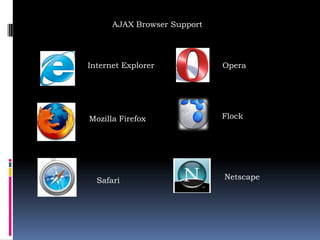
AJAX Browser Support


Internet Explorer            Opera


Mozilla Firefox              Flock


  Safari                     Netscape
How AJAX Works?


 AJAX is based on Javascript, and the main functionality is to access
the web server inside the Javascript code.

 We access to the server using special objects; we send data and
retrieve data.

 When user initiates an event, a javascript function is called which
accesses server using the objects.

 The received information is shown to the user by means of the
Javascript’s functions.
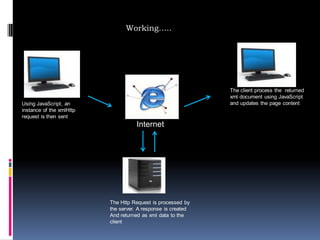
Working…..


                                                              The client process the returned
                                                              xml document using JavaScript
Using JavaScript, an                                          and updates the page content
instance of the xmlHttp
request is then sent
                                     Internet


                          The Http Request is processed by
                          the server. A response is created
                          And returned as xml data to the
                          client
Working cont…..

XMLHTTPRequest Object

Heart of the AJAX Engine and it is responsible to carry the HTTP request
to the server asynchronously.

Talking with the Server

XMLHTTPRequest talks with the server with its appropriate methods and
properties asynchronously at the backside.

Server Response

As per the Server script is concerned the request from the XMLHTTPRequest is
just another HTTP request.

Dealing with the Server Response

Once after the AJAX Engine gets notified about the successful execution.
It modifies the data according to the functionality and keeps in place.
AJAX Server


AJAX is about creating clever applications that can use the data.

Requesting Text Files

Many AJAX applications requests pure text files to retrieve data for
the application.

Requesting XML Files

A very common AJAX method is to request XML files to retrieve
application data.
Requesting ASP or PHP Files

Requesting an ASP or PHP file is the most common way to access
database information.

Requesting HTML Files

Requesting HTML files is a common method for filling out different
information on a web page.

Submitting Forms

With AJAX you can easily submit form data without having to reload the
page.
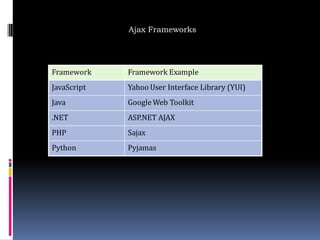
Ajax Frameworks


Framework    Framework Example
JavaScript   Yahoo User Interface Library (YUI)
Java         Google Web Toolkit
.NET         ASP.NET AJAX
PHP          Sajax
Python       Pyjamas
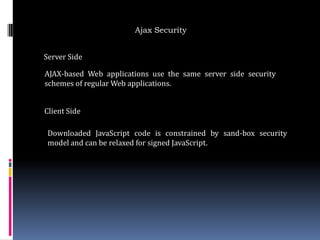
Ajax Security


Server Side

AJAX-based Web applications use the same server side security
schemes of regular Web applications.


Client Side

 Downloaded JavaScript code is constrained by sand-box security
 model and can be relaxed for signed JavaScript.
Issues with Ajax


 Complexity is increased

 AJAX-based applications can be difficult to debug, test, and maintain

 Toolkits/Frameworks are not mature yet

 No standardization of the XMLHttpRequest yet

 No support of XMLHttpRequest in old browsers

 JavaScript technology dependency & incompatibility

 JavaScript code is visible to a hacker
Thank You

Ajax

  • 1.
  • 2.
    History of AJAX Starts with web pages  Static web pages  Static html page is loaded  No interaction with user  Dynamic web pages  html page is generated dynamically  Interaction with user  Becomes slower as functionality increases  Speed becomes untolerable, so AJAX has been born
  • 3.
    What is AJAX? Asynchronous JavaScript and XML (AJAX).  Not a stand-alone language or technology.  Combines a set of known technologies in order to create faster and more user friendly web pages.  Client side technology.  Makes web pages more responsive by exchanging small amounts of data.  Allows the web page to change its content without refreshing the whole page.  Web browser technology independent of web server software.
  • 4.
    What is SoCool about AJAX?  Connection between client side script and server side script.  Better user experience.  More flexibility.  More options.
  • 5.
    AJAX Technologies  ExtensibleMarkup Language (XML)  Hyper Text Markup Language (HTML)  JavaScript  Cascading Style Sheet (CSS)  ASP or JSP (server side)
  • 6.
    AJAX Examples Google Maps Usercan drag the entire map by using the mouse instead of clicking on a button or something Google Suggest Google will offer suggestions. Gmail Gmail is a new kind of webmail, built on the idea that email can be more intuitive, efficient and useful Yahoo Maps (new) Now it's even easier and more fun to get where you're going!
  • 7.
    Why it isPopular?  Google helped popularize, and legitimize it in Gmail.  Increase Usability of Web Applications.  Rich Internet applications without Flash.  Save Bandwidth.  Download only data you need.  Faster interfaces.
  • 8.
    Advantages of AJAX Better internet Application  Requests only the content that needs to be updated  Respond quickly to the input  Page can be reloaded individually  Reduces connections to the server Prevents unnecessary reloading of a page
  • 9.
    AJAX Browser Support InternetExplorer Opera Mozilla Firefox Flock Safari Netscape
  • 10.
    How AJAX Works? AJAX is based on Javascript, and the main functionality is to access the web server inside the Javascript code.  We access to the server using special objects; we send data and retrieve data.  When user initiates an event, a javascript function is called which accesses server using the objects.  The received information is shown to the user by means of the Javascript’s functions.
  • 11.
    Working….. The client process the returned xml document using JavaScript Using JavaScript, an and updates the page content instance of the xmlHttp request is then sent Internet The Http Request is processed by the server. A response is created And returned as xml data to the client
  • 12.
    Working cont….. XMLHTTPRequest Object Heartof the AJAX Engine and it is responsible to carry the HTTP request to the server asynchronously. Talking with the Server XMLHTTPRequest talks with the server with its appropriate methods and properties asynchronously at the backside. Server Response As per the Server script is concerned the request from the XMLHTTPRequest is just another HTTP request. Dealing with the Server Response Once after the AJAX Engine gets notified about the successful execution. It modifies the data according to the functionality and keeps in place.
  • 13.
    AJAX Server AJAX isabout creating clever applications that can use the data. Requesting Text Files Many AJAX applications requests pure text files to retrieve data for the application. Requesting XML Files A very common AJAX method is to request XML files to retrieve application data.
  • 14.
    Requesting ASP orPHP Files Requesting an ASP or PHP file is the most common way to access database information. Requesting HTML Files Requesting HTML files is a common method for filling out different information on a web page. Submitting Forms With AJAX you can easily submit form data without having to reload the page.
  • 15.
    Ajax Frameworks Framework Framework Example JavaScript Yahoo User Interface Library (YUI) Java Google Web Toolkit .NET ASP.NET AJAX PHP Sajax Python Pyjamas
  • 16.
    Ajax Security Server Side AJAX-basedWeb applications use the same server side security schemes of regular Web applications. Client Side Downloaded JavaScript code is constrained by sand-box security model and can be relaxed for signed JavaScript.
  • 17.
    Issues with Ajax Complexity is increased  AJAX-based applications can be difficult to debug, test, and maintain  Toolkits/Frameworks are not mature yet  No standardization of the XMLHttpRequest yet  No support of XMLHttpRequest in old browsers  JavaScript technology dependency & incompatibility  JavaScript code is visible to a hacker
  • 18.