CREDIT SEMINAR
TOUCHLESS TOUCH SCREEN
1
DHANYA V E
17304006
CONTENTS:
• Introduction
• What’s touch screen?
• Various technologies
• Construction
• What’s touch less touch screen?
• Leap motion technology
• Advantage of touch less touch screen
• Conclusion
• References
2
INTRODUCTION:
• Touch screen were responsible for creating a great future to the
technology at alarming rate
• The main problem while working with touch screen is scratching
up on the screen
• By frequently touching screen with the help of touching device or
with finger may cause a dullness or desensitization of the touch
screen and cause failure of touch screen
• A simple user interface being developed for touch less control of
electrically operated equipment
3
• Unlike the other system which gradually depend on the distance
from the sensor ,this interface depend on the finger motion or hand
wave in certain direction.
• The device is based on optical pattern recognition using optical
sensor with a lens to detect the hand motion
• the sensor is then connected to a digital image processor. This
interrupt the pattern of motion and output the result as signal to
control the application, machineries, or on any other device which
controllable through electrical signal
4
• This paper introducing about various touch less touch screen
technologies and its various type also introducing about one of the
implemented touch less touch screen technology
• With touch less touch screen our hand doesn’t have to come in
contact with the screen at all, it work by detecting our hand movement
in front of it.
• Most of the time we have to wipe the screen to get a better modest
view of the screen
• In this technology we have to simply point our finger in the air
towards the device and move it accordingly to control the navigation of
the device 5
What’s touch screen
• Touch screen is a electronic visual display that can detect the
presence and location of a touch with in the display area
• The term generally refers touching the display of the device with
finger or hand
• Touch screen are common in devices such as all in one computers
and smart phones
• Such display can be attached to a computer or to a network as
terminals
•Touch screen enables one to interact with what is displayed
directly on the screen where it is displayed rather than indirectly
with mouse or touchpad 6
•It lets one to do so without requiring any intermediate devices
that it would be in the hand
7
VARIOUS TECHNOLOGIES
 Capacitive Touch Screen Technology
• it consist of an insulator such as glass,
coated with a transparent conductor such as
Indium Tin Oxide(ITO)
• As the human body is also an electrical
conductor, touching the surface of the
screen result in a distortion of screen’s
electric field measurable as a change in
capacitance
8
 TYPES OF CAPACITIVE TOUCH SCREEN
• Surface capacitive technology
• in this basic technology only one side of the insulator is coated
with a conductive layer
•When a conductor, such as a human finger touches the uncoated
surface a capacitance is dynamically formed
•Location of the touch indirectly from the change in the capacitance
as measured from the four corner of panels
9
Projected capacitive technology
• projected capacitive touch(PCT) technology is a capacitive
technology which permit more accurate and flexible operation by
etching the conductive layer
•The greater resolution of PCT allows operation without direct
contact, such that the conducting layer can be coated with further
protective insulating layer and operates even under the screen
protectors
•Due to the top layer of a PCT being glass, PCT is a more robust
solution versus resistive touch technology
10
Advantages
• scratch resistant, durable surface
• very accurate
• liquid won’t affect touch screen performance
Disadvantages
• does not work with gloved finger
11
Resistive touch screen
•A resistive touch screen panel is composed of several layers, the
most important of which are two thin electrically conductive layers
separated by narrow gap
• when an object such as a finger presses down on a point on the
panel’s outer surface the two metallic layer become connected at
that point
•The panel then behave like as a pair of voltage dividers with
connected outputs
12
13
•The cover sheet consist of a hard outer surface with a coated inner
surface
•When the inner layer is touched it causes the conductive layer to
touch creating a signal that the analog controller can interpret and
determine what the user wants to be done
• Resistive touch is used in restaurants factories and hospitals due to
its high resistance to liquids and contaminants
14
Advantages
• Cost-effective solution
• Activated by any stylus
• Very accurate
• Low power requirements
• Liquids won't affect touch screen performance
Disadvantages
• Polyester surface can be damaged
15
Surface acoustic wave touch
• surface acoustic wave technology uses ultrasonic wave that
passes over the touch screen
• when the panel touches a portion of the wave is absorbed
• this change in the ultrasonic wave registers the position of the
touch event send this information to the controller for processing
• surface acoustic wave touch screen technology is based on
sending acoustic wave across a clear glass panel with a series of
transducers and reflectors
•When a finger touches the screen the wave are absorbed, causing
a touch event to be detected at that point
16
17
Advantages
• Durable glass construction
• High optical clarity
• Activated by a finger, gloved hand, or soft tip stylus
Disadvantages
• Moving liquids or condensation can cause false touches
• Solid contaminants create non-touch areas until removed
Doesn't support drag or draw effectively
18
Infrared touch technology
• Infrared touch screen rely on the interruption of an IR light grid
in front of the display screen
• An opt-matrix frame is integrated into the display bezel that
contain a row of LEDs and phototransistors each mounted on two
opposite side to create a grid of invisible light
• The opt-matrix frame is isolated from the outside environment by
an IR transparent barrier
• IR controller sequentially pulses the LEDs to create a grid of IR
light beam
19
• When a stylus enter a grid, it obstruct the beams, causing one or
more of transistors to detect the absence of light and transmit a
signal with x and y coordinates
20
Advantages
• Highest quality of underlying image
• Very high transmittance
• Excellent anti-glare, with use of chemically etched glass
• Can be activated with almost any device
• Higher accuracy than other technologies
• Very high durability and reliability
Disadvantages
• Surface obstructions can cause a false touch
• It is very sensitive and can be activated by stray touches.
• Low resolution
21
Construction
•In the most popular techniques, the capacitive and resistive
approach, there are typically four layers.
•Top polyester coated with the transparent metallic conductive
coating on the bottom
•Glass layer coated with a transparent metallic conductive coating
on the top
•Adhesive layer on the back side of the glass for mounting
•When the user touches the surface the system records the change
in the electrical current that flow through the display
22
•Dispersive signal technology which measures the piezo electric
effect the voltage generated when mechanical force is applied to a
material that occurs chemically when a strengthened glass substrate
is touched
•There are two infrared based approaches. In one, an array of sensors
detect a finger touching or almost touching the display, thereby
interrupting light beams projected over the screen, in other bottom-
mounted infrared cameras record screen touches
23
• Everybody likes a touch screen the experience is really exciting but
gradually the excitement started fading
• While using the phone with the finger tip the screen started getting a lot
of finger prints and scratches
• The system is capable of detecting movement in 3D without putting our
finger on the screen
• Their untested touch less interface(UI) doesn’t require special sensor
that we wear on our finger or either on our hand
• We have to just point at the screen and we can easily manipulate object
in 3D
TOUCH LESS TOUCH SCREEN
24
• It obviously require a sensor but the sensor is not hand mounted
• Sensor is placed either on the screen or near the screen
• The hardware setup is very compact
• Sensors are mounted around the screen
• By interacting with the line of sight of these sensors, the motion
is detected and interpreted into an screen movement
• Stop unintentional gestures are used as input
• The system is capable of detecting movement in 3D with out
putting finger on the screen
25
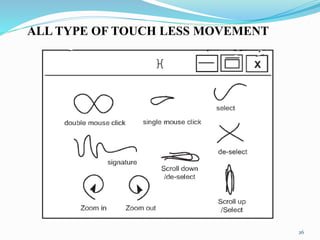
ALL TYPE OF TOUCH LESS MOVEMENT
26
TOUCH LESS MONITOR
27
•It is designed for the application where touch may difficult
•Software translate the gestures into screen commands
•Technology detect motion in 3D and require no special worn
sensors for operation
•By simply point to the screen user can manipulate the object being
displayed in 3D
•The device is based on optical pattern recognition using a solid
state optical matrix sensor with a lens to detect hand motion
28
• The sensor is then connected to a digital image processor which
interpret the pattern of motion and outputs the result as signal to
control the applications.
29
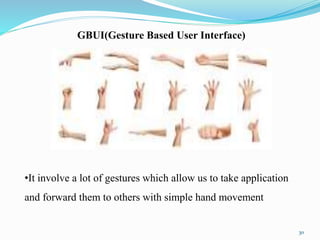
GBUI(Gesture Based User Interface)
•It involve a lot of gestures which allow us to take application
and forward them to others with simple hand movement
30
TOUCH LESS UI
The basic idea patent in that there would be sensors arrayed around
the perimeter of the device capable of sensing finger movement in
3D space
31
TOUCH LESS SDK
32
•Software Development Kit
•A set of software development tool
•Touch less SDK is an open source for .NET application
•It enables developers to create multi touch based application
using webcam for input
•Using SDK developers offers users a new and a cheap way of
experiencing multi touch capabilities without the need of
expensive hardware or software
33
TOUCH WALL
34
•It refers to the touch screen hardware setup itself
•The corresponding software to run touch wall which is built on a
standard version vista called plex
•Touch wall consist of three infra red lasers which scan a surface
•A camera notes when something breaks through the laser line and
feed that information back to the plex software
35
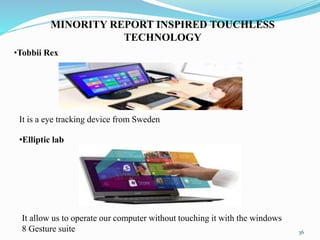
MINORITY REPORT INSPIRED TOUCHLESS
TECHNOLOGY
•Tobbii Rex
It is a eye tracking device from Sweden
•Elliptic lab
It allow us to operate our computer without touching it with the windows
8 Gesture suite 36
•Air writing
It is a technology that allows you to write text messages or compose emails by
writing in the air
•Eyesight
Eye sight is a gesture technology which allows you to navigate through
your devices by just pointing at it
37
•Mauz
Mauz is a third party device that turns over iPhone into a track pad or mouse
•Point Grab
Point Grab is something similar to eyesight, in that it enables users to
navigate on their computer just by pointing at it
38
•Leap motion
Leap motion is a motion sensor device that recognize the user’s finger with
infrared LEDs and cameras
•Microsoft kinect
It detect and recognize a user’s body movement and reproduces it within the
video game that is being played
39
LEAP MOTION TECHNOLOGY
•Leap motion controller provide an informative representation of
hands
•Leap motion controller is a new device developed for gesture
interaction by leap motion
•The device has small dimension of eight by three centimeter
•It is connected to the computer by USB, then user put hands on
the top of leap motion controller
•Leap motion controller detect the palm and finger movement on
top of it
•The tracking data which contain palm and finger position,
direction velocity it is accessed by using it’s SDK 40
DEVICE
•Leap motion controller is a new interactive device mainly
aiming at hand gestures and finger detection development by
leap motion
•There are three infra red light emitters and two camera which
receive the IR light
41
•Currently the newest version of the leap motion controller is
orion3.2.1
•Leap motion provides preprocessed data through their application
programming interface
•The data is accessed by a frame object queuing by per frame
•Based on the previews raw data we collected from leap motion
controller API they started to build feature to recognize hand
gestures
•These features are mainly divided into two
•Static gestures
•Dynamic gestures
42
STATIC GESTURES
•Features of static gestures are mainly built based on palm and
fingers relative distance
•We calculated two type of distances
•One type is the distance between fingers and palm center
•Other one is distance between two fingers which are adjacent
43
DYNAMIC GESTURE FEATURES
•Dynamic gesture features are distinguished from static gestures
•In this calculate the total velocity magnitude among fingers and
palm
•If the total movement value is greater than a user defined threshold,
it believe that hand is moving otherwise start recognizing the static
hand gesture
•Compared with static gesture pattern dynamic gesture patterns are
complicated
44
45
•There are some cases when a leap motion controller fails to detect
all the finger
•One of that case is when fingers are self occluded by palms
•In this the leap motion controller is put below the palm and can not
get full data about the finger
•The leap motion controller use IR to gather hand information in the
space
•When important fingers or regions are self occluded by others hand
part tracking data quality reduced
ADVANTAGES
•Screen should be durable for a long period
•Screen always clean
•Touch area is minimized
•It make the work simplest
•In weather like rainy and winter hand being wet or with gloves,
won’t matter since the hand and finger movement is sensed by the
sensor
46
CONCLUSION
•Today's thoughts are again around user interface
•Efforts are being put to better the technology day in day out
•The touch less touch screen user interface can be used effectively
in computer, cell phone, webcam and laptop
•May be a few years down the line, our body can be transformed
into a virtual mouse, virtual key board
•Our body turned into an input device
47
48
REFERENCES
[1] York, J., and Pendharkar, P.C., “Human interaction issues,”
International Journal of Human-Computer Studies, Vol. 60, No. 5–
6, 2004, pp. 771–797.
[2] Johnson, E.A. (1965). "Touch Display - A novel input/output
device for computers". Electronics Letters 1 (8): 219–220.
[3] en.wikipedia.org/wiki/touch-screen.
[4] en.wikipedia.org/wiki/resistive touch-screen.
[5] www.touchscreensolutions.com.au
THANK YOU
49
????
50

Touchless Touch screen

  • 1.
    CREDIT SEMINAR TOUCHLESS TOUCHSCREEN 1 DHANYA V E 17304006
  • 2.
    CONTENTS: • Introduction • What’stouch screen? • Various technologies • Construction • What’s touch less touch screen? • Leap motion technology • Advantage of touch less touch screen • Conclusion • References 2
  • 3.
    INTRODUCTION: • Touch screenwere responsible for creating a great future to the technology at alarming rate • The main problem while working with touch screen is scratching up on the screen • By frequently touching screen with the help of touching device or with finger may cause a dullness or desensitization of the touch screen and cause failure of touch screen • A simple user interface being developed for touch less control of electrically operated equipment 3
  • 4.
    • Unlike theother system which gradually depend on the distance from the sensor ,this interface depend on the finger motion or hand wave in certain direction. • The device is based on optical pattern recognition using optical sensor with a lens to detect the hand motion • the sensor is then connected to a digital image processor. This interrupt the pattern of motion and output the result as signal to control the application, machineries, or on any other device which controllable through electrical signal 4
  • 5.
    • This paperintroducing about various touch less touch screen technologies and its various type also introducing about one of the implemented touch less touch screen technology • With touch less touch screen our hand doesn’t have to come in contact with the screen at all, it work by detecting our hand movement in front of it. • Most of the time we have to wipe the screen to get a better modest view of the screen • In this technology we have to simply point our finger in the air towards the device and move it accordingly to control the navigation of the device 5
  • 6.
    What’s touch screen •Touch screen is a electronic visual display that can detect the presence and location of a touch with in the display area • The term generally refers touching the display of the device with finger or hand • Touch screen are common in devices such as all in one computers and smart phones • Such display can be attached to a computer or to a network as terminals •Touch screen enables one to interact with what is displayed directly on the screen where it is displayed rather than indirectly with mouse or touchpad 6
  • 7.
    •It lets oneto do so without requiring any intermediate devices that it would be in the hand 7
  • 8.
    VARIOUS TECHNOLOGIES  CapacitiveTouch Screen Technology • it consist of an insulator such as glass, coated with a transparent conductor such as Indium Tin Oxide(ITO) • As the human body is also an electrical conductor, touching the surface of the screen result in a distortion of screen’s electric field measurable as a change in capacitance 8
  • 9.
     TYPES OFCAPACITIVE TOUCH SCREEN • Surface capacitive technology • in this basic technology only one side of the insulator is coated with a conductive layer •When a conductor, such as a human finger touches the uncoated surface a capacitance is dynamically formed •Location of the touch indirectly from the change in the capacitance as measured from the four corner of panels 9
  • 10.
    Projected capacitive technology •projected capacitive touch(PCT) technology is a capacitive technology which permit more accurate and flexible operation by etching the conductive layer •The greater resolution of PCT allows operation without direct contact, such that the conducting layer can be coated with further protective insulating layer and operates even under the screen protectors •Due to the top layer of a PCT being glass, PCT is a more robust solution versus resistive touch technology 10
  • 11.
    Advantages • scratch resistant,durable surface • very accurate • liquid won’t affect touch screen performance Disadvantages • does not work with gloved finger 11
  • 12.
    Resistive touch screen •Aresistive touch screen panel is composed of several layers, the most important of which are two thin electrically conductive layers separated by narrow gap • when an object such as a finger presses down on a point on the panel’s outer surface the two metallic layer become connected at that point •The panel then behave like as a pair of voltage dividers with connected outputs 12
  • 13.
  • 14.
    •The cover sheetconsist of a hard outer surface with a coated inner surface •When the inner layer is touched it causes the conductive layer to touch creating a signal that the analog controller can interpret and determine what the user wants to be done • Resistive touch is used in restaurants factories and hospitals due to its high resistance to liquids and contaminants 14
  • 15.
    Advantages • Cost-effective solution •Activated by any stylus • Very accurate • Low power requirements • Liquids won't affect touch screen performance Disadvantages • Polyester surface can be damaged 15
  • 16.
    Surface acoustic wavetouch • surface acoustic wave technology uses ultrasonic wave that passes over the touch screen • when the panel touches a portion of the wave is absorbed • this change in the ultrasonic wave registers the position of the touch event send this information to the controller for processing • surface acoustic wave touch screen technology is based on sending acoustic wave across a clear glass panel with a series of transducers and reflectors •When a finger touches the screen the wave are absorbed, causing a touch event to be detected at that point 16
  • 17.
  • 18.
    Advantages • Durable glassconstruction • High optical clarity • Activated by a finger, gloved hand, or soft tip stylus Disadvantages • Moving liquids or condensation can cause false touches • Solid contaminants create non-touch areas until removed Doesn't support drag or draw effectively 18
  • 19.
    Infrared touch technology •Infrared touch screen rely on the interruption of an IR light grid in front of the display screen • An opt-matrix frame is integrated into the display bezel that contain a row of LEDs and phototransistors each mounted on two opposite side to create a grid of invisible light • The opt-matrix frame is isolated from the outside environment by an IR transparent barrier • IR controller sequentially pulses the LEDs to create a grid of IR light beam 19
  • 20.
    • When astylus enter a grid, it obstruct the beams, causing one or more of transistors to detect the absence of light and transmit a signal with x and y coordinates 20
  • 21.
    Advantages • Highest qualityof underlying image • Very high transmittance • Excellent anti-glare, with use of chemically etched glass • Can be activated with almost any device • Higher accuracy than other technologies • Very high durability and reliability Disadvantages • Surface obstructions can cause a false touch • It is very sensitive and can be activated by stray touches. • Low resolution 21
  • 22.
    Construction •In the mostpopular techniques, the capacitive and resistive approach, there are typically four layers. •Top polyester coated with the transparent metallic conductive coating on the bottom •Glass layer coated with a transparent metallic conductive coating on the top •Adhesive layer on the back side of the glass for mounting •When the user touches the surface the system records the change in the electrical current that flow through the display 22
  • 23.
    •Dispersive signal technologywhich measures the piezo electric effect the voltage generated when mechanical force is applied to a material that occurs chemically when a strengthened glass substrate is touched •There are two infrared based approaches. In one, an array of sensors detect a finger touching or almost touching the display, thereby interrupting light beams projected over the screen, in other bottom- mounted infrared cameras record screen touches 23
  • 24.
    • Everybody likesa touch screen the experience is really exciting but gradually the excitement started fading • While using the phone with the finger tip the screen started getting a lot of finger prints and scratches • The system is capable of detecting movement in 3D without putting our finger on the screen • Their untested touch less interface(UI) doesn’t require special sensor that we wear on our finger or either on our hand • We have to just point at the screen and we can easily manipulate object in 3D TOUCH LESS TOUCH SCREEN 24
  • 25.
    • It obviouslyrequire a sensor but the sensor is not hand mounted • Sensor is placed either on the screen or near the screen • The hardware setup is very compact • Sensors are mounted around the screen • By interacting with the line of sight of these sensors, the motion is detected and interpreted into an screen movement • Stop unintentional gestures are used as input • The system is capable of detecting movement in 3D with out putting finger on the screen 25
  • 26.
    ALL TYPE OFTOUCH LESS MOVEMENT 26
  • 27.
  • 28.
    •It is designedfor the application where touch may difficult •Software translate the gestures into screen commands •Technology detect motion in 3D and require no special worn sensors for operation •By simply point to the screen user can manipulate the object being displayed in 3D •The device is based on optical pattern recognition using a solid state optical matrix sensor with a lens to detect hand motion 28
  • 29.
    • The sensoris then connected to a digital image processor which interpret the pattern of motion and outputs the result as signal to control the applications. 29
  • 30.
    GBUI(Gesture Based UserInterface) •It involve a lot of gestures which allow us to take application and forward them to others with simple hand movement 30
  • 31.
    TOUCH LESS UI Thebasic idea patent in that there would be sensors arrayed around the perimeter of the device capable of sensing finger movement in 3D space 31
  • 32.
  • 33.
    •Software Development Kit •Aset of software development tool •Touch less SDK is an open source for .NET application •It enables developers to create multi touch based application using webcam for input •Using SDK developers offers users a new and a cheap way of experiencing multi touch capabilities without the need of expensive hardware or software 33
  • 34.
  • 35.
    •It refers tothe touch screen hardware setup itself •The corresponding software to run touch wall which is built on a standard version vista called plex •Touch wall consist of three infra red lasers which scan a surface •A camera notes when something breaks through the laser line and feed that information back to the plex software 35
  • 36.
    MINORITY REPORT INSPIREDTOUCHLESS TECHNOLOGY •Tobbii Rex It is a eye tracking device from Sweden •Elliptic lab It allow us to operate our computer without touching it with the windows 8 Gesture suite 36
  • 37.
    •Air writing It isa technology that allows you to write text messages or compose emails by writing in the air •Eyesight Eye sight is a gesture technology which allows you to navigate through your devices by just pointing at it 37
  • 38.
    •Mauz Mauz is athird party device that turns over iPhone into a track pad or mouse •Point Grab Point Grab is something similar to eyesight, in that it enables users to navigate on their computer just by pointing at it 38
  • 39.
    •Leap motion Leap motionis a motion sensor device that recognize the user’s finger with infrared LEDs and cameras •Microsoft kinect It detect and recognize a user’s body movement and reproduces it within the video game that is being played 39
  • 40.
    LEAP MOTION TECHNOLOGY •Leapmotion controller provide an informative representation of hands •Leap motion controller is a new device developed for gesture interaction by leap motion •The device has small dimension of eight by three centimeter •It is connected to the computer by USB, then user put hands on the top of leap motion controller •Leap motion controller detect the palm and finger movement on top of it •The tracking data which contain palm and finger position, direction velocity it is accessed by using it’s SDK 40
  • 41.
    DEVICE •Leap motion controlleris a new interactive device mainly aiming at hand gestures and finger detection development by leap motion •There are three infra red light emitters and two camera which receive the IR light 41
  • 42.
    •Currently the newestversion of the leap motion controller is orion3.2.1 •Leap motion provides preprocessed data through their application programming interface •The data is accessed by a frame object queuing by per frame •Based on the previews raw data we collected from leap motion controller API they started to build feature to recognize hand gestures •These features are mainly divided into two •Static gestures •Dynamic gestures 42
  • 43.
    STATIC GESTURES •Features ofstatic gestures are mainly built based on palm and fingers relative distance •We calculated two type of distances •One type is the distance between fingers and palm center •Other one is distance between two fingers which are adjacent 43
  • 44.
    DYNAMIC GESTURE FEATURES •Dynamicgesture features are distinguished from static gestures •In this calculate the total velocity magnitude among fingers and palm •If the total movement value is greater than a user defined threshold, it believe that hand is moving otherwise start recognizing the static hand gesture •Compared with static gesture pattern dynamic gesture patterns are complicated 44
  • 45.
    45 •There are somecases when a leap motion controller fails to detect all the finger •One of that case is when fingers are self occluded by palms •In this the leap motion controller is put below the palm and can not get full data about the finger •The leap motion controller use IR to gather hand information in the space •When important fingers or regions are self occluded by others hand part tracking data quality reduced
  • 46.
    ADVANTAGES •Screen should bedurable for a long period •Screen always clean •Touch area is minimized •It make the work simplest •In weather like rainy and winter hand being wet or with gloves, won’t matter since the hand and finger movement is sensed by the sensor 46
  • 47.
    CONCLUSION •Today's thoughts areagain around user interface •Efforts are being put to better the technology day in day out •The touch less touch screen user interface can be used effectively in computer, cell phone, webcam and laptop •May be a few years down the line, our body can be transformed into a virtual mouse, virtual key board •Our body turned into an input device 47
  • 48.
    48 REFERENCES [1] York, J.,and Pendharkar, P.C., “Human interaction issues,” International Journal of Human-Computer Studies, Vol. 60, No. 5– 6, 2004, pp. 771–797. [2] Johnson, E.A. (1965). "Touch Display - A novel input/output device for computers". Electronics Letters 1 (8): 219–220. [3] en.wikipedia.org/wiki/touch-screen. [4] en.wikipedia.org/wiki/resistive touch-screen. [5] www.touchscreensolutions.com.au
  • 49.
  • 50.